
Recently I have been trying to teach myself a bit of cloud architecture – it has not been going well. The zoo of micro-services available from AWS or Google is testing. Most recent experiment with Google, I had some trial money and spun up the cheapest Postgres database, created a trivial table, added a few rows, and then left it for a month. It racked up nearly $200 of bills in that time span. In addition the only way I could figure out how to interact with the DB was some hacky sqlalchemy python code from my local system (besides the cloud shell psql).
But I have been testing other services that are easier for me to see how I can use them for my business. This post will mostly be about supabase (note I am not paid for this!). Alt title for the post supabase is super easy. Supabase is a cloud postgres database, and out of the box it is set up to make hitting API endpoints very simple. Free tier database can hold 500mb (and get/post calls I believe are unlimited). Their beta pricing for smaller projects can up the postgres DB to 8 gigs (at $25 per month per project). This pricing makes me feel much safer than the cloud stuff – where I am constantly concerned I will accidentally leave something turned on and rack up 4 or 5 digits of expenses.
Unlike the google cloud database, I was able to figure supabase out in a day. So first after creating a project, I created a table to test out:
-- SQL Code
create table
  public.test_simple (
    id bigint generated by default as identity not null,
    created_at timestamp with time zone null default now(),
    vinfo bigint null,
    constraint test_simple_pkey primary key (id)
  ) tablespace pg_default;
I actually created this in the GUI editor. Once you create a table, it has documentation on how to call the API in the top right:
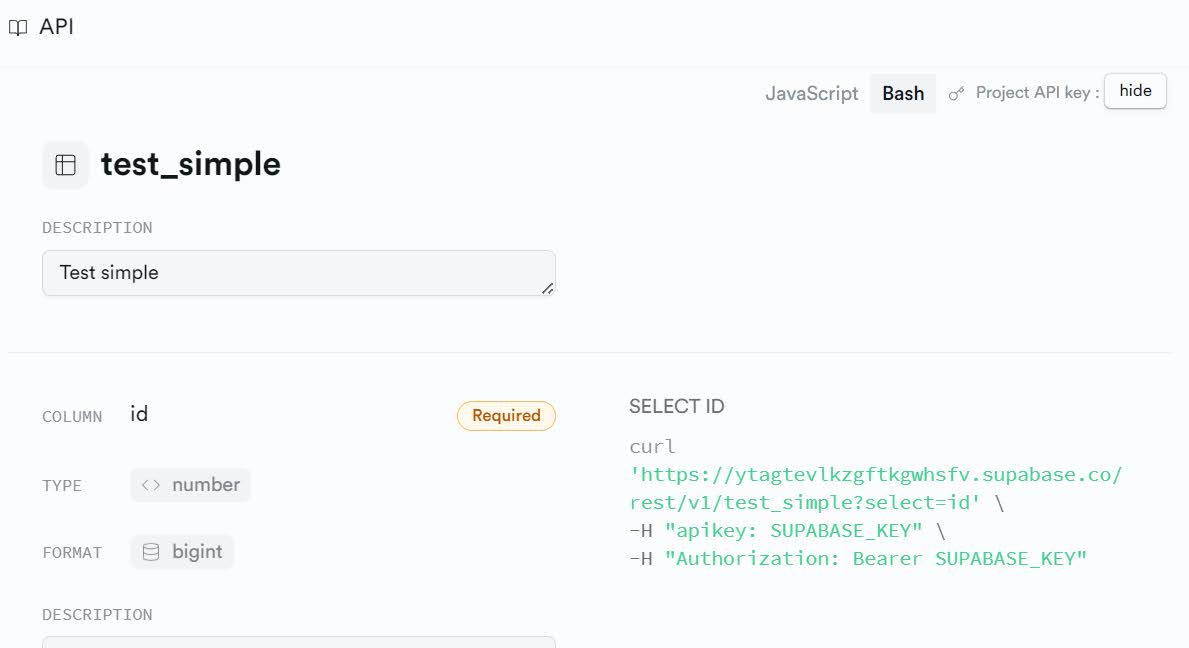
If you don’t speak curl (it also has javascript examples), you can convert curl to python:
# Python code
import requests

sup_row_key = '??yourpublickey??'

headers = {
    'apikey': sup_row_key,
    'Authorization': f'Bearer {sup_row_key}',
    'Range': '0-9',
}

# Where filter
response = requests.get('https://ytagtevlkzgftkgwhsfv.supabase.co/rest/v1/test_simple?id=eq.1&select=*', headers=headers)

# Getting all rows
response = requests.get('https://ytagtevlkzgftkgwhsfv.supabase.co/rest/v1/test_simple?select=*', headers=headers)
When creating a project, you by default get a public key with read access, and a private key that has write. But you can see the nature of the endpoint is quite simple, you just can’t copy paste the link due to needing to pass headers is all.
One example I was thinking about was more on-demand webscraping/geocoding. So as a way to be nice to different people you are scraping data from, you can call them once, and cache the results. Now back in Supabase, to do this I enabled the plv8 database extension to be able to define javascript functions. Here is the SQL I used to create a Postgres function:
-- SQL Code
create or replace function public.test_memoize(mid int)
returns setof public.test_simple as $

    // This is javascript
    var json_result = plv8.execute(
        'select * from public.test_simple WHERE id = $1',
        [mid]
    );
    if (json_result.length > 0) {
        return json_result;
    } else {
        // here just an example, you would use your own function
        var nv = mid + 2;
        var res_ins = plv8.execute(
          'INSERT INTO public.test_simple VALUES ($1,DEFAULT,$2)',
          [mid,nv]
        );
        // not really necessary to do a 2nd get call
        // could just pass the results back, ensures
        // result is formatted the same way though
        var js2 = plv8.execute(
        'select * from public.test_simple WHERE id = $1',
        [mid]);
        return js2;
     }

$ language plv8;
This is essentially memoizing a function, just using a database backend to cache the call. So it looks to see if you pass in a value if it exists, if not, do something with the result (here just add 2 to the input), insert the result into the DB, and then return the result.
Now to call this function from a web-endpoint, we need to post the values to the rpc endpoint:
# Python post to supabase function
json_data = {'mid': 20}

response = requests.post('https://ytagtevlkzgftkgwhsfv.supabase.co/rest/v1/rpc/test_memoize', headers=headers, json=json_data)
This type of memoization is good if you have expensive functions, but not all that varied of input (but can’t upfront make a batch lookup table).
Supabase also has the ability to do edge functions (server side typescript). That may be a better case for this, but very nice to be able to make a quick function and test it out.
Next up in the blog when I get a chance, I have also been experimenting with Oracle Cloud free tier. I haven’t been able to figure out the database stuff on their platform yet, but you can spin up a nice little persistent virtual machine (with 1 gig of ram). Very nice for tiny batch jobs, and next blog post will be setting up conda and showing how to do cron jobs. Batch scraping slow but smaller data jobs I am thinking is a good use case. (And having a persistent machine is nice, for the same reason having your car is nice even if you don’t use it all day every day.)
One thing I am still searching for, if I have more data intensive batch jobs – like I need to do more data intensive processing with more RAM (I often don’t need GPUs, but having more RAM is nice), what is my best cloud solution? So no Github actions (can be long running), but need more RAM than the cheap VPS. I am not even sure the correct comparable products in the big companies.
Let me know in the comments if you have any suggestions! Just knowing where to get started is sometimes very difficult.

 Andrew Wheeler
Jenn
/ June 19, 2023Hi Andy!
Funny you covered this topic… I wish I knew nothing about it, but unfortunately, I had to deal with this myself.
We created a secure data ecosystem using Amazon workspaces (https://aws.amazon.com/workspaces/), which is their packaged solution for a personal Remote Desktop. The cost is reasonable based on usage, and we installed R on there.
Everything oracle makes is terrible if you aren’t extensively incorporated into the oracle or outdated access ecosystems.
I never tried Google, and now I never will…
The workspaces are definitely worth checking out, though!
apwheele
/ June 19, 2023Thank you Jenn for the advice — will check it out!
ruilin
/ July 27, 2023Personally, I have been using AWS s3 + EMR cluster with spark for most of my heavy-lifting computational jobs. There is definitely some cost there, but so far, I have found it worth the price.
apwheele
/ July 27, 2023Definitely don’t need distributed spark for things I want to do. It is mainly just scraping + some ETL jobs I have in mind, that may be somewhat memory intensive (so the cheap VPS with 1/2 gig of RAM I am concerned about, but otherwise the cheap VPS would work if it had say 8/16 RAM).
Do you have recommended tutorials for batch AWS jobs? Like, point to a repo that has a docker file that has a RUN and just set it on a timer? The stuff for Google is crazy.
ruilin
/ July 27, 2023I am not really a cloud person, but my colleague has pointed me to this: https://github.com/dejonghe/aws-batch-example