
For some minor updates on different fronts. I have a new blog post on Crime De-Coder about how to figure out the proper ODBC connection string to query your record management system. I have done this song and dance with maybe a dozen different PDs at this point (and happened to do it twice in the prior week), so figured a post would make sense.
Two, article with Kim Rossmo has been published, The journey-to-crime buffer zone: Measurement issues and methodological challenges. Can check out the github repo and CrimRXiv version for free.
Main reason I wanted to make a post today about the types of websites. I have seen several influencers discuss using GenAI to create simple apps. These tools are nice, but many seem to make bad architecture decisions from the start (many people should not be making python served websites). So I will break down a few of the different options for creating a website in this post.
The most basic is a static html site – this just requires you create the HTML and place it somewhere on a server. A free option is github pages. You can still use javascript apps, but they are run client side and there is no real ability to limit who can see the site (e.g. you cannot make it password protected to log in). These can handle as much traffic as you want. If you have data objects in the site (such as a dashboard) the objects just need to be stored directly on the server (e.g. in json files or csv if you want to parse them). You can build data dashboards using D3 or other WASM apps.
The other types of websites you can do anything you can in HTML, so I focus more on what makes them different.
PHP sites – this probably requires you to purchase an online server (ignoring self hosting in your closet). There are many low cost vendors (my Crime De-Coder site is PHP on Hostinger. But they are pretty low price, think $5 per month. These do have the ability to create password protected content and have server side functions hidden. My $5 a month website has a service level agreement to handle 20k responses per day, it also has a built in MySQL database that can hold 2 gig of data for my plan. (These cheap sites are not bad if all you want is a smallish database.) WordPress is PHP under the hood (although if you want a custom site, I would just start from scratch and not modify WordPress. WordPress is good to use a GUI to style the site with basic templates.)
IMO if you need to protect stuff behind a server, and have fairly low traffic requirements, using a PHP site is a very good and cheap option. (For higher traffic I could pay under $20 a month for a beefier machine as well, we are talking crazy site traffic like well over 100k visits per day before you need to worry about it.)
Node.js – this is a server technology, popular for various apps. It is javascript under the hood, but you can have stuff run server side (so can be hidden from end user, same as PHP). The tech to host a site is a bit more involved than the PHP hosting sites. You can either get a VPS (for typically less than $10 a month, and can probably handle close to the same amount of traffic as the cheap PHP), and write some code to host it yourself. Think of a VPS as renting a machine (so can be used for various things, not just webhosting.) Or use some more off the shelf platform (like FlyIO, which has variable pricing). You typically need to think about a separate database hosting as well with these tools though. (I like Supabase.)
Python – python has several libraries, e.g. django, flask, as well as many different dashboard libraries. Similar to Node, you will need to either host this on a VPS (Hostinger has VPS’s as well, and I know DigitalOcean is popular), or some other service. Which is more expensive than the cheaper PHP options. It is possible to have authentication in python apps, but I do not tend to see many examples of that. Most python websites/dashboards I am familiar with are self-hosted, and so limit who can seem them intrinsically to the companies network (e.g. not online in a public website for everyone to see).
Personal story, at one point my Dallas crime dashboard (which is WASM + python) on my Crime De-Coder site (which is served on the PHP site, so takes a few extra seconds to install), was broken due to different library upgrades. So I hosted the python panel dashboard on Google cloud app while I worked on fixing the WASM. I needed one up from the smallest machine due to RAM usage (maybe 2 gigs of RAM). Google cloud app was slower than WASM on start up, sometimes would fail, and cost more than $100 per month with very little traffic. I was glad I was able to get the WASM version fixed.
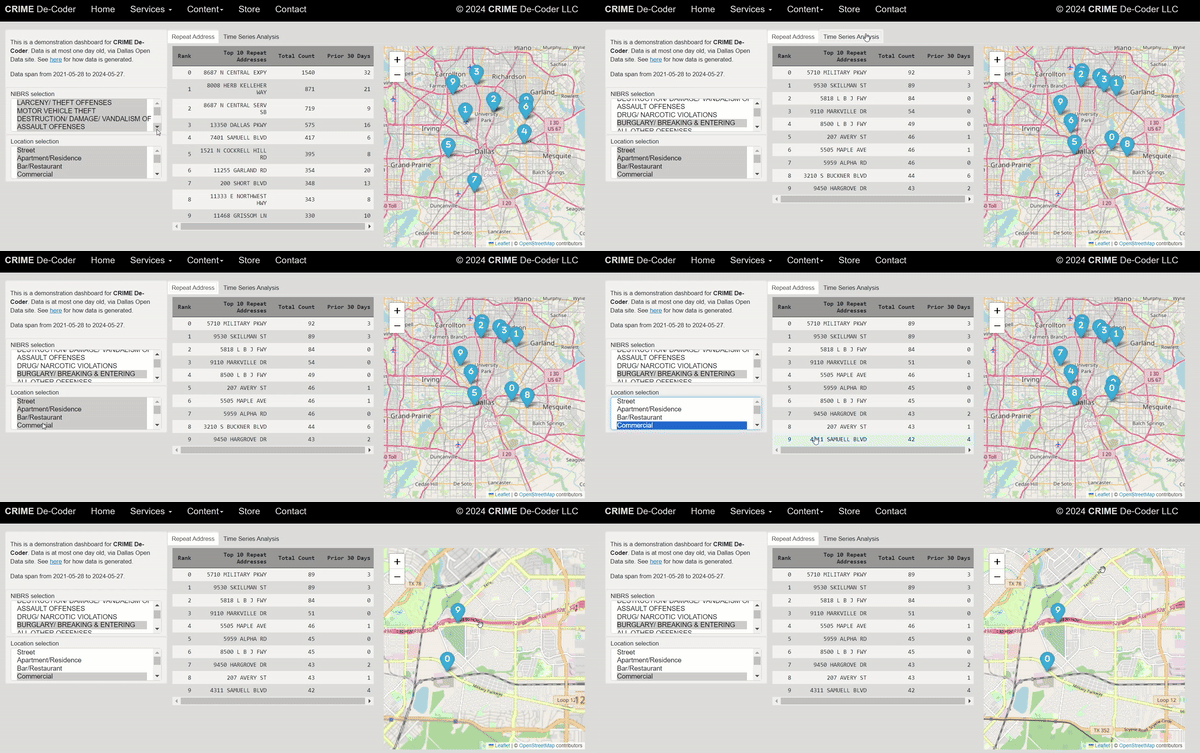
It is all about trade-offs though in the architecture. So the WASM app you can right click and see how I wrote the code to do that. Even though it is on a PHP site, it is rendered client side. So there is no way to protect that content from someone seeing it. So imagine I wanted you to pay $5 a month to access the dashboard – someone could right click and copy the code and cancel the subscription (or worse create their own clone for $4 per month). For another example, if I was querying a private database (that you don’t want people to be able to see), someone could right click and see that as well. So the WASM app only makes sense for things that don’t need to be private. Google cloud app though that is not a limitation.
The mistake I see many people make is often picking Node/Python where PHP would probably be a better choice. Besides costs, you need to think about what is exposed to the end user and the level of effort to create/manage the site. So if you say to GenAI “I want to build a dashboard website” it may pop out a python example, but many of the examples I am seeing it would have been better to use PHP and say “I have a php website, build a function to query my database and return an array of crimes by month”, and then as a follow up question say, “ok I have that array, create a line chart in PHP and javascript using D3.js”.
So to me GenAI does not obviate the need to understand the technology, which can be complicated. You need a basic understanding of what you want, the constraints, and then ask the machine for help writing that code.



 Andrew Wheeler