Using DuckDB WASM + Cloudflare R2 to host and query big data (for almost free)

The motivation here, prompted by a recent question Abigail Haddad had on LinkedIn:

For the machines, the context is hosting a dataset of 150 million rows (in another post Abigail stated it was around 72 gigs). And you want the public to be able to make ad-hoc queries on that data. Examples where you may want to do this are public dashboards (think a cities open data site, just puts all the data on R2 and has a front end).

This is the point where traditional SQL databases for websites probably don’t make sense. Databases like Supabase Postgres or MySQL can have that much data, given the cost of cloud computing though and what they are typically used for, it does not make much sense to put 72 gigs and use them for data analysis type queries.

Hosting the data as static files though in an online bucket, like Cloudflare’s R2, and then querying the data makes more sense for that size. Here to query the data, I also use a WASM deployed DuckDB. What this means is I don’t really have to worry about a server at all – it should scale to however many people want to use the service (I am just serving up HTML). The client’s machine handles creating the query and displaying the resulting data via javascript, and Cloudflare basically just pushes data around.

If you want to see it in action, you can check out the github repo, or see the demo deployed on github pages to illustrate generating queries. To check out a query on my Cloudflare R2 bucket, you can run SELECT * FROM 'https://data-crimedecoder.com/books.parquet' LIMIT 10;:

Cloudflare is nice here, since there are no egress charges (big data you need to worry about that). You do get charged for different read/write operations, but the free tiers seem quite generous (I do not know quite how to map these queries to Class B operations in Cloudflare’s parlance, but you get 10 million per month and all my tests only generated a few thousand).

For some notes on this set-up. On Cloudflare, to be able to use DuckDB WASM, I needed to expose the R2 bucket via a custom domain. Using the development url did not work (same issue as here). I also set my CORS Policy to:

[
  {
    "AllowedOrigins": [
      "*"
    ],
    "AllowedMethods": [
      "GET",
      "HEAD"
    ],
    "AllowedHeaders": [
      "*"
    ],
    "ExposeHeaders": [],
    "MaxAgeSeconds": 3000
  }
]

While my Crime De-Coder site is PHP, all the good stuff happens client-side. So you can see some example demo’s of the GSU book prices data.

One of the annoying things about this though, with S3 you can partition the files and query multiple partitions at once. Here something like SELECT * FROM read_parquet('https://data-crimedecoder.com/parquet/Semester=*/*') LIMIT 10; does not work. You can union the partitions together manually. So not sure if there is a way to set up R2 to work the same way as the S3 example (set up a FTP server? let me know in the comments!).

For pricing, for the scenario Abigail had of 72 gigs of data, we then have:

  • $10 per year for the domain
  • 0.015*72*12 = $13 for storage of the 72 gigs

So we have a total cost to run this of $23 per year. And it can scale to a crazy number of users and very large datasets out of the box. (My usecase here is just $10 for the domain, you get 10 gigs for free.)

Since this can be deployed on a static site, there are free options (like github pages). So the page with the SQL query part is essentially free. (I am not sure if there is a way to double dip on the R2 custom domain, such as just putting the HTML in the bucket. Yes, you can just put the HTML in the bucket and it will render like normal.)

While this example only shows generating a table, you can do whatever additional graphics client side. So could make a normal looking dashboard with dropdowns, and those just execute various queries and fill in the graphs/tables.
Dashboards are often not worth the effort

When end users see dashboards, they often think “this is really whiz-bang cool, lets do that for our data”. There are two issues though I commonly see with dashboards. One is the nature of the task to be accomplished with the dashboard is not well defined, and so even a visually well done dashboard mostly goes unused. The second, there are a ton of headaches deploying dashboards with real data – and the effort to do it right is not worth it.

For the first part, consider a small agency that has a simple crime trends dashboard. The intent is to identify anomalous upticks of crime. This requires someone log into the dashboard, click around the different crime trends, and visually seeing if they are higher than expected. It would be easier to either have an automated alert when some threshold is met, or a standardized report (e.g. once a week) that is emailed to review.

This post is not going to even be about ‘most dashboards show stupid data’ or ‘the charts show the data in totally inappropriate ways’. Even in cases in which you can build a nice dashboard, the complexity level is IMO not worth it in many situations I have encountered. Automating alerts and building regular standard reports for the vast majority of situations is in my opinion a better solution for data products. The whiz-bang being able to interactively click stuff will only be used by a very small number of people (who can often build stuff like that for themselves anyway).

So onto the second part, deploying dashboards with real data that others can interact with. Many of the cool example dashboards you see online do tricks that would be inappropriate for a production dashboard. So even if someone is like ‘yeah I can do a demo dashboard in a day on my laptop’, there is still a ton of more work to expose that dashboard to different individuals, which is probably the ultimate goal.

Dashboards have two parts: A) connecting to a source database, then B) exposing the user-interface to outside parties. Seems simple right? Wrong.

Lets start with part A, connecting to a source database. Many dashboard examples you see online cheat at this stage – they embed a static version of the data in the dashboard itself. If Gary needs to re-upload the data to the dashboard every week, what happens when Gary goes on vacation or takes a day off? You now have an out of date dashboard.

It is quite hard to manage connections between live source data and a dashboard. In the case you have a public facing dashboard, I would just host a public file somewhere on the internet (so anyone can download the source data), and point to that source, and then have some automated process update that source data. This solves the Gary went on vacation factor at least, and there is no security risk. You intentionally only upload data that can be disseminated to the public.

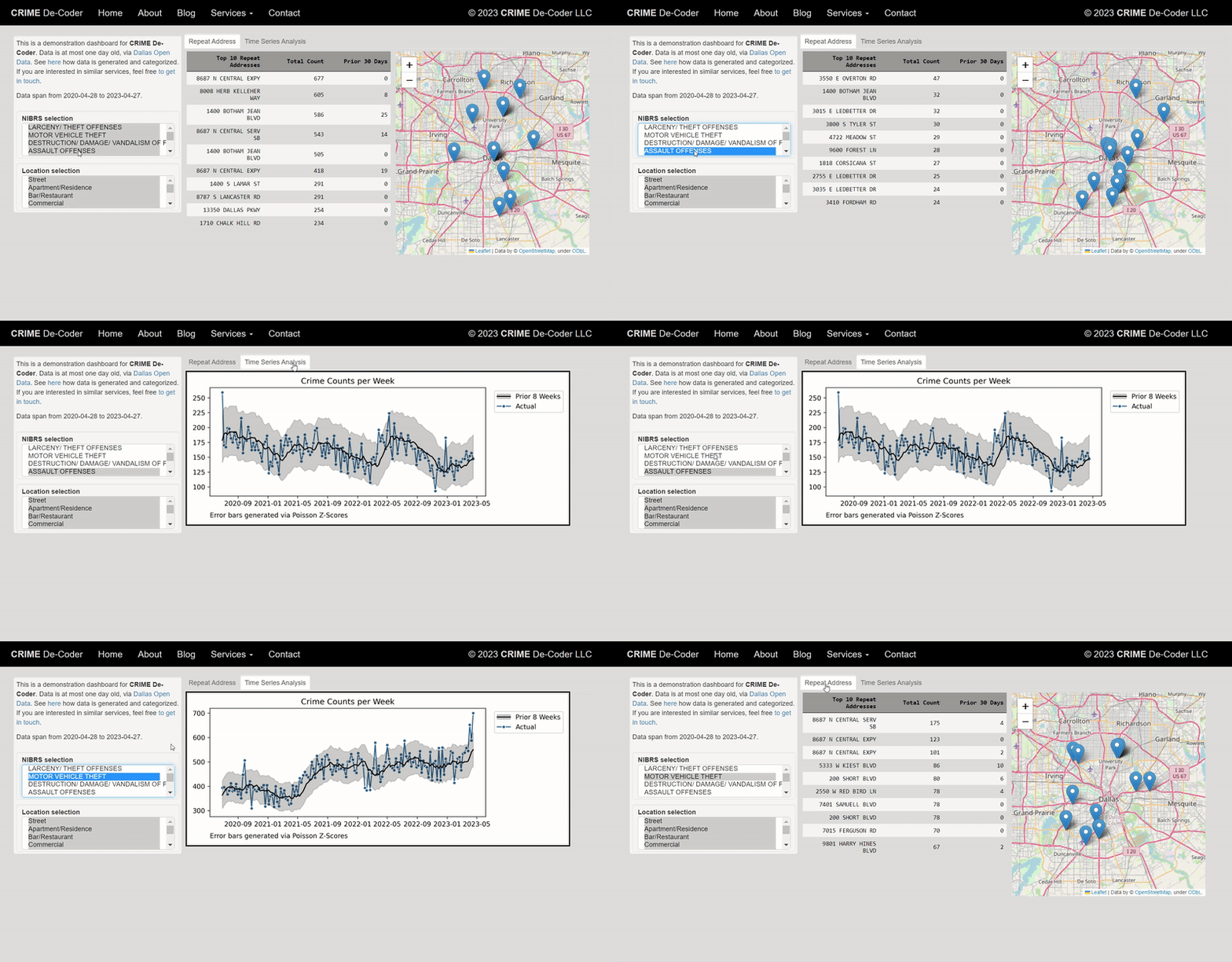
One potential alternative with the public facing dashboard is to make a serverless file. This will often embed the dashboard (and maybe data) into the webpage itself (e.g. pyscript wasm), so it may be slow to start up, but will work reasonably well if you can handle a one minute lag. You don’t need to worry about malicious actors in that scenario, as the heavy computation is done on the clients computer, not your server. I have an example on CRIME De-Coder (note it is currently not up to date, my code is running fine, but Dallas post the cyber-attack has not been updating their public data).

Managing a direct connection to your source data in a public facing dashboard is not a good idea, as malicious actors can spam your dashboard. This denial of service attack will not only make your dashboard unresponsive, but will also eat up your database processing. (Big companies often have a reporting database server vs a production database server in the best case scenario, but this requires resources most public sector agencies do not have.)

The solution to this is to limit who can access the dashboard, part B above. Unfortunately, the majority of dashboard software when you want to make a live connection and/or limit who can see the information, you are in the ‘need to pay for this scenario’. A very unfortunate aspect of the ‘you need to pay for this’ is that most of these vendors charge per viewer – it isn’t a flat fee. PowerBI is maybe OK if your organization already pays for Sharepoint, Tableau licensing is so painful I wouldn’t suggest it.

So what is the alternative? You are now in charge of spinning up your own server so people can click a dropdown menu and generate a line graph. Again you need to worry about security, but at least if you can hide behind a local network or VPN it is probably doable for most police departments.

I don’t want to say dashboards are never worth it. I think public facing dashboards are a good thing for police transparency, and if done right are easier to implement than private ones. Private ones are doable as well (especially if limiting to intranet applications). But like I said, this level of effort is over the top compared to just doing a regular report.

Crime analysis dashboards in Tableau

So previously I have rewritten a few of my Crime Analysis tutorials (in Excel) to show how to use Tableau.

It takes too much work to do a nice tutorial like that with no clear end user, so I will just post some further examples I have been constructing to self-teach myself Tableau. To see my current workbook, you can download the files here.

The real benefit of Tableau over static charts in Excel (or whatever statistical program), is you can do interactive filtering and brushing/linking. So here is an example GIF showing how you can superimpose the weekly & seasonal chart I showed earlier, along with additional charts. Here instead of a dropdown to filter by different crime types, I show how you can use a Treemap as a filter. You can also select either one element or multiple elements, so first I show selecting different types of larceny (orange), then I show selecting all of the Part 2 nuisance crimes.

The Treemap idea is courtesy of Jerry Ratcliffe and Grant Drawve, and one of my co-workers used it like this in a Tableau dashboard to give me this idea. Here the different colors represent Part 2 disorder crimes (Blue), Property Crimes (orange), and Violent Crimes (Red). While you cannot see labels for each one, it does has tooltips, so in the end you can see what individual cells contain when you also consider the interactivity component.

You can mash-up additional tables, graphs, and maps as well. Here is another example using Compstat like tables for crime totals by year, a table of counts of crime per street (would prefer to do individual addresses, but the Burlington CAD data I used to illustrate does not have individual addresses) filtered to the top 30, and a point map. You can select any one graphic and it subsets the others.

While Tableau has maps I am not real bemused by them offhand. Points maps are no big deal, but with many points they become inscrutable. You can do a kernel density map, but it is very difficult to make it look reasonable depending on the filtering/zoom. If Tableau implements something like Leaflets cluster marker for point maps I think that would be a bit more friendly.

Dashboards no doubt are a trade-off with space. You can only reasonably put so much in a limited space. But brushing/linking between graphics is a really big different between Tableau and other traditional static graphics. It may not always be necessary, but it can sometimes be useful.

Next up I have a few ideas to make a predictive model monitoring dashboard in Tableau.