Scorpion was probably not doing hot spots policing

So the Wall Street Journal had a recent article describing how crackdowns in hot spots of crime may not be the best policing tactic, Tyre Nichols Case Prompts Questions About Police Tactics in Crime Hot Spots. This is actually an OK article, but to be clear “hot spots” policing isn’t really defined by police tactics, hot spots are just a method to identify small areas with the most crime in a city. Identifying the hot spots does not explicitly determine the policing (or non-policing) tactic that one should use to reduce crime in that area. The Washington Post had a recent article in a similar vein critiquing the work of Tamara Herold in Breonna Taylor’s death. The WaPo article even prompted a response by a group of well known criminologists how it was inappropriate to blame Herold’s strategy.

So hotspots have always had a mix of different policing tactics that go with it, the most common strategies I would say are problem oriented policing (Braga et al., 1999), increased street or traffic stops (MacDonald et al., 2016; Sherman & Rogan, 1995), or simply patrolling/hanging out in the area (Groff et al., 2015; Koper, 1995). The WSJ article talks about Joel Caplan’s RTM group (which I think do good work), and they are really just doing a version of problem oriented policing. (POP has always had a component of working in tandem with the community and different public/private sector agencies.)

One of the reasons I wanted to write about this post though, is that often in my career I see a disconnect in purportedly hot spots policing (or similar tactics, such as DDACTS) on paper and what is actually happening on the ground. So using the Memphis Open Crime Data, I identified the top 100 street segments in terms of violent crime (code on github to replicate). As I suspected, the place where Nichols was pulled over is not a hot spot of crime, making the connection between the Scorpion units behavior and hot spots policing tactics a bit suspect.

If the embedded google map does now work, here is a screen shot to show how none of the top 100 street midpoints are around the location of where Nichol’s was initially stopped:

It happens to be the case that officers often have misperceptions of where hot spots are (Macbeth & Ariel, 2019; Ratcliffe & McCullagh, 2001). And that if left to no oversight, there tends to be a mismatch between where police proactivity is occurring and where the most serious crime is spatially concentrated (Wheeler et al., 2018). That is why a system to feed back information to officers for whether they are making high quality stops is so important (Worden et al., 2018).

To be clear, this is not me making excuses for researchers or crime analysts to not know what is actually occurring in their jurisdictions, and to potentially ignore the secondary harms that can come with intensive policing. But in my experience, taking the time to do hot spots policing right, which at its most basic is actually identifying hot spots using data, is a good sign that police departments take seriously the tactics they use and to seriously think about mitigating some of these secondary harms. Hot spots policing does not intrinsically result in unequal outcomes, which can be done via tactics that mitigate harm (such as problem oriented policing), or constructing a hot spots policy that promotes racial equity in outcomes from the start (Wheeler, 2020).

References

  • Braga, A.A., Weisburd, D.L., Waring, E.J., Mazerolle, L.G., Spelman, W., & Gajewski, F. (1999). Problem‐oriented policing in violent crime places: A randomized controlled experiment. Criminology, 37(3), 541-580.
  • Groff, E. R., Ratcliffe, J. H., Haberman, C. P., Sorg, E. T., Joyce, N. M., & Taylor, R. B. (2015). Does what police do at hot spots matter? The Philadelphia policing tactics experiment. Criminology, 53(1), 23-53.
  • Koper, C.S. (1995). Just enough police presence: Reducing crime and disorderly behavior by optimizing patrol time in crime hot spots. Justice Quarterly, 12(4), 649-672.
  • Macbeth, E., & Ariel, B. (2019). Place-based statistical versus clinical predictions of crime hot spots and harm locations in Northern Ireland. Justice Quarterly, 36(1), 93-126.
  • MacDonald, J., Fagan, J., & Geller, A. (2016). The effects of local police surges on crime and arrests in New York City. PLoS one, 11(6), e0157223.
  • Ratcliffe, J.H., & McCullagh, M.J. (2001). Chasing ghosts? Police perception of high crime areas. British Journal of Criminology, 41(2), 330-341.
  • Sherman, L.W., & Rogan, D.P. (1995). Effects of gun seizures on gun violence:“Hot spots” patrol in Kansas City. Justice Quarterly, 12(4), 673-693.
  • Wheeler, A.P. (2020). Allocating police resources while limiting racial inequality. Justice Quarterly, 37(5), 842-868.
  • Wheeler, A. P., Steenbeek, W., & Andresen, M. A. (2018). Testing for similarity in area‐based spatial patterns: Alternative methods to Andresen’s spatial point pattern test. Transactions in GIS, 22(3), 760-774.
  • Worden, R.E., McLean, S.J., Wheeler, A.P., Reynolds, D.L., Dole, C., Cochran, H. Smart Stops: An Inquiry into Proactive Policing. Summary Report to the National Institute of Justice, Award No. 2013-MU-CX-0012.

Setting up pyspark to run sql tests

So hacker news the other day had a thread on how do you test your SQL code. This is such a nerd/professional data science type of question I love it (and many of the high upvoted answers are good, but lack code example/nitty gritty details, hence this blog post). I figured I would make my notes on this and illustrate some real code. You get a few things in this post:

  • how to set up spark locally on a windows machine
  • how to generate SQL tests in python with pytest
  • how to set up a github action CICD pipeline to test pyspark/sql

Setting up spark on Windows

First, before we get start, getting spark up and running on a windows machine is non-trivial. Maybe I should use Docker, like I do for postgres, but here are my notes on setting it up to run locally on Windows (much of this is my condensed notes + a few extras based on this DataCamp post).

  • Step 1: Install Java. Make sure where you install it has NO SPACES. Then create an environment variable, JAVA_HOME, and point it to where you installed Java. Mine for example is C:\java_jdk (no spaces).
  • Step 2: Install spark. Set the environment variable Spark_home to wherever you downloaded it, mine is set to C:\spark. Additionally set the environment variables PYSPARK_HOME to python.
  • Step 3: Set up your python environment, e.g. something like conda create --name spenv python=3.9 pip pyspark==3.2.1 pyarrow pandas pytest to follow along with this post. (Note to make pyspark and spark downloaded versions line up.)
  • Step 4: Then you need to download winutils.exe that matches your version. So I currently have spark=3.2.1, so I just do a google search for “winutils 3.2” and up pops this github repo with the version I need (minor versions probably don’t matter). (You do not need to double click to install, the exe file just needs to be available for other programs to find.) Then set the environment variable hadoop_home to the folder where you downloaded winutils.exe. Mine is C:\winutils.

I know that is alot – but it is a one time thing. Now once this is done, from the command line try to run:

pyspark --version

You should be greeted with something that looks like:

Welcome to
      ____              __
     / __/__  ___ _____/ /__
    _\ \/ _ \/ _ `/ __/  '_/
   /___/ .__/\_,_/_/ /_/\_\   version 3.2.1
      /_/

Using Scala version 2.12.15, Java HotSpot(TM) 64-Bit Server VM, 11.0.15

Plus a bunch of other messages (related to logging errors on windows). (You can set the spark-defaults.conf and log4j.properties file to make these less obnoxious.)

But now you are good to go running spark locally on your windows machine. Note you get none of the reasons you want to use spark, such as distributing computations over multiple machines (this is equivalent to running computations on the hnode). But is convenient to do what I am going to show – testing your SQL code locally.

Testing SQL code in python

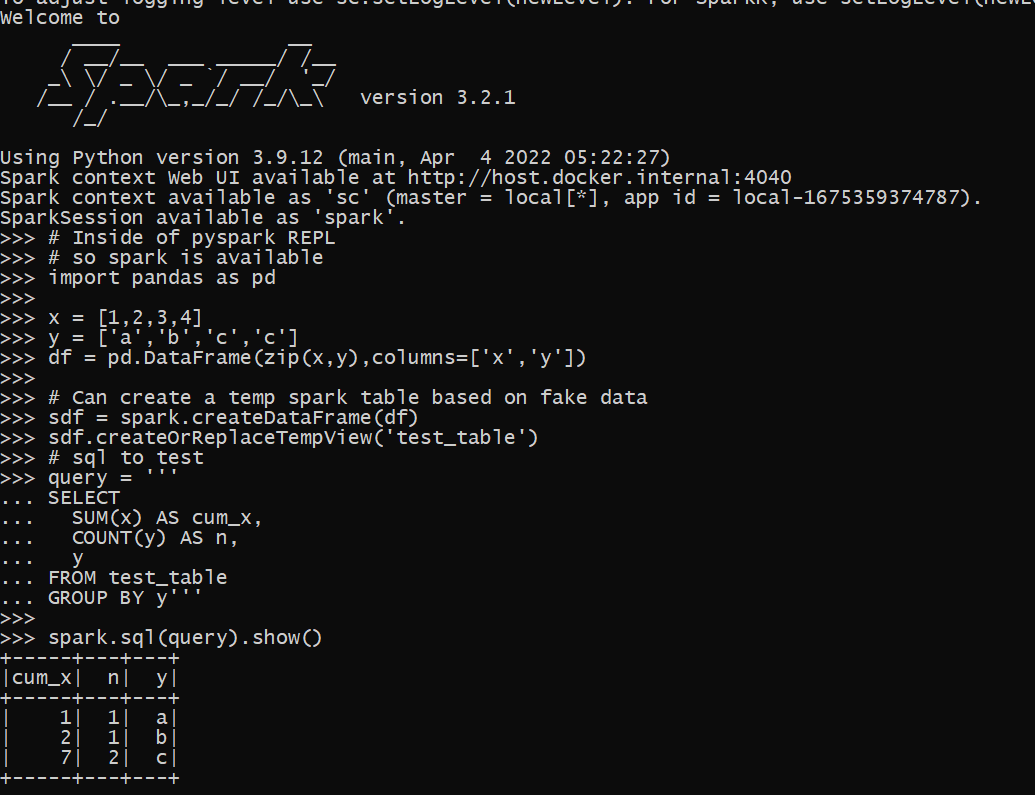
Now that we have pyspark set up, we can run a test in python. Instead of type python into the REPL, go ahead and run pyspark, so we are in a pyspark REPL session. You will again see the big Spark ascii art at the beginning. Here is an example of now creating a dummy temp table inside of our spark database (this is just a local temp table).

# Inside of pyspark REPL
# so spark is available
import pandas as pd

x = [1,2,3,4]
y = ['a','b','c','c']
df = pd.DataFrame(zip(x,y),columns=['x','y'])

# Can create a temp spark table based on fake data
sdf = spark.createDataFrame(df)
sdf.createOrReplaceTempView('test_table')

Now we can run our SQL against the spark database.

# sql to test
query = '''
SELECT
  SUM(x) AS cum_x,
  COUNT(y) AS n,
  y
FROM test_table
GROUP BY y'''

spark.sql(query).show()

And voila, you can now test your spark queries. Although this is showing for spark, you can do something very similar for different databases as well, e.g. using pyodbc or sqlalchemy. You would want to have a test dummy database you can write to though to do that (a few different databases have volatile or temp tables equivalent to spark here).

Setting up pytest + spark

So this shows in just a REPL session how to set up this, but we also want automated tests for multiple scripts via pytest. To illustrate, I am going to refer to my retenmod repo. Even though this library obviously has nothing directly to do with pyspark, I am using this repo as a way to test code/python packaging. (And note if using the same environment above, to replicate 100% of that repo, need to install pip install black flake jupyter jupyter_contrib_nbextensions pre-commit matplotlib.)

So now for pytest, a special thing is you can create python objects that are inherited for all of your tests. Here we will create the spark object one time, and then it can be passed on to your tests. So in ./tests make a file conftest.py, and in this file write:

# This is inside of conftest.py
import pytest
from pyspark.sql import SparkSession

# This sets the spark object for the entire session
@pytest.fixture(scope="session")
def spark():
    sp = SparkSession.builder.getOrCreate()
    # Then can do other stuff to set
    # the spark object
    sp.sparkContext.setLogLevel("ERROR")
    sp.conf.set("spark.sql.execution.array.pyspark.enabled", "true")
    return sp

In pytest lingo, fixtures are then passed around to the different test functions in your library (where appropriate). You can create the equivalent of spark in a pyspark session via SparkSession.builder. This is essentially what a pyspark session is doing under the hood to generate the spark object you can run queries against.

Now we can make a test function, here in a file named test_spark.py (in the same tests folder). That will then look something like:

# pseudo code to show off test
# in test_spark.py
import pandas as pd
from yourlibrary import func

test_table = ...code to create dummy table...

def test_sql(spark):
    # Create the temporary table in spark
    sdf = spark.createDataFrame(test_table)
    sdf.createOrReplaceTempView("test_table")
    # Test out our sql query
    query = func(...your parameters to generate sql...)
    res = spark.sql(query).toPandas()
    # No guarantees on row order in this result
    # so I sort pandas dataframe to make 100% sure
    res.sort_values(by="y", inplace=True, ignore_index=True)
    # Then I do tests
    # Type like tests, shape and column names
    assert res.shape == (3, 3)
    assert list(res) == ["cum_x", "n", "y"]
    # Mathy type tests
    dif_x = res["x"] != [1, 2, 7]
    assert dif_x.sum() == 0
    dif_n = res["n"] != [1, 1, 2]
    assert dif_n.sum() == 0

So note here that I pass in spark as an argument to the function. pytest then uses the fixture we defined earlier to pass into the function when the test is actually run. And then from the command line you can run pytest to check out if your tests pass! (I have placed in the retenmod package a function to show off generating a discrete time survival table in spark, will need to do another blog post though on survival analysis using SQL.)

So this shows off what most of my sql type tests look like. I test that the shape of the data is how I expected (given my fake dataframe I passed in), columns are correct, and that the actual values are what they should be. I find this useful especially to test edge cases (such as missing data) in my SQL queries. My functions in production are mostly parameterized SQL, but it would work the same if you had a series of text SQL files, just read them into python as strings.

Setting up github actions

As a bonus, I show how to set this up in an automatic CICD check via github actions. Check out the actions workflow file for the entire workflow in-situ. But the YAML file has a few extra steps compared to my prior post on generating a wheel file in github actions.

It is short enough an can just paste the whole YAML file for you to check out.

on:
  push:
    branches:
      - main

jobs:
  build_wheel:
    runs-on: ubuntu-latest
    timeout-minutes: 20
    steps:
      - uses: actions/checkout@v2
      - uses: actions/setup-java@v1
        with:
            java-version: 11
      - uses: vemonet/setup-spark@v1
        with:
          spark-version: '3.2.1'
          hadoop-version: '3.2'
      - name: Set up Python
        uses: actions/setup-python@v2
        with:
          python-version: 3.9
      - name: Build wheel and install
        run: |
          python -m pip install --user --upgrade build
          python -m build
          # installing spark libraries
          pip install pyspark pyarrow pandas pytest
          # now install the wheel file
          find ./dist/*.whl | xargs pip install
          # Now run pytest tests
          pytest --disable-warnings ./tests
      - name: Configure Git
        run: |
          git config --global user.email "apwheele@gmail.com"
          git config --global user.name "apwheele"
      - name: Commit and push wheel
        run: |
          git add -f ./dist/*.whl
          git commit -m 'pushing new wheel'
          git push
      - run: echo "🍏 This job's status is ${{ job.status }}."

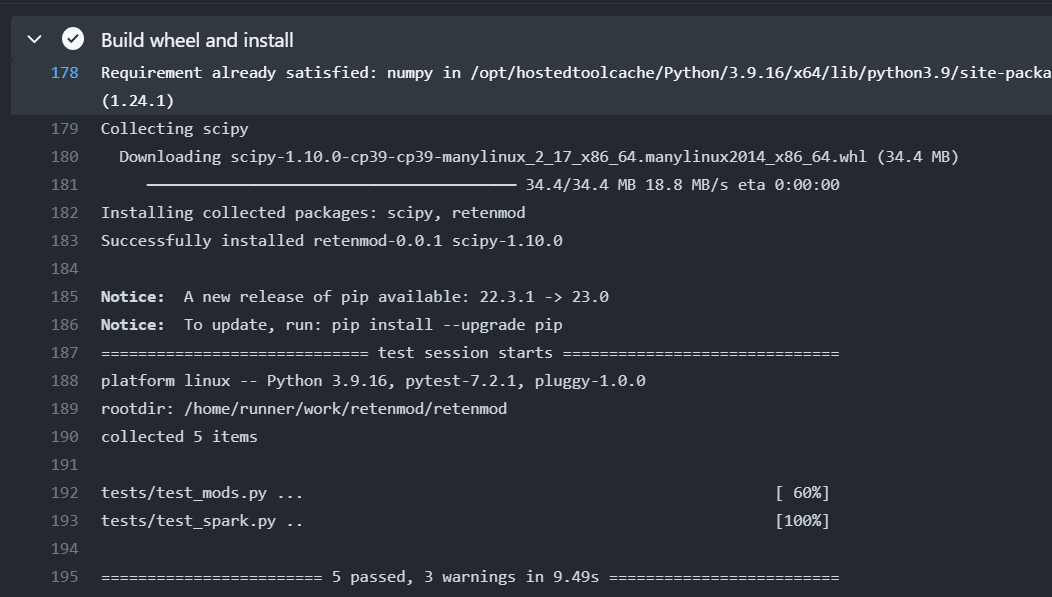
So here in addition to python, this also sets up Java and Spark. (I need to learn how to build actions myself, I wish vemonet/setup-spark@v1 had an option to cache the spark file instead of re-downloading everytime). Even with that though, it will only take a minute or two to run (the timeout is just a precaution and good idea to put in any github action).

You can then check this action out on github.

Happy SQL code testing for my fellow data scientists!

Web scraping police data using selenium and python

So I have a few posts in the past on scraping data. One shows downloading and parsing structured PDFs, almost all of the rest though use either JSON API backends, or just grab the HTML data directly. These are fairly straightforward to deal with in python. You generate the url directly, use requests, and then just parse the returned HTML however you want.

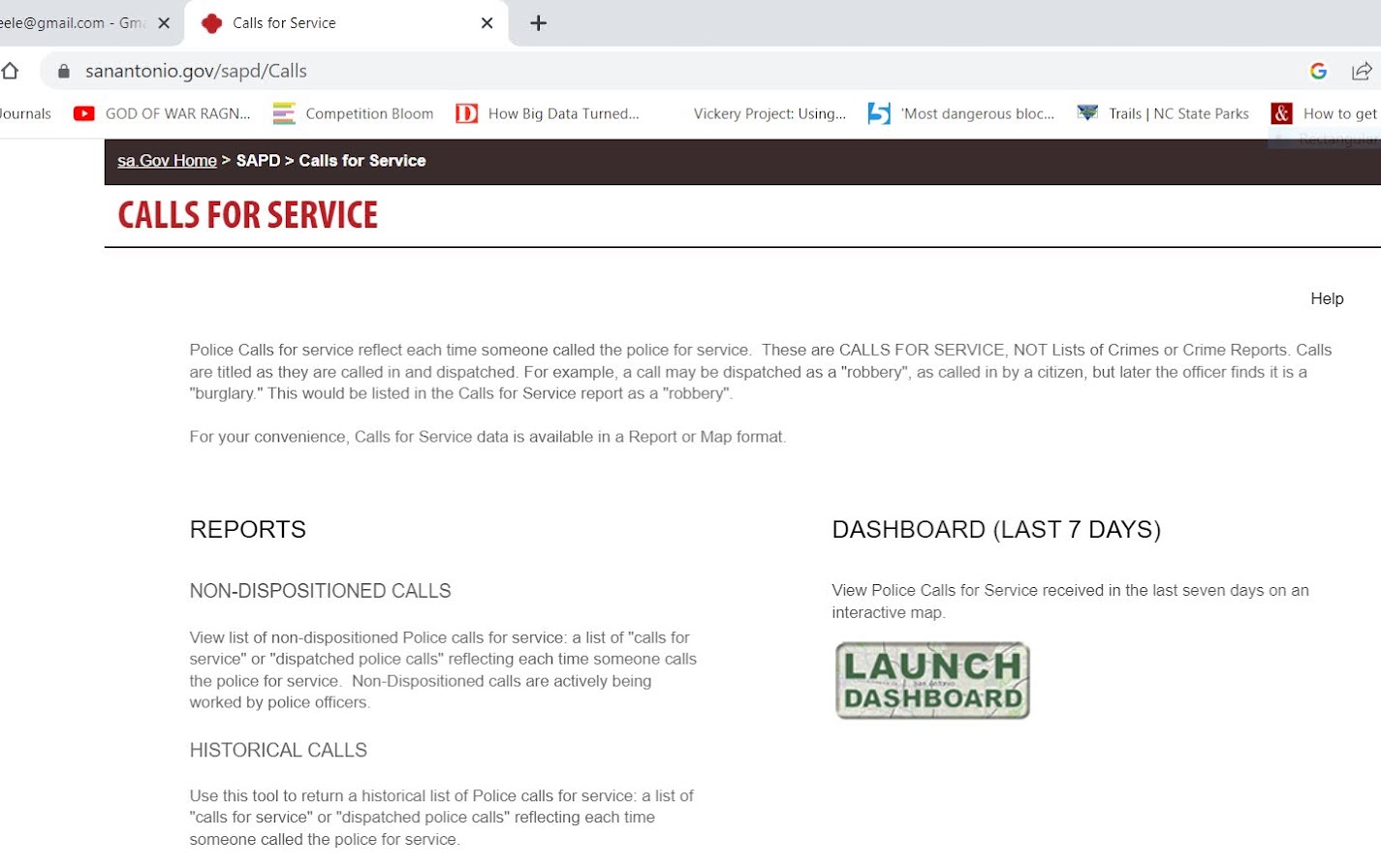
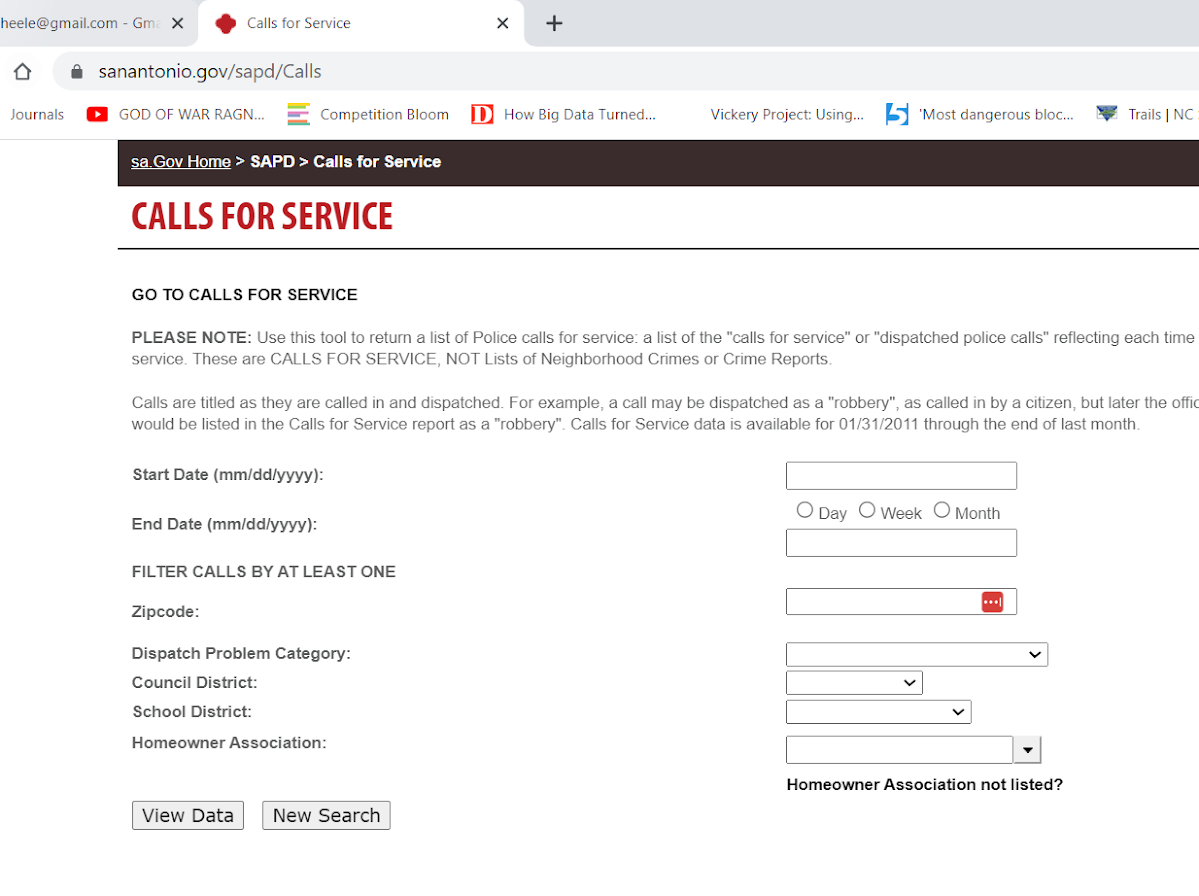
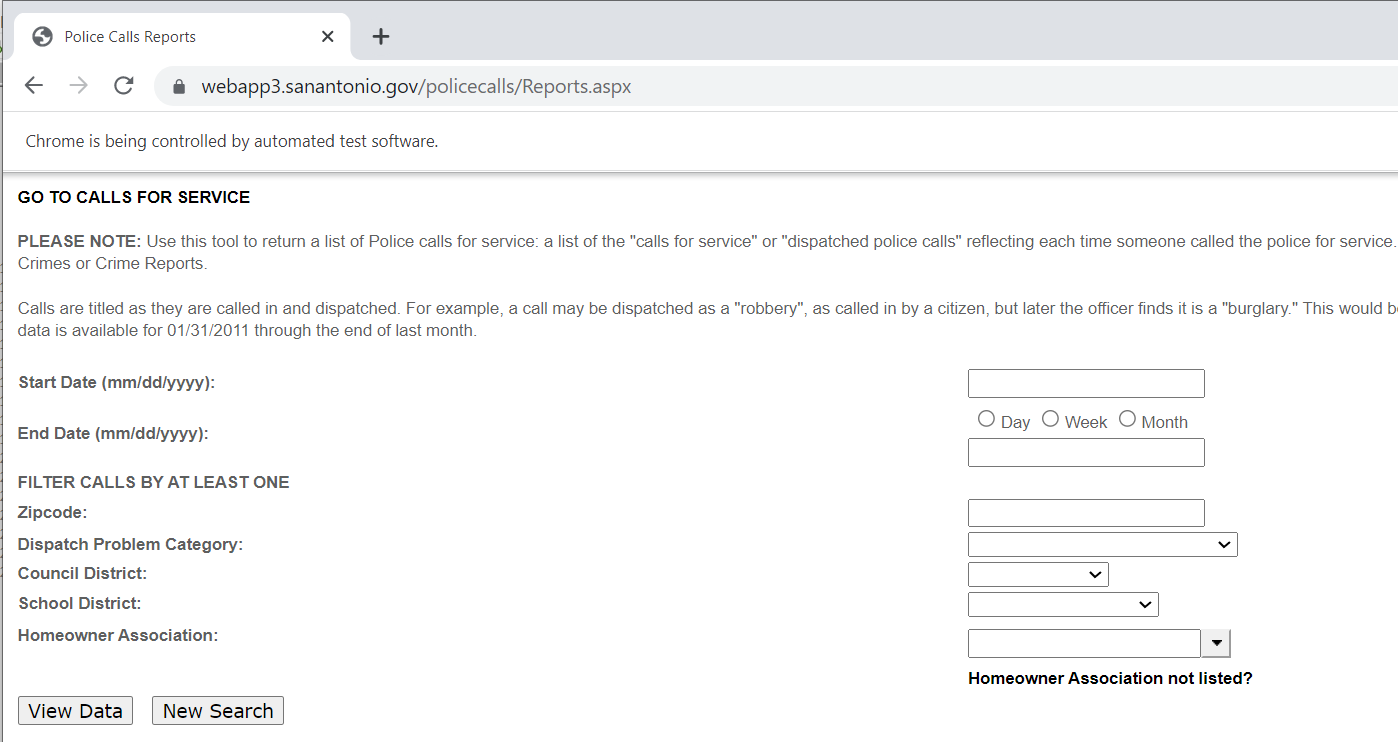
Came across a situation recently though where I needed to interact with the webpage. I figured a blog post to illustrate the process would be good. (For both myself and others!) So here I will illustrate entering data into San Antonio’s historical calls for service asp application (which I have seen several PDs use in the past).

It is tough for me to give general advice about scraping, it involves digging into the source code for a website. Here if you click on the Historical Calls button, the url stays the same, but presents you with a new form page to insert your search parameters:

This is a bit of a red-herring though, it ends up being the entire page is embedded in what is called an i-frame, so the host URL stays the same, but the window inside the webpage changes. On the prior opening page, if you hover over the link for Historical Calls you can see it points to https://webapp3.sanantonio.gov/policecalls/Reports.aspx, so that is page we really need to pay attention to.

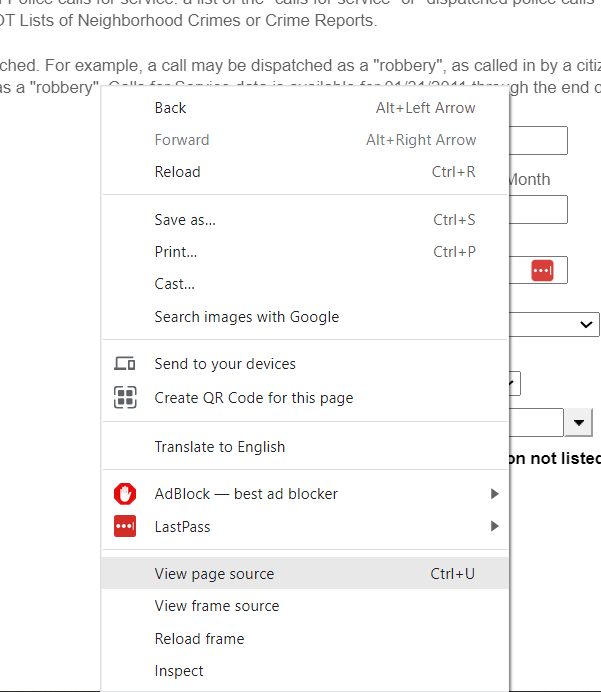
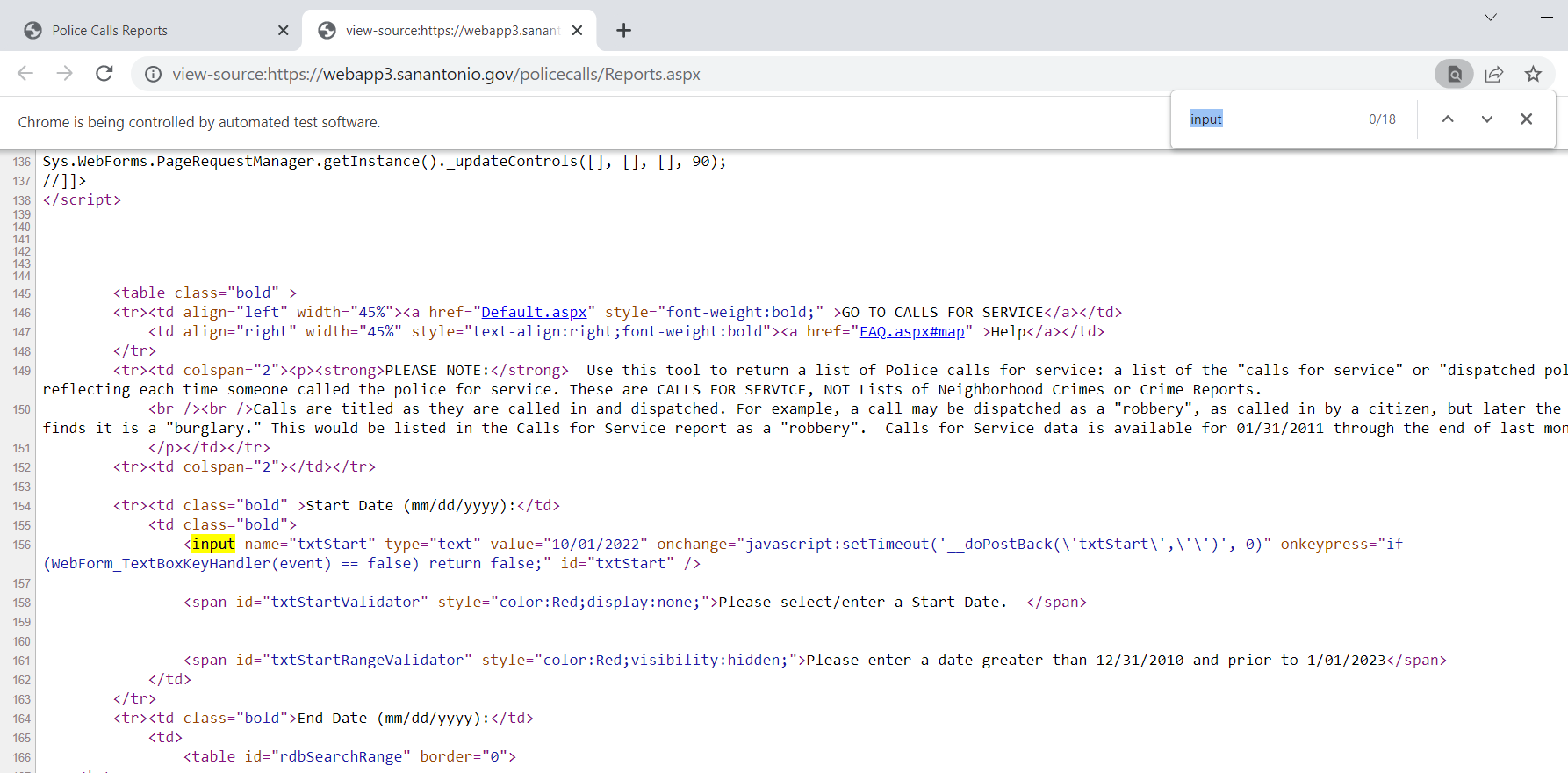
So for general advice, using Chrome to view a web-pages source html, you can right-click and select view-source:

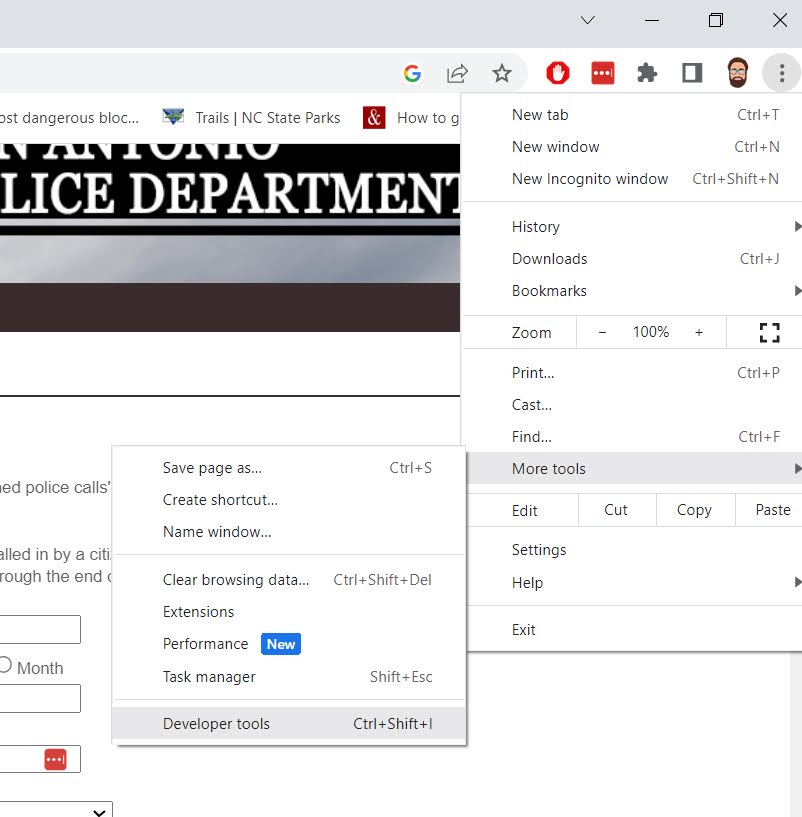
And you can also go into the Developer tools to check out all the items in a page as well.

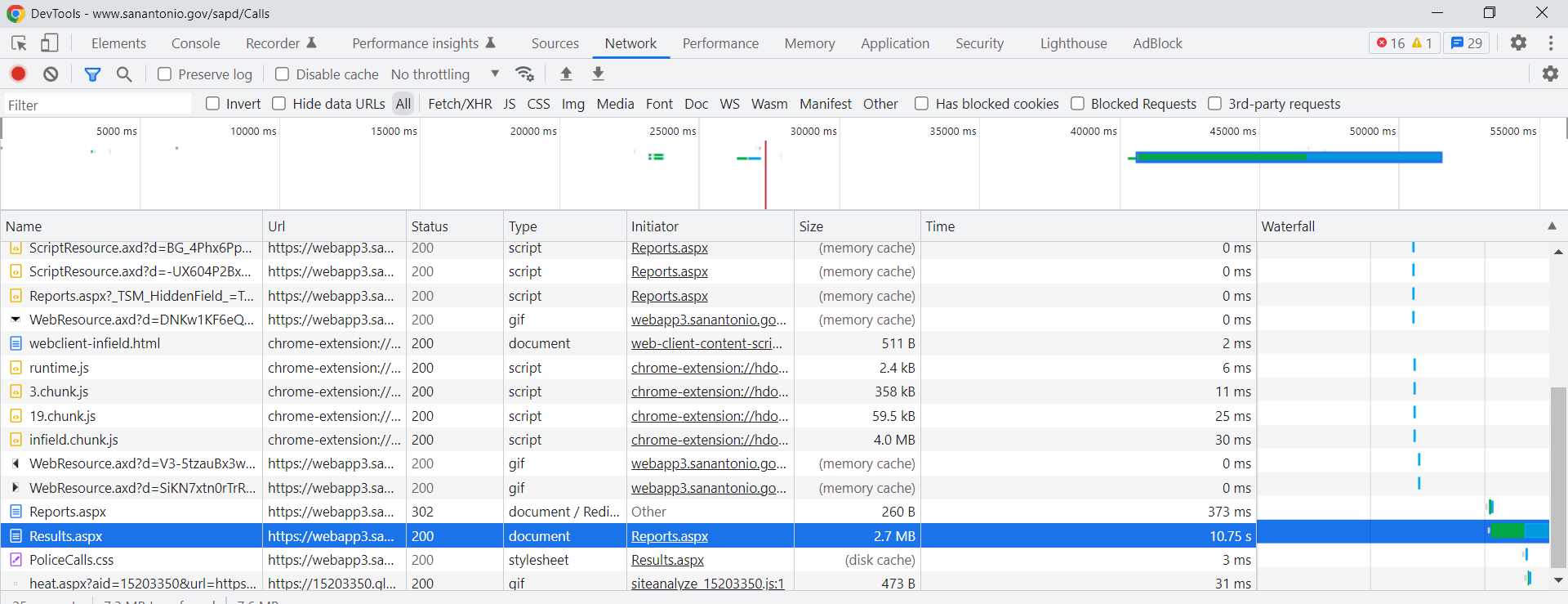
Typically before worrying about selenium, I study the network tab in here. You want to pay attention to the items that take the longest/have the most data. Typically I am looking for JSON or text files here if I can’t scrape the data directly from the HTML. (Example blog posts grabbing an entire dump of data here, and another finding a hidden/undocumented JSON api using this approach.) Here is an example network call when inputting the search into the San Antonio web-app.

The data is all being transmitted inside of aspx application, not via JSON or other plain text files (don’t take my terminology here as authoritative, I really know near 0% about servers). So we will need to use selenium here. Using python you can install the selenium library, but you also need to download a driver (here I use chrome), and then wherever you save that exe file, add that location to your PATH environment variable.

Now you are ready for the python part.

from selenium import webdriver
from selenium.webdriver.chrome.options import Options
from selenium.webdriver.support.ui import Select
import pandas as pd

# Setting Chrome Options
chrome_options = Options()
#chrome_options.add_argument("-- headless")
chrome_options.add_argument("--window-size=1920,1080")
chrome_options.add_argument("log-level=3")

# Getting the base page
driver = webdriver.Chrome(options=chrome_options)
base_url = "https://webapp3.sanantonio.gov/policecalls/Reports.aspx"
driver = webdriver.Chrome(options=chrome_options)
driver.get(base_url)

Once you run this code, you will see a new browser pop-up. This is great for debugging, but once you get your script finalized, you can see I commented out a line to run in headerless (so it doesn’t bug you by flashing up the browser on your screen).

Now typically what I do is look at the HTML source (like I showed earlier), and then search for the input buttons in HTML. We are trying to figure out the elements we need to insert the data for us to submit a search. Here is the first input for an item we care about, the begin date of the search.

Now we can insert our own date by grabbing the element from the web-page. I grab it here by the “id” attribute in the HTML (many tutorials use xpath, which I am not as familiar with, but at least for these aspx apps what I show works fine). For dates that have a validation stage, you need to not only .send_keys, but to also submit to get past the date validation.

# Inserting date field for begin date
from_date = driver.find_element("id", "txtStart")
from_date.send_keys("10/01/2022")
from_date.submit()

Once you run that code you can actually view the web-page, and see that your date is entered! Now we need to do the same thing for the end date. Then we can put in a plain text zipcode. Since this does not have validation, we do not need to submit it.

# Now for end date
end_date = driver.find_element("id", "txtEndDate")
end_date.send_keys("10/02/2022")
end_date.submit()

# Now inserting text for zipcode
zip = driver.find_element("id", "txtZipcode")
zip.send_keys("78207")
# Sometimes need to clear, zip.clear()

I have a note there on clearing a text box. Sometimes websites have pre-filled options. Sometimes web-sites also do not like .clear(), and you can simulate backspace keystrokes directly. This website does not like it if you clear a date-field for example.

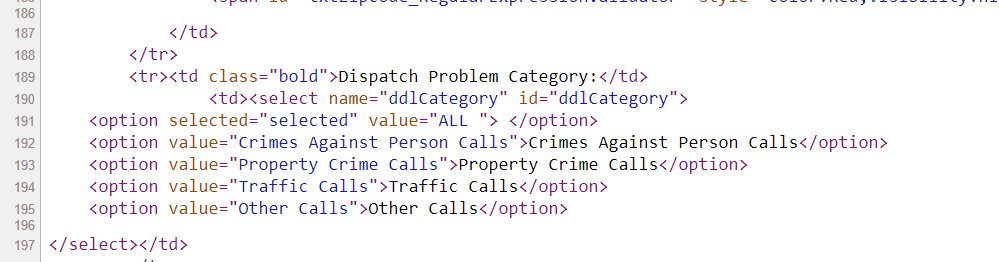
Now the last part, I am going to select a drop-down. If you go into the HTML source again, you can see the list of options.

And now we can use the Select function I imported at the beginning to select a particular element of that drop-down. Here I select the crimes against persons.

# Now selecting dropdown
crime_cat = driver.find_element("id", "ddlCategory")
crime_sel = Select(crime_cat)
crime_sel.select_by_visible_text("Crimes Against Person Calls")

Many of these applications have rate limits, so you need to limit the search to tiny windows and subsets, and then loop over the different sets you want to grab all of the data. (Being nice and using time.sleep() between calls to get the results.

Now we are ready to submit the query. The same way you can enter in text into input forms, buttons you can click are also labeled as inputs in the HTML. Here I find the submit button, and then .click() that button. (If there is a direct button to download CSV or some other format, it may make sense to click that button.)

# Now can find the View Data button and submit
view_data = driver.find_element("id", "btnSearch")
view_data.click()

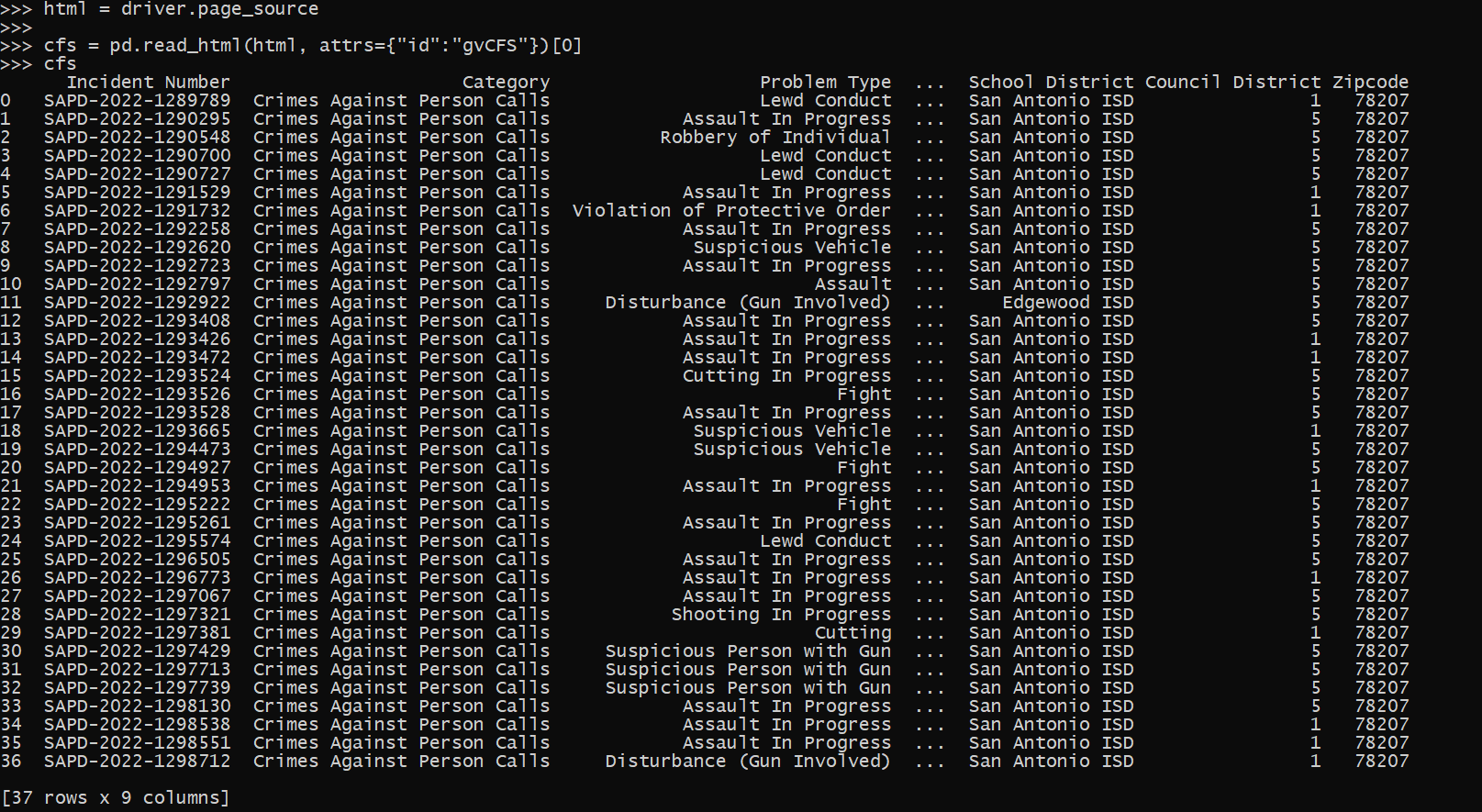
Now that we have our web-page, we can get the HTML source directly and then parse that. Pandas has a nice method to grab tables, and this application is actually very nicely formatted. (I tend to not use this, as many webpages have some very bespoke tables that are hard to grab directly like this). This method grabs all the tables in the web-page by default, here I just want the calls for service table, which has an id of "gvCFS", which I can pass into the pandas .read_html function.

# Pandas has a nice option to read tables directly
html = driver.page_source
cfs = pd.read_html(html, attrs={"id":"gvCFS"})[0]

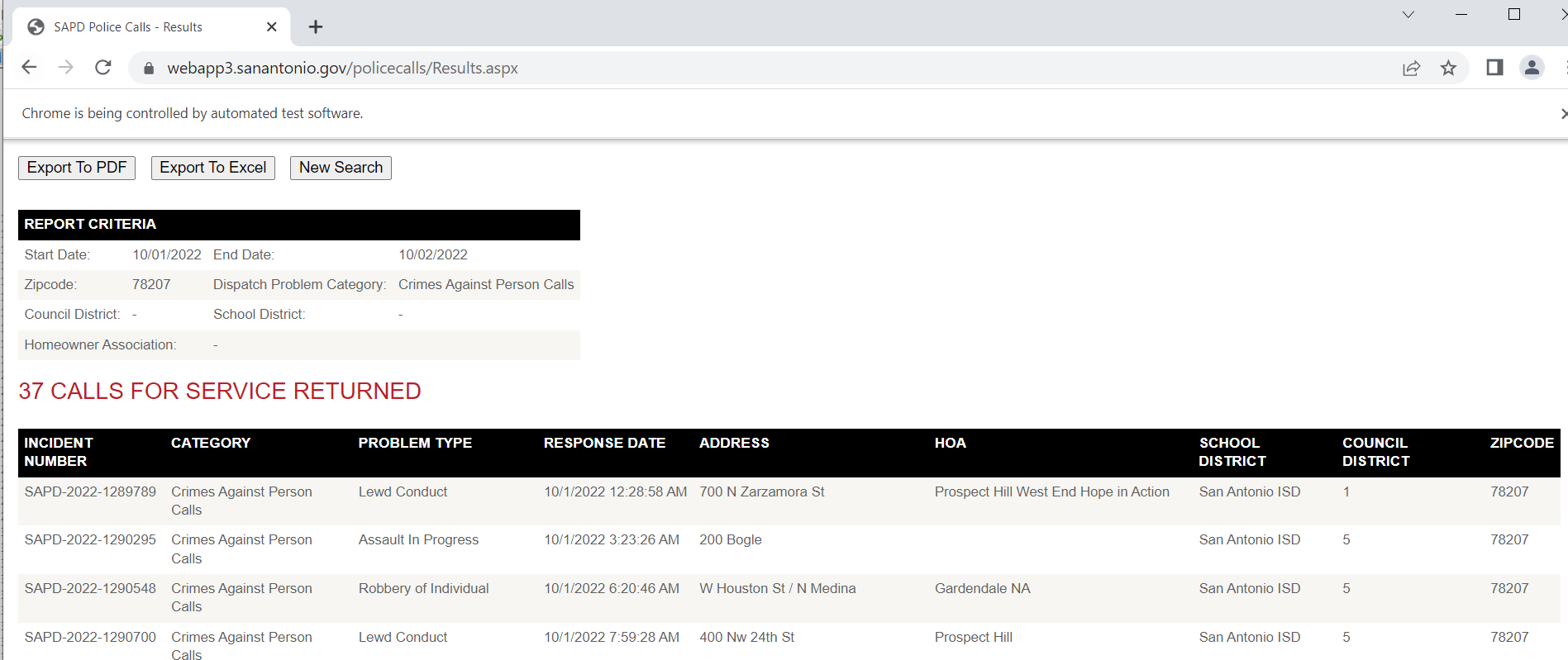
And that shows grabbing a single result. Of course to scrape, you will need to loop over many days (and here different search selections), depending on what data you want to grab. Most of these applications have search limits, so if you do too large a search, will only return the first say 500 results. And San Antonio’s is nice because it returns as a single table in the web-page, most you need to page the results though as well. Which takes further scraping the data and interacting with the page. So it is more painful whenever you need to resort to selenium.

Sometimes pages will point to PDF files, and you can set Chrome’s options to download to a particular location in that scenario (and then use os.rename to name the PDF whatever you want after it is downloaded). You can basically do anything in selenium you can manually, it is often just a tricky set of steps to replicate in code.

Using quantile regression to evaluate police response times

Jeff Asher recently had a post on analysis of response times across many agencies. One nitpick though (and ditto for prior analyses I have seen, such as Scott Mourtgos and company), is that you should not use linear models (or means in general) to describe response time distributions. They are very heavily right skewed, and so the mean tends to be not representative of the bulk of the data.

When evaluating changes in response time, imagine two simplistic scenarios. One, every single call increases by 5 minutes, so what used to be 5 is now 10, 20 is now 25, 60 is now 65, etc. That is probably not realistic for response times, it is probably calls in the tail (ones that take a very long time to wait for an opening in the queue) are what changes. E.g. 5 is still 5, 20 is still 20, but 60 is now 120. In the latter scenario, the left tail of the distribution does not change, only the right tail. In both scenarios the mean shifts.

I think a natural way to model the problem is instead of focusing on means, is to use quantile regression. It allows you to generalize the entire distribution (look at the left and right tails) and still control for individual level circumstances. Additionally, often emergency agencies set goals along the lines of “I want to respond to 90% of emergency events with X minutes”. Quantile regression is a great tool to describe that 90% make. Here I am going to show an example using the New Orleans calls for service data and python.

First, we can download the data right inside of python without saving it directly to disk. I am going to be showing off estimating quantile regression with the statsmodel library. I do the analysis for 19 through 22, but NOLA has calls for service going back to the early 2010s if folks are interested.

import pandas as pd
import statsmodels.formula.api as smf

# Download data, combo 19/20/21/22
y19 = 'https://data.nola.gov/api/views/qf6q-pp4b/rows.csv?accessType=DOWNLOAD'
y20 = 'https://data.nola.gov/api/views/hp7u-i9hf/rows.csv?accessType=DOWNLOAD'
y21 = 'https://data.nola.gov/api/views/3pha-hum9/rows.csv?accessType=DOWNLOAD'
y22 = 'https://data.nola.gov/api/views/nci8-thrr/rows.csv?accessType=DOWNLOAD'
yr_url = [y19,y20,y21,y22]
res_pd = [pd.read_csv(url) for url in yr_url]
data = pd.concat(res_pd,axis=0) # alittle over 1.7 million

Now we do some data munging. Here I eliminate self initiated events, as well as those with missing data. There then are just a handful of cases that have 0 minute arrivals, which to be consistent with Jeff’s post I also eliminate. I create a variable, minutes, that is the minutes between the time created and the time arrived on scene (not cleared).

# Prepping data
data = data[data['SelfInitiated'] == 'N'].copy() # no self init
data = data[~data['TimeArrive'].isna()].copy()   # some missing arrive
data['begin'] = pd.to_datetime(data['TimeCreate'])
data['end'] = pd.to_datetime(data['TimeArrive'])
dif = data['end'] - data['begin']
data['minutes'] = dif.dt.seconds/60
data = data[data['minutes'] > 0].copy() # just a few left over 0s

# Lets look at the distribution
data['minutes'].quantile([0.1,0.2,0.3,0.4,0.5,0.6,0.7,0.8,0.9])

For quantiles, for the entire sample the median time is around 20 minutes, the 10th percentile is under 3 minutes and the 90th percentile is around 5 hours. Using the mean here (which in Jeff’s post varies from 50 to 146 minutes over the same 4 year period), can be somewhat misleading.

An important component of response times is differentiating between different priority calls. NOLA in their data, higher numbers are higher priority. Zero priority are things NOLA says don’t necessarily need an officer at all. So it could be those “0 priority” calls are really just dragging the overall average down over time, although they may have little to do with clearance rates or public safety overall. The priority category fields also has sub-categories, e.g. 1A is higher priority than 1B. To keep the post simple I just breakdown by integer leading values, not the sub letter-categories.

# Priority just do 1/2/3
# 3 is highest priority
data['PriorCat'] = data['Priority'].str[0]
# Only 5 cases of 3s, will eliminate these as well
data.groupby('PriorCat')['minutes'].describe()

Here you can really see the right skewness – priority 2 calls the mean is 25 minutes, but the median is under 10 minutes for the entire sample. A benefit of quantile regression I will use in a bit, the few outlying cases (beyond the quantiles of interest), really don’t impact the analysis. So those cases that take almost 24 hours (I imagine they are just auto-filled in like that in the data), really don’t impact estimates of smaller quantiles. But they can have noticeable influence on mean estimates.

Some final data munging, to further simplify I drop the 16 cases of priority 3s and 4s, and add in a few more categorical covariates for hour of the day, and look at months over time as categorical. (These decisions are more so to make the results easier to parse in a blog post in simpler tables, it would take more work to model a non-linear continuous over time variable, say via a spline, and make a reasonable ordinal encoding for the sub-priority categories.)

# only worry about 0/1/2s
data = data[data['PriorCat'].isin(['0','1','2'])].copy()
# Total in the end almost 600k cases

# Some factor date variables
def dummy_stats(vdate,begin_date):
    bd = pd.to_datetime(begin_date)
    year = vdate.dt.year
    month = vdate.dt.month
    week_day = vdate.dt.dayofweek
    hour = vdate.dt.hour
    diff_days = (vdate - bd).dt.days
    # if binary, turn week/month into dummy variables
    return diff_days, week_day, hour, month, year

dn, wd, hr, mo, yr = dummy_stats(data['begin'],'1/1/2022')
data['Hour'] = hr
data['Month'] = mo
data['Year'] = yr

# Lets just look at months over time
data['MoYr'] = data['Year'] + data['Month']/100

Now finally onto the modeling stuff. For those familiar with regression, quantile regression instead of predicting the mean predicts a quantile of the distribution. Here I show predicting the 50th quantile (the median). For those not familiar with regression, this is not all that different than doing a pivot table/group by, but aggregating by quantiles instead of means. Regression is somewhat different than the simpler pivot table, since you “condition on” other continuous factors (here I “control for” hour of day), but in broad strokes is similar.

Here I use a patsy “R style” formula, and fit a categorical covariate for the 0/1/2 categories, hour of day, and the time varying months over time (to see the general trends). The subsequent regression table is big, so will show in parts:

# Quantile regression for median
mod = smf.quantreg("minutes ~ C(PriorCat, Treatment(reference='2')) + C(Hour) + C(MoYr)", data)
res50 = mod.fit(q=0.5)
res50.summary()

First, I use 2 priority events as the referent category, so you can see (in predicting the median of the distribution), priority 1 events have a median 24 minutes longer than priority 2, and priority 0 have a median two hours later. You can see some interesting patterns in the hour of the day effects (which are for the overall effects, not broken down by priority). So there are likely shift changes at 06:00, 14:00, and 22:00 that result in longer wait times.

But of most interest are patterns over time, here is the latter half of that table, showing median estimates over the months in this sample.

You could of course make the model more complicated, e.g. look at spatial effects or incorporate other direct measures of capacity/people on duty. But here it is complicated enough for an illustrative blog post. January-2019 is the referent category month, and we can see some slight decreases in a few minutes around the start of the pandemic, but have been clearly been increasing at the median time fairly noticeably starting later in 2021.

As opposed to interpreting regression coefficients, I think it is easier to see model predictions. We can just make sample data points, here at noon over the different months, and do predictions over each different priority category:

# Predictions for different categories
hour = 12
prior_cat = [0,1,2]
oos = data.groupby(['PriorCat','MoYr'],as_index=False)['Hour'].size()
oos['Hour'] = 12
oos['Q50'] = res50.predict(oos)

print(oos[oos['PriorCat'] == '0'])
print(oos[oos['PriorCat'] == '1'])
print(oos[oos['PriorCat'] == '2'])

So here for priority 0, 130 has creeped up to 143.

And for priority 1, median times 35 to 49.

Note that the way I estimated the regression equation, the increase/decrease per month is forced to be the same across the different priority calls. So, the increase among priority 2 calls is again around 13 minutes according to the model.

But this assumption is clearly wrong. Remember my earlier “fast” and “slow” example, with only the slow calls increasing. That would suggest the distributions for the priority calls will likely have different changes over time. E.g. priority 0 may increase by alot, but priority 2 will be almost the same. You could model this in the formula via an interaction effect, e.g. something like "minutes ~ C(PriorCat)*C(MoYr) + C(Hour)", but to make the computer spit out a solution a bit faster, I will subset the data to just priority 2 calls.

Here the power of quantile regression is we can look at different distributions. Estimating extreme quantiles is tough, but looking at the 10th/90th (as well as the median) is pretty typical. I do those three quantiles, and generate model predictions over the months (again assuming a call at 12).

# To save time, I am only going to analyze
# Priority 2 calls now
p2 = data[data['PriorCat'] == '2'].copy()
m2 = smf.quantreg("minutes ~ C(MoYr) + C(Hour)", p2)
oos2 = oos[oos['PriorCat'] == '2'].copy()

# loop over different quantiles
qlist = [0.1, 0.5, 0.9]
for q in qlist:
    res = m2.fit(q=q)
    oos2[f'Q_{q}'] = res.predict(oos2)

oos2

So you can see my story about fast and slow calls plays out, although even when restricted to purportedly high risk calls. When looking at just priority 2 calls in New Orleans, the 10th percentile stays very similar over the period, although does have a slight increase from under 4 to almost 5 minutes. The 50th percentile has slightly more growth, but is from 10 minutes to 13 minutes. The 90th percentile though has more volatility – grew from 30 to 60 in small increases in 2022, and late 2022 has fairly dramatic further growth to 70/90 minutes. And you can see how the prior model that did not break out priority 0/1 calls changed this estimate for the left tail for the priority 2 left tail as well. (So those groups likely also had large shifts across the entire set.)

So my earlier scenario is overly simplistic, we can see some increase in the left tails of the distribution as well in this analysis. But, the majority of the increase is due to changes in the long right tail – calls that used to take less than 30 minutes are now taking 90 minutes to arrive. Which still likely has implications for satisfaction with police and reporting behavior, maybe not so much though with clearance or direct public safety.

No easy answers here in terms of giving internet advice to New Orleans. If working with NOLA, I would like to get estimates of officer capacity per shift, so I could incorporate into the quantile regression model that factor directly. That would allow you to precisely quantify how officer capacity impacts the distribution of response times. So not just “response times are going up” but “the decrease in capacity from A to B resulted in X increase in the 90th percentile of response times”. So if NOLA had goals set they could precisely state where officer capacity needed to be to have a shot of obtaining that goal.

Handling errors in python and R

Just some quick notes on error handling in python and R. For most of my batch processes at work (in python), error handling is necessary. Most of my code has logic that if it fails, it sends an email message about the failure. This is only possible if you capture errors and have conditional logic, if the code just fails without capturing the error (for both R and python) it will just exit the script.

I had another example recently in R that used placebo tests that could fail to converge. So a more traditional stat project, but it should just keep running the loop to collect results, not fail entirely.

Python Example

In python, for most of my batch jobs I have code that looks like this:

import traceback

try:
    # whatever function you are running
    send_success_email()
except Exception:
    er = traceback.format_exc()
    print(f'Error message is \n\n{er}')
    send_error_email(er)

So it fails gracefully, and just gives me a message either in REPL for interactive debugging or stdout for regularly run batch jobs. I can see for people running servers why they want more specific error handling and using a more formal logger, but IMO that is overkill for running batch jobs.

R Example

R to do error handling looks something like this:

# trycatch for errors
my_func <- function(){
    # try/catch if error
    out <- tryCatch(
       { # part with the potential error
         #r <- ???? #whatever code steps you want
        r
       }, error=function(cond){ 
          print("Function Failed, Error message is \n\n")
          print(Cond)
          return(-1)
          } )
    return(out)
}

So if you have inside the tryCatch something that is “fit complicated model” inside your simulations (that could fail), this will still fail gracefully (and can return the error message if you need to.

Counting lines of code

Was asked recently about how many lines of python code was in my most recent project. A simple command line check, cd into your project directory and run:

find -type f -name "*.py" | xargs wc -l

(If on windows, you can download the GOW tools to be able to use these same tools by default available on unix/mac.) This will include whitespace and non-functional lines (like docstrings), but that I think is ok. Doing this for my current main project at Gainwell, I have about 30k lines of python code. Myself (and now about 4 other people) have been working on that code base for nearly a year.

For my first production project at (then) HMS, the total lines of python code are 20k, and I developed the bulk of that in around 7 months of work. Assuming 20 work days in a month, that results in around 20000/140 ~ 143 lines of code per workday. I did other projects during that time span, but this was definitely my main focus (and I was the sole developer/data scientist). I think that is high (more code is not necessarily better, overall code might have decreased as future development of this project happened over time), but is ballpark reasonable expectations for working data scientists (I would have guessed closer to around 100 per day). In the grand scheme of things, this is like 2 functions or unit tests per work day (when considering white space and docstrings).

Doing this for all of my python code on my personal machine is around 60k (I do around, as I am removing counts for projects that are just cloned). And for all the python code on my work machine is around 140k (for 3 years of work). (I am only giving fuzzy numbers, I have some projects joint work I am half counting, and some cloned code I am not counting at all.)

Doing this same exercise for R code, I only get around 40k lines of code on my personal machine. For instance, my ptools package has under 3k lines of "*.R" code total. I am guessing this is due to not only R code being more precise than python, but to take code into production takes more work. Maybe worth another blog post, but the gist of the difference between an academic project is that you need the code to run one time, whereas for a production project the code needs to keep running on a regular schedule indefinitely.

I have written much more SPSS code over my career than R code, but I have most of it archived on Dropbox, so cannot easily get a count of the lines. I have a total of 1846 sps files (note that this does not use xargs).

find -type f -name "*.sps" | wc -l

It is possible that the average sps file on my machine is 200 lines per file (it definitely is over 100 lines). So my recent python migration I don’t think has eclipsed my cumulative SPSS work going back over a decade (but maybe in two more years will).

NIJ grants funding gun violence research

Before I get into the nitty gritty of this post, a few notes. First, my next post in the Criminal Justician series on ASEBP is up, Violent Crime Interventions That are Worth it. I discuss more of the costs with implementing hot spots policing and focussed deterrence from the police departments perspective, and why they are clearly worthwhile investments for many police departments facing violence problems.

Second, I want to point folks to Jacob Kaplan’s blog, most recent post The Covid Kings of Salami. Some of Jacob’s thoughts I disagree with (I think smaller papers are OK, or that policing what is big enough is a waste of time). But if you like my posts on CJ topics, you should check out Jacob’s as well.

Now onto the title – a work in progress at the moment, but working with Scott Jacques on the openness of funded US criminology research. A short post in response to the oft mistaken idea that gun violence research is banned in the US. This is confused logic related to the Dickey act saying awards for gun control advocacy are banned as being federally funded by the CDC.

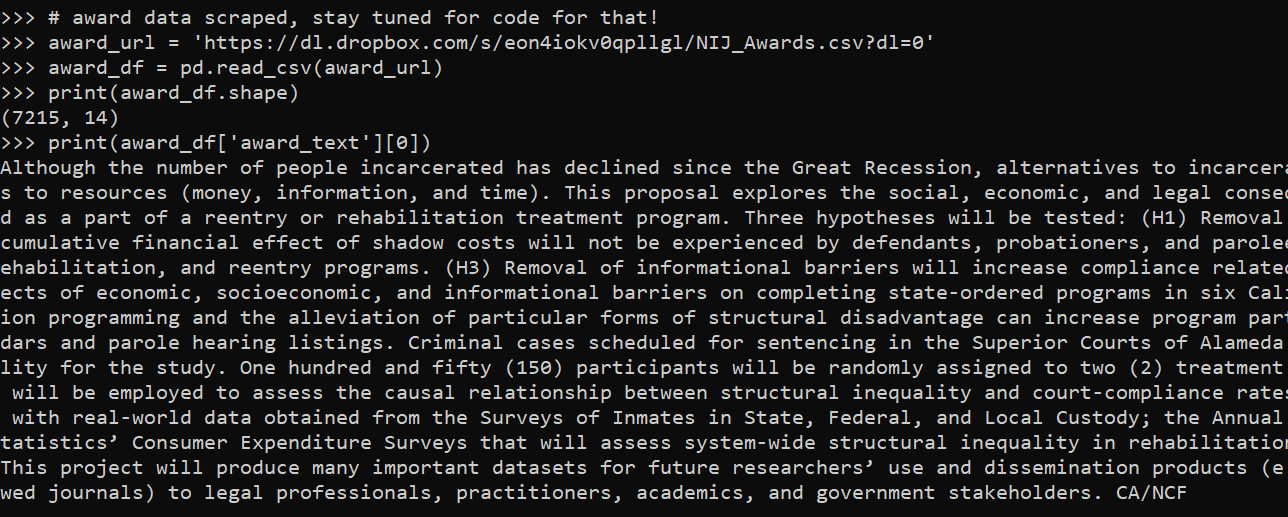
There are other agencies who fund gun violence research, in particular here I have scraped data from the National Institute of Justice (what I think is likely to be the largest funder in this area). Here is some python code showing some analyses of those awards.

So first, here you can download and see the size of the scraped dataset of NIJ awards:

import pandas as pd

# award data scraped, stay tuned for code for that!
award_url = 'https://dl.dropbox.com/s/eon4iokv0qpllgl/NIJ_Awards.csv?dl=0'
award_df = pd.read_csv(award_url)
print(award_df.shape)
print(award_df['award_text'][0])

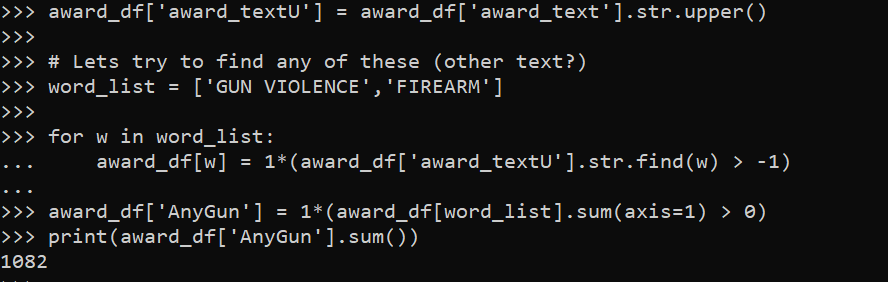
So as a first blush check for awards related to gun violence, we can just search the text for the award narrative for relevant terms, here I just search for GUN VIOLENCE and FIREARM. A more thorough investigation would either code the 7k awards or the original solicitations, but I think this will likely be largely accurate (probably slightly more false positives than false negatives).

award_df['award_textU'] = award_df['award_text'].str.upper()

# Lets try to find any of these (other text?)
word_list = ['GUN VIOLENCE','FIREARM']

for w in word_list:
    award_df[w] = 1*(award_df['award_textU'].str.find(w) > -1)

award_df['AnyGun'] = 1*(award_df[word_list].sum(axis=1) > 0)
print(award_df['AnyGun'].sum())

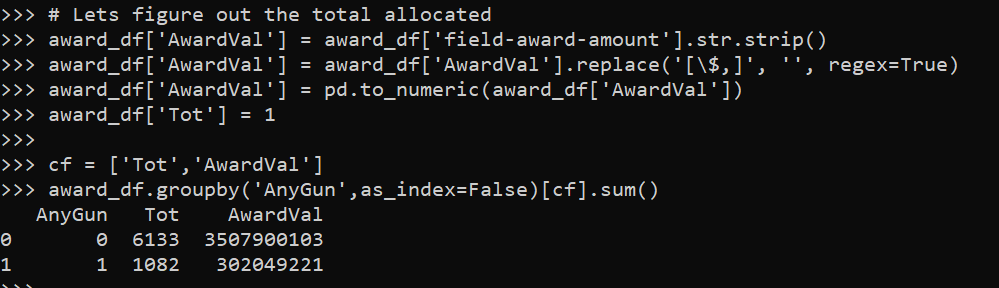
So we can see that we have 1,082 awards related to gun violence (out of 7,215 listed by the NIJ). Lets check out the total funding for these awards:

# Lets figure out the total allocated
award_df['AwardVal'] = award_df['field-award-amount'].str.strip()
award_df['AwardVal'] = award_df['AwardVal'].replace('[\$,]', '', regex=True)
award_df['AwardVal'] = pd.to_numeric(award_df['AwardVal'])
award_df['Tot'] = 1

cf = ['Tot','AwardVal']
award_df.groupby('AnyGun',as_index=False)[cf].sum()

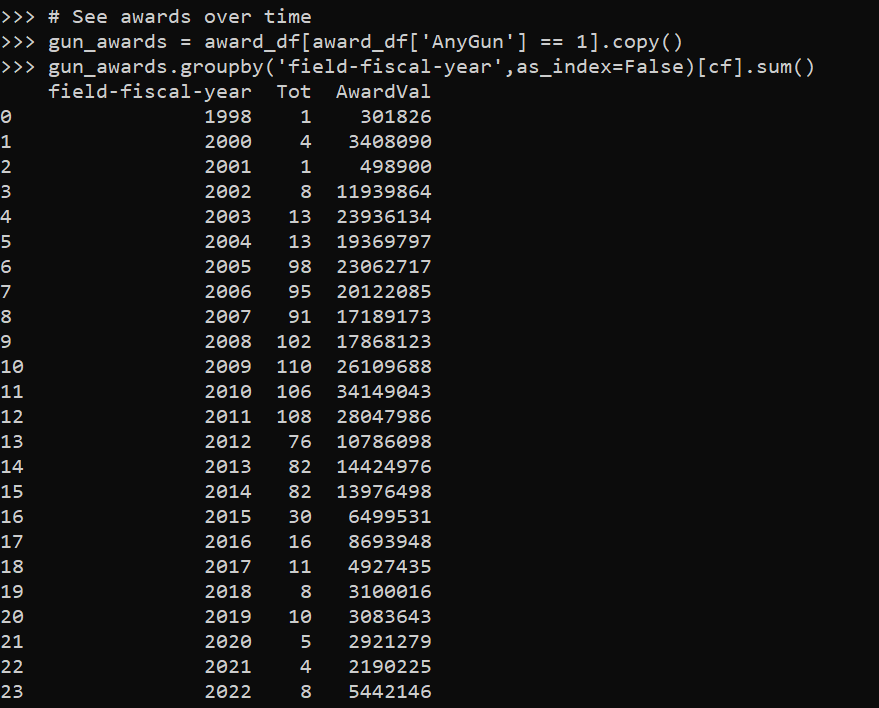
So we have in the listed awards (that go back to 1998 but appear more consistently filled in starting in 2002), over 300 million in grant awards related to gun violence/firearm research. Here we can see the breakdown over time.

# See awards over time
gun_awards = award_df[award_df['AnyGun'] == 1].copy()
gun_awards.groupby('field-fiscal-year',as_index=False)[cf].sum()

So the awards gifted by NIJ no doubt have a different flavor/orientation than if you had the same money from CDC. (There are other orgs though, like NSF, who I am sure have funded research projects relevant to gun violence over time as well.) Sometimes people distinguish between “public health” vs “criminal justice” approaches, but this is a pretty superficial dichotomy (plenty of people in public health have gotten NIJ awards).

So you certainly could argue the Dickey amendment changed the nature of gun violence research being conducted. And since the CDC budget is so massive, I suppose you could argue that it reduced the overall amounts of gun violence research being funded (although it is likely 0 sum, more for firearm research would have slashed some other area). You could use the same argument to say NIJ though is underfunded instead of advocating for the CDC to write the checks though.

But the stronger statement I often see stated, that firearm research is entirely banned in the US, is not even close to being correct.

Injury rates at Amazon warehouses

I follow several of the News & Observer (The Raleigh/Durham newspaper) newsletters, and Brian Gordon and Tyler Dukes had a story recently about fainting and ambulance runs at the Amazon warehouse in Raleigh, Open Source: Ambulances at Amazon. He did some great sleuthing, and showed that while the number on its face seemed high (an ambulance call around 1 out of 3 days) the rate of ambulance runs when accounting for the size of the workforce is pretty similar to other warehouses.

Here I will show an example of downloading the OSHA injury data to show a similar finding. Using python it is pretty quick work.

So first can import the libraries we need (the typical scientific stack). I download the OSHA data for 2021, and I calculate injury rates per person work year, so how to interpret these are at the workplace level. Per full time people per year, it is the expected number of injuries across the workforce.

import pandas as pd
import matplotlib.pyplot as plt
import numpy as np
from scipy.stats import beta

inj_2021url = "https://www.osha.gov/sites/default/largefiles/ITA-data-cy2021.zip"
inj_dat = pd.read_csv(inj_2021url)
# Calculate injuries per person full year
inj_dat['InjPerYear'] = (inj_dat['total_injuries']/inj_dat['total_hours_worked'])*2080

We can filter out warehouse workers via NAICS code 493110. I also just limit to warehouses in North Carolina. Sorting by the injury rate, Amazon is not even in the top 10 in the state:

warehouses = inj_dat[inj_dat['naics_code'] == 493110].copy()
warehouses_nc = warehouses[warehouses['state'] == 'NC'].reset_index(drop=True)
warehouses_nc['AmazonFlag'] = 1*(warehouses_nc['company_name'].str.find('Amazon.com') >= 0)

# Rate per year of work per person, 2080 
warehouses_nc.sort_values('InjPerYear',ascending=False,ignore_index=True,inplace=True)
warehouses_nc.head(10)

But note that I don’t think Bonded Logistics is a terribly dangerous place. One thing you need to watch out for when evaluating rate data is that places with smaller denominators (here lower total hours worked) tend to be more volatile. So a useful plot is to plot the total hours work (cumulative for the entire warehouse) against the overall rate of injuries per hour worked.

fig, ax = plt.subplots(figsize=(12,6))
ax.scatter(nam_ware['total_hours_worked'], nam_ware['InjPerYear'], 
           c='grey', s=30, edgecolor='k', alpha=0.5, label='Other Warehouses')
ax.scatter(amz_ware['total_hours_worked'], amz_ware['InjPerYear'], 
           c='blue', s=80, edgecolor='k', alpha=0.9, label='Amazon Warehouses')
ax.set_axisbelow(True)
ax.set_xlabel('Total Warehouse Hours Worked')
ax.set_ylabel('Injury Rate per Person Work Year (2080 hours)')
ax.legend(loc='upper right')
plt.savefig('InjRate.png', dpi=500, bbox_inches='tight')

You can see by this plot the Amazon warehouses have the largest total number of hours worked (by quite a few) relative to many other warehouses in North Carolina. But their overall rate of injuries is right in line with the rest of the crowd. Looking at the overall rate, it is around 0.04 (so you would expect around 1/20 full time workers to have an injury per year at a warehouse according to this data).

tot_rate = warehouses_nc['total_injuries'].sum()/warehouses_nc['total_hours_worked'].sum()
print(tot_rate*2080)

If we do this plot again, but add funnel bound lines to show the typical volatility we would expect with estimating these rates:

# Binomial confidence interval
def binom_int(num,den,confint=0.95):
    quant = (1 - confint)/ 2.
    low = beta.ppf(quant, num, den - num + 1)
    high = beta.ppf(1 - quant, num + 1, den - num)
    return (np.nan_to_num(low), np.where(np.isnan(high), 1, high))

den = np.geomspace(1000,8700000,500)
num = den*tot_rate
low_int, high_int = binom_int(num,den,0.99)
high_int = high_int*2080

fig, ax = plt.subplots(figsize=(12,6))
ax.plot(den,high_int, c='k', linewidth=0.5)
ax.hlines(tot_rate*2080,1000,8700000,colors='k', linewidths=0.5)
ax.scatter(nam_ware['total_hours_worked'], nam_ware['InjPerYear'], 
           c='grey', s=30, edgecolor='k', alpha=0.5, label='Other Warehouses')
ax.scatter(amz_ware['total_hours_worked'], amz_ware['InjPerYear'], 
           c='blue', s=80, edgecolor='k', alpha=0.5, label='Amazon Warehouses')
ax.set_axisbelow(True)
ax.set_xlabel('Total Warehouse Hours Worked')
ax.set_ylabel('Injury Rate per Person Work Year (2080 hours)')
plt.xscale('log', basex=10)
ax.legend(loc='upper right')
ax.annotate('Straight line is average overall injury rate\nCurved line is Binomial 99% Interval', 
            xy = (0.00, -0.13), xycoords='axes fraction')
plt.savefig('InjRate_wBin.png', dpi=500, bbox_inches='tight')

So you can see even Bonded Logistics is well within the average rate you would expect to still be consistent with the average overall injury rate relative to all the other warehouses in North Carolina.

As a note, I imagine I saw someone using this data recently looking at police departments in a criminal justice paper (I have in my notes police departments are NAICS code 922120). (Maybe Justin Nix/Michael Sierra-Arévalo/Ian Adams?) But sorry do not remember the paper (so I owe credit to someone else for pointing out this data, but not sure who).

Another way to do the analysis is to calculate the lower/upper confidence intervals per the rates, and then sort by the lower confidence interval. This way you can filter out high rate variance locations.

# Can look at police departments
# NAICS code 922120
police = inj_dat[inj_dat['naics_code'] == 922120].copy()
low_police, high_police = binom_int(police['total_injuries'],police['total_hours_worked'])
police['low_rate'] = low_police*2080
police.sort_values('low_rate',ascending=False,ignore_index=True,inplace=True)
check_fields = ['establishment_name','city','state','total_injuries','total_hours_worked','InjPerYear','low_rate']
police[check_fields].head(10)

So you can see we have some funny business going on with the LA data reporting (which OSHA mentions on the data webpage). Maybe it is just admin duty, so people are already injured and get assigned to those bureaus (not sure why LAPD reports seperate bureaus at all).

Using IO objects in python to read data

Just a quick post on a technique I’ve used a few times recently, in particular when reading web data.

First for a very quick example, in python when reading data with pandas, it often expects a filename on disk. For pandas, e.g. pd.read_csv('my_file.csv'). But if you happen to already have the contents of the csv in a text object in memory, you can use io.StringIO to just read that object.

import pandas as pd
from io import StringIO

# Example csv file inline
examp_csv = """a,b
1,x
2,z"""

pd.read_csv(StringIO(examp_csv))

Where this has come up for me recently is reading in different data from web servers. For example, here is Cary’s API for crime data, you can batch download the whole thing at the below url, but via this approach I currently get an SSL error:

# Town of Cary CSV for crimes
cary_url = 'https://data.townofcary.org/explore/dataset/cpd-incidents/download/?format=csv&timezone=America/New_York&lang=en&use_labels_for_header=true&csv_separator=%2C'

# Returns SSL Error for me
cary_df = pd.read_csv(cary_url)

Note I don’t know the distinction in web server tech that causes this (as sometimes you can just grab a CSV via url, here is an example I have grabbing PPP loan data or with the NIJ recidivism data).

But we can grab the data via requests, and use the same StringIO trick I just showed to get this data:

# Using string IO for reading text
import requests
res_cary = requests.get(cary_url)
cary_df = pd.read_csv(StringIO(res_cary.text))
cary_df

Again I don’t know why some servers you need to go through this approach, but this works for me for Socrata and CartoDB api’s for different cities open data. I also used in recently for converting geojson in ESRI’s api.

The second example I want to show is downloading zipfiles. For this, we will use io.BytesIO instead of StringIO. The census stores various data in zipfiles on their FTP server:

# Example 2, grabbing zipped contents
import zipfile
from io import BytesIO

census_url = 'https://www2.census.gov/programs-surveys/acs/summary_file/2019/data/2019_5yr_Summary_FileTemplates.zip'
req = requests.get(census_url)

# Can use BytesIO for this content
zf = zipfile.ZipFile(BytesIO(req.content))

The zipfile library would be equivalent to reading/extracting a zipfile already on disk. But when downloading there is no need to save to disk, then deal with that file. BytesIO here cuts out the middleman.

Then we gan either grab a specific file inside of our zf object, or extract all the contents one-by-one:

# Now can loop through the list
# or grab specific file
zf.filelist[0]
temp_geo = pd.read_excel(zf.open('2019_SFGeoFileTemplate.xlsx'))
temp_geo.T

Hot spots of crime in Raleigh and home buying

So my realtor, Ellen Pitts (who is highly recommended, helped us a ton remotely moving into Raleigh), has a YouTube channel where she talks about real estate trends. Her most recent video she discussed a bit about crime in Raleigh relative to other cities because of the most recent shooting.

My criminologist hot take is that generally most cities in the US are relatively low crime. So Ellen shows Dallas has quite a few more per-capita shootings than Raleigh, but Dallas is quite safe “overall”. Probably somewhat contra to what most people think, the cities that in my opinion really have the most crime problems tend to be smaller rust belt cities. I love Troy, NY (where I was a crime analyst for a few years), but Troy is quite a bit rougher around the edges than Raleigh or Dallas.

So this post is more about, you have already chosen to move to Raleigh – if I am comparing house 1 and house 2 (or looking at general neighborhoods), do I need to worry about crime in this specific location?

So for a few specific resources/strategies for the home hunter. Not just in Raleigh, but many cities now have an open data portal. You can often look at crime. Here is an example with the Raleigh open data:

So if you have a specific address in mind, you can go and see the recent crime around that location (cities often fuzz the address a bit, so the actual points are just nearby on that block of the street). Blue dots in that screenshot are recent crimes in 2022 against people (you can click on each dot and get a more specific breakdown). Be prepared when you do this – crime is everywhere. But that said the vast majority of minor crime incidents should not deter you from buying a house or renting at a particular location.

Note I recommend looking at actual crime data (points on a map) for this. Several vendors release crime stats aggregated to neighborhoods or zipcodes, but these are of very low quality. (Often they “make up” data when it doesn’t exist, and when data does exist they don’t have a real great way to rank areas of low or high crime.)

For the more high level, should I worry about this neighborhood, I made an interactive hotspot map.

For the methodology, I focused on crimes that I would personally be concerned with as a homeowner. If I pull larceny crimes, I am sure the Target in North Hills would be a hotspot (but I would totally buy a condo in North Hills). So this pulls the recent crime data from Raleigh open data starting in 2020, but scoops up aggravated assaults, interpersonal robberies, weapon violations, and residential burglaries. Folks may be concerned about drug incidents and breaking into cars as well, but my experience those also do not tend to be in residential areas. The python code to replicate the map is here.

Then I created DBScan clusters that had at least 34 crimes – so these areas average at least one of these crimes per month over the time period I sampled. Zooming in, even though I tried to filter for more potentially residential related crimes, you can see the majority of these hot spots of crime are commercial areas in Raleigh. So for example you can zoom in and check out the string of hot spots on Capital Blvd (and if you click a hot spot you can get breakdowns of specific crime stats I looked at):

Very few of these hot spots are in residential neighborhoods – most are in more commercial areas. So when considering looking at homes in Raleigh, there are very few spots I would worry about crime at all in the city when making a housing choice. If moving into a neighborhood with a higher proportion of renters I think is potentially more important long term signal than crime here in Raleigh.