Notes on making line plots in matplotlib

Line plots are probably the most common type of plot I make. Here are my notes on making nice line plots in matplotlib in python. You can see the full replication code on Github here.

First, I will be working with UCR crime reports, for national level and then city level data from the Real Time Crime Index. The AH Datalytics crew saves their data in github as a simple csv file, and with the FBI CDE this code also downloads the most recent as well. getUCR are just helper functions to download the data, and cdcplot are some of my plot helpers, such as my personal matplotlib theme.

import cdcplot, getUCR
import pandas as pd
import matplotlib.pyplot as plt
from matplotlib import cm

# Get the National level and City data from Real Time Crime Index
us = getUCR.cache_fbi()
city = getUCR.prep_city()

So first, lets just do a basic plot of the national level MV Theft rate (here the rates are per 100,000 population, not per vehicles).

# Lets do a plot for National of the Motor Vehicle Theft Rate per pop
us['Date'] = pd.to_datetime(us['Date'])
us2020 = us[us['Date'].dt.year >= 2020]
var = 'motor-vehicle-theftrate'

# Basic
fig, ax = plt.subplots()
ax.plot(us2020['Date'],us2020[var])
fig.savefig('Line00.png', dpi=500, bbox_inches='tight')
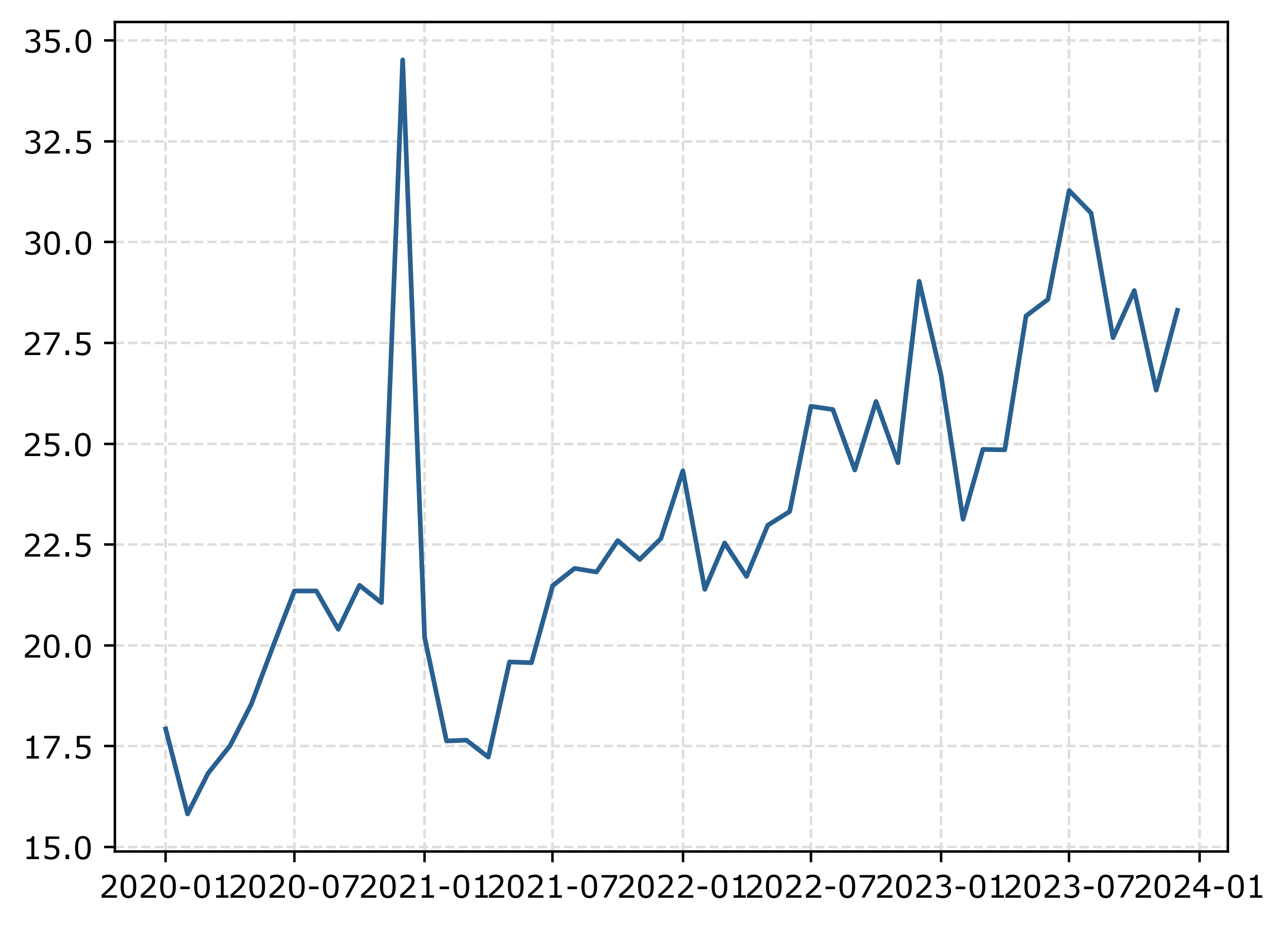
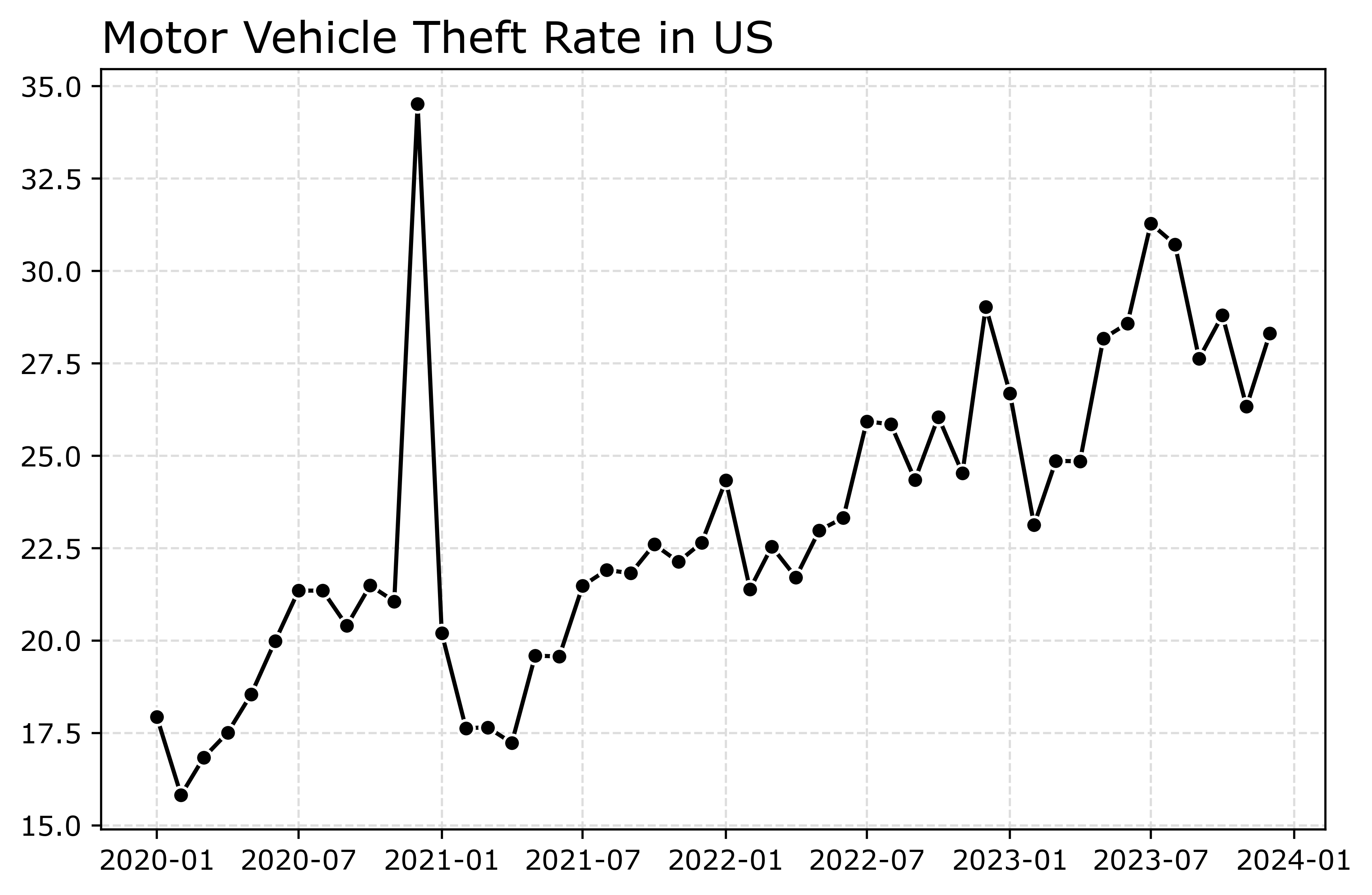
The big spike in December 2020 is due to the way FBI collects data. (Which I can’t find the specific post, but I am pretty sure Jeff Asher has written about in his substack.) So the glut of December reports are not actually extra reports in December, it is just the silly way the FBI reports the backlogged incidents.

You can also see the X axis labels are too close together. But otherwise (besides lack of labels) is acceptable. One thing I like to do with line plots is to superimpose point markers on the sample points. It doesn’t matter here so much, but this is helpful when you have irregular time points or missing data, it is clear that the time period is missing.

In matplotlib, you can do this by specifying -o after the x/y coordinates for the line. I also like the look of plotting with a white marker edge. Also making the plot slightly larger fixes the X axis labels (which have a nice default to showing Jan/July and the year). And finally, since the simplicity of the chart, instead of doing x or y axis labels, I can just put the info I need into the title. For a publication I would likely also put “per 100,000 population” somewhere (in a footnote on the chart or if the figure caption).

# Marker + outline + size
fig, ax = plt.subplots(figsize=(8,5))
ax.plot(us2020['Date'],us2020[var],'-o',
        color='k',markeredgecolor='white')
ax.set_title('Motor Vehicle Theft Rate in US')
fig.savefig('Line01.png', dpi=500, bbox_inches='tight')
Markers are one way to distinguish between multiple lines as well. So you can do -s for squares superimposed on the lines, -^ for a triangle, etc. The white edge only looks nice for squares and circles though in my opinion. See the list of filled markers in this matplotlib documentation. Circles and squares IMO look the nicest and carry a similar visual weight. Here is superimposed Charlotte and US, showing off stars just to create show how to do it.

# Multiple cities
city[var] = (city['Motor Vehicle Theft']/city['Population'])*100000
nc2020 = city[(city['Year'] >= 2020) & (city['State_ref'] == 'NC')]
ncwide = nc2020.pivot(index='Mo-Yr',columns='city_state',values=var)
cityl = list(ncwide)
ncwide.columns = cityl # removing index name
ncwide['Date'] = pd.to_datetime(ncwide.index,format='%m-%Y')
ncwide.sort_values(by='Date',inplace=True)

fig, ax = plt.subplots(figsize=(8,5))
ax.plot(ncwide['Date'],ncwide['Charlotte, NC'],'-s',
        color='green',markeredgecolor='white',label='Charlotte')
ax.plot(us2020['Date'],us2020[var],'-*',
        color='k',label='US')
ax.legend()
ax.set_title('Motor Vehicle Theft Rate')
fig.savefig('Line02.png', dpi=500, bbox_inches='tight')
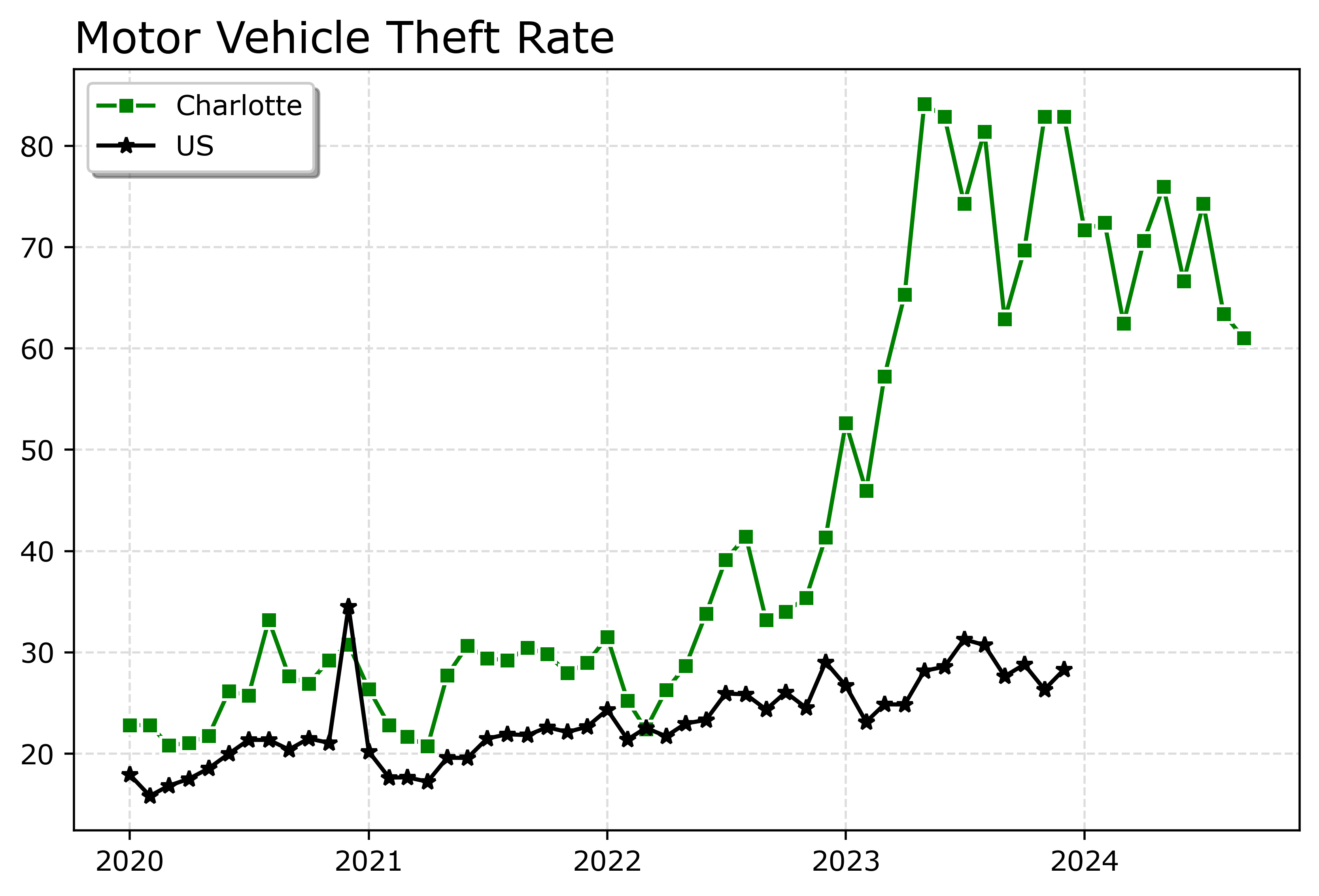
Charlotte was higher, but looked like it had parallel trends (just increased by around 10 per 100,000) with national trends from 2020 until early 2022. In early 2022, Charlotte dramatically increased though, and peaked/had high volatility since mid 2023 in a different regime shift from the earlier years.

When you make line plots, you want the lines to be a more saturated color in my opinion. It both helps them stand out, as well as makes it more likely to survive printing. No pastel colors. With the points superimposed, even with greyscale printing it will be fine. I commonly tell crime analysts to make a printable report for regular meetings, it is more likely to be viewed than an interactive dashboard.

You can technically do dashes as well via the text string input. I do not like them though typically, as they are less saturated. Here I show two different dash styles. And you could do dashes and points, e.g. :o, (see this matplotlib doc for the styles) I have never bothered to do that though.

# Dashes instead of points
fig, ax = plt.subplots(figsize=(8,5))
ax.plot(ncwide['Date'],ncwide['Charlotte, NC'],':',
        color='green',markeredgecolor='white',label='Charlotte')
ax.plot(ncwide['Date'],ncwide['Asheville, NC'],'--',
        color='#455778',label='Asheville')
ax.plot(us2020['Date'],us2020[var],'-',
        color='k',label='US')
ax.legend()
ax.set_title('Motor Vehicle Theft Rate')
fig.savefig('Line03.png', dpi=500, bbox_inches='tight')
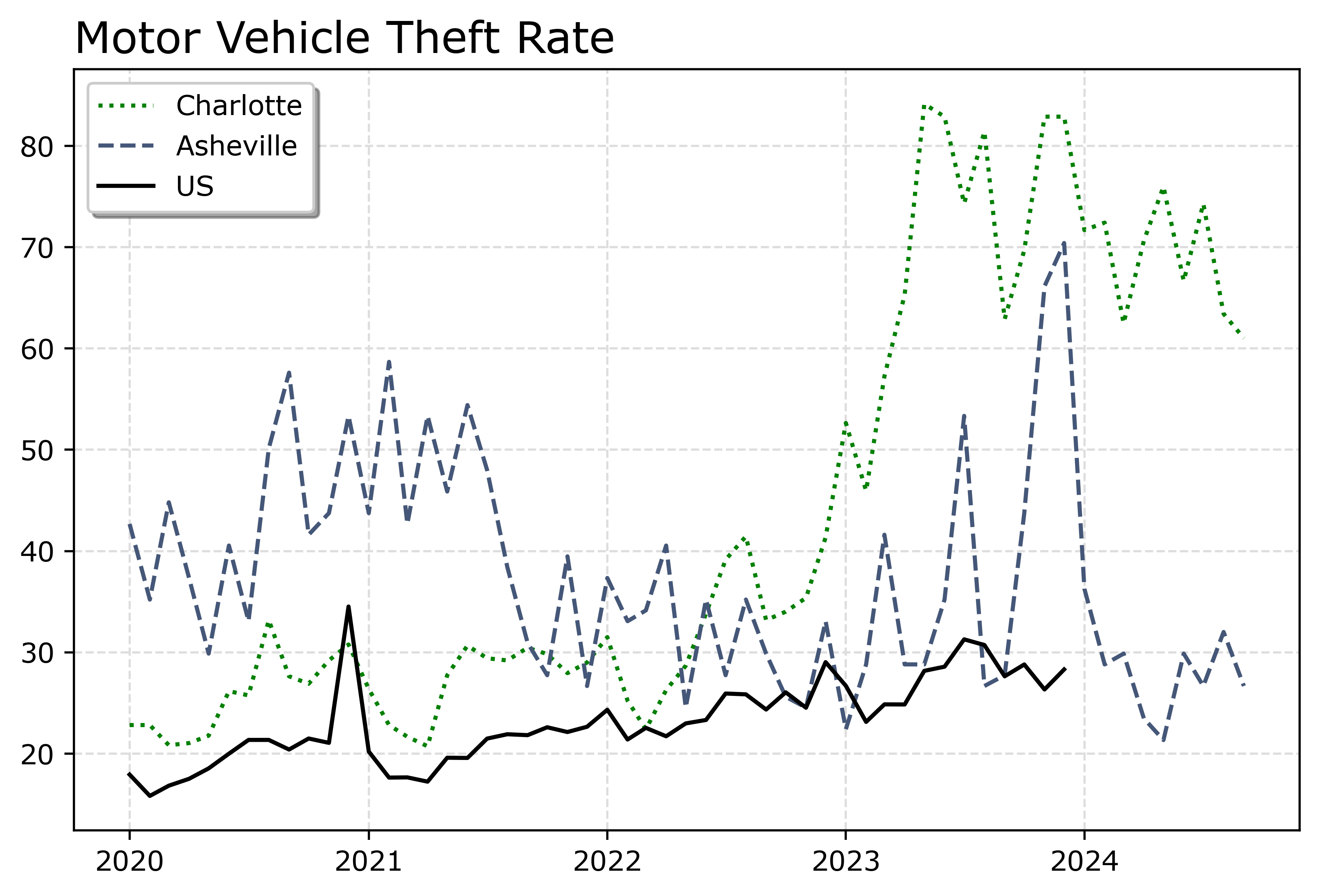
You can see Asheville had an earlier spike, went back down, and then in 2023 had another pronounced spike. Asheville has close to a 100k population, so the ups/downs correspond pretty closely to just the total counts per month. So the spikes in 2023 are an extra 10, 20, 40 mv thefts than you might have expected based on historical patterns.

If you must have many lines differentiated via colors in a static plot, the Tableau color palette or the Dark2 colors work the best. Here is an example plotting the North Carolina cities in a loop with the Tableau colors:

# It is difficult to untangle multiple cities
# https://matplotlib.org/stable/users/explain/colors/colormaps.html
fig, ax = plt.subplots(figsize=(12,8))
for i,v in enumerate(cityl):
    ax.plot(ncwide['Date'],ncwide[v],'-',color=cm.tab10(i),label=v)

ax.legend()
fig.savefig('Line04.png', dpi=500, bbox_inches='tight')
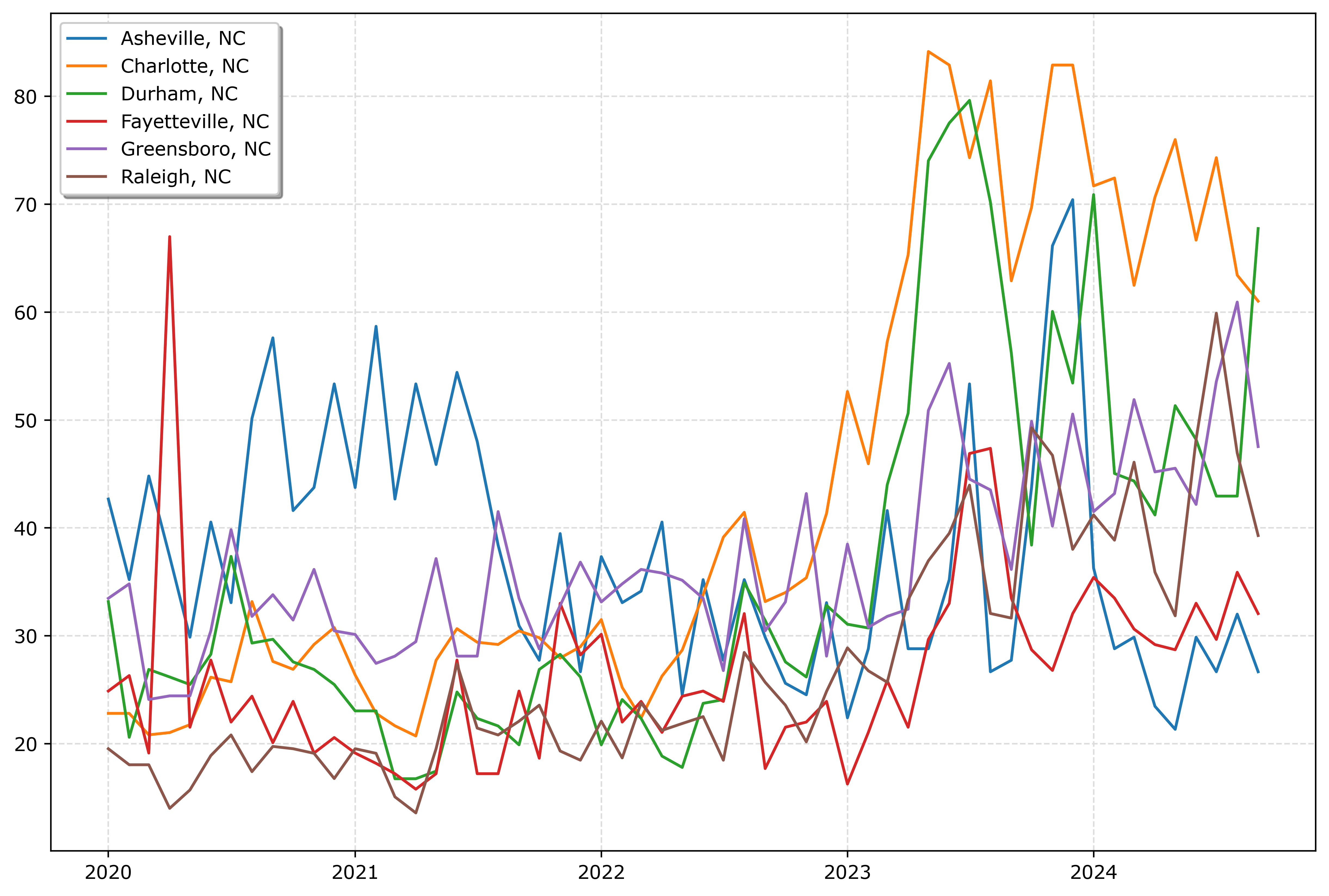
So you could look at this and see “blue does not fit the same pattern”, and then go to the legend to see blue is Asheville. It is a bit of work though to disentangle the other lines though.

And here is an example using the pandas plotting method with the Dark2 palette. I do this more for exploratory data analysis, I often end up editing so much of the axis that using the pandas short cuts are not less work. Here I would edit the axis so the lines do not abut the x axis ends. For old school R people, this is similar to matplot in R, so the data needs to be in wide format, not long. (And all the limitations that come with that.)

# pandas can be somewhat more succinct
fig, ax = plt.subplots(figsize=(12,8))
ncwide.plot.line(x='Date',ax=ax,color=cm.Dark2.colors)
fig.savefig('Line05.png', dpi=500, bbox_inches='tight')
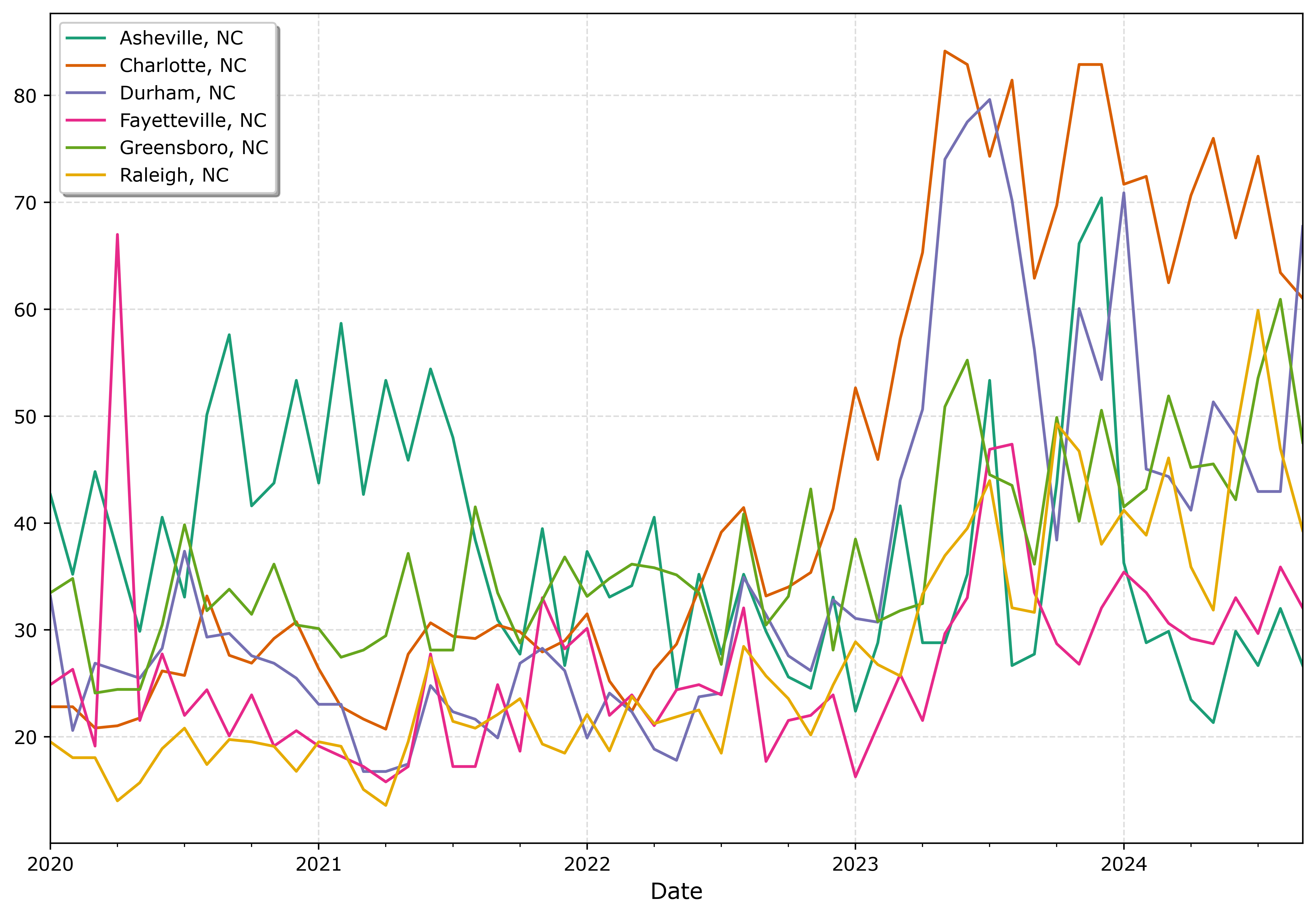
I tend to like the Tableau colors somewhat better though. The two greenish colors (Asheville and Greensboro) and the two orangish colors (Raleigh and Charlotte) I personally have to look quite closely to tell them apart. Men tend to have lower color resolution than women, I am not color blind and you may find them easier to tell the difference. Depending on your audience it would be good to assume lower than higher color acuity in the audience’s vision in general.

In my opinion, often you can only have 3 lines in a graph and it becomes too busy. It is partly due to how tortuous the lines are, so you can have many lines if they are parallel and don’t cross. But assuming you can have max 3 is a good baseline assumption.

An alternative though is to highlight specific lines. Here I highlight Durham and US, the other cities are light grey and in the background. Also looping over you can specific the order. I draw Durham last (so it goes on top). The grey cities are first (so are at the bottom). Here I only give the first grey background city a label, so the legend does not have duplicates.

# Highlight one city, compared to the rest
fig, ax = plt.subplots(figsize=(12,8))
ncwide.plot.line(x='Date',ax=ax,color=cm.Dark2.colors)
fig.savefig('Line05.png', dpi=500, bbox_inches='tight')


# Highlight one city, compared to the rest
fig, ax = plt.subplots(figsize=(12,8))
lab = 'Other NC'

for v in cityl:
    if v == 'Durham, NC':
        pass
    else:
        ax.plot(ncwide['Date'],ncwide[v],'-',color='lightgrey',label=lab)
        lab = None


ax.plot(us2020['Date'],us2020[var],'-o',
        color='k',markeredgecolor='white',label='US')
ax.plot(ncwide['Date'],ncwide['Durham, NC'],'-',linewidth=2,color='red',label='Durham')
ax.legend()
ax.set_title('Motor Vehicle Theft Rate')
fig.savefig('Line06.png', dpi=500, bbox_inches='tight')
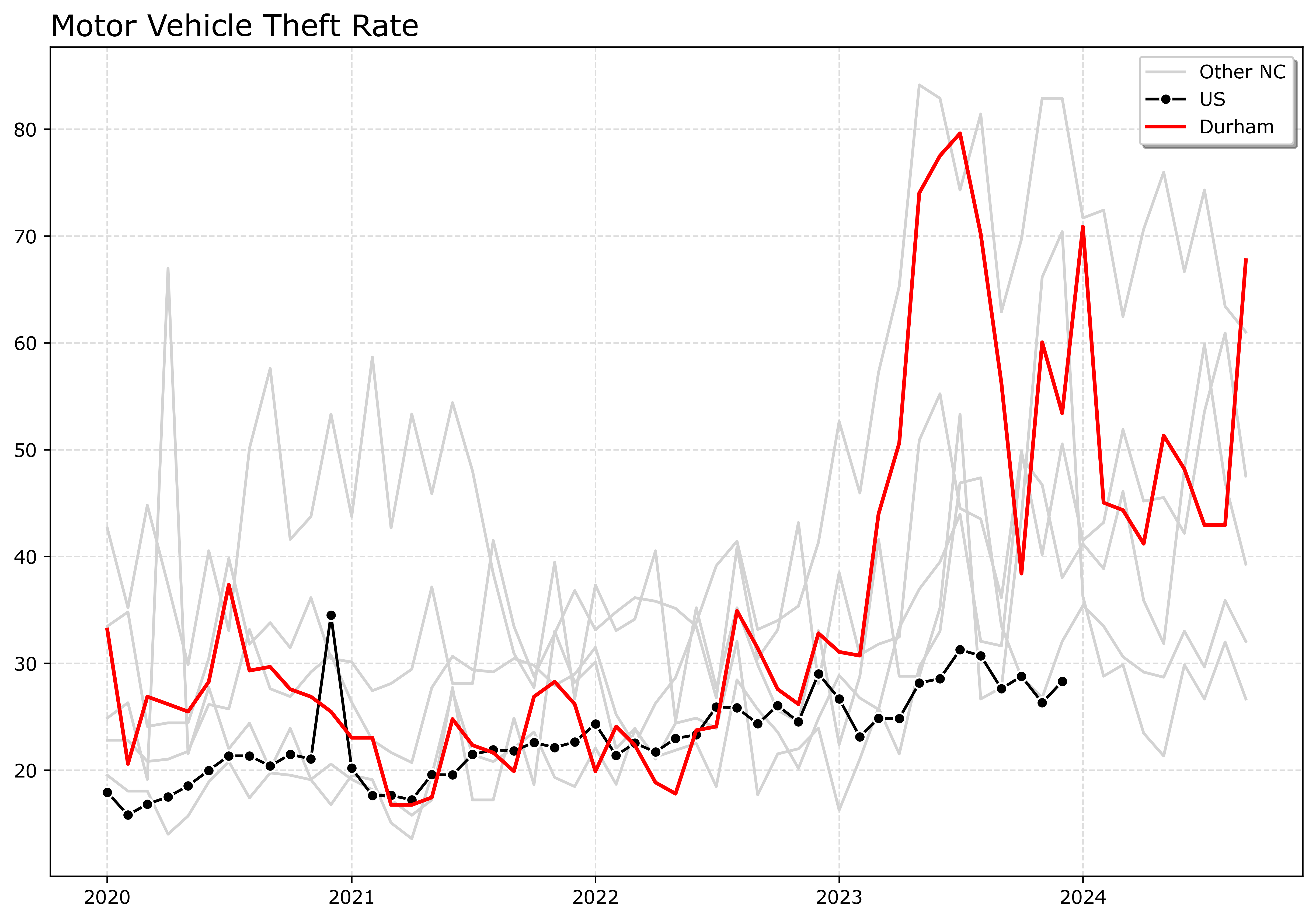
If I had many more lines, I would make the grey lines either smaller in width, e.g. linewidth=0.5, and/or make them semi-transparent, e.g. alpha=0.8. And ditto if you want to emphasize a particular line, making it a larger width (here I use 2 for Durham), makes it stand out more.

Durham here you can see has very similar overall trends compared to Charlotte.

And those are my main notes on making nice line plots in matplotlib. Let me know in the comments if you have any other typical visual flourishes you often use for line plots.

Bitcoin, Ethereum, and Axon

In 2022, I did a post on the cointegration between Bitcoin, Ethereum, Gold, and the S&P 500. I have had a few conversations about Bitcoin recently with friends and family, so figured it would be worth updating that post.

Also had a discussion with a friend about Axon last week, and when talking about stock I said “what is it at $200” and his reply was “It is close to $700”. So throwing them in the mix as well.

Here is the same indexed between 0/1 chart, so you can see all the different investments appear to be pretty correlated. Since mid 2022 all have been on a fairly consistent upward trajectory.

Now the way this chart works is y = x - min(x)/(max(x) - min(x), where x is the closing price (sampled every Friday). This hides the variation, plotting the closing prices on the logged scale better shows how volatile the different stocks are. So the S&P is a steady march, Gold has been quite consistent, the others not so much.

And a final way to show the data is to index to a start point. Here my initial post was in February 2022, so I start from there and Closing/Closing2_11_2022. So a value of 2 means it doubled from its start point, 3 tripled etc.

I was prompted to look at Ethereum back then due to the popularity of NFTs. I decided not to invest, and if looking as of last Friday, I would be at about the exact same position as I would have been with the S&P. But I would have been under for almost two years. And it would have been almost the exact same story for Bitcoin over the same period, only with the more recent increase would I have really beat the more tame investments from Bitcoin. Axon though!

With the talks about US government investment in Bitcoin (see Bryan’s Clear Value Tax video on the subject), given that traditional index funds do not cover them, I will have to consider it more seriously. (I have had 401k’s that included Gold, I presume they have not expanded to include crypto though.) They are definitely more speculative than investing in index funds, but that can be a good thing if you know that going in.

Given the NFT fad passed with Eth, I wondered if it peaked (it was already falling from a local high of 3k by that time in February 2022 I initially wrote that post). But just a few hours before writing this post, BlackRock and Fidelity purchased a big chunk, so Eth should likely continue to climb at least in the short term and is not entirely pegged to the popularity of NFTs.

The original post I wrote about cointegration analysis, which is really only useful for very short term. Thinking about more long term investments, Bitcoin is harder to peg. The Clear Value Tax video shows Powell comparing Bitcoin to Gold, which I think is probably a good way to view it. So I think you can legitimately view it as a hedge against more traditional investments at this point (and ditto for Ethereum – does CoinBase have an index fund for coins?).

Now when evaluating specific companies, whether something is a good investment is more about whether you think the company itself is on a good trajectory. As disclosure I don’t have any direct financial ties to Axon, nor have I invested in them directly beyond if my 401k has them in the portfolio. I think Axon’s rise is legit and not a fad.

So Axon currently has the dominant market share for body worn cameras and conducted energy devices. Body worn cameras I think are likely to expand out into other areas beyond police and corrections officers. There are some news articles for store workers, I suspect medical workers and teachers though are bigger expanding markets in the future. Motorola stock is not doing too shabby over this time period as well, so they may be able to capture some of that same market as well.

I am not as in the know about drones, but I presume their hardware experience for BWC and Taser make them well positioned to expand out drone capabilities.

I am not sure what prompted the most recent rise mid 2024 for Axon. I wondered if it lined up with Draft One (the generative AI to help write reports), but it appears slightly after that. Their software products I am not as bullish about offhand. I think Draft One has very good potential, although see a recent article by Ian Adams and colleagues showing it does not decrease time writing reports.

But given they have such strong market share in other areas (like BWC) they have already established sales relationships. And if they can figure out BWC they have the technical capabilities to figure out the data software stuff, like RMS as well. Basically all the different “analytic” companies have no moat – Axon could hire me (or various other data scientists) to build those same analytic software programs directly for Axon’s different current software products.

Identifying excess rounding

Given the hubbub about Blue Cross and paying for anesthesiologists, there was an interesting paper making the rounds, Comparison of Anesthesia Times and Billing Patterns by Anesthesia Practitioners. (Shared via Crémieux.)

Most medical claims are billed via what are call CPT codes (Current Procedural Terminology). So if you go to the ER, you will get billed for a code 99281 to 99285. The final digit encodes different levels of complexity for the case, with 5’s being more complex. It was news to me that anesthesiologists actually bill for time directly, but the above linked paper showed (pretty plainly) that there is strong evidence they round up to every 5 minutes.

Now the paper just selected the anesthesiologists that have the highest proportion of billed times ending in 5’s. Here I will show a better way to flag specific problematic anesthesiologists (using repeated binomial tests and false discovery rate corrections).

Here I simulate 1,000 doctors, and select 40 of them to be bad, and those 40 round all of their claims up to the nearest 5 minute mark. Whereas the other docs are just billing the time as is. And they have varying total number of claims, between 100 and 500.

import numpy as np
from scipy.stats import gamma,uniform
import matplotlib.pyplot as plt
import pandas as pd
from scipy.stats import binomtest,false_discovery_control

np.random.seed(10)

docs = 1000
# pick a random set 
bad_docs = np.random.choice(np.arange(docs),40,replace=False)
doci = []
claims = []

for i in range(docs):
    totn = int(np.ceil(uniform.rvs(100,500))) # number of claims
    doci += [i]*totn
    g = gamma.rvs(6,scale=12,size=totn)
    if i in bad_docs:
        g = np.ceil(g/5)*5
    else:
        g = g.round()
    claims += g.tolist()

dat = pd.DataFrame(zip(doci,claims),columns=['Doc','Time'])

# Histogram
fig, ax = plt.subplots(figsize=(8,4))
dat['Time'].hist(bins=range(201),alpha=0.8,color='k',ax=ax)
plt.savefig('Histogram.png',dpi=500,bbox_inches='tight')

You can see my gamma distribution is not as heavy tailed as the JAMA paper, but qualitatively has the same spike traits. Based on this, you can see the spike is relative to the other density, and so that shows in the JAMA paper there are more anesthesiologists rounding at 60 minutes than there are at the other 5 minute intervals.

In this particular example, it would be trivial to spot the bad docs, since they round 100% of the time, and you would only expect around 20% (since billing in minute intervals).

dat['Round'] = dat['Time'] % 5 == 0
dat['N'] = 1
gs = dat.groupby('Doc',as_index=False)[['N','Round']].sum()
gs['Perc'] = gs['Round']/gs['N']
gs.sort_values(by='Perc',ascending=False,ignore_index=True,inplace=True)
gs

# Upper Quantiles
np.quantile(gs['Perc'],[0.75,0.8,0.85,0.9,0.95,0.99])

But you can see a problem with using a top 5% quantile cut off here. Since I only have 4% bad doctors, using that hard cut-off will result in a few false positive flags. My suggested approach is to create a statistical test (Chi-Square, binominal, KS, whatever makes sense for individual doctors). Run the test for each doctor, get the p-value, and then run a false discovery rate correction on the p-values.

The above where doctors round 100% of the time is too easy, so here I simulate 40 doctors will round up 10% to 30% of the time. I also have fewer cases (more cases and more rounding make it much easier to spot).

# Redoing sim, but it is a smaller percentage of the stats are bad
for i in range(docs):
    totn = int(np.ceil(uniform.rvs(100,500))) # number of claims
    doci += [i]*totn
    g = gamma.rvs(6,scale=12,size=totn)
    if i in bad_docs:
        randperc = int(np.round(totn*uniform.rvs(0.1,0.2)))
        badn = np.random.choice(np.arange(totn),randperc,replace=False)
        g[badn] = np.ceil(g[badn]/5)*5
        g = g.round()
    else:
        g = g.round()
    claims += g.tolist()

dat = pd.DataFrame(zip(doci,claims),columns=['Doc','Time'])
dat['Round'] = dat['Time'] % 5 == 0
dat['N'] = 1
gs = dat.groupby('Doc',as_index=False)[['N','Round']].sum()
gs['Perc'] = gs['Round']/gs['N']
gs.sort_values(by='Perc',ascending=False,ignore_index=True,inplace=True)

Now we can apply the binomial test to each doctor, then adjust for false discovery rate.

# Calculating binom test
def bt(x):
    k,n = x.iloc[0],x.iloc[1]
    b = binomtest(k,n,p=0.2,alternative='greater')
    return b.pvalue

gs['p'] = gs[['Round','N']].apply(bt,axis=1)
gs['q'] = false_discovery_control(gs['p'],method='by')

# Captures 28 out of 40 bad docs, no false positives
gs['BadDocs'] = gs['Doc'].isin(bad_docs)
gs[gs['q'] < 0.05]

If you check out the doctors via gs.head(50), you can see that a few of the bad-docs where adjusted to have q-values of 1, but they ended up being low N and in the range you would expect.

While anesthesiologists billing is different, this same approach would be fine for CPT codes that have the 1-5 modifier (you might use a leave one out strategy and a Chi-Square test). Anesthesiologists if they know they will be scrutinized with exact 5 minutes, they will likely adjust and round up, but to not regular numbers. If that is the case, the default distribution will be expected to be uniform on the 0-9 digits (sometimes people use a Benford like test for the trailing digits, this is the same idea). That will be harder to fake.

I don’t have an issue with Blue Cross saying they will only bill for pre-allotted times. But even without making an explicit policy like that, they can identify bad actors and pursue investigations into those problematic anesthesiologists even without making widespread policy changes.

Types of websites and trade-offs

For some minor updates on different fronts. I have a new blog post on Crime De-Coder about how to figure out the proper ODBC connection string to query your record management system. I have done this song and dance with maybe a dozen different PDs at this point (and happened to do it twice in the prior week), so figured a post would make sense.

Two, article with Kim Rossmo has been published, The journey-to-crime buffer zone: Measurement issues and methodological challenges. Can check out the github repo and CrimRXiv version for free.

Main reason I wanted to make a post today about the types of websites. I have seen several influencers discuss using GenAI to create simple apps. These tools are nice, but many seem to make bad architecture decisions from the start (many people should not be making python served websites). So I will break down a few of the different options for creating a website in this post.

The most basic is a static html site – this just requires you create the HTML and place it somewhere on a server. A free option is github pages. You can still use javascript apps, but they are run client side and there is no real ability to limit who can see the site (e.g. you cannot make it password protected to log in). These can handle as much traffic as you want. If you have data objects in the site (such as a dashboard) the objects just need to be stored directly on the server (e.g. in json files or csv if you want to parse them). You can build data dashboards using D3 or other WASM apps.

The other types of websites you can do anything you can in HTML, so I focus more on what makes them different.

PHP sites – this probably requires you to purchase an online server (ignoring self hosting in your closet). There are many low cost vendors (my Crime De-Coder site is PHP on Hostinger. But they are pretty low price, think $5 per month. These do have the ability to create password protected content and have server side functions hidden. My $5 a month website has a service level agreement to handle 20k responses per day, it also has a built in MySQL database that can hold 2 gig of data for my plan. (These cheap sites are not bad if all you want is a smallish database.) WordPress is PHP under the hood (although if you want a custom site, I would just start from scratch and not modify WordPress. WordPress is good to use a GUI to style the site with basic templates.)

IMO if you need to protect stuff behind a server, and have fairly low traffic requirements, using a PHP site is a very good and cheap option. (For higher traffic I could pay under $20 a month for a beefier machine as well, we are talking crazy site traffic like well over 100k visits per day before you need to worry about it.)

Node.js – this is a server technology, popular for various apps. It is javascript under the hood, but you can have stuff run server side (so can be hidden from end user, same as PHP). The tech to host a site is a bit more involved than the PHP hosting sites. You can either get a VPS (for typically less than $10 a month, and can probably handle close to the same amount of traffic as the cheap PHP), and write some code to host it yourself. Think of a VPS as renting a machine (so can be used for various things, not just webhosting.) Or use some more off the shelf platform (like FlyIO, which has variable pricing). You typically need to think about a separate database hosting as well with these tools though. (I like Supabase.)

Python – python has several libraries, e.g. django, flask, as well as many different dashboard libraries. Similar to Node, you will need to either host this on a VPS (Hostinger has VPS’s as well, and I know DigitalOcean is popular), or some other service. Which is more expensive than the cheaper PHP options. It is possible to have authentication in python apps, but I do not tend to see many examples of that. Most python websites/dashboards I am familiar with are self-hosted, and so limit who can seem them intrinsically to the companies network (e.g. not online in a public website for everyone to see).

Personal story, at one point my Dallas crime dashboard (which is WASM + python) on my Crime De-Coder site (which is served on the PHP site, so takes a few extra seconds to install), was broken due to different library upgrades. So I hosted the python panel dashboard on Google cloud app while I worked on fixing the WASM. I needed one up from the smallest machine due to RAM usage (maybe 2 gigs of RAM). Google cloud app was slower than WASM on start up, sometimes would fail, and cost more than $100 per month with very little traffic. I was glad I was able to get the WASM version fixed.

Dallas Crime Dashboard

It is all about trade-offs though in the architecture. So the WASM app you can right click and see how I wrote the code to do that. Even though it is on a PHP site, it is rendered client side. So there is no way to protect that content from someone seeing it. So imagine I wanted you to pay $5 a month to access the dashboard – someone could right click and copy the code and cancel the subscription (or worse create their own clone for $4 per month). For another example, if I was querying a private database (that you don’t want people to be able to see), someone could right click and see that as well. So the WASM app only makes sense for things that don’t need to be private. Google cloud app though that is not a limitation.

The mistake I see many people make is often picking Node/Python where PHP would probably be a better choice. Besides costs, you need to think about what is exposed to the end user and the level of effort to create/manage the site. So if you say to GenAI “I want to build a dashboard website” it may pop out a python example, but many of the examples I am seeing it would have been better to use PHP and say “I have a php website, build a function to query my database and return an array of crimes by month”, and then as a follow up question say, “ok I have that array, create a line chart in PHP and javascript using D3.js”.

So to me GenAI does not obviate the need to understand the technology, which can be complicated. You need a basic understanding of what you want, the constraints, and then ask the machine for help writing that code.

Stacking and clustering matplotlib bar charts

Just a quick post – recently was trying to see examples of both stacking and clustering matplotlib + pandas bar charts. The few examples that come up online do not use what I consider to be one of the simpler approaches. The idea is that clustering is the hard part, and you can replicate the stacked bars fairly easily by superimposing multiple bars on top of each other. For just a quick example, here is a set of similar data to a project I am working on, cases cleared by different units over several years:

import pandas as pd
import matplotlib.pyplot as plt

# data of cases and cleared over time
years = [20,21,22]
acases = [180,190,200]
aclosed = [90,90,90]
bcases = [220,200,220]
bclosed = [165,150,165]
ccases = [90,110,100]
cclosed = [70,100,90]

df = pd.DataFrame(zip(years,acases,aclosed,bcases,bclosed,ccases,cclosed),
                  columns=['Year','Cases_A','Closed_A','Cases_B','Closed_B',
                           'Cases_C','Closed_C'])
print(df)


# Transpose
dfT = df.set_index('Year').T
dfT.index = dfT.index.str.split("_",expand=True) # multi-index

The biggest pain in doing these bar charts is figuring out how to shape the data. My data initially came in the top format, where each row is a year. For this plot though, we want years to be the columns and rows to be the different units. So you can see the format after I transposed the data. And this is pretty much the first time in my life a multi-index in pandas was useful.

To superimpose multiple pandas plots, you can have the first (which is the full bar in the background) return its ax object. Then if you pass that to the subsequent bar calls in superimposes on the plot. Then to finish I need to redo the legend.

# Now can plot
ax = dfT.loc['Cases',:].plot.bar(legend=False,color='#a6611a',edgecolor='black')
dfT.loc['Closed',:].plot.bar(ax=ax,legend=False,color='#018571',edgecolor='black')

# Redo legend
handler, labeler = ax.get_legend_handles_labels()
hd = [handler[0],handler[-1]]
lab = ['Not Closed','Closed']
ax.legend(hd, lab)
ax.set_title('Cases Assigned by Unit 21-23')

plt.show()

To make this a percentage filled bar plot, you just need to change the input data. So something like:

den = dfT.loc['Cases',:]
ax = (den/den).plot.bar(legend=False,color='#a6611a',edgecolor='black')
(dfT.loc['Closed',:]/den).plot.bar(ax=ax,legend=False,color='#018571',edgecolor='black')

# Redo legend
handler, labeler = ax.get_legend_handles_labels()
hd = [handler[0],handler[-1]]
lab = ['Not Closed','Closed']
ax.legend(hd, lab,loc='lower left')
ax.set_title('Proportion Cases Closed by Unit 21-23')

plt.show()

This does not have any way to signal that each subsequent bar in the clustered subsequent is a new year. So I just put that in the title. But I think the part is pretty simple to interpret even absent that info.

Crime De-Coder Updates

For other Crime De-Coder updates. I was interviewed by Jason Elder on his law enforcement analysts podcast.

Also I am still doing the newsletter, most recent talks about my social media strategy (small, regular posts), an interesting research job analyzing administrative datasets at Chase, and some resources I have made for Quarto (which I much prefer over Jupyter notebooks).

Aoristic analysis, ebooks vs paperback, website footer design, and social media

For a few minor updates, I have created a new Twitter/X account to advertise Crime De-Coder. I do not know if there is some setting that people ignore all unverified accounts, but would appreciate the follow and reshare if you are still on the platform.

I also have an account on LinkedIn, and sometimes comment on the Crime Analysis Reddit.

I try to share cool data visualizations and technical posts. I know LinkedIn in particular can be quite vapid self-help guru type advice, which I avoid. I know being more technical limits the audience but that is ok. So appreciate the follow if you are on those platforms and resharing the work.

Ebooks vs Paperbacks

Part of the reason to start X account back up is to just try more advertising. I have sold not quite 80 to date (including pre-sales). My baseline goal was 100.

For the not pre-sales, I have sold 35% ebooks and 65% paperbacks. So spending some time to distribute your book paperback seems to me to be worth it.

Again feel like most academics who publish technical books self-publishing is a very good idea. So read the above linked post about some of the logistics of self-publishing.

Aoristic analysis in python

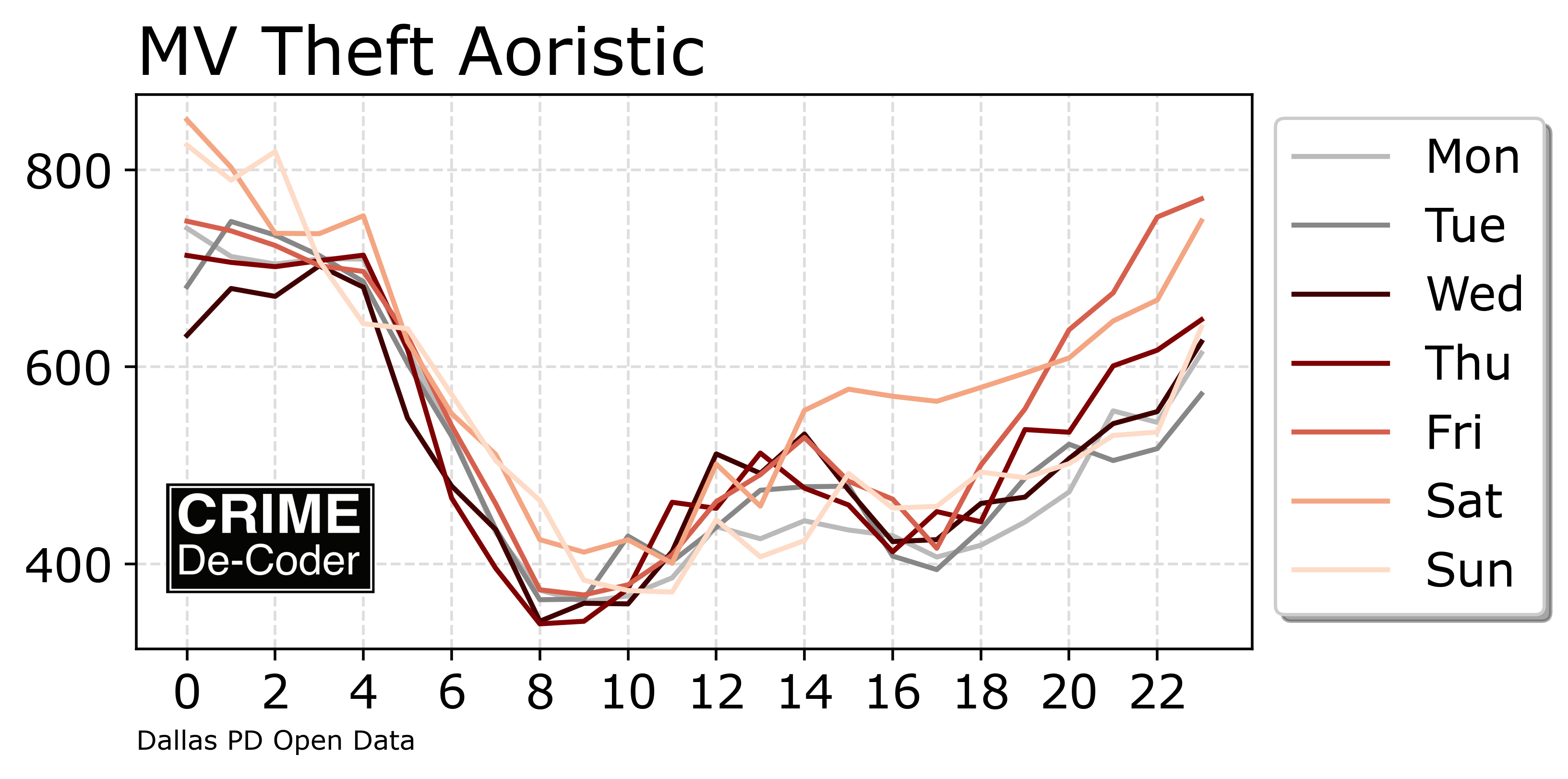
On the CRIME De-Coder blog, check out my post on Aoristic analysis. It has links to python code on github for those who just want the end result. It has several methods though to do hour of day and hour by day of week breakdowns. With the ability to do it by categories in data. And post hoc generate a few graphs. I like the line graphs the best:

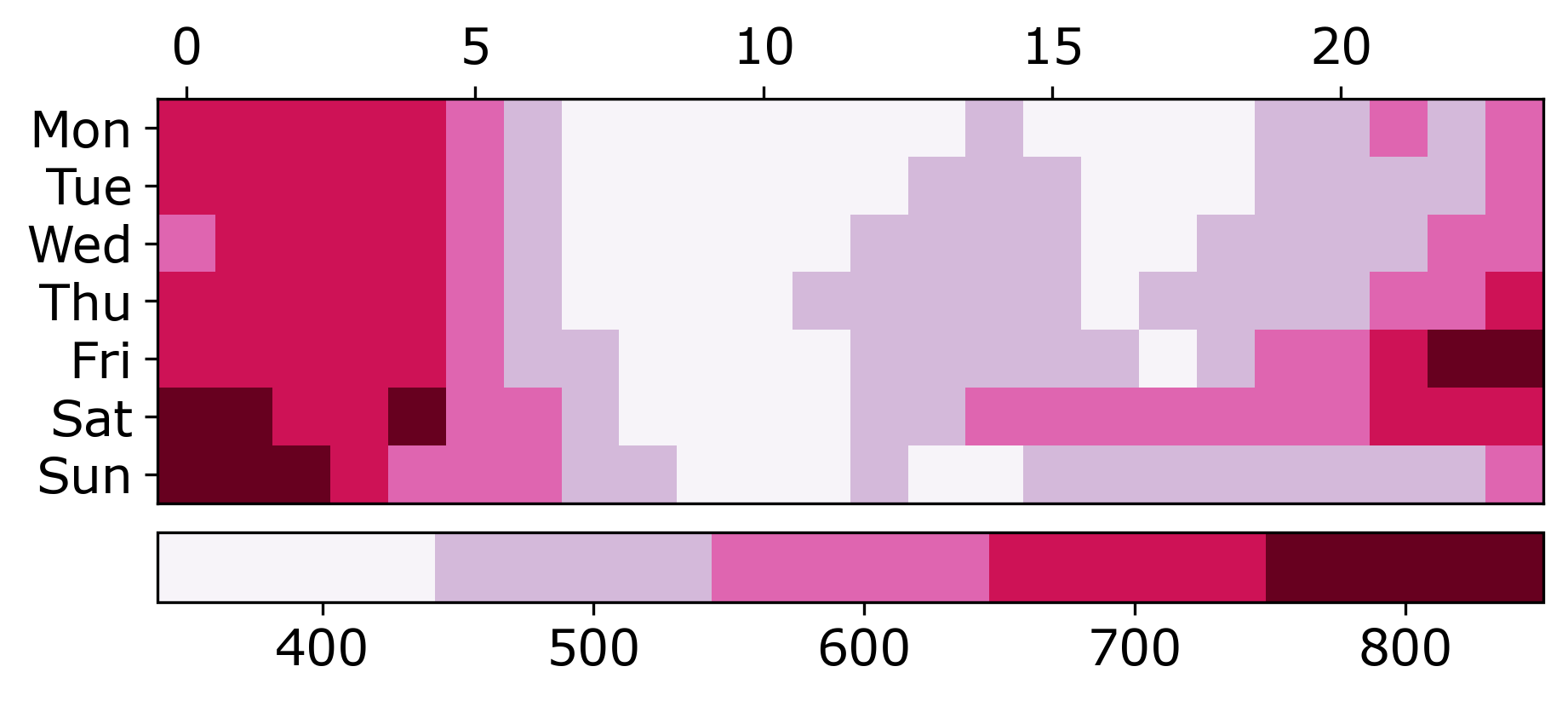
But the more common heatmap I can understand why people like it

Website Design

I have a few minor website design updates. The homepage is more svelte. Wife suggested that it should be easier to see what I do right when you are on homepage, so put the jumbotron box at the bottom and the services tiles (with no pictures) at the top.

It does not look bad on mobile either (I only recently figured out that in Chrome’s DevTools they have a button to do turn on mobile view, very helpful!)

Final part is that I made a footer for my pages:

I am not real happy with this. One of the things you notice when you start doing web-design is everyone’s web-page looks the same. There are some basic templates for WordPress or Wix (and probably other CMS generators). Here is Supabases’s footer for example:

And now that I have shown you, you will see quite a few websites have that design. So I did the svg links to social media, but I may change that. (And go with no footer again, there is not a real obvious need for it.) So open to suggestions!

In intentionally made many of the decisions for the way the Crime De-Coder site looks not only to make it usable but to make it at least somewhat different. Avoid super long scrolls, sticky header (that still works quite well on phones). The header is quite dense with many sub-pages (I like it though).

I think alot of public sector agencies that are doing data dashboards now do not look very nice. Many are just iframed Tableau dashboards. If you want help with those data visualizations embedded in a more organic way in your site, that is something Crime De-Coder can help with.

Reducing folium map sizes

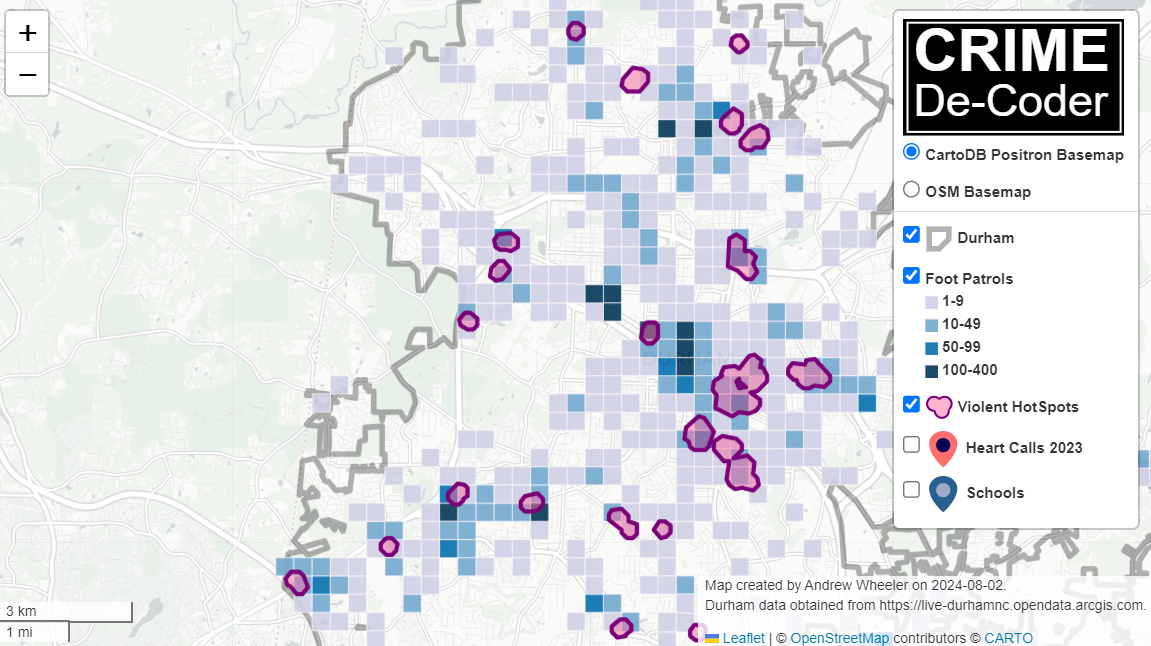
Recently for a crimede-coder project I have been building out a custom library to make nice leaflet maps using the python folium library. See the example I have posted on my website. Below is a screenshot:

This map ended up having around 3000 elements in it, and was a total of 8mb. 8mb is not crazy to put on a website, but is at the stage where you can actually notice latency when first rendering the map.

Looking at the rendered html code though it was verbose in a few ways for every element. One is that lat/lon are in crazy precision by default, e.g. [-78.83229390597961, 35.94592660794455]. So a single polygon can have many of those. Six digits of precision for lat/lon is still under 1 meter of precision, which is plenty sufficient for my mapping applications. So you can reduce 8+ characters per lat/lon and not really make a difference to the map (you can technically have invalid polygons doing this, but this is really pedantic and should be fine).

A second part of the rendered folium html map for every object is given a full uuid, e.g. geo_json_a19eff2648beb3d74760dc0ddb58a73d.addTo(feature_group_2e2c6295a3a1c7d4c8d57d001c782482);. This again is not necessary. I end up reducing the 32 length uuids to the first 8 alphanumeric characters.

A final part is that the javascript is not minified – it has quite a bit of extra lines/spaces that are not needed. So here are my notes on using python code to take care of some of those pieces.

To clean up the precision for geometry objects, I do something like this.

import re

# geo is the geopandas dataframe
redg = geo.geometry.set_precision(10**-6).to_json()
# redg still has floats, below regex clips values
rs = r'(\d{2}\.|-\d{2}\.)(\d{6})(\d+)'
re.sub(rs,r'\1\2',redg)

As most of my functions add the geojson objects to the map one at a time (for custom actions/colors), this is sufficient to deal with that step (for markers, can round lat/lon directly). It may make more sense for the set precision to be 10**-5 and then clip the regex. (For these regex’s I am showing there is some risk they will replace something they should not, I think it will be pretty safe though.)

Then to clean up the UUID’s and extra whitespace, what I do is render the final HTML and then use regex’s:

# fol is the folium object
html = fol.get_root()
res = html.script.get_root().render()
# replace UUID with first 8
ru = r'([0-9a-f]{8})[0-9a-f]{4}[0-9a-f]{4}[0-9a-f]{4}[0-9a-f]{12}'
res = re.sub(ru,r'\1',res)
# clean up whitespace
rl = []
for s in res.split('\n'):
    ss = s.strip()
    if len(ss) > 0:
        rl.append(ss)
rlc = '\n'.join(rl)

There is probably a smarter way to do this directly with the folium object for the UUID’s. For whitespace though it would need to be after the HTML is written. You want to be careful with the cleaning up the whitespace step – it is possible you wanted blank lines in say a leaflet popup or tooltip. But for my purposes this is not really necessary.

Doing these two steps in the Durham map reduces the size of the rendered HTML from 8mb to 4mb. So reduced the size of the file by around 4 million characters! The savings will be even higher for maps with more elements.

One last part is my map has redundant svg inserted for the map markers. I may be able to use css to insert the svg, e.g. something like in css .mysvg {background-image: url("vector.svg");}, and then in the python code for the marker svg insert <div class="mysvg"></div>. For dense point maps this will also save quite a few characters. Or you could add in javascript to insert the svg as well (although that would be a bit sluggish I think relative to the css approach, although sluggish after first render if the markers are turned off).

I have not done this yet, as I need to tinker with getting the background svg to look how I want, but could save another 200-300 characters per marker icon. So will save a megabyte in the map for every 3000-5000 markers I am guessing.

The main reason I post webdemo’s on the crimede-coder site is that there a quite a few grifters in the tech space. Not just for data analysis, but for front-end development as well. I post stuff like that so you can go and actually see the work I do and its quality. There are quite a few people now claiming to be “data viz experts” who just embed mediocre Tableau or PowerBI apps. These apps in particular tend to produce very bad maps, so here you can see what I think a good map should look like.

If you want to check out all the interactions in the map, I posted a YouTube video walking through them

Durham hotspot map walkthrough of interactions

My word template for Quarto

I have posted on Github my notes on creating a word template to use with quarto. And since Quarto is just feeding into pandoc, those who are just using pandoc (so not doing intermediate computations), should maybe find that template worthwhile as well.

So first, why word? Quarto by default looks pretty nice for HTML. That is fine for them to prioritize that, but the majority of reports I want to use quarto for HTML is not the best format. Many times I want a report that can be emailed in PDF and/or printed. And sometimes I (or my clients) want a semi-automated report that can be edited after the fact. In those cases word is a good choice.

Editing LaTeX is too hard, and I am pretty happy with the this template for small reports. I will be sharing my notes on writing my python book in Quarto soonish, but for now wanted to share how I created a word template.

Note some of the items may seem gratuitous (why so many CRIME De-Coder logos?). Part of those are just notes though (like how to insert an image after your author name, I have done this to insert my signature in reports for example). The qmd file has most of the things I am interested in doing in documents, such as how to format markdown tables in python, doings sections/footnotes, references, table/figure captions, etc.

I do like my logo though in the header (it is hyperlinked even, so in subsequent PDFs if you click the logo it will go to my website), and the footer page numbers I commonly need in reports as well. And my title page and TOC do not look bad as well IMO. I am not one to discuss fonts, but I like small caps for titles and the Verdana font is nice to make it look somewhat different.

Creating the Template

So first, you can do from the command line:

quarto pandoc -o custom-reference-doc.docx --print-default-data-file reference.docx

From there, you should edit that reference.docx file to get what you want. So for example, if you want to change the font used for code snippets, in Word you can open up Styles, and on the right hand side select different elements and edit them:

Here for example to change the font for code snippets, you modify the HTML code style (I like Consolas):

There ended up being a ton of things I edited, I did not keep a list. Offhand you will want to modify the Title, Headings 1 & 2, First Paragraph, Body Text. And then you can edit things like the page numbers and header/footer.

So when rendering a document, you can sometimes click on the element in the rendered document and figure out what style it inherits from. Here for example you can see in the test.docx file that the quote section uses the “Block Text” style:

This does not always work though, and it can take some digging/experimentation in the original template file to get the right style modifier. (If you are having a real hard problem, convert the word document format to .zip, and dig into the XML documents. You can see the style formats in inherits from in the XML tree.) It doesn’t work for the code segments for example. Do not render a document and edit the style in that document, only edit the original --print-default-data-file reference.docx that was generated from the command line to update your template.

I have placed a few notes in the readme on Github, but one of my main things was making tables look nice. So this plays nicely with markdown tables, which I can use python to render directly. Here is an example of spreading tables across multiple pages.

One thing to note though is that this has limits – different styles are interrelated, so sometimes I would change one and it would propagate errors to different elements. (I can’t figure out how to change the default bullets to squares instead of circles for example without having bullets in places they should not be in tables – try to figure that one out. I also cannot figure out how to change the default font in tables, I would use monospace, without changing the font for other text elements in normal blocks.) So this template was the best I could figure without making other parts broken.

I have a few notes in the qmd file as well, showing how to use different aspects of markdown, as well as some sneaky things to do extra stuff (like formatting fourth level headings to produce a page break, I do not think I will need that deep of headings).

Even for those not using Quarto for computational workflows, writing in markdown is a really useful skill. You write in plain text, and can then have the output in different formats. Even for qualitative folks (or people in industry creating documents), I think many people would be well served by writing content in plain text markdown, and then rendering to whatever output they wanted.

Power for analyzing Likert items

First for some other updates of interest to folks on the blog. On CRIME De-Coder a blog post, You should be geocoding crime data locally. I give python code to create a local geocoding engine using the arcpy library.

This is a bit more techy, so would typically post this on this blog instead of the CRIME De-Coder one. But, currently the web is sorely lacking in good advice for local geocoding solutions. Vast majority of sites discuss online geocoding APIs (e.g. google or the census geocoder), which I guess are common for web-apps, but they do not make sense for crime analysis. For the few webpages that are actually relevant to describe local solutions (that do not involve calling an online web API), all the exmples use PostGIS that I am aware of. PostGIS is both very difficult to setup and has worse results compared to ESRI. So I know ESRI is a paid for service, but they have reasonable academic and small business pricing (and most police departments already have access), so to me this is a reasonable use case. If you need to geocode 100k cases, the license fee for ESRI is worth it at that point relative to using the web engines.

Definitely do not spend thousands of dollars if you need to batch geocode a few million records. That is something that is worth getting in touch with me about. And so hopefully that gets picked up by search engines and drives a bit more traffic to my consulting website.

A second example I posted some python code to help construct network experiments. So the idea here is you want to spread out the treated nodes so you have a specific allocation of treated, connected to treated (what I call spillover here), and those not connected to treated (the leftover control group). This python code constructs linear programs to accomplish certain treated/not-touched proportions. So this graph shows if you choose to treat 1 person, but have constraints on 1,2,3 leftover.

And then you can apply this to bigger networks, here the network is 311 nodes, and 90 are treated and I want a total of 150 not treated.

Idea derivative from some work Bruce Desmarais discussed on Twitter, but also have thought about this in some discussion with Barak Ariel in focused deterrence style interventions. So hopefully that comes in handy.

My linear programming formulation is not as svelte as the optimal treatment assignment with spillovers formulation, it is 3*N + 2*E decision variables and 5*N + 2*E constraints (where N is the number of nodes and E is the number of un-directed edges). I have a feeling my formulation is redundant, so if I write my constraints smarter can be more like 2N decision variables and 2N + E constraints.

But for my examples I show it solves quite fast as is (and maybe solvers get rid of the cruft in pre-solve), so not worried about that at the moment. Don’t know the typical size networks people use, but I suspect it will work just fine and dandy on typical machines for networks even as large as 10k. (Generally if I keep the model to under 100k decision variables it is only a few minutes to solve the types of problems I show on this blog.)

Power with Likert items

The other day for a grant application we needed to conduct power analysis. Our design was t-test of mean differences for a simple treated/control group randomized experiment with the outcome being a Likert score survey response. (I know, most of the time people create latent scores with Likert items, analyzing the individual items is fine IMO and simpler to specify for a pre-registration analysis.) I am sure others have needed to do similar things, but I could not find code online to help out with this. So I scripted up a simulation in R to do this, and figured sharing would be useful.

So the rub with Likert data, and why you can’t use typical power calculations, is that they have ceiling effects. If most people answer on average 4.5 out of the your scale up to 5, it is difficult to go much higher. Here I simulate data that has that skew (so ceiling effects come into play), and then go through the motions of doing the t-test. So first for some setup, I have a function that rounds and clips data to limited sets of integers, plus some plotting functions.

# power analysis of Likert data
library(ggplot2)

# custom theme
theme_cdc <- function(){
  theme_bw() %+replace% theme(
     text = element_text(size = 16),
     panel.grid.major= element_line(linetype = "longdash"),
     panel.grid.minor= element_blank()
) }

set.seed(10) # setting the random seed

# rounding/clipping data to integers 
clipint <- function(x,min=1,max=5){
    rx <- round(x)
    rx <- ifelse(rx < min,min,rx)
    rx <- ifelse(rx > max,max,rx)
    return(rx)
}

This following function generates the p-values and standard errors, what I will use later in my simulation. Here I use a t-test of mean differences, but it would be fairly easy to say swap out with an ordinal logistic regression if you prefer that. Probably the bigger deal is the simulation generates data using a normal distribution, and then post rounds/clip the data. There is probably a smarter way to generate the data according to the logistic model and ordinal intercepts (Frank Harrell discusses such things a bit on his blog). But this at least takes into account that the data will be skewed, even in the control group, to have more positive outcomes and thus take the ceiling into account.

# this uses OLS to do t-test of mean differences
# generates normal data, but then rounds/clips
sim_ols <- function(n,eff=0.5,int=4,sd=1){
    df <- data.frame(1:n)
    df$treat <- sample(c(0,1),n,replace=TRUE)
    df$latent <- int + eff*df$treat + rnorm(n,sd=sd)
    df$likert <- clipint(df$latent)
    m1 <- lm(likert ~ treat,data=df)
    cd <- coef(summary(m1))
    pval <- cd[2,4]
    se <- cd[2,2]
    return(c(pval,se))
}

Now we can move onto the simulations, this evaluates sample sizes from 100 to 2000 (in increments of 50), effect sizes of 0.1, 0.3, and 0.5, and repeats the simulations 10k times. I then see the power (how often the two-tailed p-value is less than 0.05), as well as the standard error (precision) of the estimates. Effect sizes are in terms of the original Likert scale values, what I take to be much easier to reason about. (I have seen power analyses here use Cohen’s D, which you really can’t get a very large Cohen’s D value due to ceiling effects with this data.)

# running power estimates over different
# sample sizes and effect sizes
samp_sizes <- seq(100,2000,50)
eff_sizes <- c(0.1,0.3,0.5)
rep_size <- 10000
df <- expand.grid(samps_sizes=samp_sizes,eff_sizes=eff_sizes,pow=c(NA),se=c(NA))
for (i in 1:nrow(df)){
    ss <- df[i,1]
    es <- df[i,2]
    stats <- replicate(rep_size,sim_ols(n=ss,eff=es))
    smean <- rowMeans(stats)
    df[i,3] <- mean(stats[1,] < 0.05) # alpha 0.05
    df[i,4] <- smean[2]
}

df$eff_sizes <- as.factor(df$eff_sizes)

The graph of the power shows what you would expect, so with a few hundred samples you can determine an effect size of 0.5, but with a smaller effect size (on the order of 0.1) you will need more than 2k samples.

# Graph of power
powg <- ggplot(data=df,aes(x=samps_sizes,y=pow)) + 
        geom_line(aes(color=eff_sizes)) + 
        geom_point(pch=21,color='white',size=2,aes(fill=eff_sizes)) +
        labs(x='Sample Sizes',y=NULL,title='Power Estimates') +
        scale_y_continuous(breaks=seq(0,1,0.1)) + 
        scale_x_continuous(breaks=seq(100,2000,250)) + 
        scale_color_discrete(name="Effect Sizes") +
        scale_fill_discrete(name="Effect Sizes") + 
        theme_cdc()

Unfortunately, in reality with most survey measures of police data, e.g. rate your officer 1 to 5, a 0.5 effect is a really large increase. In my mapping attitudes paper, some demographics shift global attitudes at max by 0.2, and I doubt most interventions will be that dramatic. So I like plotting the precision of the estimator, which the effect size doesn’t really make a dent here (it could with more severe ceiling effects).

# Graph of Standard Errors (for Precision)
precg <- ggplot(data=df,aes(x=samps_sizes,y=se,color=eff_sizes)) + 
         geom_line(aes(color=eff_sizes)) + 
         geom_point(pch=21,color='white',size=2,aes(fill=eff_sizes)) +
         labs(x='Sample Sizes',y=NULL,title='Precision Estimates') +
         scale_x_continuous(breaks=seq(100,2000,250)) + 
         scale_color_discrete(name="Effect Sizes") +
         scale_fill_discrete(name="Effect Sizes") + 
         theme_cdc()

With field experiments when considering post police contacts (general attitude surveys you have more wiggle room, but still they cost money to survey) you really can’t control the sample size. You are at the whims of whatever events happen in the police departments daily duties. So the best you can do is make approximate plans for “how long am I going to collect measures before I analyze the data”, and “how reasonably precise will my estimates be”.

This particular grant I make arguments we care more about a non-inferiority type test (e.g. can be sure attitudes are not worse, within a particular error level, given our treatment is more cost-effective than business as usual). But if we did an intervention specifically intended to improve attitudes, you may be talking more like 5,000+ contacts to detect an effect of 0.1 (given likely sample non-response), which is still a big effect.

You would gain power by doing a scale (e.g. summing together multiple items or conducting a factor analysis), assuming the intervention effects the underlying latent trait, and piecemeal individual items. But that will have to be for another day simulating data to do that end-to-end analysis.

Despite not being an academic anymore, I have in the hopper more grant collaborations than I did when I was a professor. The NIJ season is winding down, so probably too late to collaborate on any more of those. But if you have other ideas and need quant help with your projects, always feel free to reach out. I enjoy doing these side projects with academics when reasonable funding is available.

Age-Period-Cohort graphs for suicide and drug overdoses

When I still taught advanced research methods for PhD students, I debated on having a section on age-period-cohort (APC) analysis. Part of the reason I did not bother with that though is there were no good open source datasets (that I was aware of). A former student asking about APC analysis, as well as a recent NBER working paper on suicide rates (Marcotte & Hansen, 2023) brought it to mind again.

I initially had plans to do more modelling examples, but I decided on just showing off the graphs I generated. The graphs themselves I believe are quite informative.

So I went and downloaded mortality rates USA mortality rates for suicides and drug overdoses, spanning 1999-2022 for suicide and 1999-2021 for drug. Here is the data and R code to recreate these graphs in the post to follow along.

To follow along here in brief, we have a dataset of death and population counts, broken down by year and age:

# Age-Period-Cohort plots
library(ggplot2)

# Read in data
suicide <- read.csv('Suicides.csv')

# Calculate Rate & Cohort
suicide$Cohort <- suicide$Year - suicide$Age
suicide$Rate <- (suicide$Deaths/suicide$Population)*100000

# Suicide only 11-84
suicide <- suicide[suicide$Age >= 11,]
head(suicide)

And this produces the output:

> head(suicide)
   Age Year Deaths Population Cohort      Rate
16  11 1999     22    4036182   1988 0.5450696
17  11 2000     24    4115093   1989 0.5832189
18  11 2001     24    4344913   1990 0.5523701
19  11 2002     22    4295720   1991 0.5121377
20  11 2003     15    4254047   1992 0.3526054
21  11 2004     18    4207721   1993 0.4277850

A few notes here. 1) I limited the CDC Vital stats data to 1999, because in the Wonder dataset pre-1999 you can’t get individual year-age breakdowns, you need to do 5 year age bins. This can cause issues where you need to age-adjust within those bins (Gelman & Auerbach, 2016), that should be less of a problem with single year breakdowns. So I would go back further were it not for that. 2) When breaking down to individual years, the total count of suicides per age bracket is quite small. Initially I was skeptical of Marcotte & Hansen’s (2023) claims of LGBTQ subgroups potentially accounting for increased trends among young people (I just thought that group was too small for that to make sense), but looking at the counts I don’t think that is the case.

When I think about age-period-cohort analysis, my mind goes age effects > period effects > cohort effects. I think people often mix up cohort effects with things that are actually age effects. (And also generation labels are not real.) In criminology, the age-crime-curve was established back in the 1800’s by Quetelet.

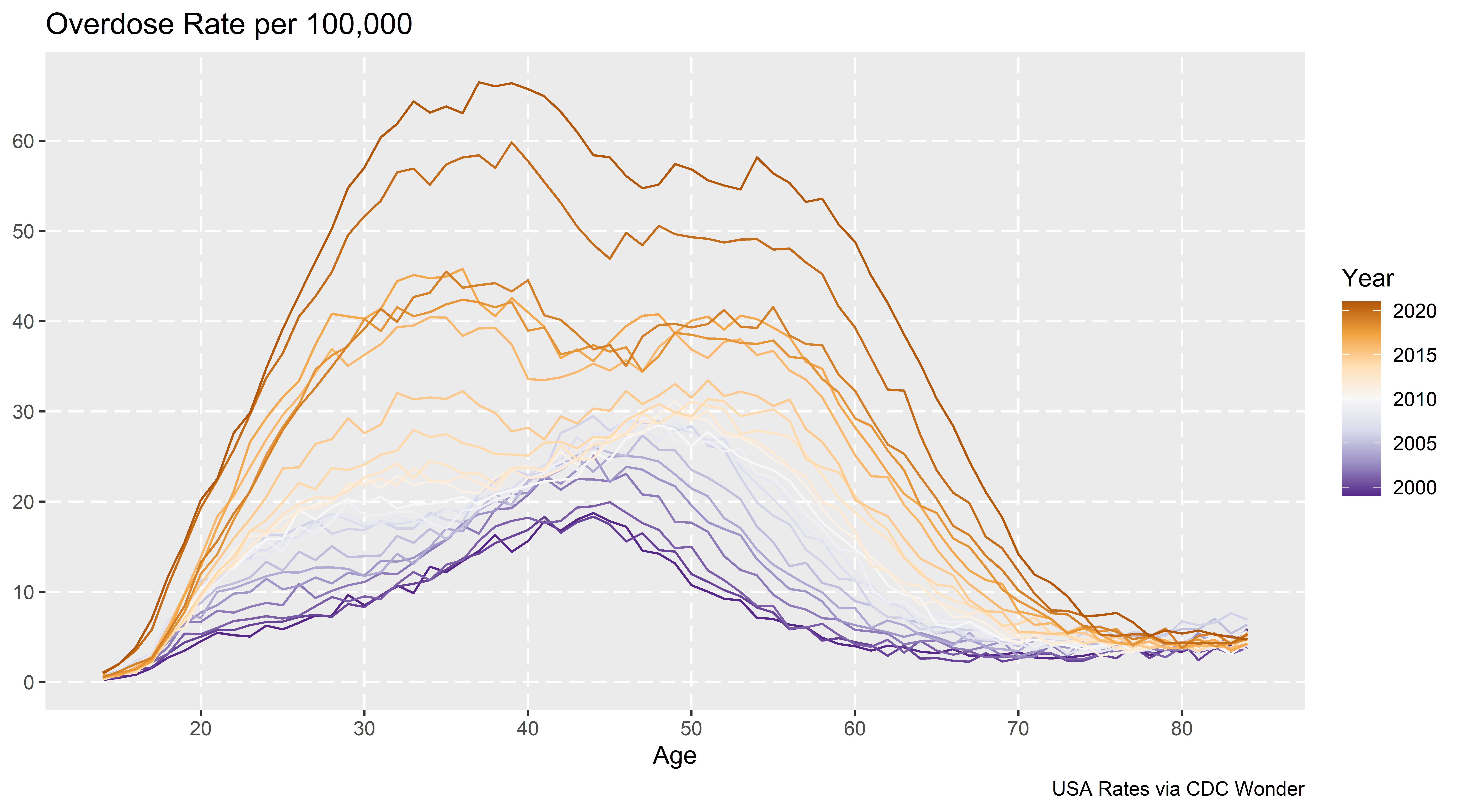
So I focus on graphing the age curve, and look at deviations from that to try to visually identify period effects or cohort effects. Here is the plot to look at each of the age curves, broken down by year.

ap <- ggplot(data=suicide, aes(x = Age, y = Rate, color=Year, group=Year)) + 
             geom_line() +
             scale_colour_distiller(palette = "PuOr") +
             scale_x_continuous(breaks=seq(10,80,10)) +
             scale_y_continuous(breaks=seq(0,30,5)) + 
             labs(x='Age',y=NULL,title='Suicide Rate per 100,000',caption="USA Rates via CDC Wonder")
ap

When using diverging color ramps to visualize a continuous variable, you get a washed out effect in the middle. So I am not sure the best color ramp here, but it does provide a nice delineation and gradual progression from the curve in the early 2000’s compared to the suicide curve in 2022. (Also spot the one outlier year, it is age 75 for the “provisional” 2022 counts. I leave it in as it is a good showcase for how plots can help spot bad data.)

The blog the graph will be tinier, open it up in a new tab on your desktop computer to get a good look at the full size image.

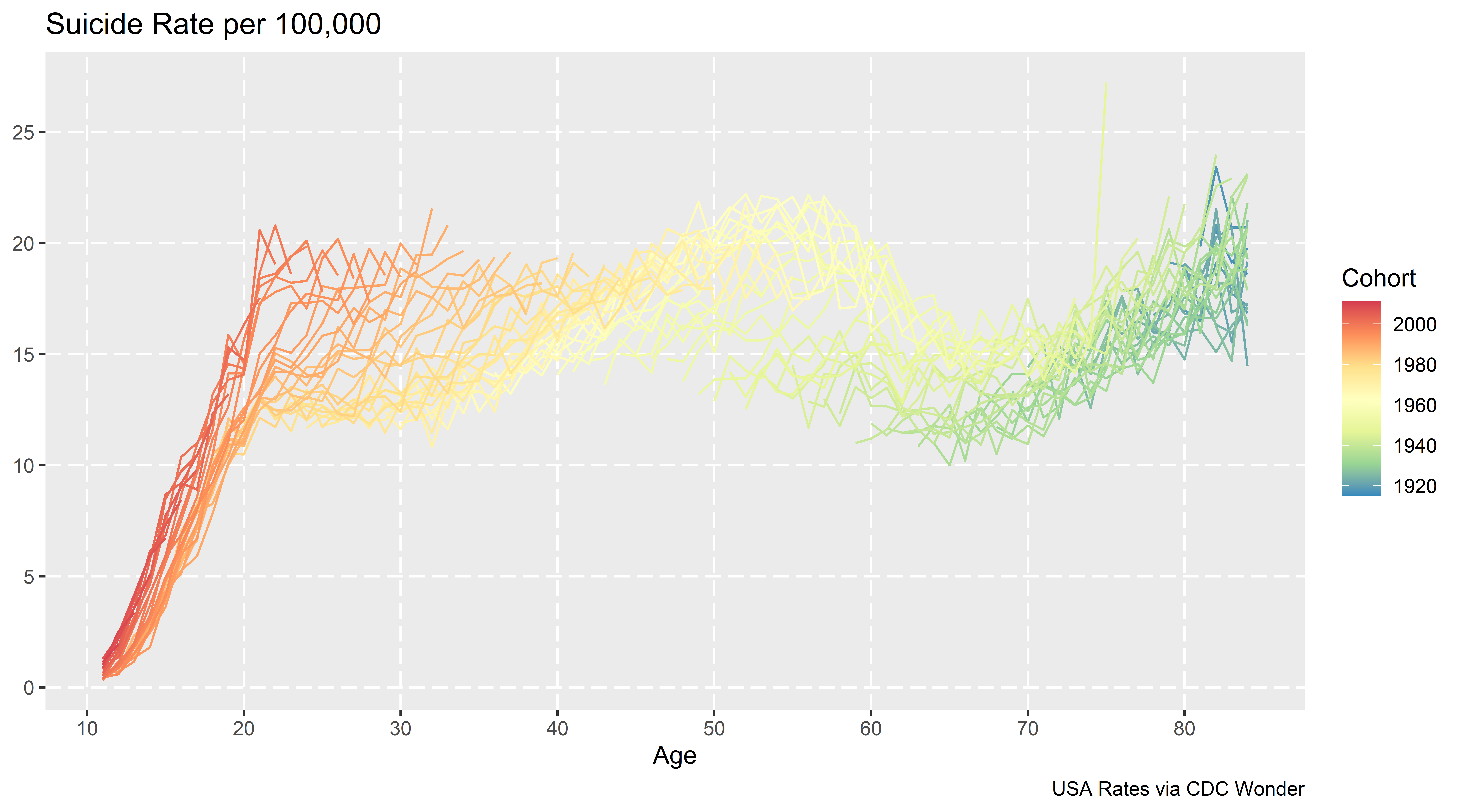
Here looking at the graph you can see two things other researchers looking at similar data have discussed. In the early 2000’s, you had a gradual increase from 20’s to the peak suicide rate at mid 40’s. More recent data has shifted that peak to later ages, more like peak 55. Case & Deaton (2015) discussing deaths of despair (of which suicide is a part) focussed on this shift, and noted that females in this age category increased at a higher rate relative to males.

Marcotte & Hansen (2023) focus on the younger ages. So in the year 2000, the age-suicide curve was a gradual incline from ages early 20’s until the peak. Newer cohorts though show steeper inclines in the earlier ages, so the trend from ages 20-60 is flatter than before.

Period effects in these charts will look like the entire curve is the same shape, and it is just shifted up and down. (It may be better to graph these as log rates, but keeping on the linear scale for simplicity.) We have a bit of a shape change though, so these don’t rule out cohort effects.

Here is the same plot, but grouping by cohorts instead of years. So the age-suicide curve is indexed to the birth year for an individual:

cp <- ggplot(data=suicide, aes(x = Age, y = Rate, color=Cohort, group=Cohort)) + 
             geom_line() +
             scale_colour_distiller(palette = "Spectral") +
             scale_x_continuous(breaks=seq(10,80,10)) +
             scale_y_continuous(breaks=seq(0,30,5)) +
             labs(x='Age',y=NULL,title='Suicide Rate per 100,000',caption="USA Rates via CDC Wonder")
cp

My initial cheeky thought (not that there aren’t enough ways to do APC models already), was to use mixture models to identify discrete cohorts. Something along the lines of this in the R flexmix package (note this does not converge):

library(flexmix)
knot_loc <- c(20,35,50,65) # for ages
model <- stepFlexmix(cbind(Deaths, Population - Deaths) ~ bs(Age, knot_loc) | Cohort, 
                     model = FLXMRglm(family = "binomial", fixed = ~Year),
                     data = suicide, k = 3)

But there is an issue with this when looking at the cohort plot, you have missing data for cohorts – to do this you would need to observe the entire age-curve for a cohort. There may be a way to estimate this using latent class models in Stata (and fixing some of the unidentified spline coefficients to a fixed value), but to me just looking at the graphs I think is all I really care about. You could maybe say the orange cohorts in the late 90’s are splitting off, but I think that is consistent with period effects. (And is also a trick of the colors I used in the plot.)

You could do mixtures for the year plots, see some of the work by Elana Erosheva (Erosheva et al., 2014), but that again just isn’t how I think about APC analysis.

Doing this same exercise for drug overdoses rates, (which I not can overlap with suicide – you can commit suicide via intentionlly taking too many drugs) we can clearly see the dramatic rise in recent years. We can also see the same trends in earlier ages now being peak, but also increases and shifts to older ages.

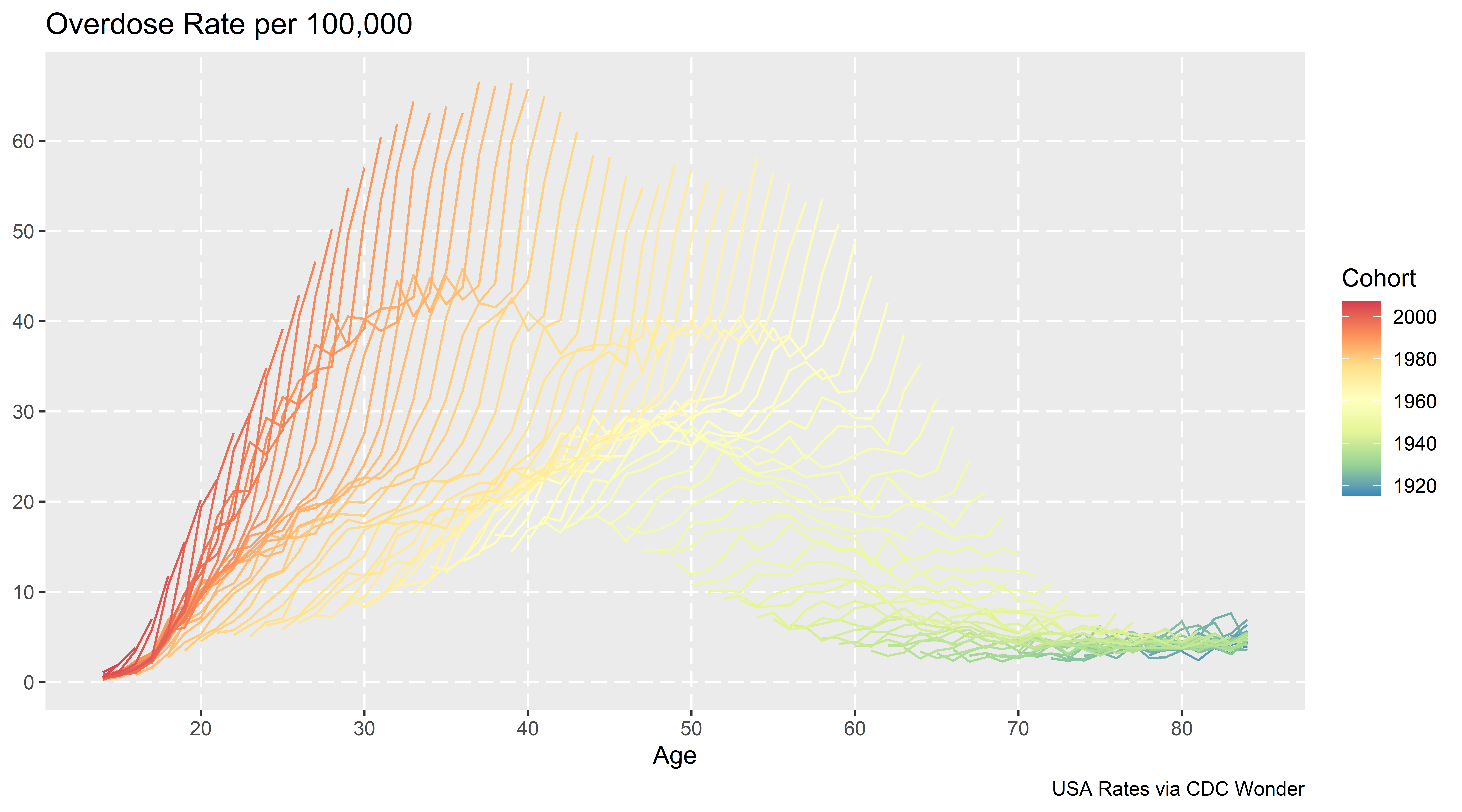
The cohort plot here looks like a Spinosaurus crest:

Which I believe is more consistent with (very strong) period effects, not so much cohort effects. Drug overdoses are increasing across both younger and older cohorts.

Nerd Notes

These datasets don’t have covariates, which to use the APC method in Spelman (2022) you would need those (it uses covariates to estimate period effects). I am not so sure that is the best approach to APC decomposition, but it is horses for courses.

What I wish is that the CDC distributed the vital statistics data at the micro level (where each row is a death, with all of the covariates), along with a matching variable dataset of the micro level American Community Survey and the weights. That doesn’t solve the APC issue with identifying the different effects, but makes it easier to do more complicated modelling, e.g. I could fit models or generate graphs for age-gender differences more easily, decompose different death types, etc.

Final nerd note is about forecasting mortality trends. While I am familiar with the PCA-functional data approach advocated by Rob Hyndman (Hyndman & Ullah, 2007), I don’t think that will do very well with this data. I am wondering if doing some type of multi-level GAM model, and doing short term extrapolation of the period effect (check out Gavin Simpson’s posts on multi-level smooths, 1, 2, 3).

So maybe something like:

library(mgcv)
smooth_model <- gam(cbind(Deaths, Population - Deaths) ~ s(Year) + s(Age,by=Cohort), 
                    family = binomial("logit"),
                    data = suicide)

Or maybe just use s(Age,Year) and not worry about the cohort effect. Caveat emptor about this model, this is just my musings, I have not in-depth studied it to make sure it behaves well (although a quick check R does not complain when fitting it).

References