Musings on Comments

I recently posted a comment policy. I do not get that many comments now, but I did delete a comment recently asking for help on a code sample, so figured it would be worth elaborating on.

Comments are great, and I hope to get more, but with my participation on the stack exchange sites (and commenting on other blogs) I definitely see the need to take active moderation. This is not a big deal for the site so far (I rarely post anything controversial) but is really necessary for any blog generating a lot of comments.

My position is not quite extreme as Ed Tufte, e.g. I don’t plan on deleting a comment if I don’t like the content enough, but I will definitely delete off-topic comments and anything I find offensive. My position is more in line with Jeff Atwood’s thoughts, who discusses the topic quite a bit on his coding horror blog (see here for one example).

Basically the comments take curation, just like any site or wiki. Comments without moderation in any substantive amount (e.g. YouTube, many news articles) are simply not worth reading. The same moderation is what makes the stack exchange sites so much better than email list-serves, and the lack of moderation is what makes some MOOC forums so chaotic.

Automating tasks in SPSS using production jobs

For tasks that take a long time, or ones I want done on a regular basis, I typically have the computer do the work while I am away. Such example tasks I have set up before are:

  • querying large databases and dumping the results into flat files (querying large tables may take an hour or longer)
  • conducting statistical analysis that takes a long time to converge
  • generating automated graphs and statistics

The SPSS facility to accomplish these are production jobs, and I will briefly detail how to set up a production job and then run the job from the command line with a simple example.

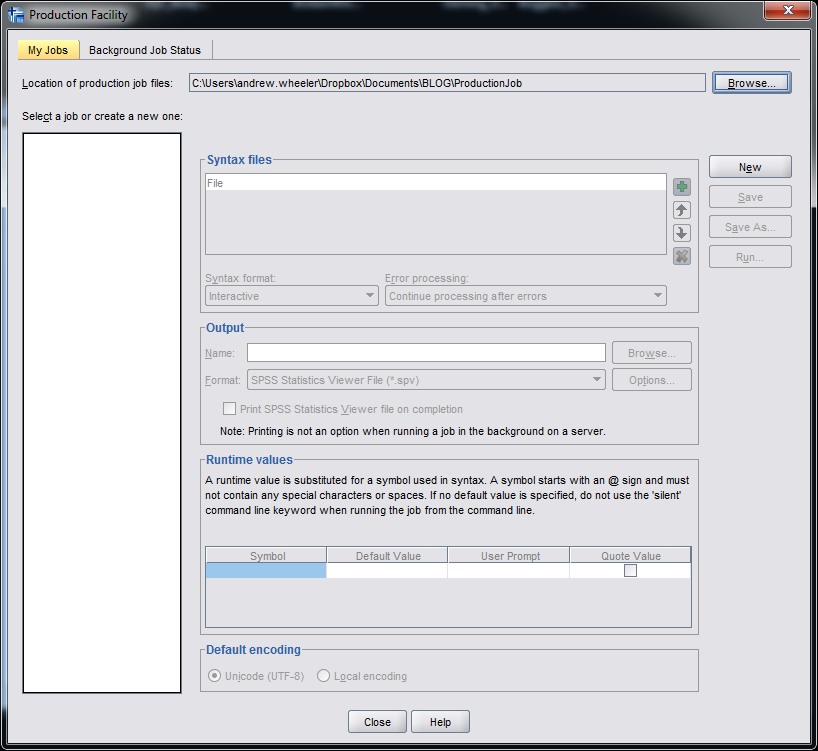
So first to set up a production job go to Utilities -> Production Facility in the menu bar. (Note you can open the screen shots larger in a separate window.)

Next you will be presented with the screen below. To specify the syntax file(s) that the production job will run, click the New button.

After you click the New button, the green plus sign in the Syntax files section will be active, and then you can browse to your sps file. Here you can see I selected a file named GenerateChart.sps in a particular directory on my C drive. You can specify the job to run multiple syntax files, but here I only choose one.

Next navigate to the Output section of the window. Here you need to choose where to save the SPSS output. Here I choose to save it in the same directory under the name Output. I choose the output format to be plain text. This ends up being the same output as if you ran the syntax interactively and then used EXPORT OUTPUT.

I could have exported the charts in the syntax directly by using EXPORT OUTPUT, but you can have the production facility do that as well. If you click on the Options button in the Output section a new dialogue will appear that lets you choose to save the charts if you want. Here I save them as png files.

Production jobs also have the capability to create user input variables directly in the syntax, using the form @VariableName in the syntax. This is what the section Run time variables deals with. These are nice if you have a set of syntax and want to input some arbitrary information, as when you run the production job a GUI pops up asking for the input, but I don’t illustrate that functionality here.

Below is the specific set of syntax that grabs a csv file, swdata.csv, calculates a moving median for each chat room, and makes some time series charts. The csv file is a set of scrapped chat data from the Cross Validated and R chat rooms via Scraperwiki (more details here). It aggregates the number of monologue tags (a pretty good indicator of the number of posts in the room) per day, so is an estimate of the chat activity.

*Where the data is located.
FILE HANDLE data 
  /NAME = "C:\Users\andrew.wheeler\Dropbox\Documents\BLOG\ProductionJob".
DATA LIST LIST (",") FILE = "data\swdata.csv" SKIP = 1 
  /Date (SDATE10) Mono (F4.0) Baseroom (A100).
DATASET NAME Chats.

*Calculate moving median.
AUTORECODE VARIABLES = Baseroom /INTO BaseN.
SORT CASES BY BaseN Date.
SPLIT FILE BY BaseN.
CREATE MovMed = RMED(Mono 5).
FORMATS MovMed (F4.0) Date (MOYR6).

*Make charts.
GGRAPH
  /GRAPHDATASET NAME="graphdataset" VARIABLES=Date Mono MovMed 
   MISSING=VARIABLEWISE
  /GRAPHSPEC SOURCE=INLINE.
BEGIN GPL
  SOURCE: s=userSource(id("graphdataset"))
  DATA: Date=col(source(s), name("Date"))
  DATA: Mono=col(source(s), name("Mono"))
  DATA: MovMed=col(source(s), name("MovMed"))
  GUIDE: axis(dim(1))
  GUIDE: axis(dim(2), label("Mono Tags"))
  ELEMENT: line(position(Date*Mono), color(color.grey), 
           transparency(transparency."0.5"), size(size."1"))
  ELEMENT: line(position(Date*MovMed), color(color.red), 
           transparency(transparency."0.4"), size(size."1"))
END GPL.

Now I am interested in running this set of syntax automatically. The details will change depending on your operating system, but on my windows machine the easiest way to do this is to create a bat file that specifies the commands. Now I named the production job ChatRoom_Dialogue.spj, and to run this job I filled in the bat file with the text:

REM delete old csv file and download new one
del swdata.csv
wget "http://goo.gl/mxyRI7" --no-check-certificate
REM this runs the SPSS syntax
"C:\Program Files\IBM\SPSS\Statistics\22\stats.exe"  "C:\Users\andrew.wheeler\Dropbox\Documents\BLOG\ProductionJob\ChatRoom_Dialogue.spj" -production silent

Here I downloaded the wget utility to grab the csv file. (Note REM is to comment lines.) The bat file treats where ever it is located at as the directory for the commands, so I first use del to delete the older csv file, and then grab the new csv file from the listed url and it automatically saves the file in the folder where the bat file is located. Then I call the SPSS syntax by starting stats.exe and then calling the spj production job file. I use the switches -production silent so I am not prompted for any user input values to insert into the syntax. If you had stats.exe as a windows system path you wouldn’t need to worry about using the fully quoted strings, but I typically don’t rely on that (unless the program automatically adds it). Note that running the fully quoted string for stats.exe makes the windows command directory go to there, so you need to then fully quote the spj files path. Note you could call the first two commands directly within SPSS using the HOST command, but being able to chain multiple commands together makes running them in the bat file directly a bit more flexible.

So now you can simply double click the bat file and it will download the new data and create two graphs. To automate the job you can use the Windows task scheduler to make the bat file run at a particular time. Here is the bundled up files to run on your own (you just need to change the files paths in the sps and the bat file to wherever you want to run the script).

Here are the two graphs the production job creates. The first is the Cross Validated chat room, and the second is the R stackoverflow chat room.

I planned on writing a blog post for the CV blog awhile ago about these trends, so if I ever get to it these are teasers.

Using the Google Distance API in SPSS – plus some EDA of travel time versus geographic distance

The other day I had a conversation with a colleague about calculating travel time distances and comparing them to actual geographic distances (aka as the crow flies). Being unfamiliar with the Network add-on in ArcGIS I figured I would take a stab at this task with the Google Distance API. Being lazy, I’m not going to explain the code, but in a nutshell works basically the same way as my prior code samples for the Google places API. The main difference is that this code will only return one result per record in the original file.

BEGIN PROGRAM Python.
import urllib, json

#This parses the returned json to pull out the distance in meters and
#duration in seconds, [None,None] is returned is status is not OK
def ExtJsonDist(place):
  if place['rows'][0]['elements'][0]['status'] == 'OK':
    meters = place['rows'][0]['elements'][0]['distance']['value']
    seconds = place['rows'][0]['elements'][0]['duration']['value']
  else:
    meters,seconds = None,None
  return [meters,seconds]

#Takes a set of lon-lat coordinates for origin and destination,
#plus your API key and returns the json from the distance API
def GoogDist(OriginX,OriginY,DestinationX,DestinationY,key):
  MyUrl = ('https://maps.googleapis.com/maps/api/distancematrix/json'
           '?origins=%s,%s'
           '&destinations=%s,%s'
           '&key=%s') % (OriginY,OriginX,DestinationY,DestinationX,key)
  response = urllib.urlopen(MyUrl)
  jsonRaw = response.read()
  jsonData = json.loads(jsonRaw)
  data = ExtJsonDist(jsonData)
  return data
END PROGRAM.

So because for each pair of origin and destinations this only returns one result, we can use this function in SPSSINC TRANS to return the distance in meters and the travel time in seconds without having to worry about any other data manipulations in python. The only additional item we need besides the origin and destination latitude and longitude are your Google API key in a seperate string variable. So if you had the OD coordinates in the fields Ox,Oy,Dx,Dy for origin longitude, origin latitude etc. the code would simply be:

STRING MyKey (A100).
COMPUTE MyKey = '!!!!!!!YOUR KEY HERE!!!!!!!!!!!!!'.
EXECUTE.

SPSSINC TRANS RESULT=Meters Seconds TYPE=0 0 
/FORMULA GoogDist(OriginX=Ox,OriginY=Oy,DestinationX=Dx,DestinationY=Dy,key=MyKey).

Note the Google distance API has a limit of 2,500 queries per day, and unlike the places API can not be upped by providing verification (unfortunately).

The context the colleague was asking was for a project about prison visitation, for some background see a report by Jacquelyn Greene at the New York State DCJS, and I saw recently Joshua Cochran plus a few other of the Florida State folks published a paper about prisoner visitation in Florida. So I figured a good test would be calculating the correlation between travel distance and geographic distances between all of the zip codes in New York State to one particular prison.

I chose to calculate the distances between the centroid of zip code areas and Attica State prison, which is in between Rochester and Buffalo in the westernmost part of New York state. FYI zip code areas are not well defined, so don’t ask me how exactly the ones I used here are calculated, but I got them from the New York State GIS clearinghouse, and they were from 2009.

So as long as you have the prior python function GoogDist defined, here is a set of brief syntax to grab the zip code data and calculate the travel time and travel distance. This does take a few minutes, but I never had a problem with the 100 queries per 1 minute suggestion by Google in my tests. Their are 2,332 zip code areas in New York State, so beware this about uses up your limit for the day (and you have no second chances)! This took me about 8 minutes to calculate.

*Grab the online data.
SPSSINC GETURI DATA
URI="https://dl.dropboxusercontent.com/u/3385251/NewYork_ZipCentroids.sav"
FILETYPE=SAV DATASET=NY_Zips.

*Travel distance to Attica.
COMPUTE Dx = -78.276205.
COMPUTE Dy = 42.850721.

STRING MyKey (A100).
COMPUTE MyKey = '!!!!!!!YOUR KEY HERE!!!!!!!!!!!!!'.
EXECUTE.

SPSSINC TRANS RESULT=Meters Seconds TYPE=0 0 
/FORMULA GoogDist(OriginX=LongCent,OriginY=LatCent,DestinationX=Dx,DestinationY=Dy,key=MyKey).

We can also calculate the euclidean "crows flies" distance via the extendedTransforms python code. This returns the distance miles, and so the following code converts the two distances to kilometers and the time to minutes.

*As the crow flies distance.
SPSSINC TRANS RESULT=MilesCrow TYPE=0
/FORMULA extendedTransforms.ellipseDist(lat1=LatCent,lon1=LongCent,lat2=Dy,lon2=Dx,inradians=False).

*Convert to meters. 
COMPUTE KMCrow = (MilesCrow*1609.34)/1000.
COMPUTE KMTrav = Meters/1000.
COMPUTE Minutes = Seconds/60.
FORMATS KMCrow KMTrav Minutes (F6.0).

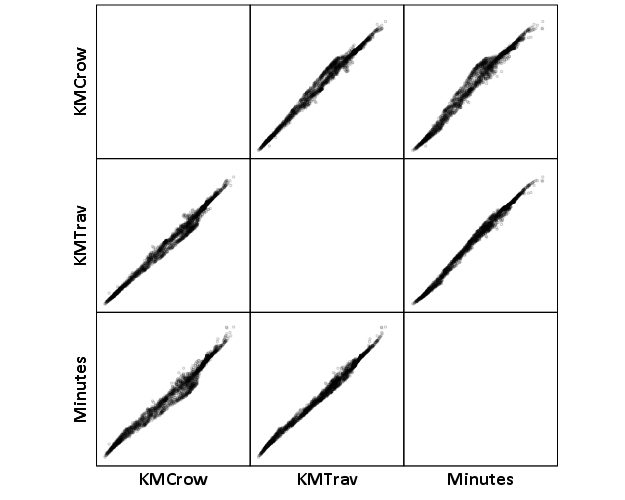
Now, part of my suggestion was actually that calculating travel times is not necessary, because they will be highly correlated with each other. Here is the scatterplot matrix of the three measures, travel distance, geographic distance, and travel time. The inter-item correlations are all around .99.

GGRAPH 
  /GRAPHDATASET NAME="graphdataset" VARIABLES=KMCrow KMTrav Minutes 
  /GRAPHSPEC SOURCE=INLINE. 
BEGIN GPL 
  SOURCE: s=userSource(id("graphdataset")) 
  DATA: KMCrow=col(source(s), name("KMCrow")) 
  DATA: KMTrav=col(source(s), name("KMTrav")) 
  DATA: Minutes=col(source(s), name("Minutes")) 
  GUIDE: axis(dim(1.1), ticks(null())) 
  GUIDE: axis(dim(2.1), ticks(null())) 
  GUIDE: axis(dim(1), gap(0px)) 
  GUIDE: axis(dim(2), gap(0px)) 
  TRANS: KMCrow_label = eval("KMCrow") 
  TRANS: KMTrav_label = eval("KMTrav") 
  TRANS: Minutes_label = eval("Minutes") 
  ELEMENT: point(position((KMCrow/KMCrow_label+KMTrav/KMTrav_label+Minutes/Minutes_label)*
                (KMCrow/KMCrow_label+KMTrav/KMTrav_label+Minutes/Minutes_label)),
                 size(size."2"), transparency.exterior(transparency."0.8"))  
END GPL.
CORRELATIONS VARIABLES= KMCrow KMTrav Minutes.

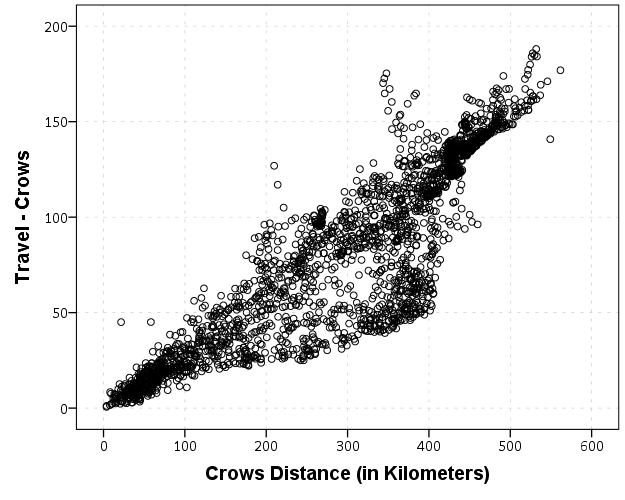
I expected that the error would get larger for larger travel and geographic distances, so to investigate this a simple graphical check is to estimate the difference between the two measures on the Y axis and the mean of the two measures on the X axis. Depending on who you ask, this is a Tukey mean difference plot or a Bland-Altman plot. Generally when comparing the scatterplot matrices it is easier to see the spread when you detilt the plot (using Tukey’s terminology), and calculating the differences is one way to do the detilting.

Here I calculate Dif = TravelDistance - GeoDistance, as I know the travel distance will always be larger than the geographic distance. For simplicity I just plot the geographic distance on the x axis instead of the mean of the two measures.

*Tukey mean difference chart.
GGRAPH
  /GRAPHDATASET NAME="graphdataset" VARIABLES=KMTrav KMCrow MISSING=LISTWISE REPORTMISSING=NO
  /GRAPHSPEC SOURCE=INLINE.
BEGIN GPL
  SOURCE: s=userSource(id("graphdataset"))
  DATA: KMTrav=col(source(s), name("KMTrav"))
  DATA: KMCrow=col(source(s), name("KMCrow"))
  TRANS: Dif = eval(KMTrav - KMCrow)
  GUIDE: axis(dim(2), label("Travel - Crows"))
  GUIDE: axis(dim(1), label("Crows Distance (in Kilometers)"))
  ELEMENT: point(position(KMCrow*Dif))
END GPL.

This shows three particular things:

  1. It appears to be a mostly mixture of two separate linear regressions
  2. Within each mixture the measurement error is close to a constant multiple of the geographic distance
  3. There are some outliers as fingers of large travel distances extending from the point cloud.

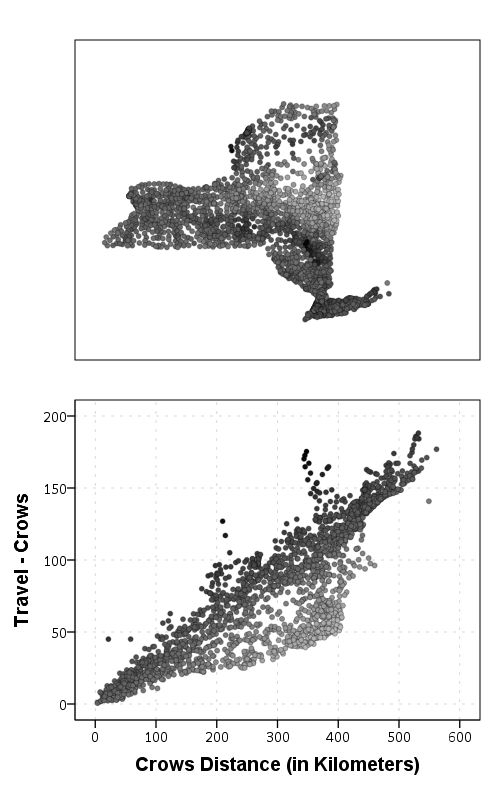
Some more EDA shows that the mixture is reflective of being close to Interstate 90 – those cities (like Albany and Syracuse) nearby the highway have a shorter travel time. Here what I did was estimate the linear regression for the prior plot and then color the residuals. Then I made a side-by-side set of the latitude-longitude coordinates next to the same scatterplot (colored). I can’t tell from this plot, but some of the high outliers appears in a cluster in downstate, maybe in the Catskills. But there are a few other of the high outliers shown around the state.

*Note this is the same as estimating regression on differences. 
*see http://stats.stackexchange.com/a/15759/1036. 
REGRESSION
  /MISSING LISTWISE
  /STATISTICS COEFF OUTS R ANOVA
  /CRITERIA=PIN(.05) POUT(.10)
  /NOORIGIN 
  /DEPENDENT KMTrav
  /METHOD=ENTER KMCrow
  /SAVE RESID(Resid1).

*Hmm, we have a mixture, lets see what explains that.
GGRAPH
  /GRAPHDATASET NAME="graphdataset" VARIABLES=LongCent LatCent Resid1 KMTrav KMCrow
    MISSING=LISTWISE REPORTMISSING=NO
  /GRAPHSPEC SOURCE=INLINE.
BEGIN GPL
  PAGE: begin(scale(500px,800px))
  SOURCE: s=userSource(id("graphdataset"))
  DATA: LongCent=col(source(s), name("LongCent"))
  DATA: LatCent=col(source(s), name("LatCent"))
  DATA: Resid1=col(source(s), name("Resid1"))
  DATA: KMTrav=col(source(s), name("KMTrav"))
  DATA: KMCrow=col(source(s), name("KMCrow"))
  TRANS: Dif = eval(KMTrav - KMCrow)
  GRAPH: begin(origin(15%, 5%), scale(81%, 40%))
  GUIDE: axis(dim(1), null())
  GUIDE: axis(dim(2), null())
  GUIDE: legend(aesthetic(aesthetic.color.interior), null())
  SCALE: linear(aesthetic(aesthetic.color), aestheticMinimum(color.lightgrey), aestheticMaximum(color.black))
  ELEMENT: point(position(LongCent*LatCent), color.interior(Resid1), size(size."5"), transparency.exterior(transparency."0.7"))
  GRAPH: end()
  GRAPH: begin(origin(15%, 50%), scale(81%, 40%))
  GUIDE: axis(dim(2), label("Travel - Crows"))
  GUIDE: axis(dim(1), label("Crows Distance (in Kilometers)"))
  GUIDE: legend(aesthetic(aesthetic.color.interior), null())
  SCALE: linear(aesthetic(aesthetic.color), aestheticMinimum(color.lightgrey), aestheticMaximum(color.black))
  ELEMENT: point(position(KMCrow*Dif), color.interior(Resid1), size(size."5"), transparency.exterior(transparency."0.7"))
  GRAPH: end()
  PAGE: end()
END GPL.

The linear regression gives a rough estimate for the relationship between travel distance and geographic distance in this sample that is about:

Travel Distance in = -4.7 + 1.3*Geographic Distance

A better model would include an interaction between distance to I-90 (and then maybe a term for being in the mountains), but again I am lazy! Obviously the negative intercept doesn’t make physical sense, so you really only want to use this for geographic distances of say 50 kilometers or larger, else it will likely be an underestimate. The opposite is true if you are close to I-90, this formula is likely to be an overestimate.

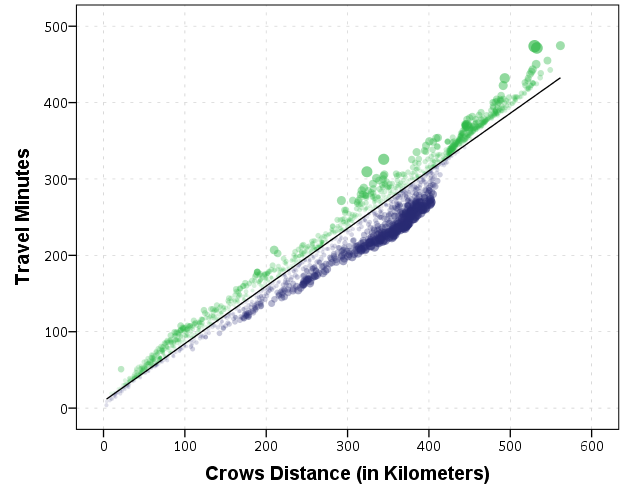
The same exercise for the travel time in minutes gives the equation Travel Time in Minutes = 9 + 0.75*(Geographic Distance in Kilometers):

*Minutes as a function of distance.
REGRESSION
  /MISSING LISTWISE
  /STATISTICS COEFF OUTS R ANOVA
  /CRITERIA=PIN(.05) POUT(.10)
  /NOORIGIN 
  /DEPENDENT Minutes
  /METHOD=ENTER KMCrow
  /SAVE RESID(MinResid).

COMPUTE AbsResid = ABS(MinResid).
COMPUTE DirResid = MinResid/AbsResid.

GGRAPH
  /GRAPHDATASET NAME="graphdataset" VARIABLES=Minutes KMCrow AbsResid DirResid
  /GRAPHSPEC SOURCE=INLINE.
BEGIN GPL
  SOURCE: s=userSource(id("graphdataset"))
  DATA: Minutes=col(source(s), name("Minutes"))
  DATA: KMCrow=col(source(s), name("KMCrow"))
  DATA: AbsResid=col(source(s), name("AbsResid"))
  DATA: DirResid=col(source(s), name("DirResid"), unit.category())
  TRANS: Dif = eval(KMTrav - KMCrow)
  GUIDE: axis(dim(2), label("Travel Minutes"))
  GUIDE: axis(dim(1), label("Crows Distance (in Kilometers)"))
  GUIDE: legend(aesthetic(aesthetic.color.interior), null())
  GUIDE: legend(aesthetic(aesthetic.transparency.interior), null())
  GUIDE: legend(aesthetic(aesthetic.size), null())
  SCALE: linear(aesthetic(aesthetic.size), aestheticMinimum(size."3"), aestheticMaximum(size."13"))
  SCALE: linear(aesthetic(aesthetic.transparency), aestheticMinimum(transparency."0.3"), aestheticMaximum(transparency."0.9"), reverse())
  ELEMENT: point(position(KMCrow*Minutes), color.interior(DirResid), transparency.interior(AbsResid),
                 size(AbsResid), transparency.exterior(transparency."1"))
  ELEMENT: line(position(smooth.linear(KMCrow*Minutes)))
END GPL.

Again the mixture appears, but the linear regression appears as a much closer fit between geographic distance and travel time.

So in both cases, at least in this sample, it appears it is not really necessary to calculate travel distance. One can make a pretty good guess as to the travel distance simply given the geographic distance. Or going the other way using Pennsylvania speak, if I say the distance between two locations is about 1 hour this would translate into about 68 kilometers (i.e. 42 miles).

Big data problems for Criminal Justice

I am on the job market this year, and I have noticed a few academic jobs focused on big data (see this Penn State posting for one example). Because example data sets in criminal justice are not typical fodder for big data conversations, I figured I would talk abit about my experiences and illustrate the need for the types of skills needed to manipulate and analyze these big datasets.

As opposed to trying to further define the big data buzzword, I will simply talk about the actual size of data I have dealt with. Depending on the definition used, most large criminal justice datasets may be called medium sized data. That is you can load it in a database or statistical program (particularly those that do not load everything into RAM, like SPSS and SAS) and calculate different summary statistics and fit simple models. Were not talking about datasets that need custom big data solutions like Hadoop. The biggest single table I’ve personally worked with is a set of 25 million arrest histories (with around 150 variables). Using SPSS server to sort this dataset took less than a minute, using my local machine it took about 10 minutes. Nothing much to complain about there, and it is where the statistical programs that don’t load everything into memory shine.

To talk specifics, the police agency where I was an analyst at (Troy, NY) is a fairly small city with a population of around 50,000 people. They generated around 60,000 calls for service per year (this includes anytime someone calls 911, or police initiated interactions like a traffic stop). Every single one of these incidents generates a one to many relationship for multiple tables, and here is a sampling of those relationships; multiple free text description of the event and follow up investigations, people involved in the incident, offences committed, property stolen or damaged, persons arrested, property recovered or confiscated, drug and weapon contraband, vehicles involved, etc. Over the time period of 04-13 the incident narratives themselves are around 1 gigabyte, and the number of unique individuals and institutions in the "names" table was around 100,000. None of these tables alone would be considered big data, but when taking multiple years and having to conduct multiple table merges it turns into complicated medium size data pretty quickly.

I’m sure I’m not alone here working with police departments. In the past month I’ve had conversations with two individuals about corrections datasets that result in millions of records. Criminal justice organizations have been collecting data for along time, and given say 50,000 records per year it only takes 10 years to turn that into 500,000. When considering larger agencies (like statewide corrections or courts) the per year becomes even larger.

Most of the time summary statistics and fairly simple regression models are all researchers and analysts are interested in in criminal justice. The field is not heavily devoted to prediction, and certainly not to fitting complicated machine learning models. Many regression tasks can be estimated with data as large as 25 million records (given that the number of predictor variables tends to be small) and even if it didn’t sampling (or reducing the data to unique observations and weighting) is an obvious option. So for these types of simple needs just learning effective practices at manipulating datasets — such as SQL and best practices for conducting data manipulations in statistical packages is most of the education one needs. But these are still definitely needs that are not met in any social science curricula that I am aware. By fire is my only experience.

Two particular areas that turn little data into big data are spatial and network analysis, as one not only needs to consider the number of nodes but also the number of edges (or potential edges) in the system to calculate various measures. For example, in my dissertation I needed to conduct spatial lags of several variables (and this is needed in calculating measures such as Moran’s I). In matrix notation this typically involves calculating Wx, where W is an n by n spatial weights matrix. In my dissertation, n was 21,506, so not a large dataset, but W is then a 21,506^2 matrix. It can be held in memory, but good luck trying to calculate anything with it. Most of the spatial econometrics literature discusses how calculating W^-1 is problematic, let alone the simpler operation of Wx. So to do those calculations I needed to create custom code. I hope to be able to write a blog post on how it can be done at some point – but these blog posts aren’t earning me any brownie points to getting a job (let alone getting tenure in the future).

The other area that I believe needs to be developed in the social science related to medium data problems are custom visualization solutions. Data in social science typically has lots of noise to signal, and adding in 100,000 observations rarely makes things clearer. This is why I think visualization within the social sciences has potential to expand, as the majority of historical discussions are not extensible to our particular use applications in the social sciences.

So I’m excited by academia recognizing that big data is a problem and takes custom solutions in the social sciences. An environment where I can be reworded for taking on those big data tasks and partly focus on publishing software, as opposed to solely publish or perish, would help develop the field and have a more lasting impact on practical applications than journal articles. At least a place that acknowledges the need to develop curricula related to these data management tasks would be a good start. But I’m not sure I like the types of applications currently being pitched in the social sciences as big data problems, particularly the trivial applications of examining social networks like facebook or twitter, nor emphasis on big data tools like Hadoop that I don’t think are applicable to the social scientists toolset. But I’m certainly biased to think that applications in criminal justice have more practical implications than alot of contemporary social science research.

Using funnel charts for monitoring rates

For a recent project of mine I was exploring arrest rates at small units of analysis (street midpoints and intersections) for one of the collaborations we have at the Finn Institute.

One of the graphs I was interested in making was a funnel plot of the arrest rates on the Y axis and the total number of stops on the X axis. You can then draw confidence bands around a particular percentage (typically the overall rate) to see if any observations have oddly high or low rates. This procedure is described in Funnel plots for comparing institutional performance (Spiegelhalter, 2005), PDF Here. Funnel charts are more common in meta-analysis, but I hope to illustrate their utility here in monitoring rates with different denominators.

For an illustration I will make a funnel plot of the homicide rates per 100,000 given by the police agencies in New York and Pennsylvania in 2012 (available via the UCR data tool). Here is the data and code available to replicate the results in this blog post in a zip file. If you have the SPSSINC GETURI DATA add-on you can start just by calling (otherwise you have to download the data to follow along).

SPSSINC GETURI DATA
URI="https://dl.dropboxusercontent.com/u/3385251/NY_PA_crimerates_2012.sav"
FILETYPE=SAV DATASET=NY_PA.

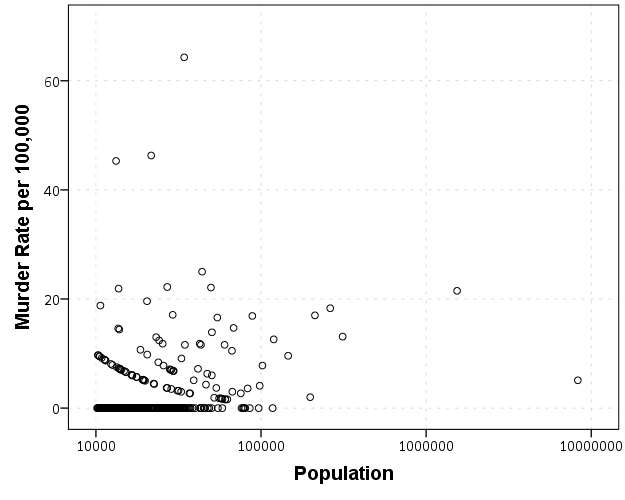
I start at the point in the code where the data is already loaded, and I generate a scatterplot for Population and Murder_and_nonnegligent_manslaughter_rate. I eliminate agencies that did not report a full 12 months or had missing data for homicides and/or the population, and this results in around 360 homicide rates for populations above 10,000 and up nearly 10 million (in New York City). The labels for SPSS graphs inherit the format for the original data, so I make the homicide rates F2.0 to avoid decimal places in the axis tick mark labels.

FORMATS Murder_and_nonnegligent_manslaughter_rate (F2.0).
GGRAPH
  /GRAPHDATASET NAME="graphdataset" VARIABLES=Population Murder_and_nonnegligent_manslaughter_rate 
  /GRAPHSPEC SOURCE=INLINE.
BEGIN GPL
  SOURCE: s=userSource(id("graphdataset"))
  DATA: Population=col(source(s), name("Population"))
  DATA: Murder_and_nonnegligent_manslaughter_rate=col(source(s),
        name("Murder_and_nonnegligent_manslaughter_rate"))
  GUIDE: axis(dim(1), label("Population"))
  GUIDE: axis(dim(2), label("Murder Rate per 100,000"))
  SCALE: log(dim(1))
  ELEMENT: point(position(Population*Murder_and_nonnegligent_manslaughter_rate))
END GPL.

So we can see that the bulk of the institutions have very low murder rates, the overall rate is just shy of 6 murders per 100,000 in this sample. But there are quite a few locations that appear to be high outliers. We are talking about proportions as small as 0.00006 to 0.00065 though, so are some of the high murder rate locations really that surprising? Lets see by adding an estimate of the error if the individual rates were drawn from the same distribution as the overall rate.

Now to make the funnel chart we need to estimate the confidence interval for a rate of 6/100,000 for population sizes between 10,000 and 10 million to add to our chart. We can add these interpolated bounds directly into our SPSS dataset. So to estimate the lines what I do is use the AGGREGATE command to interpolate population step sizes for the min and max population in the sample (and calculate the total homicide rate). Here I interpolate the population steps on the log scale, as the X axis in the chart uses a log scale.

*Aggregate proportions and max/min counts.
COMPUTE Id = $casenum - 1.
AGGREGATE OUTFILE=* MODE=ADDVARIABLES
  /BREAK
  /MaxPop = MAX(Population)
  /MinPop = MIN(Population)
  /AllHom = SUM(Murder_and_nonnegligent_Manslaughter)
  /TotalPop = SUM(Population)
  /TotalObs = MAX(Id).
*Overall homicide rate per 100,000.
COMPUTE HomRate = (AllHom/TotalPop)*100000.
*Now interpolating bounds for the population.
COMPUTE #Step = (LG10(MaxPop) - LG10(MinPop))/TotalObs.
COMPUTE N = 10**(LG10(MinPop) + Id*#Step).

So if you see the variable N in the dataset now you will see that the highest value is equal to the population in New York City at over 8 million. SPSS does not have an inverse function for the binomial distribution, but it does have one for the beta distribution. Wikipedia lists how the Clopper-Pearson binomial confidence intervals can be rewritten in terms of the beta distribution. I use this equality here to generate 99% confidence intervals for the population sizes in the N variable for the overall homicide rate, HomeRate (remembering to convert rates per 100,000 back to proportions).

*Now calculating bands based on statewide homicide rates.
*Exact bounds based on inverse beta.
*http://en.wikipedia.org/wiki/Binomial_proportion_confidence_interval#Clopper-Pearson_interval.
COMPUTE #Alph = 0.01.
COMPUTE #Suc = (HomRate*N)/100000.
COMPUTE LowB = IDF.BETA(#Alph/2,#Suc,N-#Suc+1)*100000.
COMPUTE HighB = IDF.BETA(1-#Alph/2,#Suc+1,N-#Suc)*100000.
EXECUTE.

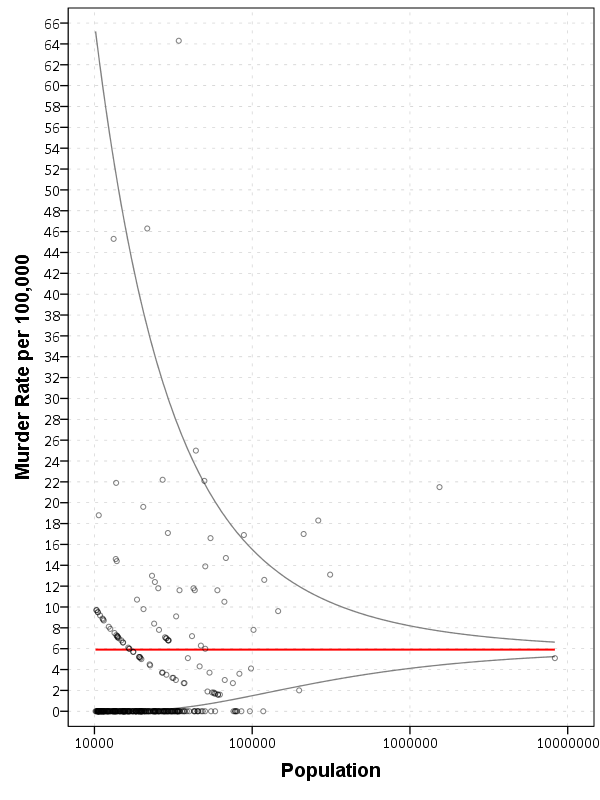
Now we can superimpose LowB, HighB, and HomRate on the same graph as the previous scatterplot to give a sense of the uncertainty in the estimates. Here I also change the size of the graph using PAGE statements. I color the error bounds as light grey lines, and the overall homicide rate as a red line, and then superimpose the homicide rates for each agency on top of them.

*Now can make the plot with the error bounds.
FORMATS LowB HighB HomRate (F2.0) N (F8.0).
GGRAPH
  /GRAPHDATASET NAME="graphdataset" VARIABLES=Population Murder_and_nonnegligent_manslaughter_rate 
                                              LowB HighB HomRate N
  /GRAPHSPEC SOURCE=INLINE.
BEGIN GPL
  PAGE: begin(scale(600px,800px))
  SOURCE: s=userSource(id("graphdataset"))
  DATA: Population=col(source(s), name("Population"))
  DATA: Murder_and_nonnegligent_manslaughter_rate=col(source(s),
        name("Murder_and_nonnegligent_manslaughter_rate"))
  DATA: LowB=col(source(s), name("LowB"))
  DATA: HighB=col(source(s), name("HighB"))
  DATA: HomRate=col(source(s), name("HomRate"))
  DATA: N=col(source(s), name("N"))
  GUIDE: axis(dim(1), label("Population"))
  GUIDE: axis(dim(2), label("Murder Rate per 100,000"), delta(2))
  SCALE: log(dim(1))
  SCALE: linear(dim(2), min(2), max(64))
  ELEMENT: line(position(N*HomRate), color(color.red), size(size."2"))
  ELEMENT: line(position(N*LowB), color(color.grey))
  ELEMENT: line(position(N*HighB), color(color.grey))
  ELEMENT: point(position(Population*Murder_and_nonnegligent_manslaughter_rate), size(size."5"), 
           transparency.exterior(transparency."0.5"))
  PAGE: end()
END GPL.

So I hope you see where the name funnel chart comes from now! This chart gives us an idea of the variability we would expect if random data were drawn with a rate of 6/100000 for population sizes between 10,000 and 100,000 is quite large, and most of the agencies with high homicide rates are still below the upper bound. Even with a population of 100,000, the 99% confidence interval covers rates between 2 and almost 16 per 100,000 – which translates directly to 2 and 16 homicides in a jurisdiction of that size.

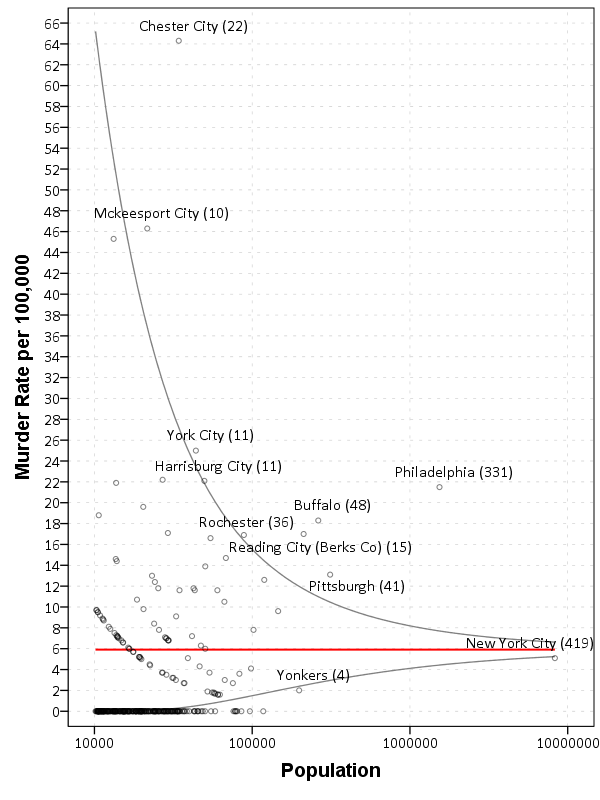
Here I add labels to the chart for locations above the interval and below the interval (but at least have one homicide). I add the total number of homicides in that jurisdiction in parenthesis to the label as well.

*Now adding in labels.
COMPUTE #Alph = 0.01.
COMPUTE #Suc = (HomRate*Population)/100000.
COMPUTE LowA = IDF.BETA(#Alph/2,#Suc,Population-#Suc+1)*100000.
COMPUTE HighA = IDF.BETA(1-#Alph/2,#Suc+1,Population-#Suc)*100000.
EXECUTE.

STRING HighLab (A50).
IF Murder_and_nonnegligent_manslaughter_rate > HighA 
   HighLab = CONCAT(RTRIM(REPLACE(Agency,"Police Dept",""))," (",LTRIM(STRING(Murder_and_nonnegligent_Manslaughter,F3.0)),")").
IF Murder_and_nonnegligent_manslaughter_rate  0 
   HighLab = CONCAT(RTRIM(REPLACE(Agency,"Police Dept",""))," (",LTRIM(STRING(Murder_and_nonnegligent_Manslaughter,F3.0)),")").
EXECUTE.

The labels get a little busy, but we can see that save for Buffalo and Rochester, all of the jurisdictions with higher than expected homicide rates are in Pennsylvania, with Philadelphia being the most egregious outlier. New York City and Yonkers are actually lower than the confidence interval, although quite close (along with a set of cities with zero homicides in populations between mainly the lower bound of 10,000 to 100,000). Chester city and Mckeesport are high locations as well, but we can see from the labels they only have 22 and 10 homicides respectively. The point to the left of Mckeesport is Coatesville, which ends up having only 6 homicides.

Where I consider such charts useful are to identify outliers (such as Philadelphia and Chester City). Depending on the nature of the study will depend on what this information could be useful for. For a reporting agency like the FBI they may be interested in seeing if Chester City is a reporting anomaly, or the NIJ/DOJ may be interested in funnelling resources to these high homicide rate locations. The same is true for a police department monitoring rates of say contraband recovery at particular locations, or uses of force per officer incident.

For a researcher they may be interested in other causal factors that could cause a high or low rate, as this might give insight into the mechanisms that increase or decrease homicides (for this particular chart). Evaluating against the overall homicide rate for the sample is an ad-hoc decision (it appears in this chart that PA and NY may plausibly have distinct homicide rate values, with PA being higher) but it at least gives the analyst an idea of the variability when evaluating rates.

Dissertation Draft

I figured I would post the current draft of my dissertation. It is being evaluated by the committee members now, and so why not have everyone evaluate it! Also, since I am on the job market there is proof I am close to finished.

Here is a pdf of the draft. This draft is not guaranteed to stay the same as I find errors, but at this point changes should (hopefully) be minimal. As always I appreciate any feedback. The title is What we can learn from small units of analysis, and below is the abstract.

The dissertation is aimed at advancing knowledge of the correlates of crime at small geographic units of analysis. I begin by detailing what motivates examining crime at small places, and focus on how aggregation creates confounds that limit causal inference. Local and spatial effects are confounded when using aggregate units, so to the extent the researcher wishes to distinguish between these two types of effects it should guide what unit of analysis is chosen. To illustrate these differences, I examine local, spatial and contextual effects for bars, broken windows and crime using publicly available data from Washington, D.C.


Stacking Intervals

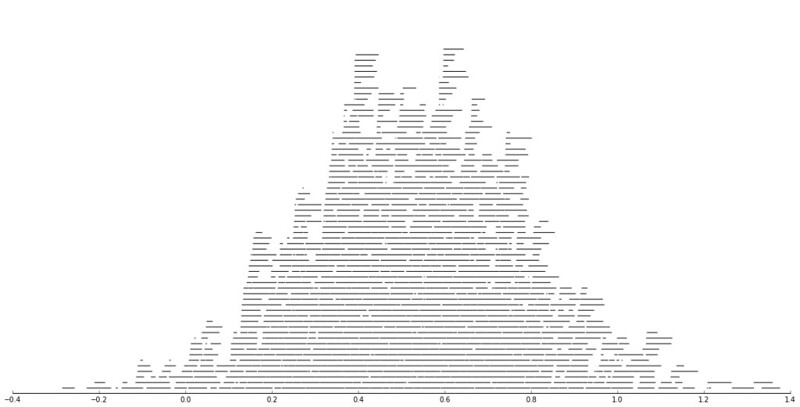
Motivated by visualizing overlapping intervals from the This is not Rocket Science blog (by Valentine Svensson) (updated link here) I developed some code in SPSS to accomplish a similar feat. Here is an example plot from the blog:

It is related to a graph I attempted to make for visualizing overlap in crime events and interval censored crime data is applicable. The algorithm I mimic by Valentine here is not quite the same, but similar in effect. Here is the macro I made to accomplish this in SPSS. (I know I could also use the python code by the linked author directly in SPSS.)

DEFINE !StackInt (!POSITIONAL = !TOKENS(1)
                 /!POSITIONAL = !TOKENS(1) 
                 /Fuzz = !DEFAULT("0") !TOKENS(1) 
                 /Out = !DEFAULT(Y) !TOKENS(1) 
                 /Sort = !DEFAULT(Y) !TOKENS(1) 
                 /TempVals = !DEFAULT(100) !TOKENS(1) )
!IF (!Sort = "Y") !THEN
SORT CASES BY !1 !2.
!IFEND
VECTOR #TailEnd(!TempVals).
DO IF ($casenum = 1).  
  COMPUTE #TailEnd(1) = End + !UNQUOTE(!Fuzz).
  COMPUTE !Out = 1.
  LOOP #i = 2 TO !TempVals.
    COMPUTE #TailEnd(#i) = Begin-1.
  END LOOP.
ELSE.
  DO REPEAT i = 1 TO !TempVals /T = #TailEnd1 TO !CONCAT("#TailEnd",!TempVals).
    COMPUTE T = LAG(T).
    DO IF (Begin > T AND MISSING(Y)).
      COMPUTE T = End + !UNQUOTE(!Fuzz).
      COMPUTE !Out = i.
    END IF.
  END REPEAT.
END IF.
FORMATS !Out !CONCAT("(F",!LENGTH(!TempVals),".0)").
FREQ !Out /FORMAT = NOTABLE /STATISTICS = MAX.
!ENDDEFINE.

An annoyance for this is that I need to place the ending bins in a preallocated vector. Since you won’t know how large the offset values are to begin with, I default to 100 values. The function prints a set of frequencies after the command though (which forces a data pass) and if you have missing data in the output you need to increase the size of the vector.

One simple addition I made to the code over the original is what I call Fuzz in the code above. What happens for crime data is that there are likely to be many near overlaps in addition to many crimes that have an exact known time. What the fuzz factor does is displaces the lines if they touch within the fuzz factor. E.g. if you had two intervals, (1,3) and (3.5,5), if you specified a fuzz factor of 1 the second interval would be placed on top of the first, even though they don’t exactly overlap. This appears to work reasonably well for both small and large n in some experimentation, but if you use too large a fuzz factor it will produce river like runs through the overlap histogram.

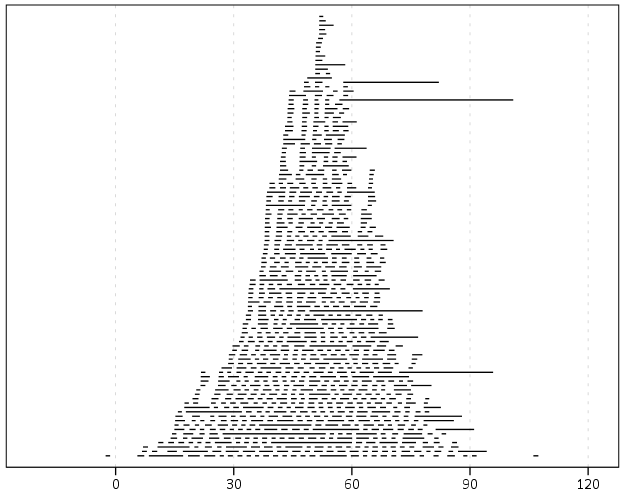
Here is an example of using the macro with some fake data.

SET SEED 10.
INPUT PROGRAM.
LOOP #i = 1 TO 1000.
  COMPUTE Begin = RV.NORMAL(50,15).
  COMPUTE End = Begin + EXP(RV.GAMMA(1,2)).
  END CASE.
END LOOP.
END FILE.
END INPUT PROGRAM.

!StackInt Begin End Fuzz = "1" TempVals = 101.

GGRAPH
  /GRAPHDATASET NAME="graphdataset" VARIABLES=Begin End Mid
  /GRAPHSPEC SOURCE=INLINE.
BEGIN GPL
  SOURCE: s=userSource(id("graphdataset"))
  DATA: End=col(source(s), name("End"))
  DATA: Begin=col(source(s), name("Begin"))
  DATA: Y=col(source(s), name("Y"), unit.category())
  GUIDE: axis(dim(1))
  GUIDE: axis(dim(2), null())
  ELEMENT: edge(position((End+Begin)*Y))
END GPL.

And here is the graph:

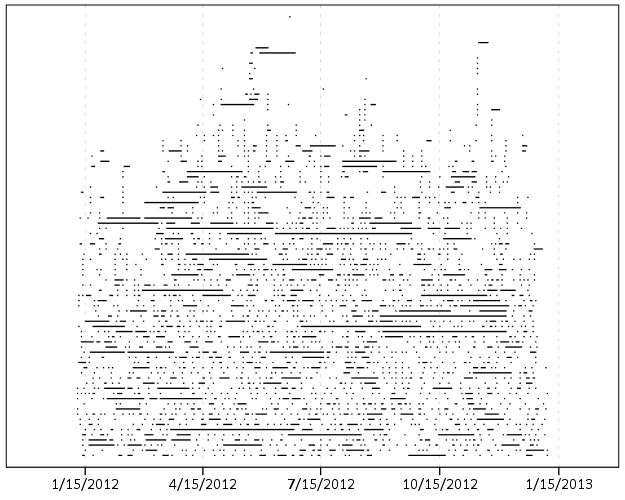
Using the same burglary data from Arlington I used for my aoristic macro, here is an example plot for a few over 6,300 burglaries in Arlington in 2012 using a fuzz factor of 2 days.

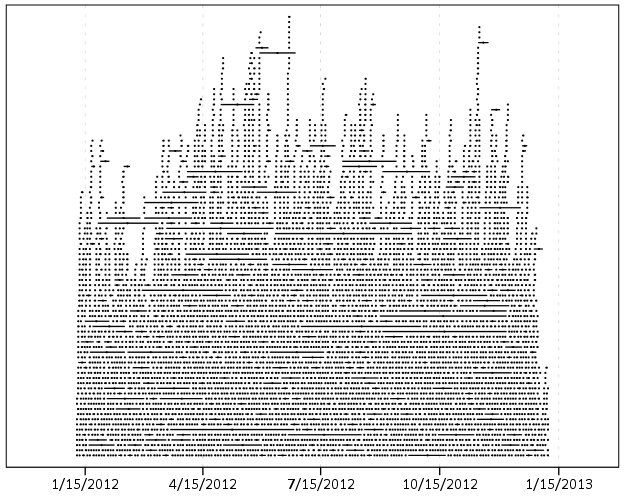
This is somewhat misleading, as events with a known exact time are not given any area in the plot. Here is the same plot but with plotting the midpoint of the line as a circle over top of the edge.

You can also add in other information to the plot. Here I color edges and points according to the beat that they are in.

It produces a pretty plot, but it is difficult to discern any patterns. I imagine this plot would be good to evaluate when there is the most uncertainty in crime reports. I might guess if I did this type of plot with burglaries after college students come back from break you may see a larger number of long intervals, showing that they have large times of uncertainty. It is difficult to see any patterns in the Arlington data though besides more events in the summertime (which an aoristic chart would have shown to begin with.) At the level of abstraction of over a year I don’t think you will be able to spot any patterns (like with certain days of the week or times of the month).

I wonder if this would be useful for survival analysis, in particular to spot any temporal or cohort effects.

Quantifying racial bias in peremptory challenges

A question came up recently on cross validated about putting some numbers on the amount of bias in jury selection. I had a previous question of a similar nature, so it had been on my mind previously. The original poster did not say this was specifically for a Batson challenge, but that is simply my presumption. It is both amazing and maddening that given the same question four different potential analyses were suggested. Although it is a bit out of the norm for what I talk about, I figured it would be worth a post.

Some background on Batson

For some background, Batson challenges are specifically in the context of selecting jurors for a trial. (Everything that follows is specific to what I know about law in the US.) To select a jury first the court selects potential jurors for the venire from the general public. Then both the prosecution and defence counsels have the opportunity to question individuals in the venire. A typical flow seems to be that a panel of the venire is selected (say 10), then the court has a set of standardized questions they ask every individual potential juror. This part is referred to as voir dire. If the individual states they can not be impartial, or there is some other characteristic that indicates they cannot be impartial that potential juror can be eliminated for cause. Without intervention of counsel the standard questions by the court typically weeds out any obvious cases. After the standard questions both counsels have the opportunity to ask their own questions and further identify challenges for cause. There are no limits on who can be eliminated for cause.

The wrinkle specific to Batson though is that each counsel is given a fixed number of peremptory challenges. The number is dictated by the severity of the case (in more serious cases each side has a higher number of challenges). The wikipedia page says in some circumstances the defense gets more than the prosecution, but the total number is always fixed in advance.

The logic behind peremptory challenges is that either counsel can use personal discretion to eliminate potential jurors without needing a justification. Basically it is a fail-safe of the court to allow gut feelings of either counsel to eliminate jurors they believe will be partial to the opposing side. But based on the equal protection clause it was decided in Batson vs. Kentucky that one can not use the challenges solely based on race. As a side effect of allowing so many peremptory challenges, one can easily eliminate a particular minority group, as being a minority group they will only have a few representatives in the venire.

During the voir dire if the opposing counsel believes the opposition is using the peremptory challenges in a racially discriminatory manner, they can object with a Batson challenge. The supreme court decided on three steps to evaluate the challenge.

  1. The party that objected has the burden to prove a prima facie case that the challenges were used in a discriminatory manner. This includes an argument that the group is discriminated against is cognizable, and that there is additional numerical evidence of discrimination.
  2. Then the burden shifts on the party being challenged to justify the use of the peremptory challenges based on race neutral reasons.
  3. The burden then shifts back to the original challenging party. This is to dispute whether the reasons proferred for the use of the peremptory challenges are purely pretextual.

Witnessing the proceedings for this particular case in the New York court of appeals case is what prompted my interest, and I recommend reading their decision as a good general background on Batson challenges (the wikipedia page is lacking quite a bit). What follows is some number crunching specific to the first part, establishing a prima facie case of discrimination.

Now some numbers

Batson challenges are made in situ during voir dire. All the cases I am familiar with simply use fractions to establish that the peremptory challenges are being used in a discriminatory manner. The fact that the numbers are changing during voir dire makes the calculations of statistics more difficult. But I will address the ex post facto assessment of the first step given the final counts of the number of peremptory challenges and the total number on the venire with their racial distribution. This presumption I will later discuss how it might impact on the findings in a more realistic setting.

Consider the case of People vs. Hecker (linked to above). It happened that the peremptory challenges by the defence to exclude two Asian’s from the jury panel is what prompted the Batson challenge. Later on one other Asian juror was seated to the jury. The appeals court considered in this case whether step 1 was justified, so it is not a totally academic question to attempt to quantify the chances of two out of three Asian’s being challenged.

First, I will specify how we might put a number of this chance occurrence. If a person randomly selected 13 names out of a hat with 39 people, and of those names 3 individuals were Asian, what is the probability that 2 of those selected would be Asian? This probability is dictated by the hypergeometric distribution. More generally, the set up is:

  • n equals the total number of eligible cases that are subject to be challenged
  • p equals the total number of the race in question that are subject to be challenged
  • k equals the total number of peremptory challenges used on the racial group in question
  • d equals the total number of peremptory challenges

And the hypergeometric distribution is calculated using binomial coefficients as:

\frac{{p \choose k} {n-p \choose d-k} }{{n \choose d}}

So plugging the numbers listed above into the formula, we get the probability of two out of three Asian jurors being challenged if the challenges were made randomly would be equal to below according to Wolfram Alpha:

\frac{{p \choose k} {n-p \choose d-k} }{{n \choose d}} = \frac{{3 \choose 2} {39-3 \choose 13-2} }{{39 \choose 13}} = \frac{156}{703} \approx 0.22

So the probability of a chance occurrence given this particular set of circumstances is 22%, not terribly small, although may be sufficient given other circumstances to justify the first step (it seems the first step is intended that the burden is rather light). Where did my numbers come from though exactly? Given the circumstances of the case in the appeal decision the only number that would be uncontroversial would be p = 2, that two Asian jurors were excluded based on peremptory challenges. p = 3 comes from after the case, in which one other Asian juror was actually seated. It appears in the appeals case I linked to they consider the jury composition after the Batson challenge was initially brought, but obviously the initial trial judge can’t use that future information. I choose to use d = 13 because the defence only used 13 of their 15 peremptory challenges by the end of the seating. The total number n = 39 is the most difficult to come by.

The appeal case states that in the first pool 18 jurors were brought for questioning, 5 were eliminated for cause, and that both the defence and prosecution used 5 peremptory challenges. I chose to count the total number as 13 for this round, 18 minus the 5 eliminated for cause. In our pulling names out of the hat experiment though you may consider the number to be only 8, so not count the cases the prosecution used their peremptory challenges on. The second round brought another 18 potential jurors, of which 4 were eliminated for challenge. In this round the two Asian jurors were challenged by the defence when the judge asked to evaluate the first 9 of this panel (given the language it appears defence used 3 peremptory challenges during this evaluation of the first 9). At the end of the second round both parties used another 5 peremptory challenges. So to get the the total number of 39, I use 13 for the first round plus 14 for the second, although I could reasonably use 8 for the first and 9 for the second. I end up at 39 by using 13 + 14 + 12 – the last Asian juror (Kazuko) was the the 13th to be questioned on the third panel. One prior juror had been challenged for cause, so I count this as 12 towards the total of 39. There were a total of 26 panellists in this round, and the defence used a total of another 3 peremptory challenges, and there is no other information on whether the prosecution used any more peremptory challenges. (I’m unsure the total number of jurors seated for the case, so I can’t make many other guesses – the total number of jurors selected in the prior two rounds were 7). I don’t worry about the selection of the alternate juror for this analysis.

So lets try to apply this same analysis at the exact time the Batson challenge was raised, when the second Asian juror was eliminated. I prefer to make the calculations at the time the challenge was raised, as the opposing counsel may later alter their behavior in light of a prior Batson challenge. In doing this, now we have p = 2 and k = 2 (there was no other mention of any Asian’s being challenged for cause). We have a bit of uncertainty about d and n though. d at a minimum for the defence has to be 7 at this point (five in the first round plus the two Asians in the second round), but could be as many as 10 (5 in the first and 5 in the second). n could be as mentioned before 8 + 9 = 17 (excluding cases the prosecution challenged) or 13 + 14 = 27 (including all cases not challenged for cause). In the middle you may consider n to be 13 + 9 = 22, the exact point when the defence was asked to bring forth challenges for the first 9 seated on that round of the panel. So what difference does this make on the estimated probabilities? Well lets just graph the estimates for all values of d between 7 and 10, and n between 17 and 27. Here the lines are for different values of d (with labels at the beginning left part of the line), and the x axis is the different values of n. We can see the probabilities follow the pattern that as n increases and d decreases the probability of that combination goes down. Even over all these values the probability never goes below 5%. I do not know if a 5% probability is sufficient for the numerical justification of the prima facie case of discrimination. 22% seems too low a threshold to me (by chance about 1 in 5 times) but 5% may be good enough (by chance 1 in 20 times).

So lets try this same sensitivity analysis for the entire case. For the evaluation of everything after the fact I think p = 3 and k = 2 are largely uncontroversial, but lets vary d between 7 and 15 and n between 23 (chosen to be at the lower end of cases that were legitimately evaluated in the pool by the end I believe) to 45. Some of these situations are not commensurate with the limited information we have (e.g. d = 7 and n = 45 is not possible) but I think the graph will be informative anyway. My labelling could use more work, but the line on top is d = 15 and they increment until the line on bottom where d = 7.

So here we can see that the probability after the fact never gets much below 10%, and that is for lower values of d and higher values of n that are not likely possible given the data. So basically in the case that looks the worst for the defence here the probability of selecting two out of three Asian’s by random (giving varying numbers of peremptory challenges and varying the pool from which to draw them) is never below 10%. Not a terribly strong case that the numerical portion of step 1 has been satisfied. Basically, no matter what reasonable values you put in for d or n in this circumstance the probability of choosing 2 out of three Asian jurors randomly is not going to be much below 10%.

On some of the other suggested analyses

On the original question on CV I mentioned previously, besides my own suggested analysis here there were 3 other suggested analysis:

  • Using a regression model to predict the probability of a racial group being challenged
  • Analysis of Contingency tables
  • Calculating all potential permutations, and then counting the percentage of those permutations that meet some criteria.

All three I do not think are completely unreasonable, but I prefer the approach I listed above. I will attempt to articulate those reasons.

So first I will talk about the regression approach. This is generically a model of the form predicting the probability of a peremptory challenge based on the race of the potential juror:

\text{Prob}(\text{Challenge}) = f(\beta_0 + \beta_1(\text{Racial Group}_i))

The anonymous function is typically a logit (for a logistic model) or a probit function. This generalized linear model is then estimated via maximum likelihood, and one formulates hypothesis tests for the B_1 coefficient. The easy critique of this is that the test is not likely to be very powerful with the small samples – as the estimates are based on maximum likelihood and are only guaranteed to unbiased asymptotically. This could be a fairly simple exercise to attempt to see the behavior of this bias in the small samples, but I suspect it reduces the power of the test greatly. Also note that in the case where the subgroup of interest is always challenged, such as in the two out of two Asian’s in the Hecker case mentioned, the equation is not identified due to perfect separation. There are alternative ways to estimate the equation in the case of perfect separation, but this does not mitigate the small sample problem.

More generally, my original formulation of the data generating mechanism being the hypergeometric distribution, drawing names out of hat, is quite different than this. This is a model of the probability of anyone being peremptory challenged. One then estimates the model to see if the probability is increased among the racial group of interest. This is arguably not the question of interest. For instance, say the model estimated the probability of an Asian being challenged to be only 6%, and the probability of anyone else to be 4%. In one sense, this establishes the prima facie case of discrimination of Asian’s compared to everyone else, but does only a probability of 6% of using a peremptory challenge warrant a Batson challenge? I don’t think so. If you think that a challenge will never come with such low probabilities, you are right in that the expected probabilities for the racial group of question will not be that low when a Batson challenge is made, but once you consider the uncertainty in the estimates (e.g. 95% confidence intervals) they could easily be that low. On the flip side if the racial group is struck 96% of the time, but everyone else is struck 94% of the time, does that establish the numerical evidence of discrimination? I’m not sure, it may if this prevents any of the particular racial group being seated.

The analysis of contingency tables, in particular Fisher’s Exact Test, is exactly the same as my hypergeometric approach if one only considers the racial group of interest against all other parties. Fisher’s exact test is a reasonable approach over the more typical chi-square because, 1) the cells will be quite small, and 2) this is one of the unusual cases where the marginals are fixed. So making a 2 by 2 contingency table based on the very first example I gave (which resulted in a probability of around 22%) would be a table:

Challenge No Challenge Total
Asian 2 1 3
Other 11 25 36
Total 13 26 39

For the formula the 2 by 2 table is referred to as:

Challenge No Challenge Total
Asian a b a + b
Other c d c + d
Total a + c b + d n

Which Fisher’s Exact Test can be formulated by the binomial coefficients:
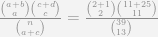
\frac{{a + b \choose a} {c+d \choose c} }{{n \choose a+c}} = \frac{{2 + 1 \choose 2} {11+25 \choose 11} }{{39 \choose 13}}

Which if you look closely is exactly the same set of binomial coefficients for the hypergeometric test I listed previously. So, as long as one only tests the one racial group against all others Fisher’s Exact test of a 2 by 2 contingency table is exactly the same as my recommendation. I don’t particularly think the historical p-value <= 0.05 standard is necessary, but it is the same information.

What bothers me more about this approach is when people start adding other cells in the contingency table. In the first step you need to establish a pattern of discrimination against one particular cognizable group. The treatment of other groups is non sequitur to this question in the first step. (In People vs Black evaluations of how unemployment was treated for non-black jurors was considered is steps 2 and 3, but not in the first step.) Including other groups into the table though will change the outcome. Such ad hoc decisions on what racial groups to consider should not have any effect on the evidence of discrimination against the specific racial group of interest. This problem of what groups is similarly applicable to the regression approach mentioned above. Hypothesis tests of the coefficients will be dependent on what particular contrasts you wish to draw and will change the estimates if certain groups are specified in the equation.

The final approach, counting up particular permutations that meet a particular threshold is intuitive, but again has an ad hoc element, the same problem with choosing which racial groups will impact the test statistic. All of the approaches (including my own) need to be explicit about the groups being tested beforehand. Only monitoring one group as in the hypergeometric test I presented earlier is much simpler to justify ex post facto, but it still would be best to establish the cognizable groups before voir dire takes place. For the tests that use other racial or ethnic groups in the calculations are much more suspect to justification, as the picking and choosing of the other groups will impact the calculations.

Some recommendations

A typical question I get asked as an academic is, So what would you recommend to improve the situation? Totally reasonable question that I often don’t have a good answer to. It is easy to throw out recommendations without considering the entirety of the situation, and the complexities of the criminal justice system are no exception. With full awareness that no one with any authority will likely read my recommendations, my suggestions follow none-the-less.

The first is, only slightly in jest, is to only allow 1 peremptory challenge. There is no bright line rule on numerical evidence presented that is necessary to establish discrimination, but the NY State court of appeals case I mentioned did indicate that it takes more than 1 challenge to establish a pattern of discrimination. This may seem extreme, but the logic applies to the same to allowing fewer peremptory challenges. The fewer the challenges, the less capability either counsel has to entirely eliminate a particular racial group from the jury. It simultaneously makes counsels use of the challenges more precious, so they should be more hesitant to use them based on gut feelings predicated solely by racial stereotyping.

As another side effect (good or bad depending on how you look at it) it also makes the evaluation of whether one is using the challenges in a racially discriminatory manner much clearer. As I shown above, when d decreased the probability of the outcome generally decreased. For example with the Hecker case, pretend there were only a total of 5 peremptory challenges. So in this hypothetical situation have n = 20, d = 5, and p and k = 2 (if the number of n was much higher with the number of peremptory challenges limited to 5 for each side the jury would have to be close to set already by the time 20 individuals were questioned). The probability of this is 5%, whereas if d = 7 the probability is 11%. To be very generic, having fewer challenges makes particular racial patterns less likely by chance.

I understand the motivation for peremptory challenges, but it is unclear to me why such a large number are currently afforded for most cases. Also to the extent that timeliness is a priority for the court, allowing fewer challenges would certainly decrease the necessary time needed for voir dire. (Which was a concern in the Hecker case, as the court only allowed a very short time for questioning the panels.)

The second is that case-law should be established for cognizable groups, particularly given the racial make up of the defendent(s) and victim(s). Or, conversely, counsels should be required a priori to voir dire to establish the cognizable groups. This avoids cherry picking any group for a Batson challenge, as one could always specify a group based on the ex post facto characteristics of the groups used for peremptory challenges. To put a probability to whether a certain number of a particular group could be chosen at at random it is necessary to supply the hypothesis before looking at data. Ad hoc selections of a group could always occur, and with some of the other statistical tests ad hoc inclusion of cells in a contingency table or to include in a test statistic could impact the analysis. Making such a case a priori should prevent any nefarious manipulation of the numbers after the fact.

Neither of these appear to be too onerous to me to be reasonable suggestions. I doubt any lawyer or judge is going to be typing binomial coefficients into Wolfram Alpha during voir dire anytime soon though. Maybe I should make a look up table or nomogram for hypergeometric probabilities for typical values that would come up during voir dire. It would be pretty easy for a lawyer to keep a tally and then do a look up, or keep in mind before hand at what point a set of challenges is unlikely due to chance. With many peremptory challenges and few uses of a particular group, I suspect the probabilities of that happening by chance are much larger than people expect. The two out of two Asian’s in the Hecker case is a good example where the numerical evidence of discrimination is very weak no matter how you plug in the numbers.

Turning data from Python into SPSS data

I’ve shown how you can grab data from SPSS and use it in Python commands, and I figured a post about the opposite process (taking data in Python and turning it into an SPSS data file) would be useful. A few different motivating examples are:

So first as a simple illustration, lets make a set of simple data in Python as a list of lists.

BEGIN PROGRAM Python.
MyData = [(1,2,'A'),(4,5,'B'),(7,8,'C')]
END PROGRAM.

Now to export this data into SPSS you can use spss.StartDataStep(), append variables using varlist.append and then add cases using cases.append (see the Python programming PDF that comes with SPSS in the help to peruse all of these functions plus the documentation). This particular codes adds in 3 variables (two numeric and one string) and then loops through the data python object and adds those cases to the define SPSS dataset.

BEGIN PROGRAM Python.
import spss
spss.StartDataStep()                   #start the data setp
MyDatasetObj = spss.Dataset(name=None) #define the data object
MyDatasetObj.varlist.append('X1',0)    #add in 3 variables
MyDatasetObj.varlist.append('X2',0)
MyDatasetObj.varlist.append('X3',1)
for i in MyData:                       #add cases in a loop
  MyDatasetObj.cases.append(i)
spss.EndDataStep()
END PROGRAM.

Here this will create a SPSS dataset and give it a generic name of the form xDataset? where ? will be an incrementing number based on the session history of naming datasets. To specify the name beforehand you need to use the SPSS command DATASET DECLARE X. and then place the dataset name as the option in the spss.Dataset(name='X') command.

As linked above I have had to do this a few times from Python objects, so I decided to make a bit of a simpler SPSS function to take care of this work for me.

BEGIN PROGRAM Python.
#Export to SPSS dataset function
import spss

def SPSSData(data,vars,types,name=None):
  VarDict = zip(vars,types) #combining variables and 
                            #formats into tuples
  spss.StartDataStep()
  datasetObj = spss.Dataset(name=name) #if you give a name, 
                                       #needs to be declared
  #appending variables to dataset
  for i in VarDict:
    datasetObj.varlist.append(i[0],i[1])
  #now the data
  for j in data:
    datasetObj.cases.append(list(j))
  spss.EndDataStep()
END PROGRAM.

This code takes an arbitrary Python object (data), and two lists, one of the SPSS variable names and the other of the format for the SPSS variables (either 0 for numeric or an integer for the size of the strings). To transform the data to SPSS, it needs a list of the same dimension as the variables you have defined, so this works for any data object that can be iterated over and that can be coerced to returning a list. Or more simply, if list(data[0]) returns a list of the same dimensions for the variables you defined, you can pass the data object to this function. This won’t work for all situations, but will for quite a few.

So with the permutation examples I previously linked to, we can use the itertools library to create a set of all the different permutations of string ABC. Then I define a set of variables and formats as lists, and then we can use the SPSSData function I created to make a new dataset.

DATASET DECLARE Combo.
BEGIN PROGRAM Python.
import itertools
YourSet = 'ABC' 
YourLen = 3
x = itertools.permutations(YourSet,YourLen)
v = ['X1','X2','X3']
t = [1,1,1]
SPSSData(data=x,vars=v,types=t,name='Combo')
END PROGRAM. 

This work flow is not optimal if you are creating the data in a loop (such as in the Google Places API example I linked to earlier), but works well for static python objects, such as the object returned by itertools.

Presentation at IACA 2014 – Making Field Stops Smart

Part of the work I am doing with the Finn Institute in collaboration with the Albany Police Department was accepted as a presentation at the upcoming IACA conference in Seattle next week. The NIJ used to have a separate Crime Mapping conference, but they folded it into the yearly IACA conference. So this is one of the NIJ Crime Mapping presentations.

The title of the presentation is Making Field Stops Smart, and below is the abstract:

Mapping hot spots of crime incidents for use in allocating patrol resources has become commonplace. This research is intended to extend the logic to mapping locations of field interviews. The project has two specific spatial analysis components; 1) are most of the stops being conducted a high crime locations, and 2) are locations with the most stops the locations with the most productive stops (in terms of arrests, contraband recovery, stopping chronic offenders). Making stops smart is being conducted as a research partnership between the Albany, NY police department and the Finn Institute of Public Safety.

The time of the presentation is at 15:30 on Thursday 9/11. Two other presenters, Eric Paull from Akron, Ohio and Christian Peterson from Portland, Oregon have presentations on the panel as well (see the IACA agenda for their talk abstracts).

I am uncomfortable publicly releasing the pre-print white papers given the collaboration (Rob Worden and Sarah McLean are co-authors) and because that APD’s name is directly attached to the work. But if you send me an email I can forward the white paper for this presentation and related work we are doing.

If you see me at IACA feel free to come up and say hi. I do not have any other plans while I am in town besides going to presentations.