Notes on making line plots in matplotlib

Line plots are probably the most common type of plot I make. Here are my notes on making nice line plots in matplotlib in python. You can see the full replication code on Github here.

First, I will be working with UCR crime reports, for national level and then city level data from the Real Time Crime Index. The AH Datalytics crew saves their data in github as a simple csv file, and with the FBI CDE this code also downloads the most recent as well. getUCR are just helper functions to download the data, and cdcplot are some of my plot helpers, such as my personal matplotlib theme.

import cdcplot, getUCR
import pandas as pd
import matplotlib.pyplot as plt
from matplotlib import cm

# Get the National level and City data from Real Time Crime Index
us = getUCR.cache_fbi()
city = getUCR.prep_city()

So first, lets just do a basic plot of the national level MV Theft rate (here the rates are per 100,000 population, not per vehicles).

# Lets do a plot for National of the Motor Vehicle Theft Rate per pop
us['Date'] = pd.to_datetime(us['Date'])
us2020 = us[us['Date'].dt.year >= 2020]
var = 'motor-vehicle-theftrate'

# Basic
fig, ax = plt.subplots()
ax.plot(us2020['Date'],us2020[var])
fig.savefig('Line00.png', dpi=500, bbox_inches='tight')

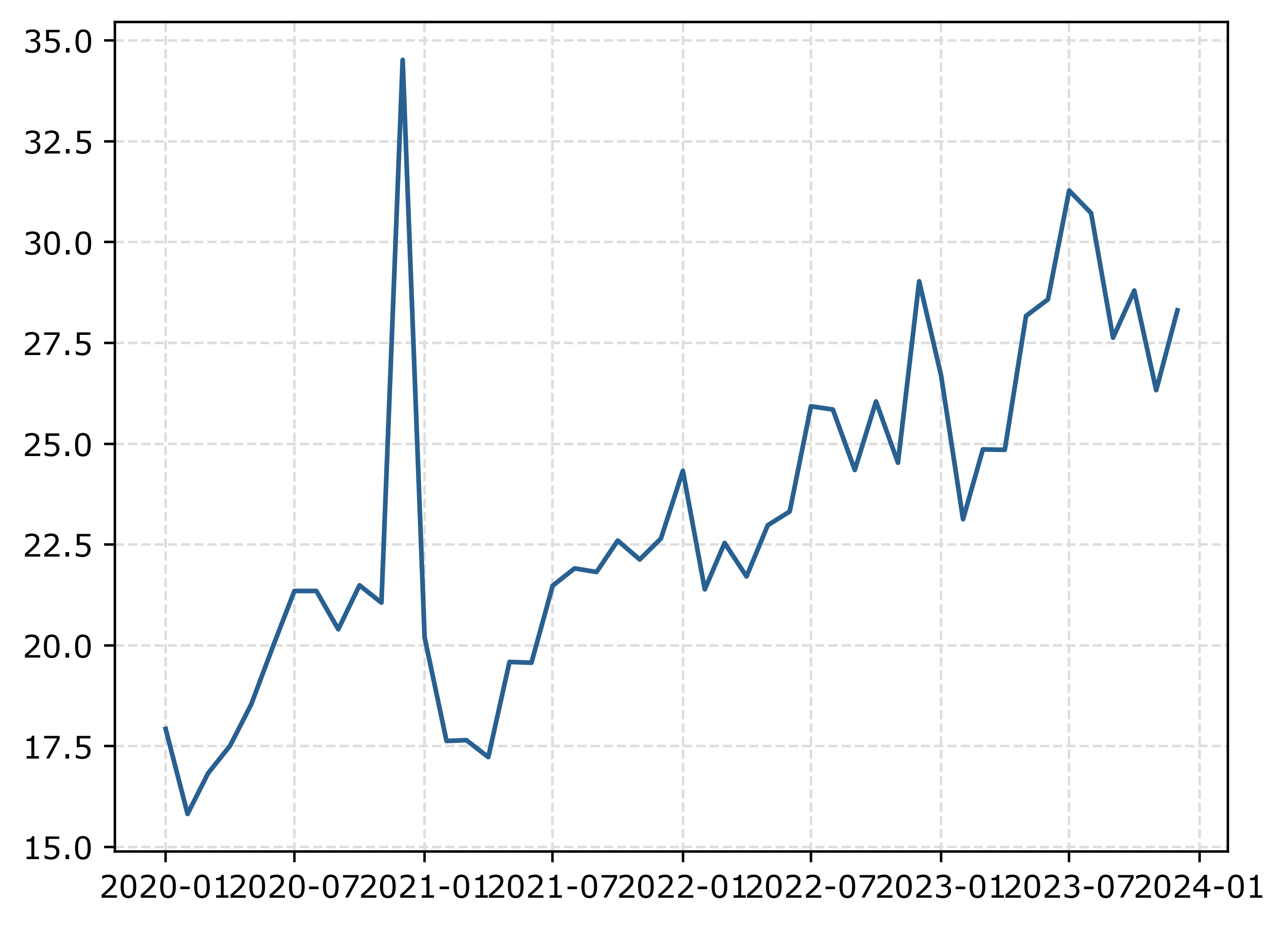
The big spike in December 2020 is due to the way FBI collects data. (Which I can’t find the specific post, but I am pretty sure Jeff Asher has written about in his substack.) So the glut of December reports are not actually extra reports in December, it is just the silly way the FBI reports the backlogged incidents.

You can also see the X axis labels are too close together. But otherwise (besides lack of labels) is acceptable. One thing I like to do with line plots is to superimpose point markers on the sample points. It doesn’t matter here so much, but this is helpful when you have irregular time points or missing data, it is clear that the time period is missing.

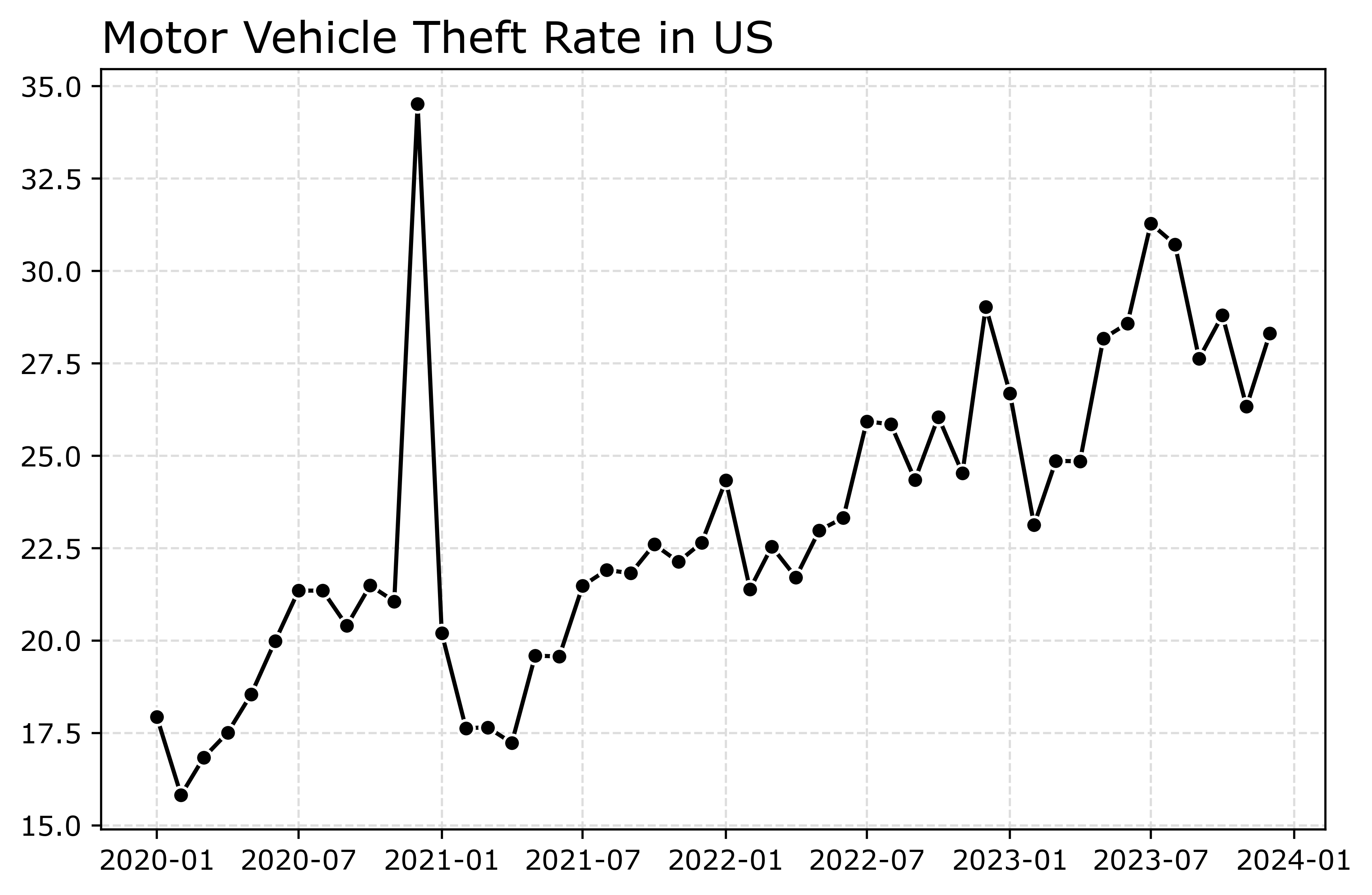
In matplotlib, you can do this by specifying -o after the x/y coordinates for the line. I also like the look of plotting with a white marker edge. Also making the plot slightly larger fixes the X axis labels (which have a nice default to showing Jan/July and the year). And finally, since the simplicity of the chart, instead of doing x or y axis labels, I can just put the info I need into the title. For a publication I would likely also put “per 100,000 population” somewhere (in a footnote on the chart or if the figure caption).

# Marker + outline + size
fig, ax = plt.subplots(figsize=(8,5))
ax.plot(us2020['Date'],us2020[var],'-o',
        color='k',markeredgecolor='white')
ax.set_title('Motor Vehicle Theft Rate in US')
fig.savefig('Line01.png', dpi=500, bbox_inches='tight')

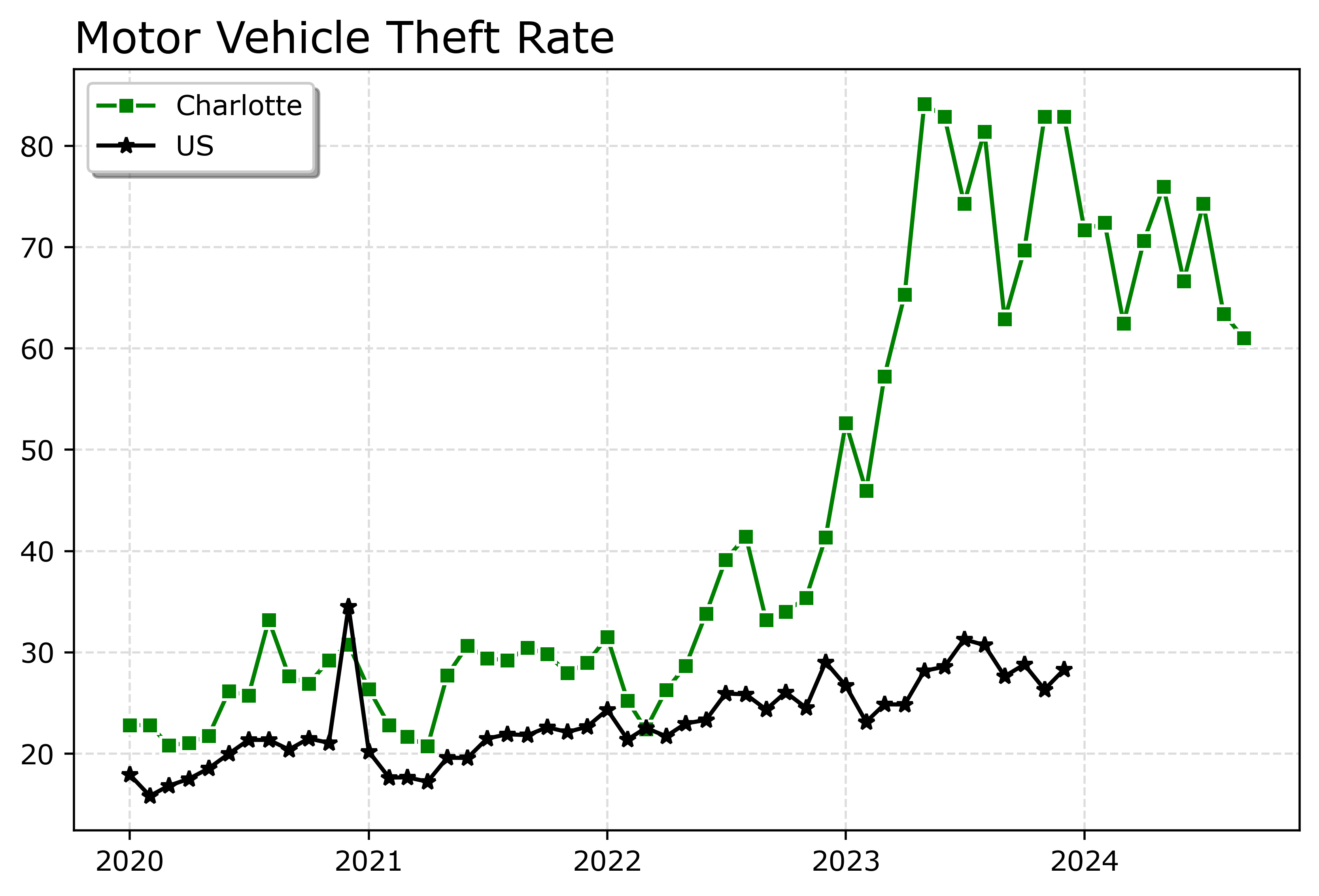
Markers are one way to distinguish between multiple lines as well. So you can do -s for squares superimposed on the lines, -^ for a triangle, etc. The white edge only looks nice for squares and circles though in my opinion. See the list of filled markers in this matplotlib documentation. Circles and squares IMO look the nicest and carry a similar visual weight. Here is superimposed Charlotte and US, showing off stars just to create show how to do it.

# Multiple cities
city[var] = (city['Motor Vehicle Theft']/city['Population'])*100000
nc2020 = city[(city['Year'] >= 2020) & (city['State_ref'] == 'NC')]
ncwide = nc2020.pivot(index='Mo-Yr',columns='city_state',values=var)
cityl = list(ncwide)
ncwide.columns = cityl # removing index name
ncwide['Date'] = pd.to_datetime(ncwide.index,format='%m-%Y')
ncwide.sort_values(by='Date',inplace=True)

fig, ax = plt.subplots(figsize=(8,5))
ax.plot(ncwide['Date'],ncwide['Charlotte, NC'],'-s',
        color='green',markeredgecolor='white',label='Charlotte')
ax.plot(us2020['Date'],us2020[var],'-*',
        color='k',label='US')
ax.legend()
ax.set_title('Motor Vehicle Theft Rate')
fig.savefig('Line02.png', dpi=500, bbox_inches='tight')

Charlotte was higher, but looked like it had parallel trends (just increased by around 10 per 100,000) with national trends from 2020 until early 2022. In early 2022, Charlotte dramatically increased though, and peaked/had high volatility since mid 2023 in a different regime shift from the earlier years.

When you make line plots, you want the lines to be a more saturated color in my opinion. It both helps them stand out, as well as makes it more likely to survive printing. No pastel colors. With the points superimposed, even with greyscale printing it will be fine. I commonly tell crime analysts to make a printable report for regular meetings, it is more likely to be viewed than an interactive dashboard.

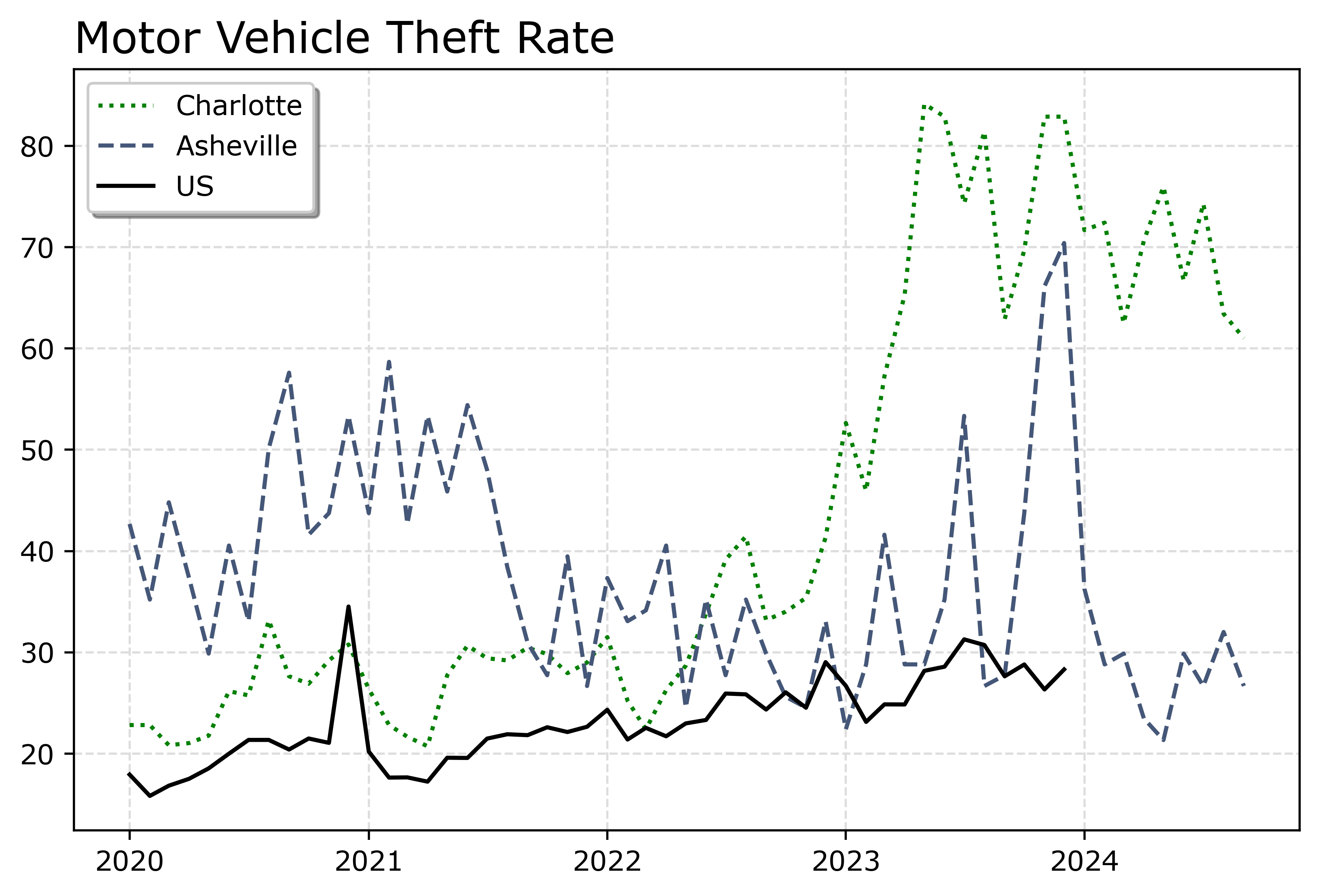
You can technically do dashes as well via the text string input. I do not like them though typically, as they are less saturated. Here I show two different dash styles. And you could do dashes and points, e.g. :o, (see this matplotlib doc for the styles) I have never bothered to do that though.

# Dashes instead of points
fig, ax = plt.subplots(figsize=(8,5))
ax.plot(ncwide['Date'],ncwide['Charlotte, NC'],':',
        color='green',markeredgecolor='white',label='Charlotte')
ax.plot(ncwide['Date'],ncwide['Asheville, NC'],'--',
        color='#455778',label='Asheville')
ax.plot(us2020['Date'],us2020[var],'-',
        color='k',label='US')
ax.legend()
ax.set_title('Motor Vehicle Theft Rate')
fig.savefig('Line03.png', dpi=500, bbox_inches='tight')

You can see Asheville had an earlier spike, went back down, and then in 2023 had another pronounced spike. Asheville has close to a 100k population, so the ups/downs correspond pretty closely to just the total counts per month. So the spikes in 2023 are an extra 10, 20, 40 mv thefts than you might have expected based on historical patterns.

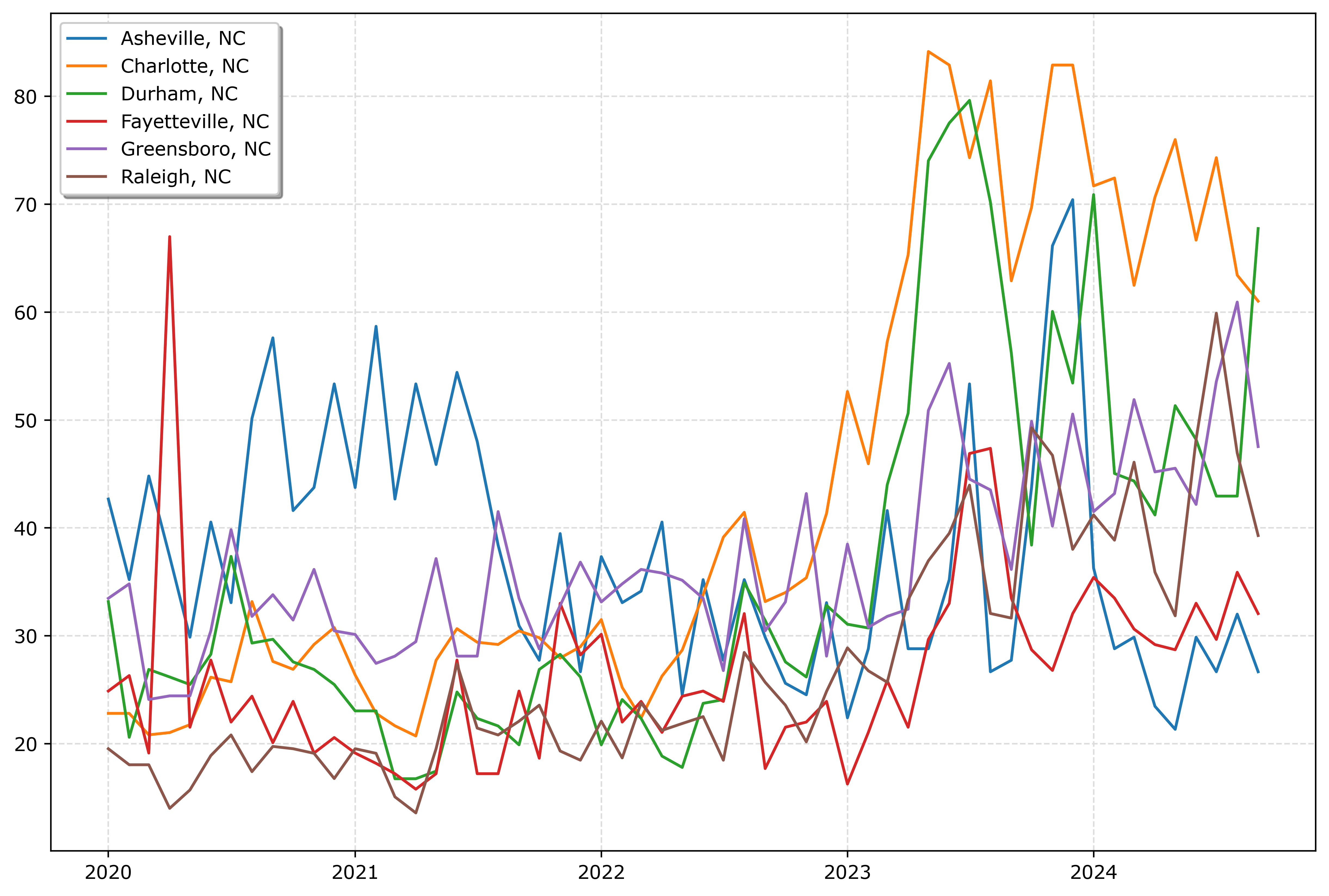
If you must have many lines differentiated via colors in a static plot, the Tableau color palette or the Dark2 colors work the best. Here is an example plotting the North Carolina cities in a loop with the Tableau colors:

# It is difficult to untangle multiple cities
# https://matplotlib.org/stable/users/explain/colors/colormaps.html
fig, ax = plt.subplots(figsize=(12,8))
for i,v in enumerate(cityl):
    ax.plot(ncwide['Date'],ncwide[v],'-',color=cm.tab10(i),label=v)

ax.legend()
fig.savefig('Line04.png', dpi=500, bbox_inches='tight')

So you could look at this and see “blue does not fit the same pattern”, and then go to the legend to see blue is Asheville. It is a bit of work though to disentangle the other lines though.

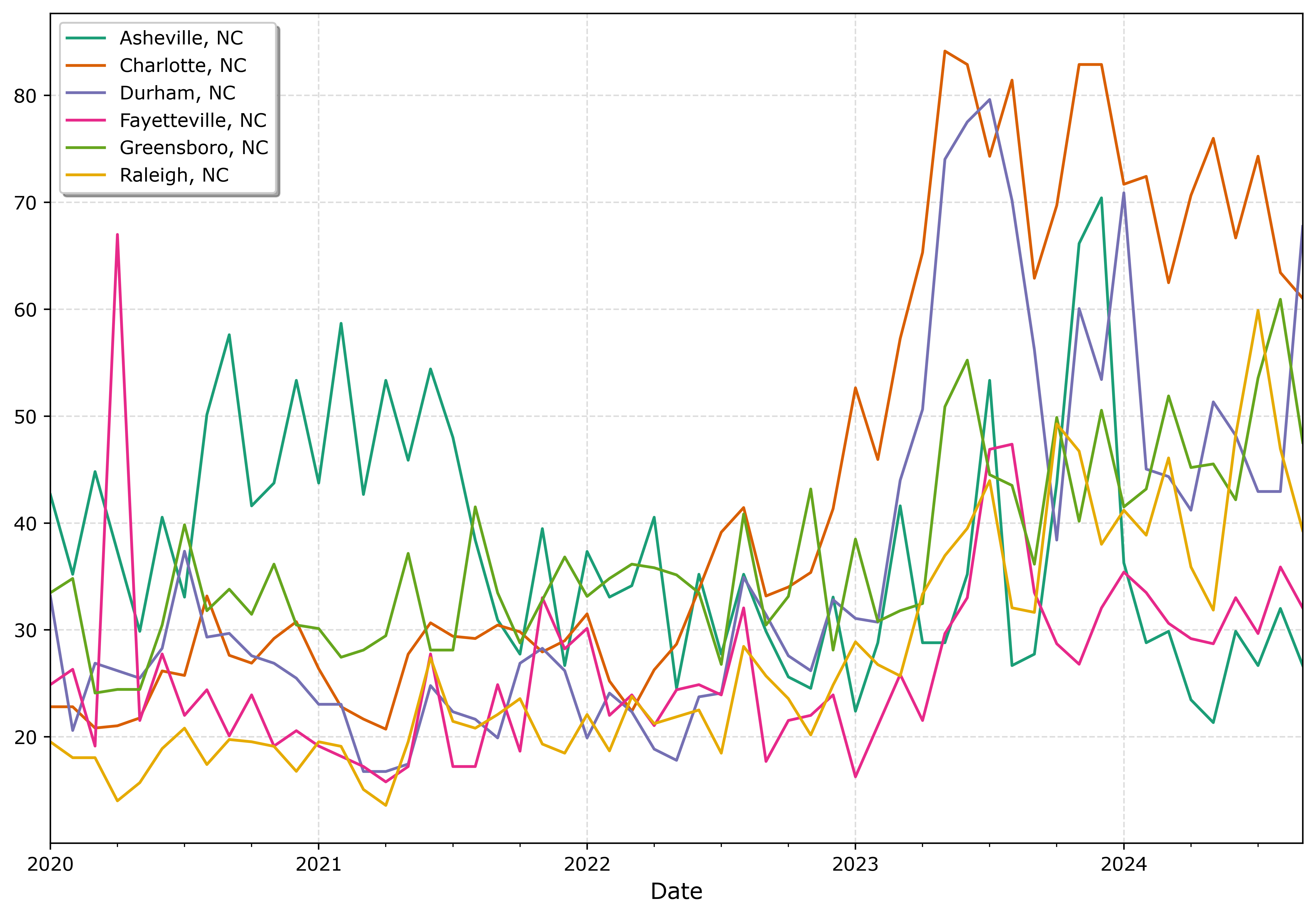
And here is an example using the pandas plotting method with the Dark2 palette. I do this more for exploratory data analysis, I often end up editing so much of the axis that using the pandas short cuts are not less work. Here I would edit the axis so the lines do not abut the x axis ends. For old school R people, this is similar to matplot in R, so the data needs to be in wide format, not long. (And all the limitations that come with that.)

# pandas can be somewhat more succinct
fig, ax = plt.subplots(figsize=(12,8))
ncwide.plot.line(x='Date',ax=ax,color=cm.Dark2.colors)
fig.savefig('Line05.png', dpi=500, bbox_inches='tight')

I tend to like the Tableau colors somewhat better though. The two greenish colors (Asheville and Greensboro) and the two orangish colors (Raleigh and Charlotte) I personally have to look quite closely to tell them apart. Men tend to have lower color resolution than women, I am not color blind and you may find them easier to tell the difference. Depending on your audience it would be good to assume lower than higher color acuity in the audience’s vision in general.

In my opinion, often you can only have 3 lines in a graph and it becomes too busy. It is partly due to how tortuous the lines are, so you can have many lines if they are parallel and don’t cross. But assuming you can have max 3 is a good baseline assumption.

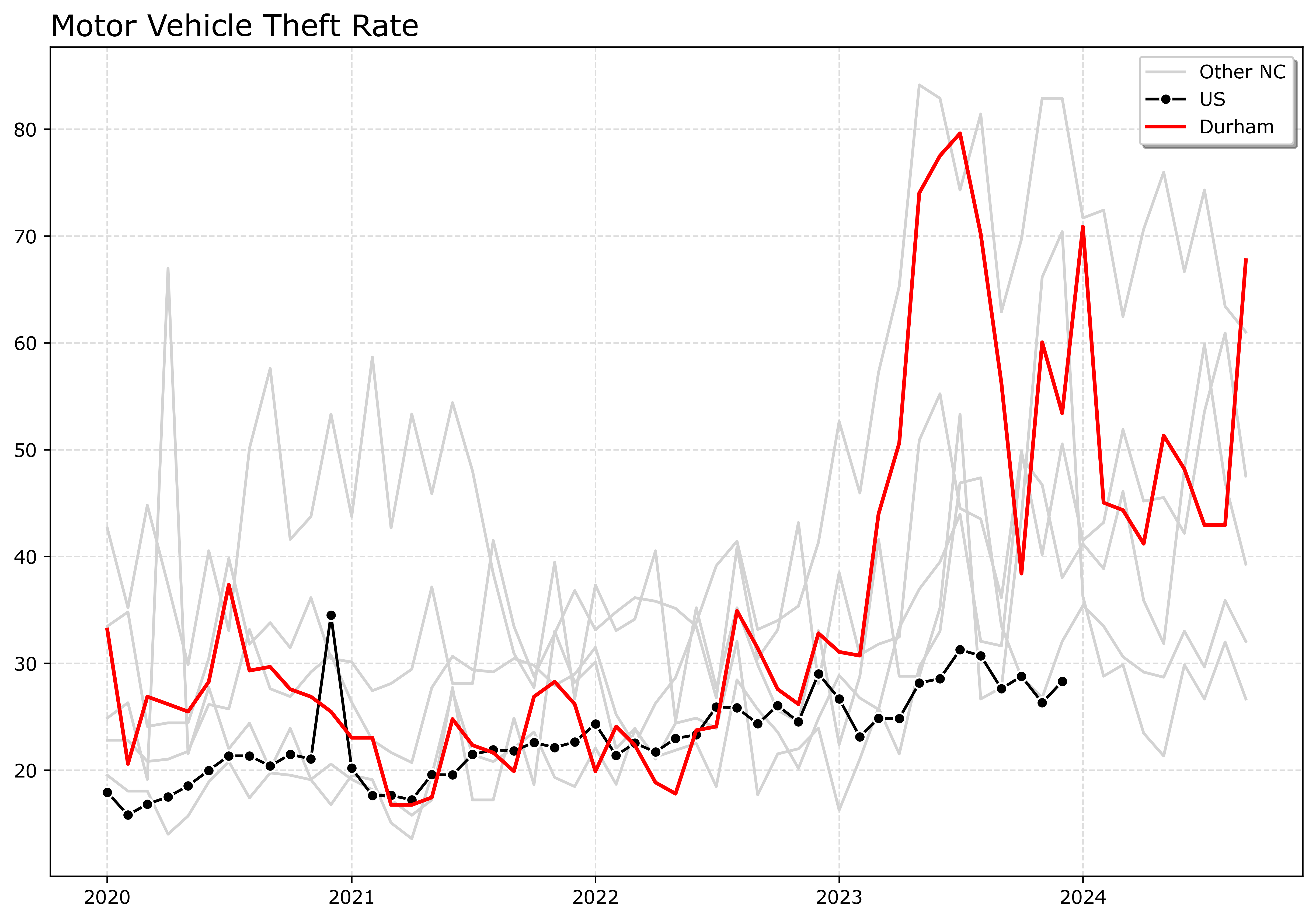
An alternative though is to highlight specific lines. Here I highlight Durham and US, the other cities are light grey and in the background. Also looping over you can specific the order. I draw Durham last (so it goes on top). The grey cities are first (so are at the bottom). Here I only give the first grey background city a label, so the legend does not have duplicates.

# Highlight one city, compared to the rest
fig, ax = plt.subplots(figsize=(12,8))
ncwide.plot.line(x='Date',ax=ax,color=cm.Dark2.colors)
fig.savefig('Line05.png', dpi=500, bbox_inches='tight')


# Highlight one city, compared to the rest
fig, ax = plt.subplots(figsize=(12,8))
lab = 'Other NC'

for v in cityl:
    if v == 'Durham, NC':
        pass
    else:
        ax.plot(ncwide['Date'],ncwide[v],'-',color='lightgrey',label=lab)
        lab = None


ax.plot(us2020['Date'],us2020[var],'-o',
        color='k',markeredgecolor='white',label='US')
ax.plot(ncwide['Date'],ncwide['Durham, NC'],'-',linewidth=2,color='red',label='Durham')
ax.legend()
ax.set_title('Motor Vehicle Theft Rate')
fig.savefig('Line06.png', dpi=500, bbox_inches='tight')

If I had many more lines, I would make the grey lines either smaller in width, e.g. linewidth=0.5, and/or make them semi-transparent, e.g. alpha=0.8. And ditto if you want to emphasize a particular line, making it a larger width (here I use 2 for Durham), makes it stand out more.

Durham here you can see has very similar overall trends compared to Charlotte.

And those are my main notes on making nice line plots in matplotlib. Let me know in the comments if you have any other typical visual flourishes you often use for line plots.

Identifying excess rounding

Given the hubbub about Blue Cross and paying for anesthesiologists, there was an interesting paper making the rounds, Comparison of Anesthesia Times and Billing Patterns by Anesthesia Practitioners. (Shared via Crémieux.)

Most medical claims are billed via what are call CPT codes (Current Procedural Terminology). So if you go to the ER, you will get billed for a code 99281 to 99285. The final digit encodes different levels of complexity for the case, with 5’s being more complex. It was news to me that anesthesiologists actually bill for time directly, but the above linked paper showed (pretty plainly) that there is strong evidence they round up to every 5 minutes.

Now the paper just selected the anesthesiologists that have the highest proportion of billed times ending in 5’s. Here I will show a better way to flag specific problematic anesthesiologists (using repeated binomial tests and false discovery rate corrections).

Here I simulate 1,000 doctors, and select 40 of them to be bad, and those 40 round all of their claims up to the nearest 5 minute mark. Whereas the other docs are just billing the time as is. And they have varying total number of claims, between 100 and 500.

import numpy as np
from scipy.stats import gamma,uniform
import matplotlib.pyplot as plt
import pandas as pd
from scipy.stats import binomtest,false_discovery_control

np.random.seed(10)

docs = 1000
# pick a random set 
bad_docs = np.random.choice(np.arange(docs),40,replace=False)
doci = []
claims = []

for i in range(docs):
    totn = int(np.ceil(uniform.rvs(100,500))) # number of claims
    doci += [i]*totn
    g = gamma.rvs(6,scale=12,size=totn)
    if i in bad_docs:
        g = np.ceil(g/5)*5
    else:
        g = g.round()
    claims += g.tolist()

dat = pd.DataFrame(zip(doci,claims),columns=['Doc','Time'])

# Histogram
fig, ax = plt.subplots(figsize=(8,4))
dat['Time'].hist(bins=range(201),alpha=0.8,color='k',ax=ax)
plt.savefig('Histogram.png',dpi=500,bbox_inches='tight')

You can see my gamma distribution is not as heavy tailed as the JAMA paper, but qualitatively has the same spike traits. Based on this, you can see the spike is relative to the other density, and so that shows in the JAMA paper there are more anesthesiologists rounding at 60 minutes than there are at the other 5 minute intervals.

In this particular example, it would be trivial to spot the bad docs, since they round 100% of the time, and you would only expect around 20% (since billing in minute intervals).

dat['Round'] = dat['Time'] % 5 == 0
dat['N'] = 1
gs = dat.groupby('Doc',as_index=False)[['N','Round']].sum()
gs['Perc'] = gs['Round']/gs['N']
gs.sort_values(by='Perc',ascending=False,ignore_index=True,inplace=True)
gs

# Upper Quantiles
np.quantile(gs['Perc'],[0.75,0.8,0.85,0.9,0.95,0.99])

But you can see a problem with using a top 5% quantile cut off here. Since I only have 4% bad doctors, using that hard cut-off will result in a few false positive flags. My suggested approach is to create a statistical test (Chi-Square, binominal, KS, whatever makes sense for individual doctors). Run the test for each doctor, get the p-value, and then run a false discovery rate correction on the p-values.

The above where doctors round 100% of the time is too easy, so here I simulate 40 doctors will round up 10% to 30% of the time. I also have fewer cases (more cases and more rounding make it much easier to spot).

# Redoing sim, but it is a smaller percentage of the stats are bad
for i in range(docs):
    totn = int(np.ceil(uniform.rvs(100,500))) # number of claims
    doci += [i]*totn
    g = gamma.rvs(6,scale=12,size=totn)
    if i in bad_docs:
        randperc = int(np.round(totn*uniform.rvs(0.1,0.2)))
        badn = np.random.choice(np.arange(totn),randperc,replace=False)
        g[badn] = np.ceil(g[badn]/5)*5
        g = g.round()
    else:
        g = g.round()
    claims += g.tolist()

dat = pd.DataFrame(zip(doci,claims),columns=['Doc','Time'])
dat['Round'] = dat['Time'] % 5 == 0
dat['N'] = 1
gs = dat.groupby('Doc',as_index=False)[['N','Round']].sum()
gs['Perc'] = gs['Round']/gs['N']
gs.sort_values(by='Perc',ascending=False,ignore_index=True,inplace=True)

Now we can apply the binomial test to each doctor, then adjust for false discovery rate.

# Calculating binom test
def bt(x):
    k,n = x.iloc[0],x.iloc[1]
    b = binomtest(k,n,p=0.2,alternative='greater')
    return b.pvalue

gs['p'] = gs[['Round','N']].apply(bt,axis=1)
gs['q'] = false_discovery_control(gs['p'],method='by')

# Captures 28 out of 40 bad docs, no false positives
gs['BadDocs'] = gs['Doc'].isin(bad_docs)
gs[gs['q'] < 0.05]

If you check out the doctors via gs.head(50), you can see that a few of the bad-docs where adjusted to have q-values of 1, but they ended up being low N and in the range you would expect.

While anesthesiologists billing is different, this same approach would be fine for CPT codes that have the 1-5 modifier (you might use a leave one out strategy and a Chi-Square test). Anesthesiologists if they know they will be scrutinized with exact 5 minutes, they will likely adjust and round up, but to not regular numbers. If that is the case, the default distribution will be expected to be uniform on the 0-9 digits (sometimes people use a Benford like test for the trailing digits, this is the same idea). That will be harder to fake.

I don’t have an issue with Blue Cross saying they will only bill for pre-allotted times. But even without making an explicit policy like that, they can identify bad actors and pursue investigations into those problematic anesthesiologists even without making widespread policy changes.

Year in Review 2024

Past year in review posts I have made focused on showing blog stats. Writing this in early December, but total views will likely be down this year – I am projecting around 140,000 views in total for this site. But I have over 25k views for the Crime De-Coder site, so it is pretty much the same compared to 2023 combining the two sites.

I do not have a succinct elevator speech to tell people what I am working on. With the Crime De-Coder consulting gig, it can be quite eclectic. That Tukey quote being a statistician you get to play in everyone’s backyard is true. Here is a rundown of the paid work I conducted in the past year.

Evidence Based CompStat: Work with Renee Mitchell and the American Society of Evidence Based Policing on what I call Evidence Based CompStat. This mostly amounts to working directly with police departments (it is more project management than crime analysis) to help them get started with implementing evidence based practices. Reach out if that sounds like something your department would be interested in!

Estimating DV Violence: Work supported by the Council on CJ. I forget exactly the timing of events. This was an idea I had for a different topic (to figure out why stores and official reports of thefts were so misaligned). Alex approached me to help with measuring national level domestic violence trends, and I pitched this idea (use local NIBRS data and NCVS to get better local estimates).

Premises Liability: I don’t typically talk about ongoing cases, but you can see a rundown of some of the work I have done in the past. It is mostly using the same stats I used as a crime analyst, but in reference to civil litigation cases.

Patrol Workload Analysis: I would break workload analysis for PDs down into two categories, advanced stats and CALEA reports. I had one PD interested in the simpler CALEA reporting requirement (which I can do for quite a bit cheaper than the other main consulting firm that offers these services).

Kansas City Python Training: Went out to Kansas City for a few days to train their analysts up in using python for Focused Deterrence. If you think the agenda in the pic below looks cool get in touch, I would love to do more of these sessions with PDs. I make it custom for the PD based on your needs, so if you want “python and ArcGIS”, or “predictive models” or whatever, I will modify the material to go over those advanced applications. I have also been pitching the same idea (short courses) for PhD programs. (So many posers in private sector data science, I want more social science PhDs with stronger tech skills!)

Patterson Opioid Outreach: Statistical consulting with Eric Piza and Kevin Wolff on a street outreach intervention intended to reduce opioid overdose in Patterson New Jersey. I don’t have a paper to share for that at the moment, but I used some of the same synthetic control in python code I developed.

Bookstore prices: Work with Scott Jacques, supported by some internal GSU money. Involves scraping course and bookstore data to identify the courses that students spend the most on textbooks. Ultimate goal in mind is to either purchase those books as unlimited epubs (to save the students money), or encourage professors to adopt better open source materials. It is a crazy amount of money students pour into textbooks. Several courses at GSU students cumulatively spend over $100k on course materials per semester. (And since GSU has a large proportion of Pell grant recipients, it means the federal government subsidizes over half of that cost.)

General Statistical Consulting: I do smaller stat consulting contracts on occasion as well. I have an ongoing contract to help with Pam Metzger’s group at the SMU Deason center. Did some small work for AH Datalytics on behind the scenes algorithms to identify anomalous reporting for the real time crime index. I have several times in my career consulted on totally different domains as well, this year had a contract on calculating regression spline curves for some external brain measures.

Data Science Book: And last (that I remember), I published Data Science for Crime Analysis with Python. I still have not gotten my 100 sales I would consider it a success – so if you have not bought a copy go do that right now. (Coupon code APWBLOG will get you $10 off for the next few weeks, either the epub or the paperback.)

Sometimes this seems like I am more successful than I am. I have stopped counting the smaller cold pitches I make (I should be more aggressive with folks, but most of this work is people reaching out to me). But in terms of larger grant proposals or RFPs in that past year, I have submitted quite a few (7 in total) and have landed none of them to date! Submitted a big one to support surveys that myself and Gio won the NIJ competition on for place based surveys to NIJ in their follow up survey solicitation, and it was turned down for example. So it goes.

In addition to the paid work, I still on occasion publish peer reviewed articles. (I need to be careful with my time though.) I published a paper with Kim Rossmo on measuring the buffer zone in journey to crime data. I also published the work on measuring domestic violence supported by the Council on CJ with Alex Piquero.

I took the day gig in Data Science at the end of 2019. Citations are often used as a measure of a scholars influence on the field – they are crazy slow though.

I had 208 citations by the end of 2019, I now have over 1300. Of the 1100 post academia, only a very small number are from articles I wrote after I left (less than 40 total citations). A handful for the NIJ recidivism competition paper (with Gio), and a few for this Covid and shootings paper in Buffalo. The rest of the papers that have a post 2019 publishing date were entirely written before I left academia.

Always happy to chat with folks on teaming up on papers, but it is hard to take the time to work on a paper for free if I have other paid work at the moment. One of the things I need to do to grow the business is to get some more regular work. So if you have a group (academic, think tank, public sector) that is interested in part time (or fractional I guess is what the cool kids are calling it these days), I would love to chat and see if I could help your group out.

Suits, Money Laundering, and Linear Programming

Currently watching Suits with the family, and an interesting little puzzle came up in the show. In Season 1, episode 8, there is a situation with money laundering from one account to many smaller accounts.

So the set up is something like “transfer out 100 million”, and then you have some number of smaller accounts that sum to 100 million.

When Lewis brought this up in the show, and Mike had a stack of papers to go through to identify the smaller accounts that summed up to the larger account, my son pointed out it would be too difficult to go through all of the permutations to figure it out. The total number of permutations would be something like:

N = Sum(b(A choose k) for 1 to k)

Where A is the total number of accounts to look over, and k is the max number of potential accounts the money was spread around. b(A choose k) is my cheeky text format for binomial coefficients.

So this will be a very large number. 10,000 choose 4 for example is 416 416 712 497 500 – over 416 trillion. You still need to add in b(10,000 choose 2) + b(10,000 choose 3) + ….. b(10,000 choose k). With even a small number of accounts, the number of potential combinations will be very large.

But, I said in response to my son I could write a linear program to find them. And this is what this post shows, but doing so made me realize there are likely too many permutations in real data to make this a feasible approach in conducting fraud investigations. You will have many random permutations that add up to the same amount. (I figured some would happen, but it appears to me many happen in random data.)

(Note I have not been involved with any financial fraud examinations in my time as an analyst, I would like to get a CFA time permitting, and if you want to work on projects let me know! So all that said, I cannot speak to the veracity of whether this is a real thing people do in fraud examinations.)

So here I use python and the pulp library (and its default open source CBC solver) to show how to write a linear program to pick bundles of accounts that add up to the right amount. First I simulate some lognormal data, and choose 4 accounts at random.

import pulp
import numpy as np

# random values
np.random.seed(10)
simn = 10000
x = np.round(np.exp(np.random.normal(loc=5.8,scale=1.2,size=simn)),2)

# randomly pick 4
slot = np.arange(0,simn)
choice = np.random.choice(slot,size=4,replace=False)
tot = x[choice].sum()
print(tot,choice)

So we are expecting the answer to be accounts 2756 5623 5255 873, and the solution adds up to 1604.51. So the linear program is pretty simple.

# make a linear program
P = pulp.LpProblem("Bundle",pulp.LpMinimize)
D = pulp.LpVariable.dicts("D",slot,cat='Binary')

# objective selects smallest group
P += pulp.lpSum(D)

# Constraint, equals the total
P += pulp.lpSum(D[i]*x[i] for i in range(simn)) == tot

# Solving with CBC
P.solve()

# Getting the solution
res = []
for i in range(simn):
    if D[i].varValue == 1:
        res.append(i)

In practice you will want to be careful with floating point (later I convert the account values to ints, another way though is instead of the equal constraint, make it <= tot + eps and >= tot - eps, where eps = 0.001. But for the CBC solver this ups the time to solve by quite a large amount.)

You could have an empty objective function (and I don’t know the SAT solvers as much, I am sure you could use them to find feasible solutions). But here I have the solution by the minimal number of accounts to look for.

So here is the solution, as you can see it does not find our expected four accounts, but two accounts that also add up to 1604.51.

You can see it solved it quite fast though, so maybe we can just go through all the potential feasible solutions. I like making a python class for this, that contains the “elimination” constraints to prevent that same solution from coming up again.

# Doing elimination to see if we ever get the right set
class Bundle:
    def __init__(self,x,tot,max_bundle=10):
        self.values = (x*100).astype('int')
        self.totn = len(x)
        self.tot = int(round(tot*100))
        self.pool = []
        self.max_bundle = max_bundle
        self.prob_init()
    def prob_init(self):
        P = pulp.LpProblem("Bundle",pulp.LpMinimize)
        D = pulp.LpVariable.dicts("D",list(range(self.totn)),cat='Binary')
        # objective selects smallest group
        P += pulp.lpSum(D)
        # Constraint, equals the total
        P += pulp.lpSum(D[i]*self.values[i] for i in range(simn)) == self.tot
        # Max bundle size constraint
        P += pulp.lpSum(D) <= self.max_bundle
        self.prob = P
        self.d = D
    def getsol(self,solver=pulp.PULP_CBC_CMD,solv_kwargs={'msg':False}):
        self.prob.solve(solver(**solv_kwargs))
        if self.prob.sol_status != -1:
            res = []
            for i in range(self.totn):
                if self.d[i].varValue == 1:
                    res.append(i)
            res.sort()
            self.pool.append(res)
            # add in elimination constraints
            self.prob += pulp.lpSum(self.d[r] for r in res) <= len(res)-1
            return res
        else:
            return -1
    def loop_sol(self,n,solver=pulp.PULP_CBC_CMD,solv_kwargs={'msg':False}):
        for i in range(n):
            rf = self.getsol(solver,solv_kwargs)
            if rf != 1:
                print(f'Solution {i}:{rf} sum: {self.values[rf].sum()}')
            if rf == -1:
                print(f'No more solutions at {i}')
                break

And now we can run through and see if the correct solution comes up:

be = Bundle(x=x,tot=tot)
be.loop_sol(n=10)

Uh oh – I do not feel like seeing how many potential two solutions there are in the data (it is small enough I could just enumerate those directly). So lets put a constraint in that makes it so it needs to be four specific accounts that add up to the correct amount.

# add in constraint it needs to be 4 selected
choice.sort()
be.prob += pulp.lpSum(be.d) == 4
print(f'Should be {choice}')
be.loop_sol(n=10)

And still no dice. I could let this chug away all night and probably come up with the set I expected at some point. But if you have so many false positives, this will not be very useful from an investigative standpoint. So you would ultimately need more constraints.

Lets say our example the cumulative total will be quite large. Will that help limit the potential feasible solutions?

# Select out a sample of high
sel2 = np.random.choice(x[x > 5000],size=4,replace=False)
tot2 = sel2.sum()
ch2 = np.arange(simn)[np.isin(x,sel2)]
ch2.sort()
print(tot2,ch2)

be2 = Bundle(x=x,tot=tot2)
be2.loop_sol(n=20)

There are still too many potential feasible solutions. I thought maybe a problem with real data is that you will have fixed numbers, say you are looking at transactions, and you have specific $9.99 transactions. If one of those common transactions results in a total sum, it will just be replicated in the solution over and over again. I figured with random data the sum would still be quite unique, but I was wrong for that.

So I was right in that I could write a linear program to find the solution. I was wrong that there would only be one solution!

Some things work

A lawyer and economist Megan Stevenson last year released an essay that was essentially “Nothing Works” 2.0. For those non-criminologists, “nothing works” was a report by Robert Martinson in the 1970’s that was critical of the literature on prisoner rehabilitation, and said to date that essentially all attempts at rehabilitation were ineffective.

Martinson was justified. With the benefit of hindsight, most of the studies Martinson critiques were poorly run (in terms of randomization, they almost all were observational self selected into treatment) and had very low statistical power to detect any benefits. (For people based experiments in CJ, think you typically need 1000+ participants, not a few dozen.)

Field experiments are hard and messy, and typically we are talking about “reducing crime by 20%” or “reducing recidivism by 10%” – they are not miracles. You can only actually know if they work using more rigorous designs that were not used at that point in social sciences.

Stevenson does not deny those minor benefits exist, but moves the goalposts to say CJ experiments to date have failed because they do not generate wide spread sweeping change in CJ systems. This is an impossible standard, and is an example of the perfect being the enemy of the good fallacy.

A recent piece by Brandon del Pozo and colleagues critiques Stevenson, which I agree with the majority of what Brandon says. Stevenson’s main critique are not actually with experiments, but more broadly organizational change (which del Pozo is doing various work in now).

Stevenson’s critique is broader than just policing, but I actually would argue that the proactive policing ideals of hotspots and focused deterrence have diffused into the field broadly enough that her points about systematic change are false (at least in those two examples). Those started out as individual projects though, and only diffused through repeated application in a slow process.

As I get older, am I actually more of the engineer mindset that Stevenson is critical of. As a single person, I cannot change the whole world. As a police officer or crime analyst or professor, you cannot change the larger organization you are a part of. You can however do one good thing at a time.

Even if that singular good thing you did is fleeting, it does not make it in vain.

References

Types of websites and trade-offs

For some minor updates on different fronts. I have a new blog post on Crime De-Coder about how to figure out the proper ODBC connection string to query your record management system. I have done this song and dance with maybe a dozen different PDs at this point (and happened to do it twice in the prior week), so figured a post would make sense.

Two, article with Kim Rossmo has been published, The journey-to-crime buffer zone: Measurement issues and methodological challenges. Can check out the github repo and CrimRXiv version for free.

Main reason I wanted to make a post today about the types of websites. I have seen several influencers discuss using GenAI to create simple apps. These tools are nice, but many seem to make bad architecture decisions from the start (many people should not be making python served websites). So I will break down a few of the different options for creating a website in this post.

The most basic is a static html site – this just requires you create the HTML and place it somewhere on a server. A free option is github pages. You can still use javascript apps, but they are run client side and there is no real ability to limit who can see the site (e.g. you cannot make it password protected to log in). These can handle as much traffic as you want. If you have data objects in the site (such as a dashboard) the objects just need to be stored directly on the server (e.g. in json files or csv if you want to parse them). You can build data dashboards using D3 or other WASM apps.

The other types of websites you can do anything you can in HTML, so I focus more on what makes them different.

PHP sites – this probably requires you to purchase an online server (ignoring self hosting in your closet). There are many low cost vendors (my Crime De-Coder site is PHP on Hostinger. But they are pretty low price, think $5 per month. These do have the ability to create password protected content and have server side functions hidden. My $5 a month website has a service level agreement to handle 20k responses per day, it also has a built in MySQL database that can hold 2 gig of data for my plan. (These cheap sites are not bad if all you want is a smallish database.) WordPress is PHP under the hood (although if you want a custom site, I would just start from scratch and not modify WordPress. WordPress is good to use a GUI to style the site with basic templates.)

IMO if you need to protect stuff behind a server, and have fairly low traffic requirements, using a PHP site is a very good and cheap option. (For higher traffic I could pay under $20 a month for a beefier machine as well, we are talking crazy site traffic like well over 100k visits per day before you need to worry about it.)

Node.js – this is a server technology, popular for various apps. It is javascript under the hood, but you can have stuff run server side (so can be hidden from end user, same as PHP). The tech to host a site is a bit more involved than the PHP hosting sites. You can either get a VPS (for typically less than $10 a month, and can probably handle close to the same amount of traffic as the cheap PHP), and write some code to host it yourself. Think of a VPS as renting a machine (so can be used for various things, not just webhosting.) Or use some more off the shelf platform (like FlyIO, which has variable pricing). You typically need to think about a separate database hosting as well with these tools though. (I like Supabase.)

Python – python has several libraries, e.g. django, flask, as well as many different dashboard libraries. Similar to Node, you will need to either host this on a VPS (Hostinger has VPS’s as well, and I know DigitalOcean is popular), or some other service. Which is more expensive than the cheaper PHP options. It is possible to have authentication in python apps, but I do not tend to see many examples of that. Most python websites/dashboards I am familiar with are self-hosted, and so limit who can seem them intrinsically to the companies network (e.g. not online in a public website for everyone to see).

Personal story, at one point my Dallas crime dashboard (which is WASM + python) on my Crime De-Coder site (which is served on the PHP site, so takes a few extra seconds to install), was broken due to different library upgrades. So I hosted the python panel dashboard on Google cloud app while I worked on fixing the WASM. I needed one up from the smallest machine due to RAM usage (maybe 2 gigs of RAM). Google cloud app was slower than WASM on start up, sometimes would fail, and cost more than $100 per month with very little traffic. I was glad I was able to get the WASM version fixed.

Dallas Crime Dashboard

It is all about trade-offs though in the architecture. So the WASM app you can right click and see how I wrote the code to do that. Even though it is on a PHP site, it is rendered client side. So there is no way to protect that content from someone seeing it. So imagine I wanted you to pay $5 a month to access the dashboard – someone could right click and copy the code and cancel the subscription (or worse create their own clone for $4 per month). For another example, if I was querying a private database (that you don’t want people to be able to see), someone could right click and see that as well. So the WASM app only makes sense for things that don’t need to be private. Google cloud app though that is not a limitation.

The mistake I see many people make is often picking Node/Python where PHP would probably be a better choice. Besides costs, you need to think about what is exposed to the end user and the level of effort to create/manage the site. So if you say to GenAI “I want to build a dashboard website” it may pop out a python example, but many of the examples I am seeing it would have been better to use PHP and say “I have a php website, build a function to query my database and return an array of crimes by month”, and then as a follow up question say, “ok I have that array, create a line chart in PHP and javascript using D3.js”.

So to me GenAI does not obviate the need to understand the technology, which can be complicated. You need a basic understanding of what you want, the constraints, and then ask the machine for help writing that code.

Stacking and clustering matplotlib bar charts

Just a quick post – recently was trying to see examples of both stacking and clustering matplotlib + pandas bar charts. The few examples that come up online do not use what I consider to be one of the simpler approaches. The idea is that clustering is the hard part, and you can replicate the stacked bars fairly easily by superimposing multiple bars on top of each other. For just a quick example, here is a set of similar data to a project I am working on, cases cleared by different units over several years:

import pandas as pd
import matplotlib.pyplot as plt

# data of cases and cleared over time
years = [20,21,22]
acases = [180,190,200]
aclosed = [90,90,90]
bcases = [220,200,220]
bclosed = [165,150,165]
ccases = [90,110,100]
cclosed = [70,100,90]

df = pd.DataFrame(zip(years,acases,aclosed,bcases,bclosed,ccases,cclosed),
                  columns=['Year','Cases_A','Closed_A','Cases_B','Closed_B',
                           'Cases_C','Closed_C'])
print(df)


# Transpose
dfT = df.set_index('Year').T
dfT.index = dfT.index.str.split("_",expand=True) # multi-index

The biggest pain in doing these bar charts is figuring out how to shape the data. My data initially came in the top format, where each row is a year. For this plot though, we want years to be the columns and rows to be the different units. So you can see the format after I transposed the data. And this is pretty much the first time in my life a multi-index in pandas was useful.

To superimpose multiple pandas plots, you can have the first (which is the full bar in the background) return its ax object. Then if you pass that to the subsequent bar calls in superimposes on the plot. Then to finish I need to redo the legend.

# Now can plot
ax = dfT.loc['Cases',:].plot.bar(legend=False,color='#a6611a',edgecolor='black')
dfT.loc['Closed',:].plot.bar(ax=ax,legend=False,color='#018571',edgecolor='black')

# Redo legend
handler, labeler = ax.get_legend_handles_labels()
hd = [handler[0],handler[-1]]
lab = ['Not Closed','Closed']
ax.legend(hd, lab)
ax.set_title('Cases Assigned by Unit 21-23')

plt.show()

To make this a percentage filled bar plot, you just need to change the input data. So something like:

den = dfT.loc['Cases',:]
ax = (den/den).plot.bar(legend=False,color='#a6611a',edgecolor='black')
(dfT.loc['Closed',:]/den).plot.bar(ax=ax,legend=False,color='#018571',edgecolor='black')

# Redo legend
handler, labeler = ax.get_legend_handles_labels()
hd = [handler[0],handler[-1]]
lab = ['Not Closed','Closed']
ax.legend(hd, lab,loc='lower left')
ax.set_title('Proportion Cases Closed by Unit 21-23')

plt.show()

This does not have any way to signal that each subsequent bar in the clustered subsequent is a new year. So I just put that in the title. But I think the part is pretty simple to interpret even absent that info.

Crime De-Coder Updates

For other Crime De-Coder updates. I was interviewed by Jason Elder on his law enforcement analysts podcast.

Also I am still doing the newsletter, most recent talks about my social media strategy (small, regular posts), an interesting research job analyzing administrative datasets at Chase, and some resources I have made for Quarto (which I much prefer over Jupyter notebooks).

Aoristic analysis, ebooks vs paperback, website footer design, and social media

For a few minor updates, I have created a new Twitter/X account to advertise Crime De-Coder. I do not know if there is some setting that people ignore all unverified accounts, but would appreciate the follow and reshare if you are still on the platform.

I also have an account on LinkedIn, and sometimes comment on the Crime Analysis Reddit.

I try to share cool data visualizations and technical posts. I know LinkedIn in particular can be quite vapid self-help guru type advice, which I avoid. I know being more technical limits the audience but that is ok. So appreciate the follow if you are on those platforms and resharing the work.

Ebooks vs Paperbacks

Part of the reason to start X account back up is to just try more advertising. I have sold not quite 80 to date (including pre-sales). My baseline goal was 100.

For the not pre-sales, I have sold 35% ebooks and 65% paperbacks. So spending some time to distribute your book paperback seems to me to be worth it.

Again feel like most academics who publish technical books self-publishing is a very good idea. So read the above linked post about some of the logistics of self-publishing.

Aoristic analysis in python

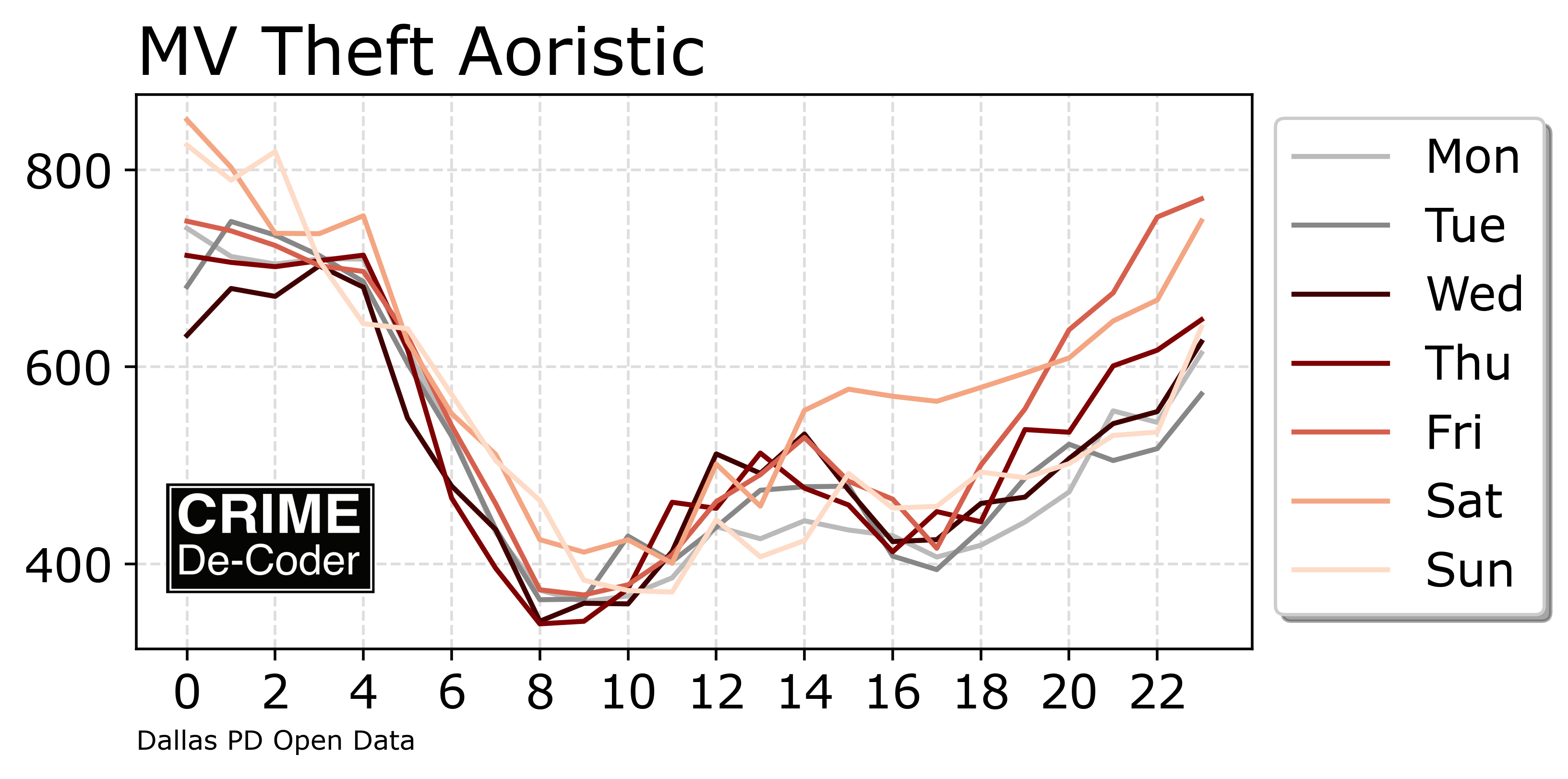
On the CRIME De-Coder blog, check out my post on Aoristic analysis. It has links to python code on github for those who just want the end result. It has several methods though to do hour of day and hour by day of week breakdowns. With the ability to do it by categories in data. And post hoc generate a few graphs. I like the line graphs the best:

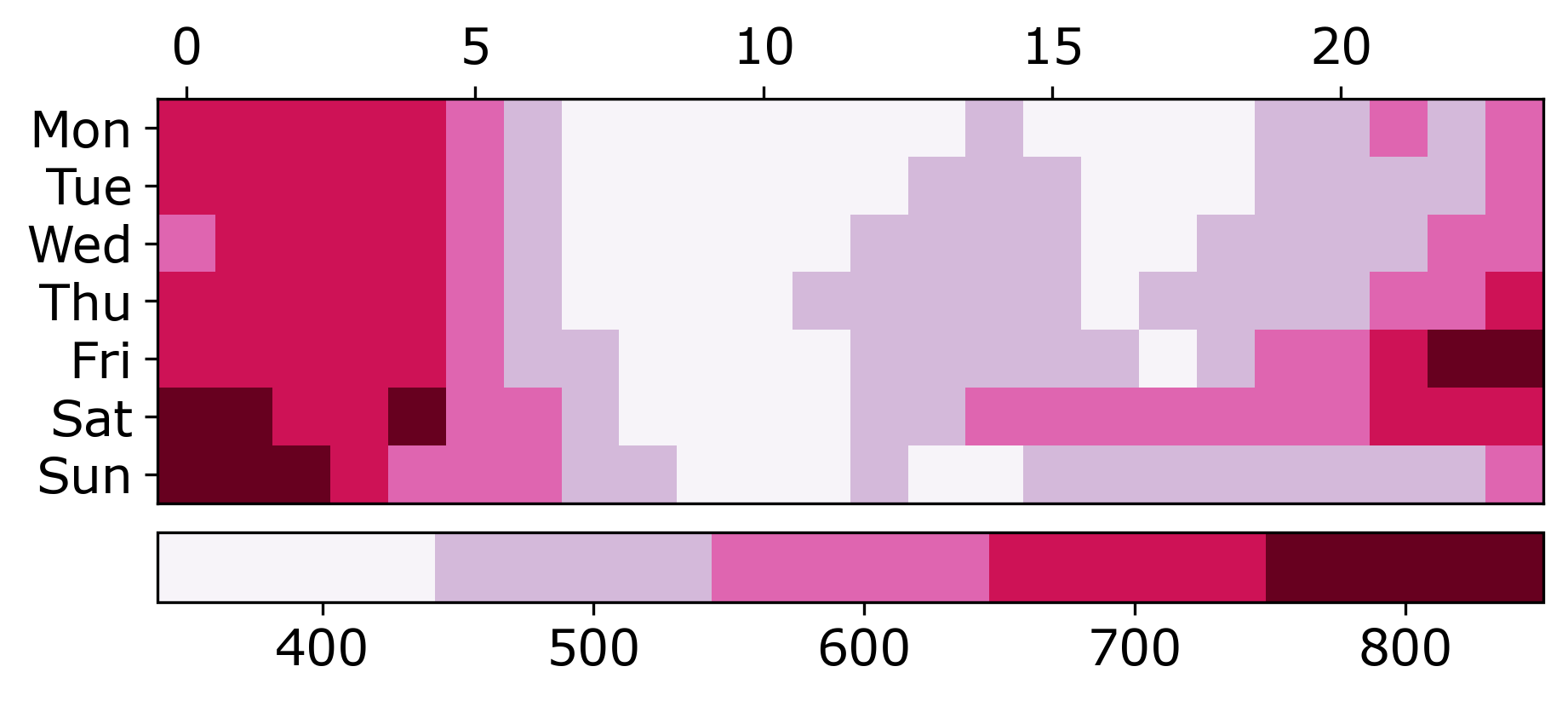
But the more common heatmap I can understand why people like it

Website Design

I have a few minor website design updates. The homepage is more svelte. Wife suggested that it should be easier to see what I do right when you are on homepage, so put the jumbotron box at the bottom and the services tiles (with no pictures) at the top.

It does not look bad on mobile either (I only recently figured out that in Chrome’s DevTools they have a button to do turn on mobile view, very helpful!)

Final part is that I made a footer for my pages:

I am not real happy with this. One of the things you notice when you start doing web-design is everyone’s web-page looks the same. There are some basic templates for WordPress or Wix (and probably other CMS generators). Here is Supabases’s footer for example:

And now that I have shown you, you will see quite a few websites have that design. So I did the svg links to social media, but I may change that. (And go with no footer again, there is not a real obvious need for it.) So open to suggestions!

In intentionally made many of the decisions for the way the Crime De-Coder site looks not only to make it usable but to make it at least somewhat different. Avoid super long scrolls, sticky header (that still works quite well on phones). The header is quite dense with many sub-pages (I like it though).

I think alot of public sector agencies that are doing data dashboards now do not look very nice. Many are just iframed Tableau dashboards. If you want help with those data visualizations embedded in a more organic way in your site, that is something Crime De-Coder can help with.

Reducing folium map sizes

Recently for a crimede-coder project I have been building out a custom library to make nice leaflet maps using the python folium library. See the example I have posted on my website. Below is a screenshot:

This map ended up having around 3000 elements in it, and was a total of 8mb. 8mb is not crazy to put on a website, but is at the stage where you can actually notice latency when first rendering the map.

Looking at the rendered html code though it was verbose in a few ways for every element. One is that lat/lon are in crazy precision by default, e.g. [-78.83229390597961, 35.94592660794455]. So a single polygon can have many of those. Six digits of precision for lat/lon is still under 1 meter of precision, which is plenty sufficient for my mapping applications. So you can reduce 8+ characters per lat/lon and not really make a difference to the map (you can technically have invalid polygons doing this, but this is really pedantic and should be fine).

A second part of the rendered folium html map for every object is given a full uuid, e.g. geo_json_a19eff2648beb3d74760dc0ddb58a73d.addTo(feature_group_2e2c6295a3a1c7d4c8d57d001c782482);. This again is not necessary. I end up reducing the 32 length uuids to the first 8 alphanumeric characters.

A final part is that the javascript is not minified – it has quite a bit of extra lines/spaces that are not needed. So here are my notes on using python code to take care of some of those pieces.

To clean up the precision for geometry objects, I do something like this.

import re

# geo is the geopandas dataframe
redg = geo.geometry.set_precision(10**-6).to_json()
# redg still has floats, below regex clips values
rs = r'(\d{2}\.|-\d{2}\.)(\d{6})(\d+)'
re.sub(rs,r'\1\2',redg)

As most of my functions add the geojson objects to the map one at a time (for custom actions/colors), this is sufficient to deal with that step (for markers, can round lat/lon directly). It may make more sense for the set precision to be 10**-5 and then clip the regex. (For these regex’s I am showing there is some risk they will replace something they should not, I think it will be pretty safe though.)

Then to clean up the UUID’s and extra whitespace, what I do is render the final HTML and then use regex’s:

# fol is the folium object
html = fol.get_root()
res = html.script.get_root().render()
# replace UUID with first 8
ru = r'([0-9a-f]{8})[0-9a-f]{4}[0-9a-f]{4}[0-9a-f]{4}[0-9a-f]{12}'
res = re.sub(ru,r'\1',res)
# clean up whitespace
rl = []
for s in res.split('\n'):
    ss = s.strip()
    if len(ss) > 0:
        rl.append(ss)
rlc = '\n'.join(rl)

There is probably a smarter way to do this directly with the folium object for the UUID’s. For whitespace though it would need to be after the HTML is written. You want to be careful with the cleaning up the whitespace step – it is possible you wanted blank lines in say a leaflet popup or tooltip. But for my purposes this is not really necessary.

Doing these two steps in the Durham map reduces the size of the rendered HTML from 8mb to 4mb. So reduced the size of the file by around 4 million characters! The savings will be even higher for maps with more elements.

One last part is my map has redundant svg inserted for the map markers. I may be able to use css to insert the svg, e.g. something like in css .mysvg {background-image: url("vector.svg");}, and then in the python code for the marker svg insert <div class="mysvg"></div>. For dense point maps this will also save quite a few characters. Or you could add in javascript to insert the svg as well (although that would be a bit sluggish I think relative to the css approach, although sluggish after first render if the markers are turned off).

I have not done this yet, as I need to tinker with getting the background svg to look how I want, but could save another 200-300 characters per marker icon. So will save a megabyte in the map for every 3000-5000 markers I am guessing.

The main reason I post webdemo’s on the crimede-coder site is that there a quite a few grifters in the tech space. Not just for data analysis, but for front-end development as well. I post stuff like that so you can go and actually see the work I do and its quality. There are quite a few people now claiming to be “data viz experts” who just embed mediocre Tableau or PowerBI apps. These apps in particular tend to produce very bad maps, so here you can see what I think a good map should look like.

If you want to check out all the interactions in the map, I posted a YouTube video walking through them

Durham hotspot map walkthrough of interactions

Using GenAI to describe charts for reports

One of the ideas that has come up with the recent GenAI craze is to use these tools to conduct end-to-end data analysis. So you feed it a dataset + a question and out pops an analysis. Mike Zidar has notes on using a Google tool to do this:

I am not worried about these tools usurping crime analysts though. The reason is that the vast majority of data analysis (crime or business or whatever) is very superficial. The hardest part is not generating the chart, it is knowing what chart to generate, and how it will be used by real people to make real decisions. Often in crime analysis you get the ambiguous “well this will help allocate resources” – when in reality your chart can in no way help dictate any realistic decision a department is going to make.

If you cut out analysts, and just have front line individuals asking google “do crime analysis”, it will be hopelessly superficial, and the front line will just ignore it altogether.

I however do think that GenAI has the ability to become power-tools for super-users. That is, someone who does know what they want to calculate, but uses the computer to help them get that information faster. Not dissimilar to how auto-complete while texting helps you type faster. And here is one use case I have been thinking about – so analysts spend a ton of time automating different products, such as monthly CompStat reports. The reports should have tables/graphs in them, like this chart of gun crimes in DC for example:

Now, most reports you want to also have a plain text summary of what is going on in the chart. Currently when auto-generating reports, it is difficult to mix that plain text in and not make it very superficial using a rule based system. The newest round of many of the GenAI tools lets you upload an image and ask it questions about the image. So this is still very open ended, but has many more guiderails than simply telling the machine “go brr and generate analysis”. You have already decided the chart, you are just asking for a nice description of the chart to fill in your already pre-made metrics.

I did this with ChatGPT, Google’s Gemini, and Claude to see how it does with the gun crime chart, the below Raleigh weekly chart:

And in some cases a more tame monthly time series chart:

Because these models are changing all the time, keep in mind that when you read this the newest models may do even better than what I show here (and see the end section on how you may prompt engineer this to produce better results as well). That said lets check out the results!

ChatGPT

For ChatGPT I used the GPT-4o model, I first just asked about the DC chart “Describe the patterns in this chart”. ChatGPT as it is known, is quite verbose:

I then asked ChatGPT to keep it to two to three sentences, and I think it did very well.

Ok, now to the Raleigh chart with error bars:

So this is OK, it spotted the recent increasing trend. “Frequently exceeded the average of the prior 8 weeks (gray shaded area)” is wrong, there are only 2! But I think the last sentence about notable recent spikes is good.

I then gave it the Durham chart that had the anomalies in early 2019/2020:

And I again think this is quite reasonable. I mean an analyst should probably say “these must be reporting idiosyncrasies”, but I don’t think this is not so bad a description as to be misleading.

All in all very happy with the results for ChatGPT here – these charts are not typical line and bar charts, and ChatGPT interpreted each quite well. At least the description is not so bad that if I did these directly in an automated report it would be embarrassing.

Google

For all of these examples I am using the free tools (that typically have limits that I run out by just these two queries). I did this on 5/22 for Google (which I think is Gemini-1.5, I am not 100% sure). So here is the DC gun crime seasonal chart for Google with the prompt Describe the trends in this chart:

This is very wrong in multiple places. It did not do any better with the Raleigh chart:

There is not strong seasonality here, and it includes some filler “important to note” that is not actually important to note. After this I gave it a more tame monthly crime counts of Robberies in Houston chart to see if Google could redeem itself:

And it flopped pretty hard again. Maybe most charts are increasing, so the model is biased to say increasing (I don’t know).

So again this is Google’s free version, and so the paid may be better (or recent updates may be better). But this isn’t even close to make me want to prompt engineer further.

Claude

I did the tests with Sonnet 3.5 (so around a month after the tests with Google/ChatGPT). I used the shorter 2/3 sentences prompt.

I like this description even slightly better than ChatGPT. How about the Raleigh MV thefts chart:

Similar to ChatGPT it is not quite right but in very subtle ways. It does catch the upward trend. It is wrong in terms of data ends before 2024, and the gray area indicating greater variability is technically true but I would not describe it as noticeable. So again not embarrassingly wrong (like Google), but not quite right either.

How about the anomaly Durham chart:

Very similar to ChatGPT, which I think is again OK.

Prompt Engineering Ideas

So the idea behind prompt engineering is you can ask “Describe this chart” or you can ask “Describe this chart in two to three sentences” and it changes the results (in any of these tools). Subsequently a big part of this is figuring out the prompts that give the most reasonable results. Prompts in these GenAI tools when submitting images have two parts, the image and the text. Do not take me as an expert by any means, but for other analysts here are my guesses as to how to prompt engineer this to maybe return better results.

For the text part, one thing you may do for auto reports is to give examples of the text you want. So for example, you could have a prompt that is “Please fill in the blanks: The chart shows _____ trends over time.”. So provide more guidance as to the structure of how you want to the response to look. Or you could do: “Here is example description 1: …., description 2: ….”. This is how RAG applications work, but with a static report you can give static exemplars, they don’t really need to be dynamically looked up from prior reports.

For the image part of the prompt, in an auto-application you may submit a different image than is actually shown in the report. So for example I may have the X axis for monthly crimes be labeled with the actual months (instead of numbers). Putting all the months in smaller font I bet the GenAI tools will still read it just fine, even if I don’t want it to look like that in the final report.

And I probably shouldn’t include logos (since they are immaterial and just cause extra info that may distract the description), and the text footers. I also think making my legends more descriptive may help guide the tools interpretation. I may remove the title text all together and place the relevant info in the prompt “Here is a chart of Robberies in Houston from …. to … Please describe the chart, including any long term trends, or anomalous spikes (high or low) in any month.” The text prompt may keep the tools on track a bit more with the specific details, but still allow them leeway to interpret the chart without being too rigid.

For the error bar chart, you could insert into the prompt explicit dates they were outside, e.g. “weeks a and b were high, make sure to mention that”. So you could have a mix of explicit anomaly detection, insert those anomalies into the prompt, to just keep the results on track.

It would still be a lot of work to automate a report with such plain text language, but I think it could be a quite reasonable iterative workflow. So you generate the report in a format you can edit, like Word, review it. And then in subsequent reports try to tweak the parameters a wee bit to produce better outputs.