Harmweighted hotspots, using ESRI python API, and Crime De-Coder Updates

Haven’t gotten the time to publish a blog post in a few. There has been a ton of stuff I have put out on my Crime De-Coder website recently. For some samples since I last mentioned here, have published four blog posts:

  • on what AI regulation in policing would look like
  • high level advice on creating dashboards
  • overview of early warning systems for police
  • types of surveys for police departments

For surveys a few different groups have reached out to me in regards to the NIJ measuring attitudes solicitation (which is essentially a follow up of the competition Gio and myself won). So get in touch if interested (whether a PD or a research group), may try to coordinate everyone to have one submission instead of several competing ones.

To keep up with everything, my suggestion is to sign up for the RSS feed on the site. If you want an email use the if this than that service. (I may have to stop doing my AltAc newsletter emails, it is so painful to send 200 emails and I really don’t care to sign up for another paid for service to do that.)

I also have continued the AltAc newsletter. Getting started with LLMs, using secrets, advice on HTML, all sorts of little pieces of advice every other week.

I have created a new page for presentations. Including, my recent presentation at the Carolina Crime Analysis Association Conference. (Pic courtesy of Joel Caplan who was repping his Simsi product – thank you Joel!)

If other regional IACA groups are interested in a speaker always feel free to reach out.

And finally a new demo on creating a static report using quarto/python. It is a word template I created (I like often generating word documents that are easier to post-hoc edit, it is ok to automate 90% and still need a few more tweaks.)

Harmweighted Hotspots

If you like this blog, also check out Iain Agar’s posts, GIS/SQL/crime analysis – the good stuff. Here I wanted to make a quick note about his post on weighting Crime Harm spots.

So the idea is that when mapping harm spots, you could have two different areas with same high harm, but say one location had 1 murder and one had 100 thefts. So if murder harm weight = 100 and theft harm weight = 1, they would be equal in weight. Iain talks about different transformations of harm, but another way to think about it is in terms of variance. So here assuming Poisson variance (although in practice that is not necessary, you could estimate the variance given enough historical time series data), you would have for your two hotspots:

Hotspot1: mean 1 homicide, variance 1
Hotspot2: mean 100 thefts, variance 100

Weight of 100 for homicides, 1 for theft

Hotspot1: Harmweight = 1*100 = 100
          Variance = 100^2*1 = 10,000
          SD = sqrt(10,000) = 100

Hotspot2: Harmweight = 100*1 = 100
          Variance = 1^2*100 = 100
          SD = sqrt(100) = 10

When you multiply by a constant, which is what you are doing when multiplying by harm weights, the relationship with variance is Var(const*x) = const^2*Var(x). The harm weights add variance, so you may simple add a penalty term, or rank by something like Harmweight - 2*SD (so the lower end of the harm CI). So in this example, the low end of the CI for Hotspot 1 is 0, but the low end of the CI for Hotspot2 is 80. So you would rank Hotspot2 higher, even though they are the same point estimate of harm.

The rank by low CI is a trick I learned from Evan Miller’s blog.

You could fancy this up more with estimating actual models, having multiple harm counts, etc. But this is a quick way to do it in a spreadsheet with just simple counts (assuming Poisson variance). Which I think is often quite reasonable in practice.

Using ESRI Python API

So I knew you could use python in ESRI, they have a notebook interface now. What I did not realize is now with Pro you can simply do pip install arcgis, and then just interact with your org. So for a quick example:

from arcgis.gis import GIS

# Your ESRI url
gis = GIS("https://modelpd.maps.arcgis.com/", username="user_email", password="???yourpassword???")
# For batch geocoding, probably need to do GIS(api_key=<your api key>)

This can be in whatever environment you want, so you don’t even need ArcGIS installed on the system to use this. It is all web-api’s with Pro. To geocode for example, you would then do:

from arcgis.geocoding import geocode, Geocoder, get_geocoders, batch_geocode

# Can search to see if any nice soul has published a geocoding server

arcgis_online = GIS()
items = arcgis_online.content.search('geocoder north carolina', 'geocoding service', max_items=30)

# And we have four
#[<Item title:"North Carolina Address Locator" type:Geocoding Layer owner:ecw31_dukeuniv>,
# <Item title:"Southeast North Carolina Geocoding Service" type:Geocoding Layer owner:RaleighGIS>, 
# <Item title:"Geocoding Service - AddressNC " type:Geocoding Layer owner:nconemap>, 
# <Item title:"ArcGIS World Geocoding Service - NC Extent" type:Geocoding Layer owner:NCDOT.GOV>]

geoNC = Geocoder.fromitem(items[0]) # lets try Duke
#geoNC = Geocoder.fromitem(items[-1]) # NCDOT.GOV
# can also do directly from URL
# via items[0].url
# url = 'https://utility.arcgis.com/usrsvcs/servers/8caecdf6384144cbafc9d56944af1ccf/rest/services/World/GeocodeServer'
# geoNC = Geocoder(url,gis)

# DPAC
res = geocode('123 Vivian Street, Durham, NC 27701',geocoder=geoNC, max_locations=1)
print(res[0])

Note you cannot cache the geocoding results. To do that, you need to use credits and probably sign in via a token and not a username password.

# To cache, need a token
r2 = geocode('123 Vivian Street, Durham, NC 27701',geocoder=geoNC, max_locations=1,for_storage=True)

# If you have multiple addresses, use batch_geocode, again need a token
#dc_res = batch_geocode(FullAddressList, geocoder=geoNC) 

Geocoding to this day is still such a pain. I will need to figure out if you can make a local geocoding engine with ESRI and then call that through Pro (I mean I know you can, but not sure pricing for all that).

Overall being able to work directly in python makes my life so much easier, will need to dig more into making some standard dashboards and ETL processes using ESRI’s tools.

I have another post that has been half finished about using the ESRI web APIs, hopefully will have time to put that together before another 6 months passes me by!

Sentence embeddings and caching huggingface models in github actions

For updates on Crime De-Coder:

This is actually more born out from demand interacting with crime analysis groups – it doesn’t really make sense for me to swoop in and say “do X/Y/Z, here is my report”. My experience doing that with PDs is not good – my recommendations often do not get implemented. So it is important to upskill your current analysts to be able to conduct more rigorous analysis over time.

Some things it is better to have an external person do the report (such as program evaluation, cost-benefit analysis, or racial bias metrics). But things like generating hotspots and chronic offender lists, those should be something your crime analysis unit learns how to do.

You can of course hire me to do those things, but if you don’t train your local analysts to take over the job, you have to perpetually hire me to do that. Which may make sense for small departments without an internal crime analysis unit. But for large agencies you should be using your crime analysts to do reports like that.


This post, I also wanted to share some work on NLP. I have not been immune at work given all the craze. I am more impressed with vector embeddings and semantic search though than I am with GenAI applications. GenAI I think will be very useful, like a more advanced auto-complete, but I don’t think it will put us all out of work anytime soon.

Vector embeddings, for those not familiar, are taking a text input and turning it into numbers. You can then do nearness calculations with the numbers. So say you had plain text crime narrative notes on modus operandi, and wanted to search “breaking car window and stealing purse” – you don’t want to do an exact search on that phrase, but a search for text that is similar. So the vector similarity search may return a narrative that is “break truck back-window with pipe, take backpack”. Not exactly the same, but semantically very similar.

Sentencetransformers makes this supersimple (no need to use external APIs for this).

from sentence_transformers import SentenceTransformer, util
model = SentenceTransformer('all-MiniLM-L6-v2')

# Base query
query = ['breaking car window and stealing purse']

# Example MO
mo = ['break truck back window with pipe, steal backpack',
      'pushing in a window AC unit, steal TV and sneakers',
      'steal car from cloned fab, joyride']

#Compute embedding for both lists
qemb = model.encode(query, convert_to_tensor=True)
moemb = model.encode(mo, convert_to_tensor=True)

#Compute cosine-similarities
cosine_scores = util.cos_sim(moemb, qemb)
print(cosine_scores)

So you have your query, and often people just return the top-k results, since to know “how close is reasonably close” is difficult in practice (google pretty much always returns some results, even if they are off the mark!).

I am quite impressed with the general models for this (even very idiosyncratic documents and jargon it tends to do quite well). But if you want to embed specifically trained models on different tasks, I often turn to simpletransformers. Here is a model based on clinical case notes.

from simpletransformers.language_representation import RepresentationModel

model = RepresentationModel("bert", "medicalai/ClinicalBERT")
sent1 = ["Procedure X-ray of wrist"] # needs to be a list
wv1 = model.encode_sentences(sent1, combine_strategy="mean")

For another example, I shared a github repo, hugging_cache, where I did some work on how to cache huggingface models in a github actions script. This is useful for unit tests, so you don’t need to redownload the model everytime.

Github cache size for free accounts is 10 gigs (and you need the environment itself, which is a few gigs). So huggingface models up to say around 4 (maybe 5) gigs will work out OK in this workflow. So not quite up to par with the big llama models, but plenty large enough for these smaller embedding models.

It is not very difficult to build a local, in-memory vector search database. Which will be sufficient for many individuals. So a crime analyst could build a local search engine for use – redo vector DB on a batch job, then just have a tool/server to do the local lookup. (Or just use a local sqlite database is probably sufficient for a half dozen analysts/detectives may use this tool every now and then.)

Forecasts need to have error bars

Richard Rosenfeld in the most recent Criminologist published a piece about forecasting national level crime rates. People complain about the FBI releasing crime stats a year late, academics are worse; Richard provided “forecasts” for 2021 through 2025 for an article published in late 2023.

Even ignoring the stalecasts that Richard provided – these forecasts had/have no chance of being correct. Point forecasts will always be wrong – a more reasonable approach is to provide the prediction intervals for the forecasts. Showing error intervals around the forecasts will show how Richard interpreting minor trends is likely to be misleading.

Here I provide some analysis using ARIMA models (in python), to illustrate what reasonable forecast error looks like in this scenario, code and data on github.

You can get the dataset on github, but just some upfront with loading the libraries I need and getting the data in the right format:

import pandas as pd
from statsmodels.tsa.arima.model import ARIMA
import matplotlib.pyplot as plt

# via https://www.disastercenter.com/crime/uscrime.htm
ucr = pd.read_csv('UCR_1960_2019.csv')
ucr['VRate'] = (ucr['Violent']/ucr['Population'])*100000
ucr['PRate'] = (ucr['Property']/ucr['Population'])*100000
ucr = ucr[['Year','VRate','PRate']]

# adding in more recent years via https://cde.ucr.cjis.gov/LATEST/webapp/#/pages/docApi
# I should use original from counts/pop, I don't know where to find those though
y = [2020,2021,2022]
v = [398.5,387,380.7]
p = [1958.2,1832.3,1954.4]
ucr_new = pd.DataFrame(zip(y,v,p),columns = list(ucr))
ucr = pd.concat([ucr,ucr_new],axis=0)
ucr.index = pd.period_range(start='1960',end='2022',freq='A')

# Richard fits the model for 1960 through 2015
train = ucr.loc[ucr['Year'] <= 2015,'VRate']

Now we are ready to fit our models. To make it as close to apples-to-apples as Richard’s paper, I just fit an ARIMA(1,1,2) model – I do not do a grid search for the best fitting model (also Richard states he has exogenous factors for inflation in the model, which I do not here). Note Richard says he fits an ARIMA(1,0,2) for the violent crime rates in the paper, but he also says he differenced the data, which is an ARIMA(1,1,2) model:

# Not sure if Richard's model had a trend term, here no trend
violent = ARIMA(train,order=(1,1,2),trend='n').fit()
violent.summary()

This produces the output:

                               SARIMAX Results
==============================================================================
Dep. Variable:                  VRate   No. Observations:                   56
Model:                 ARIMA(1, 1, 2)   Log Likelihood                -242.947
Date:                Sun, 19 Nov 2023   AIC                            493.893
Time:                        19:33:53   BIC                            501.923
Sample:                    12-31-1960   HQIC                           496.998
                         - 12-31-2015
Covariance Type:                  opg
==============================================================================
                 coef    std err          z      P>|z|      [0.025      0.975]
------------------------------------------------------------------------------
ar.L1         -0.4545      0.169     -2.688      0.007      -0.786      -0.123
ma.L1          1.1969      0.131      9.132      0.000       0.940       1.454
ma.L2          0.7136      0.100      7.162      0.000       0.518       0.909
sigma2       392.5640    104.764      3.747      0.000     187.230     597.898
===================================================================================
Ljung-Box (L1) (Q):                   0.13   Jarque-Bera (JB):                 0.82
Prob(Q):                              0.72   Prob(JB):                         0.67
Heteroskedasticity (H):               0.56   Skew:                            -0.06
Prob(H) (two-sided):                  0.23   Kurtosis:                         2.42
===================================================================================

So some potential evidence of over-differencing (with the negative AR(1) coefficient). Looking at violent.test_serial_correlation('ljungbox') there is no significant serial auto-correlation in the residuals. One could use some sort of auto-arima approach to pick a “better” model (it clearly needs to be differenced at least once, also maybe should also be modeling the logged rate). But there is not much to squeeze out of this – pretty much all of the ARIMA models will produce very similar forecasts (and error intervals).

So in the statsmodels package, you can append new data and do one step ahead forecasts, so this is comparable to Richard’s out of sample one step ahead forecasts in the paper for 2016 through 2020:

# To make it apples to apples, only appending through 2020
av = (ucr['Year'] > 2015) & (ucr['Year'] <= 2020)
violent = violent.append(ucr.loc[av,'VRate'], refit=False)

# Now can show insample predictions and forecasts
forecast = violent.get_prediction('2016','2025').summary_frame(alpha=0.05)

If you print(forecast) below are the results. One of the things I want to note is that if you do one-step-ahead forecasts, here the years 2016 through 2020, the standad error is under 20 (this is well within Richard’s guesstimate to be useful it needs to be under 10% absolute error). When you start forecasting multiple years ahead though, the error compounds over time. So to forecast 2022, you need a forecast of 2021. To forecast 2023, you need to forecast 21,22 and then 23, etc.

VRate        mean    mean_se  mean_ci_lower  mean_ci_upper
2016   397.743461  19.813228     358.910247     436.576675
2017   402.850827  19.813228     364.017613     441.684041
2018   386.346157  19.813228     347.512943     425.179371
2019   379.315712  19.813228     340.482498     418.148926
2020   379.210158  19.813228     340.376944     418.043372
2021   412.990860  19.813228     374.157646     451.824074
2022   420.169314  39.803285     342.156309     498.182318
2023   416.906654  57.846105     303.530373     530.282936
2024   418.389557  69.535174     282.103120     554.675994
2025   417.715567  80.282625     260.364513     575.066620

The standard error scales pretty much like sqrt(steps*se^2) (it is additive in the variance). Richard’s forecasts do better than mine for some of the point estimates, but they are similar overall:

# Richard's estimates
forecast['Rosenfeld'] = [399.0,406.8,388.0,377.0,394.9] + [404.1,409.3,410.2,411.0,412.4]
forecast['Observed'] = ucr['VRate']

forecast['MAPE_Andy'] = 100*(forecast['mean'] - forecast['Observed'])/forecast['Observed']
forecast['MAPE_Rick'] = 100*(forecast['Rosenfeld'] - forecast['Observed'])/forecast['Observed']

And this now shows for each of the models:

VRate        mean  mean_ci_lower  mean_ci_upper  Rosenfeld    Observed  MAPE_Andy  MAPE_Rick
2016   397.743461     358.910247     436.576675      399.0  397.520843   0.056002   0.372095
2017   402.850827     364.017613     441.684041      406.8  394.859716   2.023785   3.023931
2018   386.346157     347.512943     425.179371      388.0  383.362999   0.778155   1.209559
2019   379.315712     340.482498     418.148926      377.0  379.421097  -0.027775  -0.638103
2020   379.210158     340.376944     418.043372      394.9  398.500000  -4.840613  -0.903388
2021   412.990860     374.157646     451.824074      404.1  387.000000   6.715985   4.418605
2022   420.169314     342.156309     498.182318      409.3  380.700000  10.367563   7.512477
2023   416.906654     303.530373     530.282936      410.2         NaN        NaN        NaN
2024   418.389557     282.103120     554.675994      411.0         NaN        NaN        NaN
2025   417.715567     260.364513     575.066620      412.4         NaN        NaN        NaN

So MAPE in the held out sample does worse than Rick’s models for the point estimates, but look at my prediction intervals – the observed values are still totally consistent with the model I have estimated here. Since this is a blog and I don’t need to wait for peer review, I can however update my forecasts given more recent data.

# Given updated data until end of series, lets do 23/24/25
violent = violent.append(ucr.loc[ucr['Year'] > 2020,'VRate'], refit=False)
updated_forecast = violent.get_forecast(3).summary_frame(alpha=0.05)

And here are my predictions:

VRate        mean    mean_se  mean_ci_lower  mean_ci_upper
2023   371.977798  19.813228     333.144584     410.811012
2024   380.092102  39.803285     302.079097     458.105106
2025   376.404091  57.846105     263.027810     489.780373

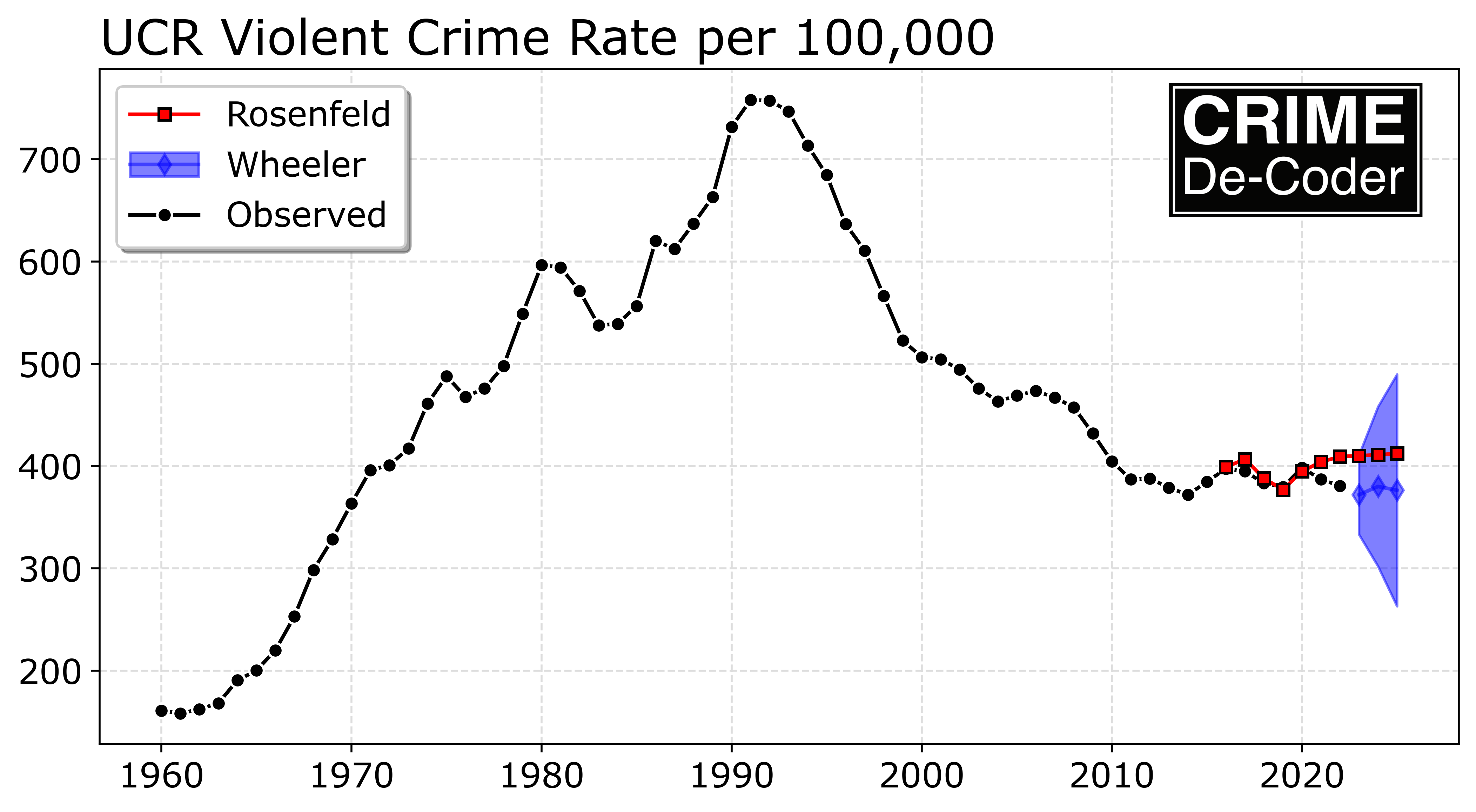
You really need to graph these out to get a sense of the magnitude of the errors:

Note how Richard’s 2021 and 2022 forecasts and general increasing trend have already been proven to be wrong. But it really doesn’t matter – any reasonable model that admitted uncertainty would never let one reasonably interpret minor trends over time in the way Richard did in the criminologist article to begin with (forecasts for ARIMA models are essentially mean-reverting, they will just trend to a mean term in a short number of steps). Richard including exogenous factors actually makes this worse – as you need to forecast inflation and take that forecast error into account for any multiple year out forecast.

Richard has consistently in his career overfit models and subsequently interpreted the tea leaves in various macro level correlations (Rosenfeld, 2018). His current theory of inflation and crime is no different. I agree that forecasting is the way to validate criminological theories – picking up a new pet theory every time you are proven wrong though I don’t believe will result in any substantive progress in criminology. Most of the short term trends criminologists interpret are simply due to normal volatility in the models over time (Yim et al., 2020). David McDowall has a recent article that is much more measured about our cumulative knowledge of macro level crime rate trends – and how they can be potentially related to different criminological theories (McDowall, 2023). Matt Ashby has a paper that compares typical errors for city level forecasts – forecasting several years out tends to product quite inaccurate estimates, quite a bit larger than Richard’s 10% is useful threshold (Ashby, 2023).

Final point that I want to make is that honestly it doesn’t even matter. Richard can continue to keep making dramatic errors in macro level forecasts – it doesn’t matter if he publishes estimates that are two+ years old and already wrong before they go into print. Because unlike what Richard says – national, macro level violent crime forecasts do not help policy response – why would Pittsburgh care about the national level crime forecast? They should not. It does not matter if we fit models that are more accurate than 5% (or 1%, or whatever), they are not helpful to folks on the hill. No one is sitting in the COPS office and is like “hmm, two years from now violent crime rates are going up by 10, lets fund 1342 more officers to help with that”.

Richard can’t have skin the game for his perpetual wrong macro level crime forecasts – there is no skin to have. I am a nerd so I like looking at numbers and fitting models (or here it is more like that XKCD comic of yelling at people on the internet). I don’t need to make up fairy tale hypothetical “policy” applications for the forecasts though.

If you want a real application of crime forecasts, I have estimated for cities that adding an additional home or apartment unit increases the number of calls per service by about 1 per year. So for growing cities that are increasing in size, that is the way I suggest to make longer term allocation plans to increase police staffing to increase demand.

References

Fitting a gamma distribution (with standard errors) in python

Over on Crime De-Coder, I have up a pre-release of my book, Data Science for Crime Analysis with Python.

I have gotten asked by so many people “where to learn python” over the past year I decided to write a book. Go check out my preface on why I am not happy with current resources in the market, especially for beginners.

I have the preface + first two chapters posted. If you want to sign up for early releases, send me an email and will let you know how to get an early copy of the first half of the book (and send updates as they are finished).

Also I have up the third installment of the AltAc newsletter. Notes about the different types of healthcare jobs, and StatQuest youtube videos are a great resource. Email me if you want to sign up for the newsletter.


So the other day I showed how to fit a beta-binomial model in python. Today, in a quick post, I am going to show how to estimate standard errors for such fitted models.

So in scipy, you have distribution.fit(data) to fit the distribution and return the estimates, but it does not have standard errors around those estimates. I recently had need for gamma fits to data, in R I would do something like:

# this is R code
library(fitdistrplus)
x <- c(24,13,11,11,11,13,9,10,8,9,6)
gamma_fit <- fitdist(x,"gamma")
summary(gamma_fit)

And this pipes out:

> Fitting of the distribution ' gamma ' by maximum likelihood
> Parameters :
>        estimate Std. Error
> shape 8.4364984  3.5284240
> rate  0.7423908  0.3199124
> Loglikelihood:  -30.16567   AIC:  64.33134   BIC:  65.12713
> Correlation matrix:
>           shape      rate
> shape 1.0000000 0.9705518
> rate  0.9705518 1.0000000

Now, for some equivalent in python.

# python code
from scipy.optimize import minimize
from scipy.stats import gamma

x = [24,13,11,11,11,13,9,10,8,9,6]

res = gamma.fit(x,floc=0)
print(res)

And this gives (8.437256958682587, 0, 1.3468401423927603). Note that python uses the scale version, so 1/scale = rate, e.g. 1/res[-1] results in 0.7424786123640676, which agrees pretty closely with R.

Now unfortunately, there is no simple way to get the standard errors in this framework. You can however minimize the parameters yourself and get the things you need – here the Hessian – to calculate the standard errors yourself.

Here to make it easier apples to apples with R, I estimate the rate parameter version.

# minimize negative log likelihood
def gll(parms,data):
    alpha, rate = parms
    ll = gamma.logpdf(data,alpha,loc=0,scale=1/rate)
    return -ll.sum()

result = minimize(gll,[8.,0.7],args=(x),method='BFGS')
se = np.sqrt(np.diag(result.hess_inv))
# printing results
np.stack([result.x,se],axis=1)

And this gives:

array([[8.43729465, 3.32538824],
       [0.74248193, 0.30255433]])

Pretty close, but not an exact match, to R. Here the standard errors are too low (maybe there is a sample correction factor?).

Some quick tests with this, using this scale version tends to be a bit more robust in fitting than the rate version.

The context of this, a gamma distribution with a shape parameter greater than 1 has a hump, and less than 1 is monotonically decreasing. This corresponds to the “buffer” hypothesis in criminology for journey to crime distributions. So hopefully some work related to that coming up soonish!


And doing alittle more digging, you can get “closed form” estimates of the parameters based on the Fisher Information matrix (via Wikipedia).

# Calculating closed form standard
# errors for gamma via Fisher Info
from scipy.special import polygamma
from numpy.linalg import inv
import numpy as np

def trigamma(x):
    return float(polygamma(1,x))

# These are the R estimates
shape = 8.4364984
rate = 0.7423908
n = 11 # 11 observations

fi = np.array([[trigamma(shape), -1/rate],
               [-1/rate, shape/rate**2]])

inv_fi = inv(n*fi)  # this is variance/covariance
np.sqrt(np.diagonal(inv_fi))

# R reports      3.5284240 0.3199124
# python reports 3.5284936 0.3199193

I do scare quotes around closed form, as it relies on the trigamma function, which itself needs to be calculated numerically I believe.

If you want to go through the annoying math (instead of using the inverse above), you can get a direct one liner for either.

# Closed for for standard error of shape
np.sqrt(shape / (n*(trigamma(shape)*shape - 1)))
# 3.528493591892887

# This works for the scale or the rate parameterization
np.sqrt((trigamma(shape))/ (n*rate**-2*(trigamma(shape)*shape - 1)))
# 0.31995664847081356

# This is the standard error for the scale version
scale = 1/rate
np.sqrt((trigamma(shape))/ (n*scale**-2*(trigamma(shape)*shape - 1)))
# 0.5803962127677769

Fitting beta binomial in python, Poisson scan stat in R

Sharing two pieces of code I worked on recently for various projects. First is fitting a beta binomial distribution in scipy. I had a need for this the other day, looking at the count of near duplicates in surveys. In that code I just used the method of moments estimator (which can often misbehave).

The top google results for this are all very bad (either code that does not work, or alternatives that are not good advice). One of the articles was even auto-generated content (ala ChatGPT type stuff), that had a few off the mark points (although was superficially what the python solution should look like, so the unwary would be led down a wrong path).

So here I show how to estimate the maximum likelihood estimate for the beta binomial distribution. First, because scipy already has a function for the pmf for the beta-binomial distribution it is pretty simple. For all of the discrete distributions, it should look like -dist.logpmf(..data..,...params...).sum(). In complicated stats speak this is “the negative of the sum of the log likelihood”. It is easier for me anyway to think in terms of the PDF/PMF though (the probability of observing your data given fixed parameters). And you find the parameters that maximize that probability over your entire sample. But to make the math easier we take the logs of the probabilities (so we can work with sums instead of multiplications), the log PMF here, and we take the negative so we find the minimum of the function.

Then you just pass the appropriate arguments to minimize and you are good to go.

import numpy as np
from scipy.optimize import minimize
from scipy.stats import betabinom
np.random.seed(10)

# simulating some random data
a = 0.8
b = 1.2

sim_size = 1000

n = 90
r = betabinom.rvs(n, a, b, size=sim_size)

# minimize negative log likelihood
def bbll(parms,k,n):
    alpha, beta = parms
    ll = betabinom.logpmf(k,n,alpha,beta)
    return -ll.sum()

result = minimize(bbll,[1,1],args=(r,90),method='Nelder-Mead')
print(result.x) # [alpha, beta]

And this returns for me:

>>> print(result.x)
[0.77065051 1.16323611]

Using simple simulations you can often get a feel for different estimators. Here n and sim_size make a decent difference for estimating beta, and beta I think tends to be biased downward in the smaller sample scenarios. (People don’t realize, for these non-normal distributions it is not un-common to need 1000+ observations to get decent un-biased estimates depending on the distribution.)

Note the nature of the data here, it is something like hits [5,8,9], and then a second either constant for every number (if the denominator is say 10 for all the observations, can just pass a constant 10). The denominator can however be variable in this set up, so you could have a set of different denominators like [6,8,10].

a = 1.5
b = 4.1

n = np.random.choice(range(30,90),size=sim_size)
r = betabinom.rvs(n, a, b, size=sim_size)

result = minimize(bbll,[1,1],args=(r,n),method='Nelder-Mead')
print(result.x)

Which returns:

>>> print(result.x)
[1.50563582 3.99837155]

I note here that some examples of beta-binomial use weighted data (the wikipedia page does this). These functions expect unweighted data. Functions that need to be repeatedly called (like the likelihood function here) I don’t like making them general with ifs and other junk, I would rewrite the bbll function for different forms of data and call that different function.

Also, as always, you need to check these to make sure the fitted parameters make sense and reasonably fit your data (plot the predicted PMF vs the observed histogram). The function here can converge, but could converge to non-sense (you probably don’t need to worry about constraints on the parameters, but better starting values are probably a good idea).

For future notes for myself, Guimaraes (2005) has examples of using fixed effects negative binomial and translating to beta-binomial (for fixed n). Also Young-Xu & Chan (2008) is a very nice reference (has Hessian, so if I wanted to estimate standard errors), as well as discussion of determining whether to use this model or a binomial with no extra dispersion.


The second thing I will post about is a scan statistic. The background is imagine someone comes to you and says “Hey, there were 10 robberies in the past week, is that normal or low?”. In the scenario where you have fixed time intervals, e.g. Monday through Sunday, and your data is approximately Poisson distributed, you can calculate the CDF. So say your mean per week over 2 years is 3.1, the probability of observing a count of 10 or more in a specific week is:

> # R code
> 1 - ppois(10-1,3.1)
> [1] 0.001400924

So alittle more than 1 in 1000. But if you ask the question “What is the probability of observing a single week of 10 or more, when I have been monitoring the series for 2 years”, with 52 weeks per year. You would adjust the probability for monitoring the trends for multiple weeks over time:

> p <- ppois(10-1,3.1)
> 1 - p^(52*2)
> [1] 0.1356679

So the probability of observing 10 or more in a single week over a 2 year period is closer to 14%. This multiple comparison issue is more extreme when you consider a sliding window – so can count events that occur in a span of a week, but not all necessarily in your pre-specified Monday to Sunday time period. So maybe you observed 10 in a week span that goes from Wednesday to Tuesday. What is the probability of observing 10 in that ad-hoc week time period over the 3 year monitoring period? This often comes up in news articles, see this post by David Spiegelhalter on pedestrian deaths for an example.

I have added in the Naus (1982) approximate statistic to calculate this in my ptools R package – scanw. If you install the latest version of ptools from github you can run for yourself:

> # R code
> library(devtools)
> install_github("apwheele/ptools") # get most recent
> library(ptools)
>
> # example given above
> scanw(52*2,1,3.1,10)

Which prints out [1] 0.5221948. So adding in the sliding window considerably ups the probability of observing a large clump of events.

I don’t think this is so useful from a crime analyst perspective, moreso from a journalistic perspective ‘oh we saw this number recently, is that anomalous’. If you are actively monitoring crime stats I would suggest you use the stats I describe in Wheeler (2016) to identify current outliers given fixed time intervals from the start. (And this approximation is for Poisson data. Overdispersed will have a higher probability.)

And for reference as well, Prieto-Curiel et al. (2023) have an approach that examines the cumulative sum. I’ve debated on doing that in a control chart style framework as well, but instead of just cumsum(counts), do cumsum(counts - expected). I don’t know how people effectively reset the cumulative charts though and effectively deal with seasonality.

I think my approach in Wheeler (2016) is better to identify anomalous trends right now, the Prieto-Curiel approach is still examining historical data and looking for breaks.

References

Survey duplicates and other stuff

So for various updates. First, I have started an AltAc newsletter, see the first email here. It will be examples of jobs, highlights of criminologists who are in the private sector, and random beginner tech advice (this week was getting started in NLP using simpletransformers, next week I will give a bit of SQL). Email me if you want to be added to the list (open to whomever).

Second, over on CRIME De-Coder I have a post on more common examples of NLP in crime analysis: named entity recognition, semantic similarity, and supervised learning. I have been on an NLP kick lately – everyone thinks genAI (e.g. ChatGPT) is all the rage, most applications though really don’t want genAI, they just think genAI is cool.

Third, Andrew Gelman blogged about the Hogan/Kaplan back and forth. I do like Gelman’s hot takes, even if he is not super in-the-know on current flavors of different micro-econ identification strategies.

Fourth, I have pushed mine and Gio’s whitepaper on using every door direct mail and web based push surveys + MRP to CrimRXiv. Using Every Door Direct Mail Web Push Surveys and Multi-level modelling with Post Stratification to estimate Perceptions of Police at Small Geographies (Circo & Wheeler, 2023). This is our solution to measuring spatially varying attitudes towards police with a reasonable budget (the NIJ community perceptions challenge). Check it out and get in touch if you want to deploy something like that to your jurisdiction.

For a bit of background, we (me and Gio) intentionally did not submit to the other categories in the competition. I don’t think you can reasonably measure micro place community attitudes using any of the other methods in the competition (with the exception of boots on the ground survey takers, which is cost prohibitive and a non-starter for most cities). So we could be like ‘uSiNG TwiTTeR aNd SenTimeNT aNalYSis tO mEasUre HoW mUCh PeoPLe hAtE pOLIcE’, but this is bad both from a measure perspective (sentiment analyses are not good, even ignoring selection biases in those public social media sources) and a tieing it to a particular spatial area perspective. The tieing it to a small spatial area also makes me very hesitant to suggest purely web based adverts to generate survey responses.

Analyzing Survey Duplicates

The last, and biggest thing I wanted to share. Jake Day and Jon Brauer’s blog, Reluctant Criminologists, has a series of posts on analyzing near survey duplicates (also with contribution by Maja Kotlaja). Apparently there was a group with SurveyMonkey/Princeton that gives a recommendation that matches over 85% are cause for concern – so if you take two survey responses, and those two responses have over 85% of the same survey responses, that is symptomatic of fraud in the SurveyMonkey advice.

This is theoretically caused by a malicious actor (such as a survey taker not wanting to do work). So they take an existing survey, duplicate it, but to be sneaky change a few responses to make it look less suspicious (this is not about making up responses whole cloth).

The 85% rule is bad advice and will result in chasing the noise. Many real world criminology surveys will have more random matches, so people will falsely assume surveys are fraudulent. RC do EDA on one of their own surveys and say why they don’t think the over 85% is likely to be fraudulent. (And sign up for their blog and other work while you go check out their post.)

So I give python code how I would analyze survey duplicates, taking into account the nature of the baseline data, Survey Forensics: Identifying Near Duplicate Responses. I show in simulations how you can get more than 85% duplicate matches, even in random data, depending on the marginal distribution of the survey responses.

I also show how to use statistics to identify outliers use false discovery rate corrections, and then cluster like responses together for easier analysis of the identified problem responses. Using data in Raleigh, I show a several groups of outlying survey near duplicates are people just doing run responses (all 5s, 4s, or missings). But I do identify 3 pairs that are somewhat suspicious.

While this is particular type of fraud is not so much a problem in web based surveys, it is not totally irrelevant – you can have people retake web based push surveys by accident. Urban talks about this in terms of analyzing IP addresses. Cell phones and WiFi though some of those could slip through, so this is idea is not totally irrelevant even for web surveys. And for shared WiFi (universities, or people in the same home/apt taking the survey) IP addresses won’t necessarily discriminate.

References

Synthetic control in python: Opioid death increases in Oregon and Washington

So Charles Fain Lehman has a recent post on how decriminalization of opioids in Oregon and Washington (in the name of harm reduction) appear to have resulted in increased overdose deaths. Two recent papers, both using synthetic controls, have come to different conclusions, with Joshi et al. (2023) having null results, and Spencer (2023) having significant results.

I have been doing synth analyses for several groups recently, have published some on micro-synth in the past (Piza et al., 2020). The more I do, the more I am concerned about the default methods. Three main points to discuss here:

  • I think the default synth fitting mechanism is not so great, so I have suggested using Lasso regression (if you want a “real” peer-reviewed citation, check out DeBiasi & Circo (2021) for an application of this technique). Also see this post on crime counts/rates and synth problems, which using an intercept in a Lasso regression avoids.
  • The fitting mechanism + placebo approach to generate inference can be very noisy, resulting in low powered state level designs. Hence I suggest a conformal inference approach to generate the null distribution
  • You should be looking at cumulative effects, not just instant effects in these designs.

I have posted code on Github, and you can see the notebook with the results. I will walk through here quickly. I initially mentioned this technique is a blog post a few years ago (with R code). Here I spent some time to script it up in python.

So first, we load in the data, and go on to conduct the Oregon analysis (you drop Washington as a potential control). Now, a difference in the Abadie estimator (just a stochastic gradient descent optimizer with hard constraints), vs a lasso estimator (soft constraints), is that you need to specify how much to penalize the coefficients. There is no good default for how much, it depends on the scale of your data (doing death rates per 1,000,000 vs per 100,000 will change the amount of penalization), how many rows of data you have, and have many predictor variables you have. So I use an approach to suggest the alpha coefficient for the penalization in a seperate step:

import LassoSynth
import pandas as pd

opioid = pd.read_csv('OpioidDeathRates.csv')
wide = LassoSynth.prep_longdata(opioid,'Period','Rate','State')

# Oregon Analysis
or_data = wide.drop('Washington', axis=1)
oregon = LassoSynth.Synth(or_data,'Oregon',38)

oregon.suggest_alpha() # default alpha is 1

This ends up suggesting an alpha value of 0.17 (instead of default 1). Now you can fit (I passed in the data already to prep it for synth on the init, so no need to re-submit the data):

oregon.fit()
oregon.weights_table()

The fit prints out some metrics, root mean square error and R-squared, {'RMSE': 0.11589514406988406, 'RSquare': 0.7555976595776881}, here for this data. Which offhand looks pretty similar to the other papers (including Charles). And for the weights table, Oregon ends up being very sparse, just DC and West Virginia for controls (plus the intercept):

Group                       Coef
Intercept               0.156239
West Virginia           0.122256
District of Columbia    0.027378

The Lasso model here does constrain the coefficients to be positive, but does not force them to sum to 1 (plus it has an intercept). I think these are all good things (based on personal experience fitting functions). We can graph the fit for the historical data, plus the standard error of the lasso counterfactual forecasts in the post period:

# Default alpha level is 95% prediction intervals for counterfactual
oregon.graph('Opioid Death Rates per 100,000, Oregon Synthetic Estimate')

So you can see the pre-intervention fit is smoother than the monthly data in Oregon, but by eye seems quite reasonable (matches the recent increase and spikes post period 20, starts in Jan-2018, so starting in August-2019). (Perfect fits are good evidence of over-fitting in machine learning.)

Post intervention, after period 37, I do my graph a bit differently. Sometimes people are confused when the intervention starts in the graph, so here I literally split pre/post data lines, so there should be no confusion. I use the conformal inference approach to generate 95% prediction intervals around the counterfactual trend. You can see the counterfactual trend has slightly decreased, whereas Oregon increased and is volatile. Some of the periods are covered by the upper most intervals, but the majority are clearly outside.

Now, besides the fitting function, one point I want to make is people should be looking at cumulative effects, not just instant effects. So Abadie has a global test, using placebos, that looks at the ratio of the pre-fit to post fit (squared errors), then does the placebo p-value based on that stat. This doesn’t have any consideration though for consistent above/below effects.

So pretend the Oregon observed was always within the 95% counterfactual error bar, but was always consistently at the top, around 0.1 increase in overdose deaths. Any single point-wise monthly inference fails to reject the null, but that overall always high pattern is not regular. You want to look at the entire curve, not just a single point. Random data won’t always be high or low, it should fluctuate around the counterfactual estimate.

To do this you look at the cumulative differences between the counterfactual and the observed (and take into account the error distribution for the counterfactuals).

# again default is 95% prediction intervals
oregon.cumgraph('Oregon Cumulative Effects, [Observed - Predicted]')

Accumulated over time, this is a total of over 7 per 100,000. With Oregon having a population of around 4.1 million, I estimate that the cumulative increased number of overdose deaths is around 290 in Oregon. This is pretty consistent with the results in Spencer (2023) as well (182 increased deaths over fewer months).

To do a global test with this approach, you just look at the very final time period and whether it covers 0. This is what I suggest in-place of the Abadie permutation test, as this has a point estimate and standard error, not just a discrete p-value.

We can do the same analysis for Washington as we did for Oregon. It shows increases, but many of the time periods are covered by the counter-factual 95% prediction interval.

But like I mentioned before, they are consistently high. So when you do the cumulative effects for Washington, they more clearly show increases over time (this data last date is March 2022).

At an accumulated 2.5 per 100,000, with a state population of around 7.7 million, it is around 190 additional overdose deaths in Washington. You can check out the notebook for more stats, Washington has a smaller suggested alpha, so the matched weights have several more states. But the pre-fit is better, and so it has smaller counterfactual intervals. All again good things compared to the default (placebo approach Washington/Oregon will pretty much have the same error distribution, so Washington being less volatile does not matter using that technique).

I get that Abadie is an MIT professor, published a bunch in JASA and well known econ journals, and that his approach is standard in how people do synthetic control analyses. My experience though over time has made me think the default approaches here are not very good – and the placebo approach where you fit many alternative analyses just compounds the issue. (If the fit is bad, it makes the placebo results more variable, causing outlier placebos. People don’t go and do a deep dive of the 49 placebos though to make sure they are well behaved.)

The lasso + conformal approach is how I would approach the problem from my experience fitting machine learning models. I can’t give perfect proof this is a better technique than the SGD + placebo approach by Adadie, but I can release code to at least make it easier for folks to use this technique.

References

  • De Biasi, A., & Circo, G. (2021). Capturing crime at the micro-place: a spatial approach to inform buffer size. Journal of Quantitative Criminology, 37, 393-418.

  • Joshi, S., Rivera, B. D., Cerdá, M., Guy, G. P., Strahan, A., Wheelock, H., & Davis, C. S. (2023). One-year association of drug possession law change with fatal drug overdose in Oregon and Washington. JAMA Psychiatry Online First.

  • Piza, E. L., Wheeler, A. P., Connealy, N. T., & Feng, S. Q. (2020). Crime control effects of a police substation within a business improvement district: A quasi‐experimental synthetic control evaluation. Criminology & Public Policy, 19(2), 653-684.

  • Spencer, N. (2023). Does drug decriminalization increase unintentional drug overdose deaths?: Early evidence from Oregon Measure 110. Journal of Health Economics, 91, 102798.

GUI Tool to download Google Streetview Imagery

For some brief updates, check out the newest post on the CRIME De-Coder blog, PDs should share crime data. I discuss the types of crime data PDs typically share, the benefit to doing so, and how it can be very easy (just upload a static file to a website).

Also wanted to share a new tool I built, a GUI interface to download multiple Google Streetview images given a list of addresses. Here is a video of the tool in action:

I have been asked in the past to do this based on several blog posts I have written (1,2). I get around 200 views of those posts per month, so figured it was worth some time to build something general to share – it is often people in marketing interested in that data.

I am selling the tool for $300. Check out the CRIME De-Coder Store to purchase. It is currently built for Windows, I can build it for Mac if there is demand. (If you have a list and just want me to download the images for you, e.g. you don’t want to sign up for a google API key yourself, just get in touch and I will give a quote based on your total volume.)

If you are wondering where the $300 pricing came in, there is a simple rule that if you can estimate the maximum price someone is willing to buy, divide by half and that is reasonably close to optimal on typical sloping downward demand curves. I had an offer for $600 for this recently, hence I set the price of the tool for $300.

If there is other web-scraping data you are interested, always feel free to get in touch. I can often give quick feedback as to the feasibility and give a quote for the work (as well as detail if what you are asking is even feasible given the data available).

Querying OSM places data in python

For updates on other blogs, we have:

For a quick post here, Simon Willison has a recent post on using duckdb to query OSM data made available by the Overture foundation. I have written in the past scraping places data (gas stations, stores, etc., often used in spatial crime analysis) from Google (or other sources), so this is a potentially free source.

So I was interested to check out the data, it is quite easy to download given the ability to query parquet data files online. Simon in his post said it was taking awhile though, and this example downloading data from Raleigh took around 25 minutes. So no good for a live API, but fine for a batch job.

This python is simple enough to just embed in a blog post:

import duckdb
import pandas as pd
from datetime import datetime
import requests

# setting up in memory duckdb + extensions
db = duckdb.connect()
db.execute("INSTALL spatial")
db.execute("INSTALL httpfs")
db.execute("""LOAD spatial;
LOAD httpfs;
SET s3_region='us-west-2';""")

# Raleigh bound box from ESRI API
ral_esri = "https://maps.wakegov.com/arcgis/rest/services/Jurisdictions/Jurisdictions/MapServer/1/query?where=JURISDICTION+IN+%28%27RALEIGH%27%29&returnExtentOnly=true&outSR=4326&f=json"
bbox = requests.get(ral_esri).json()['extent']

# check out https://overturemaps.org/download/ for new releases
places_url = "s3://overturemaps-us-west-2/release/2023-07-26-alpha.0/theme=places/type=*/*"
query = f"""
SELECT
  *
FROM read_parquet('{places_url}')
WHERE
  bbox.minx > {bbox['xmin']}
  AND bbox.maxx < {bbox['xmax']} 
  AND bbox.miny > {bbox['ymin']} 
  AND bbox.maxy < {bbox['ymax']}
"""

# Took me around 25 minutes
print(datetime.now())
res = pd.read_sql(query,db)
print(datetime.now())

And this currently queries 29k places in Raleigh. Places can have multiple categories, so here I just slice out the main category and check it out:

def extract_main(x):
    return x['main']

res['main_cat'] = res['categories'].apply(extract_main)

res['main_cat'].value_counts().head(30)

And this returns

>>> res['main_cat'].value_counts().head(30)
beauty_salon                         1291
real_estate_agent                     657
landmark_and_historical_building      626
church_cathedral                      567
community_services_non_profits        538
professional_services                 502
real_estate                           452
hospital                              405
automotive_repair                     396
dentist                               350
lawyer                                316
park                                  308
insurance_agency                      298
public_and_government_association     288
spas                                  265
financial_service                     261
gym                                   260
counseling_and_mental_health          256
religious_organization                240
car_dealer                            214
college_university                    185
gas_station                           179
hotel                                 170
contractor                            169
pizza_restaurant                      167
barber                                161
shopping                              160
grocery_store                         160
fast_food_restaurant                  160
school                                158

I can’t say anything about the coverage of this data. Looking nearby my house it appears pretty well filled in. There are additional pieces of info in the OSM data as well, such as a confidence score.

So definately a ton of potential to use that as a nice source for reproducible crime analysis (it probably has the major types of places most people are interested in looking at). But I would do some local checks for your data before wholesale recommending using the open street map data over an official business directory (if available – but that may not include things like ATMs) or Google Places API data (but this is free!)

Downloading Police Employment Trends from the FBI Data Explorer

The other day on the IACA forums, an analyst asked about comparing her agencies per-capita rate for sworn/non-sworn compared to other agencies. This is data available via the FBI’s Crime Data Explorer. Specifically they have released a dataset of employment rates, broken down by various agencies, over time.

The Crime Data Explorer to me is a bit difficult to navigate, so this post is going to show using the API to query the data in python (maybe it is easier to get via direct downloads, I am not sure). So first, go to that link above and sign up for a free API key.

Now, in python, first the API works via asking for a specific agencies ORI, as well as date ranges. (You can do a query for national and overall state as well, but I would rarely want those levels of aggregation.) So first we are just going to grab all of the agencies across 50 states. This runs fairly fast, only takes a few minutes:

import pandas as pd
import requests

key = 'Insert your key here'

state_list = ("AL", "AK", "AZ", "AR", "CA", "CO", "CT", "DE", "FL", "GA",
              "HI", "ID", "IL", "IN", "IA", "KS", "KY", "LA", "ME", "MD",
              "MA", "MI", "MN", "MS", "MO", "MT", "NE", "NV", "NH", "NJ",
              "NM", "NY", "NC", "ND", "OH", "OK", "OR", "PA", "RI",
              "SC","SD","TN","TX","UT","VT","VA","WA","WV","WI","WY","DC")

# Looping over states, getting all of the ORIs
fin_data = []
for s in states:
    url = f'https://api.usa.gov/crime/fbi/cde/agency/byStateAbbr/{s}?API_KEY={key}'
    data = requests.get(url)
    fin_data.append(pd.DataFrame(data.json()))

agency = pd.concat(fin_data,axis=0).reset_index(drop=True)

And the agency dataframe has just a few shy of 19k ORI’s listed. Unfortunately this does not have much else associated with the agencies (such as the most recent population). It would be nice if this list had population counts (so if you just wanted to compare yourself to other similar size agencies), but alas it does not. So the second part here – scraping all 18,000+ agencies, takes a bit (let it run overnight).

# Now grabbing the full employment data
ystart = 1960   # some have data going back to 1960
yend = 2022
emp_data = []

# try/catch, as some of these can fail
for i,o in enumerate(agency['ori']):
    print(f'Getting agency {i+1} out of {agency.shape}')
    url = ('https://api.usa.gov/crime/fbi/cde/pe/agency/'
          f'{o}/byYearRange?from={ystart}&to={yend}&API_KEY={key}')
    try:
        data = requests.get(url)
        emp_data.append(pd.DataFrame(data.json()))
    except:
        print(f'Failed to query {o}')

emp_pd = pd.concat(emp_data).reset_index(drop=True)
emp_pd.to_csv('EmployeePoliceData.csv',index=False)

And that will get you 100% of the employee data on the FBI data explorer, including data for 2022.

To plug my consulting firm here, this is something that takes a bit of work. If you have longer running scraping jobs, I paired this code example down to be quite minimial, but you want to periodically save results and have the code be able to run from the last save point. So if you scrape 1000 agencies, your internet goes out, you don’t want to have to start from 0, you want to start from the last point you left off.


If interested in other tutorials like this, I suggest you check out two of my books:

Each can be purchase in either paperback for epub versions worldwide from my Crime De-Coder store.


If that is something you need, it makes sense to send me an email to see if I can help. For that and more, check out my website, crimede-coder.com: