Prediction Intervals for Random Forests

I previously knew about generating prediction intervals via random forests by calculating the quantiles over the forest. (See this prior python post of mine for getting the individual trees). A recent set of answers on StackExchange show a different approach – apparently the individual tree approach tends to be too conservative (coverage rates higher than you would expect). Those Cross Validated posts have R code, figured it would be good to illustrate in python code how to generate these prediction intervals using random forests.

So first what is a prediction interval? I imagine folks are more familiar with confidence intervals, say we have a regression equation y = B1*x + e, you often generate a confidence interval around B1. Imagine we use that equation to make a prediction though, y_hat = B1*(x=10), here prediction intervals are errors around y_hat, the predicted value. They are actually easier to interpret than confidence intervals, you expect the prediction interval to cover the observations a set percentage of the time (whereas for confidence intervals you have to define some hypothetical population of multiple measures).

Prediction intervals are often of more interest for predictive modeling, say I am predicting future home sale value for flipping houses. I may want to generate prediction intervals that cover the value 90% of the time, and only base my decisions to buy based on the much lower value (if you are more risk averse). Imagine I give you the choice of buy a home valuated at 150k - 300k after flipped vs a home valuated at 230k-250k, the upside for the first is higher, but it is more risky.

In short, this approach to generate prediction intervals from random forests relies on out of bag error metrics (it is sort of like a for free hold out sample based on the bootstrapping approach random forest uses). And based on the residual distribution, one can generate forecast intervals (very similar to Duan’s smearing).

To illustrate, I will use a dataset of emergency room visits and time it took to see a MD/RN/PA, the NHAMCS data. I have code to follow along here, but I will walk through it in this post (that code has some nice functions for data definitions for the NHAMCS data).

At work I am working on a project related to unnecessary emergency room visits, and I actually went to the emergency room in December (for a Kidney stone). So I am interested here in generating prediction intervals for the typical time it takes to be served in an ER to see if my visit was normal or outlying.

Example Python Code

First for some set up, I import the libraries I am using, and read in the emergency room use data:

import numpy as np
import pandas as pd
from nhanes_vardef import * #variable definitions
from sklearn.ensemble import RandomForestRegressor
from sklearn.model_selection import train_test_split

# Reading in fixed width data
# Can download this data from 
# https://ftp.cdc.gov/pub/Health_Statistics/NCHS/Datasets/NHAMCS/
nh2019 = pd.read_fwf('ED2019',colspecs=csp,header=None)
nh2019.columns = list(fw.keys())

Here I am only going to work with a small set of the potential variables. Much of the information wouldn’t make sense to use as predictors of time to first being seen (such as subsequent tests run). One thing I was curious about though was if I changed my pain scale estimate would I have been seen sooner!

# WAITTIME
# PAINSCALE [- missing]
# VDAYR [Day of Week]
# VMONTH [Month of Visit]
# ARRTIME [Arrival time of day]
# AGE [top coded at 95]
# SEX [1 female, 2 male]
# IMMEDR [triage]
#  9 = Blank
#  -8 = Unknown
#  0 = ‘No triage’ reported for this visit but ESA does conduct nursing triage
#  1 = Immediate
#  2 = Emergent
#  3 = Urgent
#  4 = Semi-urgent
#  5 = Nonurgent
#  7 = Visit occurred in ESA that does not conduct nursing triage 

keep_vars = ['WAITTIME','PAINSCALE','VDAYR','VMONTH','ARRTIME',
             'AGE','SEX','IMMEDR']
nh2019 = nh2019[keep_vars].copy()
Many of the variables encode negative values as missing data, so here I throw out visits with a missing waittime. I am lazy though and the rest I keep as is, with enough data random forests should sort out all the non-linear effects no matter how you encode the data. I then create a test split to evaluate the coverage of my prediction intervals out of sample for 2k test samples (over 13k training samples).

# Only keep wait times that are positive
mw = nh2019['WAITTIME'] >= 0
print(nh2019.shape[0] - mw.sum()) #total number missing
nh2019 = nh2019[mw].copy()

# Test hold out sample to show
# If coverage is correct
train, test = train_test_split(nh2019, test_size=2000, random_state=10)
x = keep_vars[1:]
y = keep_vars[0]

Now we can fit our random forest model, telling python to keep the out of bag estimates.

# Fitting the model on training data
regr = RandomForestRegressor(n_estimators=1000,max_depth=7,
  random_state=10,oob_score=True,min_samples_leaf=50)
regr.fit(train[x], train[y])

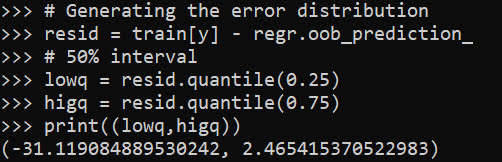
Now we can use these out of bag estimates to generate error intervals around our predictions based on the test oob error distribution. Here I generate 50% prediction intervals.

# Generating the error distribution
resid = train[y] - regr.oob_prediction_
# 50% interval
lowq = resid.quantile(0.25)
higq = resid.quantile(0.75)
print((lowq,higq)) 
# negative much larger
# so tends to overpredict time

Even 50% here are quite wide (which could be a function of both the data has a wide variance as well as the model is not very good). But we can test whether our prediction intervals are working correctly by seeing the coverage on the out of sample test data:

# Generating predictions on out of sample data
test_y = regr.predict(test[x])
lowt = (test_y + lowq).clip(0) #cant have negative numbers
higt = (test_y + higq)

cover = (test[y] >= lowt) & (test[y] <= higt)
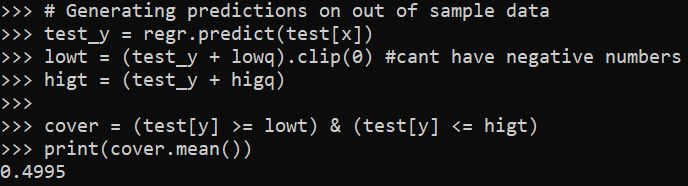
print(cover.mean())

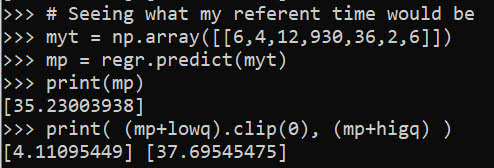
Pretty much spot on. So lets see what the model predicts my referent 50% prediction interval would be (I code myself a 2 on the IMMEDR scale, as I was billed a CPT code 99284, which those should line up pretty well I would think):

# Seeing what my referent time would be
myt = np.array([[6,4,12,930,36,2,6]])
mp = regr.predict(myt)
print(mp)
print( (mp+lowq).clip(0), (mp+higq) )

So a predicted mean of 35 minutes, and a prediction interval of 4 to 38 minutes. (These intervals based on the residual quantiles are basically non-parametric, and don’t have any strong assumptions about the distribution of the underlying data.)

To first see the triage nurse it probably took me around 30 minutes, but to actually be treated it was several hours long. (I don’t think you can do that breakdown in this dataset though.)

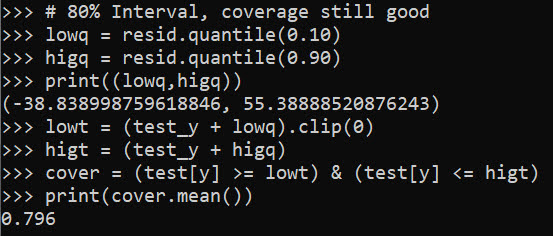
We can do wider intervals, here is a screenshot for 80% intervals:

You can see that they are quite wide, so probably not very effective in identifying outlying cases. It is possible to make them thinner with a better model, but it may just be the variance is quite wide. For folks monitoring time it takes for things (whether time to respond to calls for service for police, or here be served in the ER), it probably makes sense to build models focusing on quantiles, e.g. look at median time served instead of mean.

Optimal and Fair Spatial Siting

A bit of a belated MLK day post. Much of the popular news on predictive or machine learning algorithms has a negative connotation, often that they are racially biased. I tend to think about algorithms though in almost the exact opposite way – we can adjust them to suit our objectives. We just need to articulate what exactly we mean by fair. This goes for predictive policing (Circo & Wheeler, 2021; Liberatore et al., 2021; Mohler et al., 2018; Wheeler, 2020) as much as it does for any application.

I have been reading a bit about spatial fairness in siting health resources recently, one example is the Urban Institutes Equity Data tool. For this tool, you put in where your resources are currently located, and it tells you whether those locations are located in areas that have demographic breakdowns like the overall city. So this uses the container approach (not distance to the resources), which distance traveled to resources is probably a more typical way to evaluate fair spatial access to resources (Hassler & Ceccato, 2021; Koschinsky et al., 2021).

Here what I am going to show is instead of ex-ante saying whether the siting of resources is fair, I construct an integer linear program to site resources in a way we define to be fair. So imagine that we are siting 3 different locations to do rapid Covid testing around a city. Well, we do the typical optimization and minimize the distance traveled for everyone in the city on average to those 3 locations – on average 2 miles. But then we see that white people on average travel 1.9 miles, and minorities travel 2.2 miles. So it that does not seem so fair does it.

I created an integer linear program to take this difference into account, so instead of minimizing average distance, it minimizes:

White_distance + Minority_distance + |White_distance - Minority_distance|

So in our example above, if we had a solution that was white travel 2.1 and minority 2.1, this would be a lower objective value than (4.2), than the original minimize overall travel (1.9 + 2.2 + 0.3 = 4.4). So this gives each minority groups equal weight, as well as penalizes if one group (either whites or minorities) has much larger differences.

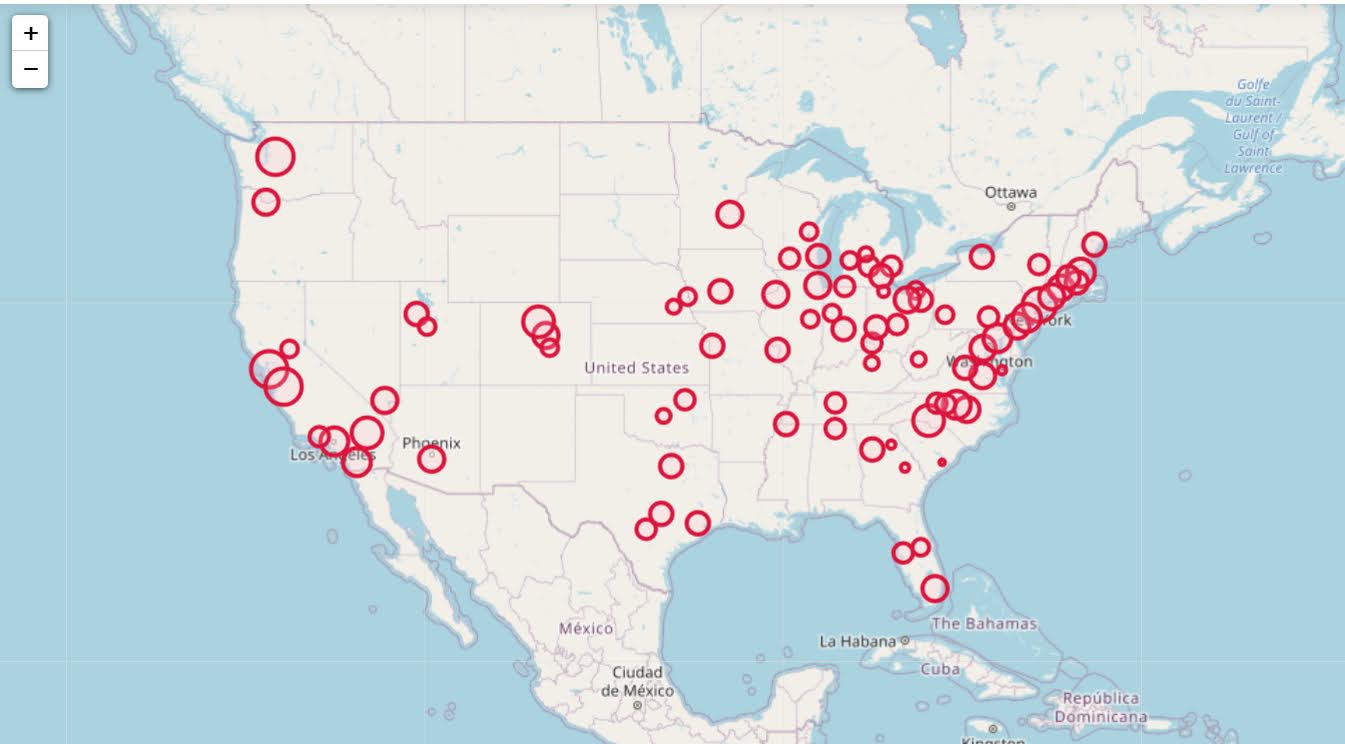
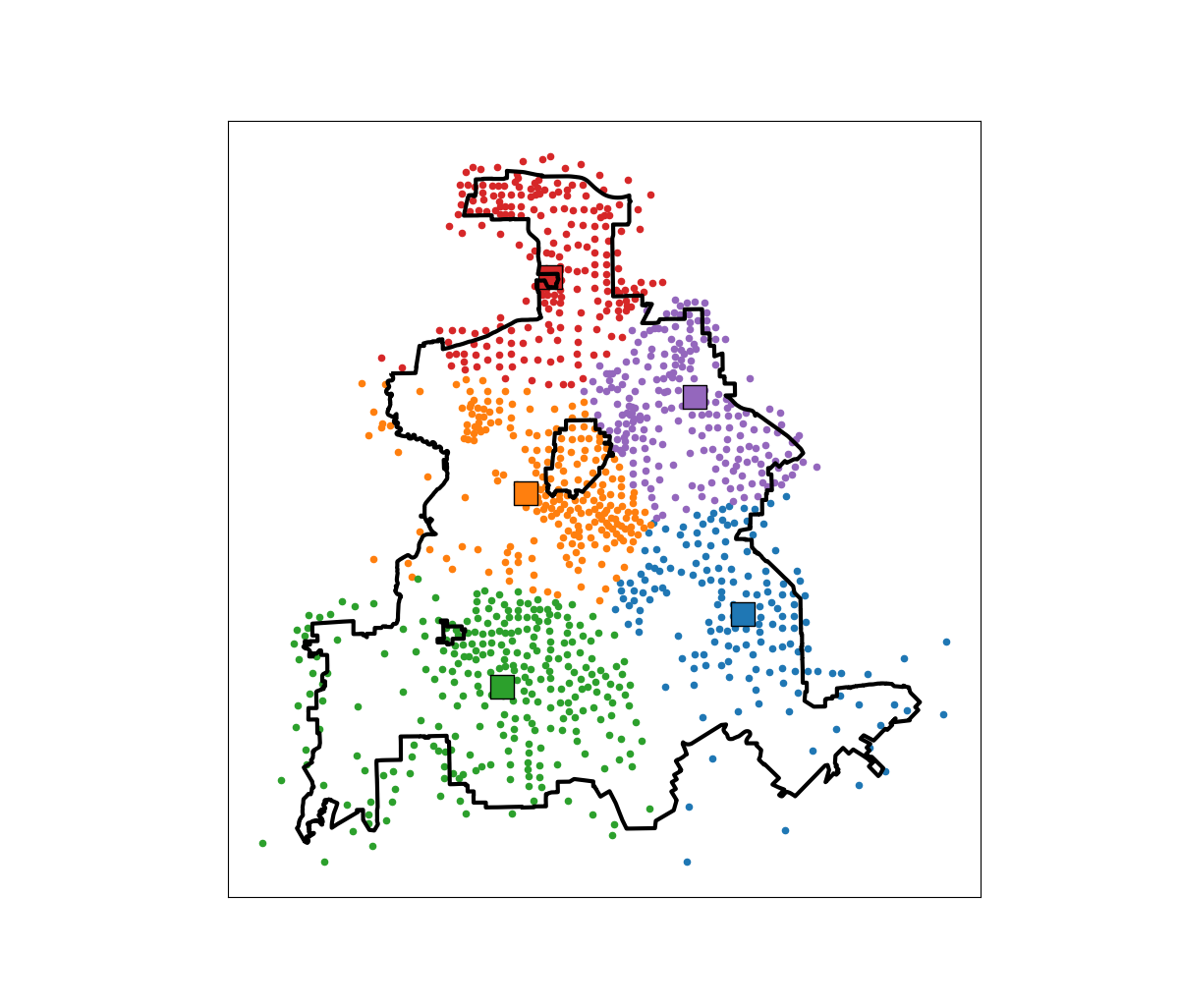
I am not going to go into all the details. I have python code that has the functions (it is very similar to my P-median model, Wheeler, 2018). The codes shows an example of siting 5 locations in Dallas (and uses census block group centroids for the demographic data). Here is a map of the results (it has points outside of the city, since block groups don’t perfectly line up with the city boundaries).

In this example, if we choose 5 locations in the city to minimize the overall distance, the average travel is just shy of 3.5 miles. The average travel for white people (not including Hispanics) is 3.25 miles, and for minorities is 3.6 miles. When I use my fair algorithm, the white average distance is 3.5 miles, and the minority average distance is 3.6 miles (minority on average travels under 200 more feet on average than white).

So this is ultimately a trade off – it ends up pushing up the average distance a white person will travel, and only slightly pushes down the minority travel, to balance the overall distances between the two groups. It is often the case though that one can be somewhat more fair, but in only results in slight trade-offs though in the overall objective function (Rodolfa et al., 2021). So that trade off is probably worth it here.

References

Learning a fair loss function in pytorch

Most of the time when we are talking about deep learning, we are discussing really complicated architectures – essentially complicated sets of (mostly linear) equations. A second innovation in the application of deep learning though is the use of back propagation to fit under-determined systems. Basically you can feed these systems fairly complicated loss functions, and they will chug along with no problem. See a prior blog post of mine of creating simple regression weights for example.

Recently in the NIJ challenge, I used pytorch and the non-linear fairness function defined by NIJ. In the end me and Gio used an XGBoost model, because the data actually do not have very large differences in false positive rates between racial groups. I figured I would share my example here though for illustration of using pytorch to learn a complicated loss function that has fairness constraints. And here is a link to the data and code to follow along if you want.

First, in text math the NIJ fairness function was calculated as (1 - BS)*(1 - FP_diff), where BS is the Brier Score and FP_diff is the absolute difference in false positive rates between the two groups. My pytorch code to create this loss function looks like this (see the pytorch_mods.py file):

# brier score loss function with fairness constraint
def brier_fair(pred,obs,minority,thresh=0.5):
    bs = ((pred - obs)**2).mean()
    over = 1*(pred > thresh)
    majority = 1*(minority == 0)
    fp = 1*over*(obs == 0)
    min_tot = (over*minority).sum().clamp(1)
    maj_tot = (over*majority).sum().clamp(1)
    min_fp = (fp*minority).sum()
    maj_fp = (fp*majority).sum()
    min_rate = min_fp/min_tot
    maj_rate = maj_fp/maj_tot
    diff_rate = torch.abs(min_rate - maj_rate)
    fin_score = (1 - bs)*(1 - diff_rate)
    return -fin_score

I have my functions all stashed in different py files. But here is an example of loading up all my functions, and fitting my pytorch model to the training recidivism data. Here I set the threshold to 25% instead of 50% like the NIJ competition. Overall the model is very similar to a linear regression model.

import data_prep as dp
import fairness_funcs as ff
import pytorch_mods as pt

# Get the train/test data
train, test = dp.get_y1_data()
y_var = 'Recidivism_Arrest_Year1'
min_var = 'Race' # 0 is White, 1 is Black
x_vars = list(train)
x_vars.remove(y_var)

# Model learning fair loss function
m2 = pt.pytorchLogit(loss='brier_fair',activate='ident',
                     minority=min_var,threshold=0.25)
m2.fit(train[x_vars],train[y_var])

I have a burn in start to get good initial parameter estimates with a more normal loss function before going into the more complicated function. Another approach would be to initialize the weights to the solution for a linear regression equation though. After that burn in though it goes into the NIJ defined fairness loss function.

Now I have functions to see how the different model metrics in whatever sample. Here you can see the model is quite balanced in terms of false positive rates in the training sample:

# Seeing training sample fairness
m2pp = m2.predict_proba(train[x_vars])[:,1]
ff.fairness_metric(m2pp,train[y_var],train[min_var],thresh=0.25)

But of course in the out of sample test data it is not perfectly balanced. In general you won’t be able to ensure perfect balance in whatever fairness metrics out of sample.

# Seeing test sample fairness
m2pp = m2.predict_proba(test[x_vars])[:,1]
ff.fairness_metric(m2pp,test[y_var],test[min_var],thresh=0.25)

It actually ends up that the difference in false positive rates between the two racial groups, even in models that do not incorporate the fairness constraint in the loss function, are quite similar. Here is a model using the same architecture but just the usual Brier Score loss. (Code not shown, see the m1 model in the 01_AnalysisFair.py file in the shared dropbox link earlier.)

You can read mine and Gio’s paper (or George Mohler and Mike Porter’s paper) about why this particular fairness function is not the greatest. In general it probably makes more sense to use an additive fairness loss instead of multiplicative, but in this dataset it won’t matter very much no matter how you slice it in terms of false positive rates. (It appears in retrospect the Compas data that started the whole false positive thing is somewhat idiosyncratic.)

There are other potential oddities that can occur with such fair loss functions. For example if you had the choice between false positive rates for (white,black) of (0.62,0.60) vs (0.62,0.62), the latter is more fair, but the minority class is worse off. It may make more sense to have an error metric that sets the max false positive rate you want, and then just has weights for different groups to push them down to that set threshold.

These aren’t damning critiques of fair loss functions (these can be amended/changed to behave better), but in the end defining fair loss functions will be very tricky. Both for empirical reasons as well as for ethical ones – they will ultimately involve quite a few trade-offs.

genrules: using a genetic algo to find high risk cases

So I recently participated in the Decoding Maternal Morbidity Data Challenge. I did not win, but will share my work anyway. I created a genetic algorithm in python to identify sets of association rules that result in high relative risks, genrules. Here I intentionally used a genetic algorithm, with the idea I wanted not just one final model, but a host of different potential rules with the goal of exploratory data analysis.

You can go see how it works by checking out the notebook using the nuMoM2b data (which you have to request, I cannot upload that to github). Here are rules I found to predict high relative risk for infections:

And I have other code to summarize these, it happens to govt insurance is very commonly in the set of rules found.

I actually like it better just as a convenient tool (that can take weights), and go through every possible permutation of a set of categorical data. I uploaded a second notebook showing off NIBRS and predicting officer assaults (see my prior blog post on this).

So here one of the rules is stolen property, and the assailant using their motor vehicle as a weapon. So perhaps people running with stolen property in a vehicle? (While I built quite a bit of machinery to look through higher level rules, why bother with higher sets than 3 variables in the vast majority of circumstances.)

This shows the risk of competing in challenges, so a few weekends lost with no reward. This was a fuzzy competition, and something that appears I misread was in the various notes the challenge asked for the creation of novel algorithms. It appears from the titles of the winners people just used typical machine learning approaches and did a deep dive into the data. I did the opposite, created a general tool that could be used by many (who are better experts on the topical material than me).

Also note this approach is very data mining. While I use p-values as a mechanism to penalize too complicated of outcomes in the genetic algorithm, I wouldn’t take those at face value. With large datasets you will always mine some sets that are ultimately confounded.

Regression Discontinuity Designs

Regression Discontinuity Designs (RDD) are one way to evaluate predictive model systems with causal outcomes associated with what you do with that information. For a hypothetical example, imagine you have a predictive model assessing the probability that you will be diagnosed with diabetes in the next two years. Those that score above 30% probability get assigned a caseworker, to try to prevent that individual from contracting diabetes. How do you know how effective that caseworker is in reducing diabetes in those high risk individuals?

The RDD design works like this – you have your running variable (here the predicted probability), and the threshold (over 30%) that gets assigned a treatment. You estimate the probability of the actual outcome (it may be other outcomes besides just future diabetes, such as the caseworker may simply reduce overall medical costs even if the person still ends up being diagnosed with diabetes). You then estimate the dip in the predicted outcome just before and just after the threshold. The difference in those two curves is the estimated effect.

Here is an example graph illustrating (with fake data I made, see the end of the post). The bump in the line (going from the blue to the red) is then the average treatment effect of being assigned a caseworker, taking into account the underlying trend that higher risk people here are more likely to have higher medical bills.

A few things to note about RDD – so there is a tension between estimating the underlying curve and the counterfactual bump at the threshold. Theoretically values closer to the threshold should be more relevant, so some (see the Wikipedia article linked earlier) try to estimate non-linear weighted curves, giving cases closer to the threshold higher weights. This often produces strange artifacts (that Andrew Gelman likes to point out on his blog) that can miss-estimate the RDD effect. This is clearly the case in noisy data if the line dips just before the threshold and curves up right after the threshold.

So you can see in my code at the end I prefer to estimate this using splines, as opposed to weighted estimators that have a bit of noise. (Maybe someday I will code up a solution to do out of sample predictive evaluations for this as an additional check.) And with this approach it is easy to incorporate other covariates (and look at treatment heterogeneity if you want). Note that while wikipedia says the weighted estimator is non-parametric this is laughably wrong (it is two straight lines in their formulation, a quite restrictive for actually) – while I can see some theoretical justification for the weighted estimators, in practice these are quite noisy and not very robust to minor changes in the weights (and you always need to make some parametric assumptions in this design, both for the underlying curve as well as the standard error around the threshold bump).

There are additional design details you need to be worried about, such as fuzzy treatments or self selection. E.g. if a person can fudge the numbers a bit and choose which side of the line they are on, it can cause issues with this design. In those cases there may be a reasonable workaround (e.g. an instrumental variable design), but the jist of the research design will be the same.

Last but not least, to actually conduct this analysis you need to cache the original continuous prediction. In trying to find real data for this blog post, many criminal justice examples of risk assessment people only end up saving the final categories (low, medium, high) and not the original continuous risk instrument.

If folks have a good public data example that I could show with real data please let me know! Scouting for a bit (either parole/probabation risk assessment, or spatial predictive policing) has not turned up any very good examples for me to construct examples with (also health examples would be fine as well).


This is the simulated data (in python), the RDD graph, and the statsmodel code for how I estimate the RDD bump effect. You could of course do more fancy things (such as penalize the derivatives for the splines), but this I think would be a good way to estimate the RDD effect in many designs where appropriate.

from matplotlib import pyplot as plt
import numpy as np
import pandas as pd
import statsmodels.api as sm
import statsmodels.formula.api as smf

########################################
# Simulating data
np.random.seed(10)
n_cases = 3000 # total number of cases
# pretend this is predicted prob
prob = np.random.beta(3,10,size=n_cases)
# pretend this is med costs over a year
med_cost = 3000 + 5000*prob + -500*(prob > 0.3) + np.random.normal(0,500,n_cases)
df = pd.DataFrame(zip(prob,med_cost), columns=['Prob','MedCost'])
# could do something fancier with non-linear effects for prob
########################################

########################################
# Fitting regression model

# Knots are small distance from threshold
# (Could also do a knot right on threshold)
mod = smf.ols(formula='MedCost ~ bs(Prob,knots=[0.2,0.25,0.35,0.4]) + I(Prob > 0.3)', data=df)
res = mod.fit()
print(res.summary())
########################################

########################################
# Plotting fit

# Getting standard errors
prob_se = res.get_prediction().summary_frame()
prob_se['Prob'] = prob
prob_se.sort_values(by='Prob',inplace=True,ignore_index=True)
low = prob_se[prob_se['Prob'] <= 0.3].copy()
high = prob_se[prob_se['Prob'] > 0.3].copy()

# Getting effect for threshold bump
coef = res.summary2().tables[1]
ci = coef.iloc[1,4:6].astype(int).to_list()

fig, ax = plt.subplots(figsize=(6,4))
ax.scatter(df['Prob'], df['MedCost'], c='grey',
           edgecolor='k', alpha=0.15, s=5, zorder=1)
ax.axvline(0.3, linestyle='solid', alpha=1.0, 
           color='k',linewidth=1, zorder=2)
ax.fill_between(low['Prob'],low['mean_ci_lower'],
                low['mean_ci_upper'],alpha=0.6,
                zorder=3, color='darkblue')
ax.fill_between(high['Prob'],high['mean_ci_lower'],
                high['mean_ci_upper'],alpha=0.6,
                zorder=3, color='red')
ax.set_xlabel('Predicted Prob Diabetes')
ax.set_ylabel('Medical Costs')
ax.set_title(f'RDD Reduced Cost Estimate {ci[0]} to {ci[1]} (95% CI)')
ax.text(0.3,6500,'Threshold',rotation=90, size=9,
         ha="center", va="center",
         bbox=dict(boxstyle="round", ec='k',fc='grey'))
plt.savefig('RDD.png', dpi=500, bbox_inches='tight')
########################################

pre-commit hooks and github actions

In keeping up with learning about code development in python and R, two things I have added to my retenmod python package recently are pre-commit hooks and github actions. I am not going to give a code example here, you can google pre-commit python black flake and get like a dozen different blog posts to describe the process. Ditto for github actions. I think it is good to do some googling on the processes, and then you can see the final yaml files I have made to do either process:

The idea behind pre-commit, is that it runs a set of commands to check your py files before you commit your changes to github on your local system. So here the pre-commit I created for this package does three things:

  • runs black code formatter for python (formats whitespace nicely where it can)
  • runs flake8 checks (checks whether py files meet pep standards)
  • updates my readme document

Note one thing I want to be able to do but cannot currently with pre-commit is to update all jupyter notebooks in place as well. Unfortunately this does not work, as notebooks generate some time meta-data under the hood (so the file is modified, and fails the test). There is probably a way to fix this (maybe some smart config via nbdime), but it is not a big deal for me at the moment. But it works fine executing notebooks and saving to different files, so the readme hook in that example works just fine. (And won’t be as painful as say for Rmarkdown as for Jupyter with that time meta-data.)

Pre-commit hooks run on your local system, so you might not want to have it do pytests. My retenmod package though is tiny (intentionally did it as a very simple example to learn). At work I do development on both a windows machine and Red Hat virtual machines, and fortunately so far have not had issues with needing different yaml files, although I could potentially seeing that happen in more complicated set ups. Although if that were the case, I would like just not install on windows (I use local windows laptop to edit powerpoint presentations, and use Red Hat for pretty much everything else).

Github actions does not run on your personal machine, but runs after you have pushed your changes to github. And then github basically spins up virtual environments and does whatever tests. This makes sense for package development, to make sure your package can be installed on multiple operating systems. And you can run other unit tests at this stage on those systems as well. But for certain tests that only make sense on your local system (say functions to generate database connections) github actions will not make sense.

Next up I will need to learn whether it makes sense to generate artifacts via github actions (for that Jupyter notebook example where pre-commit is not working so well?). Also I have never really figured out sphinx docs for python. So I will see if I can get that up and running as well for this retenmod package.

Generating multiple solutions for linear programs

I had a question the other day on my TURF analysis about generating not just the single best solution for a linear programming problem, but multiple solutions. This is one arena I like the way people typically do genetic algorithms, in that they have a leaderboard with multiple top solutions. Which is nice for exploratory data analysis.

This example though it is pretty easy to amend the linear program to return exact solutions by generating lazy constraints. (And because the program is fast, you might as well do it this way as well to get an exact answer.) The way it works here, we have decision variables for products selected. You run the linear program, and then collect the k products selected, then add a constraint to the model in the form of:

Sum(Product_k) <= k-1 

Then rerun the model with this constraint, get the solution, and then repeat. This constraint makes it so the group of decision variables selected cannot be replicated (and in the forbidden set). Python’s pulp makes this quite easy, and here is a function to estimate the TURF model I showed in that prior blog post, but generate this multiple leaderboard:

import pandas as pd
import pulp

# Function to get solution from turf model
def get_solution(prod_dec,prod_ind):
    '''
    prod_dec - decision variables for products
    prod_ind - indices for products
    '''
    picked = []
    for j in prod_ind:
        if prod_dec[j].varValue >= 0.99:
            picked.append(j)
    return picked

# Larger function to set up turf model 
# And generate multiple solutions
def turf(data,k,solutions):
    '''
    data - dataframe with 0/1 selected items
    k - integer for products selected
    solutions - integer for number of potential solutions to return
    '''
    # Indices for Dec variables
    Cust = data.index
    Prod = list(data)
    # Problem and Decision Variables
    P = pulp.LpProblem("TURF", pulp.LpMaximize)
    Cu = pulp.LpVariable.dicts("Customers Reached", [i for i in Cust], lowBound=0, upBound=1, cat=pulp.LpInteger)
    Pr = pulp.LpVariable.dicts("Products Selected", [j for j in Prod], lowBound=0, upBound=1, cat=pulp.LpInteger)
    # Objective Function (assumes weight = 1 for all rows)
    P += pulp.lpSum(Cu[i] for i in Cust)
    # Reached Constraint
    for i in Cust:
        #Get the products selected
        p_sel = data.loc[i] == 1
        sel_prod = list(p_sel.index[p_sel])
        #Set the constraint
        P += Cu[i] <= pulp.lpSum(Pr[j] for j in sel_prod)
    # Total number of products selected constraint
    P += pulp.lpSum(Pr[j] for j in Prod) == k
    # Solve the equation multiple times, add constraints
    res = []
    km1 = k - 1
    for _ in range(solutions):
        P.solve()
        pi = get_solution(Pr,Prod)
        # Lazy constraint
        P += pulp.lpSum(Pr[j] for j in pi) <= km1
        # Add in objective
        pi.append(pulp.value(P.objective))
        res.append(pi)
    # Turn results into nice dataframe
    cols = ['Prod' + str(i+1) for i in range(k)]
    res_df = pd.DataFrame(res, columns=cols+['Reach'])
    res_df['Reach'] = res_df['Reach'].astype(int)
    return res_df

And now we can simply read in our data, turn it into binary 0/1, and then generate the multiple solutions.

#This is simulated data from XLStat
#https://help.xlstat.com/s/article/turf-analysis-in-excel-tutorial?language=en_US
prod_data = pd.read_csv('demoTURF.csv',index_col=0)

#Replacing the likert scale data with 0/1
prod_bin = 1*(prod_data > 3)

# Get Top 10 solutions
top10 = turf(data=prod_bin,k=5,solutions=10)
print(top10)

Which generates the results:

>>> print(top10)
        Prod1       Prod2       Prod3       Prod4       Prod5  Reach
0   Product 4  Product 10  Product 15  Product 21  Product 25    129
1   Product 3  Product 15  Product 16  Product 25  Product 26    129
2   Product 4  Product 14  Product 15  Product 16  Product 26    129
3  Product 14  Product 15  Product 16  Product 23  Product 26    129
4   Product 3  Product 15  Product 21  Product 25  Product 26    129
5  Product 10  Product 15  Product 21  Product 23  Product 25    129
6   Product 4  Product 10  Product 15  Product 16  Product 27    129
7  Product 10  Product 15  Product 16  Product 23  Product 27    129
8   Product 3  Product 10  Product 15  Product 21  Product 25    128
9   Product 4  Product 10  Product 15  Product 21  Product 27    128

I haven’t checked too closely, but this looks to me offhand like the same top 8 solutions (with a reach of 129) as the XLStat website. The last two rows are different, likely because there are further ties.

For TURF analysis, you may actually consider a lazy constraint in the form of:

Product_k = 0 for each k

This is more restrictive, but if you have a very large pool of products, will ensure that each set of products selected are entirely different (so a unique set of 5 products for every row). Or you may consider a constraint in terms of customers reached instead of on products, so if solution 1 reaches 129, you filter those rows out and only count newly reached people in subsequent solutions. This ensures each row of the leaderboard above reaches different people than the prior rows.

Extending sklearns OrdinalEncoder

I’ve used a variant of this for a few different projects, so figured it was worth sharing. Sklearn’s OrdinalEncoder is close, but not quite what I want for a few different scenarios. Those are:

  • mixed input data types
  • missing data support (which can vary across the mixed input types)
  • the ability to limit encoding of rare categories (useful for regression models)

So I have scripted up a simple new class, what I call SimpleOrdEnc(), and can share it here in the blog post.

from sklearn.preprocessing import OrdinalEncoder
import numpy as np
import pandas as pd

class SimpleOrdEnc():
    def __init__(self, dtype=int, unknown_value=-1, lim_k=None,
                 lim_count=None):
        self.unknown_value = unknown_value
        self.dtype = dtype
        self.lim_k = lim_k
        self.lim_count = lim_count
        self.vars = None
        self.soe = None
    def fit(self, X):
        self.vars = list(X)
        # Now creating fit for each variable
        res_oe = {}
        for v in list(X):
            res_oe[v] = OrdinalEncoder(dtype=self.dtype,
                handle_unknown='use_encoded_value',
                        unknown_value=self.unknown_value)
            # Get unique values minus missing
            xc = X[v].value_counts().reset_index()
            # If lim_k, only taking top K value
            if self.lim_k:
                top_k = self.lim_k - 1
                un_vals = xc.loc[0:top_k,:]
            # If count, using that to filter
            elif self.lim_count:
                un_vals = xc[xc[v] >= self.lim_count].copy()
            # If neither
            else:
                un_vals = xc
            # Now fitting the encoder for one variable
            res_oe[v].fit( un_vals[['index']] )
        # Appending back to the big class
        self.soe = res_oe
    # Defining transform/inverse_transform classes
    def transform(self, X):
        xcop = X[self.vars].copy()
        for v in self.vars:
            xcop[v] = self.soe[v].transform( X[[v]].fillna(self.unknown_value) )
        return xcop
    def inverse_transform(self, X):
        xcop = X[self.vars].copy()
        for v in self.vars:
            xcop[v] = self.soe[v].inverse_transform( X[[v]].fillna(self.unknown_value) )
        return xcop

This works mostly the same way that other sklearn objects do. You instantiate the object, then call fit, transform, inverse_transform, etc. Under the hood it just turns the data into a collection of ordinal encoders, but does a few things. One is that it strips missing values from the original fit data – so out of the box you do not need to do anything like x.fillna(-1), it just works. It is on you though to choose a missing unknown value that does not collide with potential encoded or decoded values. (Also for fit it should be a pandas dataframe, weird stuff will happen if you pass other numpy objects or lists.)

The second are the lim_k or the lim_count arguments. This is useful if you want to encode rare categories as another value. lim_k is if you want to say keep the top 20 categories in the fitted dataset. lim_count sets the threshold at how many cases are in the data, e.g. if you have at least 100 keep it. lim_k takes precedence over lim_count, so if you specify both lim_count is ignored.

These args also confound the missing values, so missing (even if it is common in the data), gets assiged to the ‘other’ category in this encoding. If that is not the behavior you want, I don’t see any way around not explicitly using fillna() before all this.

So here is a simple example use case:

x1 = [1,2,3]
x2 = ['a','b','c']
x3 = ['z','z',None]
x4 = [4,np.nan,5]

x = pd.DataFrame(zip(x1,x2,x3,x4),columns=['x1','x2','x3','x4'])
print(x)

oe = SimpleOrdEnc()
oe.fit(x)

# Transform to the same data
tx = oe.transform(x)
print(tx)

# Inverse transform gives you None
ix = oe.inverse_transform(tx)
print(ix)

So you can see this handles missing input data, but the inverse transform always returns None values for missing. The fit method though returns numeric encoded columns with the same variable names. I default to missing values of -1 as light boost (and I think catboost as well), have those as the default missing data values for categorical data.

Here is an example limiting the output to only categories that have at least 10 observations, and setting the missing data value to 99 instead of -1.

size = 1000
x1 = np.random.choice(['a','b','c'], size).tolist()
x2 = np.random.choice([1, np.nan, 2], size, p=[0.8,0.18,0.02]).tolist()
x3 = np.random.choice(['z','y','x','w',np.nan], size, p=[0.8,0.15,0.04, 0.005, 0.005]).tolist()
x = pd.DataFrame(zip(x1,x2,x3),columns=['x1','x2','x3'])

oe = SimpleOrdEnc(lim_count=10, unknown_value=99)
oe.fit(x)

# Checking with a simpler data frame

x1 = ['a','b','c','d',None,]
x2 = [1,2,-1,4,np.nan]
x3 = ['z','y','x','w','v']
sx = pd.DataFrame(zip(x1,x2,x3),columns=['x1','x2','x3'])

oe.transform(sx)

Because the class is all wrapped up in one object, you can then use pickle to save the object/use later in pipelines. If I know I want to test out specific regression models with my data, I often use the lim_count to make sure I am not keeping a bunch of small dangles of high cardinality data. (Often in my data I use missing data is rare enough I don’t even want to worry about imputing, I rather just treat it as a rare category.)

One use case this does not work out so well though for is ICD codes in wide format. Will need to write another blog post about that. But often will just reshape wide to long to fit these encoders.

Using Jupyter Notebooks to make nice README’s for GitHub

Working on my R package ptools, the devtools folks have you make a readme R markdown file to compile to a nice readme markdown file for github. I thought to myself that you could functionally do the same thing with juypter notebooks for python. So here is a quick example of that for my retenmod python package.

So first, here is the old readme in its entirety, rendered on Github:

You can see I have an example code snippet, but it does not actually output the results. Here is the update, where I use jupyter to render the markdown nicely:

So we have nice syntax highlighting even. (Note that the pip install code is not run in a %sh cell, it is just code formatting inside of a markdown cell.) I do like the way R markdown renders the output a bit nicer than here (I also haven’t tried with pretty pandas tables). But you can also include matplotlib images as well:

You might typically want to add in README.ipynb to your gitignore file, but here I included it in the github package so you can see what this notebook looks like. To compile the notebook to markdown is quite simple:

jupyter nbconvert --execute --to markdown README.ipynb

If you have matplotlib images, it saves them in a folder named README_files (not sure if there is a flag to change this option). To get the images to render you then also need to push that image folder into Github.

Reversion in the tech stack and why DS models fail

Hackernews recently shared a story about not using an IDE, and I feel mostly the same way. Hence the title in the post – so my current workflow for when I steal some time to work on my R package ptools my workflow looks like this, using Rterm from the shell:

I don’t have anything against RStudio, I just only have so much room in my brain. Sometimes conversations at work are like a foreign language, “How are we going to test the NiFi script from Hadoop to our Kubernetes environment” or “I can pull the docker image from JFrog, but I run out of room when extracting the image on our sandbox machine. But df says we have plenty of room on all the partitions?”.

If you notice at the top the (base) in front of the shell, that is because this is within the anaconda shell as well. So if you look at many of my past blog posts (see here for one example), I am just using the snipping tool in windows to take screenshots of the shell output in interactive mode.

I am typically just writing the code in Notepad++ (as well as this blog post) – and it is quite simple to switch between interactive copy this function/code and compiling entire scripts. Here is a screenshot of R unit tests for example.

So Notepad++ has some text highlight (for both R and python), and that is nice, but honestly not that necessary. Main thing I use is the selection of brackets to make sure they are balanced. I am sure I am missing out on some nice autocomplete features that would make me more productive, and function hints in Spyder are nice for pandas functions (I mostly use google still though for that when I need it).

I do use VS Code for development work on our headerless virtual machines at work. But that is more to replicate essentially the workflow on Windows with file explorer + Notepad++ + Shell (I am not a vim ninja – what is it esc + wq:, need to look that up everytime). I fucked up one of my git repos the other day using VS Code stuff tools, and I am just using git directly anymore. (Again this means I am the problem, not VS Code!)

Why data science projects fail?

Some more random musings, but the more I get involved and see what projects work and what don’t at work, pretty much all of the failures I have come across are due to what I will call “not modeling the right thing”. That potentially covers a bit, but quite a few are simply not understanding counterfactual reasoning and selection bias.

The modeling part (in terms of actually fitting models) is typically quite easy – you do some simple but slightly theoretically informed feature engineering and feed that info into a machine learning model that is very flexible. But maybe that is the problem, people can easily fool themselves into thinking a model looks good, but because they are modeling the wrong thing it does not result in better decision making.

Even in most of the failures I have seen, selection bias is surmountable (often just requires multiple models or models on different samples of data – reduced form for the win!). So learning how to train/test split the data, and feed your data into XGboost only takes a few classes to learn. How to know the right thing to model though takes a bit more thought.

A secondary part of the failure is not learning how to translate the model outputs into actionable decisions. But the not modeling the right thing is at the start, so makes any downstream decision not work out how you want.