Favorite maps and graphs in historical criminology

I was reading Charles Booth’s Life and Labour of the People in London (available entirely at Google books) and stumbled across this gem of a connected dot plot (between pages 18-19, maybe it came as a fold out in the book?)
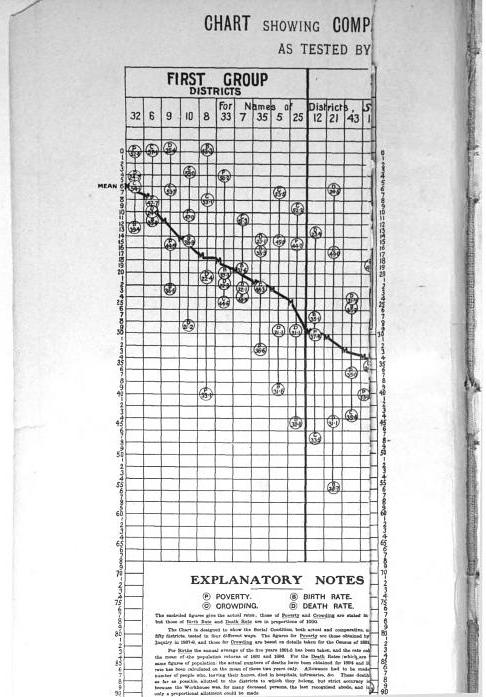
(You will also get a surprise of the hand of the scanner in the page prior!) This reminded me I wanted to make a collection of my favorite historical examples of maps and graphs for criminology and criminal justice. If you read through Calvin Schmid’s Handbook of Graphical Presentation (available for free at the internet archive) it was a royal pain to create such statistical graphics by hand before computers. It makes you appreciate the effort all that much more, and many of the good ones will rival the quality of any graphic you can make on the computer.

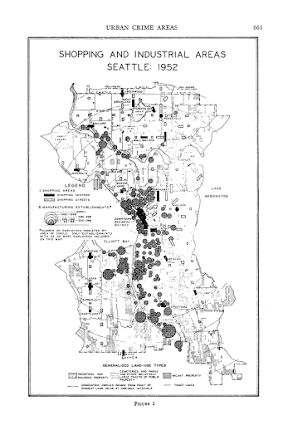
Calvin Schmid himself has some of my favorite example maps. See for instance this gem from Urban Crime Areas: Part II (American Sociological Review, 1960):
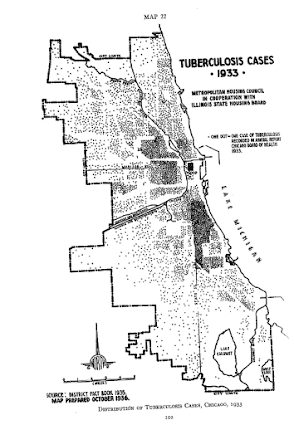
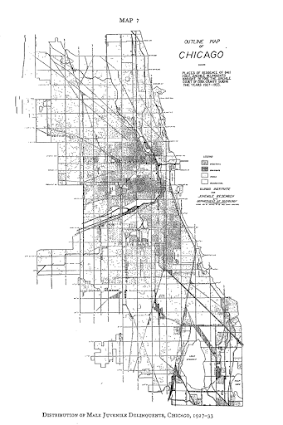
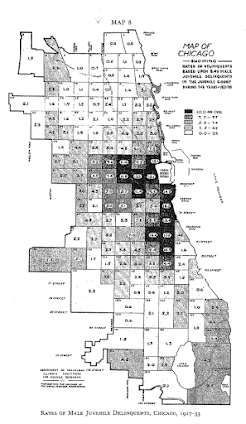
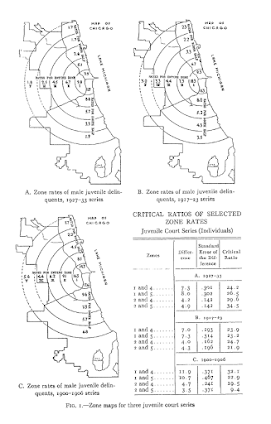
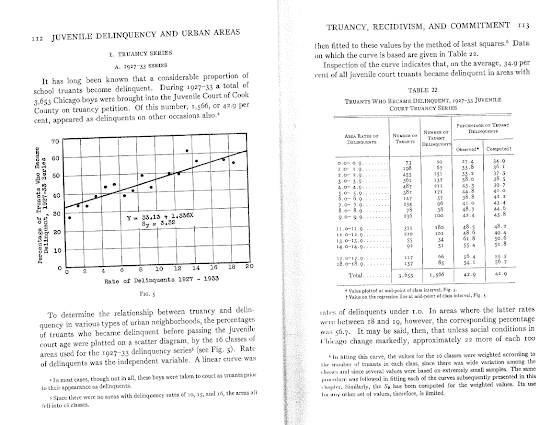
The most obvious source of great historical maps in criminology though is from Shaw and McKay’s Juvenile Delinquency in Urban Areas. It was filled with incredible graphs and maps throughout. Here are just a few examples. (These shots are taken from the second edition in 1969, but they are all from the first part of the book, so were likely in the 1942 edition):

Dot maps
Aggregated to grid cells
The concentric zonal model
And they even have some binned scatterplots to ease in calculating linear regression equations
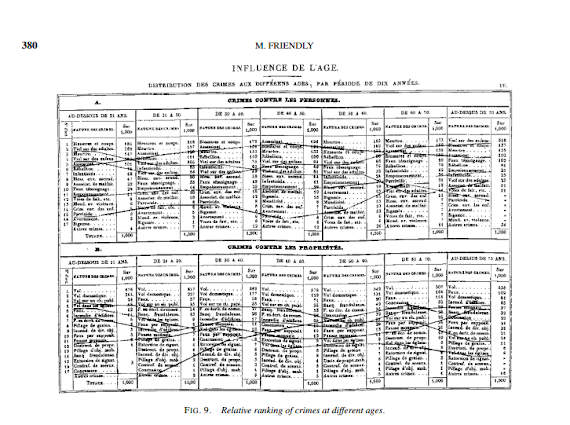
Going back further, Friendly in A.-M. Guerry’s moral statistics of France: Challenges for multivariable spatial analysis has some examples of Guerry’s maps and graphs. Besides choropleth maps, Guerry has one of the first examples of a ranked bumps chart (as later coined by Edward Tufte) of the relative rankings of the counts of crime at different ages (1833):
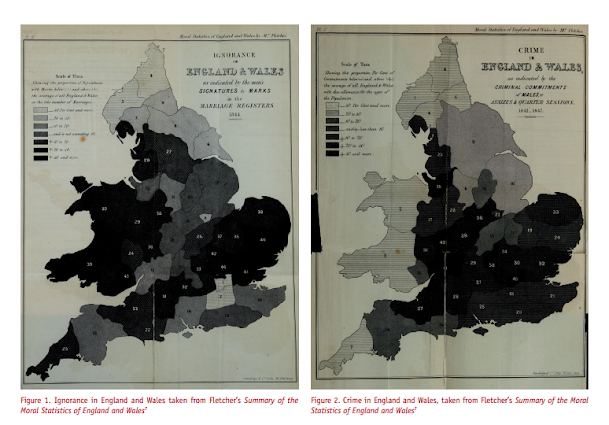
I don’t have access to any of Quetelet’s historical maps, but Cook and Wainer in A century and a half of moral statistics in the United Kingdom: Variations on Joseph Fletcher’s thematic maps have examples of Joseph Fletcher’s choropleth maps (as of 1849):
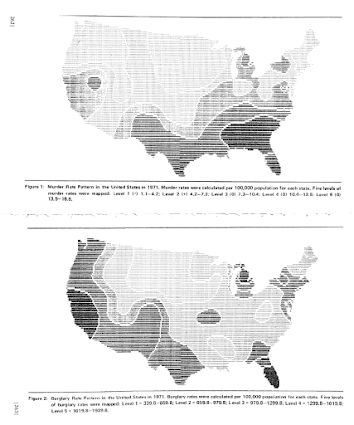
Going to more recent mapping examples, the Brantingham’s most notable I suspect is their crime pattern nodes and paths diagram, but my favorites are the ascii glyph contour maps in Crime seen through a cone of resolution (1976):
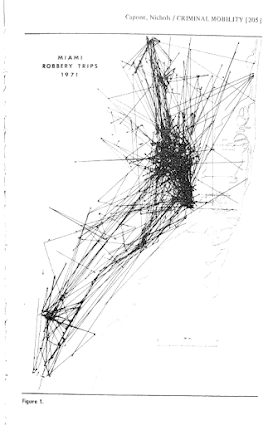
The earliest example of a journey-to-crime map I am aware of is Capone and Nichols Urban structure and criminal mobility (1976) (I wouldn’t be surprised though if there are earlier examples)
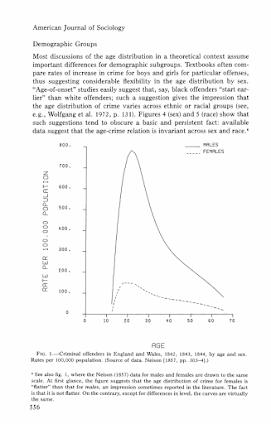
Besides maps, one other famous criminology graphic that came to mind was the age-crime curve. This is from Age and the Explanation of Crime (Hirschi and Gottfredson, 1983) (pdf here). This I presume was made with the computer – although I imagine it was still a pain in the butt to do it in 1983 compared to now! Andresen et al.’s reader Classics in Environmental Criminology in the Quetelet chapter has an age crime curve recreated in it (1842), but I will see if I can find an original scan of the image.
Edit: Was able to find an online scan of Quetelet’s original work in French. This has a fitted sine curve as one of the figures, but if you check out the tables he has binned arrest rates (page 65).
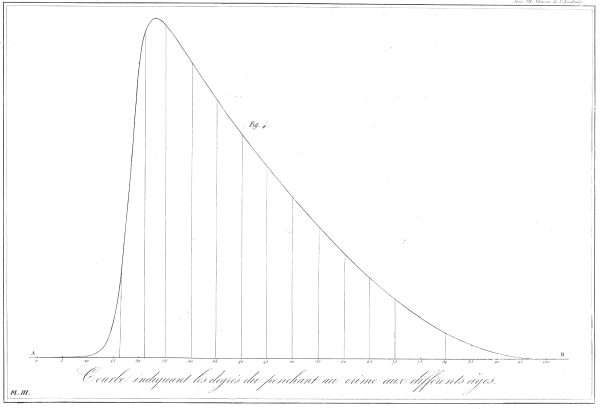
Quetelet_AgeCrimeCurve

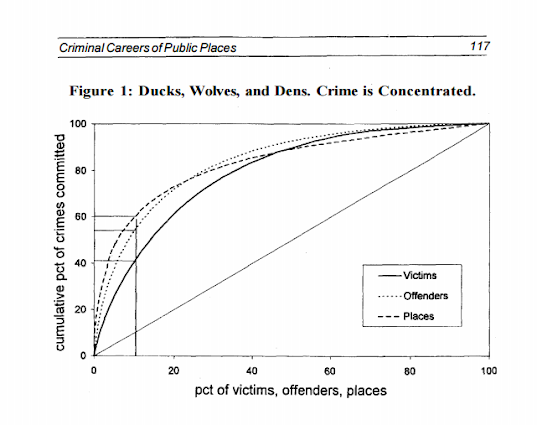
I will admit I have not read Wolfgang’s work, but I imagine he had graphs of the empirical cumulative distribution of crime offenses somewhere in Delinquency in a Birth Cohort. But William Spelman has many great examples of them for both people and places. Here is one superimposing the two from Criminal Careers of Public Places (1995):
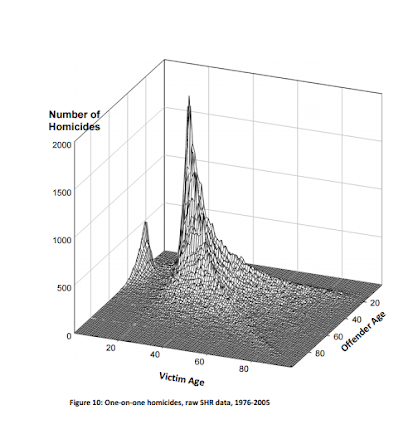
Michael Maltz has spent much work on advocating for visual presentation as well. Here is an example from his chapter, Look Before You Analyze: Visualizing Data in Criminal Justice (pdf here) of a 2.5d kernel density estimate. Maltz discussed this in an earlier publication, Visualizing Homicide: A Research Note (1998), but the image from the book chapter is nicer.
Here is an album with all of the images in this post. I will continue to update this post and album with more maps and graphs from historical work in criminology as I find them. I have a few examples in mind — I plan on adding a multivariate scatterplot in Don Newman’s Defensible Space, and I think Sampson’s work in Great American City deserves to be mentioned as well, because he follows in much of the same tradition as Shaw and McKay and presents many simple maps and graphs to illustrate the patterns. I would also like to find the earliest network sociogram of crime relationships. Maltz’s book chapter has a few examples, and Papachristo’s historical work on Al Capone should be mentioned as well (I thought I remembered some nicer network graphs though in Papachristos’s book chapter in the Morselli reader).

Let me know if there are any that I am missing or that you think should be added to the list!
New paper: The Effect of 311 Calls for Service on Crime in D.C. At Micro Places

I have a new pre-print posted, The Effect of 311 Calls for Service on Crime in D.C. At Micro Places, at SSRN. Here is the abstract:

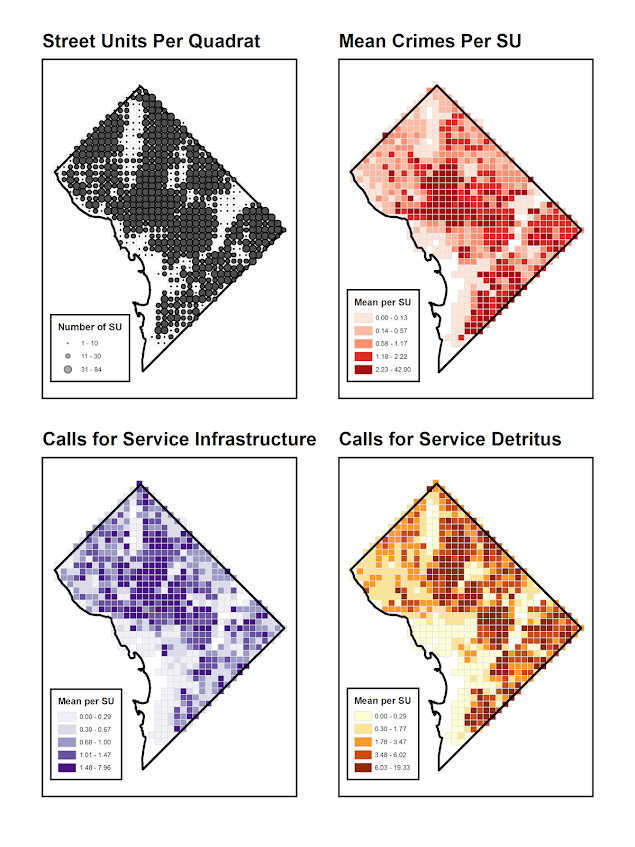
Broken windows theory has been both confirmed and refuted with several different measures of physical disorder. Small experiments tend to confirm the priming effects of physical disorder on minor deviant acts, but measures based on order maintenance policing and surveys are much more mixed. Here I use 311 calls for service as a proxy for physical disorder, as it is a simple alternative compared to neighborhood audits or community surveys. For street segments and intersections in Washington D.C., I show that 311 calls for service based on detritus (e.g. garbage on the street) and infrastructure complaints (e.g. potholes in sidewalks) have a positive but very small effect on Part 1 crimes while controlling for unobserved neighborhood effects. This suggests that 311 calls for service can potentially be a reliable indicator of physical disorder where available. The findings partially confirm the broken windows hypothesis, but reducing physical disorder is unlikely to result in appreciable declines in crime.

And here are some maps of the crimes and calls per service per the regular grid I use as the neighborhood boundaries (because everything is better with some pretty maps!):

As always, if you have feedback I am all ears. This is what I signed up to present at ASC this fall, and is based on work in my dissertation.

Cartography and GIS special issue on Crime Mapping

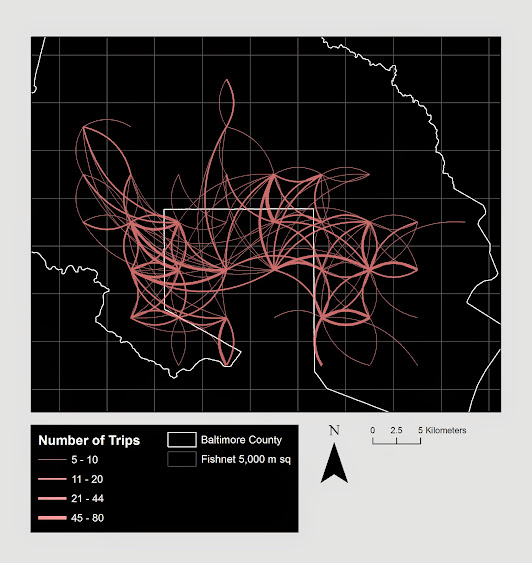
My paper, Visualization techniques for journey to crime flow data, has been recently published in a special issue in CaGIS on crime mapping. Always feel free to email me for off-prints of published papers, but the pre-print of this one I posted on SSRN as well.

There is an annoying error that crept into the paper, in that the footnote linking to the results to replicate the maps and graphs says “REDACTED FOR ANONYMITY” – which is my fault for not pointing it out to the copy-editor. The files are available here. They are certainly not easy to walk through, so if you want help replicating any of the maps for your own data and can’t figure out my code feel free to send me an email. I would like to make an R package to make maps like below eventually, but that is just not going to happen in the forseeable future.

Presentation at IACA 2014 – Making Field Stops Smart

Part of the work I am doing with the Finn Institute in collaboration with the Albany Police Department was accepted as a presentation at the upcoming IACA conference in Seattle next week. The NIJ used to have a separate Crime Mapping conference, but they folded it into the yearly IACA conference. So this is one of the NIJ Crime Mapping presentations.

The title of the presentation is Making Field Stops Smart, and below is the abstract:

Mapping hot spots of crime incidents for use in allocating patrol resources has become commonplace. This research is intended to extend the logic to mapping locations of field interviews. The project has two specific spatial analysis components; 1) are most of the stops being conducted a high crime locations, and 2) are locations with the most stops the locations with the most productive stops (in terms of arrests, contraband recovery, stopping chronic offenders). Making stops smart is being conducted as a research partnership between the Albany, NY police department and the Finn Institute of Public Safety.

The time of the presentation is at 15:30 on Thursday 9/11. Two other presenters, Eric Paull from Akron, Ohio and Christian Peterson from Portland, Oregon have presentations on the panel as well (see the IACA agenda for their talk abstracts).

I am uncomfortable publicly releasing the pre-print white papers given the collaboration (Rob Worden and Sarah McLean are co-authors) and because that APD’s name is directly attached to the work. But if you send me an email I can forward the white paper for this presentation and related work we are doing.

If you see me at IACA feel free to come up and say hi. I do not have any other plans while I am in town besides going to presentations.


Using Google Fusion Tables to make some maps!

In the past to share interactive maps with others I’ve used BatchGeo and CartoDB. BatchGeo is super easy to geocode a few incidents, and CartoDB has a few more stylistic options (including some very cool animations). Both of these projects have a limit on the number of points you can map with the free service though. The new Google maps allows you make similar products to BatchGeo and CartoDB, in that you can upload a csv file or kml and then do some light editing of the points, and then embed an iframe in a website if you want (I wish Google Maps had a time slider like Google Earth does). Here is an example from my PhD of a few locations that one of my original models did a very poor job of predicting the amount of crime at the street midpoint or intersection.

But a few recent projects I wanted to place many more geographies on the map than these free versions allow. ArcGIS online is pretty slick in my few tests, but I am settling on Google Fusion tables for the ability to link the geographies and data tables (plus the ability to filter is very nice). Basically you can upload your data table and kml in seperate Fusion tables and then merge them to create your own polygons with associated data. Here is another example from my dissertation and embedded map below.

Basically what I do is make a set of units of analysis based on street mid-points and intersections. I then divide the city up based on the Thiessen polygons of those sets of points for the allocation of different areal measures. E.g. I can calculate the overlap of the Thiessen polygon with the area of sidewalks.

I’m using Google Fusion tables for some other projects in which I want people within the PD to be able to interactively explore the data. My main interest in these slippy maps are that you can pan and zoom – and with a static map it is hard to recreate all of the potential views a consumer of the map wants. I can typically make a nicer overview map of the forest or any general data patterns in a static map, but if I think the user of the map will want to zoom in to particular locations these interactive maps meet that challenge. Pop-ups allow for a brief digging into the data as well, but don’t allow for visualizing patterns. Fusion tables are very limited though it the styling of the geography. (All of these free versions are pretty limited, but the Fusion tables are especially restrictive for point symbology and creating choropleth classes).

Using these maps has a trade off when sharing with the PD though. They are what I would call semi-public, in that if you want others to be able to view the map you can share a link, but anyone with the link can see the map. This prevents sharing of intimate information on the map that might be possibly leaked. (For the ability to have access control to more sensitive information, e.g. a user has to sign on to a secure website, I know Bair analytics offers paid for products like that – probably some of the prior web map apps I mentioned do so as well.) I’ve made them in the past for Troy P.D., but I really have no idea how often they were used – so other analysts let me know in the comments if you’ve had success with maps like these disseminating info. within the police department.

I’m getting devilishly close to finishing my dissertation, and I will post an update and link when the draft is complete. My prospectus can be seen here, and the linked maps are part of some supplemental material I compiled. The supplemental info. should provide a little more details on what the maps are showing.

Taking account of the baseline in kernel density maps using CrimeStat

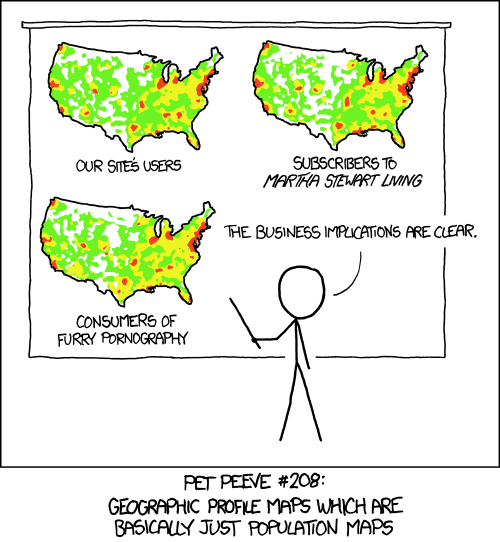
When making kernel density maps sometimes the phenonema is heavily clustered in particular locations simply because the population at risk is uneven over the study space. xkcd puts this in a bit more of laymans terms than I do:

So how do we take into account the underlying population? It depends on the data, but if you actually have population at risk data as points we can make kernel density maps that are the ratio of the cases to the underlying total population. I will show how you can do this type of raster kernel density estimate in CrimeStat using some data on reported assaults and arrests from the city of Chicago.

To make the necessary smooth estimate of the proportions of arrests in CrimeStat you will need two seperate ones, the first primary file should be all arrests of interest, and the secondary file should be all of the incidents (so the arrests are a subset of all incidents). And of course both files need to have the geocoordinates already.

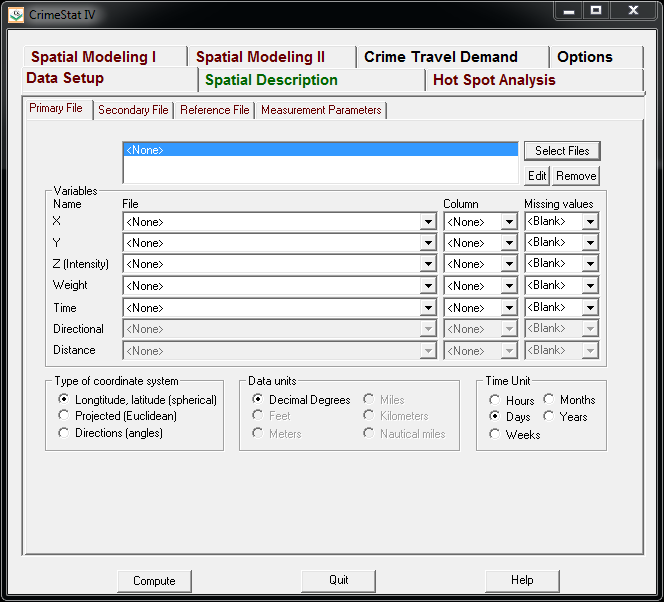
So CrimeStat has a nice GUI to make our KDE maps. So you will be greeted with the following screen after starting the CrimeStat program.

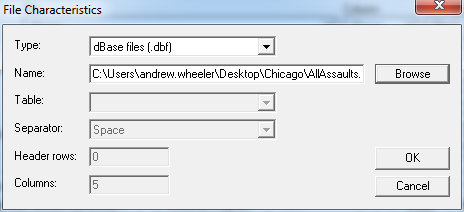
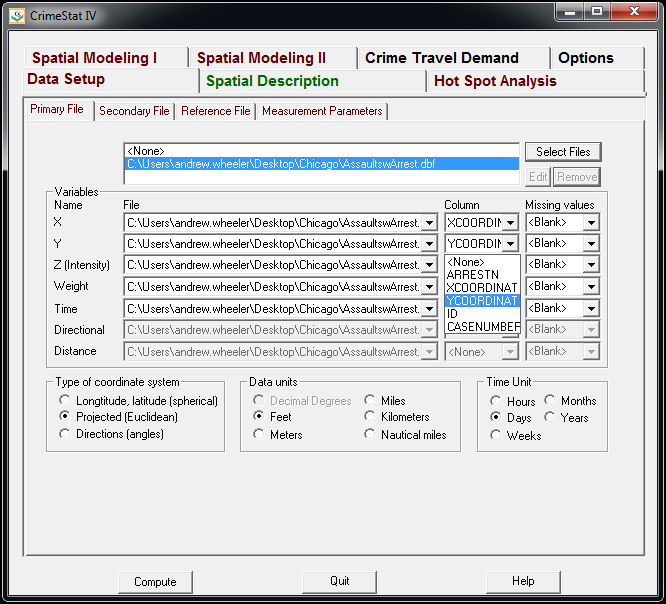
Now we can enter in our data. First click the Select Files button and then navigate to your data file. Here I saved the seperate files as DBFs, and for the primary file I use all of the arrests associated with an assault incident in Chicago in 2013.

Now that the file is loaded into CrimeStat, we need to specify what fields contain the spatial coordinates in the variables section. Then we set the appropriate options in the bottom panels. Here I am using projected coordinates in feet. I don’t specify a time unit so that option is superflous.

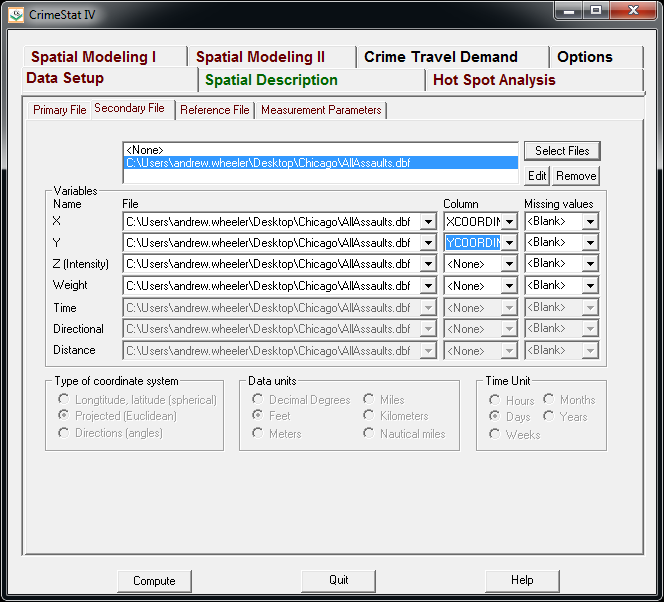
Now we can enter in our secondary file, which will be all of the assault incidents in Chicago in 2013. The Seconday File tab is in the set of minor tabs under the larger Data Setup tab (CrimeStat has an incredible number of routines, hence the many options). It is an equivalent workflow as to that of the primary file, import the spreadsheet, and define the fields.

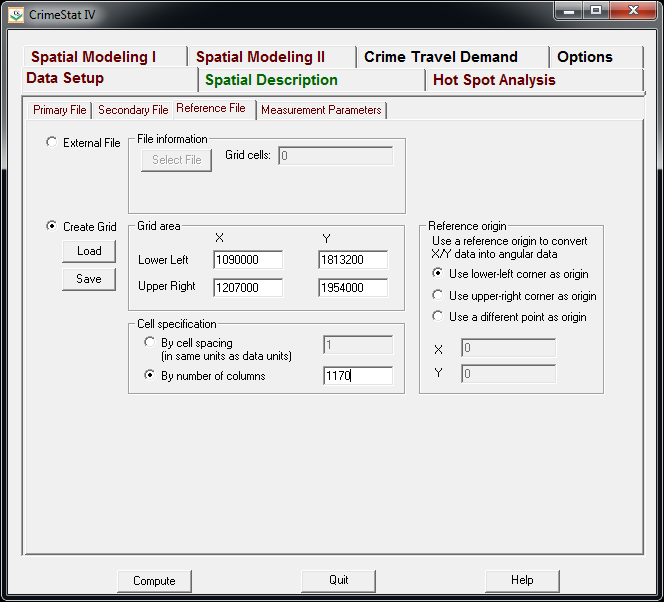
Now we need to set up the reference grid to which we will write the raster output to. Still on the same Data Setup main tab, we then navigate to the Reference file minor tab. Here we specify a set of coordinates (in the particular projection of use) as a rectangle corresponding to the lower left and upper right corners. Then you can control how fine the grid is by specifying a larger number of columns. Here the cell sizes are 300 square feet. Note you can save the particular reference file for future use.

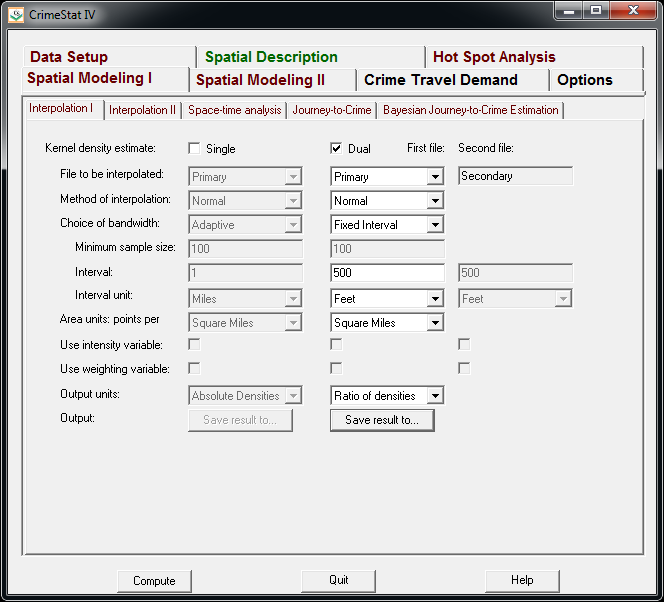
Now we can finally move onto estimating our kernel density map! Now navigate to the main Spatial Modeling I tab and navigate to the Interpolation I minor tab. To make a ratio of our two rasters (which will be the smoothed proportions of arrests). Here we choose the Dual KDE estimation, and specify the normal kernel. Typically for KDE maps the kernel makes very little difference, choosing an appropriate bandwidth impacts the look of the map to a much greater extent. I typically default to around 300 meters, but here I choose a smaller 500 foot bandwidth (we will see this is seriously undersmoothed – but I rather start with undersmoothed than oversmoothed).

The field Area units: points per ends up being superflous when specifying the ratio of the two densities. Clicking on the Save Result to button we can choose to save the output to various geographic data file formats (both vector and raster). Here I specify ArcGIS’s raster format.

Now we are ready to calculate the KDE raster. Simply click the Compute button at the bottom of CrimeStat, and be alittle patient with a dataset of this size (4,000 some arrests and over 17,500 total incidents). After that runs we can then import the rasters into your favorite GIS and make some maps.

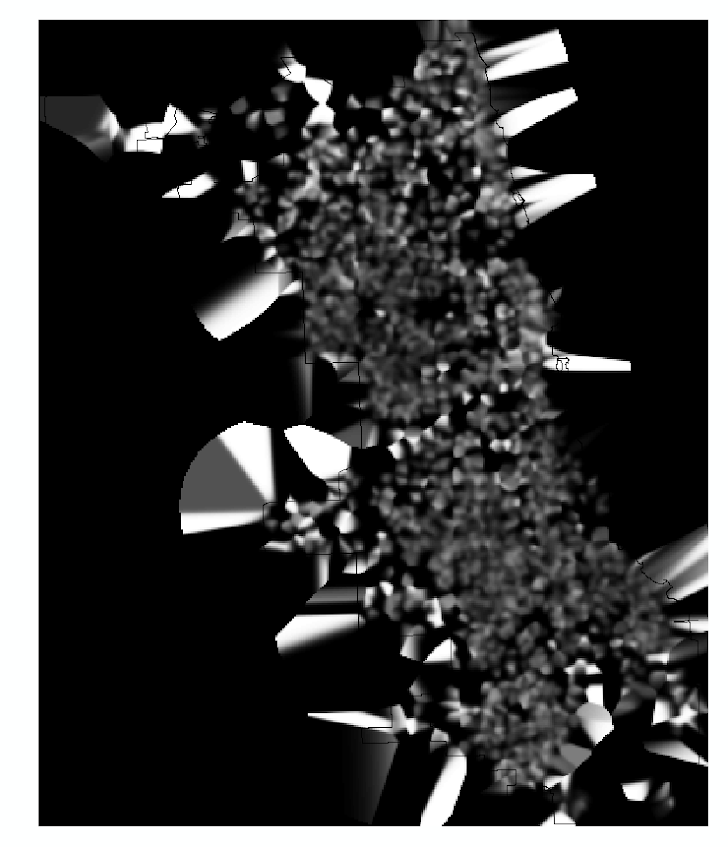
You will notice when you first upload the raster there are several strange artifacts. This is a function of places with very few incidents have a low baseline with with to calculate the smoothed proportion of arrests. Unfortunately it appears CrimeStat specifies 0 where null data values should be (places with zero density in the denominator).

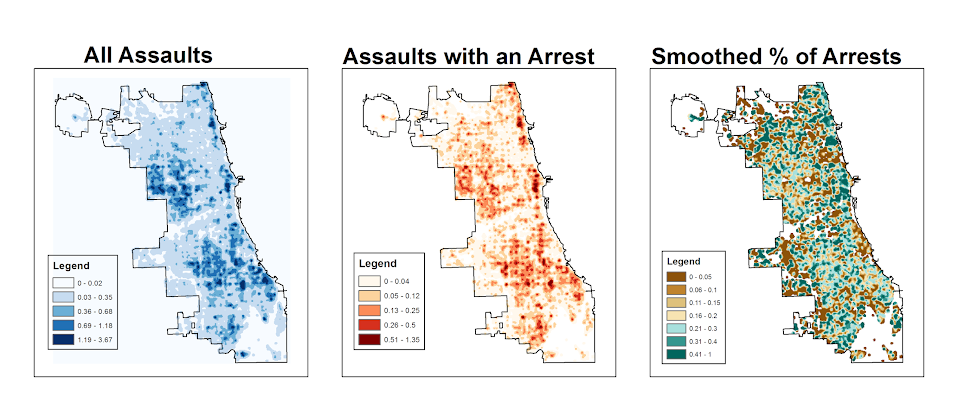
A quick fix to this problem though is to make a separate kernel density map of just the incidents and superimpose that on top of your smoothed arrests. Then you can make the zero density areas the same color as the background map so they are filtered out. Here I filter areas that have a incident density of less than <0.02 (these are absolute densities, so they sum to the total number of incidents used to calculate them to begin with).

So below are the final KDE maps. As you can see from all of them 500 feet is seriously undersmoothed, but the absolute densities of incidents and arrests (the two left most maps) appears to be highly correlated. If you look at the hit rate of arrests though in the right most map, the percent of arrests appear to be spatially random.

Other possibilities for similar analysis are say accidents involving injury or pedestrians where the baseline is all accidents, field stops that result in contraband recovery, or comparison of densities before and after an intervention (although here I may take the absolute difference as opposed to the ratio).

Of course this just scratches the surface of possible analysis. When the population at risk is not so conveniently labelled in the data set, such as coming from census geographies, one may consult the literature on dasymetric mapping (also see the head bang procedure in CrimeStat). Bivand et al. (2008) have an example of calculating the ratio raster along with some statistical tests, and the spatstat library has some more convenient functions to accomplish this and map the results (see the relrisk function). One can also estimate a logistic regression model with the spatial coordinates as non-linear predictors (e.g. using splines) and then plot the predicted probabilities for each grid cell.

I’m not sure of a quick global test of whether the proportion of arrests are random though. I thought off-hand you could use a spatial scan test for the case-control data (e.g. using SatScan or similar functions in the spatstat R library), although I’m not sure if that counts as quick.

Article: Viz. techniques for JTC flow data

My publication Visualization techniques for journey to crime flow data has just been posted in the online first section of the Cartography and Geographic Information Science journal. Here is the general doi link, but Taylor and Francis gave me a limited number of free offprints to share the full version, so the first 50 visitors can get the PDF at this link.

Also note that:

  • The pre-print is posted to SSRN. The pre-print has more maps that were cut for space, but the final article is surely cleaner (in terms of concise text and copy editing) and has slightly different discussion in various places based on reviewer feedback.
  • Materials I used for the article can be downloaded from here. The SPSS code to make the vector geometries for a bunch of the maps is not terribly friendly. So if you have questions feel free – or if you just want a tutorial just ask and I will work on a blog post for it.
  • If you ever want an off-print for an article just send me an email (you can find it on my CV. I plan on continuing to post pre-prints to SSRN, but I realize it is often preferable to cite the final in print version (especially if you take a quote).

The article will be included in a special issue on crime mapping in the CaGIS due to be published in January 2015.

Online Crime Mapping for Troy PD

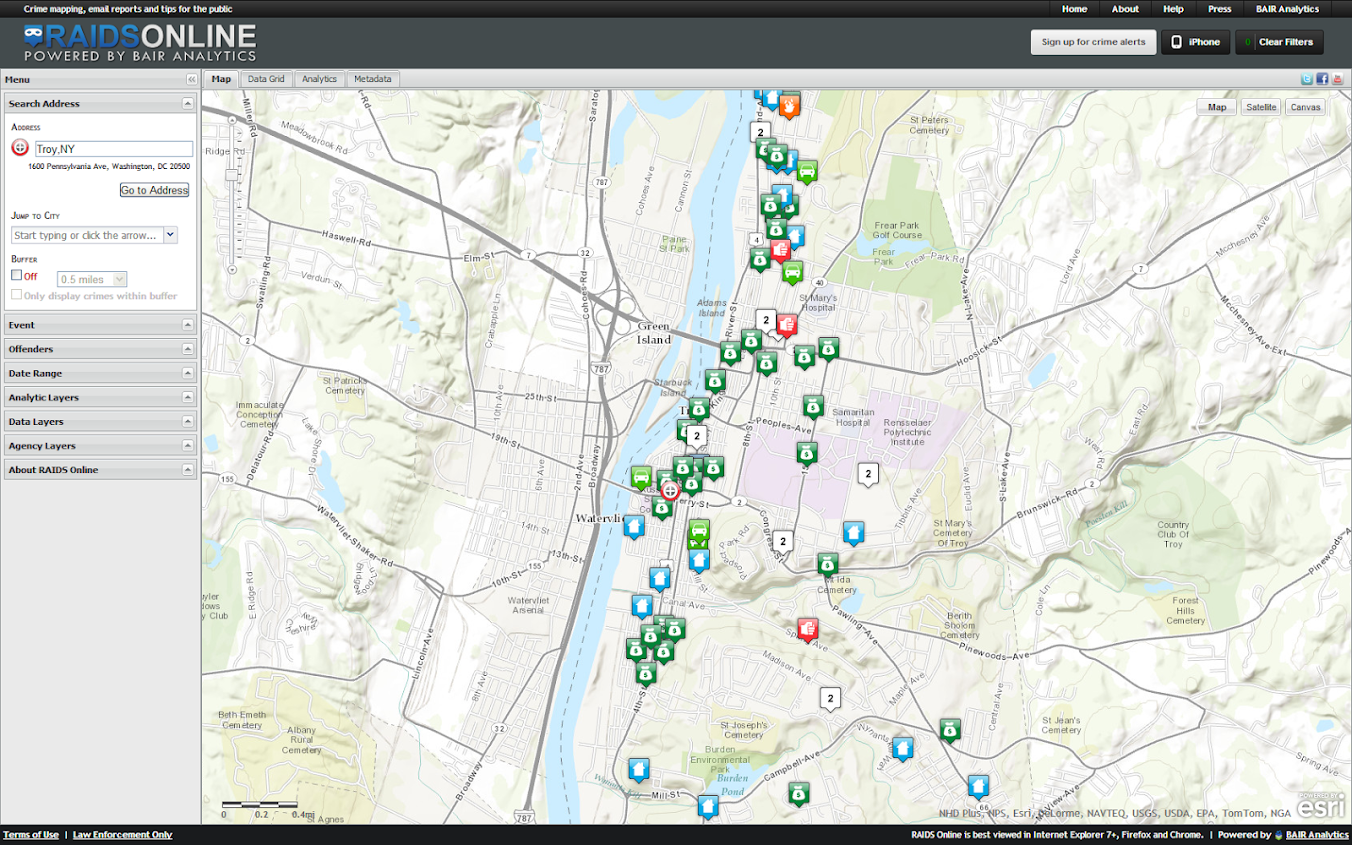
One of the big projects I have been working on since joining the Troy Police Department as a crime analyst last fall is producing timely geocoded data. I am happy to say that a fruit of this labor is the public crime map, via RAIDS Online, that has finally gone public (and can be viewed here). The credit for the online map mainly goes to BAIR Analytics and their free online mapping platform. I merely serve up the data for them to put on the map.

I’ve come to believe that more open data is the way of the future, and in particular an online crime map is a way to engage and enlighten the public to the realities of crime statistics. Although this comes with some potential negative externalities for the police department, such as complaints about innacurracy, decreasing home prices, and misleading symbology and offset geocoding. I firmly believe though that providing this information empowers the public to be more engaged in matters of crime and safety within their communities.

I thank the Troy Police Department for supporting the project in spite of these potential negative consequences, and Chief Tedesco for his continual support of the project. I also thank Capt. Cooney for arranging for all of the media releases. Below is the current online news stories (will update with CW15 if they post a story).

Here I end with a list of reading materials I consider necessary for any other crime analyst pondering the decision whether to public crime statistics online. And I end by again thanking Troy PD for allowing me to publish this data, and BAIR for providing the online service that makes it possible with a zero dollar budget.


Let me know if I should add any papers to the list! Privacy implications (such as this work by Michael Leitner and colleagues) might be worth a read as well for those interested. See my geomasking tag at CiteUlike for various other references.

Viz. JTC Flow lines – Paper for ASC this fall

Partly because I would go crazy if I worked only on my dissertation, I started a paper about visualizing JTC flow lines awhile back, and I am going to present what I have so far at the American Society of Criminology (ASC) meeting at Atlanta this fall.

My paper is still quite rough around the edges (so not quite up for posting to SSRN), but here is the current version. This actually started out as an answer I gave to a question on the GIS stackexchange site, and after I wrote it up I figured it would be worthwhile endeavor to write an article. Alasdair Rae has a couple of viz. flow data papers currently, but I thought I could extend those papers and write for a different audience of criminologists using journey to crime (JTC) data.

As always, I would still appreciate any feedback. I’m hoping to send this out to a journal in the near future, and so far I have only goated one of my friends into reviewing the paper.

Some more about black backgrounds for maps

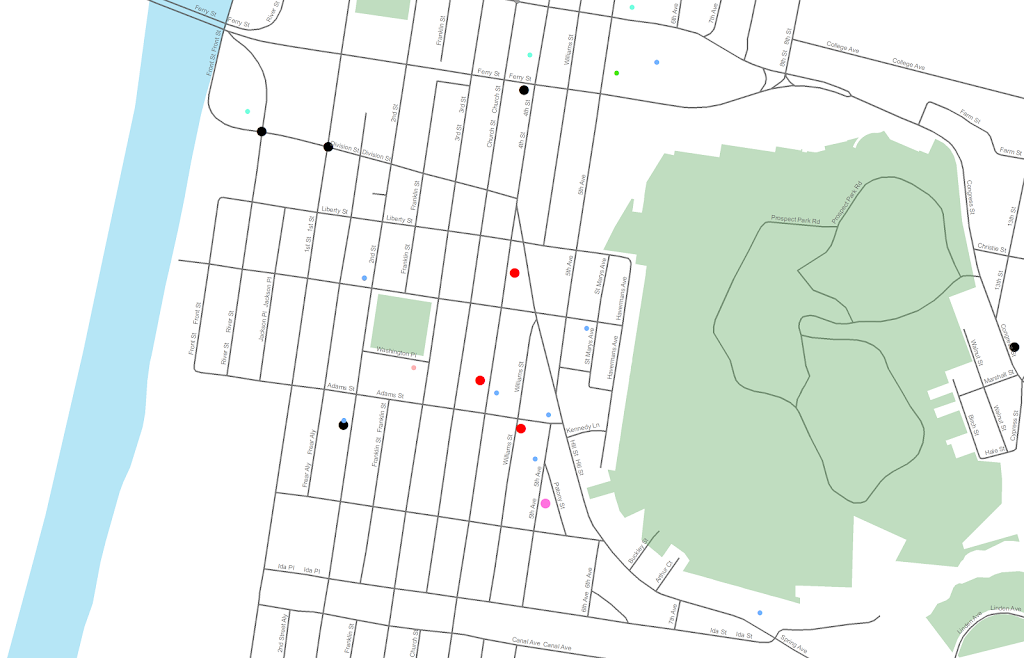
I am at it again discussing black map backgrounds. I make a set of crime maps for several local community groups as part of my job as a crime analyst for Troy PD. I tend to make several maps for each group, seperating out violent, property and quality of life related crimes. Within each map I try to attempt to make a hierarchy between crime types, with more serious crimes as larger markers and less severe crimes as smaller markers.

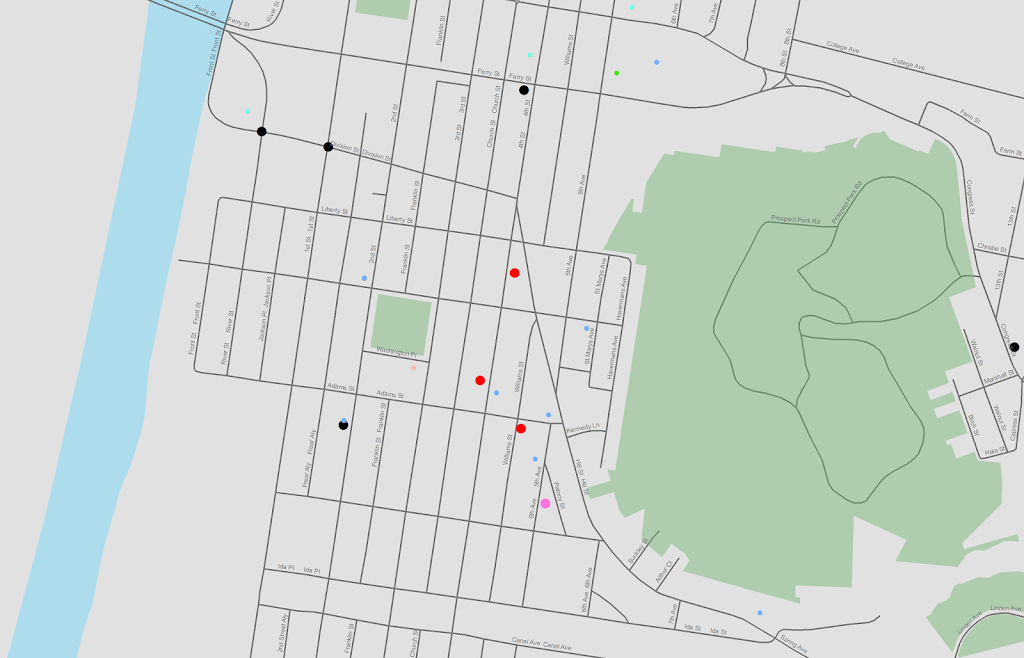
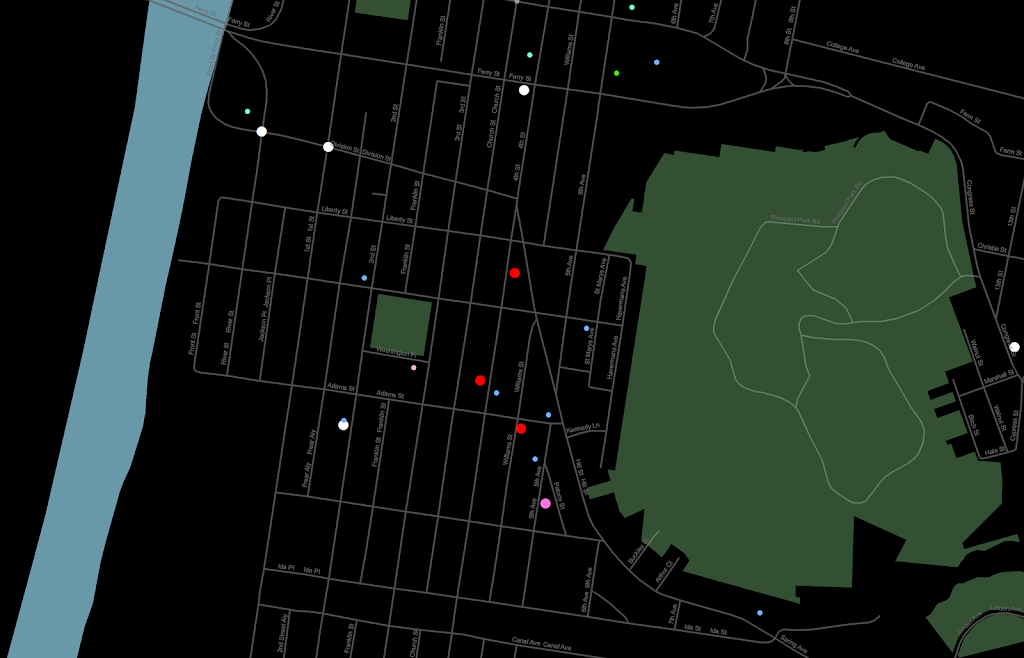
Despite critiques, I believe the dark background can be useful, as it creates greater contrast for map elements. In particular, the small crime dots are much easier to see (and IMO in these examples the streets and street name labels are still easy to read). Below are examples of the white background, a light grey background, and a black background for the same map (only changes are the black point marker is changed to white in the black background map, streets and parks are drawn with a heavy amount of transparency to begin with so don’t need to be changed).

Surprisingly to me, ink be damned, even printing out the black background looks pretty good! (I need to disseminate paper copies at these meetings) I think if I had to place the legend on the black map background I would be less thrilled, but currently I have half the page devoted to the map and the other half devoted to a table listing the events and the time they occurred, along with the legend (ditto for the scale bar and the North arrow not looking so nice).

I could probably manipulate the markers to provide more contrast in the white background map (e.g. make them bigger, draw the lighter/smaller symbols with dark outlines, etc.) But, I was quite happy with the black background map (and the grey background may be a useful in-between the two as well). It took no changes besides changing the background in my current template (and change black circles to white ones) to produce the example maps. I also chose those sizes for markers for a reason (so the map did not appear flooded with crime dots, and more severe and less severe crimes were easily distinguished), and so I’m hesistant to think that I can do much better than what I have so far with the white background maps (and I refuse to put those cheesy crime marker symbols, like a hand gun or a body outline, on my maps).

In terms of differentiating between global and local information in the maps, I believe the high contrast dark background map is nice to identify local points, but does not aid any in identifying general patterns. I don’t think general patterns are a real concern though for the local community groups (displaying so many points on the same map in general isn’t good for distinguishing general patterns anyway).

I’m a bit hesitant to roll out the black maps as of yet (maybe if I get some good feedback on this post I will be more daring). I’m still on the fence, but I may try out the grey background maps for the next round of monthly meetings. I will have to think if I can devise a reasonable experiment to differentiate between the maps and whether they meet the community groups goals and/or expectations. But, all together, the black background maps should certainly be given serious consideration for similar tasks. Again, as I said previously, the high contrast with smaller elements makes them more obvious (brings them more to the foreground) than with the white background, which as I show here can be useful in some circumstances.