Git excluding specific files when merging branches

The other day at work I had a mildly annoying problem – merging only selected files between a test and production branch in github. My particular use case was I had a test branch that needed to only interact with a test database, and the master branch needed to talk to the prod database. So I had particular config files with essentially different SQLAlchemy connection strings, but nothing else. Note I did not want these files ignored, just not merged between branches. (If I edit them I will need to make sure to edit both master & test branches in the end.)

I often use the GitHub desktop GUI to commit changes (when working on my local laptop). You can use the GUI to make a pull request, but when accepting the pull request in the browser I think it is all or nothing. I also need an entire command line solution for when I am working on a remote headerless machine with no GUI as well anyway. So here are my notes on how I solved the issue.

So just for illustration I added a test branch to my Blog_Code repository, and then some junk files just to illustrate. Via the git bash shell, if you navigate to your repository and do git diff master test --name-only, it shows you the different files in the two branches:

So you can see that I have 5 different files in total. Two config files and three different text files. If we do git diff master test -- special_config1, we can see the more specific differences between those two config files:

So you can see that the test branch version (in red) and the master branch version (in green), just have a minor difference. But in the end I want to keep those two files different between the branches, and not merge this config file (along with the other config file).

So here is the particular logic I put together, piping a bunch of commands together:

git switch master
git diff master test --name-only |
grep -v 'special_config1' |
grep -v 'Python/special_config2' |
sed 's/.*/"&"/' |
xargs git checkout test

The first line git switch is pretty self explanatory – I switch to the master branch (I will typically be doing work on test). Second I grab all the files that are different using git diff branch1 branch2, and only print out the file names. Third/Fourth lines I use grep to get rid of my specific config files out of that resulting list of files. You could also do grep -v 'file1.txt|file2.txt' |, but in this case this was giving me fits (maybe due to the forward slash not being escaped the right way for grep?).

The fifth sed line I wrap the files in quotes (if you have a file that has a space it will cause problems otherwise).

Sixth line I then use xargs to pass git checkout from the test environment, and pass in all of my files (minus my two config files). This is advice taken from this blog, just a slicker way to grab all of the files that are different minus a few specific config files. So instead of typing git checkout test file1.txt file2.txt etc. and typing the files by hand, I just grab all the files that are different and check them all out together.

Then once that is done it is the usual to commit the updated files. And then here in the end I switch the active environment back to test.

git commit -m 'Example only merging select files'
git push
git switch test

Maybe one of these days I will entirely ditch the GUI behind. But for now will just have to get by with my limited command line fu compared to these real computer programmers I work with more regularly.

Simulating Group Based Trajectories (in R)

The other day I pointed out on Erwin Kalvelagen’s blog how mixture models are a solution to fit regression models with multiple lines (where identification of which particular function/line is not known in advance).

I am a big fan of simulating data when testing out different algorithms for simply the reason it is often difficult to know how an estimator will behave with your particular data. So we have a bunch of circumstances with mixture models (in particular here I am focusing on repeated measures group based traj type mixture models) that it is hard to know upfront how they will do. Do you want to estimate group based trajectories, but have big N and small T? Or the other way, small N and big T? (Larger sample sizes tend to result in identifying more mixtures as you might imagine (Erosheva et al., 2014).) Do you have sparse Poisson data? Or high count Poisson data? Do you have 100,000 data points, and want to know how big of data and how long it may take? These are all good things to do a simulation to see how it behaves when you know the correct answer.

These are relevant no matter what the particular algorithm – so the points are all the same for k-medoids for example (Adepeju et al., 2021; Curman et al., 2015). Or whatever clustering algorithm you want to use in this circumstance. So here I show a few different simulations showing:

  • GBTM can recover the correct underlying equations
  • AIC/BIC fit stats have a difficult time distinguishing the correct number of groups
  • If the underlying model is a random effects instead of latent clusters, AIC/BIC performs quite well

The last part is because GBTM models have a habit of spitting out solutions, even if the true underlying data process has no discrete groups. This is what Skardhamar (2010) did in his article. It was focused on life course, but it applies equally to the spatial analysis GBTM myself and others have done as well (Curman et al., 2015; Weisburd et al., 2004; Wheeler et al., 2016). I’ve pointed out in the past that even if the fit for GBTM looks good, the underlying data can suggest a random effects model will work quite well, and Greenberg (2016) makes pretty much the same point as well.

Example in R

In the past I have shown how to use the crimCV package to fit these group based traj models, specifically zero-inflated Poisson models (Nielsen et al., 2014). Here I will show a different package, the R flexmix package (Grün & Leisch, 2007). This will be Poisson mixtures, but they have an example of doing zip models in there docs if you want.

So first, I load in the flexmix library, set the seed, and generate longitudinal data for three different Poisson models. One thing to note here, mixture models don’t assign an observation 100% to an underlying mixture, but the data I simulate here is 100% in a particular group.

################################################
library("flexmix")
set.seed(10)

# Generate simulated data
n <- 200 #number of individuals
t <- 10   #number of time periods
dat <- expand.grid(t=1:t,id=1:n)

# Setting up underlying 3 models
time <- dat$t
p1 <- 3.5 - time
p2 <- 1.3 + -1*time + 0.1*time^2
p3 <- 0.15*time
p_mods <- data.frame(p1,p2,p3)

# Selecting one of these by random
# But have different underlying probs
latent <- sample(1:3, n, replace=TRUE, prob=c(0.35,0.5,0.15))
dat$lat <- expand.grid(t=1:t,lat=latent)$lat
dat$sel_mu <- p_mods[cbind(1:(n*t), dat$lat)]
dat$obs_pois <- rpois(n=n*t,lambda=exp(dat$sel_mu))
################################################

Now that is the hard part really – figuring out exactly how you want to simulate your data. Here it would be relatively simple to increase the number of people/areas or time period. It would be more difficult to figure out underlying polynomial functions of time.

Next part we fit a 3 mixture model, then assign the highest posterior probabilities back into the original dataset, and then see how we do.

################################################
# Now fitting flexmix model
mod3 <- flexmix(obs_pois ~ time + I(time^2) | id, 
                model = FLXMRglm(family = "poisson"),
                data = dat, k = 3)
dat$mix3 <- clusters(mod3)

# Seeing if they overlap with true labels
table(dat$lat, dat$mix3)/t
################################################

So you can see that the identified groupings are quite good. Only 4 groups out of 200 are mis-placed in this example.

Next we can see if the underlying equations were properly recovered (you can have good separation between groups, but the polynomial fit may be garbage).

# Seeing if the estimated functions are close
rm3 <- refit(mod3)
summary(rm3)

This shows the equations are really as good as you could expect. The standard errors are as wide as they are because this isn’t really all that large a data sample for generalized linear models.

So this shows that if I feed in the correct underlying equation (almost, I could technically submit different equations with/without quadratic terms for example). But what about the real world situation in which you do not know the correct number of groups? Here I fit models for 1 to 8 groups, and then use the typical AIC/BIC to see which group it selects:

################################################
# If I look at different groups will AIC/BIC
# pick the right one?

group <- 1:8
left_over <- group[!(group %in% 3)]
aic <- rep(-1, 8)
bic <- rep(-1, 8)
aic[3] <- AIC(mod3)
bic[3] <- BIC(mod3)

for (i in left_over){
  mod <- flexmix(obs_pois ~ time + I(time^2) | id, 
                 model = FLXMRglm(family = "poisson"),
                 data = dat, k = i)
  aic[i] <- AIC(mod)
  bic[i] <- BIC(mod)
}

fit_stats <- data.frame(group,aic,bic)
fit_stats
################################################

Here it actually fit the same model for 3/5 groups (sometimes even if you tell flexmix to fit 5 groups, it will only return a smaller number). You can see that the fit stats for group 4 through are almost the same. So while AIC/BIC did technically pick the right number in this simulated example, it is cutting the margin pretty close to picking 4 groups in this data instead of 3.

So the simulation Skardhamar (2010) did was slightly different than this so far. What he did was simulate data with no underlying trajectory groups, and then showed GBTM tended to spit out solutions. Here I will show that is the case as well. I simulate random intercepts and a simple linear trend over time.

################################################
# Simulate random effects model
library(lme4)
rand_eff <- rnorm(n=n,0,1.5)
dat$re <- expand.grid(t=1:t,re=rand_eff)$re
dat$re_pois <- rpois(n=n*t,lambda=exp(dat$sel_mu))
dat$mu_re <- 3 + -0.2*time + dat$re
dat$re_pois <- rpois(n=n*t,lambda=exp(dat$mu_re))

re_mod <- glmer(re_pois ~ 1 + time + (1 | id), 
                data = dat, family = poisson(link = "log"))
summary(re_mod)
################################################

So you can see that the random effects model is all fine and dandy – recovers both the fixed coefficients, as well as estimates the correct variance for the random intercepts.

So here I go and see how the AIC/BIC compares for the random effects models vs GBTM models for 1 to 8 groups (I stuff the random effects model in the first row for group 0):

################################################
# Test AIC/BIC for random effects vs GBTM
group <- 0:8
left_over <- 1:8
aic <- rep(-1, 9)
bic <- rep(-1, 9)
aic[1] <- AIC(re_mod)
bic[1] <- BIC(re_mod)

for (i in left_over){
  mod <- flexmix(re_pois ~ time + I(time^2) | id, 
                 model = FLXMRglm(family = "poisson"),
                 data = dat, k = i)
  aic[i+1] <- AIC(mod)
  bic[i+1] <- BIC(mod)
}

fit_stats <- data.frame(group,aic,bic)
fit_stats
################################################

So it ends up flexmix will not give us any more solutions than 2 groups. But that the random effect fit is so much smaller (either by AIC/BIC) than the GBTM you wouldn’t likely make that mistake here.

I am not 100% sure how well we can rely on AIC/BIC for these different models (R does not count the individual intercepts as a degree of freedom here, so k=3 instead of k=203). But no reasonable accounting of k would flip the AIC/BIC results for these particular simulations.

One of the things I will need to experiment with more, I really like the idea of using out of sample data to validate these models instead of AIC/BIC – no different than how Nielsen et al. (2014) use leave one out CV. I am not 100% sure if that is possible in this set up with flexmix, will need to investigate more. (You can have different types of cross validation in that context, leave entire groups out, or forecast missing data within an observed group.)

References

Adepeju, M., Langton, S., & Bannister, J. (2021). Anchored k-medoids: a novel adaptation of k-medoids further refined to measure long-term instability in the exposure to crime. Journal of Computational Social Science, 1-26.

Grün, B., & Leisch, F. (2007). Fitting finite mixtures of generalized linear regressions in R. Computational Statistics & Data Analysis, 51(11), 5247-5252.

Curman, A. S., Andresen, M. A., & Brantingham, P. J. (2015). Crime and place: A longitudinal examination of street segment patterns in Vancouver, BC. Journal of Quantitative Criminology, 31(1), 127-147.

Erosheva, E. A., Matsueda, R. L., & Telesca, D. (2014). Breaking bad: Two decades of life-course data analysis in criminology, developmental psychology, and beyond. Annual Review of Statistics and Its Application, 1, 301-332.

Greenberg, D. F. (2016). Criminal careers: Discrete or continuous?. Journal of Developmental and Life-Course Criminology, 2(1), 5-44.

Nielsen, J. D., Rosenthal, J. S., Sun, Y., Day, D. M., Bevc, I., & Duchesne, T. (2014). Group-based criminal trajectory analysis using cross-validation criteria. Communications in Statistics-Theory and Methods, 43(20), 4337-4356.

Skardhamar, T. (2010). Distinguishing facts and artifacts in group-based modeling. Criminology, 48(1), 295-320.

Weisburd, D., Bushway, S., Lum, C., & Yang, S. M. (2004). Trajectories of crime at places: A longitudinal study of street segments in the city of Seattle. Criminology, 42(2), 283-322.

Wheeler, A. P., Worden, R. E., & McLean, S. J. (2016). Replicating group-based trajectory models of crime at micro-places in Albany, NY. Journal of Quantitative Criminology, 32(4), 589-612.

Podcast and Video Shout Outs

So y’all know I really enjoy blogs. So much so I think they often have a higher value added than traditional peer review papers. There are other mediums I would like to recognize, and those are Podcasts and video tutorials. So while I like to do lab tutorials (pretty much like my blog posts in which I step through some code), I know many students would prefer I do videos and lectures. And I admit some of these I have seen done quite well on Coursera for example.

Another source I have been consuming quite a bit lately are Podcasts. These often take the form of an interview. So are not technical in nature, but are more soft story telling, such as talking about a particular topical area the interviewee is expert in, or that persons career path. So here are my list of these resources I have personally learned from and enjoyed.

None of these I have listened/watched 100% of the offerings, but have listened/watch multiple episodes (and will continue to listen/watch more)! These are very criminal justice focused, so would love to branch out to data science and health care resources if folks have suggestions!

Podcasts

Reducing Crime – Jerry Ratcliffe interviews a mix of academics and folks working in the criminal justice field. I have quite a few of these episodes I found personally very informative. John Eck, Kim Rossmo, and Phil Goff were perhaps my favorites of academics. Danny Murphy and Thomas Abt were really good as well (for my favorite non-academics offhand).

Niro Knowledge – Nicholas Roy is a current crime analyst, and interviews other crime analysts and academics. Favorite interviews so far are Cynthia Lum and Renee Mitchell. Similar to reducing crime is typically more focused on a particular topic of interest to the person being interviewed (e.g. Renee talked about her work on crime harm indices).

Analyst Talk – This is a podcast hosted by Jason Elder where he interviews crime analysts from all over about their careers. Annie Thompson and my former colleague Shelagh Dorn’s are my favorite so far, but I also need to listen in sometime on Sean Bair’s series of talks as well.

Abt Podcasts – This I only came across a week ago, but have listened to several on data science, CJ, and social determinants of health. These are a bit different than the other podcasts here, they are shorter and have two individuals from different fields discuss social science relevant to the chosen topic.

Videos

Canadian Society of Evidence Based Policing – Has many interviews of academics in crim/cj. I have an interview with them (would not recommend, I need to work on sitting still!) I really enjoyed the Peter Neyroud interview though is my favorite.

UARK CASDAL – These are instructional videos uploaded by Grant Drawve, mostly around doing crime analysis in Excel, but also has a few in ArcGIS.

StatQuest with Josh Starmer – This is one of the few non crim/cj examples I watch regularly. As interview questions at my work place for entry data scientists we often ask folks to explain machine learning models (such as random forests or XGBoost) in some simple terms. These videos are excellent resources to get you to understand the basics of the mathematics behind the techniques.

Again let me know if of podcasts/video series I am missing out on in the comments!

Transforming predicted variables in regression

The other day on LinkedIn I made a point about how I think scikits TransformedTargetRegressor is very likely to mislead folks. In fact, the example use case in the docs for this function is a common mistake, fitting a model for log(y), then getting predictions phat, and then simply exponentiating those predictions exp(phat).

On LinkedIn I gave an example of how this is problematic for random forests, but here is a similar example for linear regression. For simplicity pretend we only have 3 potential residuals (all equally likely), either a residual of -1, 0, or 1.

Now pretend our logged prediction is 5, so if we simply do exp(5) we get about 148. Now what are our predictions is we consider those 3 potential residuals?

Resid  Pred-Resid Modified_Pred LinPred
  -1     5 - -1        exp(6)     403
   0     5 -  0        exp(5)     148
   1     5 -  1        exp(4)      55

So if we take the mean of our LinPred column, we then get a prediction of about 202. The prediction using this approach is much higher than the naive approach of simply exponentiating 5. The difference is that the exp(5) estimate is the median, and the above estimate taking into account residuals is the mean estimate.

While there are some cases you may want the median estimate, in that case it probably makes more sense to use a quantile estimator of the median from the get go, as opposed to doing the linear regression on log(y). I think for many (probably most) use cases in which you are predicting dollar values, this underestimate can be very problematic. If you are using these estimates for revenue, you will be way under for example. If you are using these estimates for expenses, holy moly you will probably get fired.

This problem will happen for any non-linear transformation. So while some transformations are ok, in scikit for example minmax or standardnormal scalars are ok, things like logs, square roots, or box-cox transformations are not. (To know if it is a linear transformation, if you do a scatterplot of original vs transformed, if it is a straight line it is ok, if it is a curved line it is not!)

I had a friend go back and forth with me for a bit after I posted this. I want to be clear this is not me saying the model of log(y) is the wrong model, it is just to get the estimates for the mean predictions, you need to take a few steps. In particular, one approach to get the mean estimates is to use Duan’s Smearing estimator. I will show how to do that in python below using simulated data.

Example Duan’s Smearing in python

So first, we import the libraries we will be using. And since this is simulated data, will be setting the seed as well.

######################################################
import pandas as pd
import numpy as np
np.random.seed(10)

from sklearn.linear_model import LinearRegression
from sklearn.compose import TransformedTargetRegressor
######################################################

Next I will create a simple linear model on the log scale. So the regression of the logged values is the correct one.

######################################################
# Make a fake dataset, say these are housing prices
n = (10000,1)
error = np.random.normal(0,1,n)
x1 = np.random.normal(10,3,n)
x2 = np.random.normal(5,1,n)
log_y = 10 + 0.2*x1 + 0.6*x2 + error
y = np.exp(log_y)

dat = pd.DataFrame(np.concatenate([y,x1,x2,log_y,error], axis=1),
                   columns=['y','x1','x2','log_y','error'])
x_vars = ['x1','x2']

# Lets look at a histogram of y vs log y
dat['y'].hist(bins=100)
dat['log_y'].hist(bins=100)
######################################################

Here is the histogram of the original values:

And here is the histogram of the logged values:

So although the regression is the conditional relationship, if you see histograms like this I would also by default use a regression to predict log(y).

Now here I do the same thing as in the original function docs, I fit a linear regression using the log as the function and exponential as the inverse function.

######################################################
# Now lets see what happens with the usual approach
tt = TransformedTargetRegressor(regressor=LinearRegression(),
                                func=np.log, inverse_func=np.exp)
tt.fit(dat[x_vars], dat['y'])
print( (tt.regressor_.intercept_, tt.regressor_.coef_) ) #Estimates the correct values

dat['WrongTrans'] = tt.predict(dat[x_vars])

dat[['y','WrongTrans']].describe()
######################################################

So here we estimate the correct simulated values for the regression equation:

But as we will see in a second, the exponentiated predictions are not so well behaved. To illustrate how the WrongTrans variable behaves, I show its distribution compared to the original y value. You can see that on average it is a much smaller estimate. Our sample values have a mean of 7.5 million, and the naive estimate here only has a mean of 4.6 million.

Now here is a way to get an estimate of the mean value. In a nutshell, what you do is take the observed residuals, pretty much like that little table I did in the intro of this blog post, generate predictions given those residuals, and then back transform them and take the mean.

Although this example is using logged regression, I’ve made it pretty general. So if you used any box cox transformation instead of the logged (e.g. sklearns power_transform, it will work.

######################################################
# Duan's smearing, non-parametric approach via residuals

# Can make this general for any function inside of 
# TransformedTargetRegressor
f = tt.get_params()['func']              #function
inv_f = tt.get_params()['inverse_func']  #and inverse function

# Non-parametric approach, approximate via residuals
# Using numpy broadcasting
log_pred = f(dat['WrongTrans'])
resids = f(dat['y']) - log_pred
resids = resids.values.reshape(1,n[0])
dp = inv_f(log_pred.values.reshape(n[0],1) + resids)
dat['DuanPreds'] = dp.mean(axis=1)

dat[['y','WrongTrans','DuanPreds']].describe()
######################################################

So you can see that the Duan Smeared predictions are looking better, at least the mean of the predictions is much closer to the original.

I’ve intentionally done this example without using train/test, as we know the true answers. But in that case, you will want to use the residuals from the training dataset to apply this transformation to the test dataset.

So the residuals and the Duan smearing estimator do not need to be the same dimension. So for example if you have a big data application, you may want to do something like resids = resids.sample(1000) above.

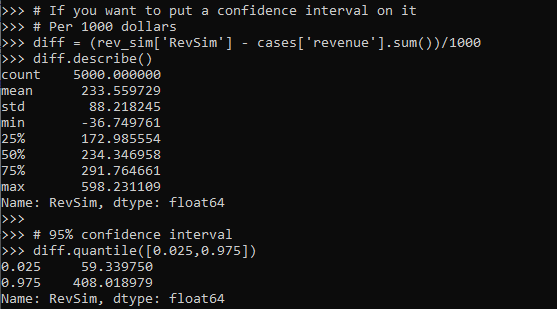
Also another nice perk of this is you can use dp above to give you prediction intervals, so np.quantile(dp,[0.025,0.975], axis=1).T would give you a 95% prediction interval of the mean on the linear scale as well.

Extra, Parametric Estimation

Another approach, which may make sense given the application, is instead of using the observed residuals to give a non-parametric estimate, you can estimate the distribution of the residuals, and then use that to make either an integral estimate of the Smeared estimate back on the original scale. Or in the case of the logged regression there is a closed form solution.

I show how to construct the integral estimator below, again trying to be more general. The integral approach will work for say any box-cox transformation.

######################################################
# Parametric approach, approximating residuals via normal

from scipy.stats import norm
from scipy.integrate import quad

# Look at the residuals again
resids = f(dat['y']) - f(tt.predict(dat[x_vars]))

# Check to make sure that the residuals are really close to normal
# Before doing this
resids.hist(bins=100)

# Fit to a normal distribution 
loc, scale = norm.fit(resids)

# Define integral
def integrand(x,pred):
    return norm.pdf(x, loc, scale)*inv_f(pred - x)

# Pred should be the logged prediction
# -50,50 should be changed if the residuals are scaled differently
def duan_param(pred):
    return quad(integrand, -50, 50, args=(pred))[0]

# This takes awhile to apply to the whole data frame!
dat['log_pred'] = f(tt.predict(dat[x_vars]))
sub_dat = dat.head(100).copy()
sub_dat['DuanParam'] = sub_dat['log_pred'].apply(duan_param)

# Can see that these are very similar to the non-parametric
print( sub_dat[['DuanPreds','DuanParam']].head(10) )

And you can see that this normal based approximation works just fine here, since by construction the model residuals are pretty well behaved in my simulation.

It happens to be the case that there is a simpler estimate than the integral approach (which you can see in my notes takes awhile to estimate).

###########
# Easier way, but only applicable to log transform
# https://en.wikipedia.org/wiki/Smearing_retransformation
test_val = np.log(5000000)

# Integral approach
print( duan_param(test_val) ) 

# Approach for just log transformed
mult = np.exp(0.5*resids.var())
print( np.exp(test_val)*mult )
##########

So you can see the integral vs the closed form function are very close:

The differences could be due to the the integral is simply an estimate (and you can see I did not do negative to positive infinity, but chopped it off, I do not know if there is a better function to estimate the integral or general approach here).

It wouldn’t surprise me if there are closed form solutions for box-cox transforms as well, but I am not familiar with them offhand. Again the integral approach (or the non-parametric approach) will work for whatever function you want. The function itself could be whatever crazy/discontinuous function you want. But this parametric Duan’s Smearing approach relies on the residuals being normally distributed. (I suppose you could use some other types of continuous distribution estimate if you have reason to, I have only seen normal distribution estimates though in practice.)

Other Notes

While this focuses on regression, I do not think this will perform all that badly for other types of models (such as random forests or xgboost). But for forests it may make sense to simply pull out the individual tree estimates, back transform them, and get the mean of that backtransformed estimate. I have a different blog post that has a function showing how to scoop up the individual predictions from a random forest model.

It should also apply the same to any regression model with regularization. But if you want to do this, there are of course other alternative models you may consider that may be better suited towards your end goals of predictions on the linear/original scale.

For example, if you really want prediction intervals, it may make sense to not transform the data, and estimate a quantile regression model at the 5% and 95% quantiles. This would give you a 90% prediction interval.

Another approach is that it may make sense to use a different model, such as Poisson regression or negative binomial regression (or another generalized linear model in general). Even if your data are not integer counts, you can still use these models! (They just need to be 0 and above, no negative values.)

That Stata blog suggests to use Poisson and then robust standard errors, but that is a bad idea if you are really interested in predictions as well (see Gary Kings comment and linked paper). But you can just do negative binomial models in most cases then, and that is a better default than Poisson for many real world datasets.

Filled contour plot in python

I’ve been making a chart that looks similar to this for a few different projects at work, so figured a quick blog post to show the notes of it would be useful.

So people often talk about setting a decision threshold to turn a predicted probability into a binary yes/no decision. E.g. do I do some process to this observation if the probability is 20%, 30%, 60%, etc. If you can identify the costs and benefits of making particular decisions, you can set a simple threshold to make that decision. For example, say you are sending adverts in the mail for a product. If the person buys the product, your company makes $50, and the advert only costs $1 to send. In this framework, if you have a predictive model for the probability the advert will be successful, then your decision threshold will look like this:

$50*probability - $1

So in this case you need the predicted probability to be above 2% to have an expected positive return on the investment of sending the advert. So if you have a probability of 10% for 2000 customers, you would expect to make 2000 * (50*0.1 - 1) = 8000. The probabilities you get from your predictive model can be thought of as in the long run averages. Any single advert may be a bust, but if your model is right and you send out a bunch, you should make this much money in the end. (If you have a vector of varying probabilities, in R code the estimated revenue will then look like prob <- runif(2000,0,0.1); pover <- prob > 0.02; sum( (50*prob - 1)*pover ).)

But many of the decisions I work with are not a single number in the benefits column. I am working with medical insurance claims data at HMS, and often determining models to audit those claims in some way. In this framework, it is more important to audit a high dollar claim than a lower dollar claim, even if the higher dollar value claim has a lower probability. So I have been making the subsequent filled contour plot I am going to show in the next section to illustrate this.

python contour plot

The code snippet is small enough to just copy-paste entirely. First, I generate data over a regular grid to illustrate different claim amounts and then probabilities. Then I use np.meshgrid to get the data in the right shape for the contour plot. The revenue estimates are then simply the probability times the claims amount, minus some fixed (often labor to audit the claim) cost. After that is is just idiosyncratic matplotlib code to make a nice filled contour.

# Example of making a revenue contour plot
import matplotlib.pyplot as plt
from matplotlib.ticker import StrMethodFormatter
import numpy as np

n = 500 #how small grid cells are
prob = np.linspace(0,0.5,n)
dollar = np.linspace(0,10000,n)
#np.logspace(0,np.log10(10000),n) #if you want to do logged

# Generate grid
X, Y = np.meshgrid(prob, dollar)

# Example generating revenue
fixed = 200
Rev = (Y*X) - fixed

fig, ax = plt.subplots()
CS = ax.contourf(X, Y, Rev, cmap='RdPu')
clb = fig.colorbar(CS)
#clb.ax.set_xlabel('Revenue') #Abit too wide
clb.ax.set_title('dollar') #html does not like the dollar sign
ax.set_xlabel('Probability')
ax.set_ylabel('Claim Amount')
ax.yaxis.set_major_formatter(StrMethodFormatter('${x:,.0f}'))
plt.title('Revenue Contours')
plt.xticks(np.arange(0,0.6,0.1))
plt.yticks(np.arange(0,11000,1000))
plt.annotate('Revenue subtracts $200 of fixed labor costs',
(0,0), (0, -50),
xycoords='axes fraction',
textcoords='offset points', va='top')
#plt.savefig('RevContour.png',dpi=500,bbox_inches='tight')
plt.show()

The color bar does nice here out of the box. Next up in my personal learning will be how to manipulate color bars a bit more. Here I may want to either use a mask to not show negative expected returns, or a diverging color scheme (e.g. blue for negative returns).

A changepoint logistic model in pystan

So the other day I showed how to use the mcp library in R to estimate a changepoint model with an unknown changepoint location. I was able to get a similar model to work in pystan, although it ends up being slower in practice than the mcp library (which uses JAGS under the hood). It also limits the changepoints to a specific grid of values. So offhand there isn’t a specific reason to prefer this approach to the R mcp library, but I post here to show my work. Also I illustrate that with this particular model, using 1000 simulated observations.

To be clear what this model is, instead of the many time series examples floating around about changepoints (like the one in the Stan guide), we have a model with a particular continuous independent variable x, and we are predicting the probability of something based on that x variable. It is not that different, but many of those time series examples the universe to check for changepoints is obvious, only the observed time series locations. But here we have a continuous input (distance a crime event is from a CCTV camera), but we can only check a finite number of locations. It ends up being closer in spirit to this recent post by Keith Goldfield.

So in some quick and dirty text math, here c is the changepoint location and l is the logit function:

l(Prob[y]) = intercept + b1*x; if x <= c
l(Prob[y]) = intercept + b1*x + b2*(x - c); if x > c

This model can be expanded however you want – such as other covariates that do not change with the changepoint. But for this simple simulation I am just looking at the one running variable x and the binary outcome y.

Python Code

So first, I load up the libraries I will be using, then I simulate some data. Here the changepoint is located at 0.42 for the x variable, and in the ylogit line you can see the underlying logistic regression equation.

#################################
# Libraries I am using
import pystan
import numpy as np
import pandas as pd
import statsmodels.api as sm
#################################

#################################
# Creating simulated data
np.random.seed(10)
total_cases = 1000 #30000
x = np.random.uniform(size=total_cases) #[total_cases,1]
change = 0.42
xdif = (x - change)*(x > change)
ylogit = 1.1 + -4.3*x + 2.4*xdif
yprob = 1/(1 + np.exp(-ylogit))
ybin = np.random.binomial(1,yprob)
#################################

When testing out these models, one mistake I made was thinking offhand that 1,000 observations should be plenty. (Easier to run more draws with a smaller dataset.) When I had smaller effect sizes, the logistic coefficients could be pretty badly biased. So I started as a check estimating the logistic model inputting the correct changepoint location. Those biased estimates are pretty much the best case scenario you could hope for in the subsequent MCMC models. So here is an example fitting a logit model inputting the correct location for the changepoint.

#################################
#Statsmodel code to get
#The coefficient estimates 
#And standard errors for the sims
con = [1]*len(x)
xcomb = pd.DataFrame(zip(con,list(x),list(xdif)),columns=['const','x','xdif'])
log_reg = sm.Logit(ybin, xcomb).fit()
print(log_reg.summary()) 
#################################

So you can see that my coefficient estimates and the frequentist standard errors are pretty large even with 1,000 samples. So I shouldn’t expect my later MCMC model to have any smaller credible intervals than above.

So here is the Stan model. I am using pystan here, but of course it would be the same text file if you wanted to fit the model using R. (Just compiles C++ code under the hood.) Of only real note is that I show how to use the softmax function to estimate the actual mean location of the changepoint. Note that that mean summary though only makes sense if you make your grid of changepoint locations regular and fairly fine. (So if you said a changepoint could be at 0.1, 0.36, and 0.87, taking a weighted mean of those three locations doesn’t make sense.)

#################################
#Stan model
changepoint_stan = """
data {
   int<lower=1> N;
   vector[N] x;
   int<lower=0,upper=1> y[N];
   int<lower=1> Samp_Points;
   vector[Samp_Points] change;
}
transformed data {
  real log_unif;
  log_unif = -log(Samp_Points);
}
parameters {
  real intercept;
  real b_x;
  real b_c;
}
transformed parameters {
  vector[Samp_Points] lp;
  real before;
  real after;
  lp = rep_vector(log_unif, Samp_Points);
  for (c in 1:Samp_Points){
    for (n in 1:N){
      before = intercept + b_x*x[n]; 
      after = before + b_c*(x[n] - change[c]);
      lp[c] = lp[c] + bernoulli_logit_lpmf(y[n] | x[n] < change[c] ? before : after );
    }  
  }
}
model {
  intercept ~ normal(0.0, 10.0);
  b_x ~ normal(0.0, 10.0);
  b_c ~ normal(0.0, 10.0);
  target += log_sum_exp(lp);
}
generated quantities {
  vector[Samp_Points] prob_point;
  real change_loc;
  prob_point = softmax(lp);
  change_loc = sum( prob_point .* change );
}
"""
#################################

And finally I show how to prepare the data for pystan (as a dictionary), compile the model, and then draw a ton of samples. I generate a regular grid of 0.01 intervals from 0.03 to 0.97 (can’t have a changepoint outside of the x data locations, which I drew as a random uniform 0,l). Note the more typical default of 1000 tended to not converge, the effective number of samples is quite small for that many. So 5k to 10k samples in my experiments tended to converge. Note that this is not real fast either, took about 40 minutes on my machine (the Stan guesstimates for time were always pretty good ballpark figures).

#################################
# Prepping data and fitting the model

stan_dat = {'N': ybin.shape[0]}
stan_dat['change'] = np.linspace(0.03,0.97,95) #[0.1, 0.2, 0.3, 0.4, 0.5, 0.6, 0.7, 0.8, 0.9]
stan_dat['Samp_Points'] = len(stan_dat['change'])
stan_dat['x'] = x
stan_dat['y'] = ybin


sm = pystan.StanModel(model_code=changepoint_stan)
#My examples needed more like 10,000 iterations
#effective sample size very low, took about 40 minutes on my machine
fit = sm.sampling(data=stan_dat, iter=5000, 
                  warmup=500, chains=4, verbose=True)
#Prints some results at the terminal!
print(fit.stansummary(pars=['change_loc','intercept','b_x','b_c']))
#################################

So you can see the results – the credible intervals for the intercept and regression coefficient before the change point are not bad, just slightly larger than the logistic model. The credible interval for the changepoint location and the changepoint effect different are quite uncertain though. The changepoint location covers almost the whole interval I examined. It may be better to plot the individual probabilities, like Goldfield did in his post, as opposed to summarized a mean location for the distribution (which is discrete in the end based on your grid of locations you look at).

So that at least gives a partial warning that you need quite big data samples to effectively identify the changepoint location, at least for this Stan model as I have shown. I haven’t run it on my 26k actual data sample, as it will end up taking my computer around 30 hours to crunch out 10k draws with 4 chains. Next up I rather see if I can get a similar model working in pyro, as my GPU on my personal machine I think will be faster than the C++ code here. (There are probably smarter ways to vectorize the Stan model as well.)

Confidence intervals around proportions

So you probably learned about confidence intervals around means in your introductory statistics class. For a refresher, a confidence interval covers a particular statistic at a pre-specified rate. So if I generate 100 90% intervals around a mean, I expect that those confidence intervals would cover the true underlying mean around 90 times out of those 100. So it is a statement about the procedure overall – not any individual test.

This repeated coverage property is often not exactly what we want in statistics. But, I often find examining confidence intervals around samples to be an informative way to quantify uncertainty in estimates. For example, I have a machine learning model serving up predictions to a subsequent auditing process. I expect this to maintain a hit rate above 20%. The past week I only had a hit rate of 30/200 (15%), should I be worried? Probably not, a 95% confidence interval around that proportion is 10% to 21%.

Proportions come up so often that intro stats courses should probably talk more extensively about generating confidence intervals around them. There are many different confidence intervals for proportions, Wikipedia lists 7 different options!

I prefer where possible to use the Clopper-Pearson intervals by default. I will show an examples of generating Clopper-Pearson intervals in Excel and Python. But, another situation I have come across is I want to do these intervals entirely in SQL. For that situation, I will show how to use Agresti–Coull intervals.

Excel Clopper-Pearson

In Excel, if the A column contains the numerator, the B column contains the denominator, and if G1 has the alpha level, this brutish formula gets you the lower bound of your confidence interval;

=IF(A2=0, 0, BETA.INV($G$1/2, A2, B2-A2+1))

A here is your upper bound;

=IF(A2=B2, 1, BETA.INV(1-$G$1/2, A2+1, B2-A2))

And here is a screenshot of the filled in results:

Note for my criminology friends, you can use this for very extreme proportions as well. So say you had a homicide rate of 10 per 100,000, where the observed sample was 30 homicides in a city of 300,000. You can generate a binomial confidence interval around the proportion and then translate back to the rate per 100,000. So in that scenario, it results in a 95% confidence interval of a homicide rate of 6.7 to 14.3.

This is actually the reason I like defaulting to Clopper-Pearson. The other approximations can fail very badly for extreme tail events like this.

Python Clopper-Pearson

Here is a simple function in python to return the Clopper-Pearson intervals. This works for vectorized inputs as well (e.g. numpy arrays or pandas series).

import numpy as np
from scipy.stats import beta

def binom_int(num,den, confint=0.95):
    quant = (1 - confint)/ 2.
    low = beta.ppf(quant, num, den - num + 1)
    high = beta.ppf(1 - quant, num + 1, den - num)
    return (np.nan_to_num(low), np.where(np.isnan(high), 1, high))

And here is an example use:

hits = np.array([0, 1, 2, 3, 97, 98, 99, 100])
tries = np.array([100]*len(hits))
lowCI, highCI = binom_int(hits, tries)

Check out my prior blog post on making smoothed scatterplots on how to plot those proportion spikes in matplotlib.

SQL Agresti–Coull

So as I mentioned previously, I prefer the Clopper-Pearson intervals. This however relies on the availability of a function for the inverse beta distribution. One common situation is I just have all my tables in SQL, and I want to make a dashboard connected to a view of my tables. So the proportion of some event broken downs by days/weeks/months etc.

In that case exporting the data to python and re-uploading to the database can be a bit of a hassle, whereas creating a view is much less work. So here is an example query to calculate the proportion intervals entirely in SQL. So the initial table is a micro level table of events with 0/1 for a particular group. (This screenshot is for Access, but this should work in various databases.)

And then it is a groupby to get the original numerator, denominator, and proportion. Then a few rows calculating the adjusted proportion (add 2 to the numerator and 2*2 to the denominator), then finally this can still produce lower than 0 and higher than 1 intervals, so I cap those off.

/* This is for Access, for others may want to use SQRT() instead of SQR()
   Also may want to use CASE WHEN instead of IIF */
SELECT
   GroupID,
   SUM(Outcome) AS Num,
   COUNT(Outcome) AS Den,
   Num/Den AS Prop,
   Num + 2 AS nadj,
   Den + 2*2 as dadj,
   nadj/dadj as padj,
   2*SQR((padj/nadj)*(1 - padj)) AS zadj,
   IIF( padj < zadj, 0, padj - zadj) AS LowCI,
   IIF( (1 - padj) < zadj, 1, padj + zadj) AS HighCI
FROM ExampleData
GROUP BY GroupID;

This produces a 95% confidence interval for the final two columns. If you wanted to generate say a 99% confidence interval, you would replace the 2’s in the above table with 2.6. (In R you can do qnorm(1 - a/2), where a is 1 - confidence_level, to figure out this constant.)

What you shouldn’t use these intervals for

While I believe many applications of dashboards are well suited to including confidence intervals, confidence intervals (like p-values) are apt to be misinterpreted. One common one is that for a single 95% confidence interval, that does not mean the interval covers the true estimate with a 95% probability. This is an inference for an individual sample that is not possible in frequentist statistics – that summary would be akin to a posterior credible interval in Bayesian statistics. Confidence intervals are about the procedure, if we do this procedure over and over again, in the long run it will cover the true statistic (which we do not observe for any individual sample), according to the level we set.

Another common mistake with confidence intervals is when comparing two different intervals, them overlapping is sometimes interpreted as no difference. But this is a very conservative test (e.g. will fail to reject the null of no differences too often).

So say we were monitoring a process over time, and in October the process was 20% (40/200) and in November it was 28% (168/600). October’s confidence interval is 15% to 26%, and November’s confidence interval is 24% to 32%. So since those intervals overlap, we should conclude there are no differences correct? Not exactly, if we do a direct test for the differences in proportions (akin to a t-test of mean differences), we get a confidence interval of the difference as -14% to -1% (in R prop.test(c(40,168), c(200,600))). So in that direct hypothesis test, we would conclude October’s percent is lower than Novembers percent.

Geoff Cumming suggests that when going from individual confidence intervals to comparisons between groups, one confidence interval needs to cover the point estimate for the other group to conclude the two groups are different.

But that being said, I believe many dashboards would be improved if incorporating such confidence intervals. So although they may not always provide the test of interest, they are a good way to prevent yourself from over-interpreting noisy trends in smaller samples. In the case of comparing two intervals, for most situations I deal with, being conservative in saying this process is not showing differences is a better approach than worrying about minor fluctuations (although just depends on the use case whether that default behavior makes sense.)

So please, when reporting proportions with small samples, provide a confidence interval around those proportions!

Outliers in Distributions

If you google ‘outlier’, all of the results that come up are in terms of individual observation outliers. So if you have a set of transaction data that is 10, 20, 30, 8000, the singlet observation 8000 is an outlier. But for many situations with transaction data, you don’t want to examine individual outlier incidents, but look for systematic patterns. For example, if I am looking at healthcare insurance claims for my work, a single claim that is $100,000 is actually not that rare. But if we have a hospital that has mostly $100,000 claims for a specific treatment, whereas another with similar cases has a range of $50,000 to $100,000, that may signal there is some funny business going on.

There is no singular way to examine outliers in distribution. A plain old t-test of mean differences may make sense for some situations. But a generally more useful way IMO to think about the problem is to examine the distribution of the outcome in CDF space, as opposed to looking at particular moments of the distribution. A t-test basically only looks at the differences in means for the distributions, whereas examining the CDF we are looking for weird patterns at any point in the distribution.

Here is an example of comparing the cost of hospital stays (per length of stay), for a hospital compared to all others from the same datasource (details on the data in a sec). The way to read this graph is that at 10^3 (so $1000 per day claims) for facility 1458, we have around 20% of the claims data are below this value. For the rest of the hospital data, a larger proportion of claims are under a thousand dollars, more like 25%. Since the red line is always below the black line, it also means that the claims at this hospital are pretty much always larger than the claims at all the other hospitals.

For this example analysis, I am using data from New York State health insurance claims data (SPARC). I have posted python code to replicate here (note if you cannot access dropbox links, feel free to email and I will forward).

Here I am specifically analyzing medical, in-patient insurance claims (I dropped surgical claims) for around 300+ hospitals. There are quite a few claims in this data, over 2 million, and the majority of hospitals have plenty of claims to examine (so no hospitals with only 10 claims). I also specifically examine costs per length of stay. Initially I just examined costs, but will get to why I changed to the normalized version towards the end of the post.

Analysis of CDF Outliers

So first what I did was attempt to do a leave-one-out type stat test using the Kolmogorov-Smirnov test. This is a test that looks at the maximum vertical difference between the CDFs I showed earlier. I should have known better though. Given this large of sample size, even with multiple comparison adjustments for false discovery rate, every hospital was considered an outlier. This is sort of the curse of null hypothesis significance testing, it is either underpowered, so you get null results when things should really be flagged, or with large samples everything is flagged.

So what I did first was make a graph of all the different CDFs for each individual hospital. You can see from this plot we have a mass of the distribution that looks very similar in shape, but is shifted left or right. (Hospitals can bill different values, i.e. casemix, so can have the same types of events but have different bills, so that is normal.) But then we have a few outliers really stick out.

To characterize the central mass in this image, what I did was calculate each empirical CDF for each hospital (over 300 in this sample). Then I estimated the CDF for each hospital at a sample of points logspace distributed between $100 to $100,000. Then I took the 90% distribution between the ECDF values. This is easier to show than to say, so in the below pic the grey area is the 90% region for the CDFs. Then you can do stats to see how hospitals may fall outside that band.

So here 1320 is looking good until around 60% of the distribution, and then it is shifted right. There is a kink in the CDF as well, so this suggests really a set of different types of claims, and in that second group it is the outlier. 1320 was the hospital that had the most sample points outside of my grey coverage area, but you could also do outliers in terms of the distance between those two lines (again like a KS test stat), or in the area between those two lines (that is like a version of the Wasserstein distance only considering above/below moves). So here is the hospital that has the largest distance below the band (above the band signals that a hospital has lower claims on average):

Flat lines horizontally signal an absence of data, whereas vertical lines signal a set of claims with the exact same bill. So here we have a set of claims around $1000 per day that look normal, then an abnormal absence of data from $1,000 to $10,000. Then a large spike of claims that end up being around $45k per day.

So this is looking at the distribution relative to other hospitals, but a few examples I am familiar with look for these flat/vertical spikes in the CDF to identify fraud. Mike Maltz has an example of identifying collusion in bids. In another, Chris Stucchio identifies spikes in transaction data signaling potential fraud. Here I am just doing a test relative to other data to identify weird curves, not just flat lines though.

One limitation of this analysis I have conducted here is that it does not take into account the nature of the claims data. So say you had a hospital that specializes in cancer treatment, it may be totally normal for them to have claims that are higher value overall than a more typical hospital that spreads claims among a wider variety of types of visits/treatments. Initially I analyzed just the cost data, and it identified a few big outliers that ended up being hospice/nursing homes. So they had really high dollar value claims, but also really long stays. So when analyzing the claim per length of say, they were totally normal in that central mass.

So ultimately there could be other characteristics in the types of claims hospitals submit that could explain the weird CDF. One way to take that into account is to do a conditional model for the claims, and then do the ECDF tests on those conditional models. One way may be to look at the residuals for each individual hospital, another would be to draw a matched comparison sample. (Greg Ridgeway did this when examining police behavior in the NYPD.)

That would be like making a single comparison line (like my initial black/red line graph). So controlling the false discovery after that will be tough with larger samples (again the typical KS test, even with a matched sample, will likely always reject). So wondering if there is another machine learning way to identify outliers in CDF space, like a mashup of isolation forests and conditional density forests. Essentially I want to fit a model to draw those grey CDF bands, instead of relying on my sample of hospitals to draw the grey band in those latter plots.

CrimCon Roundtable: Flipping a Criminal Justice PhD to an alt-academic Data Science Career

This Thursday 11/19/2020 at 1 PM Eastern, I will be participating in a roundtable for the online CrimCon event. This is free for everyone to zoom in, and here is the link to the program, I am on Stream 3!

The title is above — I have been a private sector data scientist at HMS for not quite a year now. I wanted to organize a panel to help upcoming PhD’s in criminal justice get some more exposure to potential data science positions, outside the traditional tenure track. Here is the abstract:

Tenure-track positions in academia are becoming more challenging to obtain, and only a small portion of junior faculty continue in academia to the rank of full professor. Therefore, students may opt to explore alternate options to obtain employment after their PhD is finished. These alternatives to the tenure track are often called “alt-academic” jobs. This roundtable will be focused on discussing various opportunities that exist for PhD’s in criminal justice and behavioral sciences spanning the public sector, the private sector, and non-profits/think tanks. Panelists will also discuss gaps in the typical PhD curriculum, with the goal of aiding current students to identify steps they can take to make themselves more competitive for alt-academic roles.

And here are each of the panelists bios:

Dr. Andrew Wheeler is currently a Data Scientist at HMS working on problems related to predictive modeling and optimization in relation to health insurance claims. Before joining HMS, he received a PhD degree in Criminal Justice from SUNY Albany. While in academia his research focused on collaborating with police departments for various problems including; evaluating crime reduction initiatives, place based and person based predictive modeling, data analytics for crime analysis, and developing models for the efficient and fair delivery of police resources.

Dr. Jennifer Gonzalez is the Senior Director of Population Health at the Meadows Mental Health Policy Institute, where she manages the Institute’s research and data portfolio. She earned her doctoral degree in epidemiology and a M.S. degree in criminal justice. Before joining MMHPI, Dr. Gonzalez was a tenured associate professor at the University of Texas School of Public Health, where she maintained a portfolio of more than $10 million in research funding and published more than one hundred interdisciplinary articles focused on the health of those who come into contact with—and work within—the criminal justice system.

Dr. Kyleigh Clark-Moorman is a Senior Research Associate for the Public Safety Performance Project at The Pew Charitable Trusts, a non-profit public policy organization. Kyleigh began working at Pew in 2019 and completed her PhD in Criminology and Criminal Justice at the University of Massachusetts, Lowell in May 2020. As an early career researcher, Dr. Clark-Moorman’s work has been published in Criminal Justice and Behavior, Criminal Justice Studies, and the Journal of Criminal Justice. In her role at Pew, Kyleigh is responsible for research design and data analysis focused on various criminal justice topics while also working with external partners to produce high-impact reports and analyses to raise awareness and drive public policy.

Matt Vogel is Associate Professor in the School of Criminal Justice at the University at Albany, SUNY and the Director of the Laboratory for Decision Making in Criminology and Criminal Justice. Matt regularly assists local agencies with data and evaluation needs. Some of his ongoing collaborations include assessments of racial representation on capital juries in Missouri, a longitudinal evaluation of a school-based violence reduction program, and the implementation of a police-hospital collaboration to help address retaliatory violence in St. Louis. Prior to joining the faculty at UAlbany, Matt worked in the Department of Criminology and Criminal Justice at the University of Missouri – St. Louis and held a long-term visiting appointment with the Faculty of Architecture at TU Delft (the Netherlands).

If you have any upfront questions you would like addressed by the panel, always feel free to send me a pre-emptive email (or comment below).


Update: The final roundtable is now posted on Youtube. See below for the panels thoughts on pursuing non-tenure track jobs with your social science Phd.

Regression with Simple Weights

I was reminded of this paper by Jung et al. on constructing simple rules via regression recently. So in the past few posts I have talked about how RTM (1,2) is aimed at making simple models. This is via variable selection and/or simplying the inputs to be binary yes/no. But in the end the final equation could be something like:

log(Crime) = -0.56 + 0.6923*NearbyBars + 0.329*HighDensity311

The paper linked above is about making the regression weights simple, so instead of a regression weight of 0.89728, you may just round the regression weight to 1. The Jung paper does a procedure where they use lasso regression and then round the weights. But there is a simpler approach IMO I will illustrate, just amend the lasso weights to push the coefficients to simple integers. (Also reminded by this example of using an iterative linear program to push weights to binary 0/1.)

So in lasso, you estimate your normal regression equation, but put a penalty on the weights that is typically something like lambda*(sum(abs(reg_weights)) - 1)**2. So if you have reg weights that add to more than 1, they are penalized by a particular amount (the lambda is a tuner to make the penalty higher/lower). And in the iterative algorithm to minimize your loss function plus this added penalty, it will converge to regression weights that meet the criteria of in total summing to around 1. Not exactly 1 but close.

You can however swap out that penalty term with whatever you want (or add to it additional penalties). I will show an example of using a penalty term to push regression coefficients towards integer values, creating simple regression weights.

Why Simple Models?

Dan Simpson has a good blog post of the Jung paper and why simple models are sometimes preferable (and I also have a comment why simple models like this tend to work out well for CJ datasets). But here are few quick examples why you might want a simple model results.

Example 1: If you have people in the field who are tabulating data and making quick decisions, it may be they need to use pen/paper and make a quick decision. No time to input results into a computer and pop out a prediction. Imagine a nurse in the ER, or even your general practitioner. There may be quite a bit of utility in making a simple check list that says if +4 on this scale, do a more intensive treatment.

Example 2: You have a complicated, large database. It is easier to create a simple predictive model in SQL to serve up predictions (either because of latency or because of the complexity of the data pipeline). Instead of a complicated random forest, a linear regression with simple weights will be much easier to implement.

Example 3: Transparency. Complicated models are more difficult to understand and monitor. If you have a vested interest in presenting the model to outside parties, it may make sense to sacrifice some accuracy to make the model more interpretable. Also similar to lasso, I suspect these simple weights will reduce the variance of predictions.

The reason that these simple weights work well in practice for many social science examples you could interpret either in a good light or a bad one. For the half-empty interpretation, our models are not well identified – we can literally swap out various weights in our regression equation and get near similar predictions. So it is fools errand to try to find the regression equation that describes the underlying system. But you can flip that around as well, we don’t even need to find the perfect equation, we can identify quite a few good predictive equations. And why not pick a good equation that is easier to interpret?

Pytorch Example

The example set of code here is very simple, so I will just put the python code entirely in this post. First I import my libraries I am using and change my directory.

############################################
import os
import torch
import statsmodels.api as sm
import statsmodels.formula.api as smf
import pandas as pd
import numpy as np

my_dir = r'D:\Dropbox\Dropbox\Documents\BLOG\regression_simpleweights\analysis'
os.chdir(my_dir)
############################################

Next I read in the data, which I have previously used as an example in prior blog posts on doctor visits for medicare patients. One thing to note here, is that I rescale the independent variables I am using to min/max. So the age variable instead of going from 65-90 like in the original data, now is scaled to be between 0/1. This is a problem intrinsic to lasso as well, in that you can change the scale of the input variables and it changes the weights. Here with the original data, the education variable has a tiny regression coefficient (0.2), but is highly stat significant. So without rescaling that variable, the model said to hell with your penalty and still converged to a solution of that regression weight is 0.2. If you divide the education variable by 5 though, the corresponding regression weight would change to around 1.

###########################################
#Data from Stata, https://www.stata-press.com/data/r16/gsem_mixture.dta
#see pg 501 https://www.stata.com/manuals/sem.pdf

visit_dat = pd.read_stata('gsem_mixture.dta')
y_dat = visit_dat[['drvisits']]
x_vars = ['private','medicaid','age','educ','actlim','chronic']
#rescaling variables to 0/1
x_dat = visit_dat[x_vars]
visit_dat[x_vars] = (x_dat - x_dat.min(axis=0)) / ( x_dat.max(axis=0)  - x_dat.min(axis=0) )
x_dat = visit_dat[x_vars] #intentional not a copy
###########################################

Now in the next part, I estimate the default linear regression model using statsmodels for reference. Then I stuff the results into pytorch tensors (which I will use later as default starting points for the pytorch estimates). Below is a pic of the resulting summary for the regression model (with the scaled variables, so is slightly different than my prior post).

###########################################
#Estimating the same model in statsmodel
#for confirmation of the result

stats_mod = smf.ols(formula='drvisits ~ private + medicaid + age + educ + actlim + chronic',
                    data=visit_dat)
sm_results = stats_mod.fit()
print(sm_results.summary())

#What is the mean squared error
pred = sm_results.get_prediction().summary_frame()
print( ((y_dat['drvisits'] - pred['mean'])**2).mean() )
#169513.0122252265 for sum
#46.10 for mean

#for setting default initial weights
coef_table = sm_results.params
int_ten = torch.tensor([coef_table[0]], dtype=torch.float, requires_grad=True)
coef_ten = torch.tensor(pd.DataFrame(coef_table[1:]).T.to_numpy(), dtype=torch.float, requires_grad=True)
###########################################

Now creating the pytorch model is quite simple. For linear regression it is just one linear layer, and then setting the loss function to mean squared error. Then I create my own simple weight penalization factor in the simp_loss function. This takes the regression weights (not including the bias/intercept term), takes the difference between the observed weight and the rounded weight, takes the absolute value and sums those absolute values up. Then in the loop when I am fitting the model, you can see the loss = criterion(y_pred, y_ten) + 0.4*simp_loss(model) line. For the usual linear regression, it would just be the first criterion term. Here to add in the penalty term is super simple in pytorch, you just add it to the loss. (And you can incorporate additional penalities, the same way ala elastic-net. The Jung paper they put a penalty on the sum of coefficients as per the original lasso as well.)

Then the final part of the code after the loop is just putting the coefficients in a nicer data frame to print. And below the code snippet are the results.

###########################################
#Now estimating OLS model with simple coefficient
#Penalities in Pytorch

torch.manual_seed(10)

model = torch.nn.Sequential( 
  torch.nn.Linear(len(x_vars),1,bias=True)
)

##Initializing weights
#with torch.no_grad():
#    model[0].weight = torch.nn.Parameter(coef_ten)
#    model[0].bias = torch.nn.Parameter(int_ten)

x_ten = torch.tensor( x_dat.to_numpy(), dtype=torch.float)
y_ten = torch.tensor( y_dat.to_numpy(), dtype=torch.float)

criterion = torch.nn.MSELoss(reduction='mean')
optimizer = torch.optim.Adam(model.parameters(), lr=1e-4)

def simp_loss(mod):
    dif = mod[0].weight - torch.round(mod[0].weight)
    return dif.abs().sum()

for t in range(100000):
    #Forward pass
    y_pred = model(x_ten)
    #Loss
    loss = criterion(y_pred, y_ten) + 0.4*simp_loss(model)
    if t % 1000 == 99:
        print(f'iter: {t}, loss: {loss.item()}') 
    #Zero gradients
    optimizer.zero_grad()
    loss.backward()
    optimizer.step()

#Making a nice dataframe of coefficients

coef_vars = ['Inter'] + x_vars
vals = list(model[0].bias.detach().numpy()) + list(model[0].weight.detach().numpy()[0,:])
res = pd.DataFrame(zip(coef_vars, vals), columns=['Var','Coef'])
print( res )
###########################################

Here I did not round the coefficients, so you can see that they are not exactly integer values, but are very close. So this will result in a lower loss than taking the usual linear regression coefficients and rounding them like in the noted Jung paper. It is a more direct approach. Also note that the intercept is not close to an integer value. I did not include the intercept in my penalty term. You could if you wanted to, but for most examples I don’t think it makes much sense to do that.

But one of the things that I have noticed playing around with pytorch more is that it is very difficult to get random initialized weights to converge to the same solution. That identification problem I mentioned earlier. One way is instead of using random initialized weights, is to initialize them to some reasonable values. If you uncomment the lines with torch.no_grad(): in the above code and initialize the weights to start from the unregularized OLS solution, it converges much faster, has a slightly smaller mean square error term, and results in these effects:

So you can see in that solution it is exactly the same as rounding the initial OLS solution (ignoring the intercept again). But that may not always be the case. For example if actlim (activity limitations) and educ (education) had a very high correlation, it may be rounding both down is too big a hit to the fit of the equation, so one may go down and one go up. (You need to estimate the equation to know if things like that will occur.)

And that is all folks! While if I were sharing this more broadly, I would likely make a statsmodel like interface (and it appears they use cvxopt under the hood) instead of pytorch, it is very simple to amend pytorch to return simple weights, just add in the penalty to the loss function. Works the same way for lasso/ridge as it does for the simple weights example I give here.

Next up I want to try to figure out autograd in pytorch good enough to give standard errors for these various regression models I am estimating. While I don’t think hypothesis testing makes sense for these various models I am sharing, seeing a standard error that is very high may have prognostic value. In this case, if you had a very high standard error relative to the simple coefficient, it might suggest you should rescale the variable a different way or drop it entirely.

Also for this example, to be simple in the field it would not only need simple coefficients, but simple inputs as well. Wondering if there is a way to add in threshold layers in deep learning to automatically figure out the best way to make the inputs binary (e.g. above 70, educ below 10, etc.) instead of doing min/max scaling of the inputs.