ASEBP blog posts, and auto screenshotting websites

I wanted to give an update here on the Criminal Justician series of blogs I have posted on the American Society of Evidence Based Policing (ASEBP) website. These include:

  • Denver’s STAR Program and Disorder Crime Reductions
    • Assessing whether Denver’s STAR alternative mental health responders can be expected to decrease a large number of low-level disorder crimes.
  • Violent crime interventions that are worth it
    • Two well-vetted methods – hot spots policing and focused deterrence – are worth the cost for police to implement to reduce violent crime.
  • Evidence Based Oversight on Police Use of Force
    • Collecting data in conjunction with clear administrative policies has strong evidence it overall reduces officer use of force.
  • We don’t know what causes widespread crime trends
    • While we can identify whether crime is rising or falling, retrospectively identifying what caused those ups and downs is much more difficult.
  • I think scoop and run is a good idea
    • Keeping your options open is typically better than restricting them. Police should have the option to take gun shot wound victims directly to the emergency room when appropriate.
  • One (well done) intervention is likely better than many
    • Piling on multiple interventions at once makes it impossible to tell if a single component is working, and is likely to have diminishing returns.

Going forward I will do a snippet on here, and refer folks to the ASEBP website. You need to sign up to be able to read that content – but it is an organization that is worth joining (besides for just reading my takes on science around policing topics).


So my CRIME De-Coder LLC has a focus on the merger of data science and policing. But I have a bit of wider potential application. Besides statistical analysis in different subject areas, one application I think will be of wider interest to public and private sector agencies is my experience in process automation. These often look like boring things – automating generating a report, sending an email, updating a dashboard, etc. But they can take substantial human labor, and automating also has the added benefit of making a process more robust.

As an example, I needed to submit my website as a PDF file to obtain a copyright. To do this, you need to take screenshots of your website and all its subsequent pages. Googling on this for selenium and python, the majority of the current solutions are out of date (due to changes in the Chrome driver in selenium over time). So here is the solution I scripted up the morning I wanted to submit the copyright – it took about 2 hours total in debugging. Note that this produces real screenshots of the website, not the print to pdf (which looks different).

It is short enough for me to just post the entire script here in a blog post:

from selenium import webdriver
from selenium.webdriver.common.by import By
from selenium.webdriver.chrome.options import Options
import time
from PIL import Image
import os

home = 'https://crimede-coder.com/'

url_list = [home,
            home + 'about',
            home + 'blog',
            home + 'contact',
            home + 'services/ProgramAnalysis',
            home + 'services/PredictiveAnalytics',
            home + 'services/ProcessAutomation',
            home + 'services/WorkloadAnalysis',
            home + 'services/CrimeAnalysisTraining',
            home + 'services/CivilLitigation',
            home + 'blogposts/2023/ServicesComparisons']

res_png = []

def save_screenshot(driver, url, path, width):
    driver.get(url)
    # Ref: https://stackoverflow.com/a/52572919/
    original_size = driver.get_window_size()
    #required_width = driver.execute_script('return document.body.parentNode.scrollWidth')
    required_width = width
    required_height = driver.execute_script('return document.body.parentNode.scrollHeight')
    driver.set_window_size(required_width,required_height)
    #driver.save_screenshot(path)  # has scrollbar
    driver.find_element(By.TAG_NAME, 'body').screenshot(path)  # avoids scrollbar
    driver.set_window_size(original_size['width'], original_size['height'])

options = Options()
options.headless = True
driver = webdriver.Chrome(options=options)

for url in url_list:
    driver.get(url)
    if url == home:
        name = "index.png"
    else:
        res_url = url.replace(home,"").replace("/","_")
        name = res_url + ".png"
    time.sleep(1)
    res_png.append(name)
    save_screenshot(driver,url,name,width=1400)

driver.quit()

# Now appending to PDF file
images = [Image.open(f).convert('RGB') for f in res_png if f[-3:] == 'png']
i1 = images.pop(0)
i1.save(r'Website.pdf', save_all=True, append_images=images)

# Now removing old PNG files
for f in res_png:
    os.remove(f)

One of the reasons I want to expand knowledge of coding practices into policing (as well as other public sector fields) is that this simple of a thing doesn’t make sense for me to package up and try to monetize. The IP involved in a 2 hour script is not worth that much. I realize most police departments won’t be able to take the code above and actually use it – it is better for your agency to simply do a small contract with me to help you automate the boring stuff.

I believe this is in large part a better path forward for many public sector agencies, as opposed to buying very expensive Software-as-a-Service solutions. It is better to have a consultant to provide a custom solution for your specific agency, than to spend money on some big tool and hope your specific problems fit their mold.
An alt take on opioid treatment coverage in North Carolina

The Raleigh News & Observer has been running multiple stories on the recent Medicaid expansion in North Carolina, with one recently about expanded opioid treatment coverage. Myself and Kaden Call have worked in the past on developing an algorithm to identify underprovided estimates (see background blog post, and Kaden’s work at Gainwell while an intern).

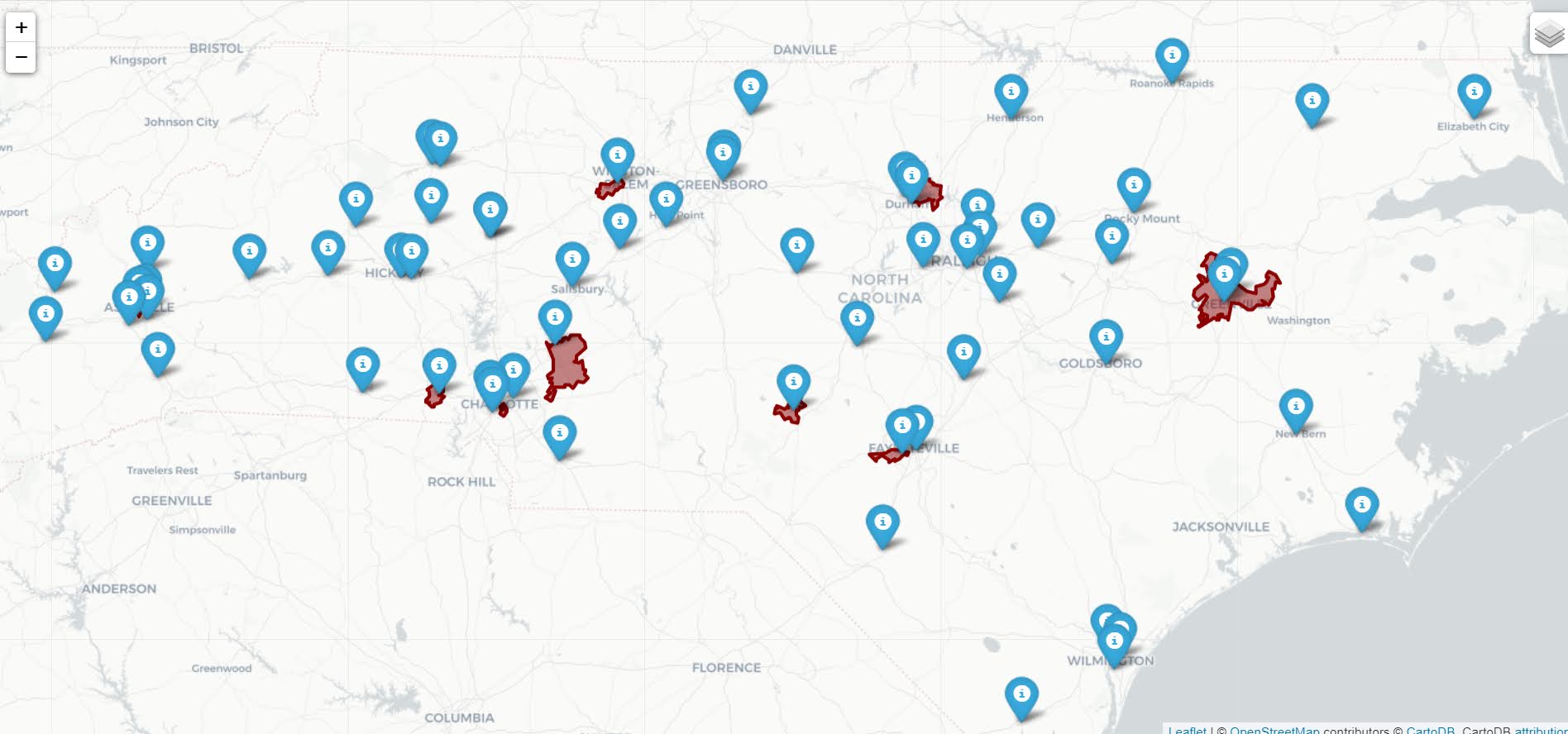
I figured I would run our algorithm through to see what North Carolina looks like. So here is an interactive map, with the top 10 zipcodes that have need for service (in red polygons), and CMS certified opioid treatment providers (in blue pins). (Below is a static image)

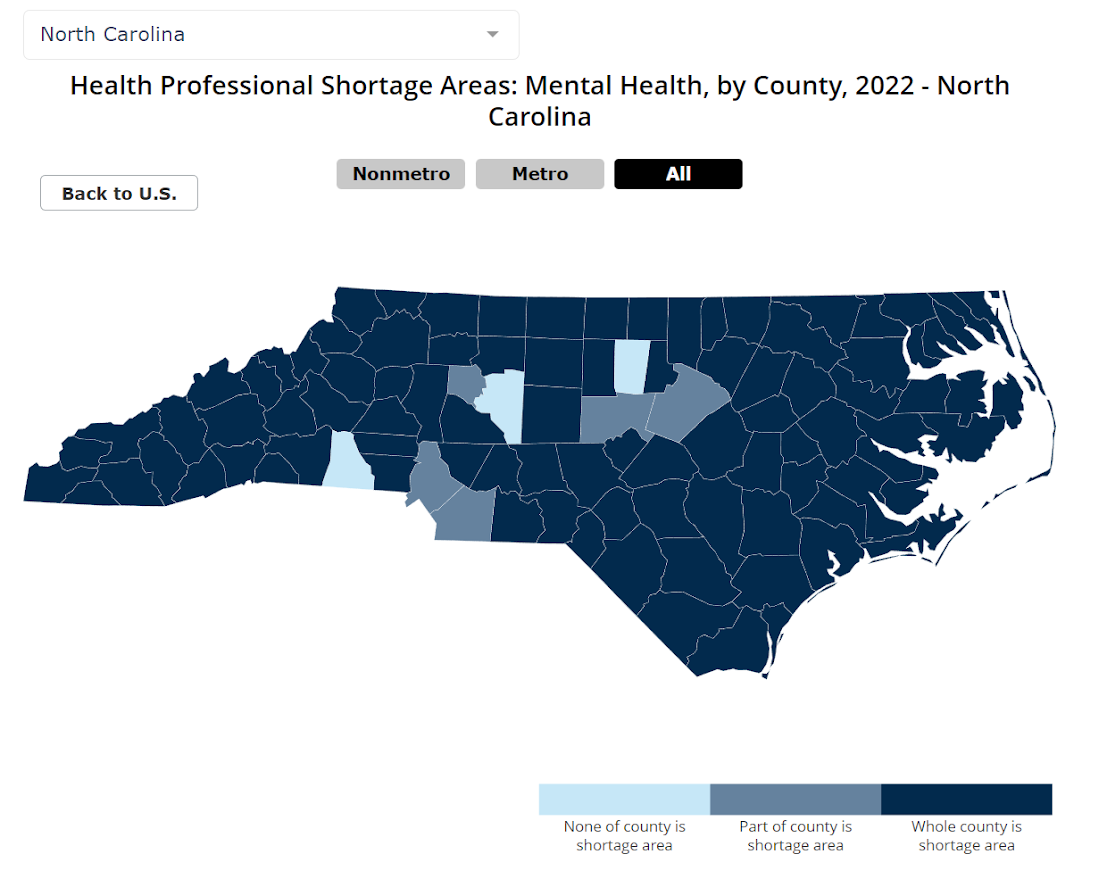
My initial impression was that this did not really jive with the quotes in the News & Observer article that suggested NC was a notorious service dessert – there are quite a few treatment providers across the state. So the cited Rural HealthInfo source disagrees with this. I cannot find their definition offhand, but I am assuming this is due to only counting in-patient treatment providers, whereas my list of CMS certified providers is mostly out-patient.

So although my algorithm identified various areas in the state that likely could use expanded services, this begs the question of whether NC is really a service dessert. It hinges on whether you think people need in-patient or out-patient treatment. Just a quick sampling of those providers, maybe half say they only take private, so it is possible (although not certain) that the recent Medicaid expansion will open up many treatment options to people who are dependent on opioids.

SAMHSA estimates that of those who get opioid treatment, around 5% get in-patient services. So maybe in the areas of high need I identify there is enough demand to justify opening new in-patient service centers – it is close though I am not sure the demand justifies opening more in-patient (as opposed to making it easier to access out-patient).

Asking folks with a medical background at work, it seems out-patient has proven to be as effective as in-patient, and that the biggest hurdle is to get people on buprenorphine/methadone/naltrexone (which the out-patient can do). So I am not as pessimistic as many of the health experts that are quoted in the News & Observer article.

The serenity prayer and being a senior developer

The serenity prayer, for those who don’t know it is:

God, grant me the serenity to accept the things I cannot change, courage to change the things I can, and wisdom to know the difference.

I think this is an important concept that distinguishes good senior developers from junior developers (or data scientists, or crime analysts, the title doesn’t really matter).

Many very green junior developers tend to err on the ‘I cannot change anything’ side. Or put another way, they are told ‘we are going to do XYZ’, and instead of saying ‘we don’t need to do Y, we can just do XZ’ they just go with the flow and do what others tell them to do. For a more concrete example, close to every project at my workplace that uses Hadoop, it is probably unnecessary. So often groups come in and say ‘we need to go from DatabaseX -> Hadoop -> Machine Learning Model -> DatabaseY’. So people go on this path, even though you could just chunk up the data into more memory safe ways and cut out Hadoop entirely.

Another common data science one I come across is ‘the business wants a ranking of priority claims that places them into bins of 1/2/3’. Instead of making a proper utility derived decision rule, the data scientist gives the business what they ask for, using ad-hoc and clearly suboptimal rules to make the bins. It is similar to the XY problem, juniors just need to recognize they have agency to go back to the business partners and say ‘we should actually do it like this instead’.

For a crime analysis example, when I worked at Troy PD and implemented these weekly metrics, the Chief at the time asked me to remove the error bars on the weekly forecasts. I simply explained to him that I used those to tell if a recent uptick was anomalous (if inside the bars it is what we would expect), and he said OK I understand now why you do that. I do things on occasion because a higher up asks that I don’t prefer, but you should push back in data science roles to nudge people to the right metrics (who often do not have as much expertise as you). It takes courage as the prayer goes.

I use the condition good senior developer earlier in the post, as I know senior people who fall into the trap of just going with the flow too much as well. But another typology for seniors is the ‘accept the things I cannot change’. I have come across this less often, but there are a few people who are very zealous about different tools/methods – kubernetes, everything needs to be CICD, agile – even when they are not possible to coerce to the particular situation. Many of these methods could be fine if they could be applied easily to the project at hand, but if it takes 2 years to develop your kubernetes or CICD pipeline, whereas I can log into a virtual machine, do a one time set up and be done in a much shorter period of time, you should probably rethink your approach.

Often the developers don’t realize it will take 2 years (or there are fundamental problems with the approach that makes it not feasible). That is why good seniors have the wisdom to know the difference between things they can change and things they cannot.


I am going to be annoying and plug my consulting firm, CRIME De-Coder LLC for a bit here on the blog. So please check my work and get in touch if you or your agency/business have any needs for statistical analysis, process automation, program analysis, predictive analytics, etc.

Crime De-Coder LLC Website

So I have created CRIME De-Coder LLC, a firm to do my consulting work with police departments. Check out my website, crimede-coder.com.

Feedback is welcome. In particular check out the services pages, and my first blog post on what distinguishes my services from most firms. Providing computer code to generate the end product is “teaching a man a fish”, whereas most firms just drop a final report and leave.

And of course feel free to reach out to consult@crimede-coder.com if you are interested in pursuing a project. Going forward I plan on making a new post around once a month, so sign up in your feed reader or using a service like IFTTT.


Setting up a stand alone website is not that hard in the end. Currently it is a static site with some custom javascript (hosted on Hostinger). I should do a PHP server for the new blog posts and RSS feed eventually, but for now this is fine. I suggest for those interested in the same get the Jon Duckett books (HTML/Javascript/PHP) for overview of the tech, and then check out Dani Kross’s youtube tutorials (for random things like editing the htaccess file).

I am not doing a newsletter for the blog-posts, as I am concerned it will get my email on random block lists. But if there is demand for it in the future I will figure out some other service I guess to do that.

I wanted a more bare-metal setup (not a hosted wordpress like this site), as in the future I will likely do demo’s of dashboards, host some pyscript, make a sign in for paid content, etc. I just wanted flexibility from the start. So stay tuned for more content from CRIME De-Coder!

Won the algae bloom prediction competition

I recently was one of the winners in the DataDriven competition predicting algaeblooms, username apwheele. So I have written in the past about alternative competition sites. To decide overall whether I will compete in a competition, it is:

  • number of competitors
  • overall prizes
  • my self-assessed skill level

And then whether I had sufficient time to devote to the competition. So for an alternative estimate example, the Astral Codex blog has a book review contest. I can see the prior years competition had 133 competitors, so given prizes of 4k in 2023, 4k/133 ~ $30 in expected return. If you have a burning desire to review a book go for it, but I don’t think I have some secret that gives me a large enough competitive edge over other readers of Scott’s blog to make this competition worth my time.

For the algae bloom competition, DataDriven I saw had previously around 1k competitors per competition, and the prizes for 1/2/3 for this competition were 12k/9k/6k. They have a few other conciliation prizes, so total of $30k. Expected return is basically the same as the Codex blog, $30, but I figured I had a better competitive edge. (Although knew it would be more work than writing a book review.)

I am typically hesitant to do Kaggle competitions, some have over 100k competitors (I feel at that point you are close to the “monkeys typing on a keyboard will produce Shakespeare eventually” stage). I debated recently on doing the Kaggle competition on Neutrino’s in Ice, but due to steeper competition and less time (prizes are similar to the Algae Bloom one) I will not be competing.

In terms of self-assessed skill, you may be thinking “Andy, you have no related skills towards remote-sensing/biology”, which is true. In this specific competition, one of the things that prompted me to compete was the use of ancillary data, so it is not just satellite imagery, you can fold in more data. This tends to favor tabular/tree based models, which I have more experience with. Additionally the example getting started blog post by DataDriven made to me a key critical error – they used a multinomial model (predicting categories) instead of a regression model predicting a continuous outcome. An ordinal model may be defensible, but with the error metric being root mean squared error, the way they used multinomial did not make sense. E.g. if multinomial predicted severity 1 at 51%, and severity 5 at 49%, your prediction should be 3, not 1. Since the majority of people competing in these competitions are clearly just copying code and not understanding the stat models under the hood, I knew this would send a decent number of competitors down a wrong track.

Another aspect I look for in modeling competitions is weird loss functions, this is one of the reasons me and Gio won quite a bit in the NIJ recidivism competition. Essentially things that you need to write custom code for (or think about the math a little under the hood), I suspect give me a decent edge based on quite a few competitors. Things where just your ability to fit and hypertune a deep-learning model based on sensor data is the difference maker I am not going to compete in.

So that was my thinking at the start of the competition. An aspect I did not anticipate though, it was quite a chore to download the data. Unlike many competitions in which the providers gift you data, DataDriven had you download your own satellite data. This was quite alot of work to write code to do this, it wouldn’t surprise me if I spent 40 hours writing code for the competition overall. Also I ended up signing up for the planetary computer resource (I would get rate limited downloading data otherwise). I bet some individuals do not know they should just cache the feature data, not rerun it everytime – it takes me over 2 days of loops in python to download all the data.

So in the end, the competition had listed over 1300 competitors, but many were not serious competitors. Maybe halfway through the competition (which was around Christmas, I suspect that also reduced competition), there was only 300 or 400 competitors signed up. If you signed up in the last few weeks, I knew you would probably not have enough time to write code/download-data/tinker with models. In the end people who submitted 2+ times and beat the benchmark DataDriven results were under 100 people. So that makes me think maybe I should consider Kaggle competitions more seriously, if less than 10% of people competing even give a serious attempt.

So in terms of competitions, I have participated in 4 overall:

Gio was the one who forwarded the recidivism competition. I should have competed in the prior hot spots NIJ competition, so I hopped on that opportunity and we did a good job.

I spent a decent chunk of time on the Maternal Morbidity challenge, with prizes of 50k for multiple teams. So although I did not win I thought that was worth a shot (I am more hesitant for soft assessment competitions though). For the toxic rating competition I failed fast – I spent two days working on a few ideas/models. I was not that high in the leaderboard based on my ideas (pulling in data from alternative sources and building a few different types of models and ensembling them together), so I stopped after a short period. I would have done the same for the Algae competition, but just using a simple regression model (without even including the satellite data), I was #1 on the leaderboard. So I spent more time downloading the data and tinkering over time, which did keep me in the #1 spot in the public leaderboard in the end.

Getting access to paywalled newspaper and journal articles

So recently several individuals have asked about obtaining articles they do not have access to that I cite in my blog posts. (Here or on the American Society of Evidence Based Policing.) This is perfectly fine, but I want to share a few tricks I have learned on accessing paywalled newspaper articles and journal articles over the years.

I currently only pay for a physical Sunday newspaper for the Raleigh News & Observer (and get the online content for free because of that). Besides that I have never paid for a newspaper article or a journal article.

Newspaper paywalls

Two techniques for dealing with newspaper paywalls. 1) Some newspapers you get a free number of articles per month. To skirt this, you can open up the article in a private/incognito window on your preferred browser (or open up the article in another browser entirely, e.g. you use Chrome most of the time, but have Firefox just for this on occasion.)

If that does not work, and you have the exact address, you can check the WayBack machine. For example, here is a search for a WaPo article I linked to in last post. This works for very recent articles, so if you can stand being a few days behind, it is often listed on the WayBack machine.

Journal paywalls

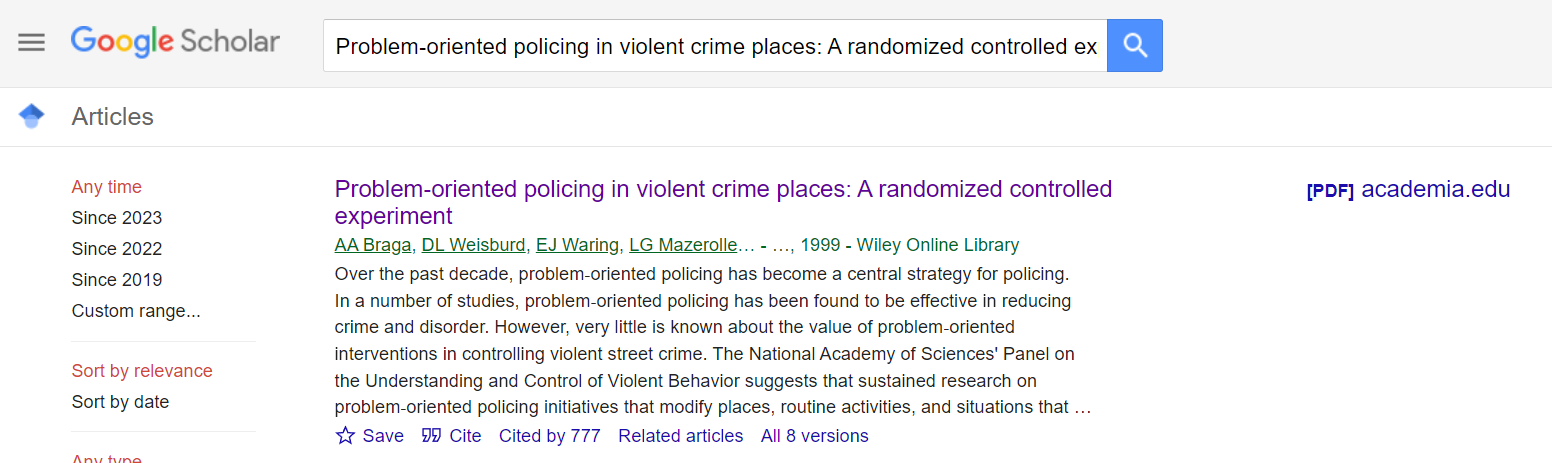
Single piece of advice here, use Google Scholar. Here for example is searching for the first Braga POP Criminology article in the last post. Google scholar will tell you if a free pre or post-print URL exists somewhere. See the PDF link on the right here. (You can click around to “All 8 Versions” below the article as well, and that will sometimes lead to other open links as well.)

Quite a few papers have PDFs available, and don’t worry if it is a pre-print, they rarely substance when going into print.1

For my personal papers, I have a google spreadsheet that lists all of the pre-print URLs (as well as the replication materials for those publications).

If those do not work, you can see if your local library has access to the journal, but that is not as likely. And I still have a Uni affiliation that I can use for this (the library and getting some software cheap are the main benefits!). But if you are at that point and need access to a paper I cite, feel free to email and ask for a copy (it is not that much work).

Most academics are happy to know you want to read their work, and so it is nice to be asked to forward a copy of their paper. So feel free to email other academics as well to ask for copies (and slip in a note for them to post their post-prints to let more people have access).

The Criminal Justician and ASEBP

If you like my blog topics, please consider joining the American Society of Evidence Based Policing. To be clear I do not get paid for referrals, I just think it is a worthwhile organization doing good work. I have started a blog series (that you need a membership for to read), and post once a month. The current articles I have written are:

So if you want to read more of my work on criminal justice topics, please join the ASEBP. And it is of course a good networking resource and training center you should be interested in as well.


  1. You can also sign up for email alerts on Google Scholar for papers if you find yourself reading a particular author quite often.↩︎

Scorpion was probably not doing hot spots policing

So the Wall Street Journal had a recent article describing how crackdowns in hot spots of crime may not be the best policing tactic, Tyre Nichols Case Prompts Questions About Police Tactics in Crime Hot Spots. This is actually an OK article, but to be clear “hot spots” policing isn’t really defined by police tactics, hot spots are just a method to identify small areas with the most crime in a city. Identifying the hot spots does not explicitly determine the policing (or non-policing) tactic that one should use to reduce crime in that area. The Washington Post had a recent article in a similar vein critiquing the work of Tamara Herold in Breonna Taylor’s death. The WaPo article even prompted a response by a group of well known criminologists how it was inappropriate to blame Herold’s strategy.

So hotspots have always had a mix of different policing tactics that go with it, the most common strategies I would say are problem oriented policing (Braga et al., 1999), increased street or traffic stops (MacDonald et al., 2016; Sherman & Rogan, 1995), or simply patrolling/hanging out in the area (Groff et al., 2015; Koper, 1995). The WSJ article talks about Joel Caplan’s RTM group (which I think do good work), and they are really just doing a version of problem oriented policing. (POP has always had a component of working in tandem with the community and different public/private sector agencies.)

One of the reasons I wanted to write about this post though, is that often in my career I see a disconnect in purportedly hot spots policing (or similar tactics, such as DDACTS) on paper and what is actually happening on the ground. So using the Memphis Open Crime Data, I identified the top 100 street segments in terms of violent crime (code on github to replicate). As I suspected, the place where Nichols was pulled over is not a hot spot of crime, making the connection between the Scorpion units behavior and hot spots policing tactics a bit suspect.

If the embedded google map does now work, here is a screen shot to show how none of the top 100 street midpoints are around the location of where Nichol’s was initially stopped:

It happens to be the case that officers often have misperceptions of where hot spots are (Macbeth & Ariel, 2019; Ratcliffe & McCullagh, 2001). And that if left to no oversight, there tends to be a mismatch between where police proactivity is occurring and where the most serious crime is spatially concentrated (Wheeler et al., 2018). That is why a system to feed back information to officers for whether they are making high quality stops is so important (Worden et al., 2018).

To be clear, this is not me making excuses for researchers or crime analysts to not know what is actually occurring in their jurisdictions, and to potentially ignore the secondary harms that can come with intensive policing. But in my experience, taking the time to do hot spots policing right, which at its most basic is actually identifying hot spots using data, is a good sign that police departments take seriously the tactics they use and to seriously think about mitigating some of these secondary harms. Hot spots policing does not intrinsically result in unequal outcomes, which can be done via tactics that mitigate harm (such as problem oriented policing), or constructing a hot spots policy that promotes racial equity in outcomes from the start (Wheeler, 2020).

References

  • Braga, A.A., Weisburd, D.L., Waring, E.J., Mazerolle, L.G., Spelman, W., & Gajewski, F. (1999). Problem‐oriented policing in violent crime places: A randomized controlled experiment. Criminology, 37(3), 541-580.
  • Groff, E. R., Ratcliffe, J. H., Haberman, C. P., Sorg, E. T., Joyce, N. M., & Taylor, R. B. (2015). Does what police do at hot spots matter? The Philadelphia policing tactics experiment. Criminology, 53(1), 23-53.
  • Koper, C.S. (1995). Just enough police presence: Reducing crime and disorderly behavior by optimizing patrol time in crime hot spots. Justice Quarterly, 12(4), 649-672.
  • Macbeth, E., & Ariel, B. (2019). Place-based statistical versus clinical predictions of crime hot spots and harm locations in Northern Ireland. Justice Quarterly, 36(1), 93-126.
  • MacDonald, J., Fagan, J., & Geller, A. (2016). The effects of local police surges on crime and arrests in New York City. PLoS one, 11(6), e0157223.
  • Ratcliffe, J.H., & McCullagh, M.J. (2001). Chasing ghosts? Police perception of high crime areas. British Journal of Criminology, 41(2), 330-341.
  • Sherman, L.W., & Rogan, D.P. (1995). Effects of gun seizures on gun violence:“Hot spots” patrol in Kansas City. Justice Quarterly, 12(4), 673-693.
  • Wheeler, A.P. (2020). Allocating police resources while limiting racial inequality. Justice Quarterly, 37(5), 842-868.
  • Wheeler, A. P., Steenbeek, W., & Andresen, M. A. (2018). Testing for similarity in area‐based spatial patterns: Alternative methods to Andresen’s spatial point pattern test. Transactions in GIS, 22(3), 760-774.
  • Worden, R.E., McLean, S.J., Wheeler, A.P., Reynolds, D.L., Dole, C., Cochran, H. Smart Stops: An Inquiry into Proactive Policing. Summary Report to the National Institute of Justice, Award No. 2013-MU-CX-0012.

ptools R package update

So as an update to my R package ptools, I have bumped a major version change to 2.0, which is now up on CRAN.

There is no new functionality, but I wanted to bump versions because I swapped out using rgdal/rgeos with sf (rgdal and rgeos are being deprecated). All the functions currently still take as inputs/output sp objects. If I ever get around to it, I will convert the functions to take either. They are somewhat inefficient with conversions, but if you are doing something where it matters you should likely switch data-engineering to another system entirely (such as via SQL in postgis directly). Generating hexagons should actually be faster now, as the sf version I swapped out is vectorized (whereas how I was using sp prior was a loop).

I debate every now and then just letting this go. I can see on cranlogs I have a total of just over 1k (as of 2/7/2023) downloads, and averaged 200 some last month (grand total, last month).

Time is finite, so I have debated on dropping this and just porting most of the functions over into python. Those cumulative downloads are partially bots (I may have racked up 100 of those downloads in my CICD actions). Let me know if you actually use this, as that gives me feedback whether to bother continuing to develop/update this.

Setting up pyspark to run sql tests

So hacker news the other day had a thread on how do you test your SQL code. This is such a nerd/professional data science type of question I love it (and many of the high upvoted answers are good, but lack code example/nitty gritty details, hence this blog post). I figured I would make my notes on this and illustrate some real code. You get a few things in this post:

  • how to set up spark locally on a windows machine
  • how to generate SQL tests in python with pytest
  • how to set up a github action CICD pipeline to test pyspark/sql

Setting up spark on Windows

First, before we get start, getting spark up and running on a windows machine is non-trivial. Maybe I should use Docker, like I do for postgres, but here are my notes on setting it up to run locally on Windows (much of this is my condensed notes + a few extras based on this DataCamp post).

  • Step 1: Install Java. Make sure where you install it has NO SPACES. Then create an environment variable, JAVA_HOME, and point it to where you installed Java. Mine for example is C:\java_jdk (no spaces).
  • Step 2: Install spark. Set the environment variable Spark_home to wherever you downloaded it, mine is set to C:\spark. Additionally set the environment variables PYSPARK_HOME to python.
  • Step 3: Set up your python environment, e.g. something like conda create --name spenv python=3.9 pip pyspark==3.2.1 pyarrow pandas pytest to follow along with this post. (Note to make pyspark and spark downloaded versions line up.)
  • Step 4: Then you need to download winutils.exe that matches your version. So I currently have spark=3.2.1, so I just do a google search for “winutils 3.2” and up pops this github repo with the version I need (minor versions probably don’t matter). (You do not need to double click to install, the exe file just needs to be available for other programs to find.) Then set the environment variable hadoop_home to the folder where you downloaded winutils.exe. Mine is C:\winutils.

I know that is alot – but it is a one time thing. Now once this is done, from the command line try to run:

pyspark --version

You should be greeted with something that looks like:

Welcome to
      ____              __
     / __/__  ___ _____/ /__
    _\ \/ _ \/ _ `/ __/  '_/
   /___/ .__/\_,_/_/ /_/\_\   version 3.2.1
      /_/

Using Scala version 2.12.15, Java HotSpot(TM) 64-Bit Server VM, 11.0.15

Plus a bunch of other messages (related to logging errors on windows). (You can set the spark-defaults.conf and log4j.properties file to make these less obnoxious.)

But now you are good to go running spark locally on your windows machine. Note you get none of the reasons you want to use spark, such as distributing computations over multiple machines (this is equivalent to running computations on the hnode). But is convenient to do what I am going to show – testing your SQL code locally.

Testing SQL code in python

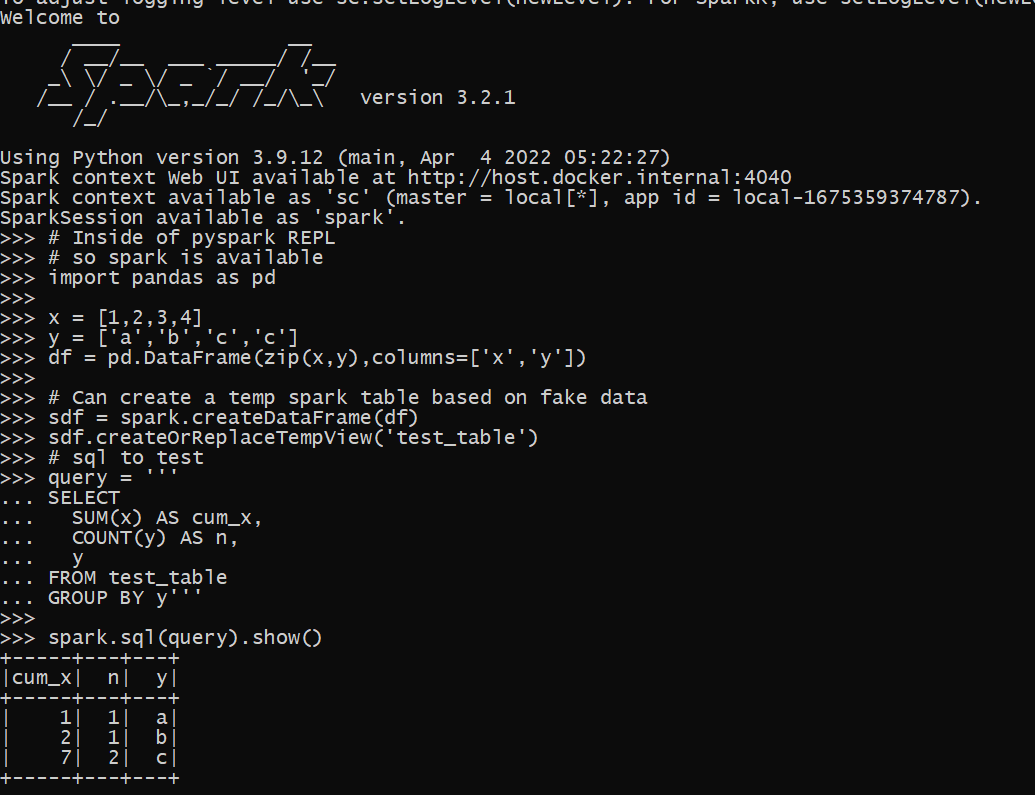
Now that we have pyspark set up, we can run a test in python. Instead of type python into the REPL, go ahead and run pyspark, so we are in a pyspark REPL session. You will again see the big Spark ascii art at the beginning. Here is an example of now creating a dummy temp table inside of our spark database (this is just a local temp table).

# Inside of pyspark REPL
# so spark is available
import pandas as pd

x = [1,2,3,4]
y = ['a','b','c','c']
df = pd.DataFrame(zip(x,y),columns=['x','y'])

# Can create a temp spark table based on fake data
sdf = spark.createDataFrame(df)
sdf.createOrReplaceTempView('test_table')

Now we can run our SQL against the spark database.

# sql to test
query = '''
SELECT
  SUM(x) AS cum_x,
  COUNT(y) AS n,
  y
FROM test_table
GROUP BY y'''

spark.sql(query).show()

And voila, you can now test your spark queries. Although this is showing for spark, you can do something very similar for different databases as well, e.g. using pyodbc or sqlalchemy. You would want to have a test dummy database you can write to though to do that (a few different databases have volatile or temp tables equivalent to spark here).

Setting up pytest + spark

So this shows in just a REPL session how to set up this, but we also want automated tests for multiple scripts via pytest. To illustrate, I am going to refer to my retenmod repo. Even though this library obviously has nothing directly to do with pyspark, I am using this repo as a way to test code/python packaging. (And note if using the same environment above, to replicate 100% of that repo, need to install pip install black flake jupyter jupyter_contrib_nbextensions pre-commit matplotlib.)

So now for pytest, a special thing is you can create python objects that are inherited for all of your tests. Here we will create the spark object one time, and then it can be passed on to your tests. So in ./tests make a file conftest.py, and in this file write:

# This is inside of conftest.py
import pytest
from pyspark.sql import SparkSession

# This sets the spark object for the entire session
@pytest.fixture(scope="session")
def spark():
    sp = SparkSession.builder.getOrCreate()
    # Then can do other stuff to set
    # the spark object
    sp.sparkContext.setLogLevel("ERROR")
    sp.conf.set("spark.sql.execution.array.pyspark.enabled", "true")
    return sp

In pytest lingo, fixtures are then passed around to the different test functions in your library (where appropriate). You can create the equivalent of spark in a pyspark session via SparkSession.builder. This is essentially what a pyspark session is doing under the hood to generate the spark object you can run queries against.

Now we can make a test function, here in a file named test_spark.py (in the same tests folder). That will then look something like:

# pseudo code to show off test
# in test_spark.py
import pandas as pd
from yourlibrary import func

test_table = ...code to create dummy table...

def test_sql(spark):
    # Create the temporary table in spark
    sdf = spark.createDataFrame(test_table)
    sdf.createOrReplaceTempView("test_table")
    # Test out our sql query
    query = func(...your parameters to generate sql...)
    res = spark.sql(query).toPandas()
    # No guarantees on row order in this result
    # so I sort pandas dataframe to make 100% sure
    res.sort_values(by="y", inplace=True, ignore_index=True)
    # Then I do tests
    # Type like tests, shape and column names
    assert res.shape == (3, 3)
    assert list(res) == ["cum_x", "n", "y"]
    # Mathy type tests
    dif_x = res["x"] != [1, 2, 7]
    assert dif_x.sum() == 0
    dif_n = res["n"] != [1, 1, 2]
    assert dif_n.sum() == 0

So note here that I pass in spark as an argument to the function. pytest then uses the fixture we defined earlier to pass into the function when the test is actually run. And then from the command line you can run pytest to check out if your tests pass! (I have placed in the retenmod package a function to show off generating a discrete time survival table in spark, will need to do another blog post though on survival analysis using SQL.)

So this shows off what most of my sql type tests look like. I test that the shape of the data is how I expected (given my fake dataframe I passed in), columns are correct, and that the actual values are what they should be. I find this useful especially to test edge cases (such as missing data) in my SQL queries. My functions in production are mostly parameterized SQL, but it would work the same if you had a series of text SQL files, just read them into python as strings.

Setting up github actions

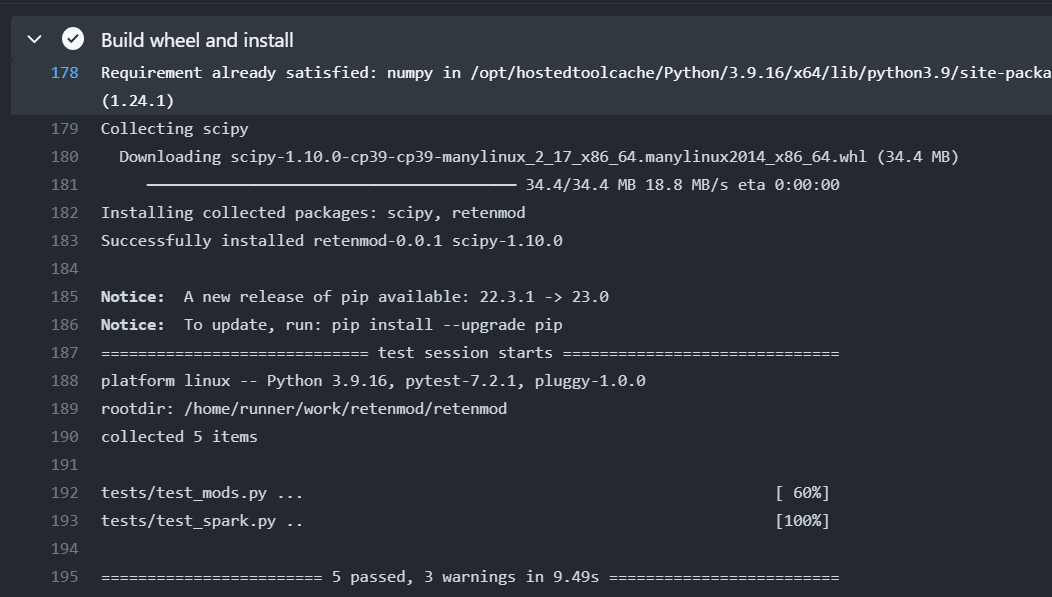
As a bonus, I show how to set this up in an automatic CICD check via github actions. Check out the actions workflow file for the entire workflow in-situ. But the YAML file has a few extra steps compared to my prior post on generating a wheel file in github actions.

It is short enough an can just paste the whole YAML file for you to check out.

on:
  push:
    branches:
      - main

jobs:
  build_wheel:
    runs-on: ubuntu-latest
    timeout-minutes: 20
    steps:
      - uses: actions/checkout@v2
      - uses: actions/setup-java@v1
        with:
            java-version: 11
      - uses: vemonet/setup-spark@v1
        with:
          spark-version: '3.2.1'
          hadoop-version: '3.2'
      - name: Set up Python
        uses: actions/setup-python@v2
        with:
          python-version: 3.9
      - name: Build wheel and install
        run: |
          python -m pip install --user --upgrade build
          python -m build
          # installing spark libraries
          pip install pyspark pyarrow pandas pytest
          # now install the wheel file
          find ./dist/*.whl | xargs pip install
          # Now run pytest tests
          pytest --disable-warnings ./tests
      - name: Configure Git
        run: |
          git config --global user.email "apwheele@gmail.com"
          git config --global user.name "apwheele"
      - name: Commit and push wheel
        run: |
          git add -f ./dist/*.whl
          git commit -m 'pushing new wheel'
          git push
      - run: echo "🍏 This job's status is ${{ job.status }}."

So here in addition to python, this also sets up Java and Spark. (I need to learn how to build actions myself, I wish vemonet/setup-spark@v1 had an option to cache the spark file instead of re-downloading everytime). Even with that though, it will only take a minute or two to run (the timeout is just a precaution and good idea to put in any github action).

You can then check this action out on github.

Happy SQL code testing for my fellow data scientists!

Web scraping police data using selenium and python

So I have a few posts in the past on scraping data. One shows downloading and parsing structured PDFs, almost all of the rest though use either JSON API backends, or just grab the HTML data directly. These are fairly straightforward to deal with in python. You generate the url directly, use requests, and then just parse the returned HTML however you want.

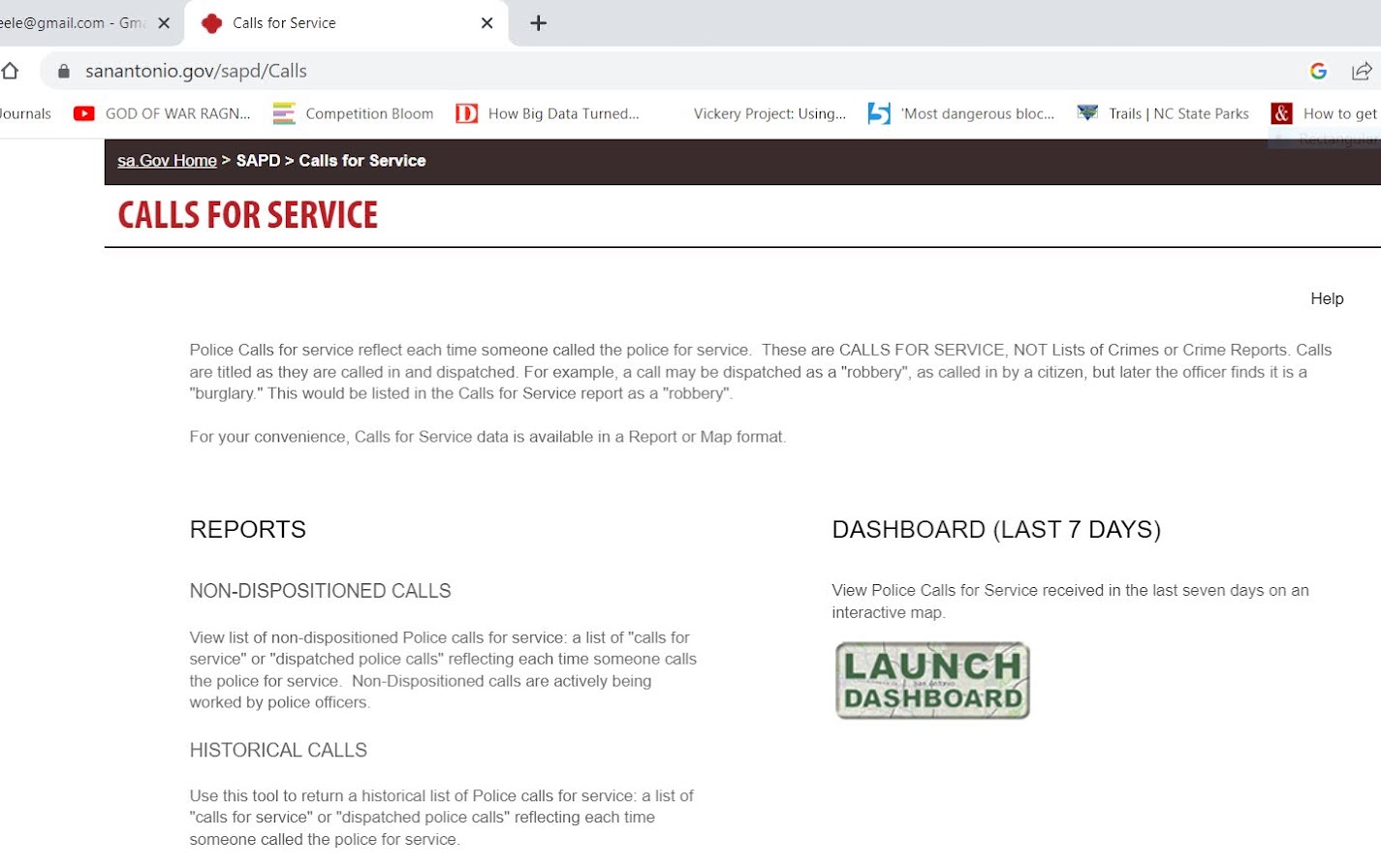
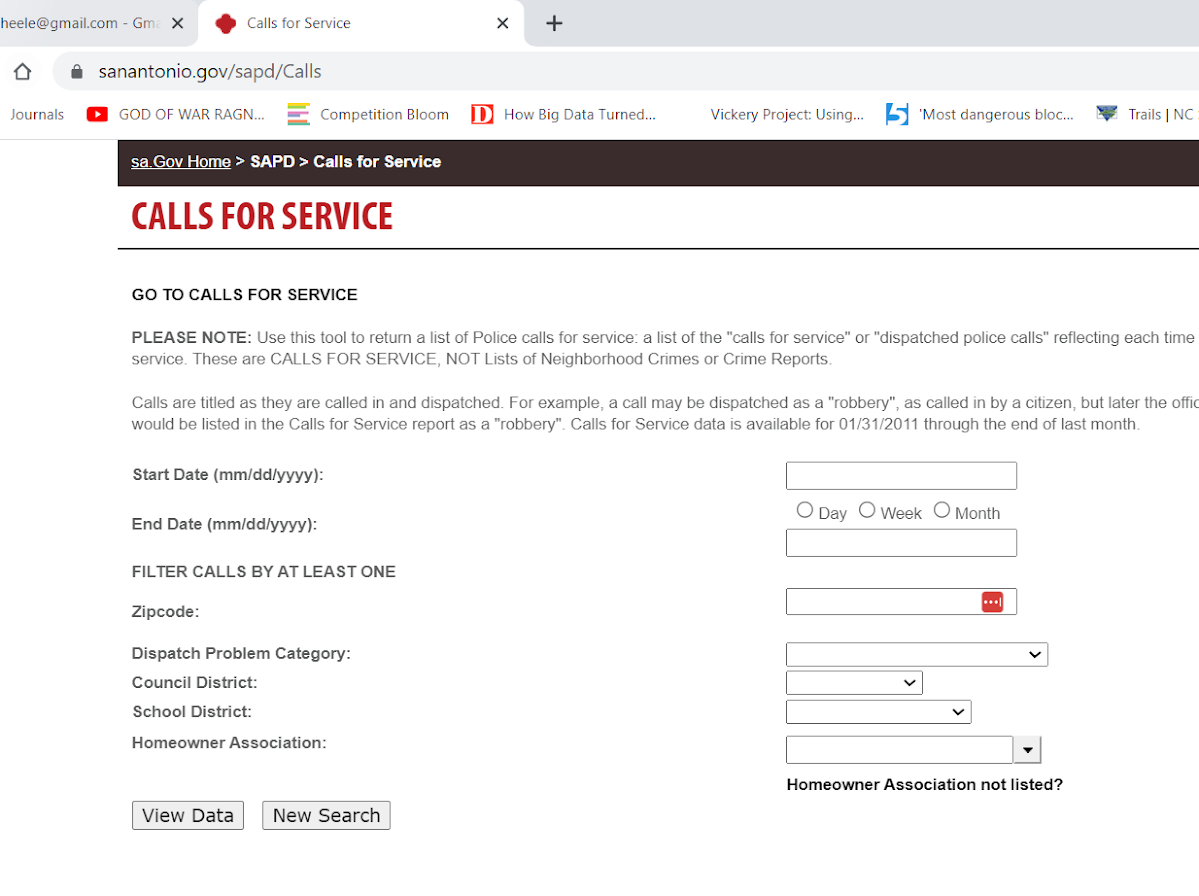
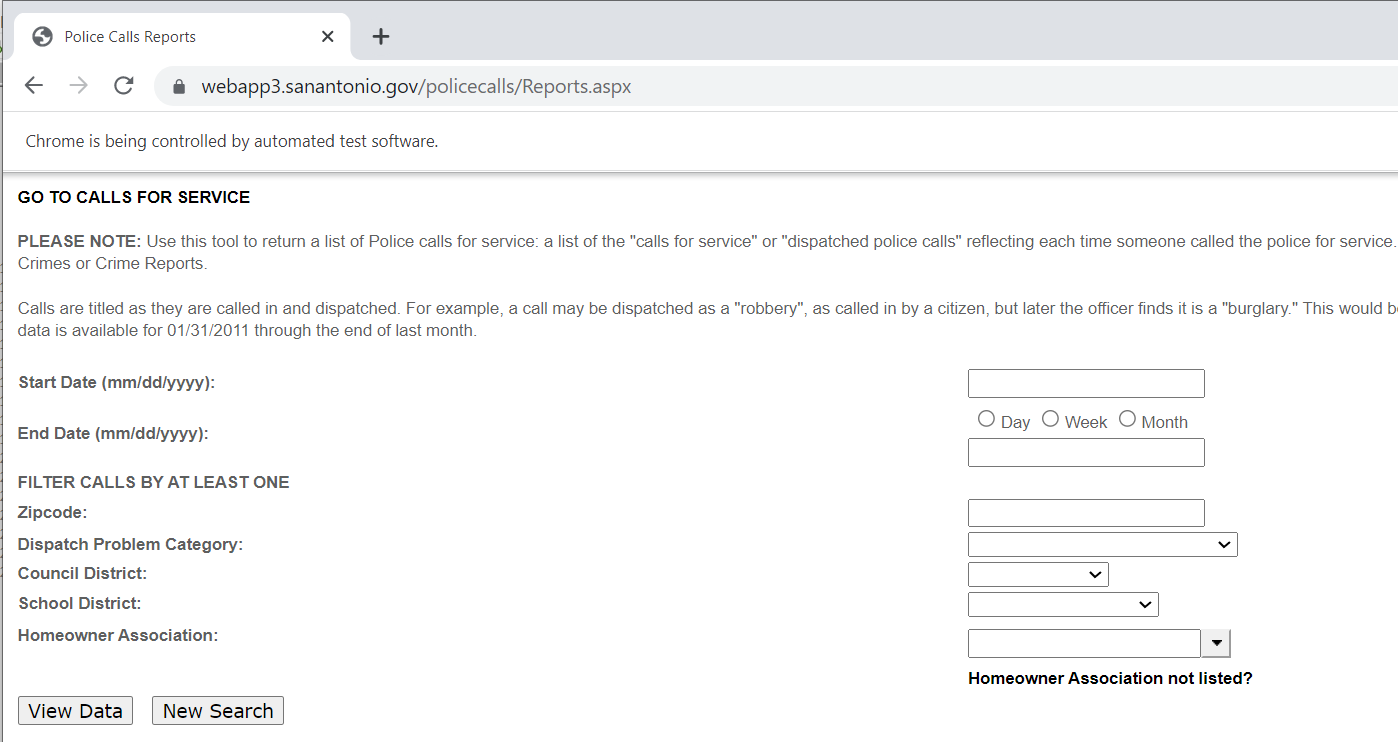
Came across a situation recently though where I needed to interact with the webpage. I figured a blog post to illustrate the process would be good. (For both myself and others!) So here I will illustrate entering data into San Antonio’s historical calls for service asp application (which I have seen several PDs use in the past).

It is tough for me to give general advice about scraping, it involves digging into the source code for a website. Here if you click on the Historical Calls button, the url stays the same, but presents you with a new form page to insert your search parameters:

This is a bit of a red-herring though, it ends up being the entire page is embedded in what is called an i-frame, so the host URL stays the same, but the window inside the webpage changes. On the prior opening page, if you hover over the link for Historical Calls you can see it points to https://webapp3.sanantonio.gov/policecalls/Reports.aspx, so that is page we really need to pay attention to.

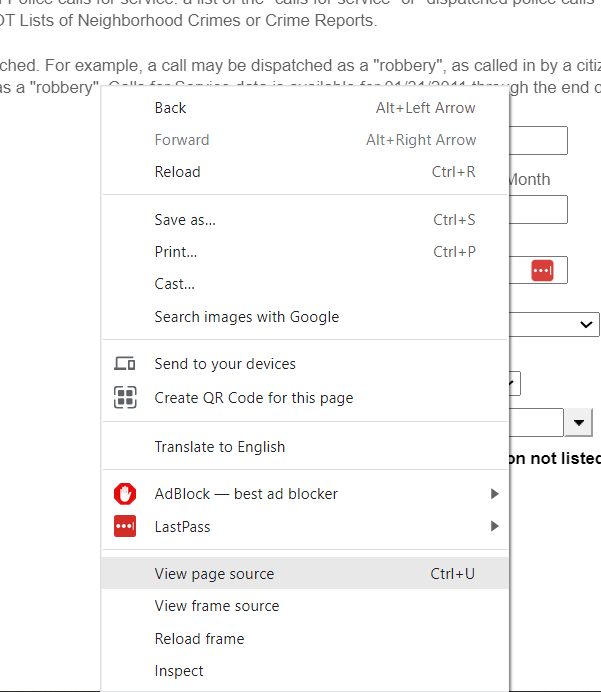
So for general advice, using Chrome to view a web-pages source html, you can right-click and select view-source:

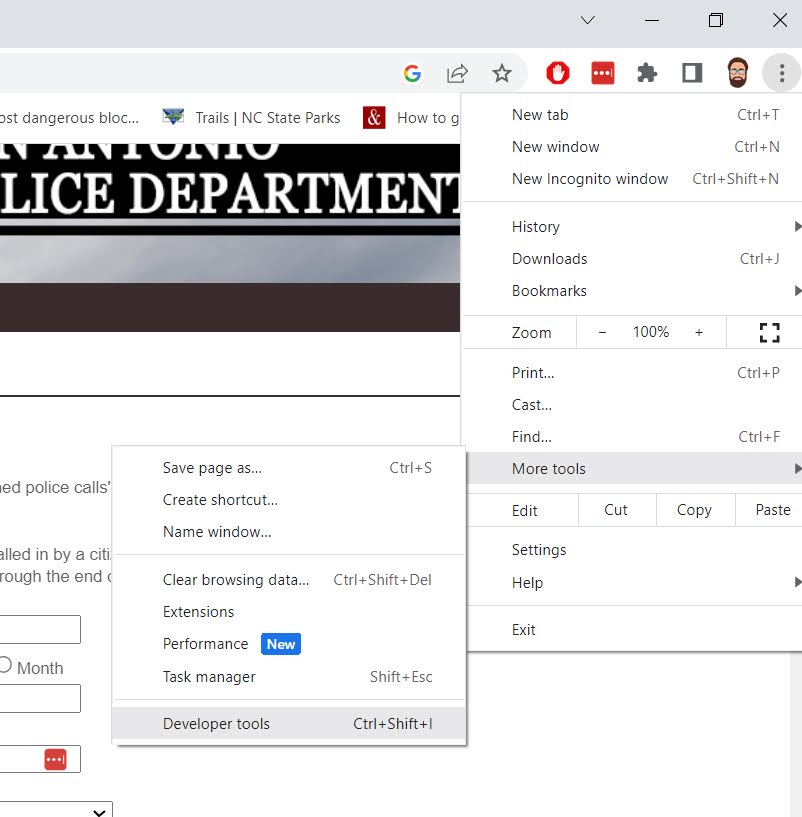
And you can also go into the Developer tools to check out all the items in a page as well.

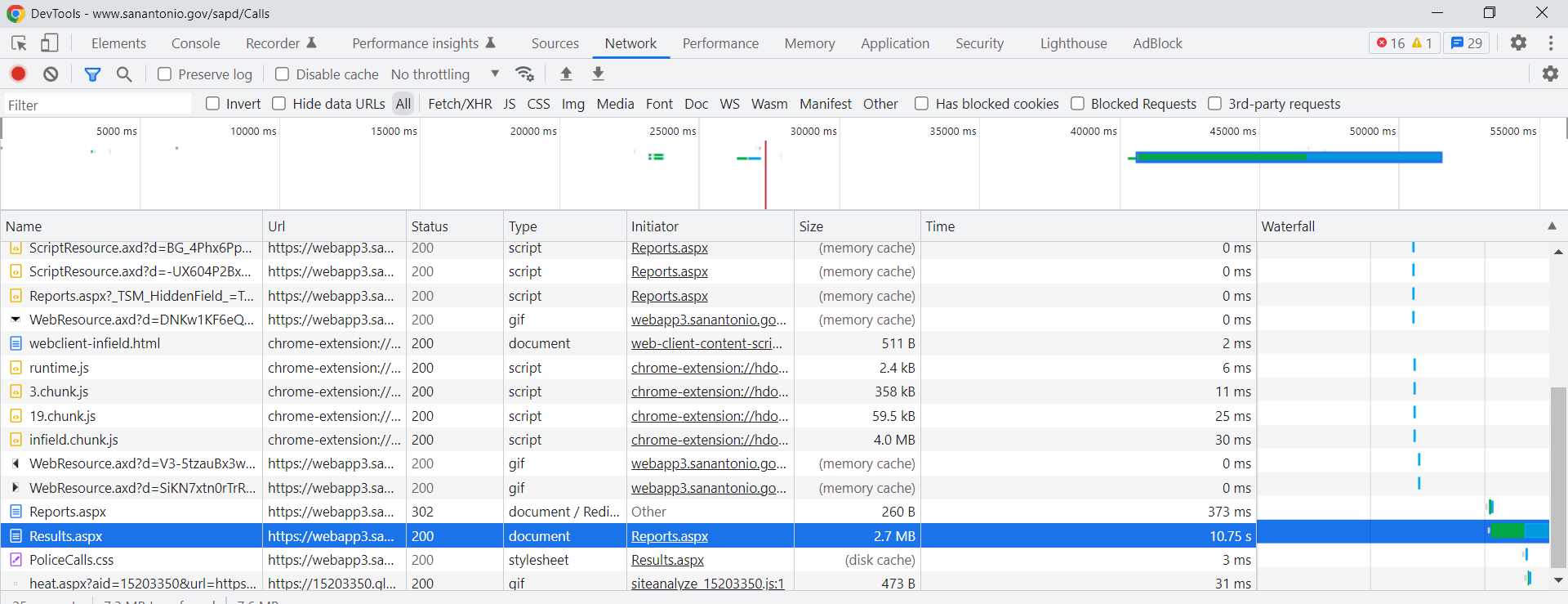
Typically before worrying about selenium, I study the network tab in here. You want to pay attention to the items that take the longest/have the most data. Typically I am looking for JSON or text files here if I can’t scrape the data directly from the HTML. (Example blog posts grabbing an entire dump of data here, and another finding a hidden/undocumented JSON api using this approach.) Here is an example network call when inputting the search into the San Antonio web-app.

The data is all being transmitted inside of aspx application, not via JSON or other plain text files (don’t take my terminology here as authoritative, I really know near 0% about servers). So we will need to use selenium here. Using python you can install the selenium library, but you also need to download a driver (here I use chrome), and then wherever you save that exe file, add that location to your PATH environment variable.

Now you are ready for the python part.

from selenium import webdriver
from selenium.webdriver.chrome.options import Options
from selenium.webdriver.support.ui import Select
import pandas as pd

# Setting Chrome Options
chrome_options = Options()
#chrome_options.add_argument("-- headless")
chrome_options.add_argument("--window-size=1920,1080")
chrome_options.add_argument("log-level=3")

# Getting the base page
driver = webdriver.Chrome(options=chrome_options)
base_url = "https://webapp3.sanantonio.gov/policecalls/Reports.aspx"
driver = webdriver.Chrome(options=chrome_options)
driver.get(base_url)

Once you run this code, you will see a new browser pop-up. This is great for debugging, but once you get your script finalized, you can see I commented out a line to run in headerless (so it doesn’t bug you by flashing up the browser on your screen).

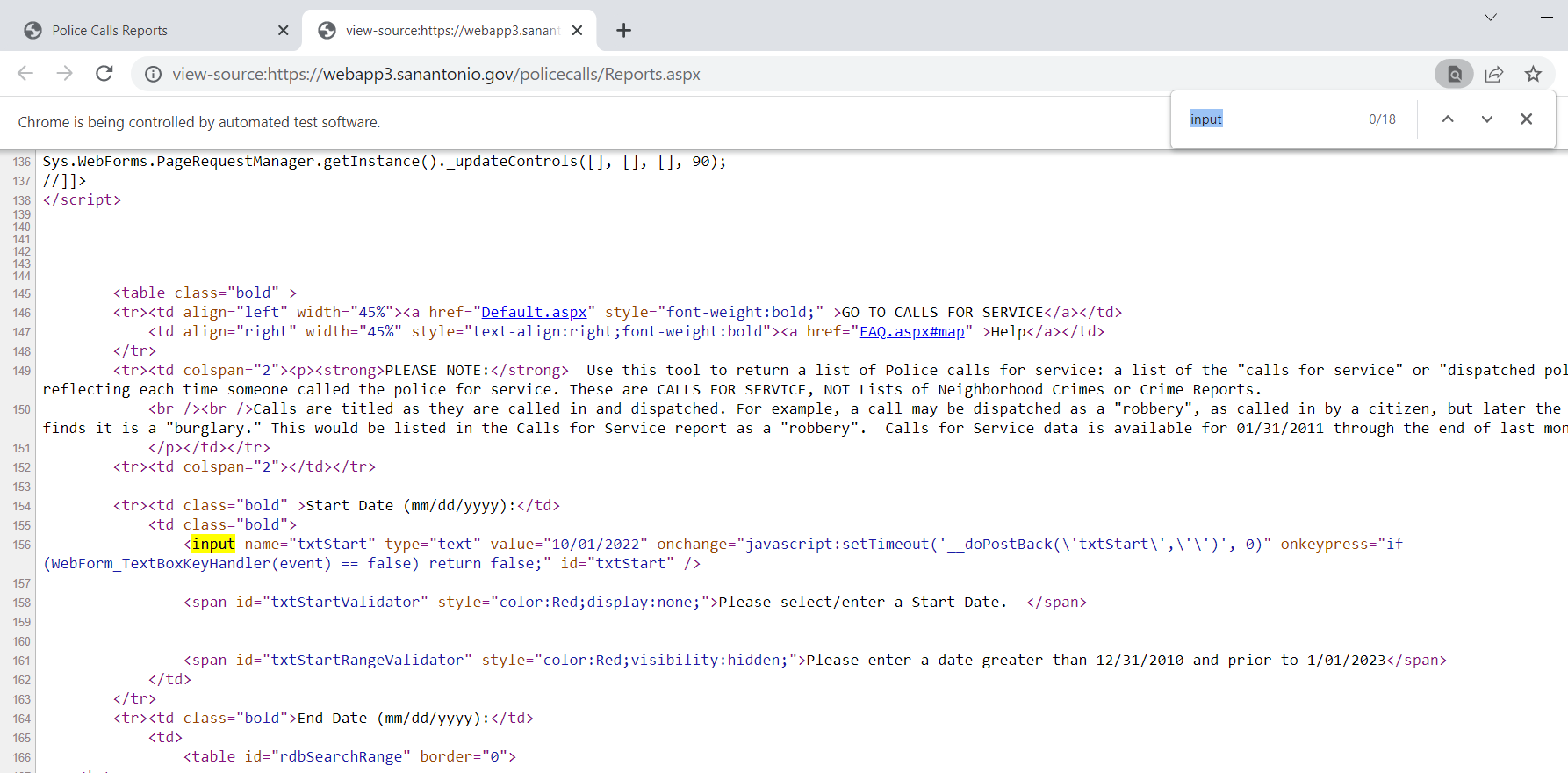
Now typically what I do is look at the HTML source (like I showed earlier), and then search for the input buttons in HTML. We are trying to figure out the elements we need to insert the data for us to submit a search. Here is the first input for an item we care about, the begin date of the search.

Now we can insert our own date by grabbing the element from the web-page. I grab it here by the “id” attribute in the HTML (many tutorials use xpath, which I am not as familiar with, but at least for these aspx apps what I show works fine). For dates that have a validation stage, you need to not only .send_keys, but to also submit to get past the date validation.

# Inserting date field for begin date
from_date = driver.find_element("id", "txtStart")
from_date.send_keys("10/01/2022")
from_date.submit()

Once you run that code you can actually view the web-page, and see that your date is entered! Now we need to do the same thing for the end date. Then we can put in a plain text zipcode. Since this does not have validation, we do not need to submit it.

# Now for end date
end_date = driver.find_element("id", "txtEndDate")
end_date.send_keys("10/02/2022")
end_date.submit()

# Now inserting text for zipcode
zip = driver.find_element("id", "txtZipcode")
zip.send_keys("78207")
# Sometimes need to clear, zip.clear()

I have a note there on clearing a text box. Sometimes websites have pre-filled options. Sometimes web-sites also do not like .clear(), and you can simulate backspace keystrokes directly. This website does not like it if you clear a date-field for example.

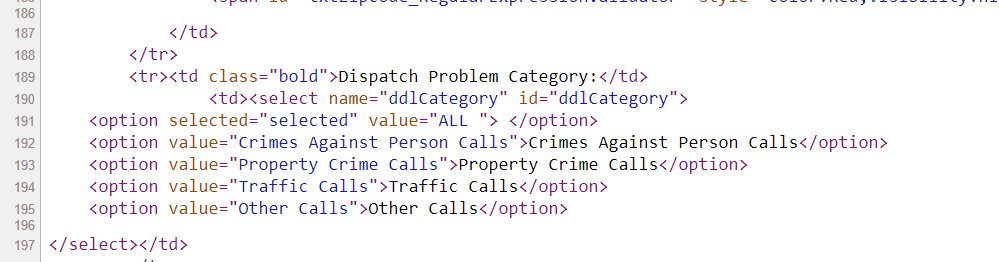
Now the last part, I am going to select a drop-down. If you go into the HTML source again, you can see the list of options.

And now we can use the Select function I imported at the beginning to select a particular element of that drop-down. Here I select the crimes against persons.

# Now selecting dropdown
crime_cat = driver.find_element("id", "ddlCategory")
crime_sel = Select(crime_cat)
crime_sel.select_by_visible_text("Crimes Against Person Calls")

Many of these applications have rate limits, so you need to limit the search to tiny windows and subsets, and then loop over the different sets you want to grab all of the data. (Being nice and using time.sleep() between calls to get the results.

Now we are ready to submit the query. The same way you can enter in text into input forms, buttons you can click are also labeled as inputs in the HTML. Here I find the submit button, and then .click() that button. (If there is a direct button to download CSV or some other format, it may make sense to click that button.)

# Now can find the View Data button and submit
view_data = driver.find_element("id", "btnSearch")
view_data.click()

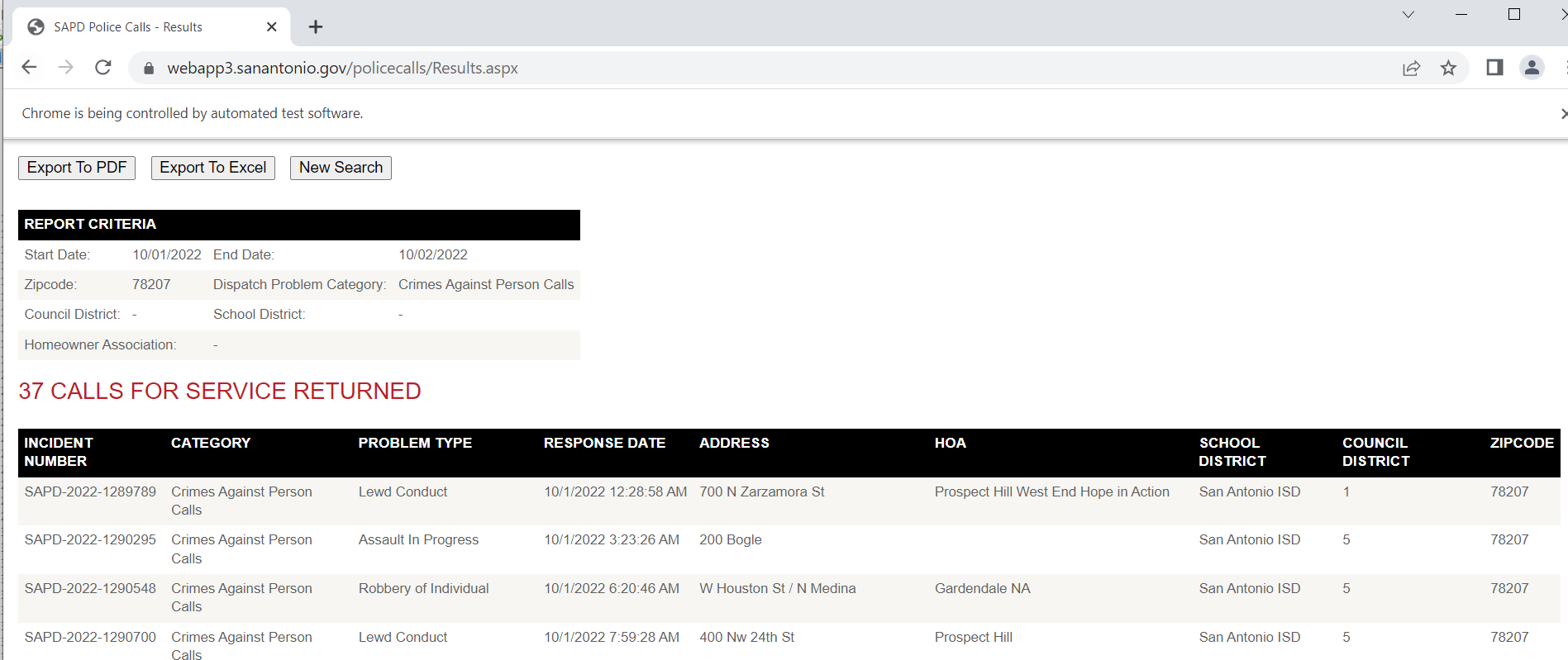
Now that we have our web-page, we can get the HTML source directly and then parse that. Pandas has a nice method to grab tables, and this application is actually very nicely formatted. (I tend to not use this, as many webpages have some very bespoke tables that are hard to grab directly like this). This method grabs all the tables in the web-page by default, here I just want the calls for service table, which has an id of "gvCFS", which I can pass into the pandas .read_html function.

# Pandas has a nice option to read tables directly
html = driver.page_source
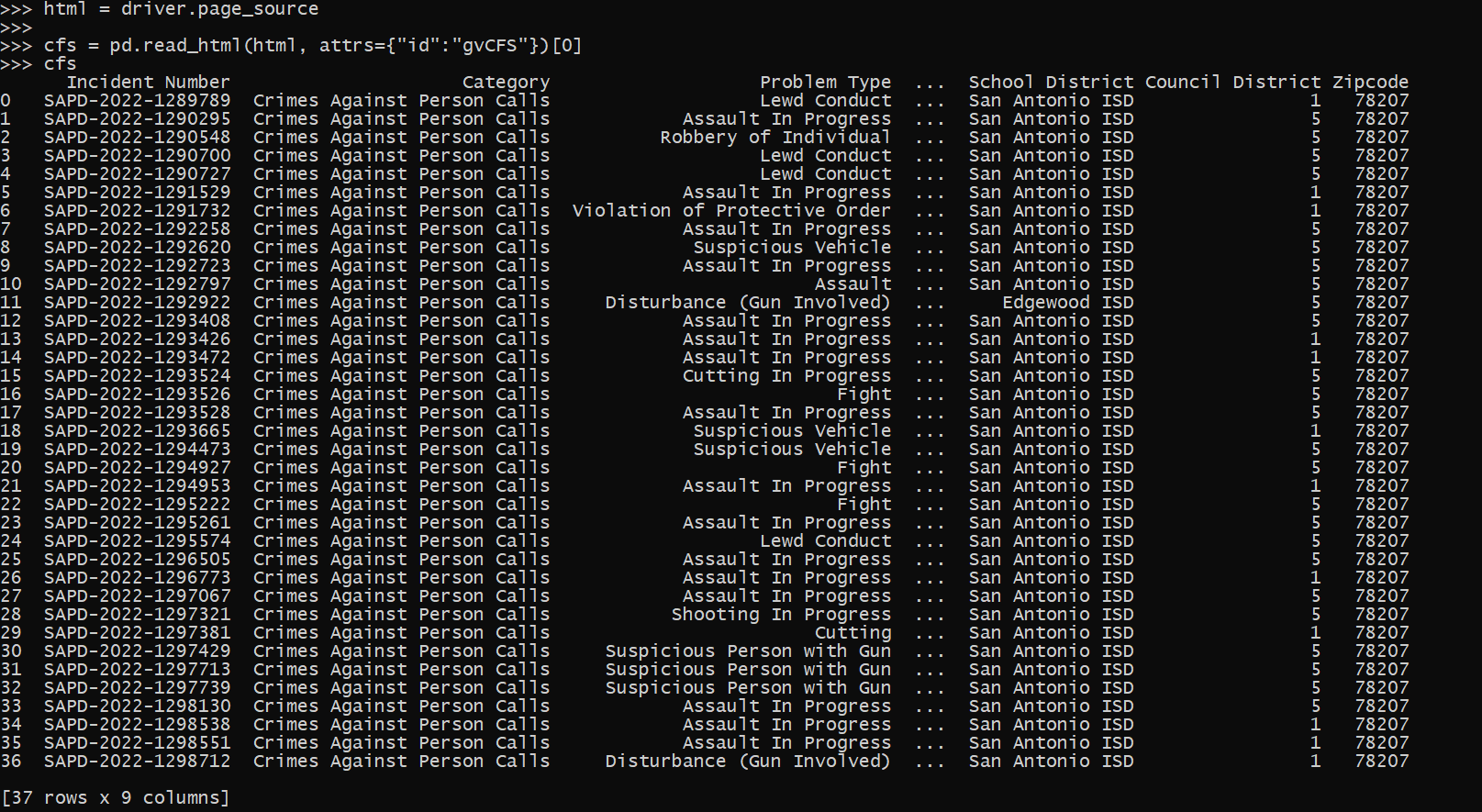
cfs = pd.read_html(html, attrs={"id":"gvCFS"})[0]

And that shows grabbing a single result. Of course to scrape, you will need to loop over many days (and here different search selections), depending on what data you want to grab. Most of these applications have search limits, so if you do too large a search, will only return the first say 500 results. And San Antonio’s is nice because it returns as a single table in the web-page, most you need to page the results though as well. Which takes further scraping the data and interacting with the page. So it is more painful whenever you need to resort to selenium.

Sometimes pages will point to PDF files, and you can set Chrome’s options to download to a particular location in that scenario (and then use os.rename to name the PDF whatever you want after it is downloaded). You can basically do anything in selenium you can manually, it is often just a tricky set of steps to replicate in code.