Drawing Google Streetview images down an entire street using python

Update: I have been asked several times over the years for help on this. In response I have made a simple GUI tool, given a list of addresses and a download folder location, will download all of the images. Applications are websites listing properties and marketers for mailings.

The tool costs $300, check out the CRIME De-Coder Store to purchase.


I’ve previously written about grabbing Google Streetview images given a particular address. For a different project I sampled images running along an entire street, so figured I would share that code. It is a bit more complicated though, because when you base it off an address you do not need to worry about drawing the same image twice. So I will walk through an example.

So first we will import the necessary libraries we are using, then will globally define your user key and the download folder you want to save the streetview images into.

#Upfront stuff you need
import urllib, os, json
key = "&key=" + "!!!!!!!!!!!!!YourAPIHere!!!!!!!!!!!!!!!!"
DownLoc = r'!!!!!!!!!!!YourFileLocationHere!!!!!!!!!!!!!!'  

Second are a few functions. The first, MetaParse, grabs the date (Month and Year) and pano_id from a particular street view image. Because if you submit just a slightly different set of lat-lon, google will just download the same image again. To prevent that, we do a sort of memoization, where we grab the meta-data first, stuff it in a global list PrevImage. Then if you have already downloaded that image once, the second GetStreetLL function will not download it again, as it checks the PrevImage list. If you are doing a ton of images you may limit the size of PrevImage to a certain amount, but it is no problem doing a few thousand images as is. (With a free account you can IIRC get 25,000 images in a day, but the meta-queries count against that as well.)

def MetaParse(MetaUrl):
    response = urllib.urlopen(MetaUrl)
    jsonRaw = response.read()
    jsonData = json.loads(jsonRaw)
    #return jsonData
    if jsonData['status'] == "OK":
        if 'date' in jsonData:
            return (jsonData['date'],jsonData['pano_id']) #sometimes it does not have a date!
        else:
            return (None,jsonData['pano_id'])
    else:
        return (None,None)

PrevImage = [] #Global list that has previous images sampled, memoization kindof        
        
def GetStreetLL(Lat,Lon,Head,File,SaveLoc):
    base = r"https://maps.googleapis.com/maps/api/streetview"
    size = r"?size=1200x800&fov=60&location="
    end = str(Lat) + "," + str(Lon) + "&heading=" + str(Head) + key
    MyUrl = base + size + end
    fi = File + ".jpg"
    MetaUrl = base + r"/metadata" + size + end
    #print MyUrl, MetaUrl #can check out image in browser to adjust size, fov to needs
    met_lis = list(MetaParse(MetaUrl))                           #does not grab image if no date
    if (met_lis[1],Head) not in PrevImage and met_lis[0] is not None:   #PrevImage is global list
        urllib.urlretrieve(MyUrl, os.path.join(SaveLoc,fi))
        met_lis.append(fi)
        PrevImage.append((met_lis[1],Head)) #append new Pano ID to list of images
    else:
        met_lis.append(None)
    return met_lis  

Now we are ready to download images running along an entire street. To get the necessary coordinates and header information I worked it out in a GIS. Using a street centerline file I regularly sampled along the streets. Based on those sample points then you can calculate a local trajectory of the street, and then based on that trajectory turn the camera how you want it. Most social science folks I imagine want it to look at the sidewalk, so then you will calculate 90 degrees to the orientation of the street.

Using trial and error I found that spacing the samples around 40 feet apart tended to get a new image. I have the pixel size and fov parameters to the streetview api hard set in the function, but you could easily amend the function to take those as arguments as well.

So next I have an example list of tuples with lat-lon’s and orientation. Then I just loop over those sample locations and draw the images. Here I also have another list image_list, that contains what I save the images too, as well as saves the pano-id and the date meta data.

DataList = [(40.7036043470179800,-74.0143908501053400,97.00),
            (40.7037139540670900,-74.0143727485309500,97.00),
            (40.7038235569946140,-74.0143546472568100,97.00),
            (40.7039329592712600,-74.0143365794219800,97.00),
            (40.7040422704154500,-74.0143185262956300,97.00),
            (40.7041517813782500,-74.0143004403322000,97.00),
            (40.7042611636045350,-74.0142823755611700,97.00),
            (40.7043707615693800,-74.0142642750708300,97.00)]

    
image_list = [] #to stuff the resulting meta-data for images
ct = 0
for i in DataList:
    ct += 1
    fi = "Image_" + str(ct)
    temp = GetStreetLL(Lat=i[0],Lon=i[1],Head=i[2],File=fi,SaveLoc=DownLoc)
    if temp[2] is not None:
        image_list.append(temp)

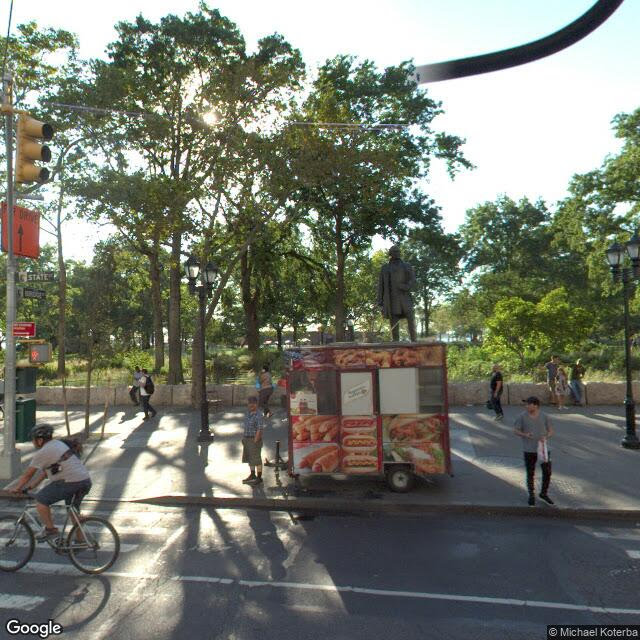
I have posted the entire python code snippet here. If you want to see the end result, you can check out the photo album. Below is one example image out of the 8 in that street segment, but when viewing the whole album you can see how it runs along the entire street.

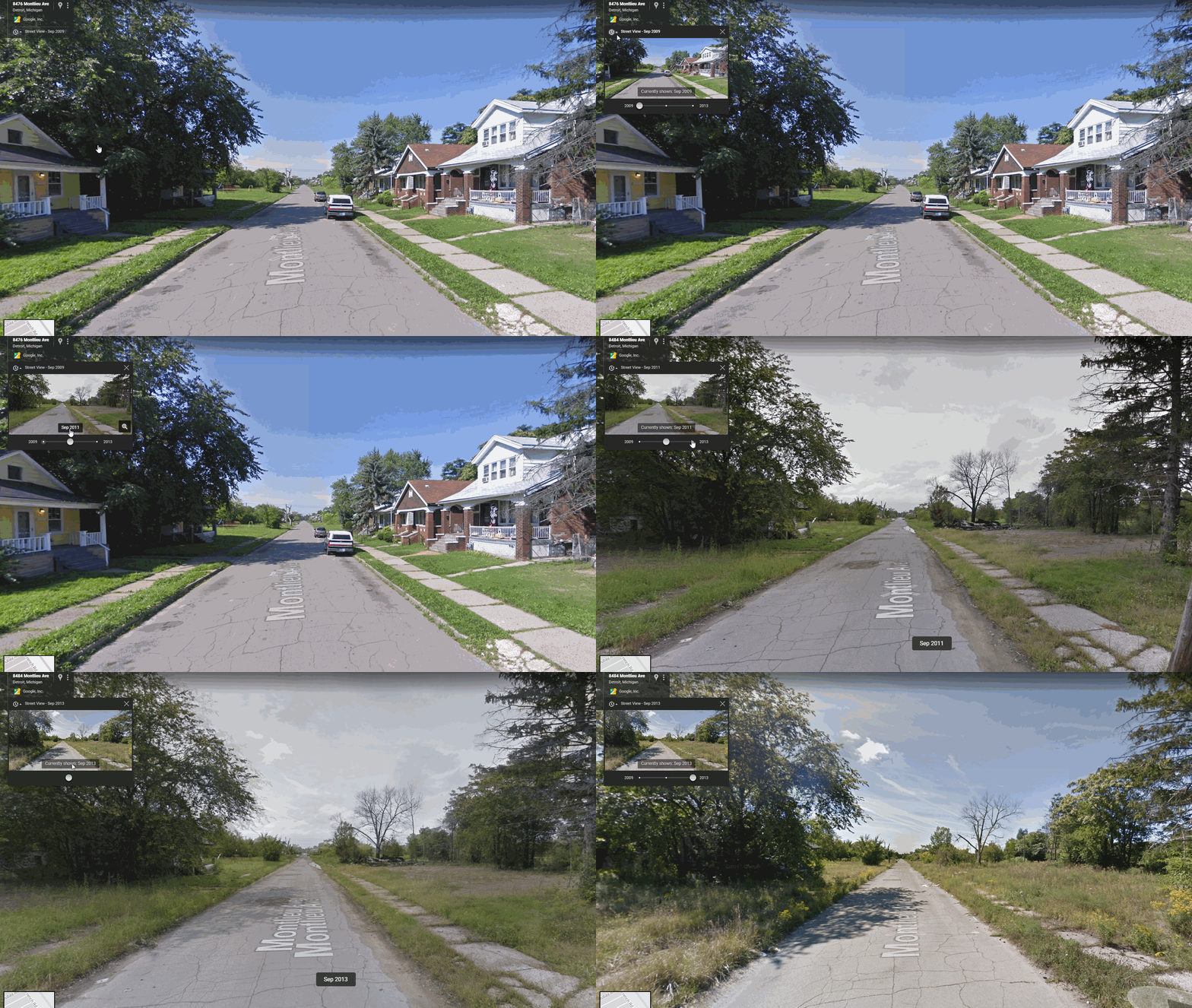
Still one of the limitations of this is that there is no easy way to draw older images that I can tell — doing this approach you just get the most recent image. You need to know the pano-id to query older images. Preferably the meta data json should contain multiple entries, but that is not the case. Let me know if there is a way to amend this to grab older imagery or imagery over time. Here is a great example from Kyle Walker showing changes over time in Detroit.

Work on Shootings in Dallas Published

I have two recent articles that examine racial bias in decisions to shoot using Dallas Police Data:

  • Wheeler, Andrew P., Scott W. Phillips, John L. Worrall, and Stephen A. Bishopp. (2018) What factors influence an officer’s decision to shoot? The promise and limitations of using public data. Justice Research and Policy Online First.
  • Worrall, John L., Stephen A. Bishopp, Scott C. Zinser, Andrew P. Wheeler, and Scott W. Phillips. (2018) Exploring bias in police shooting decisions with real shoot/don’t shoot cases. Crime & Delinquency Online First.

In each the main innovation is using control cases in which officers pulled their firearm and pointed at a suspect, but decided not to shoot. Using this design we find that officers are less likely to shoot African-Americans, which runs counter to most recent claims of racial bias in police shootings. Besides the simulation data of Lois James, this is a recurring finding in the recent literature — see Roland Fryer’s estimates of this as well (although he uses TASER incidents as control cases).

The reason for the two articles is that me and John through casual conversation found out that we were both pursuing very similar projects, so we decided to collaborate. The paper John is first author examined individual officer level outcomes, and in particular retrieved personnel complaint records for individual officers and found they did correlate with officer decisions to shoot. My article I wanted to intentionally stick with the publicly available open data, as a main point of the work was to articulate where the public data falls short and in turn suggest what information would be needed in such a public database to reasonably identify racial bias. (The public data is aggregated to the incident level — one incident can have multiple officers shooting.) From that I suggest instead of a specific officer involved shooting database, it would make more sense to have officer use of force (at all levels) attached to incident based reporting systems (i.e. NIBRS should have use of force fields included). In a nutshell when examining any particular use-of-force outcome, you need a counter-factual that is that use-of-force could happen, but didn’t. The natural way to do that is to have all levels of force recorded.

Both John and I thought prior work that only looked at shootings was fundamentally flawed. In particular analyses where armed/unarmed was the main outcome among only a set of shooting cases confuses cause and effect, and subsequently cannot be used to determine racial bias in officer decision making. Another way to think about it is that when only looking at shootings you are just limiting yourself to examining potentially bad outcomes — officers often use their discretion for good (the shooting rate in the Dallas data is only 3%). So in this regard databases that only include officer involved shooting cases are fundamentally limited in assessing racial bias — you need cases in which officers did not shoot to assess bias in officer decision making.

This approach of course has some limitations as well. In particular it uses another point of discretion for officers – when to draw their firearm. It could be the case that there is no bias in terms of when officers pull the trigger, but they could be more likely to pull their gun against minorities — our studies cannot deny that interpretation. But, it is also the case other explanations could explain why minorities are more likely to have an officer point a gun at them, such as geographic policing or even more basic that minorities call the police more often. In either case, at the specific decision point of pulling the trigger, there is no evidence of racial bias against minorities in the Dallas data.

I did not post pre-prints of this work due to the potentially contentious nature, as well as the fact that colleagues were working on additional projects based on the same data. I have posted the last version before the copy-edits of the journal for the paper in which I am first author here. If you would like a copy of the article John is first author always feel free to email.

Making interactive plots with R and Plotly

I wrote a small op-ed based on the homicide studies work I recently published about interpreting crime trends. Unfortunately that op-ed was not picked up by anyone (I missed the timing abit, maybe next year when the UCR stats come out I can just update the numbers and make the same point). I’ve posted that op-ed here, and I wanted to make a quick blog post detailing how I made the interactive graphs in that post using R and the Plotly library. All the data and code to replicate this can be downloaded from here.

Unfortunately with my free wordpress blog I cannot embed the actual interactive graphics, but I will provide links to online versions at my UT Dallas page that work and show a screenshot of each. So first, lets load all of the libraries that you will need, as well as set the working directory. (Of course change it to where you have your data saved on your local machine.)

#########################################################
#Making a shiny app for homicide rate chart
library(shiny)
library(ggplot2)
library(plotly)
library(htmlwidgets)
library(scales)

mydir <- "C:\\Users\\axw161530\\Box Sync\\Projects\\HomicideGraphs\\Analysis\\Analysis" 
setwd(mydir)
#########################################################

Now I just read in the data. I have two datasets, the funnel rates just has additional columns to draw the funnel graphs already created. (See here or here, or the data in the original Homicide Studies paper linked at the top, on how to construct these.)

############################################################
#Get the data 

FunnRates <- read.csv(file="FunnelData.csv",header=TRUE)
summary(FunnRates)
FunnRates$Population <- FunnRates$Pop1 #These are just to make nicer labels 
FunnRates$HomicideRate <- FunnRates$HomRate

IntRates <- read.csv(file="IntGraph.csv",header=TRUE)
summary(IntRates)
############################################################

Funnel Chart for One Year

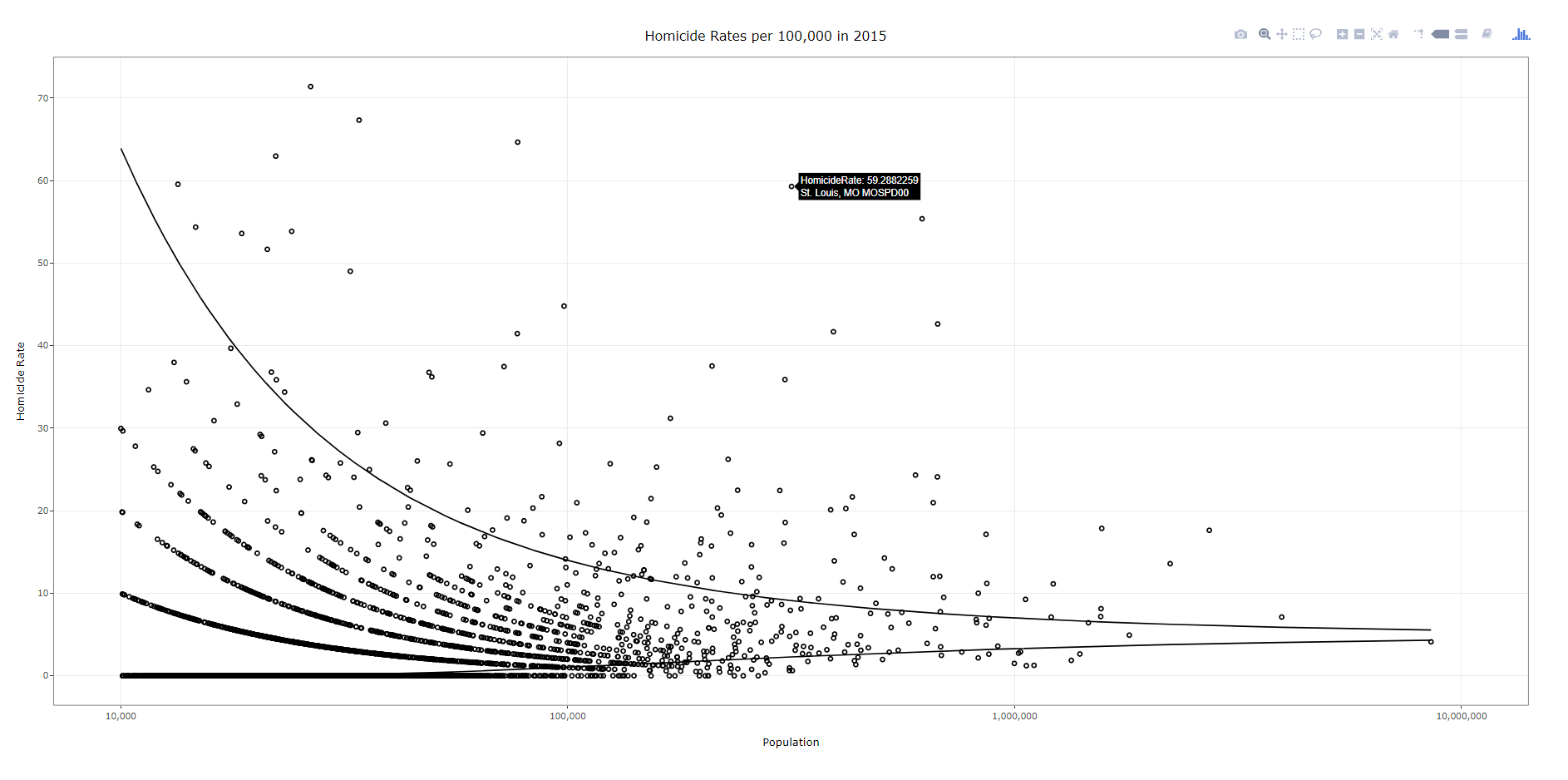
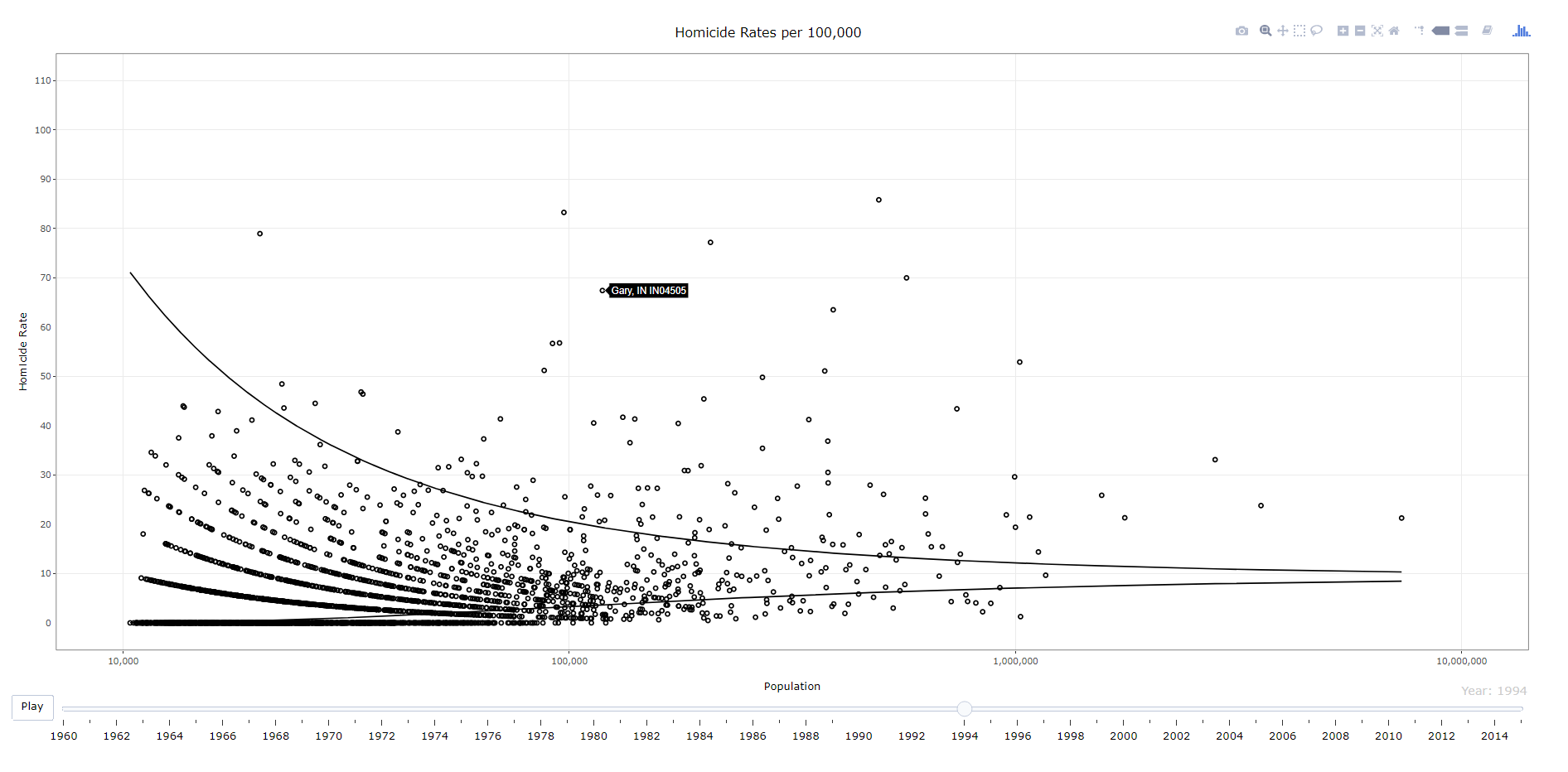
First, plotly makes it dead easy to take graphs you created via ggplot and turn them into an interactive graph. So here is a link to the interactive chart, and below is a screenshot.

To walk through the code, first you make your (almost) plane Jane ggplot object. Here I name it p. You will get an error for an “unknown aesthetics: text”, but this will be used by plotly to create tooltips. Then you use the ggplotly function to turn the original ggplot graph p into an interactive graph. By default the plotly object has more stuff in the tooltip than I want, which you can basically just go into the innards of the plotly object and strip out. Then the final part is just setting the margins to be alittle larger than default, as the axis labels were otherwise slightly cut-off.

############################################################
#Make the funnel chart
year_sel <- 2015
p <- ggplot(data = FunnRates[FunnRates$Year == year_sel,]) + geom_point(aes(x=Population, y=HomicideRate, text=NiceLab), pch=21) +
     geom_line(aes(x=Population,y=LowLoc99)) + geom_line(aes(x=Population,y=HighLoc99)) + 
     labs(title = paste0("Homicide Rates per 100,000 in ",year_sel)) + 
     scale_x_log10("Population", limits=c(10000,10000000), breaks=c(10^4,10^5,10^6,10^7), labels=comma) + 
     scale_y_continuous("Homicide Rate", breaks=seq(0,110,10)) + 
     theme_bw() #+ theme(text = element_text(size=20), axis.title.y=element_text(margin=margin(0,10,0,0)))

pl <- ggplotly(p, tooltip = c("HomicideRate","text"))
#pl <- plotly_build(p, width=1000, height=900)
#See https://stackoverflow.com/questions/45801389/disable-hover-information-for-a-specific-layer-geom-of-plotly
pl$x$data[[2]]$hoverinfo <- "none"
pl$x$data[[3]]$hoverinfo <- "none"
pl % layout(margin = list(l = 75, b = 65))
############################################################

After this point you can just type pl into the console and it will open up an interactive window. Or you can use the saveWidget function from the htmlwidgets package, something like saveWidget(as_widget(pl), "FunnelChart_2015.html", selfcontained=TRUE) to save the graph to an html file.

Now there are a couple of things. You can edit various parts of the graph, such as its size and label text size, but depending on your application these might not be a good idea. If you need to take into account smaller screens, I think it is best to use some of the defaults, as they adjust per the screen that is in use. For the size of the graph if you are embedding it in a webpage using iframe’s you can set the size at that point. If you look at my linked op-ed you can see I make the funnel chart taller than wider — that is through the iframe specs.

Funnel Chart over Time

Ok, now onto the fun stuff. So we have a funnel chart for one year, but I have homicide years from 1965 through 2015. Can we examine those over time. Plotly has an easy to use additional argument to ggplot graphs, named Frame, that allows you to add a slider to the interactive chart for animation. The additional argument ids links one object over time, ala Hans Rosling bubble chart over time. Here is a link to the interactive version, and below is a screen shot:

############################################################
#Making the funnel chart where you can select the year
py <- ggplot(data = FunnRates) + geom_point(aes(x=Population, y=HomicideRate, text=NiceLab, frame=Year,ids=ORI), pch=21) +
      geom_line(aes(x=Population,y=LowLoc99,frame=Year)) + geom_line(aes(x=Population,y=HighLoc99,frame=Year)) + 
      labs(title = paste0("Homicide Rates per 100,000")) + 
      scale_x_log10("Population", limits=c(10000,10000000), breaks=c(10^4,10^5,10^6,10^7), labels=comma) + 
      scale_y_continuous("Homicide Rate", breaks=seq(0,110,10), limits=c(0,110)) + 
      theme_bw() #+ theme(text = element_text(size=20), axis.title.y=element_text(margin=margin(0,10,0,0)))

ply % animation_opts(0, redraw=FALSE)
ply$x$data[[2]]$hoverinfo <- "none"
ply$x$data[[3]]$hoverinfo <- "none"
saveWidget(as_widget(ply), "FunnelChart_YearSelection.html", selfcontained=FALSE)
############################################################

The way I created the data it does not make sense to do a smooth animation for the funnel line, so this just flashes to each new year (via the animation_opts spec). (I could make the data so it would look nicer in an animation, but will wait for someone to pick up the op-ed before I bother too much more with this.) But it accomplishes via the slider the ability for you to pick which year you want.

Fan Chart Just One City

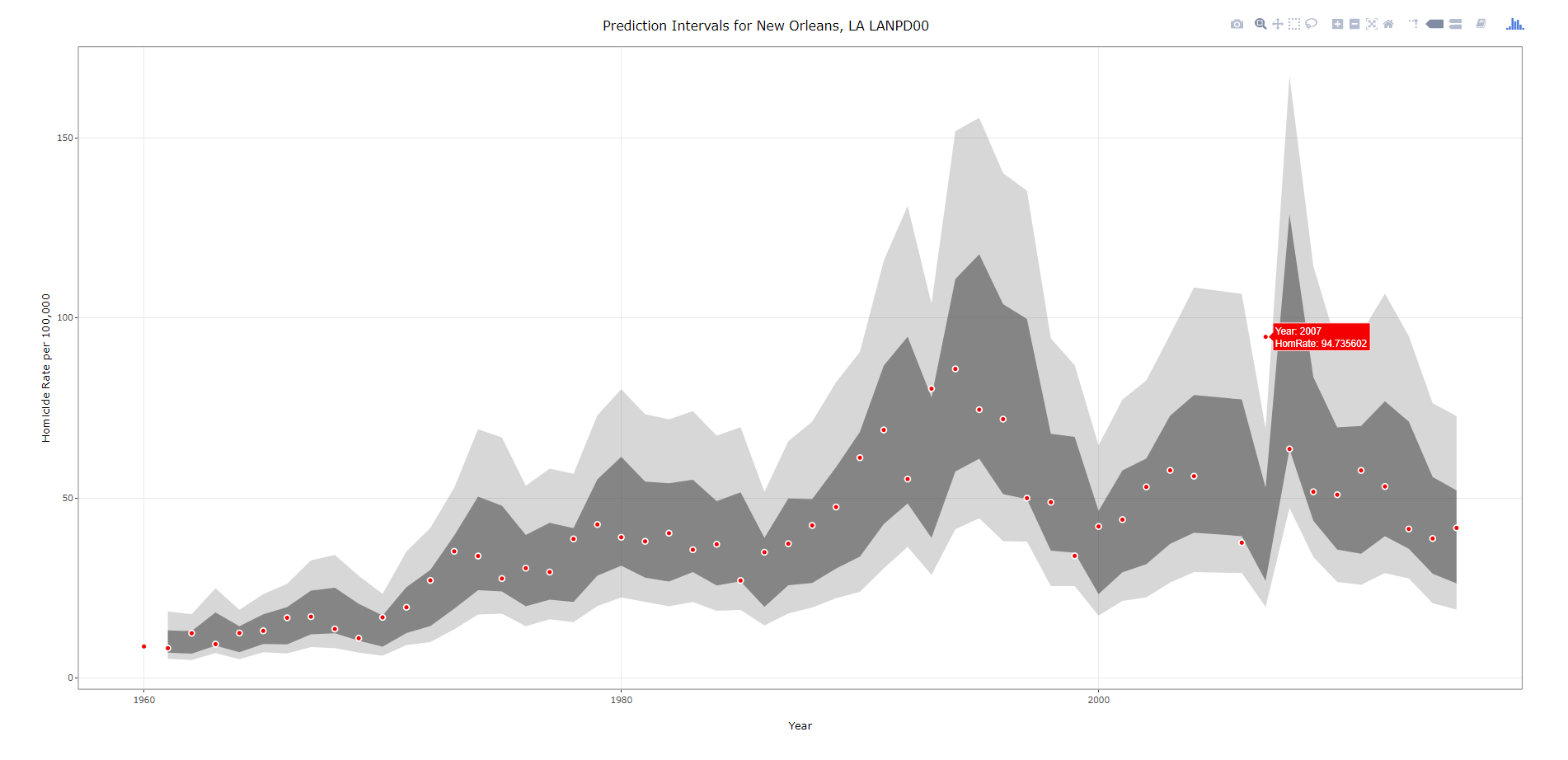
Next we are onto the fan charts for each individual city with the prediction intervals. Again you can just create this simple chart in ggplot, and then use plotly to make a version with tooltips. Here is a link to an interactive version, and below is a screenshot.

###################################################
#Making the fan graph for New Orleans
titleLab <- unique(IntRates[,c("ORI","NiceLab","AgencyName","State")])
p2 <- ggplot(data=IntRates[IntRates$ORI == "LANPD00",], aes(x=Year, y=HomRate)) + 
     geom_ribbon(aes(ymin=LowB, ymax=HighB), alpha=0.2) +
     geom_ribbon(aes(ymin=LagLow25, ymax=LagHigh25), alpha=0.5) +
     geom_point(shape=21, color="white", fill="red", size=2) +
     labs(x = "Year", y="Homicide Rate per 100,000") +
     #scale_x_continuous(breaks=seq(1960,2015,by=5)) + 
     ggtitle(paste0("Prediction Intervals for ",titleLab[titleLab$ORI == "LANPD00",c("NiceLab")])) +
     theme_bw() #+ theme(text = element_text(size=20), axis.title.y=element_text(margin=margin(0,10,0,0)))
#p2
pl2 <- ggplotly(p2, tooltip = c("Year","HomRate"), dynamicTicks=TRUE)
pl2$x$data[[1]]$hoverinfo <- "none"
pl2$x$data[[2]]$hoverinfo <- "none"
pl2 % layout(margin = list(l = 100, b = 65))
#pl2
saveWidget(as_widget(pl2), "FanChart_NewOrleans.html", selfcontained=FALSE)
###################################################

Note when you save the widget to selfcontained=FALSE, it hosts several parts of the data into separate folders. I always presumed this was more efficient than making one huge html file, but I don’t know for sure.

Fan Chart with Dropdown Selection

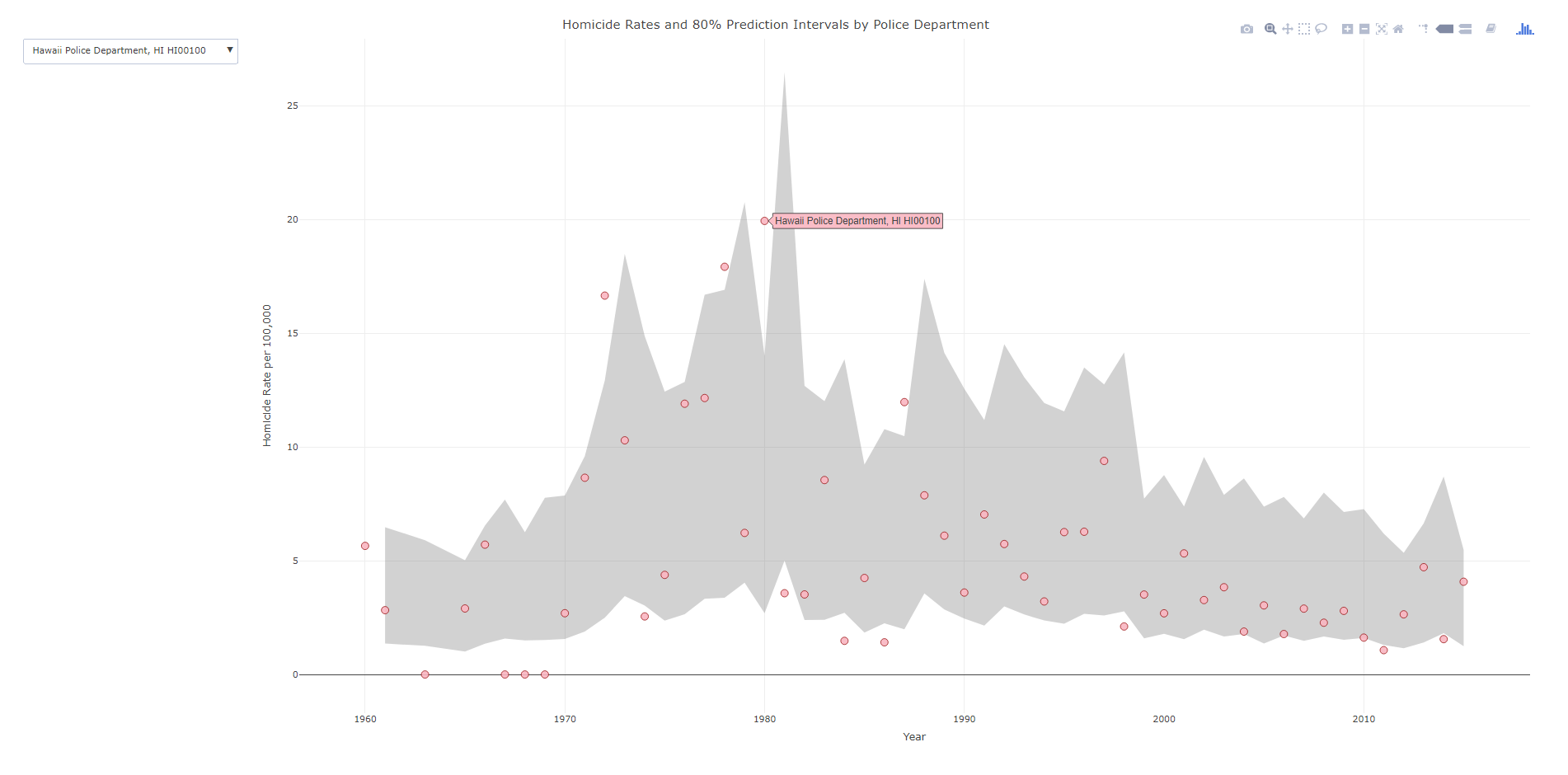
Unfortunately the frame type animation does not make as much sense here. It would be hard for someone to find a particular city of interest in that slider (as a note though the slider can have nominal data, if I only had a few cities it would work out ok, with a few hundred it will not though). So feature request if anyone from plotly is listening — please have a dropdown type option for ggplot graphs! In the meantime though there is an alternative using a tradition plot_ly type chart. Here is that interactive fan chart with a police agency dropdown, and below is a screenshot. Note there was problems with this, will need to update based on updates to plotly and ggplot make this easier I believe.

###################################################
#Making the fan graph where you can select the city of interest
#Need to have a dropdown for the city

titleLab <- unique(IntRates[,c("ORI","NiceLab","State")])
nORI <- length(titleLab[,1])
choiceP <- vector("list",nORI)
for (i in 1:nORI){
choiceP[[i]] <- list(method="restyle", args=list("transforms[0].value", unique(IntRates$NiceLab)[i]), label=titleLab[i,c("NiceLab")])
}

trans <- list(list(type='filter',target=~NiceLab, operation="=", value=unique(IntRates$NiceLab)[1]))
textLab <- ~paste("Homicide Rate:",HomRate,'$ Year:',Year,'$ Homicides:',Homicide,'$ Population:',Pop1,'$ Agency Name:',NiceLab) #Lets try with the default plotly #See https://community.plot.ly/t/need-help-on-using-dropdown-to-filter/6596 ply4 %          plot_ly(x= ~Year,y= ~HighB, type='scatter', mode='lines', line=list(color='transparent'), showlegend=FALSE, name="90%", hoverinfo="none", transforms=trans) %>%
        add_trace(y=~LowB,  type='scatter', mode='lines', line=list(color='transparent'), showlegend=FALSE, name='10%', hoverinfo="none", transforms=trans,
          fill = 'tonexty', fillcolor='rgba(105,105,105,0.3)') %>%
        add_trace(x=~Year,y=~HomRate, text=~NiceLab, type='scatter', mode='markers', marker = list(size=10, color = 'rgba(255, 182, 193, .9)', line = list(color = 'rgba(152, 0, 0, .8)', width = 1)),
          hoverinfo='text', text=textLab, transforms=trans) %>%
        layout(title = "Homicide Rates and 80% Prediction Intervals by Police Department",
          xaxis = list(title="Year"),
          yaxis = list(title="Homicide Rate per 100,000"),
          updatemenus=list(list(type='dropdown',active=0,buttons=choiceP)))
                               
saveWidget(as_widget(ply4), "FanChart_Dropdown.html", selfcontained=FALSE)
###################################################

So in short plotly makes it super-easy to make interactive graphs with tooltips. Long term goal I would like to make a visual supplement to the traditional UCR report (I find the complaint of what tables to include to miss the point — there are much better ways to show the information that worrying about the specific tables). So if you would like to work on that with me always feel free to get in touch!

Digg reader is shutting down, giving Twitter a try

I’ve used RSS feeds for quite awhile now to keep up with blogs I enjoy. I also use it to follow scholarly journals of interest. Unfortunately, my current feed reader of choice (Digg Reader) is shutting down.

This is the second time my feed reader has shuttered (I used Google Reader before that shut down as well). Another particular problem I never really solved was link rot. Google reader has some metrics where you could see old feeds that have not had any new posts for awhile. Digg had no such service, and I tried my hand at writing python code to do this myself, but that code never quite worked out.

To partially replace this service instead of migrating to another feed reading service I will give Twitter a shot. Twitter is a bit chaotic from what I can tell — I much prefer the spreadsheet like listing of just a title to peruse news and events of interest in the morning. I had been using Google+ and like it (yes, I know I’m one of those nerds), but it is a bit of a ghost-town. So I will migrate entirely over to Twitter and give it a shot.

Paper published: The effect of housing demolitions on crime in Buffalo, New York

I have a new paper published with a few of my colleagues up in Buffalo, Dae-Young Kim and Scott Phillips. This work looks at the crime reduction effects of widespread demolitions in Buffalo, is titled The Effect of Housing Demolitions on Crime in Buffalo, New York, and was published at the Journal of Research in Crime & Delinquency. In short, at the micro level there is very strong evidence that demolitions reduce crime — the neighborhood level the evidence is not as strong. This is likely partly due to the neighborhood level analysis being underpowered, as several of the estimates between the two are very similar overall.

If you cannot get access to that published article, you can always send me an email for a copy, or you can download a pre-print version from SSRN.

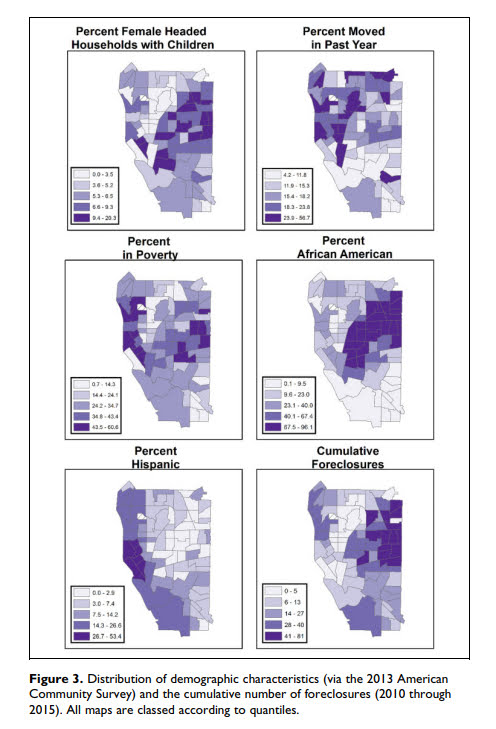
Below is one of the images from the paper, a set of small-multiple maps showing demographic characteristics of Buffalo census tracts:


Someone could surely replicate this micro level result in other cities that have experienced widespread demolitions (like Detroit). But for long term city planners I would consider more rigorous designs that incorporate not only selective demolition, but other neighborhood investment strategies to improve neighborhoods over long term. That is, this research is good evidence of the near-term crime reduction effects of demolitions, but for the long haul leaving empty lots is not going to greatly improve neighborhoods.

New working paper: Modeling the Spatial Patterns of Intra-Day Crime Trends

I have a new working paper out with Cory Haberman, Modeling the Spatial Patterns of Intra-Day Crime Trends. Below is the abstract:

Several prior studies have found that despite theoretical expectations otherwise, facilities (such as on-premise alcohol outlets) have consistent effects on crime regardless of time of the day (Bernasco et al., 2017; Haberman & Ratcliffe, 2015). We explain these results by failure to account for the regular background wave of crime, which results from ubiquitous patterns of human routine activities. Using eight years of data on assaults and robberies in Seattle (WA), we demonstrate the regularity of the within-day crime wave for all areas of the city. Then using models to predict when a crime will most likely occur, we demonstrate how schools and on-premise alcohol outlets cause bumps in the background wave at particular times of the day, such as when school dismisses. But those bumps dissipate quite rapidly in space, and are relatively small compared to the amplitude of the regular background wave of crime. Although facilities have theoretical times in which they should have a greater influence on crime patterns, they are situated within a community of other human activity uses, making it difficult to uniquely identify their effects separately from other aspects of the built environment.

And here is a joyplot showing the changes in the hour of day wave depending on how close robberies are to a public high school or middle school:

You can see bumps very nearby schools at 7 am, then around noon and throughout the later afternoon, but are smoothed out when you get to around 2,000 feet away from schools.

The idea behind this paper is that several recent articles have not found much of a conditional relationship between crime generators and time of day. For example you would think bars only effect crime at nighttime when most people are at the bar, but several recent articles found the time of day does not make much of a difference (Bernasco et al., 2017; Haberman & Ratcliffe, 2015). We hypothesize this is because of the background wave of crime per hour of the day is much larger in magnitude than any local factor. An intuitive reason for this is that a place never has just a bar in isolation, there are other local land uses nearby that influence criminal patterns. You can see places nearby crime generators cause slight bumps in the background wave, but they are tiny compared to the overall amplitude of the general within day crime wave.

The article has a link to data and code to reproduce the findings. As always if you have feedback I am all ears.

Paper published: Evaluating Community Prosecution Code Enforcement in Dallas, Texas

Some work John Worrall and I collaborated on was just published in Justice Quarterly, Evaluating Community Prosecution Code Enforcement in Dallas, Texas. I have two links to share:

If you need access to the article always feel free to email.

Below is the abstract:

We evaluated a community prosecution program in Dallas, Texas. City attorneys, who in Dallas are the chief prosecutors for specified misdemeanors, were paired with code enforcement officers to improve property conditions in a number of proactive focus areas, or PFAs, throughout the city. We conducted a panel data analysis, focusing on the effects of PFA activity on crime in 19 PFAs over a six-year period (monthly observations from 2010 to 2015). Control areas with similar levels of pre-intervention crime were also included. Statistical analyses controlled for pre-existing crime trends, seasonality effects, and other law enforcement activities. With and without dosage data, the total crime rate decreased in PFA areas relative to control areas. City attorney/code enforcement teams, by seeking the voluntary or court-ordered abatement of code violations and criminal activity at residential and commercial properties, apparently improved public safety in targeted areas.

This was a neat program, as PFAs are near equivalents of hot spots that police focus on. So for the evaluation we drew control areas from Dallas PD’s Target Area Action Grid (TAAG) Areas:

New preprint: The accuracy of the violent offender identification directive (VOID) tool to predict future gun violence

I have a new preprint out, The accuracy of the violent offender identification directive (VOID) tool to predict future gun violence. This is work with Rob Worden and Jasmine Silver from our time at the Finn Institute. Below is the abstract:

We evaluate the Violent Offender Identification Directive (VOID) tool, a risk assessment instrument implemented within a police department to prospectively identify offenders likely to be involved with future gun violence. The tool uses a variety of static measures of prior criminal history that are readily available in police records management systems. The VOID tool is assessed for predictive accuracy by taking a historical sample and calculating scores for over 200,000 individuals known to the police at the end of 2012, and predicting 103 individuals involved with gun violence (either as a shooter or a victim) during 2013. Despite weights for the instrument being determined in an ad-hoc manner by crime analysts, the VOID tool does very well in predicting involvement with gun violence compared to an optimized logistic regression and generalized boosted models. We discuss theoretical reasons why such ad-hoc instruments are likely to perform well in identifying chronic offenders for all police departments.

There were just slightly over 100 violent gun offenders we were trying to pick out of over 200,000. The VOID tool did really well! Here is a graph comparing how many of those offenders VOID captured compared to a generalized boosted model (GBM), and two different logistic regression equations.

I have some of my thoughts in this article as to why a simple tool does just as well as more complicated regression and machine learning techniques, which is a common finding in recidivism studies as well. My elevator pitch for why that is is because most offenders are generalists, and for example you can basically swap prior arrests for robbery with prior arrests for motor vehicle theft — they both provide essentially the same signal for future potential criminality. See also discussion of this on Dan Simpson’s post on the Stat Modeling, Causal Inference and Social Science blog, which in turn makes me think the idea behind simple models can be readily applied to many decision points in the criminal justice field.

The simple takeaway from this for crime analysts making chronic offender lists is that don’t let the perfect be the enemy of the good. Analysts can likely create an ad-hoc weighting to prioritize chronic offenders and it will do quite well compared to fancier models.

I will be presenting this work at the ACJS conference in New Orleans on Saturday 2/17/18. It is a great session, with YongJei Lee, Jerry Ratcliffe, Bryanna Fox, and Stacy Sechrist (see session 384 in the ACJS program), so stop on by. If you want to catch up with me in New Orleans just send me an email. And as always if you have feedback on the draft I am all ears.

New preprint: Testing for Similarity in Area-Based Spatial Patterns: Alternative Methods to Andresen’s Spatial Point Pattern Test

I just posted another pre-print to SSRN, Testing for Similarity in Area-Based Spatial Patterns: Alternative Methods to Andresen’s Spatial Point Pattern Test. This is work with Wouter Steenbeek and Martin Andresen. Below is the abstract:

Andresen’s spatial point pattern test (SPPT) compares two spatial point patterns on defined areal units: it identifies areas where the spatial point patterns diverge and aggregates these local (dis)similarities to one global measure. We discuss the limitations of the SPPT and provide two alternative methods to calculate differences in the point patterns. In the first approach we use differences in proportions tests corrected for multiple comparisons. We show how the size of differences matter, as with large point patterns many areas will be identified by SPPT as statistically different, even if those differences are substantively trivial. The second approach uses multinomial logistic regression, which can be extended to identify differences in proportions over continuous time. We demonstrate these methods on identifying areas where pedestrian stops by the New York City Police Department are different from violent crimes from 2006 through 2016.

And here is an example map using our proportion differences test and graduated circles to identify places with larger differences in the percentages:

This is opposed to the traditional SPPT output, which just identifies whether two areas are different and does not focus on the size of the difference, like below:

You can see with a large sample size, basically everything is statistically different! (This uses over 4 million stops and over 800,000 violent crimes). Focusing on the magnitude of the differences gives a much clear indication of patterns.

The paper includes a dropbox link to download the data and code used to estimate the different techniques (it includes code in SPSS, R, and Stata). If you have any feedback as always let me know. This was submitted as a GISScience presentation for the 2018 ESRI User conference in July in San Diego, so I should have news about that presentation in the near future as well.

New preprint: A Gentle Introduction to Creating Optimal Patrol Areas

I have a new preprint posted, A Gentle Introduction to Creating Optimal Patrol Areas. Below is the abstract:

Models to create optimal patrol areas have been in existence for over 45 years, but police departments still regularly construct patrol areas in an ad-hoc fashion. This essay walks the reader through formulating an integer linear program to create a set number of patrol areas that have near equal call load and that are contiguous using simple examples. Then the technique is illustrated using a case study in Carrollton, TX. Creating optimal patrol areas not only have the potential to improve efficiency in response times, but can also encourage hot spots policing. Applications of linear programming can additionally be applied to a wide variety of problems within criminal justice agencies, and this essay provides a gentle introduction to understanding the mathematical notation of linear programming.

In this paper I introduce a very simple integer linear program to create patrol beats, and then build up the complexity into the fuller p-median problem with additional constraints applicable to making patrol areas. The constraints on making the call load equal that I introduce in the paper are the only real novel aspect of the paper (although no doubt someone else has done something similar previously), but I was a bit frustrated reading other linear programs to create patrol areas. Most work was concentrated in operations research journals and in my opinion was totally inaccessible to a typical crime analyst. So I frame the paper as an introduction to integer linear programs, walk though some simplified examples, and then apply that full model in Carrollton. I also provide an extensive walkthrough using the python program PuLP so others can replicate the work with their own data in the supplementary materials.

Here is my end example map of the optimal patrol areas in Carrollton.


You can see that my areas are not as nice and convex, although most applications of correcting for that introduce multiple objective functions and/or non-linear functions, making the problem much harder to estimate in practice (which was part of my pet-peeve with prior publications – none provided code to estimate the models described, with the exception of some of the work of Kevin Curtin).

Part of the reason I tackled this problem is that it comes up all the time on the IACA list-serve — how to make new patrol areas. If you are an analyst interested in applying this in your jurisdiction and would like help always feel free to contact me.