Handling errors in python and R

Just some quick notes on error handling in python and R. For most of my batch processes at work (in python), error handling is necessary. Most of my code has logic that if it fails, it sends an email message about the failure. This is only possible if you capture errors and have conditional logic, if the code just fails without capturing the error (for both R and python) it will just exit the script.

I had another example recently in R that used placebo tests that could fail to converge. So a more traditional stat project, but it should just keep running the loop to collect results, not fail entirely.

Python Example

In python, for most of my batch jobs I have code that looks like this:

import traceback

try:
    # whatever function you are running
    send_success_email()
except Exception:
    er = traceback.format_exc()
    print(f'Error message is \n\n{er}')
    send_error_email(er)

So it fails gracefully, and just gives me a message either in REPL for interactive debugging or stdout for regularly run batch jobs. I can see for people running servers why they want more specific error handling and using a more formal logger, but IMO that is overkill for running batch jobs.

R Example

R to do error handling looks something like this:

# trycatch for errors
my_func <- function(){
    # try/catch if error
    out <- tryCatch(
       { # part with the potential error
         #r <- ???? #whatever code steps you want
        r
       }, error=function(cond){ 
          print("Function Failed, Error message is \n\n")
          print(Cond)
          return(-1)
          } )
    return(out)
}

So if you have inside the tryCatch something that is “fit complicated model” inside your simulations (that could fail), this will still fail gracefully (and can return the error message if you need to.

Counting lines of code

Was asked recently about how many lines of python code was in my most recent project. A simple command line check, cd into your project directory and run:

find -type f -name "*.py" | xargs wc -l

(If on windows, you can download the GOW tools to be able to use these same tools by default available on unix/mac.) This will include whitespace and non-functional lines (like docstrings), but that I think is ok. Doing this for my current main project at Gainwell, I have about 30k lines of python code. Myself (and now about 4 other people) have been working on that code base for nearly a year.

For my first production project at (then) HMS, the total lines of python code are 20k, and I developed the bulk of that in around 7 months of work. Assuming 20 work days in a month, that results in around 20000/140 ~ 143 lines of code per workday. I did other projects during that time span, but this was definitely my main focus (and I was the sole developer/data scientist). I think that is high (more code is not necessarily better, overall code might have decreased as future development of this project happened over time), but is ballpark reasonable expectations for working data scientists (I would have guessed closer to around 100 per day). In the grand scheme of things, this is like 2 functions or unit tests per work day (when considering white space and docstrings).

Doing this for all of my python code on my personal machine is around 60k (I do around, as I am removing counts for projects that are just cloned). And for all the python code on my work machine is around 140k (for 3 years of work). (I am only giving fuzzy numbers, I have some projects joint work I am half counting, and some cloned code I am not counting at all.)

Doing this same exercise for R code, I only get around 40k lines of code on my personal machine. For instance, my ptools package has under 3k lines of "*.R" code total. I am guessing this is due to not only R code being more precise than python, but to take code into production takes more work. Maybe worth another blog post, but the gist of the difference between an academic project is that you need the code to run one time, whereas for a production project the code needs to keep running on a regular schedule indefinitely.

I have written much more SPSS code over my career than R code, but I have most of it archived on Dropbox, so cannot easily get a count of the lines. I have a total of 1846 sps files (note that this does not use xargs).

find -type f -name "*.sps" | wc -l

It is possible that the average sps file on my machine is 200 lines per file (it definitely is over 100 lines). So my recent python migration I don’t think has eclipsed my cumulative SPSS work going back over a decade (but maybe in two more years will).

Random notes, digital art, and pairwise comparisons is polynomial

So not too much in the hopper for the blog at the moment. Have just a bunch of half-baked ideas (random python tips, maybe some crime analysis using osmnx, scraping javascript apps using selenium, normal nerd data science stuff).

Still continuing my blog series on the American Society of Evidence Based Policing, and will have a new post out next week on officer use of force.

If you have any suggestions for topics always feel free to ask me anything!


Working on some random digital art (somewhat focused on maps but not entirely). For other random suggestions I like OptArt and Rick Wicklin’s posts.

Dall-E is impressive, and since it has an explicit goal of creating artwork I think it is a neat idea. Chat bots I have nothing good to say. Computer scientists working on them seem to be under the impression that if you build a large/good enough language model out pops general intelligence. Wee bit skeptical of that.


At work a co-worker was working on timing applications for a particular graph-database/edge-detection project. Initial timings on fake data were not looking so good. Here we have number of nodes and timings for the application:

  Nodes    Minutes
   1000       0.16
  10000       0.25
 100000       1.5
1000000      51

Offhand people often speak about exponential functions (or growth), but here what I expect is we are really looking at is pairwise comparisons (not totally familiar with the tech the other data scientist is using, so I am guessing the algorithmic complexity). So this likely scales something like (where n is the number of nodes in the graph):

Time = Fixed + C1*(n) + C2*(n choose 2) + e

Fixed is just a small constant, C1 is setting up the initial node database, and C2 is the edge detection which I am guessing uses pairwise comparisons, (n choose 2). We can rewrite this to show that the binomial coefficient is really polynomial time (not exponential) in terms of just the number of nodes.

C2*[n choose 2] = C2*[{n*(n-1)}/2]
                  C2*[ (n^2 - n)/2 ]
                  C2/2*[n^2 - n]
                  C2/2*n^2 - C2/2*n

And so we can rewrite our original equation in terms of simply n:

Time = Fixed + (C1 - C2/2)*N + C2/2*N^2

Doing some simple R code, we can estimate our equation:

n <- 10^(3:6)
m <- c(0.16,0.25,1.5,51)
poly_mod <- lm(m ~ n + I(n^2))

Since this fits 3 parameters with only 4 observations, the fit is (not surprisingly) quite good. Which to be clear does not mean much, if really cared would do much more sampling (or read the docs more closely about the underlying tech involved):

> pred <- predict(poly_mod)
> cbind(n,m,pred)
      n     m       pred
1 1e+03  0.16  0.1608911
2 1e+04  0.25  0.2490109
3 1e+05  1.50  1.5000989
4 1e+06 51.00 50.9999991

And if you do instead poly_2 <- lm(m ~ n + choose(n,2)) you get a change in scale of the coefficients, but the same predictions.

We really need this to scale in our application at work to maybe over 100 million records, so what would we predict in terms of minutes based on these initial timings?

> nd = data.frame(n=10^(7:8))
> predict(poly_mod,nd)/60 # convert to hours
         1          2
  70.74835 6934.56850

So doing 10 million records will take a few days, and doing 100 million will be close to 300 days.

With only 4 observations not much to chew over (really it is too few to say it should be a different model). I am wondering though how to best handle errors for these types of extrapolations. Errors are probably not homoskedastic for such timing models (error will be larger for larger number of nodes). Maybe better to use quantile regression (and model the median?). I am not sure (and that advice I think will also apply to modeling exponential growth as well).

Injury rates at Amazon warehouses

I follow several of the News & Observer (The Raleigh/Durham newspaper) newsletters, and Brian Gordon and Tyler Dukes had a story recently about fainting and ambulance runs at the Amazon warehouse in Raleigh, Open Source: Ambulances at Amazon. He did some great sleuthing, and showed that while the number on its face seemed high (an ambulance call around 1 out of 3 days) the rate of ambulance runs when accounting for the size of the workforce is pretty similar to other warehouses.

Here I will show an example of downloading the OSHA injury data to show a similar finding. Using python it is pretty quick work.

So first can import the libraries we need (the typical scientific stack). I download the OSHA data for 2021, and I calculate injury rates per person work year, so how to interpret these are at the workplace level. Per full time people per year, it is the expected number of injuries across the workforce.

import pandas as pd
import matplotlib.pyplot as plt
import numpy as np
from scipy.stats import beta

inj_2021url = "https://www.osha.gov/sites/default/largefiles/ITA-data-cy2021.zip"
inj_dat = pd.read_csv(inj_2021url)
# Calculate injuries per person full year
inj_dat['InjPerYear'] = (inj_dat['total_injuries']/inj_dat['total_hours_worked'])*2080

We can filter out warehouse workers via NAICS code 493110. I also just limit to warehouses in North Carolina. Sorting by the injury rate, Amazon is not even in the top 10 in the state:

warehouses = inj_dat[inj_dat['naics_code'] == 493110].copy()
warehouses_nc = warehouses[warehouses['state'] == 'NC'].reset_index(drop=True)
warehouses_nc['AmazonFlag'] = 1*(warehouses_nc['company_name'].str.find('Amazon.com') >= 0)

# Rate per year of work per person, 2080 
warehouses_nc.sort_values('InjPerYear',ascending=False,ignore_index=True,inplace=True)
warehouses_nc.head(10)

But note that I don’t think Bonded Logistics is a terribly dangerous place. One thing you need to watch out for when evaluating rate data is that places with smaller denominators (here lower total hours worked) tend to be more volatile. So a useful plot is to plot the total hours work (cumulative for the entire warehouse) against the overall rate of injuries per hour worked.

fig, ax = plt.subplots(figsize=(12,6))
ax.scatter(nam_ware['total_hours_worked'], nam_ware['InjPerYear'], 
           c='grey', s=30, edgecolor='k', alpha=0.5, label='Other Warehouses')
ax.scatter(amz_ware['total_hours_worked'], amz_ware['InjPerYear'], 
           c='blue', s=80, edgecolor='k', alpha=0.9, label='Amazon Warehouses')
ax.set_axisbelow(True)
ax.set_xlabel('Total Warehouse Hours Worked')
ax.set_ylabel('Injury Rate per Person Work Year (2080 hours)')
ax.legend(loc='upper right')
plt.savefig('InjRate.png', dpi=500, bbox_inches='tight')

You can see by this plot the Amazon warehouses have the largest total number of hours worked (by quite a few) relative to many other warehouses in North Carolina. But their overall rate of injuries is right in line with the rest of the crowd. Looking at the overall rate, it is around 0.04 (so you would expect around 1/20 full time workers to have an injury per year at a warehouse according to this data).

tot_rate = warehouses_nc['total_injuries'].sum()/warehouses_nc['total_hours_worked'].sum()
print(tot_rate*2080)

If we do this plot again, but add funnel bound lines to show the typical volatility we would expect with estimating these rates:

# Binomial confidence interval
def binom_int(num,den,confint=0.95):
    quant = (1 - confint)/ 2.
    low = beta.ppf(quant, num, den - num + 1)
    high = beta.ppf(1 - quant, num + 1, den - num)
    return (np.nan_to_num(low), np.where(np.isnan(high), 1, high))

den = np.geomspace(1000,8700000,500)
num = den*tot_rate
low_int, high_int = binom_int(num,den,0.99)
high_int = high_int*2080

fig, ax = plt.subplots(figsize=(12,6))
ax.plot(den,high_int, c='k', linewidth=0.5)
ax.hlines(tot_rate*2080,1000,8700000,colors='k', linewidths=0.5)
ax.scatter(nam_ware['total_hours_worked'], nam_ware['InjPerYear'], 
           c='grey', s=30, edgecolor='k', alpha=0.5, label='Other Warehouses')
ax.scatter(amz_ware['total_hours_worked'], amz_ware['InjPerYear'], 
           c='blue', s=80, edgecolor='k', alpha=0.5, label='Amazon Warehouses')
ax.set_axisbelow(True)
ax.set_xlabel('Total Warehouse Hours Worked')
ax.set_ylabel('Injury Rate per Person Work Year (2080 hours)')
plt.xscale('log', basex=10)
ax.legend(loc='upper right')
ax.annotate('Straight line is average overall injury rate\nCurved line is Binomial 99% Interval', 
            xy = (0.00, -0.13), xycoords='axes fraction')
plt.savefig('InjRate_wBin.png', dpi=500, bbox_inches='tight')

So you can see even Bonded Logistics is well within the average rate you would expect to still be consistent with the average overall injury rate relative to all the other warehouses in North Carolina.

As a note, I imagine I saw someone using this data recently looking at police departments in a criminal justice paper (I have in my notes police departments are NAICS code 922120). (Maybe Justin Nix/Michael Sierra-Arévalo/Ian Adams?) But sorry do not remember the paper (so I owe credit to someone else for pointing out this data, but not sure who).

Another way to do the analysis is to calculate the lower/upper confidence intervals per the rates, and then sort by the lower confidence interval. This way you can filter out high rate variance locations.

# Can look at police departments
# NAICS code 922120
police = inj_dat[inj_dat['naics_code'] == 922120].copy()
low_police, high_police = binom_int(police['total_injuries'],police['total_hours_worked'])
police['low_rate'] = low_police*2080
police.sort_values('low_rate',ascending=False,ignore_index=True,inplace=True)
check_fields = ['establishment_name','city','state','total_injuries','total_hours_worked','InjPerYear','low_rate']
police[check_fields].head(10)

So you can see we have some funny business going on with the LA data reporting (which OSHA mentions on the data webpage). Maybe it is just admin duty, so people are already injured and get assigned to those bureaus (not sure why LAPD reports seperate bureaus at all).

New paper: An Open Source Replication of a Winning Recidivism Prediction Model

Our paper on the NIJ forecasting competition (Gio Circo is the first author), is now out online first in the International Journal of Offender Therapy and Comparative Criminology (Circo & Wheeler, 2022). (Eventually it will be in special issue on replications and open science organized by Chad Posick, Michael Rocque, and Eric Connolly.)

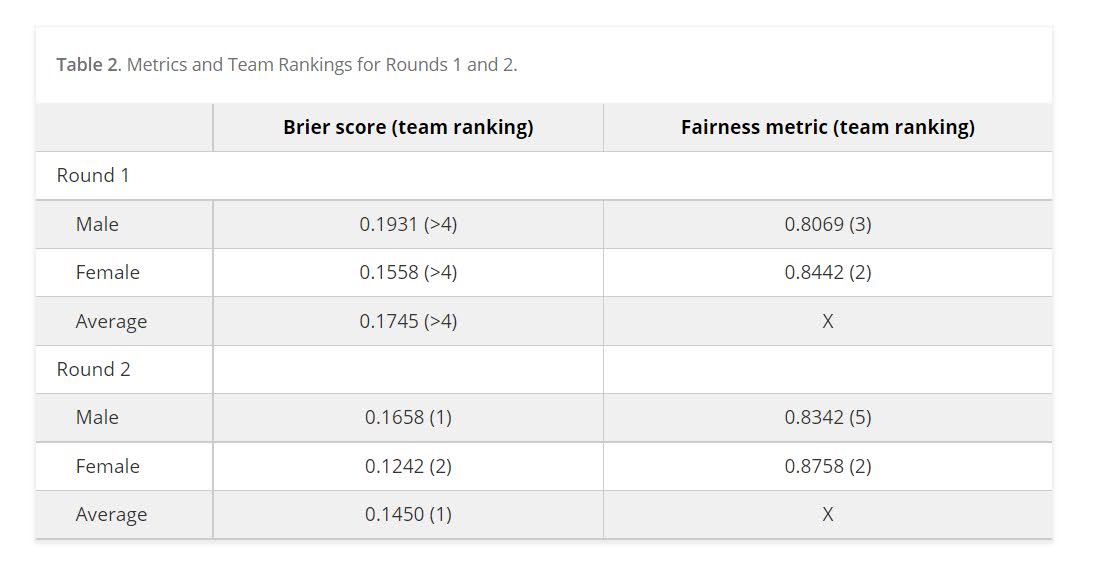
We ended up doing the same type of biasing as did Mohler and Porter (2022) to ensure fairness constraints. Essentially we biased results to say no one was high risk, and this resulted in “fair” predictions. With fairness constraints or penalities you sometimes have to be careful what you wish for. And because not enough students signed up, me and Gio had more winnings distributed to the fairness competition (although we did quite well in round 2 competition even with the biasing).

So while that paper is locked down, we have the NIJ tech paper on CrimRXiv, and our ugly code on github. But you can always email for a copy of the actual published paper as well.

Of course since not an academic anymore, I am not uber focused on potential future work. I would like to learn more about survival type machine learning forecasts and apply it to recidivism data (instead of doing discrete 1,2,3 year predictions). But my experience is the machine learning models need very large datasets, even the 20k rows here are on the fringe where regression are close to equivalent to non-linear and tree based models.

Another potential application is simple models. Cynthia Rudin has quite a bit of recent work on interpretable trees for this (e.g. Liu et al. 2022), and my linked post has examples for simple regression weights. I suspect the simple regression weights will work reasonably well for this data. Likely not well enough to place on the scoreboard of the competition, but well enough in practice they would be totally reasonable to swap out due to the simpler results (Wheeler et al., 2019).

But for this paper, the main takeaway me and Gio want to tell folks is to create a (good) model using open source data is totally within the capabilities of PhD criminal justice researchers and data scientists working for these state agencies.They are quantitaive skills I wish more students within our field would pursue, as it makes it easier for me to hire you as a data scientist!

References

Using IO objects in python to read data

Just a quick post on a technique I’ve used a few times recently, in particular when reading web data.

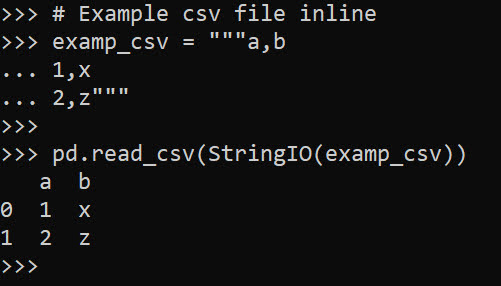
First for a very quick example, in python when reading data with pandas, it often expects a filename on disk. For pandas, e.g. pd.read_csv('my_file.csv'). But if you happen to already have the contents of the csv in a text object in memory, you can use io.StringIO to just read that object.

import pandas as pd
from io import StringIO

# Example csv file inline
examp_csv = """a,b
1,x
2,z"""

pd.read_csv(StringIO(examp_csv))

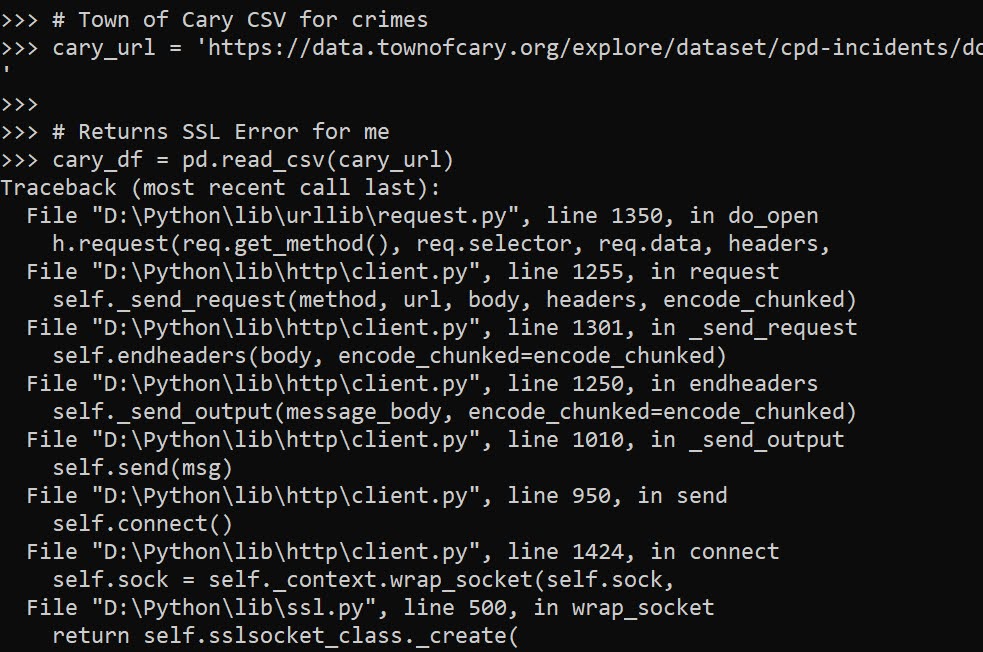
Where this has come up for me recently is reading in different data from web servers. For example, here is Cary’s API for crime data, you can batch download the whole thing at the below url, but via this approach I currently get an SSL error:

# Town of Cary CSV for crimes
cary_url = 'https://data.townofcary.org/explore/dataset/cpd-incidents/download/?format=csv&timezone=America/New_York&lang=en&use_labels_for_header=true&csv_separator=%2C'

# Returns SSL Error for me
cary_df = pd.read_csv(cary_url)

Note I don’t know the distinction in web server tech that causes this (as sometimes you can just grab a CSV via url, here is an example I have grabbing PPP loan data or with the NIJ recidivism data).

But we can grab the data via requests, and use the same StringIO trick I just showed to get this data:

# Using string IO for reading text
import requests
res_cary = requests.get(cary_url)
cary_df = pd.read_csv(StringIO(res_cary.text))
cary_df

Again I don’t know why some servers you need to go through this approach, but this works for me for Socrata and CartoDB api’s for different cities open data. I also used in recently for converting geojson in ESRI’s api.

The second example I want to show is downloading zipfiles. For this, we will use io.BytesIO instead of StringIO. The census stores various data in zipfiles on their FTP server:

# Example 2, grabbing zipped contents
import zipfile
from io import BytesIO

census_url = 'https://www2.census.gov/programs-surveys/acs/summary_file/2019/data/2019_5yr_Summary_FileTemplates.zip'
req = requests.get(census_url)

# Can use BytesIO for this content
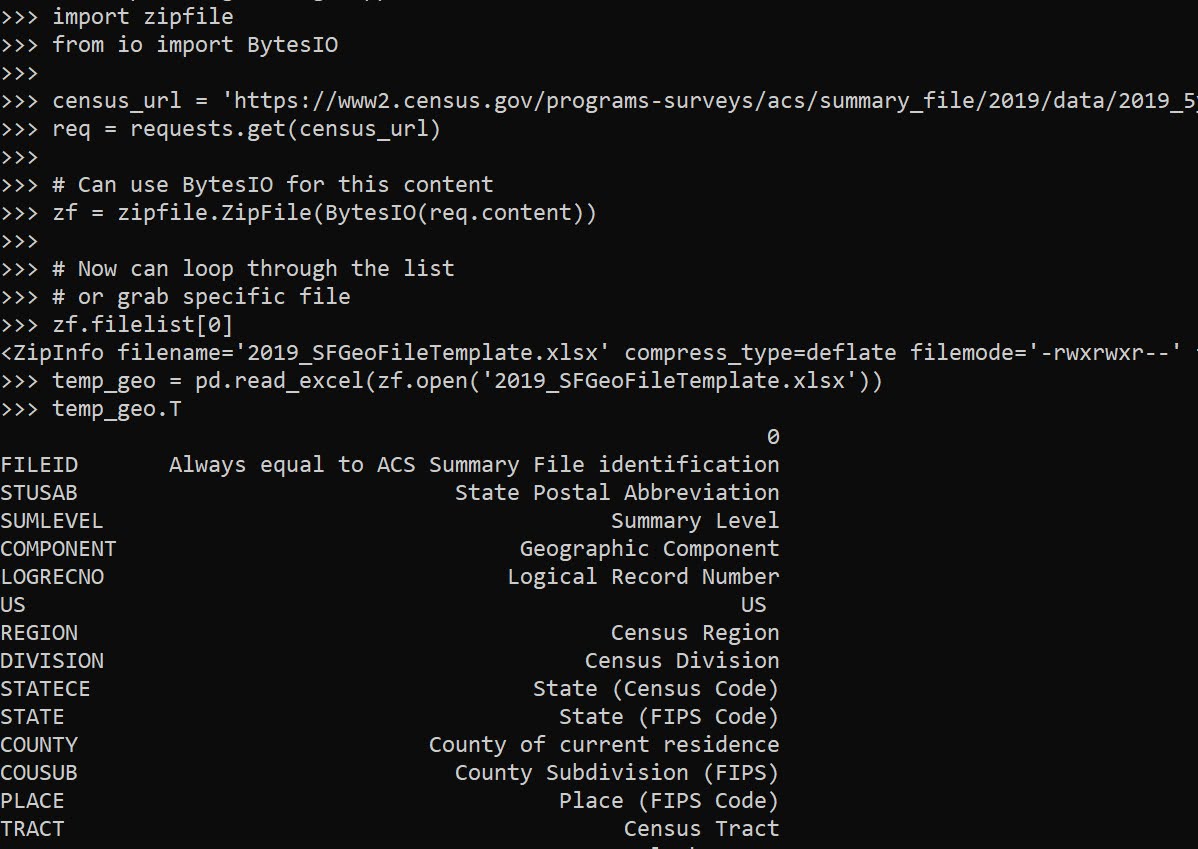
zf = zipfile.ZipFile(BytesIO(req.content))

The zipfile library would be equivalent to reading/extracting a zipfile already on disk. But when downloading there is no need to save to disk, then deal with that file. BytesIO here cuts out the middleman.

Then we gan either grab a specific file inside of our zf object, or extract all the contents one-by-one:

# Now can loop through the list
# or grab specific file
zf.filelist[0]
temp_geo = pd.read_excel(zf.open('2019_SFGeoFileTemplate.xlsx'))
temp_geo.T

Hyperparameter tuning for Random Forests

Motivated to write this post based on a few different examples at work. One, we have periodically tried different auto machine learning (automl) libraries at work (with quite mediocre success). They are OK for a baseline, not so much for production. Two, a fellow data scientist was trying some simple hyperparameter search in random forests, and was searching over all the wrong things.

For those not familiar, automl libraries, such as data robot or databricks automl, typically do a grid search over different models given a particular problem (e.g. random forest, logistic regression, XGBoost, etc.). And within this you can have variants of similar models, e.g. RFMod1(max-depth=5) vs RFMod2(max-depth=10). Then given a train/test split, see which model wins in the test set, and then suggests promoting that model into production.

My experience at work with these different libraries (mostly tabular medical records data), they choose XGBoost variants at a very high frequency. I think this is partially due to poor defaults for the hyperparameter search in several of these automl libraries. Here I will just be focused on random forests, and to follow along I have code posted on Github.

Here I am using the NIJ recidivism challenge data I have written about in the past, and for just some upfront work I am loading in various libraries/functions (I have the recid functions in the githup repo). And then making it easy to just load in the train/test data (with some smart feature engineering already completed).

from datetime import datetime
import matplotlib.pyplot as plt
import numpy as np
import optuna
import pandas as pd
from sklearn.metrics import brier_score_loss, roc_auc_score
from sklearn.model_selection import train_test_split
from sklearn.ensemble import RandomForestClassifier
import recid # my custom NIJ recid funcs

# Read in data and feature engineering
train, test = recid.fe()

Now first, in terms of hyperparameter tuning you need to understand the nature of the model you are fitting, and how those hyperparameters interact with the model. In terms of random forests for example, I see several automl libraries (and my colleague) doing a search over the number of trees (or estimators in sklearn parlance). Random forests the trees are independent, and so having more trees is always better. It is sort of like saying would you rather me do 100 simulations or 1,000,000 simulations to estimate a parameter – the 1,000,000 will of course have a more accurate estimate (although may be wasteful, as the extra precision is not needed).

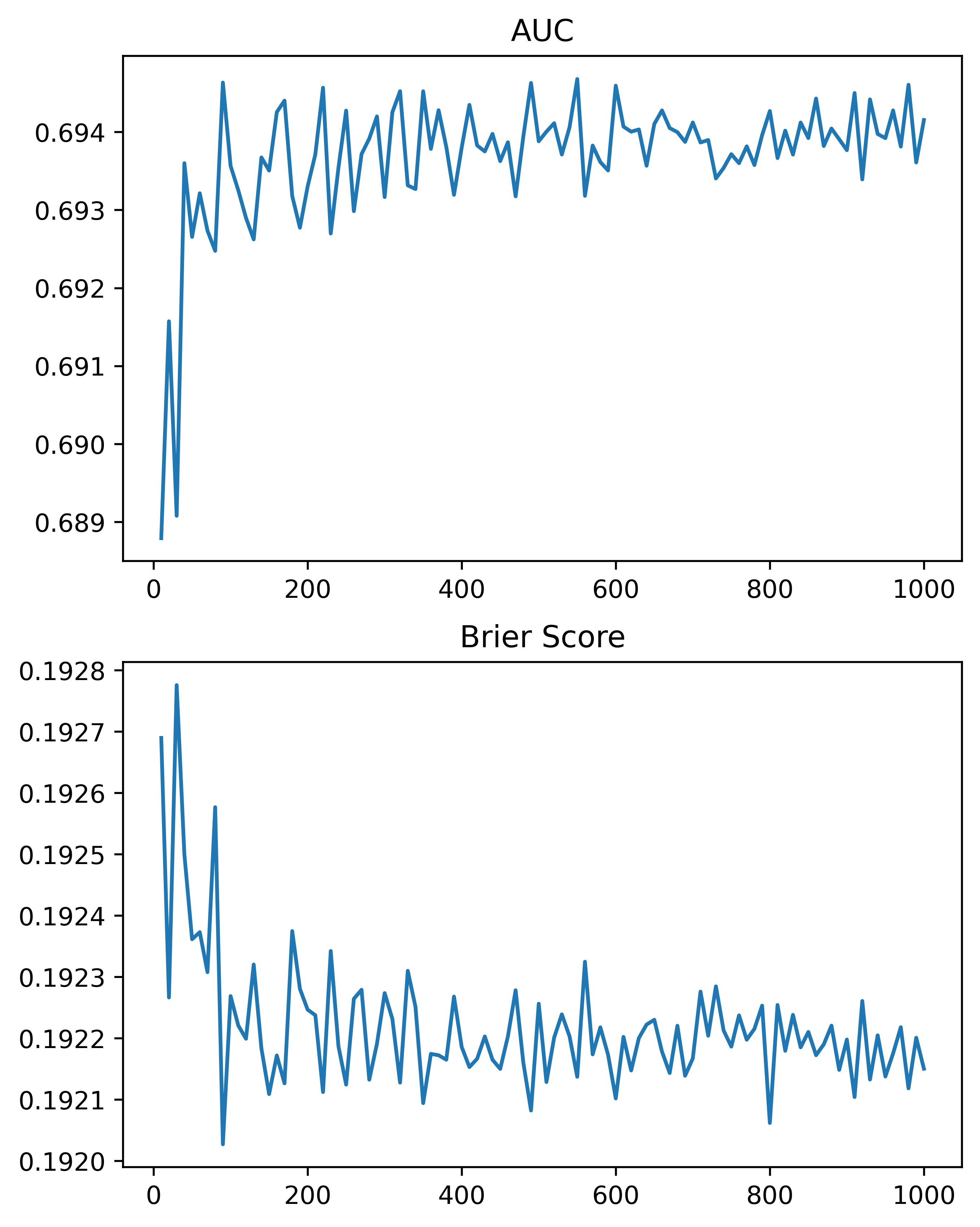
So here, using the NIJ defined train/test split, and a set of different fixed parameters (close to what I typically default to for random forests). I show how AUC or the Brier Score changes with the number of trees, over a grid from 10 to 1000 trees:

# Loop over tree sizes
ntrees = np.arange(10,1010,10)
auc, bs = [], []

# This is showing number of estimators is asymptotic
# should approach best value with higher numbers
# but has some variance in out of sample test
for n in ntrees:
    print(f'Fitting Model for ntrees:{n} @ {datetime.now()}')
    # Baseline model
    mod = RandomForestClassifier(n_estimators=n, max_depth=5, min_samples_split=50)
    # Fit Model
    mod.fit(train[recid.xvars], train[recid.y1])
    # Evaluate AUC/BrierScore out of sample
    pred_out = mod.predict_proba(test[recid.xvars])[:,1]
    auc.append(roc_auc_score(test[recid.y1], pred_out))
    bs.append(brier_score_loss(test[recid.y1], pred_out))

# Making a plot of the 
fig, (ax1, ax2) = plt.subplots(2, figsize=(6,8))
ax1.plot(ntrees, auc)
ax1.set_title('AUC')
ax2.plot(ntrees, bs)
ax2.set_title('Brier Score')
plt.savefig('Ntree_grid.png', dpi=500, bbox_inches='tight')

We can see that the relationship is noisy, but the trend clearly decreases with tree size, and perhaps asymptotes post 200 some trees for both metrics in this particular set of data.

So of course it depends on the dataset, but when I see automl libraries choosing trees in the range of 10, 50, 100 for random forests I roll my eyes a bit. You always get more accurate (in a statistical sense), with more trees. You would only choose that few for convenience in fitting and time savings. The R library ranger has a better default of 500 trees IMO (sklearns 100 is often too small in doing tests). But there isn’t much point in trying to hyperparameter tune this – your hyperparameter library may choose a smaller number of trees in a particular run, but this is due to noise in the tuning process itself.

So what metrics do matter for random forests? All machine learning models you need to worry about over-fitting/under-fitting. This depends on the nature of the data (number of rows, can fit more parameters, fewer columns less of opportunity to overfit). Random forests this is dependent on the complexity of the trees – more complex trees can overfit the data. If you have more rows of data, you can fit more complex trees. So typically I am doing searches over (in sklearn parlance) max-depth (how deep a tree can grow), min-samples-split (can grow no more trees is samples are too tiny in a leaf node). Another parameter to search for is how many columns to subsample as well (more columns can find more complex trees).

It can potentially be a balancing act – if you have more samples per leaf, it by default will create less complex trees. Many of the other hyperparameters limiting the complexity of the trees are redundant with these as well (so you could really swap out with max-depth). Here is an example of using the Optuna library a friend recommended to figure out the best parameters for this particular data set, using a train/eval approach (so this splits up the training set even further):

# Consistent train/test split for all evaluations
tr1, tr2 = train_test_split(train, test_size=2000)

def objective(trial):
    param = {
        "n_estimators": 500,
        "max_depth": trial.suggest_int("max_depth", 2, 10),
        "min_samples_split": trial.suggest_int("min_samples_split", 10, 200, step=10),
        "max_features": trial.suggest_int("max_features", 3, 15),
    }
    mod = RandomForestClassifier(**param)
    mod.fit(tr1[recid.xvars], tr1[recid.y1])
    pred_out = mod.predict_proba(tr2[recid.xvars])[:,1]
    auc = roc_auc_score(tr2[recid.y1], pred_out)
    return auc

study = optuna.create_study(direction="maximize")
study.optimize(objective, n_trials=100)
trial = study.best_trial

print(f"Best AUC {trial.value}")
print("Best Params")
print(trial.params)

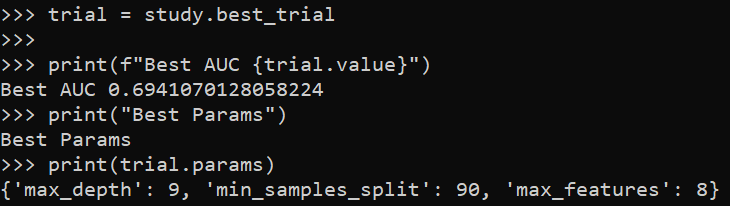
So here it chooses fairly deep trees, 9, but limited complexity via the sample size in a leaf (90). The number of features per tree is alsio slightly larger than default (here 25 features, so default is sqrt(25)). So it appears my personal defaults were slightly under-fitting the data.

My experience regression prefers smaller depth of trees but lower sample sizes (splitting to 1 is OK), but for binary classification limiting sample sizes in trees is preferable.

One thing to pay attention to in these automl libraries, a few do not retrain on the full dataset with the selected hyperparameters. For certain scenarios you don’t want to do this (e.g. if using the eval set to do calibrations/prediction intervals), but if you don’t care about those then you typically want to retrain on the full set. Another random personal observation, random forests really only start to outperform simpler regression strategies at 20k cases, with smaller sample sizes and further splitting train/eval/test, the hyperparameter search is very noisy and mostly a waste of time. If you only have a few hundred cases just fit a reasonable regression model and call it a day.

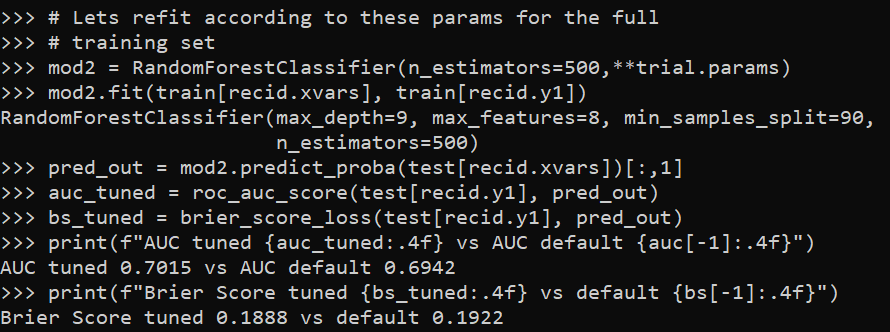
So here I retrain on the full test set, and then look at the AUC/Brier Score compared to my default model.

# Lets refit according to these params for the full
# training set
mod2 = RandomForestClassifier(n_estimators=500,**trial.params)
mod2.fit(train[recid.xvars], train[recid.y1])
pred_out = mod2.predict_proba(test[recid.xvars])[:,1]
auc_tuned = roc_auc_score(test[recid.y1], pred_out)
bs_tuned = brier_score_loss(test[recid.y1], pred_out)
print(f"AUC tuned {auc_tuned:.4f} vs AUC default {auc[-1]:.4f}")
print(f"Brier Score tuned {bs_tuned:.4f} vs default {bs[-1]:.4f}")

It is definately worth hyperparameter tuning once you have your feature set down, but lift of ~0.01 AUC (which is typical for hypertuned tabular models in my experience) is not a big deal with initial model building. Figuring out a smart way to encode some relevant feature (based on domain knowledge of the problem you are dealing with) typically has more lift than this in my experience.

Outputs vs Outcomes and Agile

For my criminal justice followers, there is a project planning strategy, Agile, that dominates software engineering. The idea behind Agile is to formulate plans in short sprints (we do two week sprints at my work). So we have very broad based objectives (Epics) that can span a significant amount of time. Then we have shorter goals (Stories) that are intended to take up the sprint. Within each story, we further break down our work into specific tasks that we can estimate how long they will take. So something at my work may look like:

  • Build Model to Predict Readmission for Heart Attacks (Epic)
    • Create date pipeline for training data (Story)
      • SQL functions to prepare data (Task, 2 days)
      • python code to paramaterize SQL (Task, 3 days)
      • Unit tests for python code (Task, 1 day)
    • Build ML Model (Story)
      • evaluate different prediction models (Task, 2 days)
      • …
    • Deploy ML Model in production (Story)
      • …

Etc. People at this point often compare Agile vs Waterfall, where waterfall is more longish term planning (often on say a quarterly schedule). And Agile per its name is suppossed to be more flexible, and modify plans on short term. Most of my problems with Agile could apply though to Waterfall planning as well – short term project planning (almost by its nature) has to be almost solely focused on outputs and not outcomes.

Folks with a CJ background will know what I am talking about here. So police management systems often contrast focusing on easily quantifiable outputs, such as racking up traffic tickets and low level arrests, vs achieving real outcomes, such as increased traffic safety or reducing violent crime. While telling police officers to never do these things does not make sense, you can give feedback/nudge them to engage in higher quality short term outputs that should better promote those longer term outcomes you want.

Agile boards (where we post these Epics/Stories/Tasks, for people to keep tabs on what everyone is doing) are just littered with outputs that have little to no tangible connection to real life outcomes. Take my Heart Attack example. It may be there is a current Heart Attack prediction system in place based on a simple scorecard – utility in that case would be me comparing how much better my system is than the simpler scorecard method. If we are evaluating via dollars and cents, it may only make sense to evaluate how effective my system is in promoting better health outcomes (e.g. evaluating how well my predictive system reduces follow up heart attacks or some other measure of health outcomes).

The former example is not a unit of time (and so counts for nothing in the Agile framework). Although in reality it should be the first thing you do (and drop the project if you cannot sufficiently beat a simple baseline). You don’t get brownie points for failing fast in this framework though. In fact you look bad, as you did not deliver on a particular product.

The latter example unfortunately cannot be done in a short time period – we are often talking about timescales of years at that point instead of weeks. People can look uber productive on their Agile board, and can easily accomplish nothing of value over broad periods of time.

Writing this post as we are going through our yearly crisis of “we don’t do Agile right” at my workplace. There are other more daily struggles with Agile – who defines what counts as meeting an objective? Are we being sufficiently specific in our task documentation? Are people over/under worked on different parts of the team? Are we estimating the time it takes to do certain tasks accurately? Does our estimate include actual work, or folds in uncertainty due to things other teams are responsible for?

These short term crises of “we aren’t doing Agile right” totally miss the boat for me though. I formulate my work strategy by defining end goals, and then work backwards to plan the incremental outputs necessary to achieve those end goals. The incremental outputs are a means to that end goal, not the ends themselves. I don’t really care if you don’t fill out your short term tasks or mis-estimate something to take a week instead of a day – I (and the business) cares about the value added of the software/models you are building. It isn’t clear to me that looking good on your Agile board helps accomplish that.

Column storage for wide datasets

The notion of big data is quite a bit overhyped. I do get some exposure to it at work, but many tools like Hadoop are not needed over doing things in chunks on more typical machines. One thing though I have learned more generally about databases, many relational databases (such as postgres) store data under the hood like this:

Index1|1|'a'|Index2|2|'b'.....|Index9999|1|'z'

So they are stacked cumulatively in an underlying file format. And then to access the information the system has to know “ok I need to find Index2 and column 2”, so it calculates offsets for where those pieces of information should be located in the file.

This however is not so nice for databases that have many columns. In particular administrative record databases that have few rows, but many thousands of columns (often with many missing fields and low dimensional categories), this default format is not very friendly. In fact many databases have limits on the number of columns a table can have. (“Few rows” is relative, but really I am contrasting with sensor data that often has billions/trillions of rows, but very few columns.)

In these situations, a columnar database (or data format) makes more sense. Instead of having to calculate many large number of offsets, the database often will represent the key-column pairs in some easier base format, and then will only worry about grabbing specific columns. Both representing the underlying data in a more efficient manner will lower on computer disk space (e.g. only takes up 1 gig instead of many gigabytes) as well as improve input/output operations on the data (e.g. it is faster to read the data/write new data).

I will show some examples via the American Community Survey data for micro areas. I have saved the functions/code here on github to follow along.

So first, I load in pandas and DuckDB. DuckDB is an open source database that uses by default a columnar storage format, but can consider it a very similar drop in replacement for sqllite for persistantly storing data.

import pandas as pd
import duckdb
import os

# my local census functions
# grabbing small area 2019 data
# here defaults to just Texas/Delaware
# still takes a few minutes
import census_funcs
cen2019_small, fields2019 = census_funcs.get_data(year=2019)
print(cen2019_small.shape) # (21868, 17145)

Here I grab the small area data for just Texas/Delaware (this includes mostly census tracts and census block groups in the census FTP data). You can see not so many rows, almost 22k, but quite a few columns, over 17k. This is after some data munging to drop entirely missing/duplicated columns even. The census data just has very many slightly different aggregate categories.

Next I save these data files to disk. For data that does not change very often, you just want to do this process a single time and save that data somewhere you can more easily access it. No need to re-download the data from the internet/census site everytime you want to do a new analysis.

I don’t have timing data here, but you can just experiment to see the parquet data format is quite a bit faster to save (and csv formats are the slowest). DuckDB is smart and just knows to look at your local namespace to find the referenced pandas dataframe in the execute string.

# Save locally to CSV file
cen2019_small.to_csv('census_test.csv')

# Trying zip compression
cen2019_small.to_csv('census_test.csv.zip',compression="zip")

# Save to parquet files
cen2019_small.to_parquet('census.parquet.gzip',compression='gzip',engine='pyarrow')

# Save to DuckDB, should make the DB if does not exist
con = duckdb.connect(database='census.duckdb',read_only=False)
con.execute('CREATE TABLE census_2019 AS SELECT * FROM cen2019_small')

If we then go and check out the datasizes on disk, csv for just these two states is 0.8 gigs (the full set of data for all 50 states is closer to 20 gigs). Using zip compression reduces this to around 1/4th of the size for the csv file. Using parquet format (which can be considered an alternative fixed file format to CSV although columnar oriented) and gzip compression is pretty much the same as zip compression for this data (not many missing values or repeat categories of numbers), but if you have repeat categorical data with a bit of missing data should be slightly better compression (I am thinking NIBRS here). The entire DuckDB database is actually smaller than the CSV file (I haven’t checked closely, I try to coerce the data to smarter float/int formats before saving, but there are probably even more space to squeeze out of my functions).

# Lets check out the file sizes
files = ['census_test.csv','census_test.csv.zip',
         'census.parquet.gzip','census.duckdb']

for fi in files:
    file_size = os.path.getsize(fi)
    print(f'File size for {fi} is {file_size/1024**3:,.1f} gigs')

# File size for census_test.csv is 0.8 gigs
# File size for census_test.csv.zip is 0.2 gigs
# File size for census.parquet.gzip is 0.2 gigs
# File size for census.duckdb is 0.7 gigs

The benefit of having a database here like DuckDB is for later SQL querying, as well as the ability to save additional tables. If I scoop up the 2018 data (that has slightly different columns), I can save to an additional table. Then later on downstream applications can select out the limited columns/years as needed (unlikely any real analysis workflow needs all 17,000 columns).

# Can add in another table into duckdb
cen2018_small, fields2018 = census_funcs.get_data(year=2018)
con.execute('CREATE TABLE census_2018 AS SELECT * FROM cen2018_small')
con.close()

ducksize = os.path.getsize(files[-1])
print(f'File size for {files[-1]} with two tables is {ducksize/1024**3:,.1f} gigs')
# File size for census.duckdb with two tables is 1.5 gigs

Sqllite is nice, as you can basically share a sqllite file and you know your friend will be able to open it. I have not worked with DuckDB that much, but hopefully it has similar functionality and ability to share without too much headache.

I have not worried about doing timing – I don’t really care about write timings of these data formats compared to CSV (slow read timing is annoying, but 10 seconds vs 1 minute to read data is not a big deal). But it is good practice to not be gluttonous with on disk space, which saving a bunch of inefficient csv files can be a bit wasteful.

Legends in python

Legends in python and matplotlib can be a little tricky (it is quite a web of different objects). Here are a few notes I have collected over different projects. First, one thing python does not do, even if you name things the same, it does not combine them in a legend. First example will show superimposing lines and error bars – even though I only have two labels, they each get their own slot in the resulting legend.

import numpy as np
import geopandas as gpd

# Need a bunch of junk from matplotlib
import matplotlib
from matplotlib import pyplot as plt
from matplotlib import patches
from matplotlib.legend_handler import HandlerPatch

# Making simple fake data
x = [0,1,2,3]
y1 = np.array([1,1,1,1])
y1l = y1 - 0.5
y1h = y1 + 0.5

y2 = np.array([2,2,2,2])
y2l = y2 - 0.1
y2h = y2 + 0.1

# Default, does not combine legends
fig, ax = plt.subplots()
# First Line
ax.plot(x,y1,zorder=3, color='blue',alpha=0.9,label='y1')
ax.fill_between(x,y1l,y1h,alpha=0.2,zorder=2,color='blue',label='y1')
# Second Line
ax.plot(x,y2,zorder=3, color='k',alpha=0.9,label='y2')
ax.fill_between(x,y2l,y2h,alpha=0.2,zorder=2,color='k',label='y2')
ax.legend(bbox_to_anchor=(1.0, 0.5))
plt.savefig('Leg01.png', dpi=500, loc="center left", bbox_inches='tight')

You can combine the legend items by scooping out the original objects, here via the ax.get_* function to get the labels and the “handles”. You can think of handles as just points/lines/polygons that refer to individual parts of the legend. And so combining the lines and polygons together, we can make the legend how we want it.

fig, ax = plt.subplots()
# First Line
ax.plot(x,y1,zorder=3, color='blue',alpha=0.9,label='y1')
ax.fill_between(x,y1l,y1h,alpha=0.2,zorder=2,color='blue',label='y1')
# Second Line
ax.plot(x,y2,zorder=3, color='k',alpha=0.9,label='y2')
ax.fill_between(x,y2l,y2h,alpha=0.2,zorder=2,color='k',label='y2')
# Can combine legend items
handler, labeler = ax.get_legend_handles_labels()
hd = [(handler[0],handler[1]),
       (handler[2],handler[3])]
lab = ['y1','y2']
ax.legend(hd, lab, loc="center left", bbox_to_anchor=(1, 0.5))
plt.savefig('Leg02.png', dpi=500, bbox_inches='tight')

I made a simple function combo_legend(ax) to combine items that have the same label in such matplotlib figures. So they do not need to per se be collections of similar items, just have the same text label.

# Can pass these to legend
def combo_legend(ax):
    handler, labeler = ax.get_legend_handles_labels()
    hd = []
    labli = list(set(labeler))
    for lab in labli:
        comb = [h for h,l in zip(handler,labeler) if l == lab]
        hd.append(tuple(comb))
    return hd, labli

# Combo line/error/scatter
fig, ax = plt.subplots()
# First Line
ax.plot(x,y1,zorder=3, color='blue',alpha=0.9,label='y1')
ax.fill_between(x,y1l,y1h,alpha=0.2,zorder=2,color='blue',label='y1')
ax.scatter(x,y1,c='blue', edgecolor='white',
           s=30,zorder=4,label='y1')
# Second Line
ax.plot(x,y2,zorder=3, color='k',alpha=0.9,label='y2')
ax.fill_between(x,y2l,y2h,alpha=0.2,zorder=2,color='k',label='y2')
hd, lab = combo_legend(ax)
ax.legend(hd, lab, loc="center left", bbox_to_anchor=(1, 0.5))
plt.savefig('Leg03.png', dpi=500, bbox_inches='tight')

Note that the set() call makes it so the order may not be how you want. You can just rearrange the objects you get back from combo_legend to sort them in the order you want.

Now for the second example in the post, is going to show some examples munging with geopandas objects/plots.

So default geopandas uses a continuous color ramp:

# Get counties for all US
county_url = r'https://www2.census.gov/geo/tiger/TIGER2019/COUNTY/tl_2019_us_county.zip'
us_county = gpd.read_file(county_url)
# Get counties for North Carolina
nc = us_county[us_county['STATEFP'] == '37'].copy()
nc['wat_prop'] = nc['AWATER']/(nc['AWATER'] + nc['ALAND'])

# Plot proportion area water
fig, ax = plt.subplots(figsize=(8,4))
nc.plot(column='wat_prop', edgecolor='grey', linewidth=0.2, ax=ax, legend=True)
plt.savefig('Leg04.png', dpi=1000, bbox_inches='tight')

I have a tough time with continuous color ramps. The geopandas mapping user guide has an example of making a nicer sized continuous legend, but overall I find making classed choropleth maps much easier in general. geopandas objects have a special set of arguments, where you can pass information to class the map and make a legend:

# Make the legend not the raster scale
bin_edge = np.arange(0.2,0.9,0.2)
leg_args = {'loc': 'lower left',
            'prop': {'size': 9},
            'title':'Prop. Water'}

fig, ax = plt.subplots(figsize=(8,4))
nc.plot(column='wat_prop',
        scheme="User_Defined",
        classification_kwds=dict(bins=bin_edge),
        legend_kwds=leg_args,
        edgecolor='grey',
        linewidth=0.2,
        ax=ax,
        legend=True)
plt.savefig('Leg05.png', dpi=1000, bbox_inches='tight')

But now we have circles. ArcGIS has the ability to use different glyphs in its legends, and it is common to use a blocky type glyph for geopolitical boundaries (which have unnatural straight lines).

If you go down the rabbit hole of geopandas objects, in this scenario the matplotlib handler is actually the same Line2D type object as if you call ax.plot(). So hacking together from a matplotlib doc tutorial, we can make a custom handler to draw our prespecified glyph. (Don’t take this as a nice example legend glyph, just threw something together very quick!) I also add in different labels to signify the boundary edges for the choropleth bins.

class MapHandler:
    def legend_artist(self, legend, orig_handle, fontsize, handlebox):
        x0, y0 = handlebox.xdescent, handlebox.ydescent
        # Can handle lines or polygons
        try:
            face_col = orig_handle.get_markerfacecolor()
        except:
            face_col = orig_handle.get_facecolor()
        width, height = handlebox.width, handlebox.height
        # Ugly shape, can make your own!
        xy = [[0,0],
              [1,0.2],
              [0.7,1],
              [0.05,0.4]]
        xy2 = []
        for x,y in xy:
            xt = x*width
            yt = y*height
            xy2.append([xt,yt])
        patch = patches.Polygon(xy2, fc=face_col)
        handlebox.add_artist(patch)
        return patch

leg_args2 = leg_args.copy()
leg_args2['handler_map'] = {matplotlib.lines.Line2D: MapHandler()}
leg_args2['labels'] = ['[0.0 to 0.2)','[0.2 to 0.4)','[0.4 to 0.6)','[0.6 to 0.8]']

fig, ax = plt.subplots(figsize=(8,4))
nc.plot(column='wat_prop',
        scheme="User_Defined",
        classification_kwds=dict(bins=bin_edge),
        legend_kwds=leg_args2,
        edgecolor='grey',
        linewidth=0.2,
        ax=ax,
        legend=True)
plt.savefig('Leg06.png', dpi=1000, bbox_inches='tight')

This will be sufficient for many peoples choropleth map needs, but often times in maps you superimpose additional things, such as roads or other types of boundaries. So it may be necessary to go back into the legend and rebuild it entirely.

Here is an example of adding in something totally different, an ellipse, into the legend:

# Taken from that same matplotlib doc linked earlier
class HandlerEllipse(HandlerPatch):
    def create_artists(self, legend, orig_handle,
                       xdescent, ydescent, width, height, fontsize, trans):
        center = 0.5 * width - 0.5 * xdescent, 0.5 * height - 0.5 * ydescent
        p = patches.Ellipse(xy=center, width=width + xdescent,
                             height=height + ydescent)
        self.update_prop(p, orig_handle, legend)
        p.set_transform(trans)
        return [p]

fig, ax = plt.subplots(figsize=(8,4))
nc.plot(column='wat_prop',
        scheme="User_Defined",
        classification_kwds=dict(bins=bin_edge),
        legend_kwds=leg_args2,
        edgecolor='grey',
        linewidth=0.2,
        ax=ax,
        legend=True)

# ax.get_legend_handles_labels() does not work here
leg = ax.get_legend()
handlers = leg.legendHandles
p = patches.Ellipse(xy=(0,0),width=2,height=1,facecolor='red')
handlers += [p]
new_labs = ['a','b','c','d','Whatever']
new_map = leg.get_legend_handler_map()
new_map[matplotlib.patches.Polygon] = MapHandler()
new_map[matplotlib.patches.Ellipse] = HandlerEllipse()
ax.legend(handlers, new_labs, handler_map=new_map, loc='lower left')
plt.savefig('Leg07.png', dpi=1000, bbox_inches='tight')