The baseline in histograms & outliers

One of my current reads is Graphics of Large Datasets: Visualizing a Million (Unwin, Theus & Hofman, 2007). In one of the introductory chapters (I believe it was Theus) makes the point that for histograms with stretched out values it is very difficult to identify outliers in the tails (or really see the density at all).

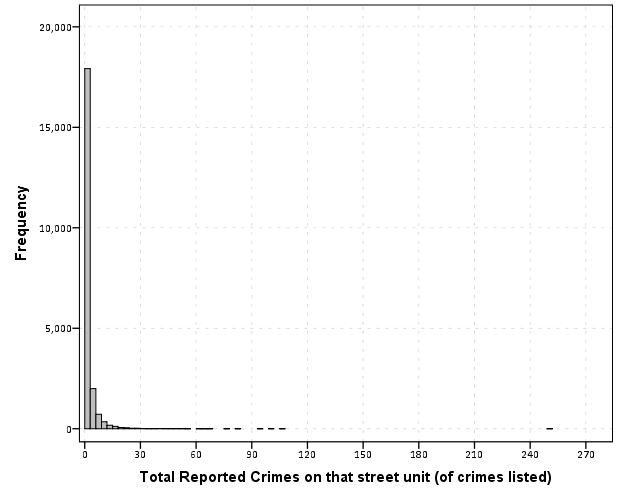
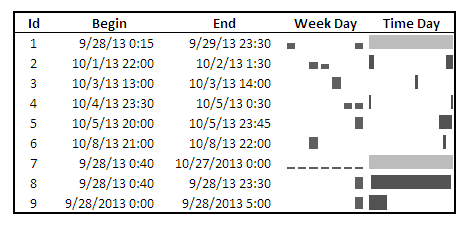
Here is an example with the crime data for 21,506 street units I am using for my dissertation.

Now we know there likely are a few outliers based on SPSS drawing the chart axis to 300, but we can not see their location. The bar lengths are so tiny that they are indiscriminable from the outline of the chart. In very large datasets, the height of the bar is not even guaranteed to encompass one pixel on the screen (depending on the Y axis scale).

But most statistical packages draw the bars with outlines, so even if the height of the bar won’t necessarily have any pixels devoted to it, most histograms will still spare some ink to draw the outline. So I immediately thought an simple improvement to this same chart would be instead of anchoring the bins to the bottom of the chart, simply add a bit of buffer below the baseline so there is some whitespace between the histogram bars and the chart outline.

So now we can see that we have a lone outlier around 250 crimes on the street and no others within 100 crimes. The density taking into account the outline of the bar may be inaccurate in an absolute sense, but it is really an inconsequential error in terms of evaluating the shape of the distribution.

Clearly histograms are not the most appropriate tool for identifying outliers (e.g. a rug plot showing individual values below the axis would help), but this is a fairly simple change to make the typical histogram more informative. In SPSS you can simply edit the chart interactively to give the Y axis a buffer below the lowest value. The same advice applies to bar charts as well with low values in certain categories. Knowing the difference between very few and 0 is an important distinction both for histograms and bar charts.

Maybe histograms and bar charts should be drawn with this whitespace buffer by default.

A critique of slopegraphs

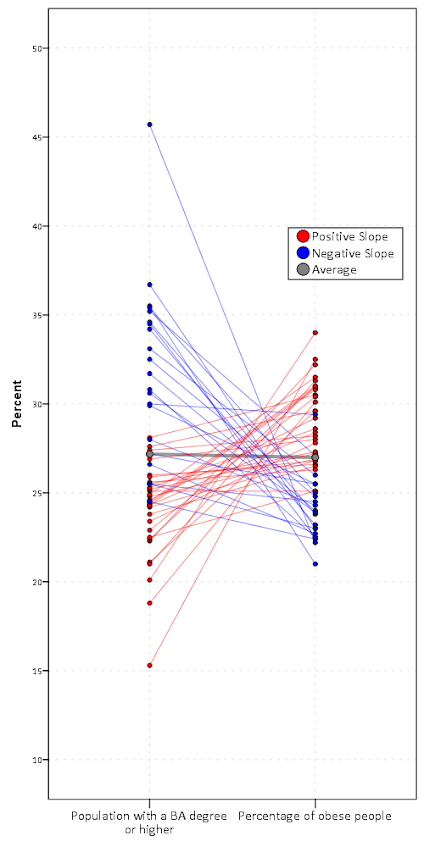
I’ve recently posted a pre-print of an article, A critique of slopegraphs, on SSRN. In the paper I provide a critique of the use of slopegraphs and present alternative graphics to use in their place, using the slopegraph displayed on the cover of Albert Cairo’s The Functional Art as motivation – below is my rendering of that slopegraph.

Initially I wanted to write a blog post about the topic – but I decided to give all of the examples and full discussion I wanted it would be far too long. So I ended up writing a (not so short) paper. Below is the abstract, and I will try to summarize it in a few quick points (but obviously I encourage you to read the full paper!)

Slopegraphs are a popular form of graphic depicting change along two independent axes by means of a connecting line. The critique here lists several reasons why interpreting the slopes may be misleading and suggests alternative plots depending on the goals of the visualization. Guidelines as to appropriate situations to use slopegraphs are discussed.

So the three main points I want to make are:

  • The slope is not the main value of interest in a slopegraph. The slope is itself an arbitrary function of how far away the axes are placed from one another.
  • Slopegraphs are poor for judging correlation and seeing a functional relationship between the two values. Scatterplots or just graphing the change directly are often better choices.
  • Slopegraphs are difficult to judge when the variance between axes changes (which produce either diverging or converging slopes) and when the relationship is negative (which produces many crossings in the slopes).

I’ve catalogued a collection of articles, examples and other critiques of slopegraphs at this location. Much of what I say is redundant with critiques of slopegraphs already posted in other blogs on the internet.

I’m pretty sure my criminal justice colleagues will not be interested in the content of the paper, so I may need to cold email someone to review it for me before I send it off. So if you have comments or a critique of the paper I would love to hear it!

Article: Viz. techniques for JTC flow data

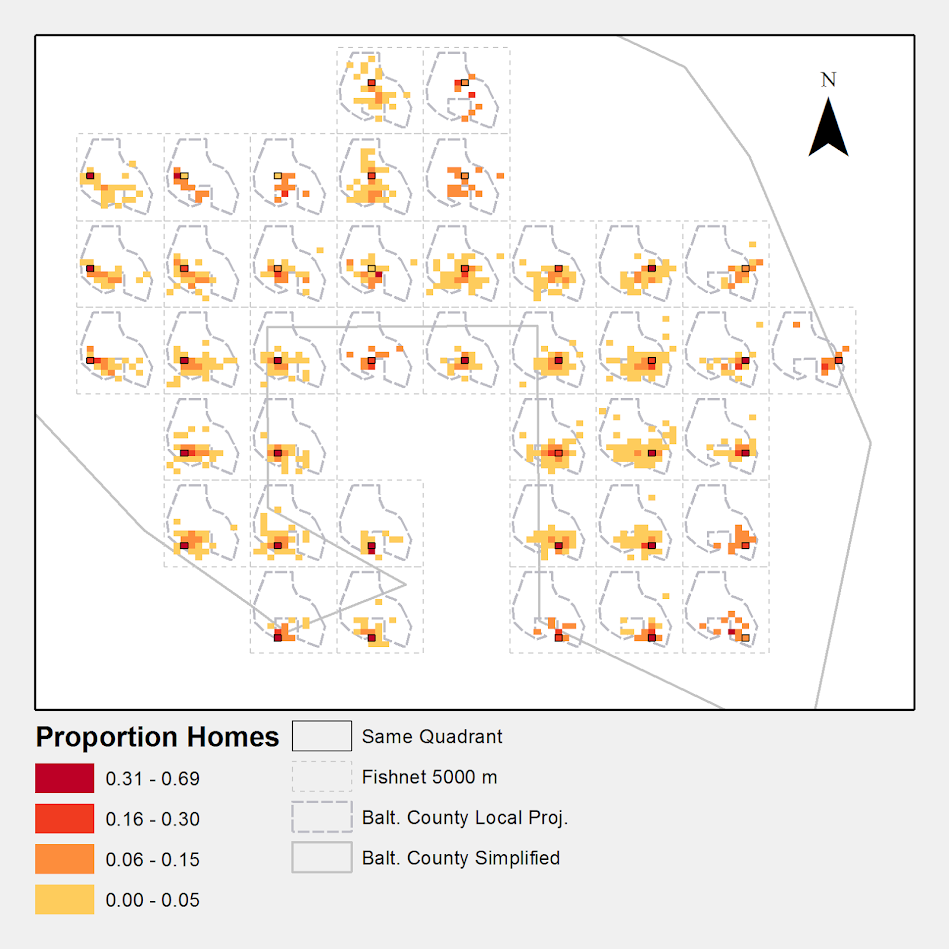
My publication Visualization techniques for journey to crime flow data has just been posted in the online first section of the Cartography and Geographic Information Science journal. Here is the general doi link, but Taylor and Francis gave me a limited number of free offprints to share the full version, so the first 50 visitors can get the PDF at this link.

Also note that:

  • The pre-print is posted to SSRN. The pre-print has more maps that were cut for space, but the final article is surely cleaner (in terms of concise text and copy editing) and has slightly different discussion in various places based on reviewer feedback.
  • Materials I used for the article can be downloaded from here. The SPSS code to make the vector geometries for a bunch of the maps is not terribly friendly. So if you have questions feel free – or if you just want a tutorial just ask and I will work on a blog post for it.
  • If you ever want an off-print for an article just send me an email (you can find it on my CV. I plan on continuing to post pre-prints to SSRN, but I realize it is often preferable to cite the final in print version (especially if you take a quote).

The article will be included in a special issue on crime mapping in the CaGIS due to be published in January 2015.

Visualizing multi-level data using ellipses

After reading Elliptical Insights: Understanding Statistical Methods through Elliptical Geometry (Friendly, Monette & Fox 2013) I was interested in trying ellipses out for viz. multi-level data. Note there is an add-on utility for SPSS to draw ellipses in R graphics (ScatterWEllipse.spd), but I wanted to give it a try in SPSS graphics.

So I’ve made two SPSS macros. The first, !CorrEll, takes two variables and returns a set of data that can be used by the second macro, !Ellipse, to draw data ellipses based on the eigenvectors and eigenvalues of those 2 by 2 covariance matrices by group. In this example I will be using the popular2.sav data available from Joop Hox’s Multilevel Analysis book. The code can be downloaded from here to follow along.

So first lets define the FILE HANDLE where the data and scripts are located. Then we can read in the popular2.sav data. I only know very little about the data – but it is students nested within classrooms (pretty close to around 20 students in 100 classes), and it appears focused on student evaluations of teachers.


FILE HANDLE Mac / name = "!Location For Your Data!".
INSERT FILE = "Mac\MACRO_CorrEll.sps".
INSERT FILE = "Mac\MACRO_EllipseSPSS.sps".
GET FILE = "Mac\popular2.sav".
DATASET NAME popular2.

Now we can call the first macro, !CorrEll for the two variables extrav (a measure of the teachers extroversion) and popular (there are two popular measures in here, and I am unsure what the difference between them are – this is the "sociometry" popular variable though). This will return a dataset with the means, variances and covariances for those two variables split by the group variable class. It will also return the major and minor diameters based on the square root of the eigenvalues of that 2 by 2 matrix, and then the ellipse is rotated according to direction of the covariance.


!CorrEll X = extrav Y = popular Group = class.

This returns a dataset named CorrEll as the active dataset, with which we can then draw the coordinate geometry for our ellipses using the !Ellipse macro.


!Ellipse X = Meanextrav Y = Meanpopular Major = Major Minor = Minor Angle = AngDeg Steps = 100.

The Steps parameter defines the coordinates around the circle that are drawn. So more steps means a more precise drawing (but also more datapoints to draw). This makes a new dataset called Ellipse as the active dataset, and based on this we can draw those ellipses in SPSS using the path element with the split modifier so the ellipses aren’t drawn in one long pen stroke. Also note the ellipses are not closed circles (that is the first point does not meet the last point) so I use the closed() option when drawing the paths.


FORMATS X Y Id (F3.0).
GGRAPH
  /GRAPHDATASET NAME="graphdataset" DATASET = 'Ellipse' VARIABLES=X Y Id
  REPORTMISSING=NO
  /GRAPHSPEC SOURCE=INLINE.
BEGIN GPL
 SOURCE: s=userSource(id("graphdataset"))
 DATA: X=col(source(s), name("X"))
 DATA: Y=col(source(s), name("Y"))
 DATA: Id=col(source(s), name("Id"), unit.category())
 GUIDE: axis(dim(1), label("Extraversion"))
 GUIDE: axis(dim(2), label("Popular"))
 ELEMENT: path(position(X*Y), split(Id), closed())
END GPL.

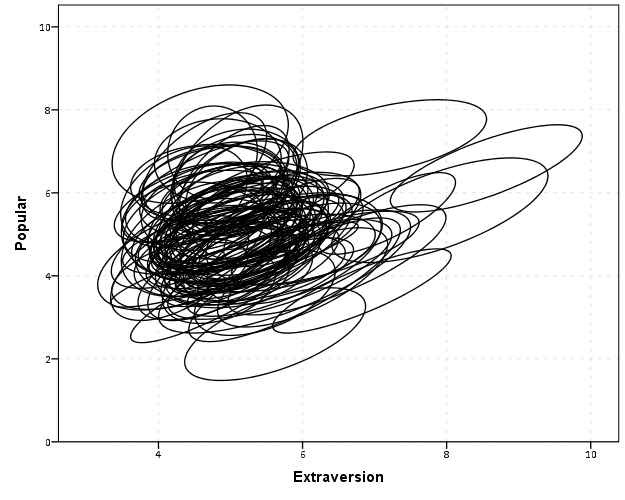
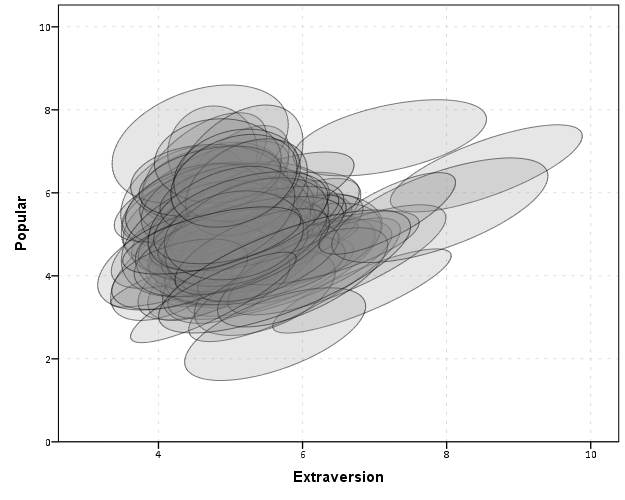
With 100 groups this is a pretty good test of the efficacy of the display. While many multi-level modelling strategies will have fewer groups, if the technique can not scale to at least 100 groups it would be a tough sell. So above is a bit of an overplotted mess, but here I actually draw the polygons with a light grey fill and use a heavy amount of transparency in both the fill and the exterior line. To draw the ellipses I use the polygon element and connect the points using the link.hull statement. The link.hull modifier draws the convex hull of the set of points, which of course an ellipse is convex.


GGRAPH
  /GRAPHDATASET NAME="graphdataset" DATASET = 'Ellipse' VARIABLES=X Y Id
  REPORTMISSING=NO
  /GRAPHSPEC SOURCE=INLINE.
BEGIN GPL
 SOURCE: s=userSource(id("graphdataset"))
 DATA: X=col(source(s), name("X"))
 DATA: Y=col(source(s), name("Y"))
 DATA: Id=col(source(s), name("Id"), unit.category())
 GUIDE: axis(dim(1), label("Extraversion"))
 GUIDE: axis(dim(2), label("Popular"))
 ELEMENT: polygon(position(link.hull(X*Y)), split(Id), color.interior(color.grey), transparency.interior(transparency."0.8"),
          transparency.exterior(transparency."0.5"))
END GPL.

I thought that using a fill might make the plot even more busy, but that doesn’t appear to be the case. Using heavy transparency helps a great deal. Now what can we exactly learn from these plots?

First, you can assess the distribution of the effect of extroversion on popularity by class. In particular for multi-level models we can assess whether we can to include random intercepts and/or random slopes. In this case the variance of the extroversion slope looks very small to me, so it may be reasonable to not let its slope vary by class. Random intercepts for classes though seem reasonable.

Other things you can assess from the plot are if there are any outlying groups, either in coordinates on the x or y axis, or in the direction of the ellipse. Even in a busy – overplotted data display like this we see that the covariances are all basically in the same positive direction, and if one were strongly negative it would stick out. You can also make some judgements about the between group and within group variances for each variable. Although any one of these items may be better suited for another plot (e.g. you could actually plot a histogram of the slopes estimated for each group) the ellipses are a high data density display that may reveal many characteristics of the data at once.

A few other interesting things that are possible to note from a plot like this are aggregation bias and interaction effects. For aggregation bias, if the direction of the orientation of the ellipses are in the opposite direction of the point cloud of the means, it provides evidence that the correlation for the aggregate data is in the opposite direction as the correlation for the micro level data.

For interaction effects, if you see any non-random pattern in the slopes it would suggest an interaction between extroversion and some other factor. The most common one is that slopes with larger intercepts tend to be flatter, and most multi-level software defaults to allow the intercepts and slopes to be correlated when they are estimated. I was particularly interested in this here, as the popularity score is bounded at 10. So I really expected that to have a limiting effect on the extroversion slope, but that doesn’t appear to be the case here.

So unfortunately none of the cool viz. things I mention (outliers, aggregation bias or interaction effects) really appear to occur in this plot. The bright side is it appears to be a convenient set of data to fit a multi-level model too, and even the ceiling effect of the popularity measure do not appear to be an issue.

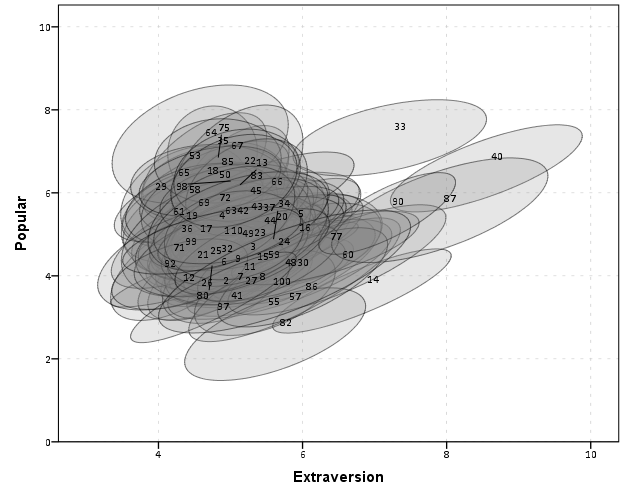
We can add in other data to the plot from either the original dataset or the CorrEll calculated dataset. Here is an example of grabbing data from the CorrEll dataset and labelling the ellipses with their group numbers. It is not very useful for the dense cloud, but for the outlying groups you can pretty easily see which label is associated with each ellipse.


DATASET ACTIVATE CorrEll.
FORMATS Meanpopular Meanextrav class (F3.0).
DATASET ACTIVATE Ellipse.
GGRAPH
  /GRAPHDATASET NAME="graphdataset" DATASET = 'Ellipse' VARIABLES=X Y Id
  /GRAPHDATASET NAME="Center" DATASET = 'CorrEll' VARIABLES=Meanpopular Meanextrav class
  REPORTMISSING=NO
  /GRAPHSPEC SOURCE=INLINE.
BEGIN GPL
 SOURCE: s=userSource(id("graphdataset"))
 DATA: X=col(source(s), name("X"))
 DATA: Y=col(source(s), name("Y"))
 DATA: Id=col(source(s), name("Id"), unit.category())
 SOURCE: c=userSource(id("Center"))
 DATA: CentY=col(source(c), name("Meanpopular"))
 DATA: CentX=col(source(c), name("Meanextrav"))
 DATA: class=col(source(c), name("class"), unit.category())
 GUIDE: axis(dim(1), label("Extraversion"))
 GUIDE: axis(dim(2), label("Popular"))
 ELEMENT: polygon(position(link.hull(X*Y)), split(Id), color.interior(color.grey), transparency.interior(transparency."0.8"),
          transparency.exterior(transparency."0.5"))
 ELEMENT: point(position(CentX*CentY), transparency.exterior(transparency."1"), label(class))
END GPL.

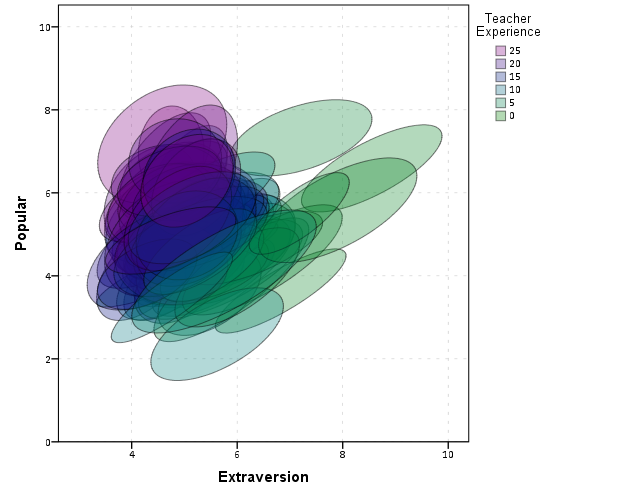
Another piece of information we can add into the plot is to color the fill of the ellipses using some alternative variable. Here I color the fill of the ellipse according to teacher experience with a green to purple continuous color ramp. SPSS uses some type of interpolation through some color space, and the default is the dreaded blue to red rainbow color ramp. With some experimentation I discovered the green to purple color ramp is aesthetically pleasing (I figured the diverging color ramps from colorbrewer would be as good a place to start as any). I use a diverging ramp as I want a higher amount of discrimination for exploratory graphics like this. Using a sequential ramp ends up muting one end of the spectrum, which I don’t really want in this circumstance.


DATASET ACTIVATE popular2.
DATASET DECLARE TeachExp.
AGGREGATE OUTFILE='TeachExp'
  /BREAK=Class
  /TeachExp=FIRST(texp).
DATASET ACTIVATE Ellipse.
MATCH FILES FILE = *
  /TABLE = 'TeachExp'
  /RENAME (Class = Id)
  /BY Id.
FORMATS TeachExp (F2.0).
*Now making plot with teacher experience colored.
DATASET ACTIVATE Ellipse.
GGRAPH
  /GRAPHDATASET NAME="graphdataset" DATASET = 'Ellipse' VARIABLES=X Y Id TeachExp
  REPORTMISSING=NO
  /GRAPHSPEC SOURCE=INLINE.
BEGIN GPL
 SOURCE: s=userSource(id("graphdataset"))
 DATA: X=col(source(s), name("X"))
 DATA: Y=col(source(s), name("Y"))
 DATA: TeachExp=col(source(s), name("TeachExp"))
 DATA: Id=col(source(s), name("Id"), unit.category())
 GUIDE: axis(dim(1), label("Extraversion"))
 GUIDE: axis(dim(2), label("Popular"))
 GUIDE: legend(aesthetic(aesthetic.color.interior), label("Teacher Experience"))
 SCALE: linear(aesthetic(aesthetic.color.interior), aestheticMinimum(color.green), aestheticMaximum(color.purple))
 ELEMENT: polygon(position(link.hull(X*Y)), split(Id), color.interior(TeachExp), transparency.interior(transparency."0.7"),
          transparency.exterior(transparency."0.5"))
END GPL.

Again I use a heavy amount of transparency and it produces what I think is a very nice looking plot. From this we can deduce that there is a clear relationship between extroversion and teacher experience, younger teachers tend to be more extroverted. We can also see that teacher experience explains some of the differences in means not explained by extroversion. That is some of the teachers with higher mean popular scores but lower extroversion scores are more experienced. This suggests the effects of teacher experience and extroversion are additive in the model predicting popularity.

You could of course color the ellipse with other variables as well. Because these are data ellipses and not confidence ellipses, you could make ellipses with fewer observations more transparent to illustrate that those estimates are less certain. Here the classrooms are all very similar size, so the error in the estimates is basically constant for all of the groups in this example.

The current code calculates the ellipses based on the eigenvectors and eigenvalues of the covariance matrix, but I may change this in the future to calculate them based on the Cholesky decomposition. If you read the Friendly paper most of the notation is written in terms of the Cholesky decomposition, and this would allow one to estimate confidence ellipses as well as the data ellipses here. So you could draw an ellipse that shows a confidence interval as opposed to the ellipses here that are just one possible level curve through the bivariate normal estimate.

Another thing I noticed the other day in the bowels of the SPSS chart template was that the xml defined glyphs had a rotation and an aspect parameter, so you could actually make a set of ellipse glyphs (although to cycle through them in SPSS charts is a pain). That makes me think that rotation and aspect should be mappable in the grammar of graphics, but I am unfamiliar with any statistical packages that allow you to easily manipulate figures in plots by specifying either the rotation of a glyph or the aspect of the glyph.

Let me know if there are any other good examples of using ellipses to visualize multi-level data.

Network Xmas Tree in SPSS

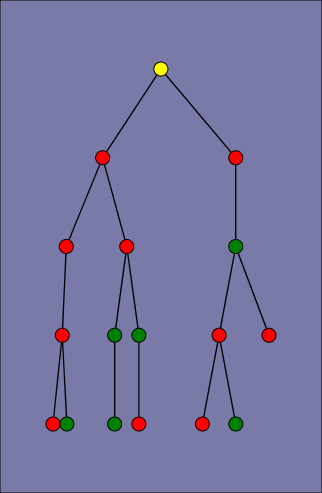
Motivated by Rick Wicklin’s raster based Christmas Tree in SAS, here I will show how to lay out a network Xmas tree in SPSS – XKCD network style.

SPSS’s GPL language has the ability to lay out different network diagrams given a list of edges and vertices. One of the layouts is a tree layout, and is intended for hierarchical data. Dendrograms created from hierarchical clustering are some of the most popular uses for this type of layout.

So to create the data for our Xmas tree, what I first did was just drew the XKCD tree on a piece of paper, and then replaced the ornaments with an integer value used to represent a node. Below is my best ASCII art representation of that tree.


              1
          ____|______
         |           |
         2           3
     ____|      _____|_____
    |          |           |
    4          5           6
 ___|____      |       ____|____
|        |     |      |         |
7        8     9     10        11
|_____      ___|___   |         |         
|     |    |       |  |         |
12   13    14      15 16       17

From here we can make an edge dataset that consists of the form of all the directed connections in the above graph. So 1 is connected to 2, 2 is connected to 4 etc. That dataset will look like below.


data list free / XFrom XTo.
begin data
1 2
1 3
2 4
3 5
3 6
4 7
4 8
5 9
6 10
6 11
7 12
7 13
9 14
9 15
10 16
11 17
end data.
dataset name edges.

If all I wanted to do was to draw the edges this would be sufficient for the graph. But I also want to style the nodes, so I create a dataset listing the nodes and a color which I will draw them with.


data list free / Node (F2.0) Type (A15).
begin data
1 Yellow
2 Red
3 Red
4 Green
5 Red
6 Red
7 Red
8 Red
9 Red
10 Green
11 Green
12 Green
13 Red
14 Green
15 Red
16 Green
17 Red
end data.
dataset name nodes.

Now here is the magic of GPL to draw our Xmas tree.


GGRAPH
  /GRAPHDATASET NAME="edges" DATASET = "edges" VARIABLES=XFrom XTo
  /GRAPHDATASET NAME="nodes" DATASET = "nodes" VARIABLES=Node Type
  /GRAPHSPEC SOURCE=INLINE.
BEGIN GPL
 SOURCE: e=userSource(id("edges"))
 DATA: XFrom=col(source(e), name("XFrom"), unit.category())
 DATA: XTo=col(source(e), name("XTo"), unit.category())
 SOURCE: n=userSource(id("nodes"))
 DATA: Node=col(source(n), name("Node"), unit.category())
 DATA: Type=col(source(n), name("Type"), unit.category())
 GUIDE: axis(dim(1), null())
 GUIDE: legend(aesthetic(aesthetic.color.interior), null())
 COORD: rect(dim(1,2), reflect(dim(2)))
 SCALE: cat(aesthetic(aesthetic.color.interior), map(("Yellow", color.yellow), ("Red", color.red), ("Green", color.green)))
 ELEMENT: edge(position(layout.tree(node(Node),from(XFrom), to(XTo), root("1"))))
 ELEMENT: point(position(layout.tree(node(Node),from(XFrom), to(XTo), root("1"))), color.interior(Type), size(size."14"))
END GPL.

I ended up drawing the Y axis (and reflecting it) because my chart template did not have enough padding for the root node and the yellow circle was partially cut off in the plot. I then post-hoc deleted the Y axis, changed the aspect ratio and the background color of the plot. And Voila – Happy Holidays!

A Comment on Data visualization in Sociology

Kieran Healy and James Moody recently posted a pre-print, Data visualization in sociology that is to appear in a forthcoming issue of the Annual Review of Sociology. I saw awhile ago on Kieran’s blog that he was planning on releasing a paper on data viz. in sociology and was looking forward to it. As I’m interested in data visualization as well, I’m glad to see the topic gain exposure in such a venue. After going through the paper I have several comments and critiques (all purely of my own opinion). Take it with a grain of salt, I’m neither a sociologist nor a tenured professor at Duke! (I will refer to the paper as HM from here on.)

Sociological Lags

The first section, Sociological Lags, is intended to set the stage for the contemporary use of graphics in sociology. I find both the historical review lacking in defining what is included, and the segway into contemporary use uncompelling. I break the comment in this section into three sections of my own making, the historical review, the current state of affairs & reasoning for the current state of affairs.

Historical Review of What Exactly?

It is difficult to define the scope when reviewing historical applications of visualization on sociology; both because sociology can be immensely broad (near anything to do with human behavior) and defining what counts as a visual graph is difficult. As such it ends up being a bit of a fools errand to go back to the first uses of graphics in sociology. Often Playfair is considered the first champion of graphing numeric summaries (although he has an obvious focus on macro-economics), but if one considers maps as graphics people have made those before we had words and numbers. Tufte often makes little distinction between any form of writing or diagram that communicates information, e.g. in-text sparklines, Hobbe’s visual table of contents to Leviathan on the frontpiece, or Galileo’s diagrams of the rings of Saturn. Paul Lewi in Speaking of Graphics describes the quipu as a visual tool used for accounting by the Incas. If one considers ISOTYPE counting picture diagrams as actual graphs, the Mayan hieroglphys for counting values would seemingly count (forgive my ingorance of anthropology, as I’m sure other examples that fit these seemingly simple criteria exist in other and older societies). Tufte gives an example of using mono-spaced type font, which in our base 10 counting system approximates a logarithmic chart if the numbers are right aligned in a column.

10000
 1000
  100
   10
    1

So here we come to a bit of a contradiction, in that one of the main premises of the article is to advocate the use of graphics over tables, but a table can be a statistical graphic under certain definitions. The word semi-graphic is sometimes used to describe these hybrid tables and graphics (Feinberg, 1979).

So this still leaves us the problem of defining the scope for a historical review. Ignoring the fuzzy definition of graphics laid out prior, we may consider the historical review to contain examples of visualizations from sociologists or applications of visualization to sociological inquiry in general. HM cite 6 examples at the top of page 4, which are a few examples of visualizations from sociologists (pictures please of the examples!) I would have liked to seen the work of Aldophe Quetelet mentioned as a popular historical figure in sociology, and his maps of reported crimes would be considered an example of earlier precedence for data visualization. (I distinctly remember a map at the end of Quetelet (1984) and it appears he used graphs in other works, so I suspect he has other examples I am not familiar with.)

Other popular historical figures that aren’t sociologists but analyzed sociological relevant data were geographers such as Booth’s poverty maps, Minard’s migration flows (Friendly, 2002a), and Guerry/Balbi & Fletcher’s maps of moral statistics (Cook & Wainer, 2012; Friendly, 2007). Other popular champions in public health are John Snow and Florence Nightingale (Brasseur, 2005). I would have liked HM to either had a broader review of historical visualization work pertinent to sociologists, or (IMO even better) more clearly defined the scope of the historical examples they talk about. Friendly (2008) is one of the more recent reviews that I know of talking about the historical examples, so I’d prefer just referring the reader there and then having a more pertinent review of applications within sociology. Although no bright line exists for who is a sociologist, this seems to me to be an easier way to limit the scope of a historical review. Perhaps restrict the discussion to its use in major journals or well known texts (especially methodology oriented ones). The lack of graphs in certain influential works is perhaps more telling than their inclusion. I don’t think Weber or Durkheim used any graphs or maps that I remember.

The Current State of Affairs

The historical discussion is pertinent as a build up to the current state of affairs, but the segway between examples in the early 1900’s and contemporary research is difficult. The fact that the work of Calvin Schmid isn’t mentioned anywhere in the paper is remarkable (or perhaps just indicative of his lack of influence – he still should be mentioned though!) Uses of mapping crime seems to be a strong counter-example of the lack of graphs in either olden or modern sociology; Shaw and McKay’s Juvenile Delinquency in Urban Areas has many exemplary maps and statistical graphics. Sampson’s Great American City follows suit with a great many scatterplots and maps. (Given my background I am prejudiced to be more familiar with applications in criminology.)

So currently in the article we go from a few examples of work in sociology around the turn of the 20th century to the lack of use of graphics in sociology compared to the hard sciences. This is well known, and Cleveland (1984) should have been cited in addition to the anecdotal examples of comparison to articles in Science. (And is noted later on that this in and of itself is a poor motivation for the use of more graphs.) What is potentially more interesting (and pertinent to sociologists) is the variation within sociology itself over time or between different journals in sociology. For instance; is more page space devoted to figures now that one does not need to draw your own graphs by hand compared to say in the 1980s? Do journals such as Sociological Methodology and Sociological Methods & Research have clearly more examples of using graphics compared to ASR or AJS? Has the use of graphics laggard behind the adoption of quantitative analysis in the field? Answering these questions IMO provides a better sense of the context of the contemporary use of graphs in sociology than simply repeating old hat comparing to other fields. It also provides a segway between the historical and contemporary use of graphics within sociology. Indeed it is "easy to find" examples of graphs in contemporary journal articles in sociology, and I would prefer to have some sort of quantitative estimate of the prevalence of graphics within sociological articles over time. This also allows investigation of the cultural impediment hypothesis in this section versus the technical impediment discussions later on. HM also present some hypotheses about the adoption of quantitative modelling in sociology in reference to other social science fields that would lend itself to empirical verification of this kind.

Reasoning For The Current State of Affairs

I find the sentences by HM peculiar:

But, somewhere along the line, sociology became a field where sophisticated statistical models were almost invariably represented by dense tables of variables along rows and model numbers along columns. Though they may signal scientific rigor, such tables can easily be substantively indecipherable to most readers, and perhaps even at times to authors. The reasons for this are beyond the scope of this review, although several possibly complementary hypotheses suggest themselves.

And can be interpreted in two different ways given the context. It can be interpreted as posing the question why are graphics preferable to tables, or why are graphics in relative disuse in sociology. For either I disagree it is outside the scope of the article!

If interpreted in the latter (why disuse of graphics in sociology) HM don’t follow their own advice, and give an excellent discussion of the warnings of graphics provided by Keynes. This section is my favorite in the paper, and I would have liked to see discussion on either training curricula in sociology or discussion of the role in graphs of popular sociological methodology text books. Again, I don’t believe Durkheim or Weber use graphs at all (although I provide other examples of prior scholars they have been exposed to did). Fisher has a chapter on graphs, so the concept isn’t foreign, and obviously the use of ANOVA and regression was adopted within sociology with open arms – why not graphical methods? Why is Schmid (1954) seemingly ignored? The discussion of Keynes is fascinating, but did Keynes really have that much influence on the behavior of sociologists? (I’m reminded of this great quote on the CV site on Wooldrige, 776 pages without a single graph!) This still doesn’t satisfactorily (to me) explain the current state of affairs. For instance a great counter example is Yule (1926); which was a pretty popular paper that used (22!) graphs to explain the behavior of time series. We are left to speculation about historical inertia of an economist as the reasoning for lack of discourse and use of graphics in contemporary sociological publications. I enjoyed the speculation, but I am unconvinced. Again having estimates of the proportion of page space devoted to graphs in sociology over time (and/or in comparison to the other social science fields mentioned) would lend credence to the hypotheses about cultural and technological impediments.

If you interpret the quoted sentence as posing the question why are graphics preferable to tables, then that seems to be crucial discussion to motivate the article to begin with, and I will argue is on topic in the authors next section, visualization in principle. HM miss a good opportunity to relate the quote of Keynes to when we want to use graphs (making relative comparisons) versus tables (which are best when we are just looking up one value, but we are not often interested in just looking up one value!)

Visualization in Principle

The latter sections of the paper, visualization in principle and practice, I find much more reasonable as reviews and well organized into sections (albeit the scope of the sections are still ill-defined). Most of my dissapointments from here on are ommissions that I feel are important to the discussion.

I was disappointed in this particular section of the article, as I believed it would have been a great opportunity to introduce concepts of graphical perception (e.g. Cleveland’s hierarchy), connect the piece to more contemporary work examining graphical perception, and even potentially provide more actionable advice about improving graphics for publication.

This section begins with a hod-podge list of popular viz. books. I was surprised to see Wilkinson’s Grammar of Graphics mentioned, and I was surprised to see Stephen Kosslyn’s books (which are more how to cook book like) and Calvin Schmid ommitted. IMO MacEachren’s How Maps Work should also be included on the shelf, but I’m not sure if that or any of those listed can be objectively defined as influential. Influential is a seemingly ill-defined criteria, and I would have liked to seen citation counts for any of these in sociology journals (I would bet they are all minimal). I presume this is possible as Neal Caren’s posts on scatterplot or Kieran’s philosophy citation network are examples using synonmous data. I find the list strange in that the books are very different in content (see Kosslyn (1985) for a review of several of them), and a reader may be misled in that they cover redundant material. The next part then discusses Tufte and his walkthrough of the famous March of Napoleon graphic by Minard and tries to give useful tidbits of advice along the way.

Use of Example Minard Graphic

While I don’t deny that the Minard example is a wonderful, classical example of a great graph, I would prefer to not perpetuate Tufte’s hyperbole as it beeing the best statistical graphic ever drawn. It is certainly an interesting application, but does time-stamped data of the the number of troops exemplify any type of data sociologists work with now? I doubt it. Part of why I’m excited by field specific interest in visualization is because in sociology (and criminology) we deal with data that isn’t satisfactorily discussed in many general treatments of visualization.

A much better example, in this context IMO, would have been Kieran Healy’s blog post on finding Paul Revere. It is as great an example as the Minard march, has direct relevance to sociologists, and doesn’t cover ground previously covered by other authors. It also is a great example of the use of graphical tools for direct analysis of sociological data. It isn’t a graph to present the results of the model, it is a graph to show us the structure of the network in ways that a model never could! Of course not everyone works with social network data either, but if the goal is to simply have a wow thats really cool example to promote the use of graphics, it would have sufficed and been more clearly on topic for sociology.

The use of an exemplar graphic can provide interest to the readers, but it isn’t clear from the onset of this section that this is the reasoning behind presenting the graphic. Napoleon’s March (nor any single graphic) can not be substantive enough fodder for description of guides to making better graphics. The discussion of topics like layering and small multiples are too superficial to constitute actionable advice (layering needs to be shown examples really to show what you are talking about).

If someone were asking me for the simple introduction to the topic, I would introduce Cleveland’s hierarchy JASA paper (Cleveland & McGill, 1984). For making prettier graphs, I would just suggest to The Visual Display of Quantitative Information and Stephen Few’s short papers. Cleveland’s hierarchy should really be mentioned somewhere in the paper.

This section ends with a mix of advice and more generic discussion on graphical methods, framing the discussion in terms of reproducible research.

Reproducible Research

While I totally endorse the encouragement of reproducible research, and I agree the technical programming skills for producing graphs are the same, I’m not sure I see as strong a connection to data visualization. In much of the paper the connections of direct pertinence to sociologists are not explicit, but HM miss a golden opportunity here to make one; data we often use is confidential in nature, providing problems of both sharing code and displaying graphics in publications. Were not graphing scatterplots of biological assays, but of peoples behavior and sensitive information.

IMO a list of criteria to improve the aesthetics of most graphs that are disseminated in social science articles are; print the graph as a high resolution PNG file or a vector file format (much software defaults to JPEG unfortunately), sensible color choices (how is ColorBrewer not mentioned in the article!) or sensible choices for line formats, and understanding how to make elements of interest come to the foreground in the plot (e.g. not too heavy of gridlines, use color selectively to highlight areas of interest – discussed under the guise of layering earlier in the Minard graphic section). This list of simple advice though for aesthetics can be accomplished in any modern statistical software (and has been possible for years now). The section ends up being a mix of advice about aesthetics of plots with advice about how to make complicated plots more understandable (e.g. talk about small multiples). Discussing these concepts is best kept seperated. Although good advice extends to both, a quick and dirty scatterplot doesn’t have the same expectations as a plot in a publication. (The model of clarity residual plots from R would not be so clear if they had 10,000 points although it still may be sufficient for most purposes.)

Visualization in Practice

This section is organized into exploratory data analysis and presenting the results of models. HM touch on pertinent examples to sociologists (mainly large datasets with high variance to signals that are too complicated for bivariate scatterplots to tell the whole story). I enjoyed this section, but will mention additional examples and discussion that IMO should have been included.

EDA

HM make the great point that EDA and confirmatory analysis are never seperate, and that we can use thoughts from EDA to evaluate regression models. This IMO isn’t anything different than what Tukey talks about when he takes out row and column effects, it is just the scale of the number of data points and ability to fit models is far beyond any examples in Tukey’s EDA.

For the EDA section on categorical variables notable omissions are mosaic plots (Friendly, 1994) – which are mentioned but not shown in the pairs plot example and later on page 23 – and techniques for assessing residuals in logistic regression models (Greenhill et al., 2011; Esarey & Pierce, 2012). When discussing parallel coordinate plots mention should also be made of extensions to categorical data (Bendix et al. 2005; Dang et al. 2010; Hofmann & Vendettuoli, 2013). Later on mention is made that mosaic plots one needs to develop gestalt to interpret them (which I guess we are born with the ability to interpret bar graphs and scatterplots?) The same is oft mentioned for interpreting parallel coordinate plots, and anything that is novel will take some training to be able to interpret.

For continous models partial residual plots should be mentioned (Fox, 1991), and ellipses and caterpillar plots should be mentioned in relation to multi-level modelling (Afshartous & Wolf, 2007; Friendly et al. 2013; Loy & Hofmann 2013) as well as corrgrams for simple data reduction in SPLOMS (Friendly, 2002b). From the generic discussion of Bourdieu it sounds like they are discussing bi-plots or some sort of similar data reduction technique.

I should note that this is just my list of things I think deserve mention for application to sociologists, and the task of what to include is essentially an impossible one. Of course what to include is arbitrary, but I base it mainly on tasks I believe are more common for quantitative sociologists. This is mainly regression analysis and evaluating causal relationships between variables. So although parallel coordinate plots are a great visualization tool for anyone to be familiar with, I doubt it will be as interesting as tools to evaluate the fit or failure of regression models. HM mention that PCP plots are good for identifying clusters and outliers (they aren’t so good for evaluating correlations). Another example (that HM don’t mention) would be treemaps. It is an interesting tool to visualize hierarchical data, but I agree that it shouldn’t be included in this paper as such hierarchical data in sociology is rare (or at least many applications of interest aren’t immediately obvious to me). The Buja et al. paper on using graphs for inference is really neat idea, (and I’m glad to see it mentioned) but I’m more on the fence as to whether it should have taken precedence to some of the other visualizations ideas I mention.

EDA for examining the original data and for examining model residuals are perhaps different enough that it should have its own specific section (although HM did have a nice discussion of this distinction). Examining model residuals is always preached but is seemingly rarely performed. More examples for the parade of horribles I would enjoy (Figure 1 presents a great one – maybe find one for a more complicated model would be good – I know of a few using UCR county data in criminology but none off-hand in sociology). The quote from Gelman (2004) is strange. Gelman’s suggestions for posterior simulations to check the model fit can be done with frequentist models, see King et al. (2000) for basically the same advice (although the citation is at an appropriate place). Also King promotes these as effective displays to understand models, so they are not just EDA then but reasonable tools to summarize models in publications (similar to effect plots later shown).

Presenting model results

The first two examples in this section (Figure 7 histogram and Figure 8 which I’m not sure what it is displaying) seem to me that they should be in the EDA section (or are not cleary defined as presenting results versus EDA graphics). Turning tables into graphs (Cook & Teo, 2011; Gelman et al. 2002; Feinberg & Wainer, 2011; Friendly & Kwan, 2011; Kastellec & Leoni, 2007) is a large omission in this section. Since HM think that tables are used sufficiently, this would have been a great opportunity to show how some tables in an article are better presented as graphs and make more explicit how graphs are better at displaying regression results in some circumstances (Soyer & Hogarth, 2012). It also would have presented an opportunity to make the connection that data visualization can even help guide how to make tables (see my blog post Some notes on making effective tables and Feinberg & Wainer (2011)).

Examples of effects graphs are great. I would have liked mentions of standardizing coefficients to be on similar or more interpretable scales (Gelman & Pardoe, 2007; Gelman, 2008) and effectively displaying uncertainty in the estimates (see my blog post and citations Viz. weighted regression in SPSS and some discussion).

Handcock & Morris (1999) author names are listed in the obverse order in the bibliography in case anyone is looking for it like I was!

In Summary and Moving Forward

As oppossed to ending with a critique of the discussion, I will simply use this as a platform to discuss things I feel are important for moving forward the field of data visualization within sociology (and more broadly the social sciences). First, things I would like to see in the social sciences moving forward are;

  • More emphasis on the technical programming skills necessary to make quality graphs.
  • Encourage journals to use appropriate graphical methods to convey results.
  • Application of the study of data viz. methods as a study worthy in sociology unto itself.

The first suggestion, emphasis on technical programming skills, is in line with the push towards reproducible research. I would hope programs are teaching the statistical computing skills necessary to be an applied quantitative sociologist, and teaching graphical methods should be part and parcel. The second suggestion, encourage journals to use appropriate graphical methods, I doubt is objectionable to most contemporary journals. But I doubt reviewers regularly request graphs instead of tables even where appropriate. It is both necessary for people to submit graphs in their articles and for reviewers to suggest graphs (and journals to implement and enforce guidelines) to increase usage in the field.

When use of graphs becomes more regular and widespread in journal articles, I presume the actual discussion and novel applications will become more regular within sociological journals as well. James Moody is a notable exception with some of his work on networks, and I hope more sociologists are motivated to develop tools unique to their situation and test the efficacy of particular displays. Sociologists have some unique circumstances (spatial and network data, mostly categorical dimensions, low signal/high variance) that call for not just transporting ideas from other fields, but attention and development within sociology itself.


Citations

  • Afshartous, D. and Wolf, M. (2007). Avoiding ‘data snooping’ in multilevel and mixed effects models. Journal of the Royal Statistical Society: Series A (Statistics in Society), 170(4):1035-1059.
  • Bendix, F., Kosara, R., and Hauser, H. (2005). Parallel sets: visual analysis of categorical data. In IEEE Symposium on Information Visualization, 2005. INFOVIS 2005., pages 133-140. IEEE.
  • Brasseur, L. (2005). Florence nightingale’s visual rhetoric in the rose diagrams. Technical Communication Quarterly, 14(2):161-182.
  • Cleveland, W. S. and McGill, R. (1984). Graphical perception: Theory, experimentation, and application to the development of graphical methods. Journal of the American Statistical Association, 79(387):531-554.
  • Cleveland, W. S. (1984). Graphs in scientific publications. The American Statistician, 38(4):261-269.
  • Cook, Alex R. & Shanice W. Teo. (2011) The communicability of graphical alternatives to tabular displays of statistical simulation studies. PLoS ONE 6(11): e27974.
  • Cook, R. and Wainer, H. (2012). A century and a half of moral statistics in the united kingdom: Variations on joseph fletcher’s thematic maps. Significance, 9(3):31-36.
  • Dang, T. N., Wilkinson, L., and Anand, A. (2010). Stacking graphic elements to avoid Over-Plotting. IEEE Transactions on Visualization and Computer Graphics, 16(6):1044-1052.
  • Esarey, Justin & Andrew Pierce. 2012. Assessing fit quality and testing for misspecification in binary-dependent variable models. Political Analysis 20(4): 480-500. Preprint PDF Here
  • Feinberg, R. A. and Wainer, H. (2011). Extracting sunbeams from cucumbers. Journal of Computational and Graphical Statistics, 20(4):793-810.
  • Fienberg, S. E. (1979). Graphical methods in statistics. The American Statistician, 33(4):165-178.
  • Fox, J. (1991). Regression diagnostics. Number no. 79 in Quantitative applications in the social sciences. Sage.
  • Friendly, M. (1994). Mosaic displays for Multi-Way contingency tables. Journal of the American Statistical Association, 89(425):190-200.
  • Friendly, M. (2002a). Visions and Re-Visions of charles joseph minard. Journal of Educational and Behavioral Statistics, 27(1):31-51.
  • Friendly, M. (2002b). Corrgrams: Exploratory displays for correlation matrices. The American Statistician, 56(4):316-324.
  • Friendly, M. (2007). A.-M. guerry’s moral statistics of france: Challenges for multivariable spatial analysis. Statistical Science, 22(3):368-399.
  • Friendly, M. (2008). The golden age of statistical graphics. Statistical Science, 23(4):502-535.
  • Friendly, M., Monette, G., and Fox, J. (2013). Elliptical insights: Understanding statistical methods through elliptical geometry. Statistical Science, 28(1):1-39.
  • Friendly, Michael & Ernest Kwan. 2011. Comment on Why tables are really much better than graphs. Journal of Computational and Graphical Statistics 20(1): 18-27.
  • Gelman, A. (2008). Scaling regression inputs by dividing by two standard deviations. Statistics in medicine, 27(15):2865-2873.
  • Gelman, A. and Pardoe, I. (2007). Average predictive comparisons for models with nonlinearity, interactions, and variance components. Sociological Methodology, 37(1):23-51.
  • Gelman, Andrew, Cristian Pasarica & Rahul Dodhia (2002). Let’s practice what we preach. The American Statistician 56(2):121-130.
  • Greenhill, Brian, Michael D. Ward & Audrey Sacks. 2011. The separation plot: A new visual method for evaluating the fit of binary models. American Journal of Political Science 55(4):991-1002.
  • Hofmann, H. and Vendettuoli, M. (2013). Common angle plots as Perception-True visualizations of categorical associations. Visualization and Computer Graphics, IEEE Transactions on, 19(12):2297-2305.
  • Kastellec, Jonathan P. & Eduardo Leoni. (2007). Using graphs instead of tables in political science. Perspectives on Politics 5(4):755-771.
  • King, G., Tomz, M., and Wittenberg, J. (2000). Making the most of statistical analyses: Improving interpretation and presentation. American Journal of Political Science, 44(2):347-361.
  • Kosslyn, S. M. (1985). Graphics and human information processing: A review of five books. Journal of the American Statistical Association, 80(391):499-512.
  • Kosslyn, S. M. (1994). Elements of graph design. WH Freeman New York.
  • Lewi, P. J. (2006). Speaking of graphics. http://www.datascope.be/sog.htm
  • Loy, A. and Hofmann, H. (2013). Diagnostic tools for hierarchical linear models. Wiley Interdisciplinary Reviews: Computational Statistics, 5(1):48-61.
  • MacEachren, A. M. (2004). How maps work: representation, visualization, and design. Guilford Press.
  • Sampson, R. J. (2012). Great American city: Chicago and the enduring neighborhood effect. University of Chicago Press.
  • Schmid, C. F. (1954). Handbook of graphic presentation. Ronald Press Company. http://archive.org/details/HandbookOfGraphicPresentation
  • Shaw, C. R. and McKay, H. D. (1972). Juvenile delinquency and urban areas: a study of rates of delinquency in relation to differential characteristics of local communities in American cities. A Phoenix Book. University of Chicago Press.
  • Soyer, E. and Hogarth, R. M. (2012). The illusion of predictability: How regression statistics mislead experts. International Journal of Forecasting, 28(3):695-711.
  • Tufte, E. R. (1983). The visual display of quantitative information. Graphics Press.
  • Quetelet, A. (1984). Adolphe Quetelet’s Research on the propensity for crime at different ages. Criminal justice studies. Anderson Pub. Co.
  • Yule, G. U. (1926). Why do we sometimes get Nonsense-Correlations between Time-Series?-a study in sampling and the nature of Time-Series. Journal of the Royal Statistical Society, 89(1):1-63.

Odds Ratios NEED To Be Graphed On Log Scales

Andrew Gelman blogged the other day about an example of Odds Ratios being plotted on a linear scale. I have seen this mistake a couple of times, so I figured it would be worth the time to further elaborate on.

Reported odds ratios are almost invariably from the output of a generalized linear regression model (e.g. logistic, poisson). Graphing the associated exponentiated coefficients and their standard errors (or confidence intervals) is certainly a reasonable thing to want to do – but unless someone wants to be misleading they need to be on a log scale. When the coefficients (and the associated intervals) are exponeniated they are no longer symmetric on a linear scale.

To illustrate a few nefarious examples, lets pretend our software spit out a series of regression coefficients. The table shows the original coefficients on the log odds scale, and the subsequent exponentiated coefficients +- 2 Standard Errors.

Est.  Point  S.E. Exp(Point) Exp(-2*S.E.) Exp(+2*S.E.)
  1   -0.7   0.1    0.5        0.4            0.6
  2    0.7   0.1    2.0        1.6            2.5
  3    0.2   0.1    1.2        1.0            1.5
  4    0.1   0.8    1.1        0.2            5.5
  5   -0.3   0.9    0.7        0.1            4.5

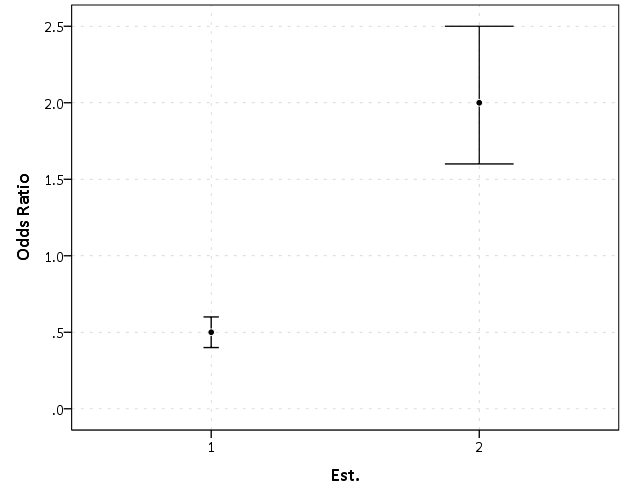
Now, to start lets graph the exponentiated estimates (the odds ratios) for estimates 1 and 2 and their standard errors on an arithmetic scale, and see what happens.

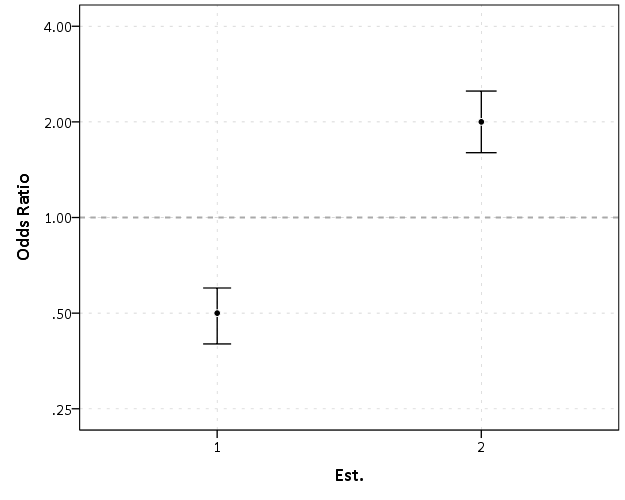
This graph would give the impression that 2 is both a larger effect and has a wider variance than effect 1. Now lets look at the same chart on a log scale.

By construction effects 1 and 2 are exactly the same (this is clear on the original log odds scale before the coefficients were exponentiated). Changes in the ratio of the odds can not go below zero, and a change from an odds ratio between 0.5 and 0.4 is the same relative change as that between 2.0 and 2.5. On the linear scale though the former is a difference of 0.1, and the latter a difference of 0.5.

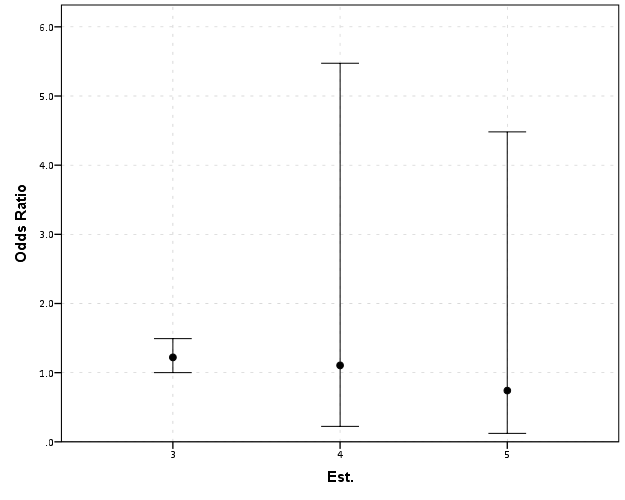
Such visual discrepancies get larger the further towards zero you go, and as what goes in the denominator and what goes in the numerator is arbitrary, displaying these values on a linear scale is very misleading. Consider a different example:

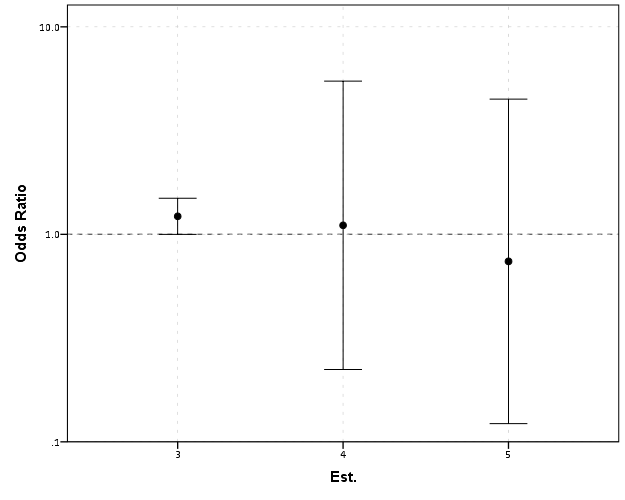
Well, what would we gather from this? Estimates 4 and 5 both have a wide variance, and the majority of their error bars are both above 1. This is an incorrect interpretation though, as the point estimate of 5 is below 1, and more of its error bar is on the below 1 side.

Looking up some more examples online this may be a problem more often than I thought (doing a google image search for “plot odds ratios” turns up plenty of examples to support my position). I even see some examples of forest plots of odds ratios fail to do this. An oft critique of log scales is that they are harder to understand. Even if I acquiesce that this is true, plotting odds ratios on a linear scale is misleading and should never be done.


To make a set of charts in SPSS with log scales for your particular data you can simply enter in the model estimates using DATA LIST and then use GGRAPH to make the plot. In particular for GGRAPH see the SCALE lines to set the base of the logarithms. Example below:

*Can input your own data.
DATA LIST FREE / Id  (A10) PointEst  SEPoint Exp_Point CIExp_L CIExp_H.
BEGIN DATA
  1   -0.7   0.1    0.5        0.4            0.6
  2    0.7   0.1    2.0        1.6            2.5
  3    0.2   0.1    1.2        1.0            1.5
  4    0.1   0.8    1.1        0.2            5.5
  5   -0.3   0.9    0.7        0.1            4.5
END DATA.
DATASET NAME OddsRat.

*Graph of Confidence intervals on log scale.
FORMATS Exp_Point CIExp_L CIExp_H (F2.1).
GGRAPH
  /GRAPHDATASET NAME="graphdataset" VARIABLES=Id Exp_Point CIExp_L CIExp_H
  /GRAPHSPEC SOURCE=INLINE.
BEGIN GPL
  SOURCE: s=userSource(id("graphdataset"))
  DATA: Id=col(source(s), name("Id"), unit.category())
  DATA: Exp_Point=col(source(s), name("Exp_Point"))
  DATA: CIExp_L=col(source(s), name("CIExp_L"))
  DATA: CIExp_H=col(source(s), name("CIExp_H"))
  GUIDE: axis(dim(1), label("Point Estimate and 95% Confidence Interval"))
  GUIDE: axis(dim(2))
  GUIDE: form.line(position(1,*), size(size."2"), color(color.darkgrey))
  SCALE: log(dim(1), base(2), min(0.1), max(6))
  ELEMENT: edge(position((CIExp_L+CIExp_H)*Id))
  ELEMENT: point(position(Exp_Point*Id), color.interior(color.black), 
           color.exterior(color.white))
END GPL.

Equal Probability Histograms in SPSS

The other day on NABBLE an individual asked for displaying histograms with unequal bar widths. I showed there if you have the fences (and the height of the bar) you can draw the polygons in inline GPL using a polygon element and the link.hull option for edges. I used a similar trick for spineplots.

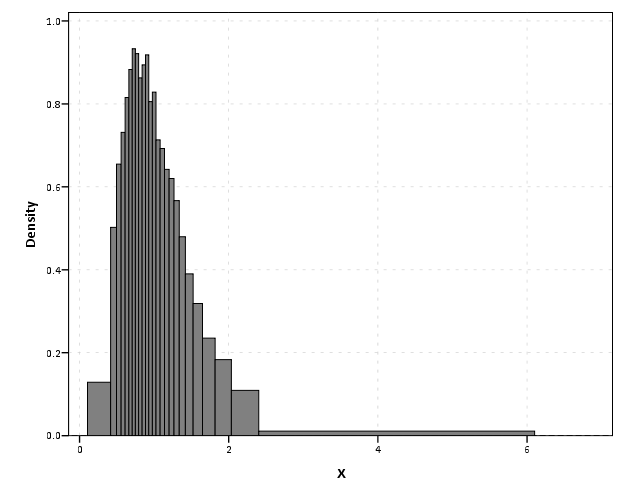
On researching when someone would use unequal bar widths a common use is to make the fences at specified quantiles and plot the density of the distribution. That is the area of the bars in the plot is equal, but the width varies giving the bars unequal height. Nick Cox has an awesome article about graphing univariate distributions in Stata with equally awesome discussion of said equal probability histograms.

The full code is at the end of the post, but in a nutshell you can call the !EqProbHist MACRO by specifying the Var and how many quantiles to slice it, NTiles. The macro just uses OMS to capture the table of NTiles produced by FREQUENCIES along with the min and max, and returns a dataset named FreqPoly with the lower and upper fences plus the height of the bar. This dataset can then be plotted with a seperate GGRAPH command.

!EqProbHist Var = X NTiles = 25.
GGRAPH
  /GRAPHDATASET DATASET = 'FreqPoly' NAME="graphdataset" VARIABLES=FenceL FenceU Height
  /GRAPHSPEC SOURCE=INLINE.
BEGIN GPL
 SOURCE: s=userSource(id("graphdataset"))
 DATA: FenceL=col(source(s), name("FenceL"))
 DATA: FenceU=col(source(s), name("FenceU"))
 DATA: Height=col(source(s), name("Height"))
 TRANS: base=eval(0)
 TRANS: casenum = index() 
 GUIDE: axis(dim(1), label("X"))
 GUIDE: axis(dim(2), label("Density"))
 SCALE: linear(dim(2), include(0))
 ELEMENT: polygon(position(link.hull((FenceL + FenceU)*(base + Height))), color.interior(color.grey), split(casenum)) 
END GPL.

An example histogram is below.

Note if you have quantiles that are tied (e.g you have categorical or low count data) you will get division by zero errors. So this type of chart is only reasonable with continuous data.

*********************************************************************************************.
*Defining Equal Probability Macro - only takes variable and number of tiles to slice the data.
DEFINE !EqProbHist (Var = !TOKENS(1)
                   /NTiles = !TOKENS(1) )
DATASET DECLARE FreqPoly.
OMS
/SELECT TABLES
/IF SUBTYPES = 'Statistics'
/DESITINATION FORMAT = SAV OUTFILE = 'FreqPoly' VIEWER = NO.
FREQUENCIES VARIABLES=!Var
  /NTILES = !NTiles
  /FORMAT = NOTABLE
  /STATISTICS = MIN MAX.
OMSEND.
DATASET ACTIVATE FreqPoly.
SELECT IF Var1 <> "N".
SORT CASES BY Var4.
COMPUTE FenceL = LAG(Var4).
RENAME VARIABLES (Var4 = FenceU).
COMPUTE Height = (1/!NTiles)/(FenceU - FenceL).
MATCH FILES FILE = *
/KEEP FenceL FenceU Height.
SELECT IF MISSING(FenceL) = 0.
!ENDDEFINE.
*Example Using the MACRO and then making the graph.
dataset close all.
output close all.
set seed 10.
input program.
loop #i = 1 to 10000.
  compute X = RV.LNORMAL(1,0.5).
  compute X2 = RV.POISSON(3).
  end case.
end loop.
end file.
end input program.
dataset name sim.
PRESERVE.
SET MPRINT OFF.
!EqProbHist Var = X NTiles = 25.
GGRAPH
  /GRAPHDATASET DATASET = 'FreqPoly' NAME="graphdataset" VARIABLES=FenceL FenceU Height
  /GRAPHSPEC SOURCE=INLINE.
BEGIN GPL
 SOURCE: s=userSource(id("graphdataset"))
 DATA: FenceL=col(source(s), name("FenceL"))
 DATA: FenceU=col(source(s), name("FenceU"))
 DATA: Height=col(source(s), name("Height"))
 TRANS: base=eval(0)
 TRANS: casenum = index() 
 GUIDE: axis(dim(1), label("X"))
 GUIDE: axis(dim(2), label("Density"))
 SCALE: linear(dim(2), include(0))
 ELEMENT: polygon(position(link.hull((FenceL + FenceU)*(base + Height))), color.interior(color.grey), split(casenum)) 
END GPL.
RESTORE.
*********************************************************************************************.

Stacked (pyramid) bar charts for Likert Data

A while ago this question on Cross Validated showed off some R libraries to plot Likert data. Here is a quick post on replicating the stacked pyramid chart in SPSS.

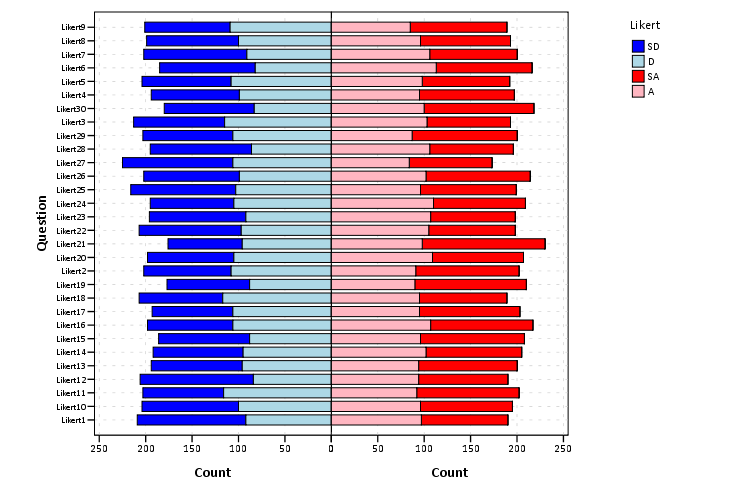
This is one of the (few) examples where stacked bar charts are defensible. One task that is easier with stacked bars (and Pie charts – which can be interpreted as a stacked bar wrapped in a circle) is to combine the lengths of adjacent categories. Likert items present an opportunity with their ordinal nature to stack the bars in a way that allows one to more easily migrate between evaluating positive vs. negative responses or individually evaluating particular anchors.

First to start out lets make some fake Likert data.

**************************************.
*Making Fake Data.
set seed = 10.
input program.
loop #i = 1 to 500.
compute case = #i.
end case.
end loop.
end file.
end input program.
dataset name sim.
execute.
*making 30 likert scale variables.
vector Likert(30, F1.0).
do repeat Likert = Likert1 to Likert30.
compute Likert = TRUNC(RV.UNIFORM(1,6)).
end repeat.
execute.
value labels Likert1 to Likert30 
1 'SD'
2 'D'
3 'N'
4 'A'
5 'SA'.
**************************************.

To make a similar chart to the one posted earlier, you need to reshape the data so all of the Likert items are in one column.

**************************************.
varstocases
/make Likert From Likert1 to Likert30
/index Question (Likert).
**************************************.

Now to make the population pyramid Likert chart we will use SPSS’s ability to reflect panels, and so we assign an indicator variable to delineate the positive and negative responses.

***************************************
*I need to make a variable to panel by.
compute panel = 0.
if Likert > 3 panel = 1.
***************************************.

From here we can produce the chart without displaying the neutral central category. Here I use a temporary statement to not plot the neutral category, and after the code is the generated chart.

***************************************.
temporary.
select if Likert <> 3.
GGRAPH
  /GRAPHDATASET NAME="graphdataset" VARIABLES=Question COUNT()[name="COUNT"] Likert panel
    MISSING=LISTWISE REPORTMISSING=NO
  /GRAPHSPEC SOURCE=INLINE.
BEGIN GPL
  SOURCE: s=userSource(id("graphdataset"))
  COORD: transpose(mirror(rect(dim(1,2))))
  DATA: Question=col(source(s), name("Question"), unit.category())
  DATA: COUNT=col(source(s), name("COUNT"))
  DATA: Likert=col(source(s), name("Likert"), unit.category())
  DATA: panel=col(source(s), name("panel"), unit.category())
  GUIDE: axis(dim(1), label("Question"))
  GUIDE: axis(dim(2), label("Count"))
  GUIDE: axis(dim(3), null(), gap(0px))
  GUIDE: legend(aesthetic(aesthetic.color.interior), label("Likert"))
  SCALE: linear(dim(2), include(0))
  SCALE: cat(aesthetic(aesthetic.color.interior), sort.values("1","2","5","4"), map(("1", color.blue), ("2", color.lightblue), ("4", color.lightpink), ("5", color.red)))
  ELEMENT: interval.stack(position(Question*COUNT*panel), color.interior(Likert), shape.interior(shape.square))
END GPL.
***************************************.

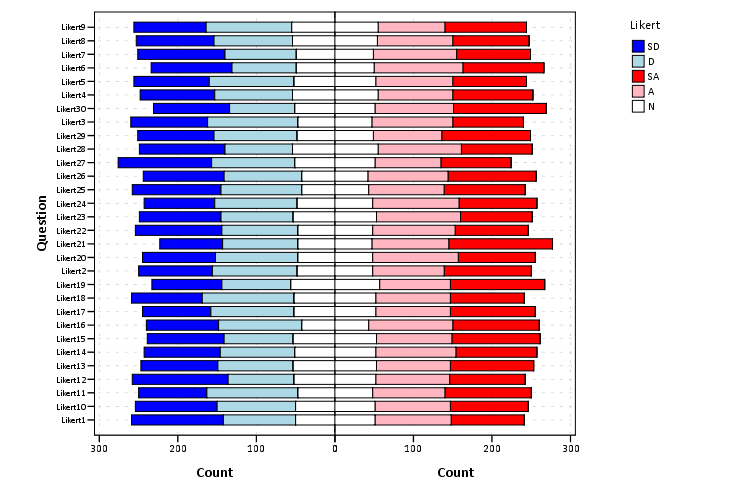
These charts when displaying the Likert responses typically allocate the neutral category half to one panel and half to the other. To accomplish this task I made a continuous random variable and then use the RANK command to assign half of the cases to the positive panel.

***************************************.
compute rand = RV.NORMAL(0,1).
AUTORECODE  VARIABLES=Question  /INTO QuestionN.
RANK
  VARIABLES=rand  (A) BY QuestionN Likert /NTILES (2)  INTO RankT /PRINT=NO
  /TIES=CONDENSE .
if Likert = 3 and RankT = 2 panel = 1.
***************************************.

From here it is the same chart as before, just with the neutral category mapped to white.

***************************************.
GGRAPH
  /GRAPHDATASET NAME="graphdataset" VARIABLES=Question COUNT()[name="COUNT"] Likert panel
    MISSING=LISTWISE REPORTMISSING=NO
  /GRAPHSPEC SOURCE=INLINE.
BEGIN GPL
  SOURCE: s=userSource(id("graphdataset"))
  COORD: transpose(mirror(rect(dim(1,2))))
  DATA: Question=col(source(s), name("Question"), unit.category())
  DATA: COUNT=col(source(s), name("COUNT"))
  DATA: Likert=col(source(s), name("Likert"), unit.category())
  DATA: panel=col(source(s), name("panel"), unit.category())
  GUIDE: axis(dim(1), label("Question"))
  GUIDE: axis(dim(2), label("Count"))
  GUIDE: axis(dim(3), null(), gap(0px))
  GUIDE: legend(aesthetic(aesthetic.color.interior), label("Likert"))
  SCALE: linear(dim(2), include(0))
  SCALE: cat(aesthetic(aesthetic.color.interior), sort.values("1","2","5","4", "3"), map(("1", color.blue), ("2", color.lightblue), ("3", color.white), ("4", color.lightpink), ("5", color.red)))
  ELEMENT: interval.stack(position(Question*COUNT*panel), color.interior(Likert),shape.interior(shape.square))
END GPL.
***************************************.

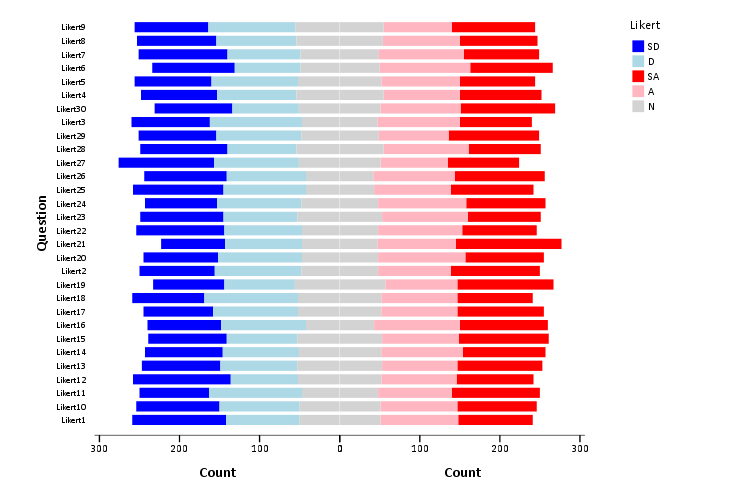
The colors are chosen to illustrate the ordinal nature of the data, with the anchors having a more saturated color. To end I map the neutral category to a light grey and then omit the outlines of the bars in the plot. They don’t really add anything (except possible moire patterns), and space is precious with so many items.

***************************************.
GGRAPH
  /GRAPHDATASET NAME="graphdataset" VARIABLES=Question COUNT()[name="COUNT"] Likert panel
    MISSING=LISTWISE REPORTMISSING=NO
  /GRAPHSPEC SOURCE=INLINE.
BEGIN GPL
  SOURCE: s=userSource(id("graphdataset"))
  COORD: transpose(mirror(rect(dim(1,2))))
  DATA: Question=col(source(s), name("Question"), unit.category())
  DATA: COUNT=col(source(s), name("COUNT"))
  DATA: Likert=col(source(s), name("Likert"), unit.category())
  DATA: panel=col(source(s), name("panel"), unit.category())
  GUIDE: axis(dim(1), label("Question"))
  GUIDE: axis(dim(2), label("Count"))
  GUIDE: axis(dim(3), null(), gap(0px))
  GUIDE: legend(aesthetic(aesthetic.color.interior), label("Likert"))
  SCALE: linear(dim(2), include(0))
  SCALE: cat(aesthetic(aesthetic.color.interior), sort.values("1","2","5","4", "3"), map(("1", color.blue), ("2", color.lightblue), ("3", color.lightgrey), ("4", color.lightpink), ("5", color.red)))
  ELEMENT: interval.stack(position(Question*COUNT*panel), color.interior(Likert),shape.interior(shape.square),transparency.exterior(transparency."1"))
END GPL.
***************************************.

Sparklines for Time Interval Crime Data

I developed some example sparklines for tables when visualizing crime data that occurs in an uncertain window. The use case is small tables that list the begin and end date-times, and the sparklines provide a quick visual assessment of the day of week and time of day. Examining for overlaps in two intervals is one of the hardest things to do when examining a table, and deciphering days of week when looking at dates is just impossible.

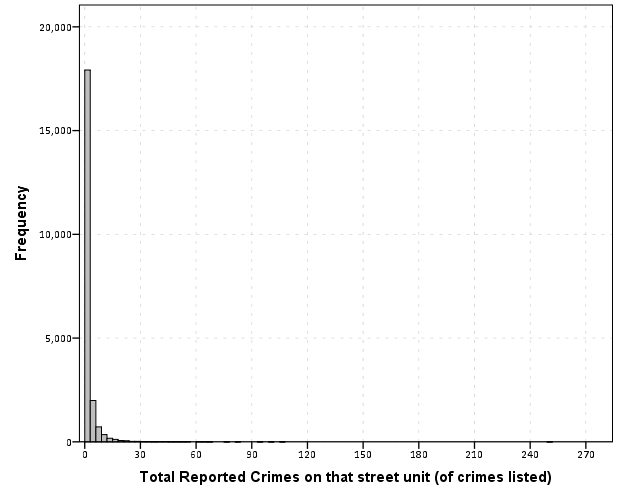
Here is an example table of what they look like.

The day of week sparklines are a small bar chart, with Sunday as the first bar and Saturday as the last bar. The height of the bar represents the aoristic estimate for that day of week. An interval over a week long (entirely uncertain what day of week the crime took place) ends up looking like a dashed line over the week. This example uses the sparkline bar chart built into Excel 2010, but the Sparklines for Excel add-on provides synonymous functionality. The time of day sparkline is a stacked bar chart in disguise; it represents the time interval with a dark grey bar, and the remaining stack is white. This allows you to have crimes that occur overnight and are split in the middle of the day. Complete ignorance of when the crime occurred during the day I represent with a lighter grey bar.

The spreadsheet can be downloaded from my drop box account here.

A few notes the use of the formulas within the sheet:

  • The spreadsheet does have formulas to auto-calculate the example sparklines (how they exactly work is worth another blog post all by itself) but it should be pretty clear to replicate the example bar chart for the day of week and time of day in case you just want to hand edit (or have another program return the needed estimates).
  • For the auto-calculations to work for the Day of Week aoristic estimates the crime interval needs to have a positive value. That is, if the exact same time is listed in the begin and end date column you will get a division by zero error.
  • For the day of week aoristic estimates it calculates the proportion as 1/7 if the date range is over one week. Ditto for the time range it is considered the full range if it goes over 24 hours.

A few notes on the aesthetics of sparklines:

  • For the time of day sparkline if you have zero (or near zero) length for the interval it won’t show up in the graph. Some experimentation suggests the interval needs around 15 to 45 minutes for typical cell sizes to be visible in the sheet (and for printing).
  • For the time of day sparkline the empty time color is set to white. This will make the plot look strange if you use zebra stripes for the table. You could modify it to make the empty color whatever the background color of the cell is, but I suspect this might make it confusing looking.
  • A time of day bar chart could be made just the same as the day of week bar chart. It would require the full expansion for times of day, which I might do in the future anyway to provide a conveniant spreadsheet to calculate aoristic estimates. (I typically do them with my SPSS MACRO – but it won’t be too arduous to expand what I have done here to an excel template).
  • If the Sparklines for Excel add-on allowed pie charts with at least two categories or allowed the angle of the pie slice to be rotated, you could make a time of day pie chart sparkline. This is currently not possible though.

I have not thoroughly tested the spreadsheet calculations (missing values will surely return errors, and if you have the begin-end backwards it may return some numbers, but I doubt they will be correct) so caveat emptor. I think the sparklines are a pretty good idea though. I suspect some more ingenious uses of color could be used to cross-reference the days of week and the time of day, but this does pretty much what I hoped for when looking at the table.