Fitting a pytorch model

Out of the box when fitting pytorch models we typically run through a manual loop. So typically something like this:

# Example fitting a pytorch model
# mod is the pytorch model object
opt = torch.optim.Adam(mod.parameters(), lr=1e-4)
crit = torch.nn.MSELoss(reduction='mean')
for t in range(20000):
    opt.zero_grad()
    y_pred = mod(x)   #x is tensor of independent vars
    loss = crit(y_pred,y) #y is tensor of outcomes
    loss.backward()
    opt.step()

And this would use backpropogation to adjust our model parameters to minimize the loss function, here just the mean square error, over 20,000 iterations. Best practices are to both evaluate the loss in-sample and wait for it to flatten out, as well as evaluate out of sample.

I recently wrote some example code to make this process somewhat more like the sklearn approach, where you instantiate an initial model object, and then use a mod.fit(X, y) function call to fit the pytorch model. For an example use case I will just use a prior Compas recidivism data I have used for past examples on the blog (see ROC/Calibration plots, and Balancing False Positives). Here is the prepped CSV file to download to follow along.

So first, I load the libraries and then prep the recidivism data before I fit my predictive models.

###############################################
# Front end libraries/data prep

import pandas as pd
import numpy as np
import matplotlib.pyplot as plt
import torch

# Setting seeds
torch.manual_seed(10)
np.random.seed(10)

# Prepping the Compas data and making train/test
recid = pd.read_csv('PreppedCompas.csv')

#Preparing the variables I want
recid_prep = recid[['Recid30','CompScore.1','CompScore.2','CompScore.3',
                    'juv_fel_count','YearsScreening']].copy()
recid_prep['Male'] = 1*(recid['sex'] == "Male")
recid_prep['Fel'] = 1*(recid['c_charge_degree'] == "F")
recid_prep['Mis'] = 1*(recid['c_charge_degree'] == "M")
dum_race = pd.get_dummies(recid['race'])

# White for reference category
for d in list(dum_race):
    if d != 'Caucasion':
        recid_prep[d] = dum_race[d]

# reference category is separated/unknown/widowed
dum_mar = pd.get_dummies(recid['marital_status'])
recid_prep['Single'] = dum_mar['Single']
recid_prep['Married'] = dum_mar['Married'] + dum_mar['Significant Other']

#Now generating train and test set
recid_prep['Train'] = np.random.binomial(1,0.75,len(recid_prep))
recid_train = recid_prep[recid_prep['Train'] == 1].copy()
recid_test = recid_prep[recid_prep['Train'] == 0].copy()

#Independant variables
ind_vars = ['CompScore.1','CompScore.2','CompScore.3',
            'juv_fel_count','YearsScreening','Male','Fel','Mis',
            'African-American','Asian','Hispanic','Native American','Other',
            'Single','Married']

# Dependent variable
y_var = 'Recid30'
###############################################

Now next part is more detailed, but it is the main point of the post. Typically we will make a pytorch model object something like this. Here I have various switches, such as the activation function (tanh or relu or pass in your own function), or the final function to limit predictions to 0/1 (either sigmoid or clamp or again pass in your own function).

# Initial pytorch model class
class logit_pytorch(torch.nn.Module):
    def __init__(self, nvars, device, activate='relu', bias=True,
                 final='sigmoid'):
        """
        Construct parameters for the coefficients 
        activate - either string ('relu' or 'tanh', 
                   or pass in your own torch function
        bias - whether to include bias (intercept) in model
        final - use either 'sigmoid' to squash to probs, or 'clamp'
                or pass in your own torch function
        device - torch device to construct the tensors
                 default cuda:0 if available
        """
        super(logit_pytorch, self).__init__()
        # Creating the coefficient parameters
        self.coef = torch.nn.Parameter(torch.rand((nvars,1),
                    device=device)/10)
        # If no bias it is 0
        if bias:
            self.bias = torch.nn.Parameter(torch.zeros(1,
                    device=device))
        else:
            self.bias = torch.zeros(1, device=device)
        # Various activation functions
        if activate == 'relu':
            self.trans = torch.nn.ReLU()
        elif activate == 'tanh':
            self.trans = torch.nn.Tanh()
        else:
            self.trans = activate
        if final == 'sigmoid':
            self.final = torch.nn.Sigmoid()
        elif final == 'clamp':
            # Defining my own clamp function
            def tclamp(input):
                return torch.clamp(input,min=0,max=1)
            self.final = tclamp
        else: 
            # Can pass in your own function
            self.final = final
    def forward(self, x):
        """
        predicted probability
        """
        output = self.bias + torch.mm(x, self.trans(self.coef))
        return self.final(output)

To use this though again we need to specify the number of coefficients to create, and then do a bunch of extras like the optimizer, and stepping through the function (like described at the beginning of the post). So here I have created a second class that behaves more like sklearn objects. I create the empty object, and only when I pass in data to the .fit() method it spins up the actual pytorch model with all its tensors of the correct dimensions.

# Creating a class to instantiate model to data and then fit
class pytorchLogit():
    def __init__(self, loss='logit', iters=25001, 
                 activate='relu', bias=True, 
                 final='sigmoid', device='gpu',
                 printn=1000):
        """
        loss - either string 'logit' or 'brier' or own pytorch function
        iters - number of iterations to fit (default 25000)
        activate - either string ('relu' or 'tanh', 
                   or pass in your own torch function
        bias - whether to include bias (intercept) in model
        final - use either 'sigmoid' to squash to probs, or 'clamp'
                or pass in your own torch function. Should not use clamp
                with default logit loss
        opt - ?optimizer? should add an option for this
        device - torch device to construct the tensors
                 default cuda:0 if available
        printn - how often to check the fit (default 1000 iters)
        """
        super(pytorchLogit, self).__init__()
        if loss == 'logit':
            self.loss = torch.nn.BCELoss()
            self.loss_name = 'logit'
        elif loss == 'brier':
            self.loss = torch.nn.MSELoss(reduction='mean')
            self.loss_name = 'brier'
        else:
            self.loss = loss
            self.loss_name = 'user defined function'
        # Setting the torch device
        if device == 'gpu':
            try:
                self.device = torch.device("cuda:0")
                print(f'Torch device GPU defaults to cuda:0')
            except:
                print('Unsuccessful setting to GPU, defaulting to CPU')
                self.device = torch.device("cpu")
        elif device == 'cpu':
            self.device = torch.device("cpu")
        else:
            self.device = device #can pass in whatever
        self.iters = iters
        self.mod = None
        self.activate = activate
        self.bias = bias
        self.final = final
        self.printn = printn
        # Other stats to carry forward
        self.loss_metrics = []
        self.epoch = 0
    def fit(self, X, y, outX=None, outY=None):
        x_ten = torch.tensor(X.to_numpy(), dtype=torch.float,
                             device=self.device)
        y_ten = torch.tensor(pd.DataFrame(y).to_numpy(), dtype=torch.float,
                             device=self.device)
        # Only needed if you pass in an out of sample to check as well
        if outX is not None:
            x_out_ten = torch.tensor(outX.to_numpy(), dtype=torch.float,
                             device=self.device)
            y_out_ten = torch.tensor(pd.DataFrame(outY).to_numpy(), dtype=torch.float,
                             device=self.device)
        self.epoch += 1
        # If mod is not already created, create a new one, else update prior
        if self.mod is None:
            loc_mod = logit_pytorch(nvars=X.shape[1], activate=self.activate, 
                                    bias=self.bias, final=self.final, 
                                    device=self.device)
            self.mod = loc_mod
        else:
            loc_mod = self.mod
        opt = torch.optim.Adam(loc_mod.parameters(), lr=1e-4)
        crit = self.loss
        for t in range(self.iters):
            opt.zero_grad()
            y_pred = loc_mod(x_ten)
            loss = crit(y_pred,y_ten)
            if t % self.printn == 0:
                if outX is not None:
                    pred_os = loc_mod(x_out_ten)
                    loss_os = crit(pred_os,y_out_ten)
                    res_tup = (self.epoch, t, loss.item(), loss_os.item())
                    print(f'{t}: insample {res_tup[2]:.4f}, outsample {res_tup[3]:.4f}')
                else:
                    res_tup = (self.epoch, t, loss.item(), None)
                    print(f'{t}: insample {res_tup[2]:.5f}')
                self.loss_metrics.append(res_tup)
            loss.backward()
            opt.step()
    def predict_proba(self, X):
        x_ten = torch.tensor(X.to_numpy(), dtype=torch.float,
                             device=self.device)
        res = self.mod(x_ten)
        pp = res.cpu().detach().numpy()
        return np.concatenate((1-pp,pp), axis=1)
    def loss_stats(self, plot=True, select=0):
        pd_stats = pd.DataFrame(self.loss_metrics, columns=['epoch','iteration',
                                                            'insamploss','outsamploss'])
        if plot:
            pd_stats2 = pd_stats.rename(columns={'insamploss':'In Sample Loss', 'outsamploss':'Out of Sample Loss'})
            pd_stats2 = pd_stats2[pd_stats2['iteration'] > select].copy()
            ax = pd_stats2[['iteration','In Sample Loss','Out of Sample Loss']].plot.line(x='iteration', 
                            ylabel=f'{self.loss_name} loss')
            plt.show()
        return pd_stats

Again it allows you to pass in various extras, which here are just illustrations for binary predictions (like the loss function as the Brier score or the more typical log-loss). It also allows you to evaluate the fit for just in-sample, or for out of sample data as well. It also allows you to specify the number of iterations to fit.

So now that we have all that work done, here as some simple examples of its use.

# Creating a model and fitting
mod = pytorchLogit()
mod.fit(recid_train[ind_vars], recid_train[y_var])

So you can see that this is very similar now to sklearn functions. It will print at the console fit statistics over the iterations:

So it defaults to 25k iterations, and you can see that it settles down much before that. I created a predict_proba function, same as most sklearn model objects for binary predictions:

# Predictions out of sample
predprobs = mod.predict_proba(recid_test[ind_vars])
predprobs # 1st column is probability 0, 2nd prob 1

And this returns a numpy array (not a pytorch tensor). Although you could modify to return a pytorch tensor if you wanted it to (or give an option to specify which).

Here is an example of evaluating out of sample fit as well, in addition to specifying a few more of the options.

# Evaluating predictions out of sample, more iterations
mod2 = pytorchLogit(activate='tanh', iters=40001, printn=100)
mod2.fit(recid_train[ind_vars], recid_train[y_var], recid_test[ind_vars], recid_test[y_var])

I also have an object function, .loss_stats(), which gives a nice graph of in-sample vs out-of-sample loss metrics.

# Making a nice graph
dp = mod2.loss_stats()

We can also select the loss function to only show later iterations, so it is easier to zoom into the behavior.

# Checking out further along
mod2.loss_stats(select=10000)

And finally like I said you could modify some of your own functions here. So instead of any activation function I pass in the identity function – so this turns the model into something very similar to a vanilla logistic regression.

# Inserting in your own activation (here identity function)
def ident(input):
    return input

mod3 = pytorchLogit(activate=ident, iters=40001, printn=2000)
mod3.fit(recid_train[ind_vars], recid_train[y_var], recid_test[ind_vars], recid_test[y_var])

And then if you want to access the coefficients weights, it is just going down the rabbit hole to the pytorch object:

# Can get the coefficients/intercept
print( mod3.mod.coef )
print( mod3.mod.bias )

This type of model can of course be extended however you want, but modifying the pytorchLogit() and logit_pytorch class objects to specify however detailed switches you want. E.g. you could specify adding in hidden layers.

One thing I am not 100% sure the best way to accomplish is loss functions that take more parameters, as well as the best way to set up the optimizer. Maybe use *kwargs for the loss function. So for my use cases I have stuffed extra objects into the initial class, so they are there later if I need them.

Also here I would need to think more about how to save the model to disk. The model is simple enough I could dump the tensors to numpy, and on loading re-do them as pytorch tensors.

Academia and the culture of critiquing

Being out of academia for a bit now gives me some perspective on common behaviors I now know are not normal for other workplaces. Andrew Gelman and Jessica Hullman’s posts are what recently brought this topic to mind. Both what Jessica (and other behavior Andrew Gelman points out commonly on his blog) are near synonymous with my personal experience at multiple institutions. So even though we all span different areas in science it appears academic culture is quite similar across places and topical areas.

One in academia is senior academics shirking responsibility – deadwoods. This behavior I can readily attribute to rational behavior, so although I found it infuriating it was easily explainable. Hey, if you let me collect a paycheck into my 90’s I would likely be a deadwood at that point too! (Check out this Richard Larson post on why universities should encourage more professors to be semi-retired.)

Another behavior I had a harder time wrapping my head around was what I will refer to as the culture of critique. To the extent that we have a scientific method, a central component of that is to be critical of scientific results. If I read a news article that says X made crime go up/down, my immediate thought is ‘there needs to be more evidence to support that assertion’.

That level of skepticism is a necessary component of being an academic. We apply this skepticism not only to newspaper articles, but to each other as well. University professors don’t really have a supervisor like normal jobs, we each evaluate our peers research through various mechanisms (peer review journal articles, tenure review, reviewing grant proposals, critique public presentations, etc.).

This again is necessary for scientific advancement. We all make mistakes, and others should be able to rightly go and point out my mistakes and improve upon my work.

This bleeds out though in several ways that negatively impact academics ability to interact with one another. I don’t really have a well scoped out outline of these behaviors, but here are several examples I’ve noticed over time (in no particular order):

1) The person receiving critiques cannot distinguish between personal attacks and legitimate scientific ones. This has two parts, one is that even if you can distinguish between the two in your mind, they make you feel like shit either way. So it doesn’t really matter if someone gives a legitimate critique or someone makes ad hominem attacks – they each are draining on your self-esteem the same way.

The second part is people actually cannot tell the difference in some circumstances. In replication work on fish behavior pointing out potential data fabrication, some scientists response is that it is intentionally cruel to critique prior work. Original researchers often call people who do replications data thugs or shameless bullies, impugning the motives of those who do the critiques. For a criminology example check out Justin Pickett’s saga trying to get his own paper retracted.

To be fair to the receiver of critiques, in critiques it is not uncommon to have a mixture of legitimate and personal attacks, so it is reasonable to not know the difference sometimes. I detail on this blog on a series of back and forth on officer involved shooting research how several individuals from both sides again have their motivations impugned based on their research findings. So 2) the person sending critiques cannot distinguish between legitimate scientific critique and unsubstantiated personal attacks.

One of the things that is pretty clear to me – we can pretty much never have solid proof into the motives or minds of people. We can only point out either logical flaws in work, or in the more severe case of forensic numerical work can point out inconsistencies that are at best gross negligence (and at worse intentional malfeasance). It is also OK to point out potential conflicts of interest of course, but relying on that as a major point of scientific critique is often pretty weak sauce. So while I cannot define a bright line between legitimate and illegitimate critique, I don’t think in practice the line is all that fuzzy.

But because critiquing is a major component of many things we do, we have 3) piling on every little critique we can think of. I’ve written about how many reviewers have excessive complaints about minutia in peer reviews, in particular people commonly critique clearly arbitrary aspects of writing style. I think this is partly a function of even if people really don’t have substantive things to say, they go down the daisy chain and create critiques out of something. Nothing is perfect, so everything can be critiqued in some way, but clearly what citations you included are rarely a fundamental aspect of your work. But that part of your work is often the major component of how you are evaluated, at least in terms of peer reviewed journal articles.

This I will admit is a harder problem though – personal vs legitimate critiques I don’t think is that hard to tell the difference – but what counts as a deal breaker vs acceptable problem with some work is a harder distinction to make. This results in someone being able to always justify rejecting some work on some grounds, because we do not have clear criteria for what is ‘good enough’ to publish, ‘justified enough’ to get a grant, ‘excellent enough’ to get an award, etc.

4) The scarlet mark. Academics have a difficult time separating out critiques on one piece of research vs a persons work as a whole. This admittedly I have the weakest evidence of widespread examples across fields (only personal anecdotes really, the original Gelman/Hullman posts point out some similar churlish behavior though, such as asking others to disassociate themselves), but it was common in my circle of senior policing scholars to critique other younger policing scholars out of hand. It happened to me as well, senior academics saying directly to me based on the work I do I shouldn’t count as a policing scholar.

Another common example I came across was opinions of the Piquero’s and their work. It would be one thing to critique individual papers, often times people dismissed their work offhand because they are prolific publishers.

This is likely also related to network effects. If you are in the right network, individuals will support you and defend your work (perhaps without regards to the content). Whereas if you are in an outside network folks will critique you. Because it is fair game to critique everything, and there are regular norms in peer review to critique things that are utterly arbitrary, you can sink a paper for what appears to be objective reasons but is really you just piling on superficial critiques. So of course if you have already decided you do not like someone’s work, you can pile on whatever critiques you want with impunity.

The final behavior I will point out, 5) never back down or admit faults. For a criminal justice example, I will point out an original article in JQC and critique in JQC about interaction effects. So the critique by Alex Reinhart was utterly banal, it was that if you estimate a regression model:

y = B1*[ log(x1*x2*x3) ]

This does not test an interaction effect, quite the opposite, it forces the effects to be equal across the three variables:

y = B1*log(x1) + B1*log(x2) + B1*log(x3)

Considering a major hypothesis for the paper was testing interaction effects, it was kind of a big deal for interpretations in the paper. So the response by the original authors should have been ‘Thank you Alex for pointing out our error, here are the models when correcting for this mistake’, but instead we get several pages of of non sequiturs that attempt to justify the original approach (the authors confuse formative and reflective measurement models, and the distribution of your independent variables doesn’t matter in regression).

To be fair this never admit you are wrong behavior appears to be for everyone, not just academics. Andrew Gelman on his blog often points to journalists refusing to correct mistakes as well.

The irony of never back down is that since critique is a central part of academia, you would think it would also be normative to say ‘ok I made a mistake’ and/or ‘OK I will fix my mistake you pointed out’. Self correcting is surely a major goal of critiques and I mean we all make mistakes. But for some reason admitting fault is not normative. Maybe because we are so used to defending our work through a bunch of nonsense (#2) we also defend it even when it is not defensible. Or maybe because we evaluate people as a whole and not individual pieces of work (#4) we need to never back down, because you will carry around a scarlet mark of one bad piece forever. Or because we ourselves cannot distinguish between legitimate/illegitimate (#1), people never back down. I don’t know.

So I am sure a sociologist who does this sort of analysis for a living could make sense of why these behaviors exist than me. I am simply pointing out regular, repeated interactions I had that make life in academia very mentally difficult.

But again I think these are maybe intrinsic to the idea that skepticism and critiquing are central to academia itself. So I don’t really have any good thoughts on how to change these manifest negative behaviors.

ROC and calibration plots for binary predictions in python

When doing binary prediction models, there are really two plots I want to see. One is the ROC curve (and associated area under the curve stat), and the other is a calibration plot. I have written a few helper functions to make these plots for multiple models and multiple subgroups, so figured I would share, binary plots python code. To illustrate their use, I will use the same Compas recidivism data I have used in the past, (CSV file here). So once you have downloaded those two files you can follow along with my subsequent code.

Front Prep

First, I have downloaded the binary_plots.py file and the PreppedCompas.csv file to a particular folder on my machine, D:\Dropbox\Dropbox\Documents\BLOG\binary_plots. To import these functions, I append that path using sys, and change the working directory using os. The other packages are what I will be using the fit the models.

###############################################
# Front end prep

import pandas as pd
import numpy as np
from xgboost import XGBClassifier
from sklearn.ensemble import RandomForestClassifier
from sklearn.linear_model import LogisticRegression

import os
import sys

my_dir = r'D:\Dropbox\Dropbox\Documents\BLOG\binary_plots'
os.chdir(my_dir)

# Can append to path
sys.path.append(my_dir)
import binary_plots

np.random.seed(10) #setting the seed for the random
# split for train/test
###############################################

Next up I prepare the data, this is just boring stuff turning categorical variables into various dummies and making a train/test split for the data (which can be done in a variety of ways).

###############################################
# Prepping Compas Data

#For notes on data source, check out 
#https://github.com/apwheele/ResearchDesign/tree/master/Week11_MachineLearning
recid = pd.read_csv('PreppedCompas.csv')

#Preparing the variables I want
recid_prep = recid[['Recid30','CompScore.1','CompScore.2','CompScore.3',
                    'juv_fel_count','YearsScreening']].copy()
recid_prep['Male'] = 1*(recid['sex'] == "Male")
recid_prep['Fel'] = 1*(recid['c_charge_degree'] == "F")
recid_prep['Mis'] = 1*(recid['c_charge_degree'] == "M")

print( recid['race'].value_counts() )
dum_race = pd.get_dummies(recid['race'])
# White for reference category
for d in list(dum_race):
    if d != 'Caucasion':
        recid_prep[d] = dum_race[d]

print( recid['marital_status'].value_counts() )
dum_mar = pd.get_dummies(recid['marital_status'])
recid_prep['Single'] = dum_mar['Single']
recid_prep['Married'] = dum_mar['Married'] + dum_mar['Significant Other']
# reference category is separated/unknown/widowed

#Now generating train and test set
recid_prep['Train'] = np.random.binomial(1,0.75,len(recid_prep))
recid_train = recid_prep[recid_prep['Train'] == 1].copy()
recid_test = recid_prep[recid_prep['Train'] == 0].copy()

#Independant variables
ind_vars = ['CompScore.1','CompScore.2','CompScore.3',
            'juv_fel_count','YearsScreening','Male','Fel','Mis',
            'African-American','Asian','Hispanic','Native American','Other',
            'Single','Married']

# Dependent variable
y_var = 'Recid30'
###############################################

Next, the sklearn library makes it quite easy to fit a set of multiple models. Most of the time I start with XGBoost, random forests, and a normal logistic model with no coefficient penalty. I just stuff the base model object in a dictionary, pipe in the same training data, and fit the models. Then I can add in the predicted probabilities from each model into the test dataset. (These plots I show you should only show on the test dataset, of course the data will be calibrated on the training dataset.)

###############################################
# Training three different models, Logit,
# Random Forest, and XGBoost

final_models = {}
final_models['XGB'] = XGBClassifier(n_estimators=100, max_depth=5)
final_models['RF'] = RandomForestClassifier(n_estimators=1000, max_depth=10, min_samples_split=50)
final_models['Logit'] = LogisticRegression(penalty='none', solver='newton-cg')

# Iterating over each model and fitting on train
for nm, mod in final_models.items():
    mod.fit(recid_train[ind_vars], recid_train[y_var])

# Adding predicted probabilities back into test dataset
for nm, mod in final_models.items():
    # Predicted probs out of sample
    recid_test[nm] =  mod.predict_proba(recid_test[ind_vars])[:,1]
###############################################

This is fairly tiny data, so I don’t need to worry about how long this takes or run out of memory. I’d note you can do the same model, but different hyperparameters in this approach. Such as tinkering with the depth for tree based models is one I by default limit quite a bit.

AUC Plots

First, my goto metric to see the utility of a particular binary prediction model is the AUC stat. This has one interpretation in terms of the concordance stat, an AUC of 0.7 means if you randomly picked a 0 case and a 1 case, the 1 case would have a higher value 70% of the time. So AUC is all about how well your prediction discriminates between the two classes.

So with my binary_plots function, you can generate an ROC curve for the test data for a single column of predictions as so:

# A single column
binary_plots.auc_plot(recid_test, y_var, ['Logit'], save_plot='AUC1.png')

As I have generated predictions for multiple models, I have also generated a similar graph, but stuff the AUC stats in the matplotlib legend:

# Multiple columns to show different models
pred_prob_cols = list(final_models.keys()) #variable names
binary_plots.auc_plot(recid_test, y_var, pred_prob_cols, save_plot='AUC2.png')

It is also the case you want to do these plots for different subgroups of data. In recidivism research, we are often interested in sex and racial breakdowns. Here is the Logit model AUC broken down by Males (1) and Females (0).

# By subgroups in the data
binary_plots.auc_plot_long(recid_test, y_var, 'Logit', group='Male', save_plot='AUC3.png')

So this pulls the labels from the data, but you can pass in strings to get nicer labels. And finally, I show how to put both of these together, both by models and by subgroups in the data. Subgroups are different panels, and you can pass in a fontsize moniker to make the legends smaller for each subplot, and a size for each subplot (they are squares).

# Lets make nicer variable names for Male/Females and Racial Groups
recid_test['Sex'] = recid_test['Male'].replace({0: 'Female', 1:'Male'})
recid_test['Race'] = recid[recid_prep['Train'] == 0]['race']
recid_test['Race'] = recid_test['Race'].replace({'Hispanic': 'Other', 'Asian':'Other', 'Native American':'Other', 'African-American':'Black', 'Caucasian':'White'})

# Now can do AUC plot by gender and model type
binary_plots.auc_plot_wide_group(recid_test, y_var, pred_prob_cols, 'Sex', size=4, leg_size='x-small', save_plot='AUC4.png')

The plots have a wrap function (default wrap at 3 columns), so you can plot as many subgroups as you want. Here is an example combing the sex and race categories:

One limitation to note in these plots, ROC plots are normalized in a way that the thresholds for each subgroup may not be at the same area of the plot (e.g. a FPR of 0.1 for one subgroup implies a predicted probability of 30%, whereas for another subgroup it implies a predicted probability of 40%).

ROC/AUC is definitely not a perfect stat, most of the time we are only interested in the far left hand side of the ROC curve (how well we can identify high risk cases without a ton of false positives). That is why I think drawing the curves are important – one model may have a higher AUC, but it is in an area of the curve not relevant for how you will use the predictions in practice. (For tree based models with limited depth and limited variables, it can produce flat areas in the ROC curve for example.)

But I find the ROC curve/AUC metric the most useful default for both absolute comparisons (how well is this model doing overall), as well as relative model comparisons (is Model A better than Model B).

Most models I work with I can get an AUC of 0.7 without much work, and once I get an AUC of 0.9 I am in the clearly diminishing returns category to tinkering with my model (this is true for both criminology related models I work with, as well as healthcare related models in my new job).

This is of course data dependent, and even an AUC of 0.9 is not necessarily good enough to use in practice (you need to do a cost-benefit type analysis given how you will use the predictions to figure that out).

Calibration Charts

For those with a stat background, these calibration charts I show are a graphical equivalent of the Hosmer-Lemeshow test. I don’t bother conducting the Chi-square test, but visually I find them informative to not only see if an individual model is calibrated, but also to see the range of the predictions (my experience XGBoost will be more aggressive in the range of predicted probabilities, but is not always well calibrated).

So we have the same three types of set ups as with the ROC plots, a single predicted model:

# For single model
binary_plots.cal_data('XGB', y_var, recid_test, bins=60, plot=True, save_plot='Cal1.png')

For multiple models, I always do these on separate subplots, they would be too busy to superimpose. And because it is a single legend, I just build the data and use seaborn to do a nice small multiple. (All of these functions return the dataframe I use to build the final plot in long format.) The original plot was slightly noisy with 60 bins, so I reduce it to 30 bins here, but it is still slightly noisy (but each model is pretty well calibrated). XGBoost has a wider range of probabilities, random forests lowest bin is around 0.1 and max is below 0.8. Logit has lower probabilities but none above 0.8.

# For multiple models
binary_plots.cal_data_wide(pred_prob_cols, y_var, recid_test, bins=30, plot=True, save_plot='Cal2.png')

For a single model, but by subgroups in the data. The smaller other race group is more noisy, but again each model appears to be approximately calibrated.

# For subgroups and one model
binary_plots.cal_data_group('XGB', y_var, 'Race', recid_test, bins=20, plot=True, save_plot='Cal3.png')

And a combo of subgroup data and multiple models. Again the smaller subgroup Females appear more noisy, but all three models appear to be doing OK in this quick example.

# For subgroups and multiple models
binary_plots.cal_data_wide_group(pred_prob_cols, y_var, 'Sex', recid_test, bins=20, plot=True, save_plot='Cal4.png')

Sometimes people don’t bin the data (Peter Austin likes to do a smoothed plot), but I find the binned data easier to follow and identify deviations above/below predicted probabilities. In real life you often have some fallout/dropoff if there is feedback between the model and how other people respond to the model (e.g. the observed is always 5% below the predicted).

Python f string number formatting and SPSS break long labels

Another quick blog post, as moving is not 100% crazy all the time now, but I need a vacation after all that work. So two things in this blog post: formatting numeric f strings in python, and breaking long labels in SPSS meta-data.

Python f-string numeric formatting

This is super simple, but I can never remember it (so making a quick blog post for my own reference). As of python 3.6, you can use f-strings to do simple text substitution. So if you do:

x = 2/3
sub_str = f'This proportion is {x}'
print(sub_str)

Then we will get printed out This proportion is 0.6666666666666666. So packing global items inside of {} expands within the f string. While for more serious string subsitution (like creating parameterized SQL queries), I like to use string templates, these f-strings are very nice to print short messages to the console or make annotations in graphs.

Part of this note is that I never remember how to format these strings. If you are working with integers it is not a big deal, but as you can see above I often do not want to print out all those decimals inside my particular message. A simple way to format the strings are:

f'This proportion is {x:.2f}'

And this prints out to two decimal places 'This proportion is 0.67'. If you have very big numbers (say revenue), you can do something like:

f'This value is ${x*10000:,.0f}'

Which prints out 'This value is $6,667' (so you can modify objects in place, to say change a proportion to a percentage).

Note also to folks that you can have multi-line f-strings by using triple quotes, e.g.:

f'''This is a super
long f-string for {x:.2f}
on multiple lines!'''

But one annoying this is that you need to keep the whitespace correct inside of functions even inside the triple string. So those are cases I like using string templates. But another option is to break up the string and use line breaks via \n.

long_str = (f'This is line 1\n'
            f'Proportion is {x:.1f}\n'
            f'This is line 3')
print(long_str)

Which prints out:

This is line 1
Proportion is 0.7
This is line 3

You could do the line breaks however, either at the beginning of each line or at the end of each line.

SPSS break long labels

This was in reference to a project where I was working with survey data, and for various graphs I needed to break up long labels. So here is an example to illustrate the problem.

* Creating simple data to illustrate.
DATA LIST FREE / X Y(2F1.0).
BEGIN DATA
1 1
2 2
3 3
4 4
END DATA.
DATASET NAME LongLab.
VALUE LABELS X
  1 'This is a reallllllllly long label'
  2 'short label'
  3 'Super long unnecessary label that is long'
  4 'Again another long label what is up with this'
.
VARIABLE LABELS
  X 'Short variable label'
  Y 'This is also a super long variable label that is excessive!'
.
EXECUTE.

GGRAPH
  /GRAPHDATASET NAME="g" VARIABLES=X Y
  /GRAPHSPEC SOURCE=INLINE.
BEGIN GPL
  SOURCE: s=userSource(id("g"))
  DATA: X=col(source(s), name("X"), unit.category())
  DATA: Y=col(source(s), name("Y"))
  COORD: rect(dim(1,2), transpose())
  GUIDE: axis(dim(1))
  GUIDE: axis(dim(2), label("Value"))
  SCALE: linear(dim(2), include(0))
  ELEMENT: interval(position(X*Y))
END GPL.

So you can see, SPSS shrinks the data to accommodate the long labels. (I don’t know how to control the behavior in the graph or the chart template itself, so not sure why only this gets wrapped for the first label.) So we can use the \n line break trick again in SPSS to get these to split where we prefer. Here are some python functions to do the splitting (which I am sure can be improved upon), as well as to apply the splits to the current SPSS dataset. You can decide the split where you want the line to be broken, and so if a word goes above that split level it wraps to the next line.

* Now some python to wrap long labels.
BEGIN PROGRAM PYTHON3.
import spss, spssaux

# Splits a long string with line breaks
def long_str(x,split):
    split_str = x.split(" ")
    cum = len(split_str[0])
    cum_str = split_str[0]
    for s in split_str[1:]:
        cum += len(s) + 1
        if cum <= split:
            cum_str += " " + s
        else:
            cum_str += r"\n" + s
            cum = len(s)
    return cum_str

# This grabs all of the variables in the current SPSS dataset
varList = [spss.GetVariableName(i) for i in range(spss.GetVariableCount())]

# This looks at the VALUE LABELS and splits them up on multiple lines
def split_vallab(vList, lsplit):
    vardict = spssaux.VariableDict()
    for v in vardict:
        if v in vList:
            vls= v.ValueLabels.keys()
            if vls:
                for k in vls:
                    ss = long_str(v.ValueLabels[k], lsplit)
                    if ss != v.ValueLabels[k]:
                        vn = v.VariableName
                        cmd = '''ADD VALUE LABELS %(vn)s %(k)s \'%(ss)s\'.''' % ( locals() )
                        spss.Submit(cmd)

# I run this to split up the value labels
split_vallab(varList, 20)

# This function is for VARIABLE LABELS
def split_varlab(vList,lsplit):
    for i,v in enumerate(vList):
        vlab = spss.GetVariableLabel(i)
        if len(vlab) > 0:
            slab = long_str(vlab, lsplit)
            if slab != vlab:
                cmd = '''VARIABLE LABELS %(v)s \'%(slab)s\'.''' % ( locals() )
                spss.Submit(cmd)

# I don't run this right now, as I don't need it
split_varlab(varList, 30)
END PROGRAM.

And now we can re-run our same graph command, and it is alittle nicer:

GGRAPH
  /GRAPHDATASET NAME="g" VARIABLES=X Y
  /GRAPHSPEC SOURCE=INLINE.
BEGIN GPL
  SOURCE: s=userSource(id("g"))
  DATA: X=col(source(s), name("X"), unit.category())
  DATA: Y=col(source(s), name("Y"))
  COORD: rect(dim(1,2), transpose())
  GUIDE: axis(dim(1))
  GUIDE: axis(dim(2), label("Value"))
  SCALE: linear(dim(2), include(0))
  ELEMENT: interval(position(X*Y))
END GPL.

And you can also go to the variable view to see my inserted line breaks:

SPSS still does some auto-intelligence when to wrap lines in tables/graphs (so if you do DISPLAY DICTIONARY. it will still wrap the X variable label in my default tables, even though I have no line break). But this gives you at least a slight bit of more control over charts/tables.

Some ACS download helpers and Research Software Papers

The blog has been a bit sparse recently, as moving has been kicking my butt (hanging up curtains and recycling 100 boxes today!). So just a few quick notes.

Downloading ACS Data

First, I have posted some helper functions to work with American Community Survey data (ACS) in python. For a quick overview, if you import/define those functions, here is a quick example of downloading the 2019 Texas micro level files (for census tracts and block groups) from the census FTP site. Can pipe in another year (if available) and and whatever state into the function.

# Python code to download American Community Survey data
base = r'??????' #put your path here where you want to download data
temp = os.path.join(base,'2019_5yr_Summary_FileTemplates')
data = os.path.join(base,'tables')

get_acs5yr(2019,'Texas',base)

Some locations have census tract data to download, I think the FTP site is the only place to download block group data though. And then based on those files you downloaded, you can then grab the variables you want, and here I show selecting out the block groups from those fields:

interest = ['B03001_001','B02001_005','B07001_017','B99072_001','B99072_007',
            'B11003_016','B11003_013','B14006_002','B01001_003','B23025_005',
            'B22010_002','B16002_004','GEOID','NAME']
labs, comp_tabs = merge_tabs(interest,temp,data)
bg = comp_tabs['NAME'].str.find('Block Group') == 0

Then based on that data, I have an additional helper function to calculate proportions given two lists of the numerators and denominators that you want:

top = ['B17010_002',['B11003_016','B11003_013'],'B08141_002']
bot = ['B17010_001',        'B11002_001'       ,'B08141_001']
nam = ['PovertyFamily','SingleHeadwithKids','NoCarWorkers']
prep_sdh = prop_prep(bg, top, bot, nam)

So here to do Single Headed Households with kids, you need to add in two fields for the numerator ['B11003_016','B11003_013']. I actually initially did this example with census tract data, so not sure if all of these fields are available at the block group level.

I have been doing some work on demographics looking at the social determinants of health (see SVI data download, definitions), hence the work with census data. I have posted my prior example fields I use from the census, but criminologists may just use the social-vulnerability-index from the CDC – it is essentially the same as how people typically define social disorganization.

Peer Review for Criminology Software

Second, jumping the gun a bit on this, but in the works is an overlay journal for CrimRxiv. Part of the contributions we will accept are software contributions, e.g. if you write an R package to do some type of analysis function common in criminology.

It is still in the works, but we have some details up currently and a template for submission (I need to work on a markdown template, currently just a word doc). High level I wanted something like the Journal of Statistical Software or the Journal of Open Source Software (I do not think the level of detail of JSS is necessary, but wanted an example use case, which JoSS does not have).

Just get in touch if you have questions whether your work is on topic. Aim is to be more open to contributions at first. Really excited about this, as publicly sharing code is currently a thankless prospect. Having a peer reviewed venue for such code contributions for criminologists fills a very important role that traditional journals do not.

Future Posts?

Hopefully can steal some time to continue writing posts here and there, but will definitely be busy getting the house in order in the next month. Hoping to do some work on mapping grids and KDE in python/geopandas, and writing about the relationship between healthcare data and police incident report data are two topics I hope to get some time to work on in the near future for the blog.

If folks have requests for particular topics on the blog though feel free to let me know in the comments or via email!

Costs and Benefits and CrimeSolutions.gov

The Trace the other day presented an article giving a bit of (superficial overall in the end) critique of CrimeSolutions.gov. They are right in that the particular scenario with the Bronx defenders office highlights the need for a change in the way content aggregators like CrimeSolutions presents overall recommendations. I have reviewed for CrimeSolutions, and I think they did a reasonable job in creating a standardized form, but will give my opinion here about how we can think about social programs like the Bronx defenders program beyond the typical null hypothesis significance testing – we need to think about overall costs and benefits of the programs. The stat testing almost always just focuses on the benefits part, not the cost part.

But first before I go into more details on CrimeSolutions, I want to address Thomas Abt’s comments about potential political interference in this process. This is pizzagate level conspiracy theory nonsense from Abt. So the folks reviewing for Crime Solutions are other professors like me (or I should more specifically say I was a former professor). I’d like to see the logic from Abt how Kate Bowers, a professor at University College London, is compromised by ties to Donald Trump or the Republican Party.

Us professors get a standardized form to fill in the blank on the study characteristics, so there is no reasonable way that the standardized form biases reviews towards any particular political agenda. They are reviewed by multiple people (e.g. if I disagree with another researcher, we have emails back and forth to hash out why we had different ratings). So it not only has to be individuals working for the man, but collusion among many of us researchers to be politically biased like Abt suggests.

The only potential way I can see any political influence in the process is if people at DSG selectively choose particular studies. (This would only make sense though to say promote more CJ oriented interventions over other social service type interventions). Since anyone can submit a study (even non US ones!) highly skeptical political bias happens in that aspect either. Pretty sure the DSG folks want people to submit more studies FYI.

FYI Abt’s book Bleeding Out is excellent, not sure why he is spouting this nonsense about politics in this case though. So to be clear claiming political bias in these reviews is total non-sense, but of course the current implementation of the CrimeSolutions final end recommendation could be improved. (I really like the Trace as well, have talked to them before over Gio’s/my work on shooting fatalities, this article however doesn’t have much meat to critique CrimeSolutions beyond some study authors are unhappy and Abt’s suggestion of nefarious intentions.)

How does CrimeSolutions work now?

At a high level, CrimeSolutions wants to be a repository for policy makers to help make simple decisions on different policy decisions – what I take as a totally reasonable goal. So last I knew, they had five different end results a study could fall into (I am probably violating some TOS here sharing this screenshot but whatever, we do alot of work filling in the info as a reviewer!) These include Effective, Promising, Ineffective, Null Effect, and Inconclusive.

You get weights based on not only the empirical evidence presented, but aspects of the design itself (e.g. experiments are given a higher weight than quasi-experiments), the outcomes examined (shorter time periods less weight than longer time periods), the sample size, etc. It also includes fuzzy things like description of the program (enough to replicate), and evidence presented of adherence to the program (which gets the most points for quantitative evidence, but has categories for qualitative evidence and no evidence of fidelity as well).

So Promising is basically some evidence that it works, but the study design is not the strongest. You only get null effect is the study design is strong and there were no positive effects found. Again I mean ‘no positive effects’ in the limited sense that there are crime end points specified, e.g. reduced recidivism, overall crime counts in an area, etc. (it is named CrimeSolutions). But there can of course be other non-crime beneficial aspects to the program (which is the main point of this blog post).

When I say at the beginning that the Trace article is a bit superficial, it doesn’t actually present any problems with the CrimeSolutions instrument beyond the face argument hey I think this recommendation should be different! If all you take is someone not happy with the end result we will forever be unhappy with CrimeSolutions. You can no doubt ex ante make arguments all day long why you are unhappy for any idiosyncratic reason. You need to objectively articulate the problems with the CrimeSolutions instrument if you want to make any progress.

So I can agree that the brand No Effect for the Bronx defenders office does not tell the whole story. I can also say how the current CrimeSolutions instruments fails in this case, and can suggest solutions about how to amend it.

Going Beyond p-values

So in the case of the Bronx Defenders analysis, what happens is that the results are not statistically significant in terms of crime reductions. Also because it is a large sample and well done experimental design, it unfortunately falls into the more damning category of No Effects (Promising or Inconclusive are actually more uncertain categories here).

One could potentially switch the hypothesis testing on its head and do non-inferiority tests to somewhat fit the current CrimeSolutions mold. But I have an approach I think is better overall – to evaluate the utility of a program, you need to consider both its benefits (often here we are talking about some sort of crime reduction), as well as its costs:

Utility = Benefits - Costs

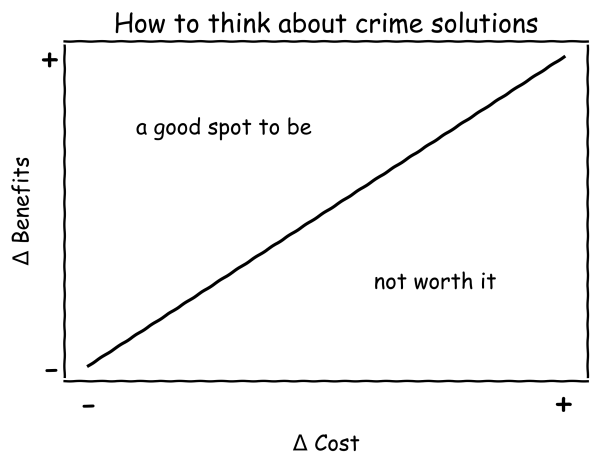
So here we just want Benefits > Costs to justify any particular social program. We can draw this inequality as a diagram, with costs and benefits as the two axes (I will get to the delta triangle symbols in a minute). Any situation in which the benefits are greater than the costs, we are on the good side of the inequality – the top side of the line in the diagram. Social programs that are more costly will need more evidence of benefits to justify investment.

Often we are not examining a program in a vacuum, but are comparing this program to another counter-factual, what happens if that new proposed program does not exist?

Utility_a = Benefits_a - Costs_a : Program A's utility
Utility_s = Benefits_s - Costs_s : Status Quo utility

So here we want in the end for Utility_a > Utility_s – we rather replace the current status quo with whatever this program is, as it improves overall utility. It could be the case that the current status quo is do nothing, which in the end is Utility_s = Benefits_s - Costs_s = 0 - 0 = 0.

It could also be the case that even if Benefits_a > Costs_a, that Utility_a < Utility_s – so in that scenario the program is beneficial, but is worse in overall utility to the current status quo. So in that case even if rated Effective in current CrimeSolutions parlance, a city would not necessarily be better off ponying up the cash for that program. We could also have the situation Benefits_a < Costs_a but Utility_a > Utility_s – that is the benefits of the program are still net negative, but they still have better utility than the current status quo.

So to get whether the new proposed program has added utility over the status quo, we take the difference in two equations:

  Utility_a = Benefits_a - Costs_a : Program A's utility
- Utility_s = Benefits_s - Costs_s : Status Quo utility
--------------------------------------------------------
Δ Utility = Δ Benefits - Δ Costs

And we end up with our changes in the graph I showed before. Note that this implies a particular program can actually have negative effects on crime control benefits, but if it reduces costs enough it may be worth it. For example Megan Stevenson argues pre-trial detention is not worth the costs – although it no doubt will increase crime some, it may not be worth it. Although Stevenson focuses on harms to individuals, she may even be right just in terms of straight up costs of incarceration.

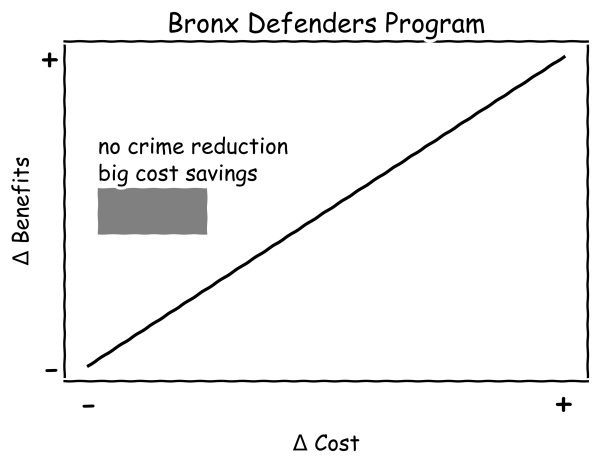
For the Bronx defenders analysis, they showed no benefits in terms of reduced crime. But the intervention was a dramatic cost savings compared to the current status quo. I represent the Bronx defenders results as a grey box in the diagram. It is centered on the null effects for crime benefits, but is clearly in the positive utility part of the graph. If it happened that it was expensive or no difference in costs though, the box would shift right and not clearly be in the effective portion.

For another example, I show the box as not a point in this graph, but an area. An intervention can show some evidence of efficacy, but not reach the p-value < 0.05 threshold. The Chicago summer jobs program is an example of this. It is rated as no effects. I think DSG could reasonably up the sample size requirement for individual recidivism studies, but even if this was changed to the promising or inconclusive recommendation in CrimeSolutions parlance the problem still remains by having a binary yes/no end decision.

So here the box has some uncertainty associated with it in terms of the benefits, but has more area on the positive side of the utility line. (These are just generic diagrams, not meant to be an exact representation, it could be more area of the square should be above the positive utility line given the estimates.) If the authors want to argue that the correct counter-factual status quo is more expensive – so it would shift the pink box to the left – it could as is be a good idea to invest in more. Otherwise it makes sense for the federal govt to invest in more research programs trying to replicate, although from a local govt perspective may not be worth the risk to invest in something like this given the uncertainty. (Just based on the Chicago experiment it probably would be worth the risk for a local govt IMO, but I believe overall jobs and crime programs have a less than stellar track record.)

So these diagrams are nice, but it leaves implicit how CrimeSolutions would in practice measure costs to put this on the diagram. Worst case scenario costs are totally unknown (so would span the entire X axis here, but in many scenarios I imagine people can give reasonable estimates of the costs of social programs. So I believe a simple solution to the current CrimeSolutions issue is two-fold.

  1. They should incorporate costs somewhere into their measurement instrument. This could either be as another weighted term in the Outcome Evidence/Primary Outcomes portion of the instrument, or as another totally separate section.
  2. It should have breakdowns on the website that are not just a single final decision endpoint, but show a range of potential results in a diagram like I show here. So while not quite as simple as the binary yes/no in the end, I believe that policy makers can handle that minor bit of added level of complexity.

Neither of these will make CrimeSolutions foolproof – but better to give suggestions to improve it than to suggest to get rid of it completely. I can forsee issues of defining in this framework what are the relevant costs. So the Stevenson article I linked to earlier talks about individual harm, it may be someone can argue that is not the right cost to calculate (and could do something like a willingness to pay experiment). But that goes for the endpoint outcomes as well – we could argue whether or not they are reasonable for the situation as well. So I imagine the CrimeSolutions/DSG folks can amend the instrument to take these cost aspects into account.

Down the rabbit hole with R functions

I had a friend the other day ask me about modifying the plot that goes with R’s boxCox function. In particular they had multiple plots, and wanted to make the Y axes consistent between the different dependent variables. So for a typical R base plot call, you can specify ylim = c(whatever_low, whatever_high), but if you look at function in the end it does not let you do this yourself (it fixes ylim based on the log-likelihood range.

library(car)
data(trees)
# Making a second Y variable for illustration later
trees$V2 <- trees$Volume*2 + 3*rnorm(nrow(trees))

# Original function, https://rdrr.io/rforge/car/man/boxCox.html
orig_output <- with(trees, boxCox(Volume ~ log(Height) + log(Girth), data = trees))

So if we look at the orig_output object, it gives us the x and y values for the above plot, but it does not give us the dashed line locations in the plot.

Typically here I would type out boxCox without the parenthesis at the prompt to get the function definition. That does not quite work here, as it is unhelpful and just gets us the message useMethod(boxCox). From here we can do the function method(boxCox) to help slightly more – we can see that the boxCox function really has 3 different functions, that depend on the original input.

Here we are specifying the formula interface to the function call, so lets look at getAnywhere(boxCox.formula):

Well, that is not very helpful, lets look at getAnywhere(boxCox.default) instead:

Ok, that is what we are going for. If you look into the function, at the very end you will see how it draws those dashed reference lines (anything drawn with lty = 2 in the code).

So what is happening here is that the different boxCox function calls are all daisy chained together, and it goes from formula -> lm object -> the original boxCox function. Now that we can see the function, we can make some small changes to have it return the locations of the vertical/horizontal reference lines that we want (or we could change it to accept a ylim argument directly). I name this new function boxCox.new.

# Modifying the function to return all the info you need
boxCox.new <- function(object, lambda = seq(-2, 2, 1/10), plotit = TRUE, interp = plotit, 
    eps = 1/50, xlab = NULL, ylab = NULL, family = "bcPower", 
    param = c("lambda", "gamma"), gamma = NULL, grid = TRUE, 
    ...) 
{
    if (class(object)[1] == "mlm") 
        stop("This function is for univariate response only")
    param <- match.arg(param)
    ylab <- if (is.null(ylab)) {
        if (family != "bcnPower") 
            "log-likelihood"
        else {
            if (param == "gamma") {
                expression(max(logL[gamma](lambda, gamma)))
            }
            else {
                expression(max[lambda](logL(lambda, gamma)))
            }
        }
    }
    else ylab
    xlab <- if (is.null(xlab)) {
        if (param == "lambda") 
            expression(lambda)
        else expression(gamma)
    }
    else xlab
    #fam <- matchFun(family) #Needed to change this to base function
    fam <- match.fun(family)
    if (is.null(object$y) || is.null(object$qr)) 
        stop(paste(deparse(substitute(object)), "does not have both 'qr' and 'y' components"))
    y <- object$y
    n <- length(y)
    xqr <- object$qr
    xl <- loglik <- if (family != "bcnPower") 
        as.vector(lambda)
    else {
        if (param == "lambda") 
            as.vector(lambda)
        else {
            if (!is.null(gamma)) 
                as.vector(gamma)
            else {
                p1 <- powerTransform(object, family = "bcnPower")
                gam <- p1$gamma
                se <- sd(y)
                seq(max(0.01, gam - 3 * se), gam + 3 * se, length = 100)
            }
        }
    }
    m <- length(xl)
    if (family != "bcnPower") {
        for (i in 1L:m) {
            yt <- fam(y, xl[i], j = TRUE)
            loglik[i] <- -n/2 * log(sum(qr.resid(xqr, yt)^2))
        }
    }
    else {
        lambda.1d <- function(gamma) {
            fn <- function(lam) bcnPowerllik(NULL, y, NULL, lambda = lam, 
                gamma = gamma, xqr = xqr)$llik
            f <- optimize(f = fn, interval = c(-3, 3), maximum = TRUE)
            f$objective
        }
        gamma.1d <- function(lambda) {
            fn <- function(gam) bcnPowerllik(NULL, y, NULL, lambda = lambda, 
                gamma = gam, xqr = xqr)$llik
            f <- optimize(f = fn, interval = c(0.01, max(y)), 
                maximum = TRUE)
            f$objective
        }
        for (i in 1L:m) {
            loglik[i] <- if (param == "lambda") 
                gamma.1d(loglik[i])
            else lambda.1d(loglik[i])
        }
    }
    if (interp) {
        sp <- spline(xl, loglik, n = 100)
        xl <- sp$x
        loglik <- sp$y
        m <- length(xl)
    }
    if (plotit) {
        mx <- (1L:m)[loglik == max(loglik)][1L]
        Lmax <- loglik[mx]
        lim <- Lmax - qchisq(19/20, 1)/2
        # Adding in vector to contain x functions location and top line
        xF <- c()
        xT <- c()
        plot(xl, loglik, xlab = xlab, ylab = ylab, type = "n", 
            ylim = range(loglik, lim))
        if (grid) {
            grid(lty = 1, equilogs = FALSE)
            box()
        }
        lines(xl, loglik)
        plims <- par("usr")
        abline(h = lim, lty = 2)
        y0 <- plims[3L]
        scal <- (1/10 * (plims[4L] - y0))/par("pin")[2L]
        scx <- (1/10 * (plims[2L] - plims[1L]))/par("pin")[1L]
        text(xl[1L] + scx, lim + scal, " 95%")
        la <- xl[mx]
        if (mx > 1 && mx < m) 
            segments(la, y0, la, Lmax, lty = 2)
            xF <- c(xF, la)
            xT <- c(xT, Lmax)
        ind <- range((1L:m)[loglik > lim])
        if (loglik[1L] < lim) {
            i <- ind[1L]
            x <- xl[i - 1] + ((lim - loglik[i - 1]) * (xl[i] - 
                xl[i - 1]))/(loglik[i] - loglik[i - 1])
            segments(x, y0, x, lim, lty = 2)
            xF <- c(xF, x)
            xT <- c(xT, lim)
        }
        if (loglik[m] < lim) {
            i <- ind[2L] + 1
            x <- xl[i - 1] + ((lim - loglik[i - 1]) * (xl[i] - 
                xl[i - 1]))/(loglik[i] - loglik[i - 1])
            segments(x, y0, x, lim, lty = 2)
            xF <- c(xF, x)
            xT <- c(xT, lim)
        }
    # See definitions of hline, vlines, vtop, ybase, just returning that info
    return(list(x = xl, y = loglik, hline = lim, vlines = xF, vtop = xT, ybase = y0))
    }
    list(x = xl, y = loglik)
}

But this won’t work offhand with just calling boxCox.new with our same prior function calls, so we need to just entirely replace the original boxCox.default function for our daisy chain of function references to work. Here can use the assignInNamespace function to effectively overwrite the original.

# Need to do this to get it to work with lm objects
assignInNamespace("boxCox.default",boxCox.new,ns="car")

r1 <- with(trees, boxCox(Volume ~ log(Height) + log(Girth), data = trees))
r2 <- with(trees, boxCox(V2 ~ log(Height) + log(Girth), data = trees))

And now if we inspect either r1 or r2 you can see it returns the info we want.

And now we build own our set of plots. I don’t have the nice text annotations (or the default grid lines), but leave that to the reader to do that extra work.

par(mfrow=c(2,1), mai = c(1, 1, 0.2, 1))
plot(r1$x,r1$y,ylim=c(-160,-70), type='l', xaxp = c(-160,-70, 8),
     xlab=expression(lambda),ylab='log-Likelihood')
# You need to specify the bottom of the segment to match your limit
abline(h = r1$hline, lty = 2)
segments(r1$vlines, -160, r1$vlines, r1$vtop, lty = 2)
plot(r2$x, r2$y,ylim=c(-160,-70), type='l', xaxp = c(-160,-70, 8),
     xlab=expression(lambda),ylab='log-Likelihood')
segments(r2$vlines, -160, r2$vlines, r2$vtop, lty = 2)
abline(h = r2$hline, lty = 2)

I have done this previously for default plots in base R that I wanted to make myself in ggplot, which you could do here as well and do a facetted plot instead of the par deal with multiple rows (ggplot takes care of the spacing a bit nicer). But that is too much work for this quick tip to cajole those different data frames to do the facets for ggplot.

Minimum detectable effect sizes for place based designs

So I was reading Blattman et al.’s (2018) work on a hot spot intervention in Bogotá the other day. It is an excellent piece, but in a supplement to the paper Blattman makes the point that while his study is very high powered to detect spillovers, most other studies are not. I am going to detail here why I disagree with his assessment on that front.

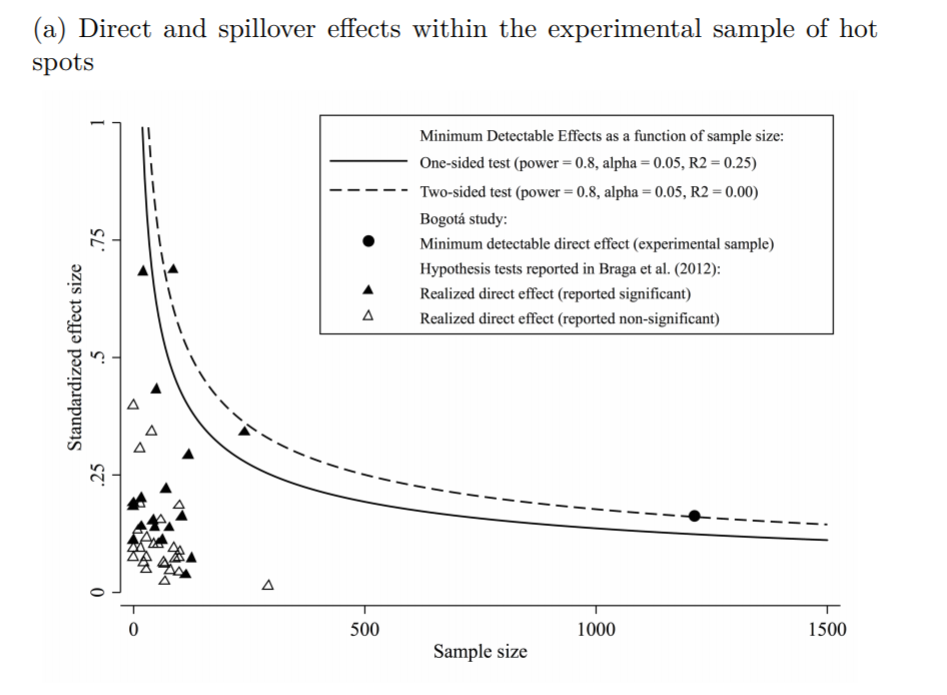
In appendix A he has two figures, one for the direct effect comparing the historical hot spot policing studies (technically he uses the older 2014 Braga study, but here is the cite for the update Braga et al., 2020).

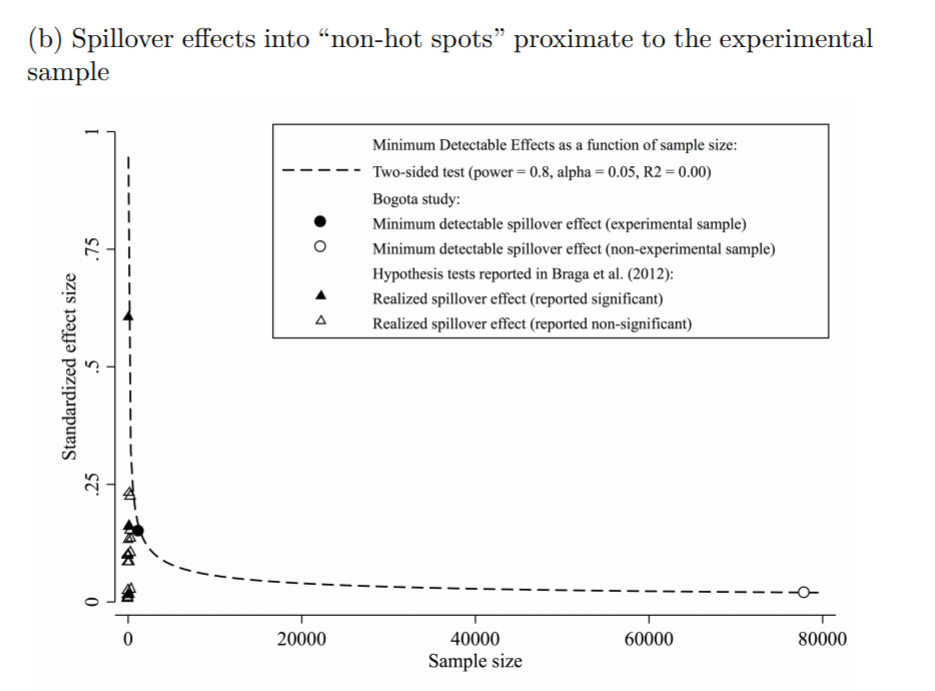
The line signifies a Cohen’s D of 0.17, and here is the same graph for the spillover estimates:

So you can see Blattman’s study in total number of spatial units of analysis breaks the chart so to speak. You can see however there are plenty of hot spot studies in either chart that reported statistically significant differences, but do not meet the 0.17 threshold in Chris’s chart. How can this be? Well, Chris is goal switching a bit here, he is saying using his estimator the studies appear underpowered. The original studies on the graph though did not necessarily use his particular estimator.

The best but not quite perfect analogy I can think of is this. Imagine I build a car that gets better gas mileage compared to the current car in production. Then someone critiques this as saying the materials that go into production of the car have worse carbon footprints, so my car is actually worse for the environment. It would be fine to argue a different estimate of total carbon footprint is reasonable (here Chris could argue his estimator is better than the ones the originally papers used). It is wrong though to say you don’t actually improve gas mileage. So it is wrong for Chris to say the original articles are underpowered using his estimator, they may be well powered using a different estimator.

Indeed, using either my WDD estimator (Wheeler & Ratcliffe, 2018) or Wilson’s log IRR estimator (Wilson, 2021), I will show how power does not grow with more experimental units, but with a larger baseline number of crimes for those estimators. They both only have two spatial units of analysis, so in Chris’s chart will never gain more power.

One way I think about the issue for spatial designs is this – you could always split up a spatial lattice into ever finer and finer spatial units of analysis. For example Chris could change his original design to use addresses instead of street segments, and split up the spillover buffers into finer slices as well. Do you gain something for doing nothing though? I doubt it.

I describe in my dissertation how finer spatial units of analysis allow you to check for finer levels of spatial spillovers, e.g. can check if crime spills over from the back porch to the front stoop (Wheeler, 2015). But when you do finer spatial units, you get more cold floor effects as well due to the limited nature of crime counts – they cannot go below 0. So designs with lower baseline crime rates tend to show lower power (Hinkle et al., 2013).

MDE for the WDD and log IRR

For minimum detectable effect (MDE) sizes for OLS type estimators, you need to specify the variance you expect the underlying treated/control groups to have. With the count type estimators I will show here, the variance is fixed according to the count. So all I need to specify is the alpha level of the test. Here I will do a default of 0.05 alpha level (with different lines for one-tailed vs two-tailed). The other assumption is the distribution of crime counts between treated/control areas. Here I assume they are all equal, so 4 units (pre/post and treated/control). For my WDD estimator this actually does not matter, for the later IRR estimator though it does (so the lines won’t really be exact for his scenario).

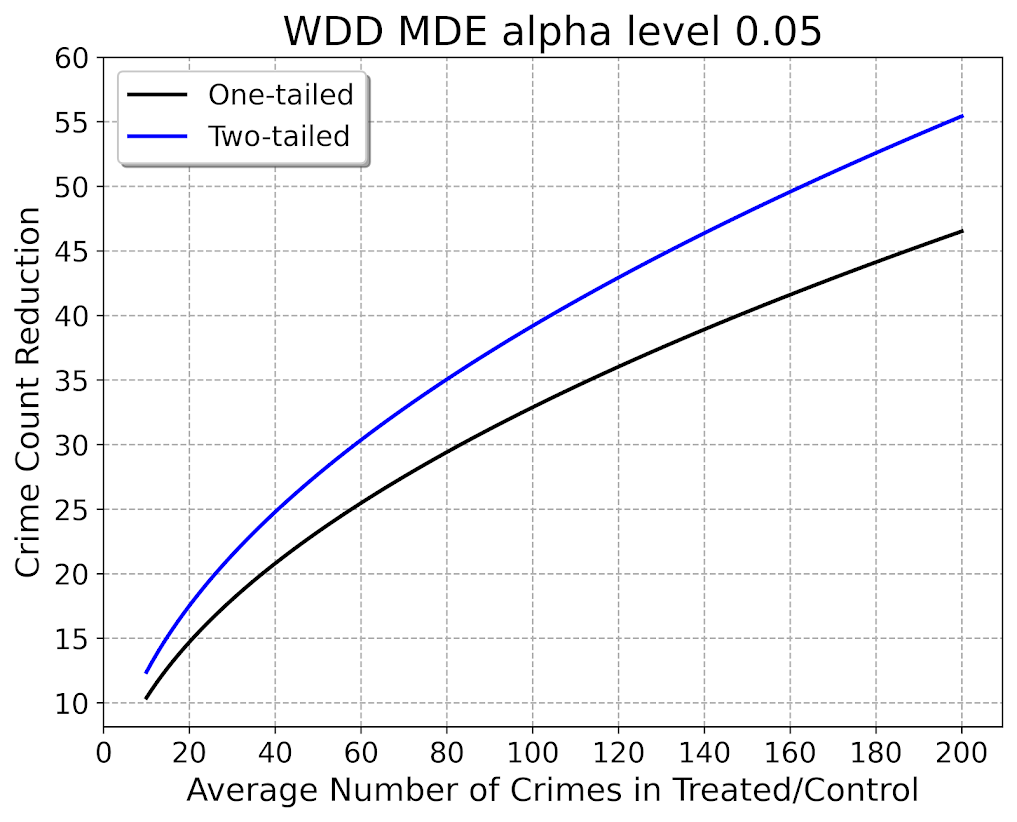
So here is the MDE for mine and Jerry’s WDD estimator:

What this means is that if you have an average of 20 crimes in the treated/control areas for each time period separately, you would need to find a reduction of 15 crimes to meet this threshold MDE for a one-tailed. It is pretty hard when starting with low baselines! For an example close to this, if the treated area went from 24 to 9, and the control area was 24 to 24, this would meet the minimal treated reduction of 15 crimes in this example.

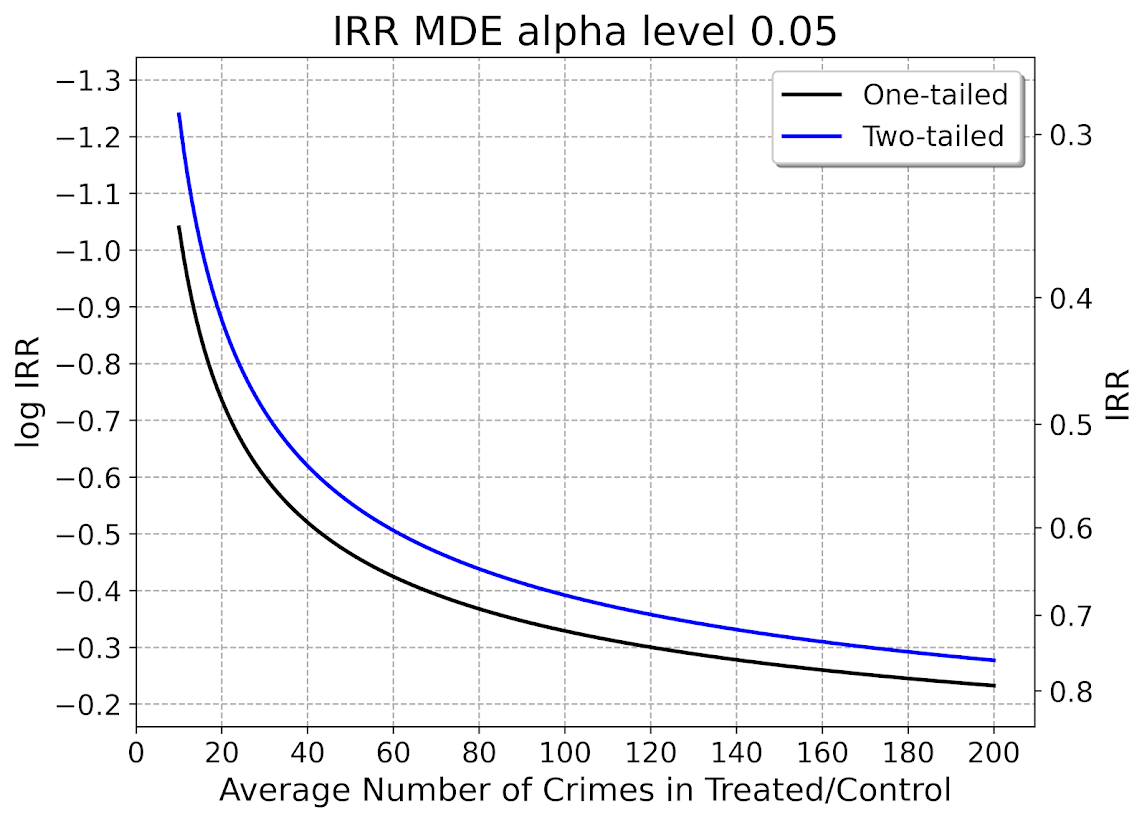
And here is the MDE for the log IRR estimator. The left hand Y axis has the logged effect, and the right hand side has the exponentiated IRR (incident rate ratio).

Since the IRR is commonly thought of as a percent reduction, this suggests even with baselines of 200 crimes, for Wilson’s IRR estimator you need percent reductions of over 20% relative to control areas.

So I have not gone through the more recent Braga et al. (2020) meta-analysis. I do not know if they have the data readily available to draw the points on this plot the same as in the Blattman article. To be clear, it may be Blattman is right and these studies are underpowered using either his or my estimator, I am not sure. (I think they probably are quite underpowered to detect spillover, since this presumably will be an even smaller amount than the direct effect. But that would not explain estimates of diffusion of benefits commonly found in these studies!)

I also do not know if one estimator is clearly better or not – for example Blattman could use my estimator if he simply pools all treated/control areas. This is not obviously better than his approach though, and foregoes any potential estimates of treatment effect variance (I will be damned if I can spell that word starting with het even close enough for autocorrect). But maybe the pooled estimate is OK, Blattman does note that he has cold floor effects in his linear estimator – places with higher baselines have larger effects. This suggests Wilson’s log IRR estimator with the pooled data may be just fine and dandy for example.

Python code

Here is the python code in its entirety to generate the above two graphs. You can see the two functions to calculate the MDE given an alpha level and average crime counts in each area if you are planning your own study, the wdd_mde and lirr_mde functions.

'''
Estimating minimum detectable effect sizes
for place based crime interventions

Andy Wheeler
'''

import numpy as np
from scipy.stats import norm
import matplotlib
import matplotlib.pyplot as plt
import os
my_dir = r'D:\Dropbox\Dropbox\Documents\BLOG\min_det_effect'
os.chdir(my_dir)

#########################################################
#Settings for matplotlib

andy_theme = {'axes.grid': True,
              'grid.linestyle': '--',
              'legend.framealpha': 1,
              'legend.facecolor': 'white',
              'legend.shadow': True,
              'legend.fontsize': 14,
              'legend.title_fontsize': 16,
              'xtick.labelsize': 14,
              'ytick.labelsize': 14,
              'axes.labelsize': 16,
              'axes.titlesize': 20,
              'figure.dpi': 100}

matplotlib.rcParams.update(andy_theme)
#########################################################

#########################################################
# Functions for MDE for WDD and logIRR estimator


def wdd_mde(avg_counts,alpha=0.05,tails='two'):
    se = np.sqrt( avg_counts*4 )
    if tails == 'two':
        a = 1 - alpha/2
    elif tails == 'one':
        a = 1 - alpha
    z = norm.ppf(a)
    est = z*se
    return est

def lirr_mde(avg_counts,alpha=0.05,tails='two'):
    se = np.sqrt( (1/avg_counts)*4 )
    if tails == 'two':
        a = 1 - alpha/2
    elif tails == 'one':
        a = 1 - alpha
    z = norm.ppf(a)
    est = z*se
    return est

# Generating regular grid from 10 to 200
cnts = np.arange(10,201)
wmde1 = wdd_mde(cnts, tails='one')
wmde2 = wdd_mde(cnts)

imde1 = lirr_mde(cnts, tails='one')
imde2 = lirr_mde(cnts)

# Plot for WDD MDE
fig, ax = plt.subplots(figsize=(8,6))
ax.plot(cnts, wmde1,color='k',linewidth=2, label='One-tailed')
ax.plot(cnts, wmde2,color='blue',linewidth=2, label='Two-tailed')
ax.set_axisbelow(True)
ax.set_xlabel('Average Number of Crimes in Treated/Control')
ax.set_ylabel('Crime Count Reduction')
ax.legend(loc='upper left')
plt.xticks(np.arange(0,201,20))
plt.yticks(np.arange(10,61,5))
plt.title("WDD MDE alpha level 0.05")
plt.savefig('WDD_MDE.png', dpi=500, bbox_inches='tight')

# Plot for IRR MDE
fig, ax = plt.subplots(figsize=(8,6))
ax2 = ax.secondary_yaxis("right", functions=(np.exp, np.log))
ax.plot(cnts,-1*imde1,color='k',linewidth=2, label='One-tailed')
ax.plot(cnts,-1*imde2,color='blue',linewidth=2, label='Two-tailed')
ax.set_axisbelow(True)
ax.set_xlabel('Average Number of Crimes in Treated/Control')
ax.set_ylabel('log IRR')
ax.set_ylim(-0.16, -1.34)
ax.legend(loc='upper right')
ax.set_yticks(-1*np.arange(0.2,1.31,0.1))
ax2.set_ylabel('IRR')
ax2.grid(False)
plt.xticks(np.arange(0,201,20))
plt.title("IRR MDE alpha level 0.05")
plt.savefig('IRR_MDE.png', dpi=500, bbox_inches='tight')

#########################################################

References

Using Random Forests in ArcPro to forecast hot spots

So awhile back had a request about how to use the random forest tool in ArcPro for crime prediction. So here I will show how to set up the data in a way to basically replicate how I used random forests in this paper, Mapping the Risk Terrain for Crime using Machine Learning. ArcPro is actually pretty nice to replicate how I set it up in that paper to do the models, but I will discuss some limitations at the end.

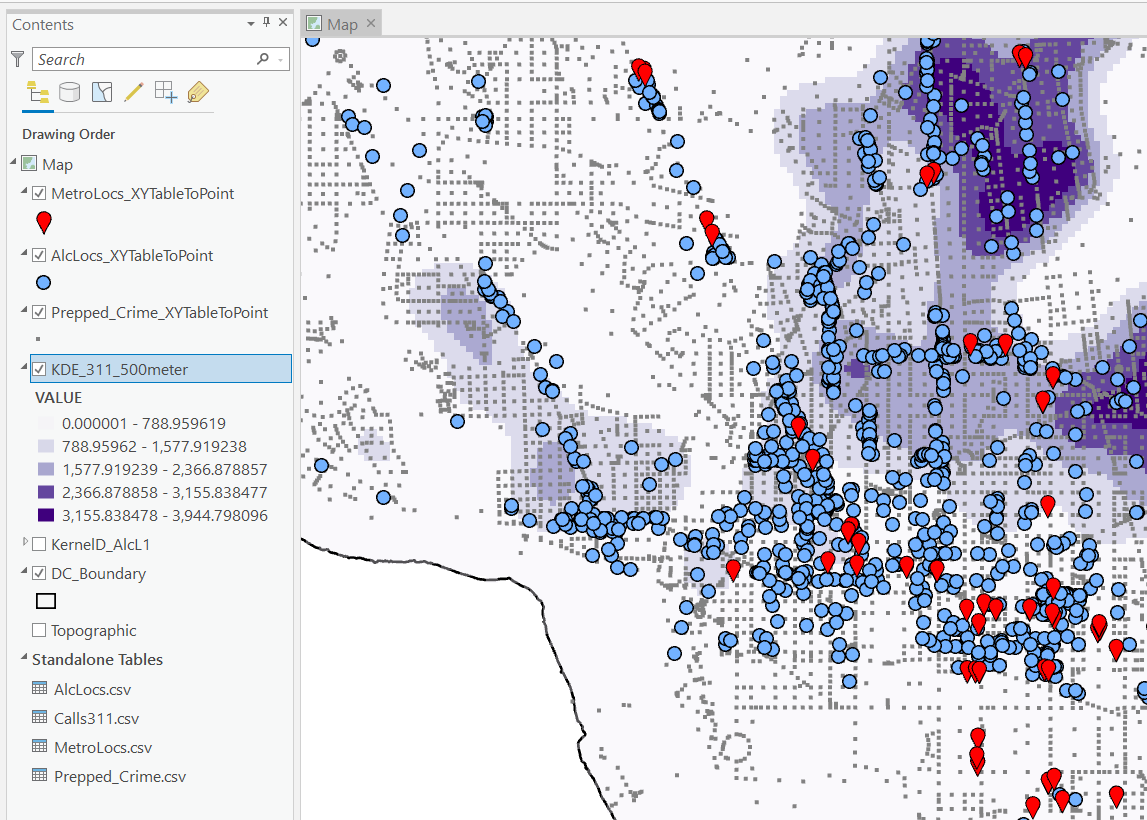
I am not sharing the whole project, but the data I use you can download from a prior post of mine, RTM Deep Learning style. So here is my initial data set up based on the spreadsheets in that post. So for original data I have crimes aggregated to street units in DC Prepped_Crime.csv (street units are midpoints in street blocks and intersections), and then point dataset tables of alcohol outlet locations AlcLocs.csv, Metro entrances MetroLocs.csv, and 311 calls for service Calls311.csv.

I then turn those original csv files into several spatial layers, via the display XY coordinates tool (these are all projected data FYI). On top of that you can see I have two different kernel density estimates – one for 311 calls for service, and another for the alcohol outlets. So the map is a bit busy, but above is the basic set of information I am working with.

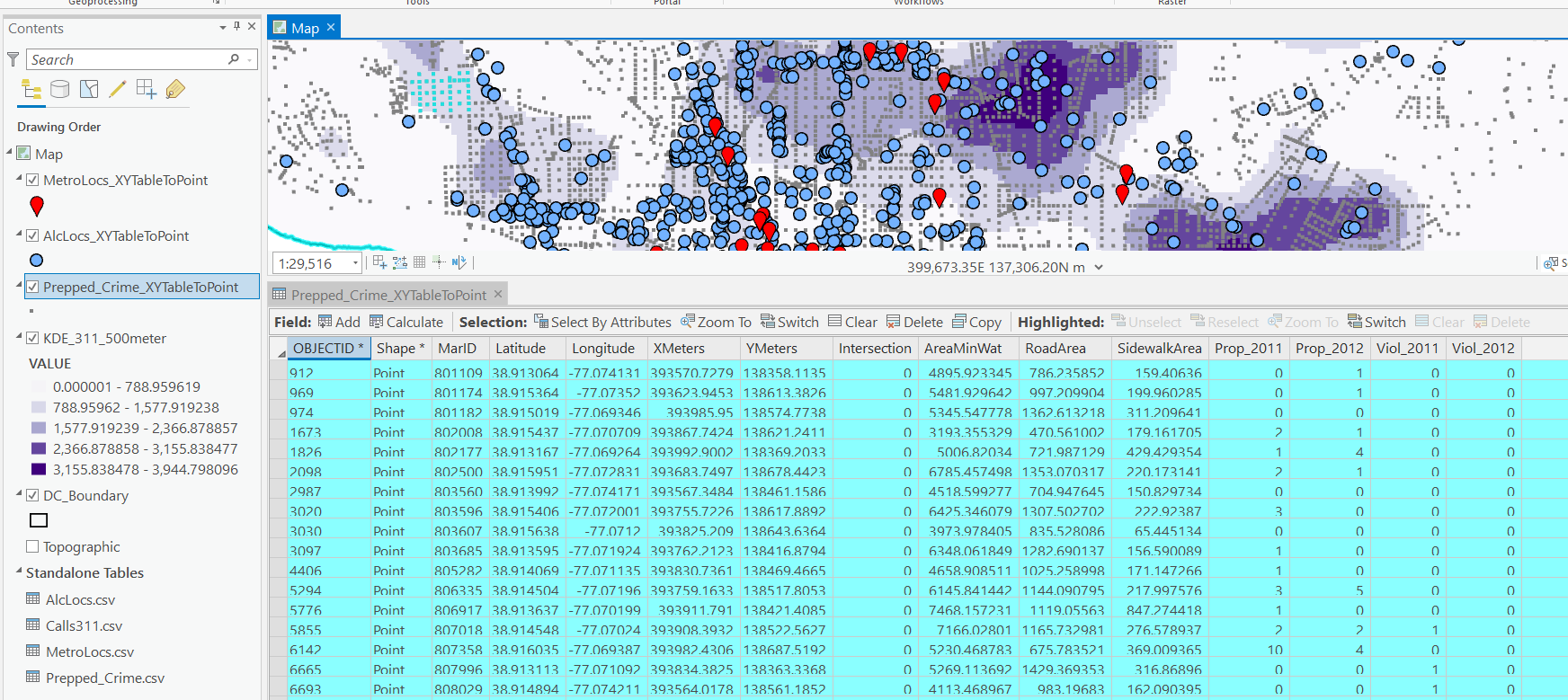
For the crimes, these are the units of analysis I want to predict. Note that this vector layer includes spatial units of analysis even with 0 crimes – this is important for the final model to make sense. So here is a snapshot of the attribute table for my street units file.

Here we are going to predict the Viol_2011 field based on other information, both other fields included in this street units table, as well as the other point/kernel density layers. So while I imagine that ArcPro can predict for raster layers as well, I believe it will be easier for most crime analysts to work with vector data (even if it is a regular grid).

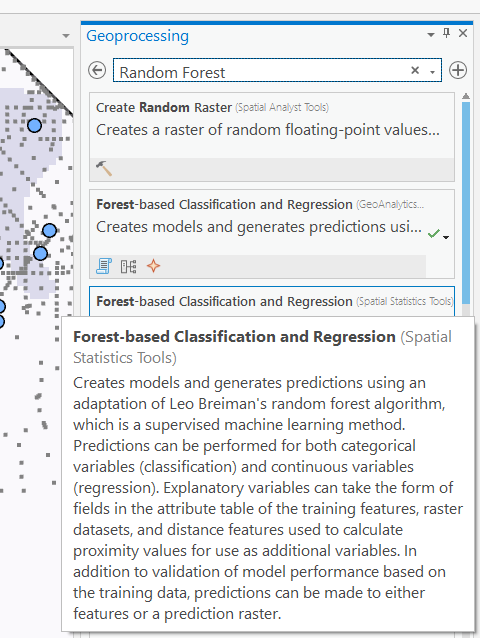
Next, in the Analysis tab at the top click the Tools toolbox icon, and you get a bar on the right to search for different tools. Type in random forest – several different tools come up (they just have slightly different GUI’s) – the one I showcase here is the Spatial Stats tools one.

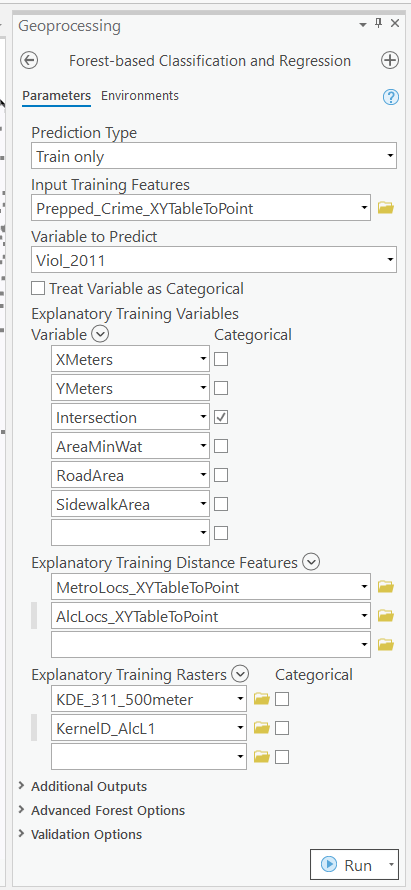
So this next screenshot shows filling in the data to build a random forest model to predict crimes.

  1. in the input training features, put your vector layer for the spatial units you want to predict. Here mine is named Prepped_Crime_XYTableToPoint.
  2. Select the variable to predict, Viol_2011. The options are columns in the input training features layer.
  3. Explanatory Training Variables are additional columns in your vector layer. Here I include the XY locations, whether a street unit is an intersection, and then several different area variables. These variables are all calculated outside of this procedure.

Note for the predictions, if you just have 0/1 data, you can change the variable to predict as categorical. But later on in determining hotspots you will want to use the predicted probability from that output, not the binary final threshold.

For explanatory variables, here it is ok to use the XY coordinates, since I am predicting for the same XY locations in the future. If I fit a model for Dallas, and then wanted to make predictions for Austin, the XY inputs would not make sense. Finally it is OK to also include other crime variables in the predictions, but they should be lagged in time. E.g. I could use crimes in 2010 (either violent/property) to predict violent crimes in 2011. This dataset has crimes in 2012, and we will use that to validate our predictions in the end.

Then we can also include traditional RTM style distance and kernel density inputs as well into the predictions. So we then include in the training distance features section our point datasets (MetroLocs and AlcLocs), and in our training rasters section we include our two kernel density estimates (KDE_311 calls and KernelD_AlcL1 is the kernel density for alcohol outlets).

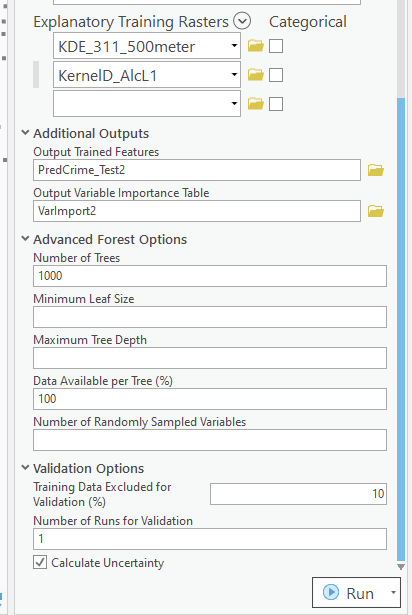
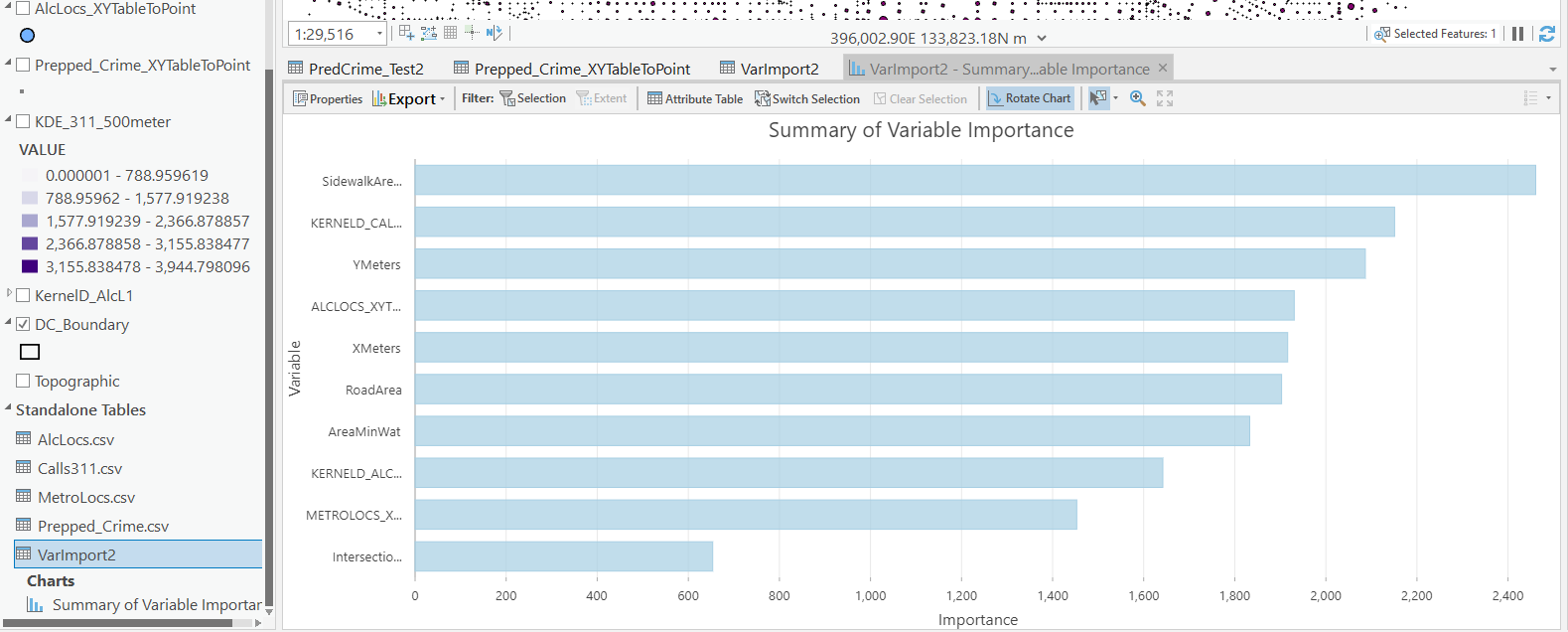
Going onto the next section of filling out the random forest tool, I set the output for a layer named PredCrime_Test2, and also save a table for the variable importance scores, called VarImport2. The only other default I change is upping the total number of trees, and click on Calculate Uncertainty at the bottom.

My experience with Random Forests, for binary classification problems, it is a good idea to set the minimum leaf size to say 50~100, and the depth of the trees to 5~10. But for regression problems, regulating the trees is not necessarily as big of a deal.

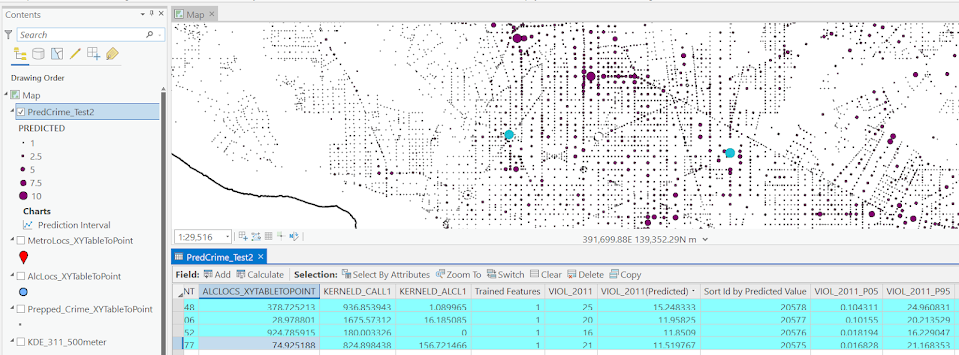
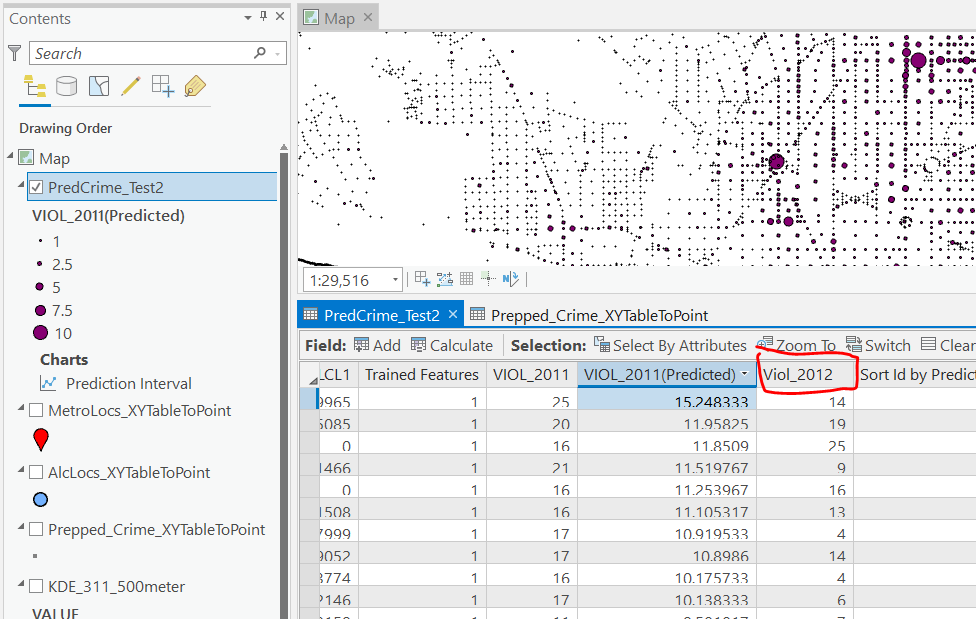
Click run, and then even with 1000 trees this takes less than a minute. I do get some errors about missing data (should not have done the kernel density masked to the DC boundary, but buffered the boundary slightly I think). But in the end you get a new layer, here it is named PredCrime_Test2. The default symbology for the residuals is not helpful, so here I changed it to proportional circles to the predicted new value.

So you would prioritize your hotspots based on these predicted high crime areas, which you can see in the screenshot are close to the historical ranks but not a 100% overlap. Also this provides a potentially bumpy (but mostly smoothed) set of predicted values.

Next what I did was a table join, so I could see the predicted values against the future 2012 violent crime data. This is just a snap shot, but see this blog post about different metrics you can use to evaluate how well the predictions do.

Finally, we saved the variable importance table. I am not a big fan of these, these metrics are quite volatile in my experience. So this shows the sidewalk area and kernel density for 311 calls are the top two, and the metro locations distance and intersection are at the bottom of variable importance.

But these I don’t think are very helpful in the end (even if they were not volatile). For example even if 311 calls for service are a good predictor, you can have a hot spot without a large number of 311 calls nearby (so other factors can combine to make hotspots have different factors that contribute to them being high risk). So I show in my paper linked at the beginning how to make reduced form summaries for hot spots using shapely values. It is not possible using the ArcPro toolbox (but I imagine if you bugged ESRI enough they would add this feature!).

This example is for long term crime forecasting, not for short term. You could do random forests for short term, such as predicting next week based on several of the prior weeks data. This would be more challenging to automate though in ArcPro environment I believe than just scripting it in R or python IMO. I prefer the long term forecasts though anyway for problem oriented strategies.

Health Insurance Claims Data via HMS Data Sharing for Researchers

I have been sharing this with a bunch of people recently so figured it would be appropriate to share on the blog. My company, HMS, which audits health insurance claims has a data sharing agreement for researchers.

So this provides access to micro level Medicaid health insurance claims for a set of states. It includes 10 states currently:

It provides a limited set of person level info, provider level info (e.g. the hospital location of the claim), as well as all the info that comes with the insurance claim itself. Mostly folks will be interested in ICD codes associated with the claim I imagine, as well as maybe the CPT codes. (CPT are for particular procedures, whereas ICD are more like broader diagnoses for the overall visit.)

It is only criminology adjacent, and is tough because the coverage is limited to Medicaid for some research designs. But examples criminology folks may be interested in are say you could look for domestic violence ICD codes, or look at provider level behavior for opioid prescriptions, or mental health treatment claims, etc.

One of the things with criminology research is it is very hard to identify the costs of crime. Looking at victimization costs via health insurance claims may be an underestimate, but has a pretty clear societal cost. And the limited coverage to Medicaid will make cost estimates on the low side (although more directly relevant to the state, and among the most vulnerable population).